codex-echoink
Health Gecti
- License — License: NOASSERTION
- Description — Repository has a description
- Active repo — Last push 0 days ago
- Community trust — 48 GitHub stars
Code Basarisiz
- rm -rf — Recursive force deletion command in .github/workflows/release.yml
- fs module — File system access in .github/workflows/release.yml
- process.env — Environment variable access in esbuild.config.mjs
- fs module — File system access in esbuild.config.mjs
- process.env — Environment variable access in scripts/account-desktop-pricing-tests.mjs
Permissions Gecti
- Permissions — No dangerous permissions requested
Bu listing icin henuz AI raporu yok.
EchoInk Agent — a personal knowledge agent for Obsidian: chat with your notes, organize knowledge, and keep editable long-term memory.
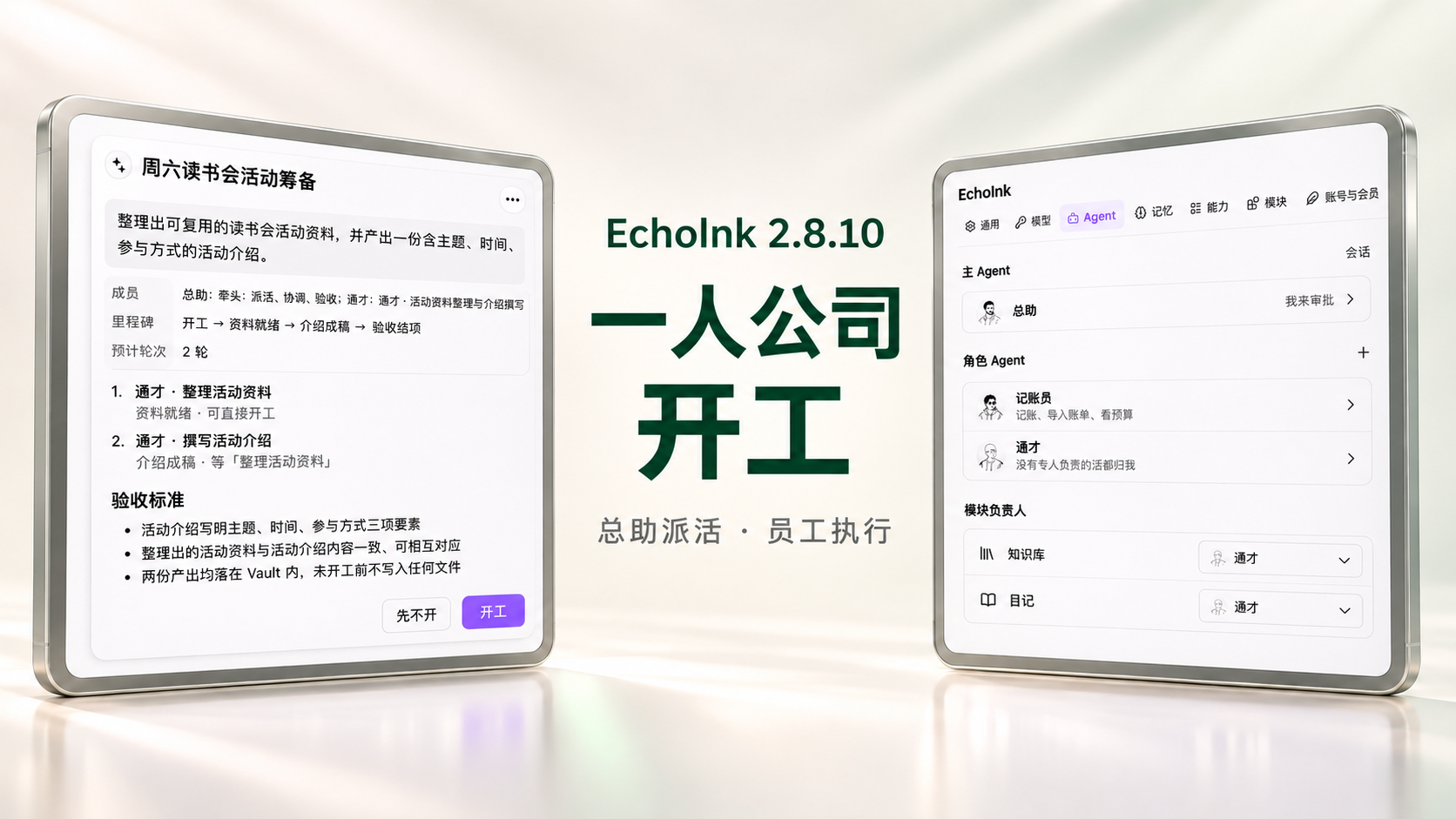
EchoInk Agent
An AI companion that lives in your Obsidian vault.
It chats with your notes, keeps them organized, and remembers what matters — in memory you can read and edit.
Website · Features · Pricing · Privacy · 中文




What you can do
| 💬 Chat with your notes | Ask anything about your vault. Answers cite the notes they actually used. |
| 📚 Turn sources into knowledge | Organize new material into a knowledge base, with health checkups and previewed repairs. |
| 🧠 Memory you can see and edit | EchoInk learns about you over time. Browse, correct, pin, or forget any memory. |
| 📅 Journal, to-dos, and finances | Write your day once. EchoInk can turn journal entries into tasks and records. |
| 🤖 A small AI team | An assistant plans and delegates, role agents do the work, and you approve the decisions. |
| ✏️ Create from your sources | Generate notes, Canvas layouts, and drawings from the material you already have. |
Your notes stay in your vault. Bring your own model API key, or use the built-in models with AI credits.
Get started
- Install. Open EchoInk in Obsidian, or search
EchoInkin Community plugins. Requires Obsidian 1.11.4+. - Set up. Open the workbench and pick Automatic, Guided, or Manual setup. Your existing notes stay where they are.
- Connect a model. Add an API key for OpenAI or a compatible provider, or sign in to use the built-in models, then start chatting.
Free, PRO, and Max
| Free | PRO | Max | |
|---|---|---|---|
| Chat, knowledge Q&A, knowledge base and checkups | ✅ | ✅ | ✅ |
| Long-term memory and memory constellation | ✅ | ✅ | ✅ |
| Journal, to-dos, workbench | ✅ | ✅ | ✅ |
| AI team, module owners, custom Skills | ✅ | ✅ | ✅ |
| @Agent inside notes, PDF reading | — | ✅ | ✅ |
| Finance, English diary | — | ✅ | ✅ |
| Expert hiring, official methodology Skills, EchoInk MCP server | — | ✅ | ✅ |
| Cloud sync | — | 1 GB | 5 GB |
| AI credits for built-in models, per month | — | 500 | 3,000 |
You can bring your own model API key on any plan. See current plans and prices.
Full feature list💬 Conversations and knowledge
| Feature | Description | Basic | PRO |
|---|---|---|---|
| Agent conversations | Ask with notes, continue conversations, or archive them; desktop supports attachments | ✅ | ✅ |
| Knowledge Q&A (Ask) | Follow related sources and cite the sources actually used | ✅ | ✅ |
| Knowledge systems and checkups | Organize domain trees and run quick or deep checkups on desktop; preview and confirm repairs. Review model judgments; deep checkups and organization use model credits | ✅ | ✅ |
| Knowledge maintenance | Organize new or changed sources incrementally, update existing knowledge, and preserve handwritten content | ✅ | ✅ |
| Generate from sources | Generate notes, Canvas layouts, or editable drawings on desktop; drawings require Excalidraw 2.29 or later enabled and a model supporting tool calls | ✅ | ✅ |
| PDF reading and extraction | Extract originals and generate translations and reading notes on desktop; optional MinerU enhanced parsing | ❌ | ✅ |
| @Agent in notes | Ask in a note, review proposed edits, and confirm changes before writing them back; undo is available | ❌ | ✅ |
| Web search | Off by default; choose Tavily or DeepSeek, with separate service charges | ✅ | ✅ |
🧠 Memory and methods
| Feature | Description | Basic | PRO |
|---|---|---|---|
| Long-term memory | Browse, correct, export, forget, restore, and pin; fading does not delete memories, and knowledge retrieval excludes private memory | ✅ | ✅ |
| Memory constellation | Inspect profile, memories, and sources on desktop via Settings → Memory; correct, pin, or restore memories | ✅ | ✅ |
| Skills (built-in and custom) | Built-in basic Skills, custom Skills, and basic knowledge review | ✅ | ✅ |
| Official methodology Skills and enhanced knowledge review | Seven official methodology Skills and enhanced knowledge review download on demand | ❌ | ✅ |
| EchoInk MCP server | On desktop, share authorized knowledge, profile, and memories with external agents on the same computer; off by default and read-only | ❌ | ✅ |
📅 Everyday life
| Feature | Description | Basic | PRO |
|---|---|---|---|
| Workbench | View tasks, reminders, starter cards, and weather for your chosen city in one place on desktop | ✅ | ✅ |
| Journal | Customize naming; preview moves for older journals and undo those moves on desktop | ✅ | ✅ |
| To-dos | Manage categories, due dates and times, and completion; enable automatic journal-to-task organization on desktop | ✅ | ✅ |
| Finance | Manage income, expenses, budgets, bill imports, and analysis | ❌ | ✅ |
| English diary | Generate English drafts on desktop, correct errors or clearly unnatural English, and collect useful expressions | ❌ | ✅ |
🤖 Agent team
| Feature | Description | Basic | PRO |
|---|---|---|---|
| One-person company | The assistant delegates on desktop, iPhone, and iPad; projects start after proposal confirmation, with questions and approvals in Pending decisions. Mobile is in Beta | ✅ | ✅ |
| Module owners | Assign role agents to modules in Agent settings; choose an owner before starting. Paid modules retain their own entitlement requirements | ✅ | ✅ |
| Multi-agent tasks | View employee tasks and outputs; review interruptions before resuming. Projects and employee conversations cannot yet be viewed or resumed across devices | ✅ | ✅ |
| Expert hiring | Browse and hire experts on desktop, continue from their avatars, and retain conversations after dismissal | ❌ | ✅ |
| Item | Description |
|---|---|
| Appearance | Minimal is free; Highlighter and Manifesto require active PRO. Install the companion theme separately from echoink.cn/theme |
| Desktop | Provides the desktop entries described above; validation in native Windows and Linux environments remains incomplete |
| Mobile Beta | iPhone and iPad provide the workbench, company workflow, module owners, settings, and Journal, To-dos, Finance, Knowledge, and English Diary pages. Handle questions and approvals in Pending decisions. Projects and employee conversations cannot yet be viewed or resumed across devices; projects advance only in the foreground, with interrupted work checked before resuming. Stream answers and reasoning per model service where supported. Memory constellation, knowledge system organization, knowledge checkups, source generation, generation-template settings, and PDF reading are desktop-only. Attachments, CLI, and desktop background knowledge tasks are not connected; Skills use existing mobile tools, and MCP currently saves configuration only. This version's additions and fixes have not been verified on physical iPhone or iPad devices; native Android validation remains incomplete. |
Privacy at a glance
- Your notes stay local. Conversations, knowledge, memory, journals, and finances are stored in your vault. EchoInk does not upload your whole vault.
- AI requests go to the model service you choose, using your own API key, with only the content needed for that request.
- echoink.cn is used for account sign-in and PRO authorization, PRO Skill and expert downloads, optional weather, workbench check-in, and problem reports you choose to send. PRO requires an EchoInk account; chat and knowledge do not.
- Optional third-party services: web search (Tavily or DeepSeek, off by default) and MinerU PDF parsing, each with its own account and billing.
- On desktop, EchoInk can access files outside the vault according to the permission mode you select, and can run the local MCP commands you configure.
- No client usage telemetry.
Read the full privacy and data details.
Good to know
- Back up before upgrading. Keep a full copy of your vault and plugin data.
- Obsidian Sync Standard: the plugin file is larger than its 5 MB per-file limit, so install and update EchoInk on each device separately.
- Mobile is in Beta. This version's changes have not been verified on physical iPhone or iPad devices.
| Step | Action | Instructions |
|---|---|---|
| 1 | Install | Search for EchoInk in Obsidian's community plugins, or download main.js, manifest.json, and styles.css from Releases into .obsidian/plugins/codex-echoink/, then enable it in Community Plugins settings. Requires Obsidian 1.11.4 or later |
| 2 | Set up | On desktop, open setup from the workbench and choose Automatic, Guided, or Manual. For Automatic or Guided, review the plan before confirming; existing notes stay in place, and a starter guide opens when setup finishes |
| 3 | Connect a model | Bring your own model API key, or connect later. Directory setup and guide generation do not call a model; connection tests and source extraction you choose to enable use model credits |
| 4 | Start | Open the workbench to begin a conversation; @Agent in notes requires active PRO |
Make a complete backup of your vault, plugin settings, and data before upgrading. For manual upgrades, replace only the official main.js, manifest.json, and styles.css, keep your existing settings and data files, and re-enable the plugin. To roll back, restore the complete pre-upgrade backup together with the matching older plugin; replacing only the plugin files with an older version is not a supported downgrade.
The plugin file exceeds Obsidian Sync Standard's 5 MB per-file limit. Install or update the plugin independently on each device through the official download or Community Plugins; do not rely on Sync Standard to transfer this file.
What's new
2.8.10 (2026-11-06) — One-person company, module owners, memory constellation, and knowledge checkups. See the changelog and releases.
License
The base plugin is open source under the MIT License. Finance, English Diary, membership, and other PRO components use the EchoInk PRO License. See LICENSE for the exact scope and THIRD_PARTY_NOTICES.md for third-party material.
Yorumlar (0)
Yorum birakmak icin giris yap.
Yorum birakSonuc bulunamadi