CANExplorer
Health Gecti
- License — License: MIT
- Description — Repository has a description
- Active repo — Last push 0 days ago
- Community trust — 151 GitHub stars
Code Gecti
- Code scan — Scanned 12 files during light audit, no dangerous patterns found
Permissions Gecti
- Permissions — No dangerous permissions requested
Bu listing icin henuz AI raporu yok.
CANBus GUI and toolkit for the modern man!

CANExplorer
CANBus monitoring for the modern man!
Monitor, analyse, diagnose, simulate and test CAN, CAN FD and LIN buses — on Linux,
Windows and macOS, with any adapter python-can supports, or without hardware on a virtual bus.
Documentation · Quick start · Downloads · Changelog
Features
Monitoring and analysis
- Live view of any python-can interface: SocketCAN, PCAN, Vector, Kvaser,
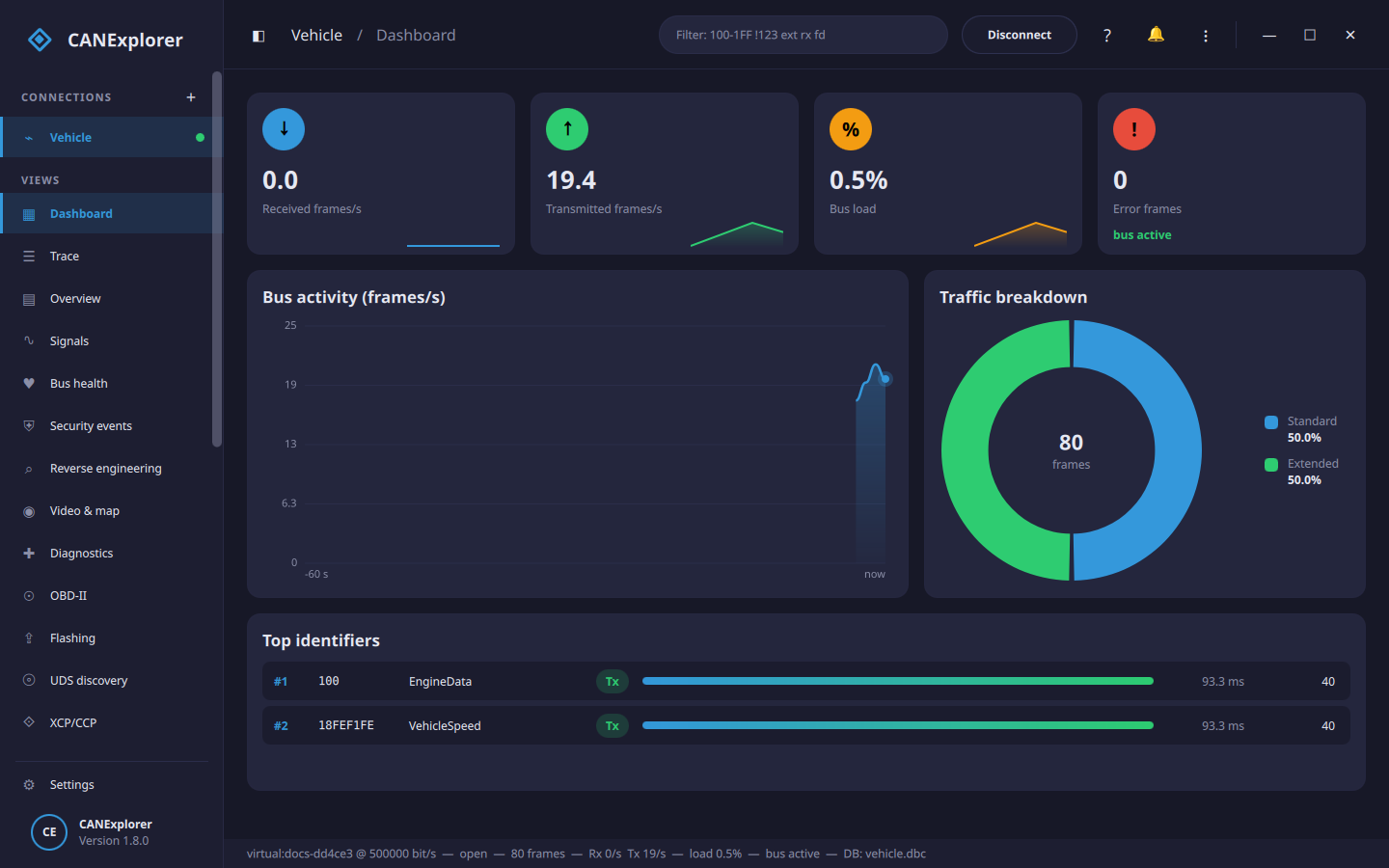
gs_usb, slcan and other serial adapters, virtual buses; CAN FD with a separate data bitrate; channel detection - Dashboard with frame rates, bus load, error frames, bus activity, traffic breakdown and the busiest identifiers
- Trace and per-identifier overview (cycle times, changed bytes highlighted, sortable columns), display filters
such as100-1FF !123 ext rx fd, search by text, data pattern or signal condition, and bookmarks - Millions of frames per session: older frames are paged to disk
- Bus health: error state timeline, error frames, TEC/REC and bus load over up to an hour
- Remote buses:
can-servershares the interfaces of e.g. a Raspberry Pi in a vehicle over the network - MQTT: publish decoded signals (and frames) to a broker for dashboards and home automation, from the application or
can-server, and optionally send frames requested over MQTT (from source: themqttextra) - MCP:
can-mcpexposes a bus to an AI agent over the Model Context Protocol — inspect identifiers, decode frames
and protocols, run the reverse-engineering analysis, correlate fields, promote results to a DBC, read trouble
codes over OBD-II/UDS, and optionally transmit; as tools, resources and prompts, behind permission tiers - Signal plots with zoom and pan over the whole buffer, two cursors with values and statistics, several signals per
chart and CSV export - Reverse engineering: bit and byte statistics per identifier and a notch; automatic detection of checksums,
counters, multiplexers and values; matching fields to database signals, CSV/GPS logs or polled OBD-II values;
grouping fields that carry the same signal across messages; event markers; frame-interval (Δt) and per-byte
timing graphs; and bit fields to plot without a database or add to one
Recording and replay
- ASC, BLF, CSV, candump LOG, PEAK TRC, SQLite, ASAM MF4 and gzip compressed text logs
- Splitting into numbered files by size or time, and triggered recording with conditions such as
EngineData.EngineSpeed > 6000, keeping the time before and after the event - Replay at 0.25× to 10× or as fast as possible, with pause and jumping to any position
- Camera video and GPS map in step with recordings: record a camera next to the log, attach a GPX/NMEA track, and
replay the bus, the video and the position on a map together - Replay of a recording onto a real bus, filtered and repeated
- Several buses on one timeline, and simulated gateways forwarding frames between them
- Comparison of two recordings: identifiers only in one of them, changed cycle times and payloads, and signal
values, aligned by time, by a trigger identifier or by frame sequence
Signal databases
- Vector DBC, BUSMASTER DBF, AUTOSAR ARXML (including container PDUs), Kayak KCD, PCAN SYM and LIN LDF
- AUTOSAR E2E (profiles 2, 5, 22) and SecOC of the PDUs of an ARXML checked live in the trace
- Database editor for CAN and LIN databases (frames, signals, nodes, encodings, schedule tables) with a bit layout
view and consistency checks, and conversion between the formats
Diagnostics and protocols
- UDS over ISO-TP and the LIN transport layer: sessions, reset, data identifiers, security access with your own
seed/key algorithm, DTCs, routines; CANdelaStudio CDD and ASAM ODX/PDX descriptions for named and decoded identifiers - OBD-II (SAE J1979): a dedicated page for the standard emissions diagnostics — scan for supported values, watch
them live, read and clear trouble codes, and read the VIN - ECU flashing over UDS (RequestDownload/TransferData) from Intel HEX, S-record or binary files, with progress
- DoIP (Diagnostics over IP, ISO 13400-2): finds DoIP entities, connects with routing activation (optionally over
TLS) and runs diagnostics and flashing over Ethernet; a simulated entity works without a vehicle - SOME/IP over automotive Ethernet: listens on UDP, discovers the services offered through SOME/IP-SD and shows the
decoded messages; load a FIBEX or ARXML file to deserialize the payloads into named signals; E2E checks of
protected methods and events (profiles 4, 6, 7) - Automotive Ethernet capture: open a pcap/pcapng file (or capture live on Linux, macOS and Windows), dissect each
packet field by field, and decode the stack (Ethernet, VLAN, 802.1CB R-TAG, IPv4/IPv6, ARP, ICMP, IGMP/MLD,
UDP/TCP) and the protocols on top — SOME/IP, DoIP, gPTP, LLDP, the SRP/TSN control protocols (MVRP/MSRP/MMRP),
MACsec and its key agreement (EAPOL-MKA), IPsec, TLS, DHCP/DNS/mDNS and UDP-NM, and AVTP (IEEE 1722):
audio/video streams, and CAN, LIN and FlexRay tunnelled over Ethernet via ACF (exportable as a CAN log); IPsec,
MACsec and TLS are decrypted with keys from the security manager - UDS discovery: scan an ECU for the services, data identifiers, subfunctions and routines it exposes, classifying
the answers, for reverse engineering diagnostics; and fuzz it with mutated requests, detecting hangs and crashes - Bus gateway: forward frames between two connections with filtering, identifier rewriting and rate limiting
- Security manager: a password-protected key store for SecOC keys, TLS certificates, IPsec/MACsec keys, seed/key
algorithms and UDS authentication keys — SecOC secured PDUs of an ARXML verified in the trace and secured when sent
(restbus, transmit, test scripts, with replay and forgery tests; AUTOSAR trip/reset freshness values), DoIP over
mutual TLS, UDS Authentication (0x29) by certificate exchange or challenge-response, IPsec ESP, MACsec and TLS
(with a key log) in Ethernet captures decrypted and decoded, security events for buses and captures, security
access tests (seed quality, lockout), revocation lists, an HMAC-chained audit log, key bundles, test certificates
and the OS keychain; security profiles and key servers supply manufacturer keys, seed/key and signatures without
keeping the secrets on this computer - XCP/CCP measurement and calibration: read measurements live and read/write calibration values by address or by
name from an A2L file, with simulated slaves for trying it without hardware - GMLAN (GMW3110) diagnostics for GM/Opel vehicles — data identifiers, modes, security access and trouble codes —
over CAN, including single-wire (SWCAN, 33.3 kbit/s) buses; a simulated ECU works without hardware - GM Class 2 (SAE J1850 VPW) for the pre-CAN GM vehicles of 1996–2007 (e.g. the 99–06 P01/P59 PCMs): monitor the
10.4 kbit/s single-wire bus and run SAE J1979 diagnostics (PIDs, VIN, trouble codes) through an ELM327/OBDLink
adapter; a simulated ECU works without hardware - K-Line (ISO 9141-2 / ISO 14230 KWP2000) for the non-CAN OBD-II vehicles of roughly 1996–2008: monitor the
10.4 kbit/s diagnostic bus through an ELM327/OBDLink adapter, with the service payloads decoded in the trace - J1708: a live capture of the 9600-baud serial bus of older heavy trucks through a USB RS-485/J1708 adapter,
decoded as J1587 in the trace - J1939: nodes with their address claims, DM1/DM2 trouble codes and lamps, clearing codes, requests and sending
parameter groups by name with BAM or RTS/CTS - CANopen master: NMT, SDO access to object dictionaries from EDS/DCF files, PDO mappings with live values,
emergency messages - CANopen over EtherCAT (CoE): EtherCAT slaves with their states, object dictionaries (SDO information or EDS),
PDO assignment and emergencies; real adapters need theethercatextra, a simulated network works without - Physical I/O: switch the digital outputs of a USB I/O adapter (aio_usb) and watch its inputs and analogue values,
from the tool or test scripts; needs theioextra, a simulated device works without - Decoding of ISO-TP, UDS, KWP2000, K-Line (ISO 9141-2 / ISO 14230), J1939, J1939-22 (J1939 on CAN FD),
NMEA 2000 (marine, with Fast Packet), CANopen, LIN, J1587, AUTOSAR Network Management and SecOC frames in the trace - LIN master schedule tables
Simulation and test automation
- Simulated ECUs written in Python, controlled from QML panels
- Restbus simulation: transmit a connection's database messages periodically at their cycle times — with per-message
signal values and node exclusion — so an ECU on the bench sees the rest of the bus - ECU test scripts with checks, timing measurements and UDS requests; pass/fail verdicts in the Tests view or
headless withcan-test, with HTML, JUnit and Markdown reports for CI; parametrised test cases and requirement
traceability
Workspace
- Connections, databases, filters, plots and scripts saved in one workspace file
- Dashboard-style interface with a collapsible sidebar, a wide choice of light and dark colour themes, a command
palette (Ctrl+K), in-app help (F1) and English, German, French, Chinese and Japanese texts
See the documentation for a guide to every feature.
Installation
Installers
Download the installer for your platform from the releases: asetup.exe for Windows, an AppImage or .deb for Linux and a .dmg for macOS (Apple silicon). Portable zip
archives are attached as well. No Python installation is needed.
On Linux, CANExplorer is also a snap: sudo snap install canexplorer, then connect the hardware interfaces withsudo snap connect canexplorer:can-bus (SocketCAN) and sudo snap connect canexplorer:raw-usb (USB adapters).
From source
With uv and Python 3.10 or newer:
git clone https://github.com/AKJ7/CANExplorer.git
cd CANExplorer
uv sync                  # Add --extra mf4 for ASAM MF4 log files (installs asammdf and pandas),
                         # --extra mqtt for MQTT (installs aiomqtt),
                         # --extra ethercat for EtherCAT adapters (installs pysoem),
                         # --extra io for USB I/O adapters (installs pyusb and libusb),
                         # --extra drivers for the python-can interfaces marked ¹ below
uv run canexplorer
On Linux, uv run canexplorer --install-desktop-entry adds CANExplorer with its icon to the application menu.
Interfaces
CANExplorer supports every interface of python-can
4.6. Install the vendor's driver for your adapter; the
supported interfaces page lists the drivers, CAN FD
support and the Linux kernel drivers.
| Interface | Hardware | Platforms |
|---|---|---|
SocketCAN (socketcan) |
Any adapter with a Linux kernel driver: PEAK, Kvaser, candleLight/gs_usb (CANable), ETAS ES58x, 8devices, EMS, esd, MCP2515/MCP251xFD (Raspberry Pi hats), virtual vcan; LIN through sllin |
Linux |
PEAK PCAN (pcan) |
PCAN-USB, PCAN-USB FD, PCAN-PCI(e), PCAN-LAN | Windows, Linux, macOS |
Vector (vector) |
VN16xx, VN56xx and other XL Driver Library devices, Vector virtual channels | Windows |
Kvaser (kvaser) |
Leaf, U100, Memorator, USBcan | Windows, Linux |
IXXAT (ixxat) |
HMS IXXAT USB-to-CAN, CAN-IB | Windows |
ETAS (etas) |
ES581, ES582, ES584, ES891 (BOA) | Windows |
Intrepid neoVI (neovi) ¹ |
neoVI, ValueCAN, RAD-Galaxy | Windows, Linux, macOS |
NI-XNET (nixnet) ¹ |
National Instruments NI-XNET devices | Windows |
NI-CAN (nican) |
National Instruments NI-CAN devices | Windows |
SYS TEC (systec) |
USB-CANmodul | Windows |
8devices USB2CAN (usb2can) |
USB2CAN (Korlan) | Windows |
Thorsis isCAN (iscan) |
isCAN | Windows |
Neousys (neousys) |
CAN ports of Neousys industrial computers | Windows, Linux |
CANalyst-II (canalystii) ¹ |
Chuangxin CANalyst-II | Windows, Linux, macOS |
CANtact (cantact) ¹ |
CANtact, CANable | Windows, Linux, macOS |
gs_usb (gs_usb) ¹ |
candleLight/gs_usb firmware adapters through libusb | Windows, Linux, macOS |
slcan (slcan) |
Lawicel CANUSB, CANable (slcan firmware), USBtin and other serial slcan adapters | Windows, Linux, macOS |
GVRET (gvret) |
ESP32RET boards, Macchina M2 (M2RET), CANDue: SavvyCAN's GVRET protocol over USB serial or WiFi | Windows, Linux, macOS |
J2534 (j2534) |
J2534 pass-thru devices: Mongoose, CarDAQ, OpenPort 2.0, Bosch, Autel …; 32-bit drivers through a bridge process | Windows |
RP1210 (rp1210) |
TMC RP1210 heavy-duty (truck/bus/off-highway) adapters: Nexiq USB-Link, DG DPA 5, Noregon DLA+, Cummins INLINE …; 32-bit Windows drivers | Windows |
ELM327 / OBDLink (elm327) |
OBDLink MX+, LX, SX, EX and ELM327 compatible OBD adapters over USB, Bluetooth or WiFi, for diagnostics | Windows, Linux, macOS |
J1850 VPW / GM Class 2 (elm327_vpw) |
GM "Class 2" 10.4 kbit/s single-wire bus of 1996–2007 GM vehicles, through an ELM327/OBDLink adapter (not CAN) | Windows, Linux, macOS |
K-Line (elm327_kline) |
ISO 9141-2 / ISO 14230 (KWP2000) K-Line diagnostic bus of non-CAN OBD-II vehicles (~1996–2008), through an ELM327/OBDLink adapter (not CAN); @3/@4/@5 chooses the protocol |
Windows, Linux, macOS |
J1708 (j1708) |
SAE J1708 9600-baud serial (RS-485) bus of older heavy trucks, carrying J1587; through a USB RS-485/J1708 adapter (not CAN) | Windows, Linux, macOS |
python-can serial (serial) |
Adapters with python-can's serial protocol | Windows, Linux, macOS |
Robotell (robotell) |
Robotell USB-CAN | Windows, Linux, macOS |
Seeed Studio (seeedstudio) |
USB-CAN Analyzer | Windows, Linux, macOS |
socketcand (socketcand) |
SocketCAN buses of another Linux computer, over the network | Windows, Linux, macOS |
CANExplorer remote (canexplorer_remote) |
Buses shared by can-server on another computer, e.g. a Raspberry Pi |
Windows, Linux, macOS |
UDP multicast (udp_multicast) ¹ |
A software bus between computers over UDP multicast | Windows, Linux, macOS |
Virtual (virtual) |
A software bus inside CANExplorer, no hardware needed | Windows, Linux, macOS |
¹ Needs Python packages that the installers do not include: run from source with uv sync --extra drivers.
Try it without hardware
Run the example ECU tests against the example engine simulation on a virtual bus:
uv run can-test examples/testing/vehicle_tests.py \
    --database examples/simulation/vehicle.dbc \
    --simulation examples/simulation/engine_simulation.py \
    --report report.html
In the application, connect to a VirtualBus, load examples/simulation/vehicle.dbc and runengine_simulation.py in the Simulation view; the
quick start walks through it.
Command line
| Command | Purpose |
|---|---|
uv run canexplorer |
The application. Options such as --log_level DEBUG, or CANEXPLORER_* environment variables |
uv run can-test SCRIPT … |
Run ECU test scripts on a bus; exit code and HTML/JUnit reports for CI |
uv run can-db-convert IN OUT |
Convert signal databases, e.g. vehicle.dbc vehicle.dbf, or one bus with system.arxml powertrain.dbc --bus Powertrain |
uv run can-server |
Share the local CAN interfaces over the network, for the canexplorer_remote interface |
uv run can-mcp |
Expose a bus to an AI agent over the Model Context Protocol |
Development
uv run pytest                                  # Tests (headless Qt, python-can virtual buses)
uv run ruff check . && uv run ruff format --check .  # Lint and formatting
uv run --group docs mkdocs serve               # Documentation preview on http://127.0.0.1:8000
uv run python packaging/build.py --archive     # Standalone bundle in dist/ (--backend nuitka to compile)
uv run python packaging/installer.py           # Installers of the platform in dist/installers
The core (can_explorer/core) is Qt-independent asyncio code; can_explorer/gui adapts it to the QML interface
in can_explorer/gui/qt, and Qt and asyncio share one event loop through
qasync. The
development guide covers the architecture, testing,
packaging and contributing.
License
MIT, as declared in pyproject.toml.
Yorumlar (0)
Yorum birakmak icin giris yap.
Yorum birakSonuc bulunamadi