nutrition-mcp
Health Uyari
- License — License: MIT
- Description — Repository has a description
- Active repo — Last push 0 days ago
- Low visibility — Only 5 GitHub stars
Code Uyari
- process.env — Environment variable access in src/index.ts
- process.env — Environment variable access in src/oauth.ts
- process.env — Environment variable access in src/supabase.ts
Permissions Gecti
- Permissions — No dangerous permissions requested
This is a remote Model Context Protocol (MCP) server that allows AI assistants to log meals, track daily macros, and review personal nutrition history through conversation.
Security Assessment
Overall risk: Low. The tool does not request any dangerous local permissions and avoids executing shell commands. It makes external network requests to a hosted endpoint and uses Supabase for its PostgreSQL database and user authentication. There are no hardcoded secrets in the codebase. Environment variable access is properly flagged but entirely expected, as it is used to securely load database URLs, authentication keys, and OAuth configurations. Because the tool handles personally identifiable information (email, passwords) and health data (dietary habits), users should trust the remote host before registering.
Quality Assessment
The project is actively maintained, with its most recent push occurring today. It is licensed under the highly permissive MIT license. However, it has very low community visibility, currently sitting at only 5 GitHub stars. Because of this small footprint, the project has not undergone widespread public security auditing.
Verdict
Safe to use, but keep in mind that you are trusting a relatively unknown remote server with your personal health and authentication data.
A remote MCP server for personal nutrition tracking — log meals, track macros, and review nutrition history through conversation.
Nutrition MCP
A remote MCP server for personal nutrition tracking — log meals, track macros, and review nutrition history through conversation.

Quick Start
Already hosted and ready to use — just connect it to your MCP client:
https://nutrition-mcp.com/mcp
On Claude.ai: Customize → Connectors → + → Add custom connector → paste the URL → Connect
On first connect you'll be asked to register with an email and password. Your data persists across reconnections.
Demo
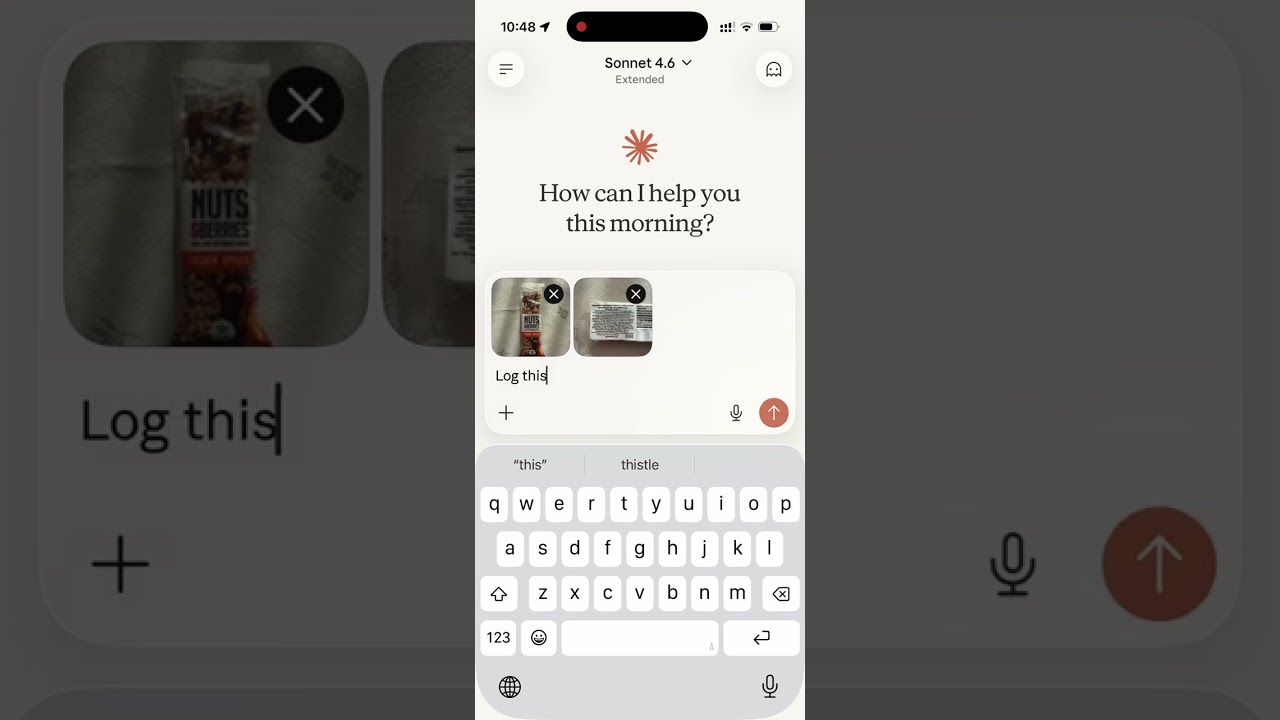
Read the story behind it: How I Replaced MyFitnessPal and Other Apps with a Single MCP Server
Tech Stack
- Bun — runtime and package manager
- Hono — HTTP framework
- MCP SDK — Model Context Protocol over Streamable HTTP
- Supabase — PostgreSQL database + user authentication
- OAuth 2.0 — authentication for Claude.ai connectors
MCP Tools
| Tool | Description |
|---|---|
log_meal |
Log a meal with description, type, calories, macros, notes |
get_meals_today |
Get all meals logged today |
get_meals_by_date |
Get meals for a specific date (YYYY-MM-DD) |
get_nutrition_summary |
Daily nutrition totals for a date range |
delete_meal |
Delete a meal by ID |
update_meal |
Update any fields of an existing meal |
get_meals_by_date_range |
Get meals between two dates (inclusive) |
delete_account |
Permanently delete account and all associated data |
Supabase Setup
- Create a Supabase project
- Enable Email Auth (Authentication → Providers → Email) and disable email confirmation
- Run the following SQL in the SQL Editor:
-- Meals
CREATE TABLE meals (
    id uuid PRIMARY KEY DEFAULT gen_random_uuid(),
    user_id uuid NOT NULL REFERENCES auth.users(id),
    logged_at timestamptz NOT NULL DEFAULT now(),
    meal_type text CHECK (meal_type IN ('breakfast', 'lunch', 'dinner', 'snack')),
    description text NOT NULL,
    calories integer,
    protein_g numeric,
    carbs_g numeric,
    fat_g numeric,
    notes text
);

-- OAuth access tokens
CREATE TABLE oauth_tokens (
    token text PRIMARY KEY,
    user_id uuid NOT NULL REFERENCES auth.users(id),
    expires_at timestamptz NOT NULL,
    created_at timestamptz NOT NULL DEFAULT now()
);

-- OAuth authorization codes (short-lived, single-use)
CREATE TABLE auth_codes (
    code text PRIMARY KEY,
    redirect_uri text NOT NULL,
    user_id uuid NOT NULL REFERENCES auth.users(id),
    code_challenge text,
    expires_at timestamptz NOT NULL,
    created_at timestamptz NOT NULL DEFAULT now()
);

-- Refresh tokens
CREATE TABLE refresh_tokens (
    token text PRIMARY KEY,
    user_id uuid NOT NULL REFERENCES auth.users(id),
    expires_at timestamptz NOT NULL,
    created_at timestamptz NOT NULL DEFAULT now()
);

-- Tool analytics
CREATE TABLE tool_analytics (
    id UUID PRIMARY KEY DEFAULT gen_random_uuid(),
    user_id VARCHAR(255) NOT NULL,
    tool_name VARCHAR(100) NOT NULL,
    success BOOLEAN NOT NULL,
    duration_ms INTEGER NOT NULL,
    error_category VARCHAR(50),
    date_range_days INTEGER,
    mcp_session_id VARCHAR(255),
    invoked_at TIMESTAMPTZ NOT NULL DEFAULT NOW(),
    created_at TIMESTAMPTZ DEFAULT NOW()
);

CREATE INDEX idx_tool_analytics_user_id ON tool_analytics(user_id);
CREATE INDEX idx_tool_analytics_tool_name ON tool_analytics(tool_name);
CREATE INDEX idx_tool_analytics_invoked_at ON tool_analytics(invoked_at);
CREATE INDEX idx_tool_analytics_user_tool ON tool_analytics(user_id, tool_name);

-- Enable Row Level Security on all tables
ALTER TABLE meals ENABLE ROW LEVEL SECURITY;
ALTER TABLE oauth_tokens ENABLE ROW LEVEL SECURITY;
ALTER TABLE auth_codes ENABLE ROW LEVEL SECURITY;
ALTER TABLE refresh_tokens ENABLE ROW LEVEL SECURITY;

-- Allow access for the service role
CREATE POLICY "Allow all for service role" ON meals
    FOR ALL USING (true) WITH CHECK (true);
CREATE POLICY "Allow all for service role" ON oauth_tokens
    FOR ALL USING (true) WITH CHECK (true);
CREATE POLICY "Allow all for service role" ON auth_codes
    FOR ALL USING (true) WITH CHECK (true);
CREATE POLICY "Allow all for service role" ON refresh_tokens
    FOR ALL USING (true) WITH CHECK (true);
ALTER TABLE tool_analytics ENABLE ROW LEVEL SECURITY;
CREATE POLICY "Service role has full access to tool_analytics" ON tool_analytics
    FOR ALL TO service_role USING (true) WITH CHECK (true);
- Copy the service role key from Project Settings → API and use it as
SUPABASE_SECRET_KEY
Environment Variables
| Variable | Description |
|---|---|
SUPABASE_URL |
Your Supabase project URL |
SUPABASE_SECRET_KEY |
Supabase service role key (bypasses RLS) |
OAUTH_CLIENT_ID |
Random string for OAuth client identification |
OAUTH_CLIENT_SECRET |
Random string for OAuth client authentication |
PORT |
Server port (default: 8080) |
Note: The HTML files in
public/include a Google Analytics tag (G-1K4HRB2R8X). If you're self-hosting, remove or replace the gtag snippet inpublic/index.html,public/login.html, andpublic/privacy.html.
Generate OAuth credentials:
openssl rand -hex 16   # use as OAUTH_CLIENT_ID
openssl rand -hex 32   # use as OAUTH_CLIENT_SECRET
Development
bun install
cp .env.example .env   # fill in your credentials
bun run dev             # starts with hot reload on http://localhost:8080
Connect to Claude.ai
- Open Claude.ai and click Customize
- Click Connectors, then the + button
- Click Add custom connector
- Fill in:
- Name: Nutrition Tracker
- Remote MCP Server URL:
https://nutrition-mcp.com/mcp
- Click Connect — sign in or register when prompted
- After signing in, Claude can use your nutrition tools. If you reconnect later, sign in with the same email and password to keep your data.
API Endpoints
| Endpoint | Description |
|---|---|
GET /health |
Health check |
GET /.well-known/oauth-authorization-server |
OAuth metadata discovery |
POST /register |
Dynamic client registration |
GET /authorize |
OAuth authorization (shows login page) |
POST /approve |
Login/register handler |
POST /token |
Token exchange |
GET /favicon.ico |
Server icon |
ALL /mcp |
MCP endpoint (authenticated) |
Deploy
The project includes a Dockerfile for container-based deployment.
- Push your repo to a hosting provider (e.g. DigitalOcean App Platform)
- Set the environment variables listed above
- The app auto-detects the Dockerfile and deploys on port
8080 - Point your domain to the deployed URL
License
Yorumlar (0)
Yorum birakmak icin giris yap.
Yorum birakSonuc bulunamadi