AyMON
Health Uyari
- License — License: NOASSERTION
- Description — Repository has a description
- Active repo — Last push 0 days ago
- Low visibility — Only 8 GitHub stars
Code Uyari
- network request — Outbound network request in examples/ai-vision/PRJEDU_gauge/www/app.js
Permissions Gecti
- Permissions — No dangerous permissions requested
Bu listing icin henuz AI raporu yok.
Industrial monitoring and automation engine (SCADA / IIoT) for Windows and Linux: Modbus, OPC UA, MQTT, SNMP, SQL, web pages, clustering and an MCP endpoint for AI assistants. Runnable examples - no licence, no hardware needed.
AyMON
An industrial monitoring and automation engine, for Windows and Linux. It
speaks the field protocols, keeps the whole plant as one live, addressable
XML-shaped tree, runs scripts and timers on that tree, raises alarms, writes
history and serves the web pages. One engine runs on a small box and on a
server; the difference is configuration, not a different build.
- One command, nothing to install. Every example here starts with
run.bator./run.sh— no licence, no hardware, no database. The
machines they talk to come with them, simulated. - Protocols as configuration. Modbus, OPC UA, MQTT, SNMP, SQL, HTTP /
REST and WebSocket, with TLS, are elements in the XML, not code to write. - Two engines, one job. Replication, and a cluster that fails over: kill
the master and the spare carries on from the same unit within a second or two. - AI assistants, inside rules. An MCP endpoint lets Claude or any MCP
client read the plant and change what it is allowed to — and nothing else. - Free to run. The FREE edition never expires and allows production use
within 5 documents, 8 connections, 8 devices and 4 logged-in users.
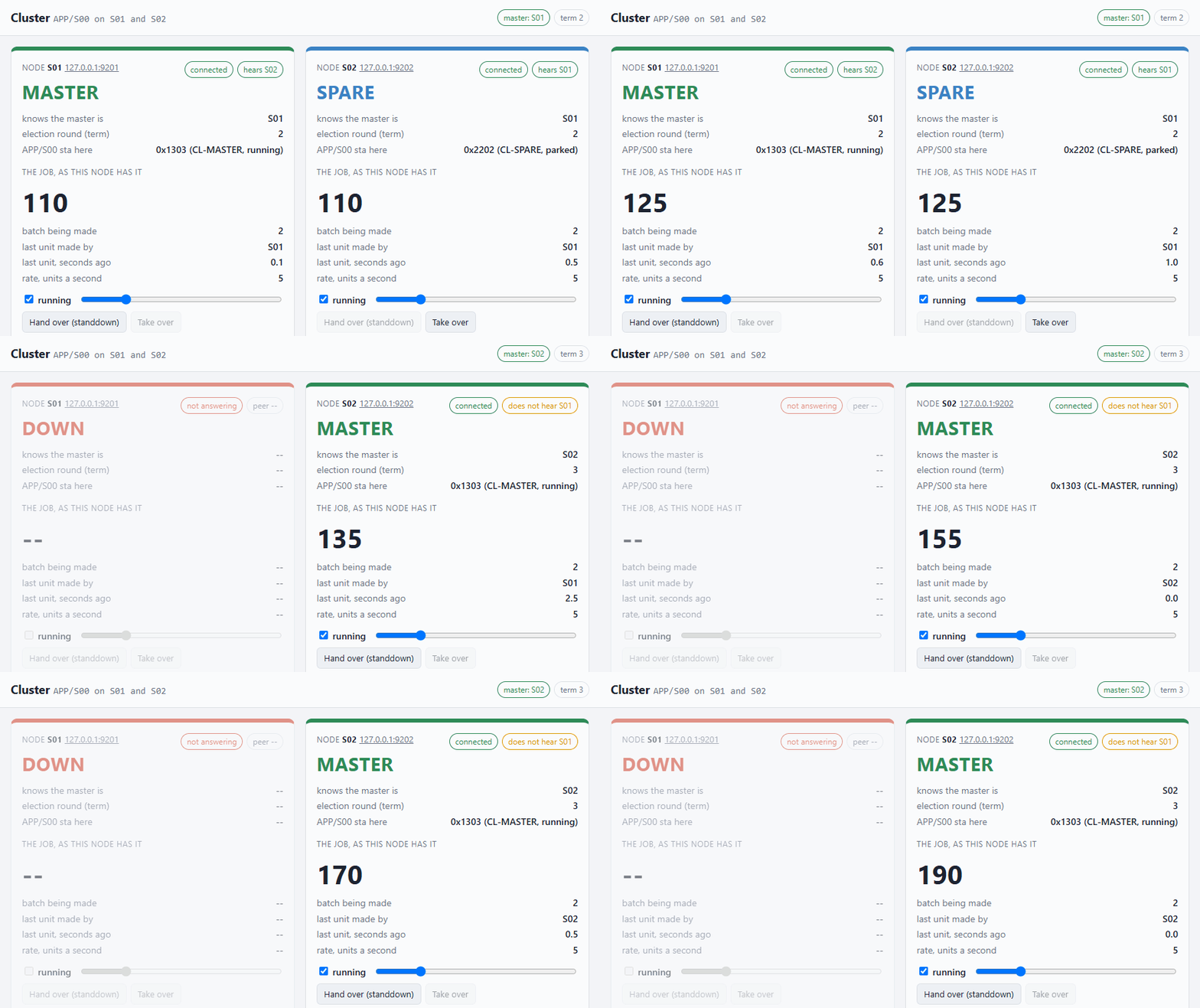 PRJEDU_cluster — two engines, one job. The master is stopped; a second later the spare is master and goes on from the same unit. |
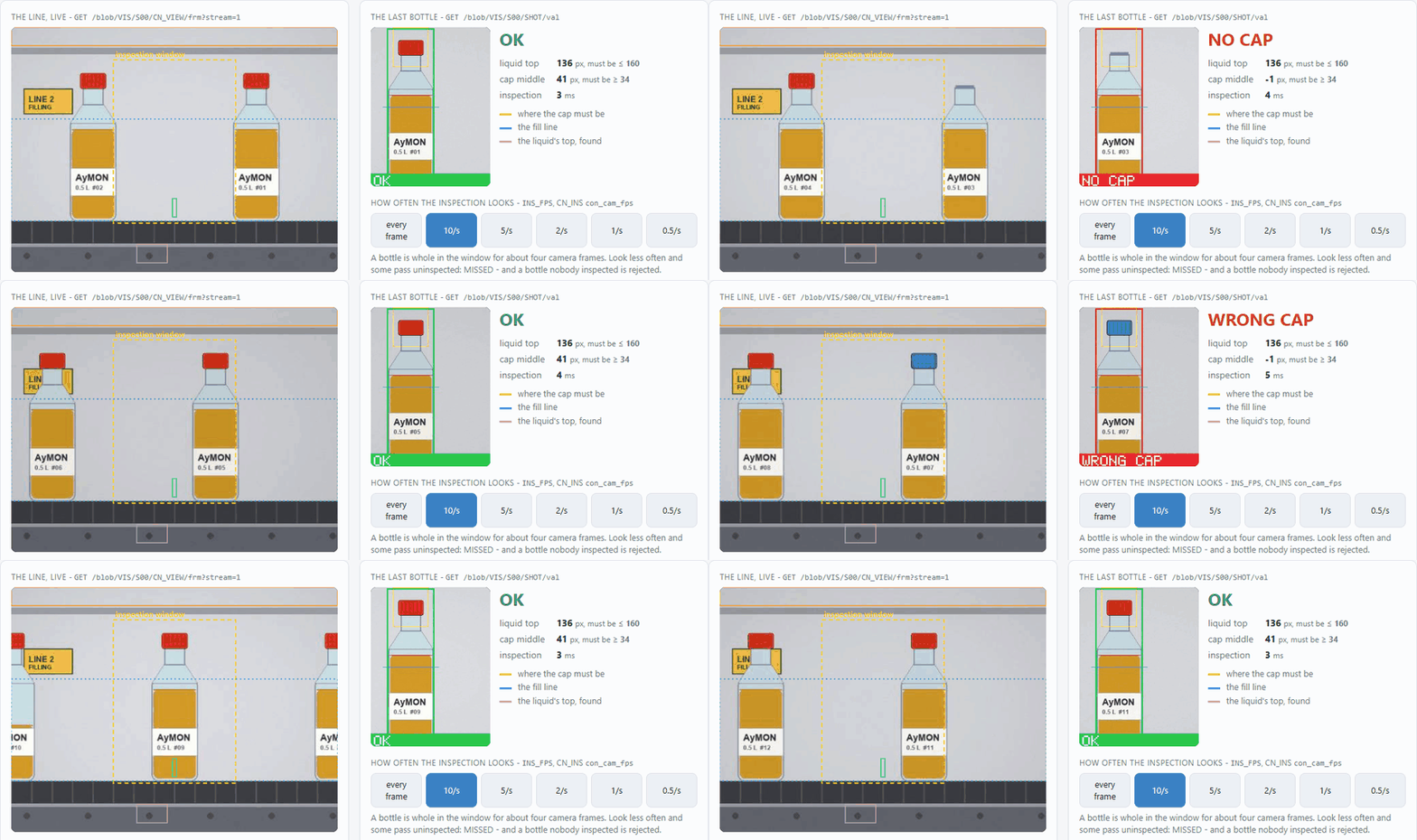 PRJEDU_vision — a camera inspects bottles inside the engine: a missing cap, the wrong cap, a short fill. Twenty lines of JScript; no Python, no OpenCV. |
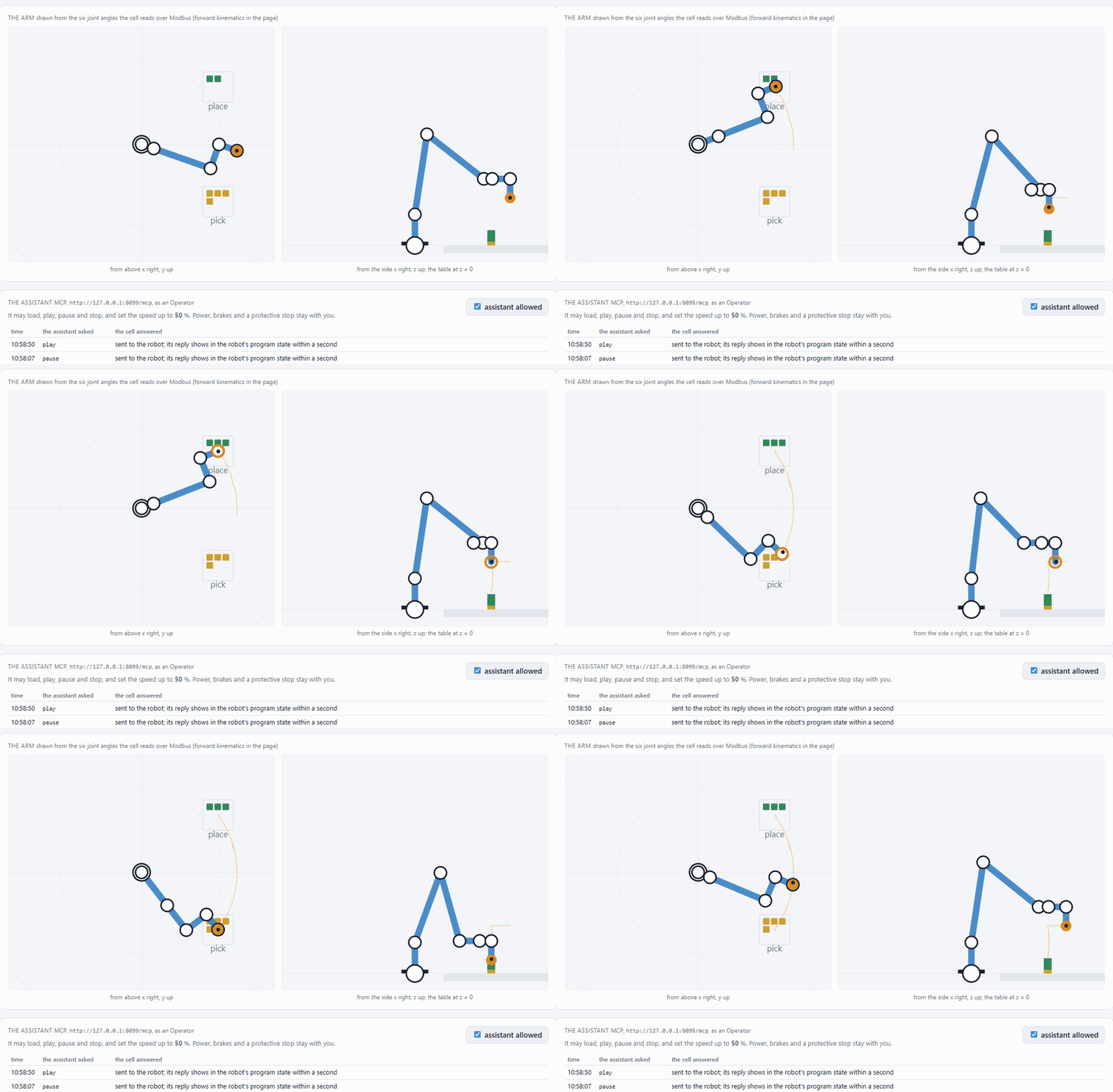 PRJEDU_robot_mcp — an AI assistant runs a robot cell over MCP. It may load, play and pause; power, brakes and a protective stop stay with a person. |
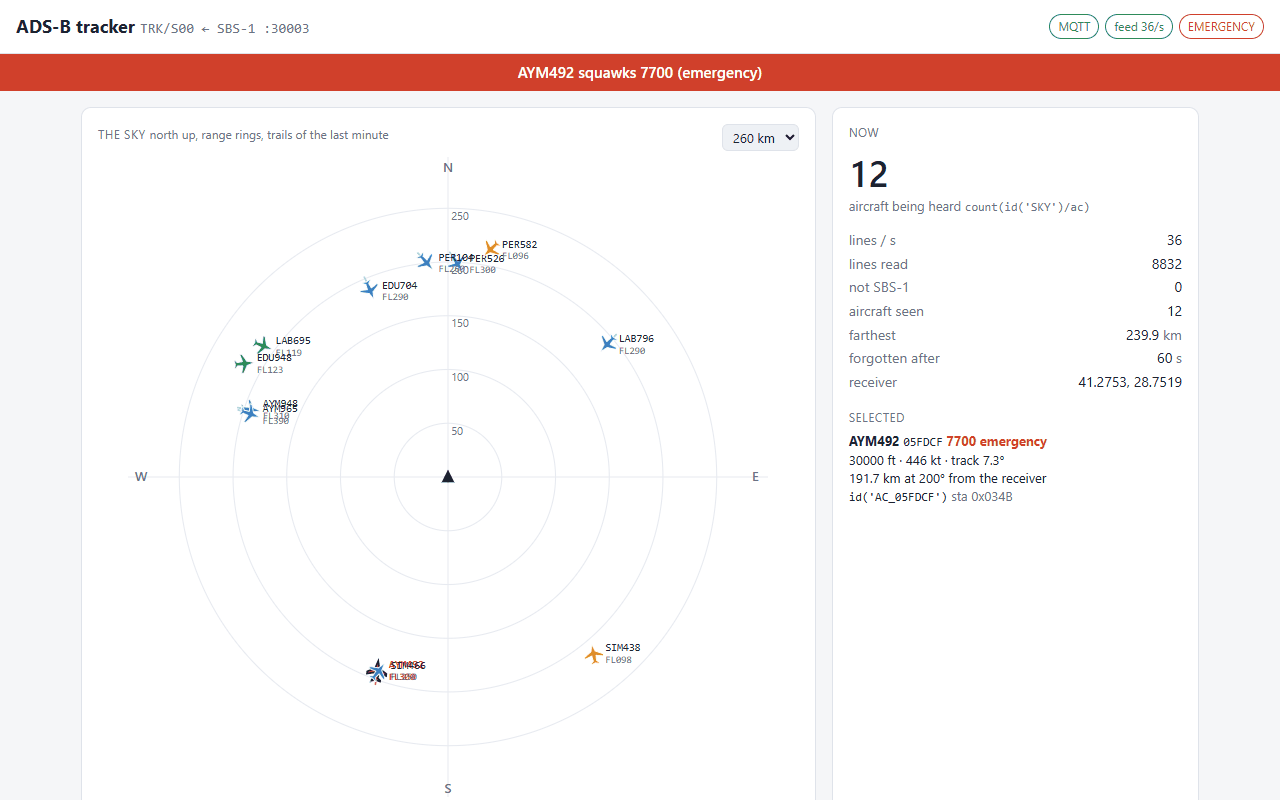 PRJPER_adsb — the aircraft overhead, from an ADS-B receiver or the simulated one around Istanbul Airport. An emergency squawk is an alarm, set in configuration. |
This repository is where you get AyMON: the engine for Windows and Linux inbin/, and runnable projects for learning, teaching and hobby use. Every example starts with one
command and needs no licence, no hardware and no database unless its own
README says otherwise.
The same pages as a searchable site: https://docs.aymon.ca/
AyMON/
  bin/win-x64/     the engine (AyXDB.exe) and its runtime, Windows x64
  bin/linux-x64/   the same engine for Linux x86-64 (AyXDB + lib*.so)
  bin/lic/         the education / personal licence - one file, every example
                   and every platform
  examples/        the examples, one folder per group:
    start/           first steps (PRJEDU_101)
    protocols/       Modbus, MQTT, SNMP, OPC UA - both ends, no hardware
    data/            databases, mail and files
    web/             live pages, pages the engine writes, logins, a
                     maintenance shell, a plant to harden
    cluster/         two engines: replication, and a cluster that fails over
    labs/            course labs: a PLC program, PID, OEE, a robot arm
    ai-vision/       AI assistants over MCP, Python, machine vision
    hobby/           a drone, the aircraft overhead, your phone (PRJPER_*)
  docs/            six short guides, written for these examples
  media/           the pictures in this README
  licenses/        third-party licence texts
Run one
cd examples\start\PRJEDU_101
run.bat
run.bat finds the engine in ..\..\..\bin\win-x64 and hands it the licence in..\..\..\bin\lic with -lic: — one licence per process, so projects under
different licences can run side by side on one machine. Stop it with CTRL-C.
Everything the engine did is in that project's log\ directory and on the
console.
To point at an engine installed somewhere else:
run.bat "C:\Program Files\AyMON\bin"
On Linux
Every example has a run.sh beside its run.bat (and run_plant.sh /run_centre.sh, shell.sh, try.sh where there is a .bat of that name):
cd examples/start/PRJEDU_101
./run.sh
It does what run.bat does: finds the engine in ../../../bin/linux-x64, hands it
the licence in ../../../bin/lic with -lic:, and starts it in the project
directory. Stop it with Ctrl-C (or ESC); Ctrl-X opens the maintenance prompt.
The same education licence works on both platforms.
| Machine | x86-64 with glibc 2.34 or newer and OpenSSL 3: Ubuntu 22.04+, Debian 12+, Fedora 35+, RHEL / Rocky 9, and WSL on Windows. The engine takes libssl.so.3 from the system (sudo apt install libssl3 if run.sh says it is missing); everything else ships in bin/linux-x64. ARM (Raspberry Pi) is not in this repository yet. |
| Helpers | examples/web/PRJEDU_telnet/shell.sh and examples/ai-vision/PRJEDU_mcp/try.sh run small Python 3 scripts (standard library only) — the counterparts of shell.ps1 / try.ps1. |
| Python in the engine | only PRJEDU_gauge and PRJEDU_pycall: libAyLIB_Python.so in bin/linux-x64 runs their scripts in Python 3.11 (Debian 12's default; deadsnakes on Ubuntu) — the gauge with numpy installed for that version, pycall with the standard library only. Every other example runs without it — the module is loaded only when a document has a Python script. |
| ODBC | PRJEDU_odbc runs on its embedded SQLite out of the box. For PostgreSQL or SQL Server install unixODBC and the driver (sudo apt install unixodbc odbc-postgresql); on Linux the drivers are named in /etc/odbcinst.ini — {PostgreSQL Unicode}, not Windows' {PostgreSQL Unicode(x64)}. |
| Paths | the projects write %PRJ% / %DB% paths with /, which both platforms read; a file database written as Database=log\x.db works too — on Linux the engine reads the \ as a separator. |
| Copied from Windows? | a zip loses the executable bits: chmod +x examples/*/*/*.sh bin/linux-x64/AyXDB. A git clone keeps them. |
The examples
They live in examples/, one folder per group; each group's folder has a README of its own.
Run an example from its own folder.
First steps
| Project | What it teaches | Needs |
|---|---|---|
| PRJEDU_101 | the document tree, a thread and its clock, a timer-driven value, a calculated value, an alarm with limits, reading the log | nothing |
Field protocols
| Project | What it teaches | Needs |
|---|---|---|
| PRJEDU_modbus | <con> / <dev> / <bi> / <io>, the block as the unit of communication, register and BIT addressing, scaling and alarms as configuration — and the slave side, so the plant and the monitoring side are two documents of one engine; a live page at http://127.0.0.1:8103/ |
nothing |
| PRJEDU_mqtt | MQTT with nothing to install: AyMON as the broker that publishes its own document and takes writes on .../set, and as a client whose <dev>/<bi>/<io> are a publisher, a subscription and a topic — retain from the document, what stays local, writing back without an echo, and pointing it at mosquitto instead; a live page at http://127.0.0.1:8104/ |
nothing; mosquitto to try the optional steps |
| PRJEDU_snmp | SNMP with nothing to install: the manager side as you would write it for a real device — one request carrying every point of a block, the OID split between <bi> and <io>, types and scaling — and the device side written in script on PRO.raw, which is how any protocol the engine does not speak can be tried out first; a live page at http://127.0.0.1:8105/ |
nothing |
| PRJEDU_opcua | an OPC UA client against a machine that comes with its own server — a simulated injection moulding machine on asyncua, somebody else's stack: NodeIds by namespace URI (nsu=) rather than index, a poll and a subscription of the same value side by side (30 against 135 changes in 30 s), why the subscription gets a connection of its own (a Publish waits at the server and held the 1 s poll to 0.65 reads a second), one session one thread so the page's requests are carried out by a timer on the session's thread, writes and method calls (OPC.call) signed and encrypted as a user, the anonymous write the server refuses, certificates trusted in both directions (OPC.cert, the machine's rejected folder, pro_trust), and OPC.browse / OPC.gen for where the NodeIds come from |
Python 3.10+ for the machine (setup.bat / setup.sh installs asyncua into the example's own folder) |
Data, history, mail and files
| Project | What it teaches | Needs |
|---|---|---|
| PRJEDU_sqlite | the SQL surface: exec_direct vs prepare/parameter/execute and why a value is never pasted into a statement, SQL.qry turning rows into addressable elements, what an SQL NULL is in script, and a history that survives a restart; a live page at http://127.0.0.1:8106/ |
nothing |
| PRJEDU_odbc | connection strings kept in the root document and handed to the <con> in xdb_init, the ODBC and SQLite drivers attaching themselves, one script whose SQL runs unchanged on three databases — and the traps between them (LIMIT/TOP, round(), a Turkish collation); a live page at http://127.0.0.1:8107/ |
nothing for SQLite; SQL Server or PostgreSQL to try those |
| PRJEDU_net | the engine writes mail and files: a tank's level alarm sends one mail when it comes and one when it is gone — a mail is a write to a point of a PRO.smtp connection and the server's answer comes back into the same point, the connection is made for the message and let go when quiet, sending runs on a thread of its own; a shift report is written, zipped (FILE.zip) and uploaded by PRO.ftp as .part then renamed, and the directory listed; the mail and file servers at the other end are written in script on PRO.raw — they speak first (pro_onaccept) and hear a connection end (pro_onclose, the end of an FTP upload), so nothing is installed; how to point it at a real mailbox or FTP server and the licence's 20 operations a day; a live page at http://127.0.0.1:8114/ |
nothing; engine 4.3.4.568 or later and its module AyLIB_net (in bin) |
Web pages, access and security
| Project | What it teaches | Needs |
|---|---|---|
| PRJEDU_web | a live page in a browser: static files over HTTP, a JSON snapshot over REST, live values and a write-back over MQTT inside a WebSocket — one port for all three, the same again over TLS (https / wss), and why the web side is configuration, not code | a browser |
| PRJEDU_pages | web pages the engine writes: a file ending in .ayp is a template (<% %>, <%= %> escaped, <%- %> raw, include, as in ASP / JSP / EJS) that the engine runs on every request with the same evt.GetValue every script uses — no JavaScript in the browser, no API to design; a tank farm's overview, a form that changes set points (checked on the server, POST then redirect), the same data as JSON for a program, a page that shows it runs with the visitor's rights (xdb_acl), and a login: a plain form the engine answers, a cookie per login, set points only an operator may change, a CSRF token on the form; a live page at http://127.0.0.1:8115/ |
nothing; engine 4.3.4.594 or later |
| PRJEDU_telnet | getting inside an engine that has no console: the maintenance shell over plain TCP and over TLS, the three gates in front of it (con_acl at accept, con_auth at login, xdb_acl per element), what four different roles see of the same plant, project verbs through pro_oncmd, and following the log live — with a terminal for it in the box |
nothing |
| PRJEDU_hardening | a security course's lab, the defending side: a small plant (tank, pump, high-level trip, a secret recipe) delivered with seven weaknesses in who may do what — no address filter, no login and every connection an Operator, no default deny, the safety trip open to operators, the recipe open to all, passwords in clear text, unlimited guesses — to be fixed in its XML; the plant checks its own configuration, and the page logs in as four identities and tries what each may and may not do; a solution file marks every fix; measured: without a password the tank could be made to overflow, after hardening 8 of 8 | nothing |
Two engines
| Project | What it teaches | Needs |
|---|---|---|
| PRJEDU_rep | replication between two engines on one machine: the mirror that has no file of its own, direction decided by the document and not the connection, one connection row that works out its own end, and why an unlicensed feature is a local feature; a live page at http://127.0.0.1:8108/ | nothing |
| PRJEDU_cluster | two engines that share one job: an election (PRO.clt) over a link on each node, the role written into the job document's sta (TRANSIT, master, spare), replication (PRO.rep) whose direction follows the role, one set of files for both nodes told apart by tid, CLT.info for the cluster's state in a script, a write on the spare forwarded to the master, a planned hand-over — and a page that shows both nodes side by side while you kill one; measured (engine 4.3.4.622): master again 1–3 s after the kill, nothing skipped, at most the last step made again; both copies of the batch list the same, in the same order |
nothing |
Course labs
| Project | What it teaches | Needs |
|---|---|---|
| PRJEDU_plc | an automation course's lab: a bottle filling line (conveyor, photo-eyes, nozzle, level switch, supply tank, START / STOP / RESET / EMERGENCY STOP wired normally closed) whose signals are a Modbus TCP remote I/O, and a PLC program in script that scans it every 100 ms — a step sequence, edges, timers, an interlock on the valve, a watchdog on the fieldbus and a life bit the other way — with an HMI page that shows the line, the sequence and the I/O image | nothing |
| PRJEDU_pid | a control course's lab: a simulated heater block (first order plus dead time, sensor noise, a fan as the disturbance) in one document and a PID controller in another — ISA form, derivative on the measurement with a filter, anti-windup you can switch off, bumpless AUTO/MANUAL, a trip — that measures every set-point step (rise, overshoot, settling, IAE), runs a step test, fits a model and suggests a SIMC tuning; a lab page with a trend, the three terms and a CSV for the report | nothing |
| PRJEDU_oee | an industrial engineering course's lab: a simulated line (products in lots, breakdowns, jams, slow spells, missing material, changeovers, bad parts) that tells the world only seven Modbus registers, and a small MES that turns them into time and OEE — 16-bit counters that wrap, the ideal cycle as master data, minor stops, stops the machine cannot name and the operator names on the page, the planned break taken from the shift plan, a stop split when its reason changes; a waterfall of where the shift's time went, A × P × Q checked against fully productive time / planned time, a Pareto of downtime, every stop and shift in SQLite, a CSV, and a printable shift report written by the engine from the database (report.ayp, a server page) |
nothing |
| PRJEDU_robotarm | a robotics or automation course's lab: a six-axis collaborative arm built after a UR5e (Denavit-Hartenberg forward kinematics, joint moves with a speed ramp, programs as data) that speaks a UR's two cell interfaces — the dashboard server (text, TCP 29999) and the Modbus TCP server (joints, tool position and general purpose registers at UR's addresses) — and a cell controller that runs it: a dashboard command queue with a greeting to set aside, a part handshake over registers, a feeder, the rules in the engine; protective and safeguard stops; a page that draws the arm from its joint angles | nothing; URSim or a UR robot for a real one |
AI assistants, Python and vision
| Project | What it teaches | Needs |
|---|---|---|
| PRJEDU_mcp | an AI assistant (Claude Code, Claude Desktop, any MCP client) on the plant: publishing a document with mcp_pub, a read-only and a read+write endpoint, why the endpoint's role and each element's xdb_acl decide everything, the four answers to a write (OKY / refused / PARTIAL / dry_run), and tools a project adds in script — with every call runnable without an AI; a live page at http://127.0.0.1:8109/ |
nothing; an MCP client to try it with an assistant |
| PRJEDU_robot_mcp | the robot cell of PRJEDU_robotarm with an MCP endpoint an AI assistant (Claude Code, Claude Desktop, any MCP client) comes in through: three project tools (cell_status, robot_command, set_speed), a separate assistant channel kept apart from the person's by xdb_acl in both directions, the robot's document off the MCP whitelist, and rules the assistant cannot change — power, brakes and a protective stop stay with a person, a speed ceiling, a switch on the page that turns the assistant off; try.bat makes every call without an assistant |
an MCP client to connect an assistant; seven connections, inside FREE |
| PRJEDU_gauge | Python beside the engine: a <script language="Python"> that draws what a camera would see of an old dial gauge and finds the needle in it with numpy — the dial, a ray scan, a calibration that is configuration, and a confidence that decides whether a frame is used at all — so the reading becomes an ordinary point with rounding and alarms; the frame is a blob that Python hands to the engine as a numpy array, the engine measures (IMG.stats) and encodes (IMG.encode) without copying it, and the page fetches over HTTP, while the old way, a base64 PNG on MQTT, stays one button away to compare; the true pressure is shown too, so the error can be seen |
a 64-bit Python 3.11 with numpy (py -3.11 -m pip install numpy; on Linux python3.11 -m pip install --user numpy); engine 4.3.4.564 or later and its picture module AyLIB_vision (in bin) |
| PRJEDU_pycall | calling Python from the engine without waiting for it: a function marked @xdb_fnc becomes a JScript wrapper, and its parameters decide the kind of call — analyse(evt) hung on a point as val_fnc="[vib.analyse]" (an event call: Python sees the value being written, the engine stores it afterwards) and vib.forecast(4.5, now) from JScript (an argument call: the caller gets 1, "queued", never the result). A pump bearing's vibration, 512 samples every 2 s, analysed in plain Python (RMS, crest factor, a DFT, the bearing's band) and a forecast of when the RMS reaches its alarm limit; the results go back as points with their own rounding and alarms, and the page shows how long every call waited and ran — and what happens when Python is slower than the data; a live page at http://127.0.0.1:8112/ |
a 64-bit Python 3.11, standard library only; engine 4.3.4.513 or later |
| PRJEDU_vision | machine vision with nothing to install: a camera that is a connection (CON.cam: sta on and off, redialled when lost, every frame a blob in its frm), here playing back a recording of a filling line, one button away from your own camera; three more views of the same camera with link:, each with its own rate, window, size and format, changed while they run (live con_cam_* fields); an inspection in twenty lines of JScript on its own thread — colour masks, labelled parts, a count and a centroid (IMG.hsv, inrange, label, count, moments) — that finds a missing cap, the wrong cap, a cap not pressed down and a short fill, with the colours and limits as configuration; the verdict drawn on the picture (IMG.rect, line, text, encode), the live view an MJPEG stream from the engine's memory, the last six rejects as pictures, and what happens when the inspection looks too seldom: bottles pass uninspected and are rejected; a line-speed button up to 1000 frames a second shows what the engine really keeps up with (measured: ~500 frames and ~3800 bottles a minute inspected, none missed); the same line watched without a script by PRO.vision — a camera device whose blocks the engine runs on every frame (motion, a light barrier, the light, has the camera moved), each an ordinary point with alarm limits, and a watchdog that puts the device in alarm when the camera stops; a live page at http://127.0.0.1:8113/ |
nothing; engine 4.3.4.577 or later and its picture module AyLIB_vision (in bin) |
Hobby projects
| Project | What it teaches | Needs |
|---|---|---|
| PRJPER_tello | a hobby drone, both ends: the Tello SDK's text protocol spoken in script on PRO.raw — a simulated Tello that answers a move when it is done, and a ground station that queues commands, turns the state line into points with alarms, and keeps the safety rules (battery, height, lost link) where a page cannot reach them (xdb_acl); flown from a web page with a map, instruments and keyboard sticks |
nothing; a Tello to fly a real one |
| PRJPER_adsb | a hobby radio's data, tracked: the SBS-1 text stream a dump1090 serves on TCP 30003 — cut back into lines on PRO.raw, one element per aircraft created with AddElement and deleted with DelElement when it goes quiet, an emergency squawk as an ALM.onin alarm in configuration, the whole sky as one json(...) value once a second — and a simulated receiver flying a dozen aircraft around Istanbul Airport; a map page with range rings, trails and a table |
nothing; an RTL-SDR stick and dump1090 or readsb for real aircraft |
| PRJPER_phone | a phone as a device, with nothing installed on it: a page read from the engine over https reads the motion sensors and sends five lines a second - features, not samples (vibration RMS, the smallest and largest acceleration, tilt, heading) - and the engine makes each phone an element the first time it speaks, its values under classes that carry the units and the alarm limits, a link alarm when it goes quiet, a drop told from a toss by free fall followed by an impact; two doors with two roles (the phones may only report; the dashboard on the PC may move the limits for every phone at once, buzz a phone, reset a drop); the phone's banner is coloured by the engine's alarms; a simulated phone for a PC | a phone on the same Wi-Fi; nothing for the simulated one |
More examples will follow.
| Prefix | Meaning |
|---|---|
PRJEDU_* |
education — a classroom, a course, a workshop |
PRJDEV_* |
development — trying something out before it becomes a plant |
PRJPER_* |
personal / hobby |
The suffix names what the example is about (_modbus, _snmp); PRJEDU_101
keeps its number because it is the one to read first.
Questions and help
| Search | the site — every guide and every README here, searchable |
| Ask your AI assistant | give it llms-full.txt — all of these pages in one file — and ask in your own language |
| Ask a person | Discussions → Q&A, English or Turkish; read about once a week |
| Something is broken | Issues |
| A security problem | privately — see SECURITY.md |
Copyright, notices and patents
Three files at the top of this repository, and they cover different things:
| File | What it covers |
|---|---|
LICENSE |
Part A the example projects — yours to copy and adapt. Part B the engine in bin\ — run it, for the examples and for projects of your own within the FREE edition (production included); the education licence is for teaching and trying out only; do not redistribute it. |
NOTICE |
third-party components inside the binaries (OpenSSL, SQLite, mimalloc, …) and their attributions |
PATENTS |
the patent application the engine implements, and what running it does and does not license |
The section below is about something else: the engine's own runtime licence
file, which is what decides how big a plant it will run.
Licence — you probably do not need one
With no licence file at all, AyMON runs the FREE edition:
| FREE | |
|---|---|
| documents | 5 |
connections (<con>) |
8 |
| devices | 8 |
| logged-in users | 4 |
| protocols | Modbus, MQTT, HTTP/REST/SOAP, SNMP, OPC UA, RFID, bridge, SQL, telnet — and every plug-in |
FREE never expires, and it is also the edition for personal use — there is
no separate personal licence. Within its limits you may run the engine for
anything, commercial and production use included (LICENSE, Part B). Every
example here runs on it: measured on all of them, the most any one uses is 4
documents, 7 connections and 3 devices.
- Devices are the
<dev>elements the engine polls or writes — however
they are connected; eight units behind one gateway are eight devices. - Logged-in users are people, not connections: one user with two browser
tabs, a phone and the telnet shell is one user. A page you only look at
without logging in is not counted at all.
Cluster, replication, RPC and MCP are not in FREE — but they still work on a
LOCAL connection: a loopback address (127.0.0.1) or any non-IP transport.
So you can run two engines on one machine and try replication or a cluster
fail-over end to end, with nothing installed and nothing bought. The moment the
peer is on another machine, the connection is refused.
bin\lic\AyMON.lic in this repository is the education licence. It has
FREE's numbers and one more thing: 32 logged-in users, for a classroom that
shares one engine. run.bat / run.sh hand it to the engine with -lic:
when the file is there; nothing to copy, nothing to configure.
The engine looks for the licence in this order, and says in the log which one
it used:
| Where | When | |
|---|---|---|
| 1 | -lic:<dir or file> on the command line |
one licence for one process — what the run scripts here use |
| 2 | AYMON_LIC environment variable |
a machine that keeps licences elsewhere |
| 3 | <project>\db\lic\AyMON.lic |
the normal place for a real installation: the licence is backed up with the project |
| 4 | <directory of AyXDB.exe>\lic\AyMON.lic |
one binary directory shared by several projects |
That file is bound to the PRJEDU / PRJDEV directory names, so it is of no
use to a production project — and the PRJPER_* examples simply run on FREE.
It is not a production licence and does not pretend to be one — a real one
lives in db\lic\ next to the project it was issued for.
Full details: docs/04_Licensing.md.
The guides
docs/ holds six short guides written for someone who has just run
the examples — not the product reference. Run the example first, then read the
guide:
| 01_The_Element_Tree.md | <con> / <dev> / <bi> / <io>, addresses, sta, how a value reaches the tree |
| 02_Timers_and_Events.md | threads, evt_*, and why a write runs a chain of functions |
| 03_Scripting.md | where script lives, how XML calls it, and the six places the language is not JavaScript |
| 04_Licensing.md | what is free, and why the replication example runs anyway |
| 05_Connections_and_Protocols.md | transports and protocols, who dials and who asks, one port for several services, polled against subscribed |
| 06_Access_and_Safety.md | the three gates — con_acl, the login, xdb_acl — TLS, and what the examples leave open |
The complete field notes — SNMP, OPC UA, MQTT, cluster and replication, access
control, the plug-in SDK, the Python module, telnet, load metrics — come with
the licensed product.
Yorumlar (0)
Yorum birakmak icin giris yap.
Yorum birakSonuc bulunamadi