agetor
Health Gecti
- License — License: MIT
- Description — Repository has a description
- Active repo — Last push 0 days ago
- Community trust — 88 GitHub stars
Code Basarisiz
- network request — Outbound network request in e2e/agent-profiles-api.spec.ts
- network request — Outbound network request in e2e/agent-profiles-dialogs.spec.ts
- network request — Outbound network request in e2e/agent-profiles-launch.spec.ts
- network request — Outbound network request in e2e/agent-profiles-settings.spec.ts
- network request — Outbound network request in e2e/agent-profiles.spec.ts
- network request — Outbound network request in e2e/at-file-autocomplete.spec.ts
- execSync — Synchronous shell command execution in e2e/at-file-truncated.spec.ts
- network request — Outbound network request in e2e/at-file-truncated.spec.ts
Permissions Gecti
- Permissions — No dangerous permissions requested
Bu listing icin henuz AI raporu yok.
The harness orchestrator — a local-first kanban for running Claude Code, Codex, and other CLI coding agents in parallel, each in its own git worktree.

Agetor
The harness orchestrator.
A local-first kanban for running Claude Code, Codex, Cursor, Gemini CLI and fx in parallel, with each task in its own git worktree.





Website · Download · Quick start · Pipelines · CLI · Contributing
Why Agetor
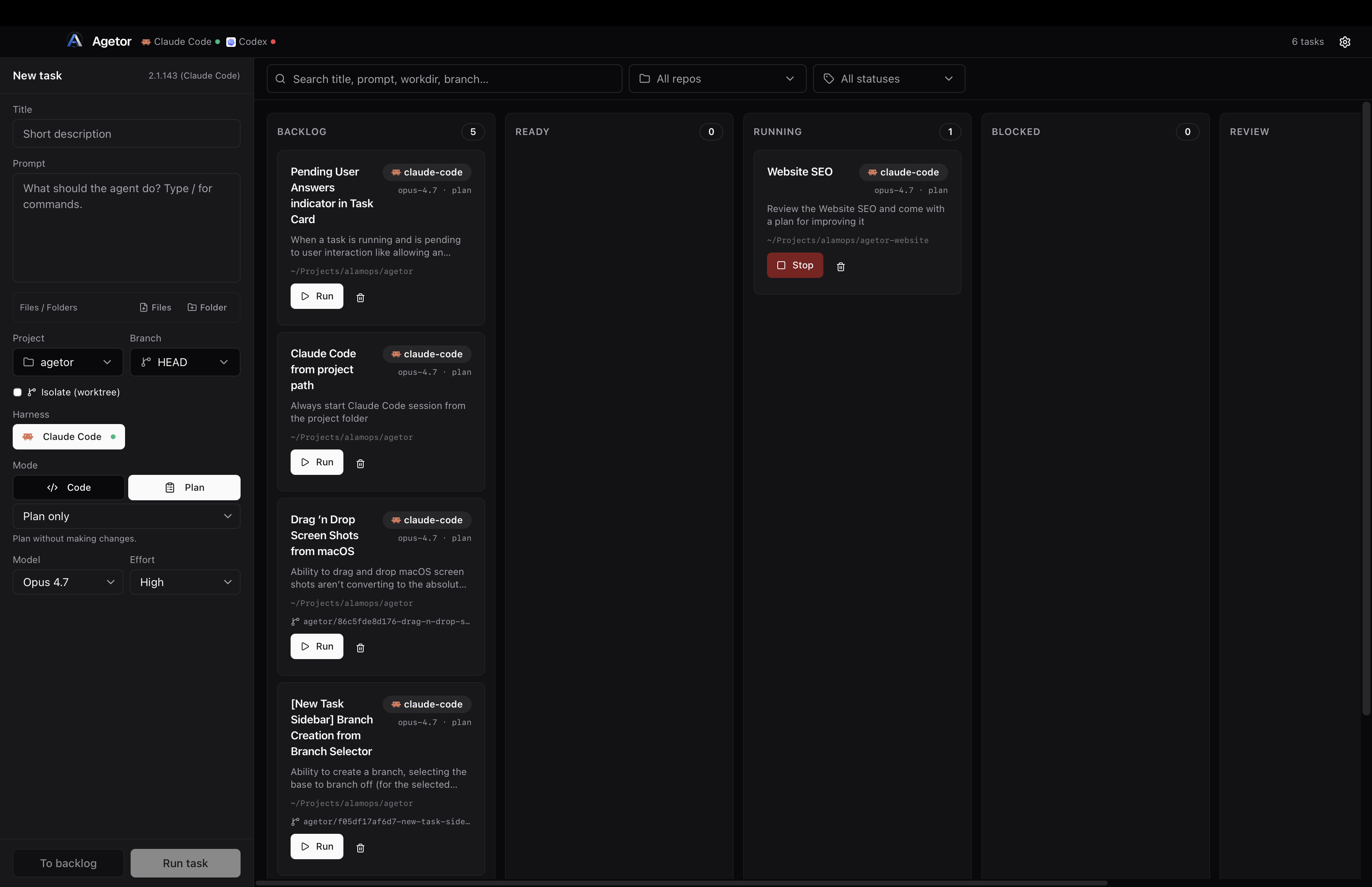
Coding agents are good enough now that the limiting factor is you: one terminal, one conversation, one branch at a time. Agetor turns a kanban board into a control plane for the agents you already use. Each card is a prompt, a repository and a harness. When you press Run, Agetor creates an isolated git worktree, launches the agent's own CLI inside it and streams the conversation to the board. The card moves by itself when the agent finishes or needs you.
Agetor doesn't replace your agents, and it doesn't replace your harness. Claude Code is still Claude Code, with the same login, skills, MCP servers, slash commands and settings. Agetor adds what one terminal can't give you: many agents working in parallel, isolation between them, and one place to review, answer and ship their work.
- Local-first. Everything runs on your machine. There's no Agetor account, no cloud relay and no telemetry.
- Non-invasive. Agetor installs no hooks and no MCP server, and it doesn't edit your
CLAUDE.md. It drives the real CLI the way you would. - Restart-safe. Claude Code, Codex, Cursor and Gemini CLI run inside
tmux, so quitting Agetor doesn't stop them, and the next launch reconnects to them. fx is the exception: it runs as a child process of Agetor and stops when Agetor quits, so an fx turn in progress doesn't survive a restart.
Features
Orchestrate
- Kanban workflow. Tasks move through Backlog → Ready → Running → Blocked → Review → Done as their runs start, stall, fail or finish. You can drag a card to override the flow at any time.
- A git worktree for every task. Each task runs on its own branch (
agetor/<id>-<slug>) under~/.agetor/worktrees/, so two agents can work on the same repo at once without colliding. The base commit is pinned when the task is created, so the task keeps the same starting point even after the source branch moves on. - Five harnesses, many accounts. Run Claude Code, Codex, Cursor, Gemini CLI and fx side by side. To use a second account for any of them, add a harness with its own isolated
$HOME. - Agents (reusable profiles). Save a harness, model, effort, mode, instructions and skills as a named Agent, then launch tasks from it in one click.
- Pipelines. Chain Agents into a reusable graph on a canvas, such as Plan → Implement → Review. Steps hand context to each other, branch, fan out and loop, all from a single board card. See Pipelines.
- Model discovery. Model and effort pickers start from a curated list. For Codex, Cursor and fx, they also include the models your account actually offers, as reported by the CLI. If a model needs a newer CLI than you have installed, Agetor refuses the run with an upgrade hint instead of letting the CLI fail with a confusing error.
Converse
- A live, structured transcript. Assistant text, thinking, tool calls, subagents, plans, TODO progress and files the agent sends you each render as their own UI components, not as raw terminal output.
- Questions and approvals as cards. Claude's
AskUserQuestion, plan approvals and permission prompts show up as cards you answer in the panel. Agetor then types the keystrokes into the real session. fx permission requests and Cursor plans work the same way. - Follow-ups at any time. You can message a running agent and the message folds into its current turn. Drafts you're not ready to send go to a per-task Save for later tray.
- An autocompleting composer.
/completes slash commands, skills, MCP servers and plugins.@completes files and folders, which Agetor resolves to real paths inside the task's worktree. You can also attach files and images and reuse saved prompts. - Built-in terminals. Every task has terminal tabs rooted in its worktree.
agetor attach <id>connects your own terminal to the live agent session.
Ship
- Diff review. Review a branch's changes in the app. Select lines and send them back to the agent as a quoted follow-up.
- Git host integration. Works with GitHub, GitLab and Bitbucket Cloud. You can commit and push, open pull requests, check mergeability, create a conflict-resolution task, browse issues, and start a task from an issue's full comment thread.
- Clone any repository. Clone from any of those three hosts with live progress and cancel. Optionally, an agent then writes an
ELI5.mdtour of the codebase.
Stay in the loop
- Notifications. Native macOS notifications link straight to the task that needs you. Cards show an unread dot when the agent has said something new.
- Usage meter. Plan quota for Claude Code, Codex and Cursor accounts, read with the logins those CLIs already have, plus local token rollups.
- Themes and automatic updates. Auto, dark or light theme. The app is signed, notarized and updates itself in place.
Supported harnesses
A harness is the agent CLI Agetor drives. Agetor launches the real binary on your PATH with your existing login, and it doesn't proxy or re-implement the agent.
| Harness | Binary | How Agetor drives it | Default model | Install |
|---|---|---|---|---|
| Claude Code | claude |
Interactive session in a per-task tmux session; output is tailed from Claude's own JSONL transcript |
Opus 5.5 | npm i -g @anthropic-ai/claude-code |
| Codex experimental | codex |
codex exec --json for each turn inside tmux; the conversation resumes by thread id |
GPT-6.1 Sol | npm i -g @openai/codex |
| Cursor experimental | cursor-agent |
stream-json headless mode for each turn inside tmux; the conversation resumes by session id |
Grok 4.7 | curl https://cursor.com/install -fsS | bash |
| Gemini CLI experimental | gemini |
stream-json headless mode for each turn inside tmux; the conversation resumes by session id |
Gemini 3.1 Pro (preview) | npm i -g @google/gemini-cli |
| fx (Vercel Labs) experimental | fx |
Agent Client Protocol (JSON-RPC over stdio), through Vercel AI Gateway | GLM 5.3 Flash | curl -fsSL https://fx.sh/setup.sh | bash |
Claude Code is enabled out of the box. The experimental harnesses are opt-in: turn them on in Settings → Harnesses. Settings and the onboarding checklist show whether each CLI is installed and logged in, and give an install hint if it isn't.
Each harness offers the permission modes its CLI actually supports. They range from hands-off modes (Auto, Full access) to Ask, Plan only and Read-only.
Install
Desktop app (macOS, Apple Silicon)
- Download Agetor-arm64.dmg from the latest release.
- Drag Agetor into Applications and open it.
- Install at least one harness and log in to it the way you normally would (for example, run
claudeonce).
The app is signed and notarized by Apple and updates itself. Harnesses hosted in tmux need it on your PATH; if it's missing, the app offers to use a bundled copy instead.
CLI
curl -fsSL https://github.com/alamops/agetor/releases/latest/download/install.sh | sh
The installer verifies a SHA-256 checksum and installs a single agetor binary into /usr/local/bin, or ~/.local/bin if that isn't writable. The CLI works with or without the desktop app. See Command-line interface below.
[!NOTE]
Agetor ships for macOS on Apple Silicon only. Linux and Windows targets are configured but not built or tested yet.
Quick start
- Click New task in the left rail.
- Pick a project folder. If it's a git repository, the task gets its own worktree automatically.
- Choose an Agent, or pick a harness, model and mode yourself, then write your prompt.
- Click Run task to start now, or To backlog to queue it.
Click a card to open its run panel. From there you can watch the transcript stream, answer questions, send follow-ups, review the diff, open a terminal, or commit and open a PR once you're happy with the result.
Pipelines
A pipeline chains several Agents into a named, reusable graph of steps. For example, a planner hands off to an implementer, and a reviewer either approves the work or sends it back. You build pipelines on a full-page canvas (the Pipelines button in the header, or Settings → Pipelines), give each step its own Agent and instructions, and launch them like any other task.
flowchart LR
    Plan --> Implement --> Review
    Review -- "changes requested" --> Implement
    Review -- "approved" --> Docs
- One card, many agents. Running a pipeline creates a single board card. Each step runs as a hidden task in the card's worktree. Click any step to read its transcript, chat with it or check its diff, just like a normal task.
- Structured handoffs. Each step ends its turn with a small
<handoff>JSON block: a summary, the files it touched, open questions and which step runsnext. That block becomes the next step's context. - Branching, fan-out and loops. When a step has more than one outgoing edge, it chooses where to go by putting the next step's name (or the edge's label) in its handoff. A step can instead run all of its outgoing steps in parallel, and an edge can loop back to an earlier step. A step with several incoming edges either runs each time one of them hands off, or waits until all of them have. A step cap (25 by default) stops runaway loops.
- Live run view. The canvas animates as the pipeline runs: the active step pulses, and a token travels along each edge when a handoff happens.
- Blocks instead of guessing. If a step needs your input, fails, or can't produce a valid handoff even after one automatic reminder, the card moves to Blocked with the reason. From there you can retry the step, choose the next step yourself, stop, or restart.
- Frozen at launch. A pipeline and its Agents are captured the moment you click Run, so editing or deleting them never affects a run already in progress.
- Portable. Export Agents and Pipelines to one JSON file and import them on another machine — from Settings → Agents, Settings → Pipelines or the Pipelines page (per row, a multi-select, or Export all; import by choosing a file, pasting JSON or dropping the file onto the list), or with
agetor export/agetor import. A pipeline brings every Agent it uses, with its full settings. Each Agent records its harness and the built-in harness that harness wraps, so an Agent on an extra account such assecondary-claude-codestill imports on a machine without that account: it lands on the built-in Claude Code harness, with a warning. Import shows a preview first — what it will create, which harness each Agent lands on, and the instructions it carries — and then creates everything in one step; in a terminal,agetor importprints the same preview and asks before importing (--dry-runonly previews,--yesskips the question for scripts). If something changes on this machine between the preview and the import (a name gets taken, say), the import stops and shows the new preview instead of creating something you didn't confirm. Instructions with invisible characters a preview couldn't show are refused. A name that's already taken becomesName (imported); nothing local is overwritten.
Handoff format and run control[!WARNING]
Parallel steps share one worktree, and nothing stops two of them from editing the same files. Use fan-out only for work that is truly independent, such as docs in one branch and tests in another.
A step ends its turn with a block like this. The last block in the turn wins.
<handoff>
{
  "purpose": "Add CSV export to the reports page",
  "summary": "Implemented the export endpoint and button; tests pass.",
  "reason": "Ready for review — handing off to the QA step",
  "next": "QA",
  "artifacts": ["src/routes/export.ts"],
  "openQuestions": []
}
</handoff>
next names a step, or the label of an edge leading out of this step. It only matters when the step has more than one outgoing edge: a single edge is always followed, and a step set to run all of its next steps ignores next. A step with no outgoing edges ends its path.
| Action | What it does | CLI |
|---|---|---|
| Run | Starts the pipeline. On a blocked or cancelled pipeline, it resumes where it stopped and never starts over. | agetor start <id> for the first run; agetor pipeline retry <ref> to resume |
| Retry | Re-runs the blocked or cancelled step. When the step cap was hit, each Retry adds another full allowance. | agetor pipeline retry <ref> [--from <step-task>] |
| Advance | Skips the stuck step: you pick the next step, or finish the run. | agetor pipeline advance <ref> --next <step> | --finish |
| Stop | From the run view header, stops the whole pipeline. From a single step, stops only that branch. | agetor cancel <id> |
| Restart | Cancels anything still running and starts over from the first step, discarding the previous run. | agetor pipeline restart <ref> |
A step can also list other Agents it's allowed to delegate to as subagents, with an optional cap. Agetor passes this to the step as guidance in its prompt; it doesn't enforce the cap. Deleting or archiving a pipeline task also deletes or archives its steps.
On your own machine, a step points at the Agent itself, not at its name, so renaming an Agent doesn't break a pipeline. Two Agents can't share a name. An exported file carries the Agents themselves, so names only matter when you import a pipeline file from an older version of Agetor: those files list each step's Agent by name only, and import uses the local Agent with that name.
Command-line interface
The agetor CLI drives the same board from your shell. If the desktop app is running, the CLI talks to it. If it isn't, the CLI starts a headless background daemon that shares the same ~/.agetor state. A task you add in the terminal shows up in the app, and the reverse is also true. When you open the app later, the daemon hands over to it.
agetor                       # full-screen live dashboard: board, streaming detail, inline compose/answer

# create · inspect
agetor add                   # create a task (guided wizard, or --title/--prompt[/--start])
agetor add --issue <url>     # seed a task from a GitHub/GitLab/Bitbucket issue and its thread
agetor add --profile <name>  # launch from a saved Agent profile
agetor add --pipeline <name> # launch a saved Pipeline (its steps supply every agent)
agetor ls [filters]          # list tasks (--column/--agent/--type/--repo/--search/--archived/--all)
agetor ls --steps            # include the hidden step tasks of pipelines
agetor ps                    # running and blocked tasks only
agetor show <id>             # details, runs, pending interactions

# run · converse
agetor start <id>            # run a task
agetor send <id> <msg…>      # message a task (--ref <path> to attach a file; resumes a finished one)
agetor answer <id>           # answer a task that's waiting on you
agetor logs <id>             # stream the conversation (--no-follow · --notify · --rebuild)
agetor commit <id>           # ask the agent to commit everything and push the branch
agetor cancel <id>           # stop the active run
agetor resume <id>           # resume an fx response paused by rate limiting
agetor attach <id>           # attach your terminal to the live tmux session
agetor shell <id>            # open a shell in the task's worktree
agetor diff <id>             # the task's git diff
agetor files <id>            # files the agent sent you

# manage · setup
agetor edit <id> [flags]     # change title, prompt, harness, model, mode, effort, column…
agetor move <id> <column>    # e.g. `agetor move <id> done`
agetor archive <id>          # archive a done task (unarchive to restore)
agetor rm <id> --yes         # delete a task, its worktree and its branch
agetor clone <url>           # clone a GitHub/GitLab/Bitbucket repo as a new project
agetor projects <sub>        # list | add <path> | rm <path> | branches <path>
agetor harness <sub>         # list | add | edit | enable | disable | rm | shell
agetor profile <sub>         # ls | show | add | edit | rm | export | import (saved Agents)
agetor pipeline <sub>        # ls | show | rm | export | import | status | retry | advance | restart
agetor export --all --out f  # Agents and/or Pipelines to a JSON file (--profile/--pipeline <ref> to pick)
agetor import <file>         # preview + confirm, then import (--dry-run, --yes, --harness-map <from>=<to>, --enable-harnesses)
agetor daemon status|start|stop
agetor config [key] [value]  # view or set preferences
Every command accepts --json for scripting. Short id prefixes (the 8 characters agetor ls shows) work anywhere an <id> is expected. In the CLI, --agent always means the harness, and a saved Agent is called a profile.
Dashboard keys: ↑/↓ or j/k select · s run · x stop · m message · c commit and push · g answer · r resume · p show a pipeline's steps · q quit.
How it works
Agetor is an Electrobun app: a Bun main process that owns the orchestration, and a native macOS WebView that renders a React UI.
flowchart LR
    UI["Desktop app<br/>(React webview)"] -- "HTTP + SSE" --> Core
    CLI["agetor CLI / TUI"] -- "HTTP + SSE" --> Core
    Core["Bun core<br/>orchestrator · SQLite · git"]
    Core -- "tmux (interactive)" --> Claude["claude"]
    Core -- "tmux (one-shot per turn)" --> OneShot["codex · cursor-agent · gemini"]
    Core -- "ACP over stdio" --> FX["fx"]
    Claude --> WT[("git worktree<br/>per task")]
    OneShot --> WT
    FX --> WT
- One local API. The desktop UI and the CLI both talk to the core over HTTP and Server-Sent Events. The API listens only on
127.0.0.1, and every route except/healthrequires a random token generated at each launch. - Drive the real CLI; don't re-implement it. Claude Code runs as an interactive session inside
tmuxand receives prompts as keystrokes. Its structured output comes from the transcript Claude writes itself. Codex, Cursor and Gemini CLI run once per turn insidetmuxand resume by session id. fx talks the Agent Client Protocol. - Restart-safe by design. On boot, Agetor reattaches to any
tmux-hosted session that is still alive and replays its transcript without duplicates. Runs whose session is gone move back to Ready, so no card is left stuck in Running. - Local persistence. Tasks, runs, events, projects, harnesses and preferences live in a SQLite database with versioned migrations.
The architecture, lifecycle and gotchas are documented in depth in CLAUDE.md. Design notes for individual features are in docs/plans/.
Configuration
Most settings live in the app under Settings: General, Harnesses, Agents, Pipelines, Git Integration and Saved Prompts. All state is stored under ~/.agetor/:
~/.agetor/
├── agetor.sqlite            # tasks, runs, events, projects, harnesses, agents, preferences
├── agetor-core.json         # 0600: the running core's port + token (how the CLI connects)
├── github-tokens.json       # 0600: git host tokens from Settings → Git Integration
├── worktrees/<task-id>/     # per-task git worktrees
├── harnesses/<id>/          # isolated $HOME for additional-account harnesses
├── attachments/             # files and images attached to prompts
├── issue-threads/           # issue snapshots for tasks started from an issue
├── pipeline-runs/           # handoffs recorded by each pipeline run
├── {codex,cursor,gemini,fx}-logs/   # per-run structured agent output
└── daemon.log               # headless CLI daemon log
| Variable | Purpose | Default |
|---|---|---|
AGETOR_DATA_DIR |
Where the database, worktrees and logs live. | ~/.agetor |
AGETOR_API_PORT |
Port for the local API. | 4317 |
AGETOR_API_HOST |
Address the headless core's API binds to: 127.0.0.1, 0.0.0.0 or ::. Only for running Agetor headless in a container (see below); the desktop app ignores it. |
127.0.0.1 |
AGETOR_CLAUDE_BIN / AGETOR_CLAUDE_ARGS |
Override the claude binary / append extra args. |
claude on PATH |
AGETOR_CODEX_BIN / AGETOR_CODEX_ARGS |
Same, for Codex. | codex on PATH |
AGETOR_CURSOR_BIN / AGETOR_CURSOR_ARGS |
Same, for Cursor. | cursor-agent on PATH |
AGETOR_GEMINI_BIN / AGETOR_GEMINI_ARGS |
Same, for Gemini CLI. | gemini on PATH |
AGETOR_FX_BIN / AGETOR_FX_ARGS |
Same, for fx. | fx on PATH |
AGETOR_TMUX_BIN |
Override the tmux binary. |
tmux on PATH |
AGETOR_SKIP_CLI_VERSION_FLOOR |
Set to 1 to skip the per-model minimum CLI version check. |
unset |
AGETOR_DAEMON_IDLE_MS |
Shut the CLI daemon down after this long with no run and no client (0 disables). |
300000 |
The bin, home and env overrides you set per harness in Settings take precedence over these variables. The CLI honors AGETOR_DATA_DIR and AGETOR_API_PORT too, and so do its --data-dir and --port flags. Test-only switches (fake drivers, API stubs) are documented in CLAUDE.md.
Running headless in a container. The API binds to 127.0.0.1 by default, and a Docker port mapping can't reach a loopback-only listener inside the container. Set AGETOR_API_HOST=0.0.0.0 (or ::) in the container so the published port works. The headless core (agetor daemon) accepts only 127.0.0.1, 0.0.0.0 or ::, and refuses to start on anything else: the CLI and agent hooks inside the container connect over 127.0.0.1, which a specific address such as the container's own IP, or localhost/::1 (IPv6-only), would break. The desktop app always stays on 127.0.0.1.
A wildcard bind is protected only by the bearer token, and the API speaks plain HTTP, so that token travels in cleartext. Agetor logs a warning about this at startup. Publish the port to 127.0.0.1 on the host so nothing beyond your machine can reach it, and never publish it more widely. For remote access, use an SSH tunnel or a TLS-terminating proxy:
docker run -e AGETOR_API_HOST=0.0.0.0 -p 127.0.0.1:4317:4317 <your-agetor-image>
services:
  agetor:
    image: <your-agetor-image>
    environment:
      AGETOR_API_HOST: 0.0.0.0
    ports:
      - "127.0.0.1:4317:4317"
The token changes on every launch and is written to agetor-core.json in the data directory.
Security model
- Agents run with your privileges. Each harness runs with your full user privileges in the task's directory, exactly as it would if you launched it yourself. Agetor adds no sandbox beyond what the CLI provides. The default modes are hands-off; pick an Ask or Read-only mode for tasks where you want approvals.
- Only local, authenticated access. The API binds to
127.0.0.1and requires a random token generated at each launch. A website you visit can't read the token, so it can't drive an agent run. - Untrusted text is labeled. Issue and PR text pulled into a prompt is marked as untrusted, and the agent is told not to follow instructions found inside it.
- Minimal network use. The only network calls Agetor itself makes are update checks against GitHub Releases, the git host APIs you configure, and quota lookups against your harnesses' own providers.
Found a vulnerability? Please report it privately to [email protected] instead of opening a public issue.
Contributing
Issues and pull requests are welcome, including AI-assisted and fully vibecoded ones. Agetor itself is built almost entirely by Claude Code running inside Agetor. Hold your PR to the same bar as a hand-written one: tests green, types clean, and a description that makes the why obvious.
Development setup
You'll need Bun ≥ 1.3.5, Git, tmux, and at least one harness CLI.
git clone https://github.com/alamops/agetor.git
cd agetor
bun install
bun run dev:hmr        # Vite (HMR) + Electrobun, using ~/.agetor-dev on port 4318
The dev scripts use their own data directory (~/.agetor-dev), so work in progress can't touch the state of your installed app. bun run wipe:dev resets it. Changes to the webview hot-reload; changes under src/bun/ require a restart.
bun run typecheck                               # tsc --noEmit — must be green
bun test                                        # unit and integration tests (Bun test runner)
bun test src/bun/orchestrator.test.ts           # a single file
bun node_modules/@playwright/test/cli.js test   # end-to-end tests (Playwright)
bun run build:cli                               # standalone CLI binary → artifacts/
bun run build produces the signed, notarized .app and requires a Developer ID identity, so only maintainers need it.
Conventions
- Read
CLAUDE.mdfirst. It covers the architecture, every subsystem and the known traps. Reading it is the single most useful thing you can do before your first PR. - Tests for behavior changes. Test files set
AGETOR_DATA_DIRto a temp directory at the top of the file, not inbeforeAll, so they never touch a real database. Use a temp git repo, orisolation: "none", so tests never create real branches. - Never edit an applied migration. Add a new numbered file to
src/bun/migrations/and append it toindex.ts. - Keep
src/shared/free of runtime imports. Both processes import it. - Use semantic theme tokens in the UI. Write
text-success,bg-warning/10and so on, never literal palette classes. The UI has to work in both light and dark themes.
Adding a harness
- Extend the
AgentKindunion and add an entry toAGENT_OPTIONSinsrc/shared/types.ts. - Teach
buildCommandandspawnAgentinsrc/bun/agents.tshow to launch it, and add a driver if it needs one (seecodex-tmux.tsorfx-acp.ts). - Add availability and install hints in
src/bun/agent-status.ts.
The orchestrator, UI and CLI pick up the new kind automatically.
Roadmap
- Linux and Windows builds. The targets are configured in
electrobun.config.tsbut not yet built or tested. - Graduating Codex, Cursor, Gemini CLI and fx from experimental to stable.
- More harnesses as new agent CLIs mature.
Have an idea? Open an issue.
Acknowledgements
- Electrobun and Bun: the runtime Agetor is built on.
- Claude Code, Codex CLI, Cursor CLI, Gemini CLI and fx: the agents Agetor orchestrates.
- tmux: what keeps agent sessions alive across restarts.
- React, React Flow, dagre, Motion, dnd-kit, shadcn/ui, Tailwind CSS, Lucide, Sonner, xterm.js, Ink and Clack: the UI and TUI stack.
License
MIT © 2026 Alamo Saravali
Yorumlar (0)
Yorum birakmak icin giris yap.
Yorum birakSonuc bulunamadi