openclaw-firecracker
Health Uyari
- License — License: MIT
- Description — Repository has a description
- Active repo — Last push 0 days ago
- Low visibility — Only 5 GitHub stars
Code Basarisiz
- rm -rf — Recursive force deletion command in build-rootfs.sh
- rm -rf — Recursive force deletion command in deploy/lambda/api/handler.py
Permissions Gecti
- Permissions — No dangerous permissions requested
This tool provides a multi-tenant AI agent platform that uses AWS EC2 Firecracker microVMs to run isolated instances for different tenants. It handles auto-scaling, resource scheduling, web management, and data backups via a serverless AWS architecture.
Security Assessment
Overall risk: Medium. The platform requires deep AWS infrastructure access (EC2, S3, Lambda, DynamoDB, API Gateway) to function, meaning it inherently manages sensitive configurations and tenant data. The tool heavily executes shell commands via bash scripts and SSM Run Command to provision and manage virtual machines. Two failed security checks flagged the use of `rm -rf` (recursive force deletion) in `build-rootfs.sh` and `deploy/lambda/api/handler.py`. While likely intended for cleanup during builds and deployments, uninitialized variables or incorrect paths in these scripts could result in accidental data loss on the host machine. No hardcoded secrets were detected, but the architecture relies on standard AWS IAM security practices.
Quality Assessment
The project is very new and has low community visibility, currently sitting at only 5 GitHub stars. However, it is actively maintained (last push was today) and properly licensed under the permissive MIT license. The provided documentation is exceptionally detailed, outlining a clear, robust architectural design and a comprehensive feature set.
Verdict
Use with caution. The architecture is well-designed, but the low community adoption and presence of risky shell execution commands mean you should thoroughly review the deployment scripts before running this in a production environment.
🦞 OpenClaw Pool — multi-tenant AI agent platform on AWS EC2 Firecracker microVMs with per-tenant isolation, auto-scaling, and web management console.
OpenClaw Pool on EC2 Firecracker

Multi-tenant isolated deployment of OpenClaw AI agents on AWS using Firecracker microVMs. Each tenant runs in its own microVM with independent kernel, filesystem, and network. Managed via API, with auto-scaling hosts and idle reclamation.
This project uses EC2 nested virtualization to run KVM + Firecracker inside EC2 instances. Currently supports Intel instance families (c8i/m8i/r8i, etc.).
Features
- Tenant Management — Create/delete/query tenants via API. Each tenant is an OpenClaw instance running in an isolated Firecracker microVM with its own rootfs, data volume, and network
- Security Isolation — Firecracker microVM-based isolation: independent kernel, network, and filesystem per tenant
- Auto Scheduling — Automatically selects a host with available resources; scales out when capacity is insufficient
- Auto Scale-in — Idle hosts are reclaimed after timeout (two-round confirmation to prevent false kills)
- Health Checks — Real-time VM health monitoring with automatic status updates
- Web Console — Online management console with Cognito authentication, real-time host/tenant status
- Rootfs Pre-build — Rootfs + data template distributed via S3, downloaded on host init
- Dashboard Access — One-click HTTPS access to each tenant's OpenClaw Dashboard, no custom domain required
- Auto Backup — EventBridge scheduled backup of all tenant data volumes to S3, with manual trigger and backup query API
- AgentCore Integration — Optional toggle; when enabled, all VMs auto-connect to AgentCore Gateway (MCP tool hub), Memory, Code Interpreter, and Browser
- Shared Skills — All tenants share a unified skill set (S3-managed, auto-synced to all VMs), with independent memory
- Config Templates — Custom OpenClaw configuration templates for different LLM providers/models, selectable when creating tenants
- Default Toolchain — Each VM comes with Python3/uv/git/gh/Node.js/htop/tmux/tree pre-installed
- Data Backup — Automated daily backup + manual backup API, Firecracker pause/resume for consistency
Architecture
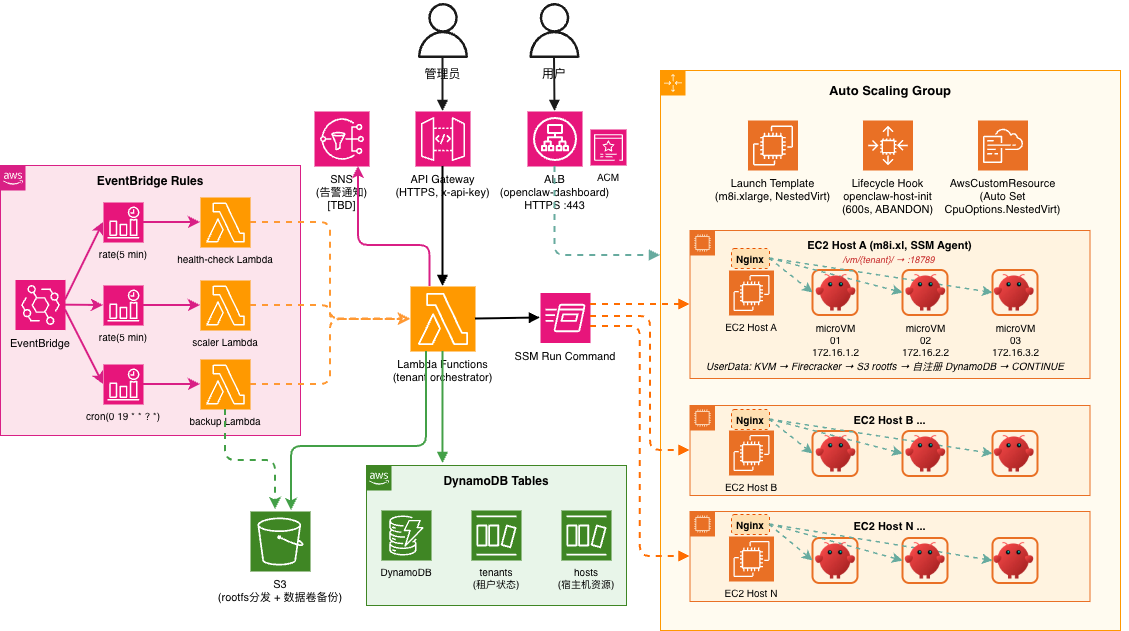
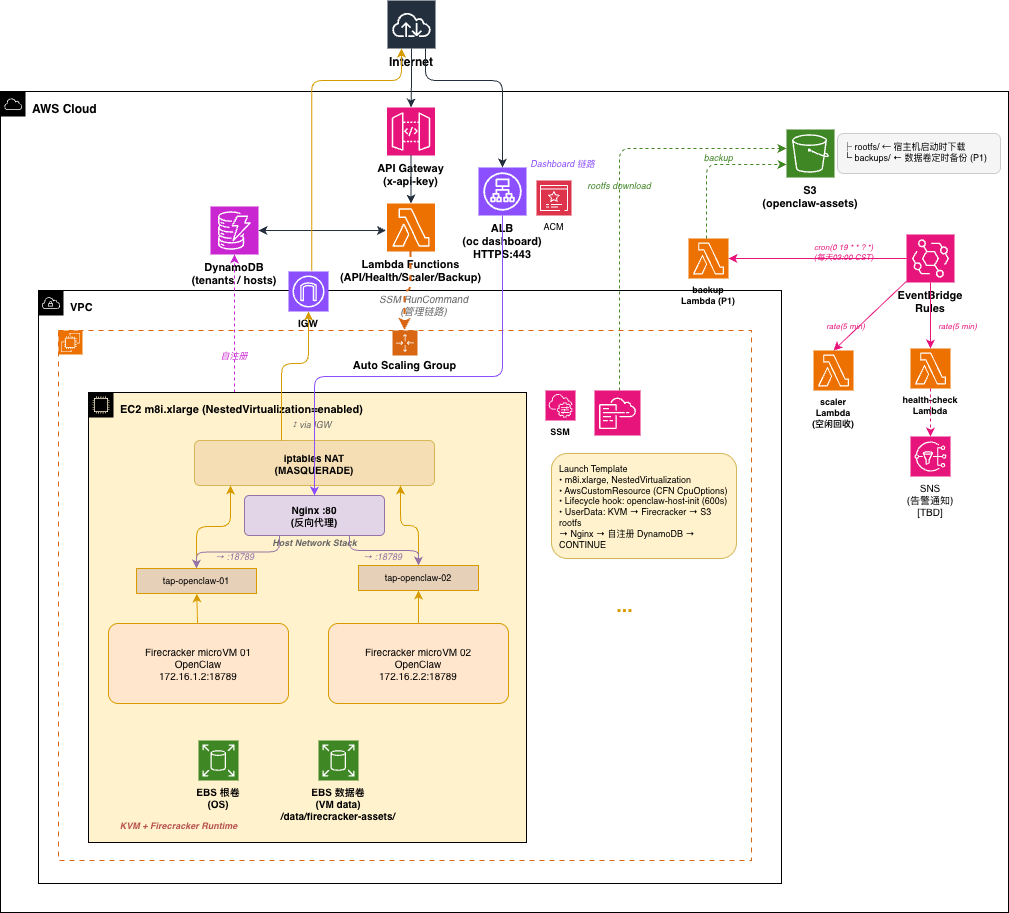
Admin / User
    │
    ├── API Gateway (HTTPS, x-api-key) ──→ Lambda ──→ DynamoDB
    │                                                  ├── tenants
    │                                                  └── hosts
    │
    └── ALB (HTTPS) ──→ Host Nginx:80 ──→ VM Gateway:18789
                        ├── /vm/{tenant-a}/ → 172.16.1.2
                        └── /vm/{tenant-b}/ → 172.16.2.2

Lambda ── SSM Run Command ──→ EC2 Host
                               ├── microVM 01 (172.16.1.2)
                               ├── microVM 02 (172.16.2.2)
                               └── ...

S3: rootfs distribution + data backup + shared skills
ASG: auto-scaling hosts
EventBridge: health checks + idle reclamation + scheduled backup
Project Structure
openclaw-firecracker/
├── deploy/                    # CDK project
│   ├── stack.py               # Infrastructure definition
│   ├── lambda/
│   │   ├── api/handler.py     # Tenant CRUD + host management
│   │   ├── templates/handler.py  # Config template CRUD
│   │   ├── skills/handler.py  # Shared skills list
│   │   ├── health_check/handler.py  # Scheduled health checks
│   │   ├── agentcore_tools/handler.py  # AgentCore Gateway Lambda tools
│   │   └── scaler/handler.py  # Idle host reclamation
│   └── userdata/
│       ├── init-host.sh       # Host initialization
│       ├── host-agent.py      # VM health polling + DDB writes
│       ├── launch-vm.sh       # microVM launch
│       └── stop-vm.sh         # microVM stop
├── console/                   # Web management console
│   ├── index.html             # Alpine.js SPA (3 tabs)
│   ├── style.css
│   └── config.js              # Auto-generated
├── templates/                 # OpenClaw config templates
│   ├── openclaw.json.example  # Example config
│   └── openclaw.json          # User config (gitignored)
├── config.yml                 # Global config (single source of truth)
├── setup.sh                   # One-click deploy + export .env.deploy
├── build-rootfs.sh            # Build rootfs + data template, upload to S3
├── scripts/
│   ├── bind-domain.sh         # Bind custom domain + HTTPS to CloudFront
│   ├── destroy.sh             # Tear down environment (--purge for full cleanup)
│   ├── oc-connect.sh          # SSH into OpenClaw microVM
│   └── oc-dashboard.sh        # Access OpenClaw dashboard
└── docs/
Prerequisites
- AWS account + CLI configured
- CDK CLI + Python 3.12+
- uv (Python package manager)
Quick Start
# 1. Configure
cp config.yml.example config.yml          # Edit infrastructure config
cp templates/openclaw.json.example templates/openclaw.json  # Set your API key, model provider, etc.

# 2. Deploy infrastructure
./setup.sh ap-northeast-1 lab
# Environment variables saved to .env.deploy

# 3. Build rootfs (auto-uploads to S3 + pushes to hosts)
source .env.deploy
./build-rootfs.sh v1.0

# 4. Create a tenant (OpenClaw instance)
source .env.deploy
curl -s -X POST "${API_URL}tenants" -H "x-api-key: ${API_KEY}" \
  -d '{"name":"my-agent","vcpu":2,"mem_mb":4096}' | jq .

# 5. Open Console — manage tenants, templates, and settings
# Console URL is printed after deploy
Management Console
Web-based console hosted on CloudFront (/console/), with Cognito authentication.
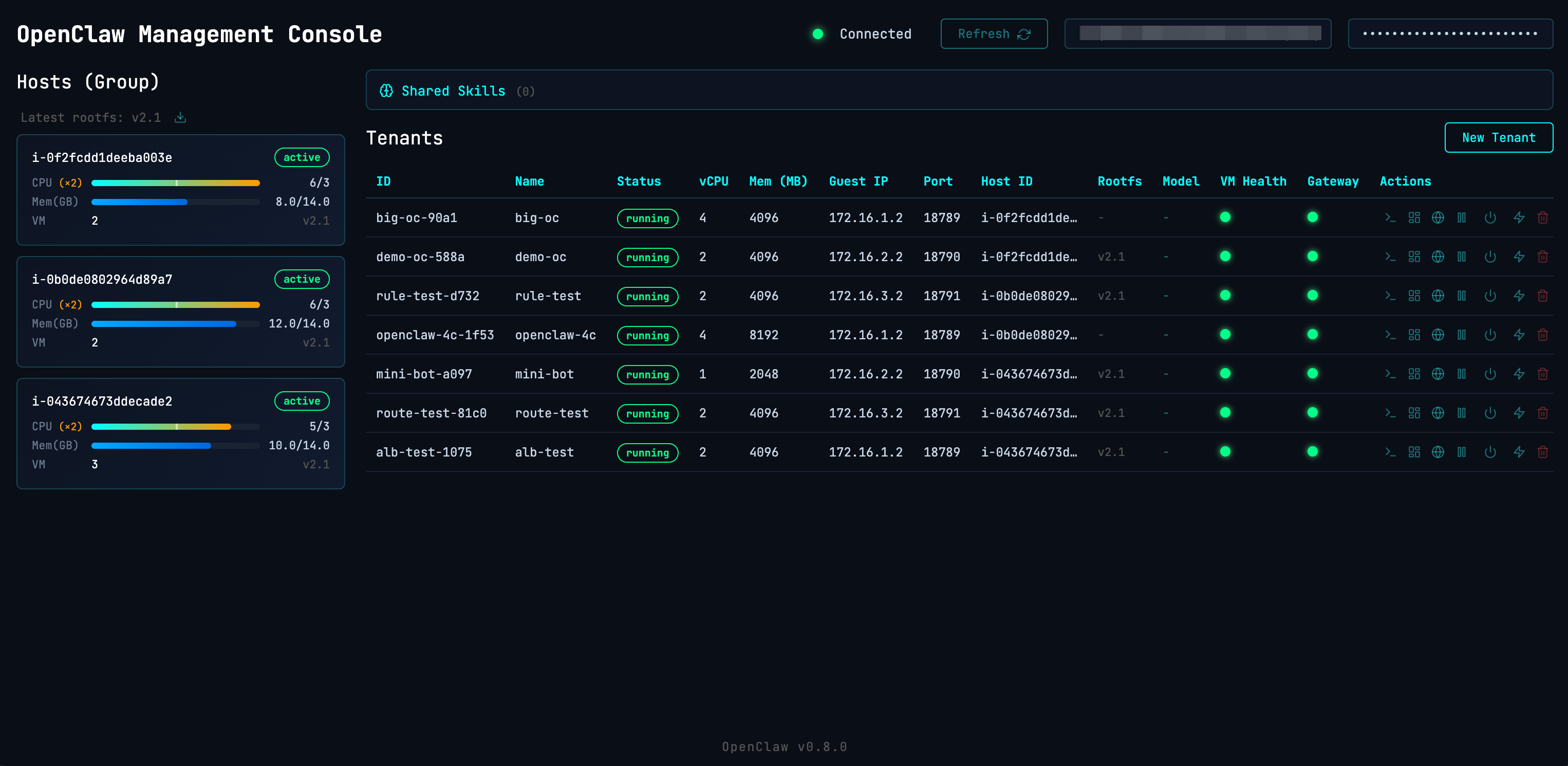
Features:
- Tenants — Host resource overview, create/delete tenants, one-click Dashboard access
- App Config — Shared skills list, config template management (create/edit/delete)
- Settings — API connection, AgentCore status, system info
Dashboard Access
Each tenant's OpenClaw Dashboard is accessible via CloudFront + ALB + Nginx reverse proxy:
https://{cloudfront-domain}/vm/{tenant-id}/ → Tenant Dashboard (WebSocket)
HTTPS is provided by CloudFront out of the box — no custom domain or ACM certificate required. The Console's "Open Dashboard" button includes the gateway token for one-click access.
Traffic flow: Browser → CloudFront:443 → ALB:80 → Host Nginx:80 → VM Gateway:18789
Nginx config is automatically managed by launch-vm.sh / stop-vm.sh.
Custom Domain (Optional)
Optionally bind a custom domain + HTTPS directly to the ALB:
# Prerequisites:
# 1. Request ACM certificate and complete DNS validation
# 2. CNAME your domain to the ALB DNS (see DASHBOARD_URL in .env.deploy)

./scripts/bind-domain.sh oc.example.com arn:aws:acm:ap-northeast-1:xxx:certificate/xxx

# Access: https://oc.example.com/vm/{tenant-id}/
The script creates the ALB HTTPS listener, attaches the ACM certificate, and updates DASHBOARD_URL in .env.deploy.
Auto Backup
EventBridge schedules daily backups of all running tenant data volumes to S3. Manual trigger also supported.
Backup flow: pause VM → pigz compress data.ext4 → resume VM → upload to S3. VM auto-resumes even on failure (trap cleanup).
source .env.deploy

# Manual backup (async, returns 202)
curl -s -X POST "${API_URL}tenants/{id}/backup" -H "x-api-key: ${API_KEY}" | jq .

# List backups
curl -s "${API_URL}tenants/{id}/backups" -H "x-api-key: ${API_KEY}" | jq .

# Config (config.yml):
# backup_cron: "cron(0 19 * * ? *)"  # UTC 19:00 = Beijing 03:00
# backup_retention_days: 7            # S3 lifecycle auto-cleanup
Backups stored at s3://{bucket}/backups/{tenant-id}/{timestamp}.gz.
Shared Skills
All tenants share a unified skill set (SKILL.md files), with independent memory per tenant.
# Upload skills to S3 (auto-synced to all VMs)
aws s3 sync ./my-skills/ s3://${ASSETS_BUCKET}/skills/ --profile $PROFILE

# Sync chain:
# S3 → Host /data/shared-skills/ (cron 5min) → All running VMs
# New VMs get skills injected into data volume at launch
Auto Scaling
Scale-out — No available host when creating a tenant → tenant enters pending → ASG launches new instance → pending tenants auto-assigned after init
Scale-in — Scaler Lambda checks every 5 minutes:
- Host with
vm_count=0exceedingidle_timeout_minutes→ markedidle - Next round confirms still idle and ASG instances > min → terminate
- If a tenant is assigned during this window → auto-recover to
active
Configuration
Config Files
| File | Purpose |
|---|---|
config.yml |
Infrastructure config — copy from config.yml.example and customize |
templates/openclaw.json |
OpenClaw app config (model, API key, provider) — copy from .example |
.env.deploy |
Deploy environment (region, API URL/Key, bucket) — auto-generated by setup.sh |
config.yml
| Section | Key | Default | Description |
|---|---|---|---|
| host | instance_type | m8i.2xlarge | Must support NestedVirtualization (c8i/m8i/r8i) |
| host | data_volume_gb | 200 | Data volume for rootfs templates + VM disks |
| host | cpu_overcommit_ratio | 2.0 | CPU overcommit (1.0=none, 2.0=allocate 2x vCPU) |
| vm | default_vcpu | 2 | Default vCPU per tenant |
| vm | default_mem_mb | 4096 | Default memory (MB) per tenant |
| vm | data_disk_mb | 8192 | Data volume size (MB) per tenant |
| asg | min_capacity | 1 | Minimum host instances |
| asg | max_capacity | 5 | Maximum host instances |
| asg | use_spot | false | Spot instances (save ~60-70%, may be reclaimed) |
| scaler | idle_timeout_minutes | 10 | Idle host reclaim timeout |
| health_check | interval_minutes | 5 | Lambda watchdog interval |
| agentcore | enabled | false | AgentCore Gateway/Memory/CodeInterpreter/Browser |
| console_auth | enabled | false | Cognito authentication for Console |
| console_auth | self_sign_up | false | Allow user self-registration |
See config.yml.example for all options. Redeploy after changes: ./setup.sh <region> <profile>
Tear Down
./scripts/destroy.sh           # Destroy stack, keep S3 bucket and DynamoDB tables
./scripts/destroy.sh --purge   # Full cleanup including S3 data and DynamoDB tables
API Reference
All requests require x-api-key header.
| Method | Path | Description |
|---|---|---|
| GET | /tenants | List all tenants |
| POST | /tenants | Create tenant {"name":"xx","vcpu":2,"mem_mb":4096} |
| GET | /tenants/{id} | Get tenant details |
| DELETE | /tenants/{id} | Delete tenant (?keep_data=true to preserve data volume) |
| POST | /tenants/{id}/restart | Restart VM (reuse disks, fast) |
| POST | /tenants/{id}/stop | Stop VM (disks preserved) |
| POST | /tenants/{id}/start | Start a stopped VM |
| POST | /tenants/{id}/pause | Freeze vCPU (Firecracker native, instant) |
| POST | /tenants/{id}/resume | Resume a paused VM |
| POST | /tenants/{id}/reset | Reinstall rootfs (data volume preserved) |
| POST | /tenants/{id}/backup | Manual data backup (async, returns 202) |
| GET | /tenants/{id}/backups | List backups |
| GET | /hosts | List all hosts |
| POST | /hosts | Register host (called by UserData) |
| POST | /hosts/refresh-rootfs | Push latest rootfs to all hosts |
| GET | /hosts/rootfs-version | Query current rootfs version (manifest.json) |
| DELETE | /hosts/{id} | Deregister host |
Network Model
Each VM uses an independent /24 subnet, communicating with the host via TAP device:
VM1: tap-vm1  host=172.16.1.1/24  guest=172.16.1.2/24
VM2: tap-vm2  host=172.16.2.1/24  guest=172.16.2.2/24
VMn: tap-vmN  host=172.16.N.1/24  guest=172.16.N.2/24
- Outbound: iptables MASQUERADE → internet
- Inbound: ALB → Nginx reverse proxy → VM:18789
- Inter-VM: fully isolated, no routing between subnets
Rootfs Management
The build script produces two images: rootfs (OS + software) and data template (/home/agent pre-configured content).
Versions managed via S3 manifest.json. Hosts and tenants track their rootfs_version.
# Build and upload (updates manifest.json + refreshes hosts)
./build-rootfs.sh v1.8

# Manually refresh host images
source .env.deploy
curl -s -X POST "${API_URL}hosts/refresh-rootfs" -H "x-api-key: ${API_KEY}" | jq .

# Query current version
curl -s "${API_URL}hosts/rootfs-version" -H "x-api-key: ${API_KEY}" | jq .

# New VMs use the latest version; existing VMs need reset to update
Yorumlar (0)
Yorum birakmak icin giris yap.
Yorum birakSonuc bulunamadi