claude-code-statusline
Health Warn
- License — License: MIT
- Description — Repository has a description
- Active repo — Last push 0 days ago
- Low visibility — Only 7 GitHub stars
Code Pass
- Code scan — Scanned 3 files during light audit, no dangerous patterns found
Permissions Pass
- Permissions — No dangerous permissions requested
No AI report is available for this listing yet.
Enhanced status line for Claude Code - model, git, context window, session cost, and live usage limits in one bash script
claude-code-statusline
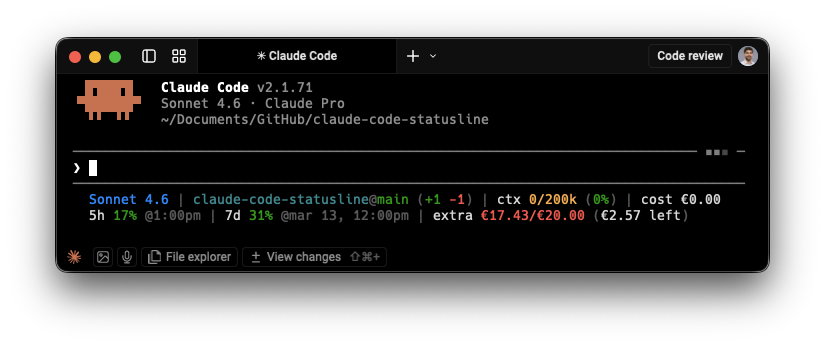
Model, git, token usage, session cost, and live plan limits — directly in your Claude Code status line.



Install — tell Claude Code to do it:
Download https://raw.githubusercontent.com/aleksander-dytko/claude-code-statusline/main/statusline.sh to ~/.claude/statusline.sh and register it as the statusLine command in ~/.claude/settings.json. Use the downloaded file exactly as-is — do not generate or modify it.
Then restart Claude Code. No API keys, no manual token setup.
What it solves
Claude Code doesn't surface usage data inline — you have to switch to the web app to check your 5-hour session limit, weekly limit, or billing. This script puts all of that directly in the status line. No app switching, no manual token management, no extra setup.
Background
This is Part 3 of a Claude Code series I've been writing for Product Managers — specifically about building an AI workspace where the AI already knows your project, your notes, and your context before you type a single word.
If you want to understand why this script exists and what it fits into:
- Your AI Has No Memory. Mine Does. — the concept: why context beats prompts, and how to build a PM workspace where AI has persistent memory across sessions
- Your AI Still Has No Memory? Here's the Blueprint. — the open-source ai-pm-workspace template you can clone and personalize in five minutes
The statusline is what you reach for after that setup is in place. Once you live in Claude Code daily, the last remaining friction is not knowing your session limits without leaving the terminal. This script removes that.
Layouts
Default — single line:
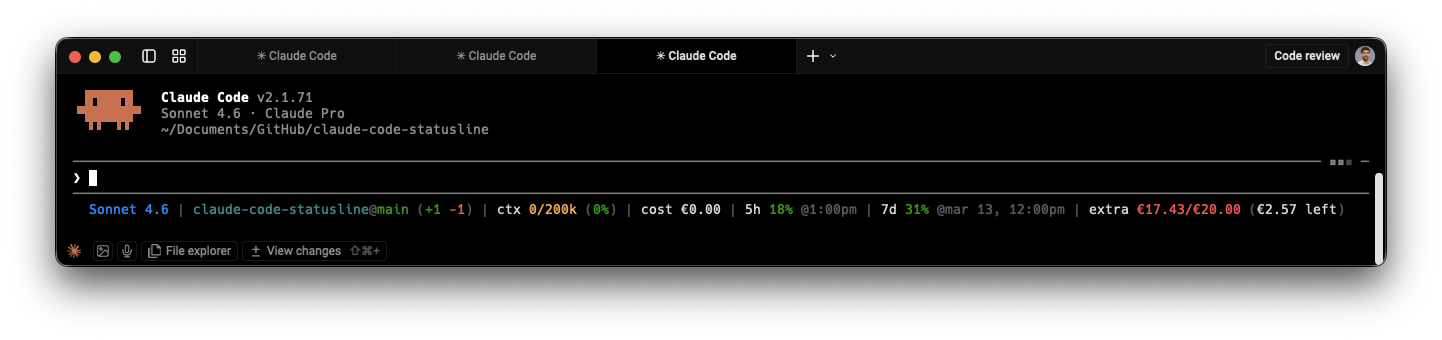
Two-line mode — separates inline data (model, git, context, cost) from API-fetched usage limits:

- Line 1: model · git branch/diff · context window · session cost
- Line 2: 5h session usage · 7d weekly usage · extra overage billing
Enable with:
export STATUSLINE_SPLIT_LINES=true
Install
Option 1 — Tell Claude Code to do it:
Download https://raw.githubusercontent.com/aleksander-dytko/claude-code-statusline/main/statusline.sh to ~/.claude/statusline.sh and register it as the statusLine command in ~/.claude/settings.json. Use the downloaded file exactly as-is — do not generate or modify it.
Option 2 — One-liner:
curl -fsSL https://raw.githubusercontent.com/aleksander-dytko/claude-code-statusline/main/install.sh | bash
Then restart Claude Code.
Requirements
- Claude Code (any version with
statusLinesupport) - macOS or Linux (Windows requires WSL)
bash,curl,jq- macOS:
brew install jq - Ubuntu/Debian:
sudo apt install jq
- macOS:
- A Claude Pro or Max subscription (for the usage limits API)
Segments
| Segment | Label | Source | Example |
|---|---|---|---|
| Model | none | stdin | Sonnet 4.6 |
| Git | dir@branch |
git | project@main (+10 -3) |
| Context window | ctx |
stdin | ctx 45k/200k (22%) |
| Session cost | cost |
stdin | cost $0.07 |
| 5h session limit | 5h or ⚡ 5h |
OAuth API | 5h 45% @4:30pm |
| 7d weekly limit | 7d or ⚡ 7d |
OAuth API | 7d 78% @mar 14, 11am |
| Extra usage | extra or extra ⚡ |
OAuth API | extra ⚡ €17.30/€20 (€2.70 left) |
Worktrees: When in a Claude Code worktree, the git segment shows
project[wt:name]@branch.
Session cost: This shows the equivalent API cost of your session's token usage. Pro and Max subscribers are not charged this amount — your usage is included in your subscription. The cost is informational, showing what the same usage would cost at API rates. See Anthropic's cost docs for details.
Color coding
| Segment | Green | Yellow | Red |
|---|---|---|---|
| Context window | < 50% | 50–75% | ≥ 75% |
| 5h session | < 70% | 70–90% | ≥ 90% |
| 7d weekly | < 70% | 70–90% | ≥ 90% |
| Extra usage spend | < 50% of limit | 50–80% | ≥ 80% |
| Session cost | white (informational) | — | — |
⚡ rules:
⚡ 5h/⚡ 7d— that limit is at 100%, currently routing to extra billingextra ⚡— extra usage is actively being consumed because a plan limit is hit- When at limit: shows
resets in Xh Ymincountdown instead of wall clock
Configuration
All settings are optional environment variables. Add them to your shell profile (~/.zshrc, ~/.bashrc, or ~/.config/fish/config.fish).
| Variable | Default | Description |
|---|---|---|
STATUSLINE_SHOW_GIT |
true |
Show git repo, branch, and diff |
STATUSLINE_SHOW_CONTEXT |
true |
Show context window token usage |
STATUSLINE_SHOW_SESSION_COST |
true |
Show session cost from stdin |
STATUSLINE_SPLIT_LINES |
false |
Split into 2 rows (stdin segments / API segments) |
STATUSLINE_SHOW_SESSION |
true |
Show 5-hour session limit |
STATUSLINE_SHOW_WEEKLY |
true |
Show 7-day weekly limit |
STATUSLINE_SHOW_EXTRA |
true |
Show extra usage / overage billing |
STATUSLINE_CURRENCY_SYMBOL |
$ |
Currency prefix (set to € for Europe) |
STATUSLINE_CACHE_TTL |
60 |
Seconds between API refreshes |
STATUSLINE_CACHE_DIR |
/tmp/claude |
Cache file directory |
CLAUDE_CODE_OAUTH_TOKEN |
(auto) | Override OAuth token explicitly |
Examples
# European billing
export STATUSLINE_CURRENCY_SYMBOL='€'

# Minimal — model + context only
export STATUSLINE_SHOW_GIT=false
export STATUSLINE_SHOW_SESSION_COST=false
export STATUSLINE_SHOW_SESSION=false
export STATUSLINE_SHOW_WEEKLY=false
export STATUSLINE_SHOW_EXTRA=false

# Refresh usage data every 2 minutes instead of 1
export STATUSLINE_CACHE_TTL=120
How it works
Claude Code calls the status line script on every render, passing session context as JSON on stdin. The script reads the model name, context window usage, session cost, and current working directory from that JSON — no API call required for these segments.
Git information (branch name and diff stats) comes from running git commands against the current directory. Worktree names are read directly from stdin when available.
Usage limits (5-hour session, 7-day weekly, and extra overage) are fetched from the Anthropic API at api.anthropic.com/api/oauth/usage. The script auto-discovers your OAuth token from the macOS Keychain, a Linux credentials file, or the CLAUDE_CODE_OAUTH_TOKEN environment variable — the same token Claude Code itself uses. Responses are cached for 60 seconds so all terminal tabs share one API call.
See docs/CONFIGURATION.md for full configuration reference.
Manual install
If you prefer not to pipe to bash:
curl -fsSL https://raw.githubusercontent.com/aleksander-dytko/claude-code-statusline/main/statusline.sh \
    -o ~/.claude/statusline.sh
chmod +x ~/.claude/statusline.sh
Then add to ~/.claude/settings.json:
{
  "statusLine": {
    "type": "command",
    "command": "bash ~/.claude/statusline.sh"
  }
}
Troubleshooting
License
MIT — see LICENSE.
Reviews (0)
Sign in to leave a review.
Leave a reviewNo results found