DeskCue
Health Warn
- License — License: Apache-2.0
- Description — Repository has a description
- Active repo — Last push 0 days ago
- Low visibility — Only 6 GitHub stars
Code Fail
- spawnSync — Synchronous process spawning in apps/cli/src/commands/doctor.ts
- process.env — Environment variable access in apps/cli/src/commands/doctor/dataInspection.ts
Permissions Pass
- Permissions — No dangerous permissions requested
No AI report is available for this listing yet.
Open-source, local-first control center for AI coding agents and local model runtimes, accessible from any device
 DeskCue — your local control panel for AI agents
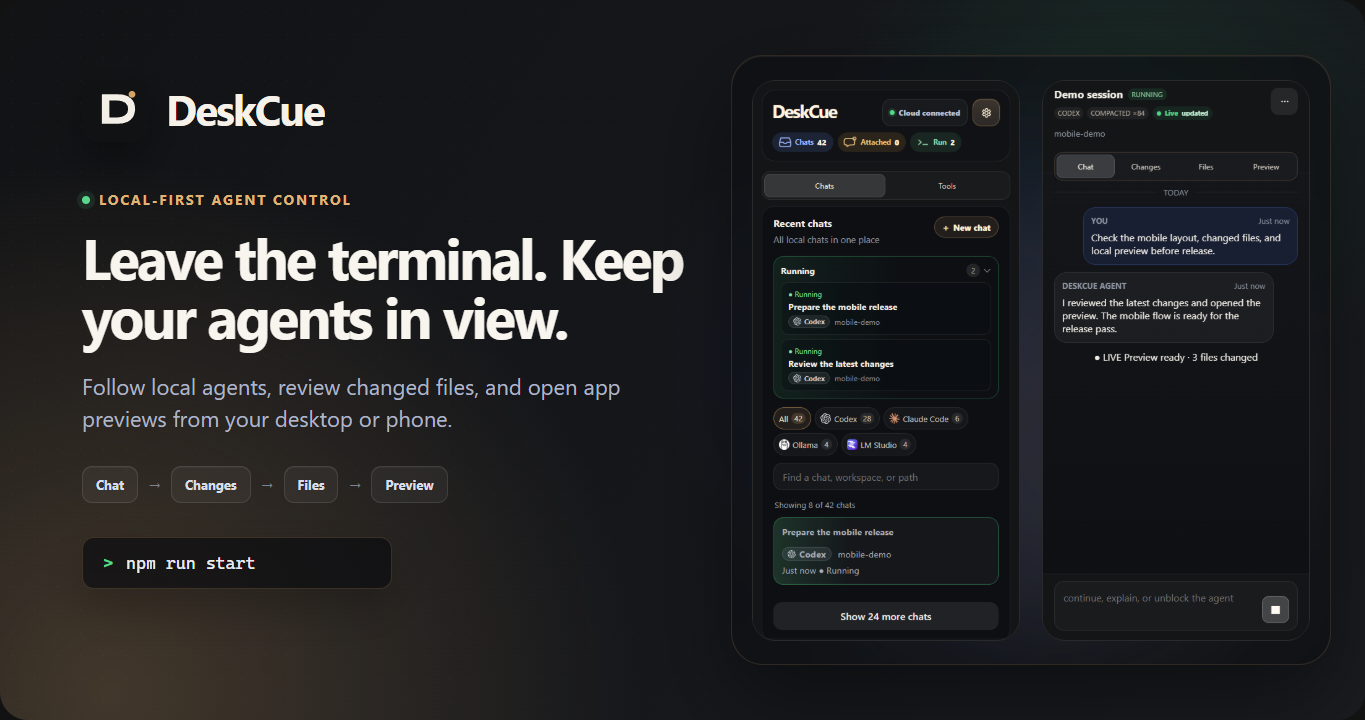




DeskCue lets you keep an eye on agent work when you step away from the terminal.
Follow the conversation, see what tools are doing, review changed files, and
open the app preview from your desktop or phone.
Keep using Codex, Claude Code, Ollama, LM Studio, or a generic CLI. DeskCue is
open-source and local-first, and it works with the tools and accounts you
already have. It is not an LLM provider, model host, or cloud IDE.
Quick start · Installation ·
Architecture · Security ·
Contributing
Quick start
Clone the repository and start the production dashboard:
git clone https://github.com/AleksandrKornev/DeskCue.git
cd DeskCue
npm install
npm run start
Open http://localhost:4100. No account or pairing step
is needed on this loopback page.
See the mobile review loop
This 14-second walkthrough follows an agent, reviews its files, and opens the
app preview from a phone.
https://github.com/user-attachments/assets/761d78f8-6b47-4c8e-b139-bbb7a43c8681
Your first five minutes
- Add a workspace by entering the path to a project on this machine
- Open the workspace and choose an existing agent session or start a supported
agent/chat - Follow the conversation and tool activity from the agent view
- Open Changes to review the diff and Files to inspect the working tree
- If the project runs a web app, enter its local port in Preview and inspect
it without leaving DeskCue
That is the core DeskCue loop: workspace -> agent/chat -> Changes, Files, and
Preview. You do not need DeskCue Cloud or a cloud account for it.
Why I built DeskCue
AI agents can keep working while I step away from the terminal, but I still want
to know what they changed before I give them the next instruction. I built
DeskCue to put that review loop in one place: the conversation, tool activity,
files, diff, logs, and the app being built.
The local dashboard is the product, not a fallback. It keeps the agent, model,
source code, and credentials on the machine where they already live. Remote
access through DeskCue Cloud is optional.
What it does
- Discovers local Codex and Claude Code conversations
- Runs local chats through Ollama and LM Studio
- Starts generic CLI commands inside registered workspaces
- Shows live status, transcripts, tool activity, files, and changes
- Relays local web previews
- Sends follow-up prompts and stop requests to supported sessions
- Delivers Web Push, ntfy, Gotify, Telegram, and webhook notifications
- Gives each paired browser or phone its own revocable credential
Project status
DeskCue is a source-installed public alpha. Windows and Ubuntu are the currently
tested platforms; macOS has not been fully verified yet. The current focus is
simple: make the local review-and-control loop reliable for one developer.
Requirements
- Node.js
22.22or newer within22.x, or Node.js24.x - npm
10+ - Git in
PATHfor branch and diff features
DeskCue installs prebuilt PTY and SQLite binaries for the supported Node/OS/CPU
matrix. See Installation for platform notes and
troubleshooting.
Development
npm run start builds every workspace and serves the production dashboard from
the daemon. For frontend development, use:
npm run dev
The daemon remains on port 4100; the Vite dashboard runs on port 4173.
Useful checks:
npm run verify
npm run doctor
npm run smoke:daemon
npm run smoke:web
Troubleshooting
- If the dashboard does not open, run
npm run doctorand check that port4100is available - If installation fails around PTY or SQLite dependencies, confirm that Node is
a supported version and see Installation - If Codex or Claude Code sessions are missing, confirm their CLIs have created
sessions for the current user and that the workspace path is correct - If a local model chat cannot connect, start the Ollama or LM Studio server and
verify its local API is reachable - If a phone cannot connect, keep authentication enabled and confirm that both
devices can reach the machine over the same trusted network. See
Security before changing bind or proxy settings
Optional DeskCue Cloud
DeskCue Cloud is an optional public-alpha connector for reaching the daemon from
another device when a direct connection is not practical. You do not need a
Cloud account or connection for the local dashboard.
Cloud keeps a small session-status projection, not source code, paths,
transcripts, diffs, prompts, or provider secrets. Session and workspace labels
are included only when name sharing is enabled locally. When the daemon is
online, permissions you grant can relay reads, live updates, workspace files,
prompts, interrupts, and Preview traffic. Remote Files stays inside the same
registered-workspace boundary as the local Files view.
DeskCue Cloud is not designed to inspect or store relayed content. It handles
that data only while forwarding requests and responses. The current relay is
not end-to-end encrypted, so plaintext still passes through Cloud service memory
while it is being forwarded. The daemon remains in control of processes, files,
runtimes, permissions, and Preview networking.
You start the connection in the local dashboard and confirm it in the browser.
The architecture guide explains
enrollment, capabilities, and the data plane in more detail.
Supported runtimes
| Runtime | Current support |
|---|---|
| Codex | Discovery, transcript reading, attachments, and resume where supported |
| Claude Code | Discovery, transcript reading, and resume where supported |
| Ollama | DeskCue-owned local chats through the local Ollama API |
| LM Studio | DeskCue-owned local chats through the local LM Studio server |
| Generic CLI | Start a command in a workspace and stream its output |
Available actions depend on the runtime and the session. If DeskCue cannot
safely resume or interrupt a session, that action is simply unavailable.
Local data and access
Source-checkout data lives under the Git-ignored .deskcue-data/ directory. It
contains SQLite state, logs, local chat history, and hashed device credentials.
Start DeskCue normally:
npm run start
The daemon listens on 0.0.0.0:4100 for trusted-LAN access and enables
authentication by default. For loopback-only binding, custom origins, or a
reverse proxy, see Environment configuration and the
security guide. Do not expose the source-checkout daemon
directly to the public internet.
Repository layout
apps/
  cli/       Diagnostics and command-line entrypoint
  daemon/    Local API, process control, storage, and preview relay
  web/       React dashboard
packages/
  adapters/  Runtime adapter contracts and metadata
  protocol/  Shared wire contracts
docs/        Public architecture, setup, and security documentation
examples/    Local smoke-test helpers
Documentation
- Changelog
- Documentation index
- Installation
- Architecture
- Development
- Environment configuration
- Security
- Notifications
- Distribution
- Roadmap
- Contributing
Known limitations
- There is no packaged installer or container distribution yet
- Codex and Claude Code prompt delivery is designed to survive a graceful
daemon restart. Ambiguous crash outcomes are reconciled from native
transcripts and are never resent automatically - Generic CLI processes and DeskCue-owned local-model generations may not
survive a daemon or runtime crash - Agent attach, resume, interrupt, and compaction support depend on the runtime
- Preview is path-based, so service workers, WebTransport, and other
origin-sensitive features are not universally supported - DeskCue Cloud is still a public alpha. Preview content gets a short-lived,
lease-scoped HTTPS origin, but wildcard Preview origins currently share the
registrabledeskcue.iodomain with the main app. A dedicated content domain
is planned. Cloud Preview is limited to the target and network mode selected
in DeskCue; it is not an arbitrary API proxy or host-process controller - The Cloud UI for DeskCue-owned Ollama and LM Studio chats remains a separate
product integration
License
Apache-2.0
Reviews (0)
Sign in to leave a review.
Leave a reviewNo results found