c4-diagram-skill
Health Gecti
- License — License: MIT
- Description — Repository has a description
- Active repo — Last push 0 days ago
- Community trust — 13 GitHub stars
Code Gecti
- Code scan — Scanned 2 files during light audit, no dangerous patterns found
Permissions Gecti
- Permissions — No dangerous permissions requested
Bu listing icin henuz AI raporu yok.
C4 Container Diagram skill for Claude Code — generate editable .drawio files following Simon Brown's C4 model standard
C4 Diagram Skill for Claude Code
Generate C4 Container diagrams (Simon Brown's standard) as editable .drawio files directly from Claude Code conversations.
What It Does
- Generates C4 Container-level architecture diagrams
- Outputs editable .drawio XML (opens in draw.io desktop or web)
- Follows the official C4 color scheme and notation
- Strict layered layout: Person → System Boundary → External Systems
- Every element gets explicit coordinates (no auto-layout drift)
- Legend included on every diagram
- Solid arrows = synchronous, dashed = asynchronous
Example
Ask Claude Code:
/c4-diagram

Draw a C4 container diagram for an e-commerce system with:
- Web app (React), mobile app (Flutter)
- API gateway (Node.js)
- Order service, payment service (Python)
- PostgreSQL database, Redis cache
- External: Stripe payments, SendGrid email
Claude generates a .drawio file you can open and edit in draw.io:
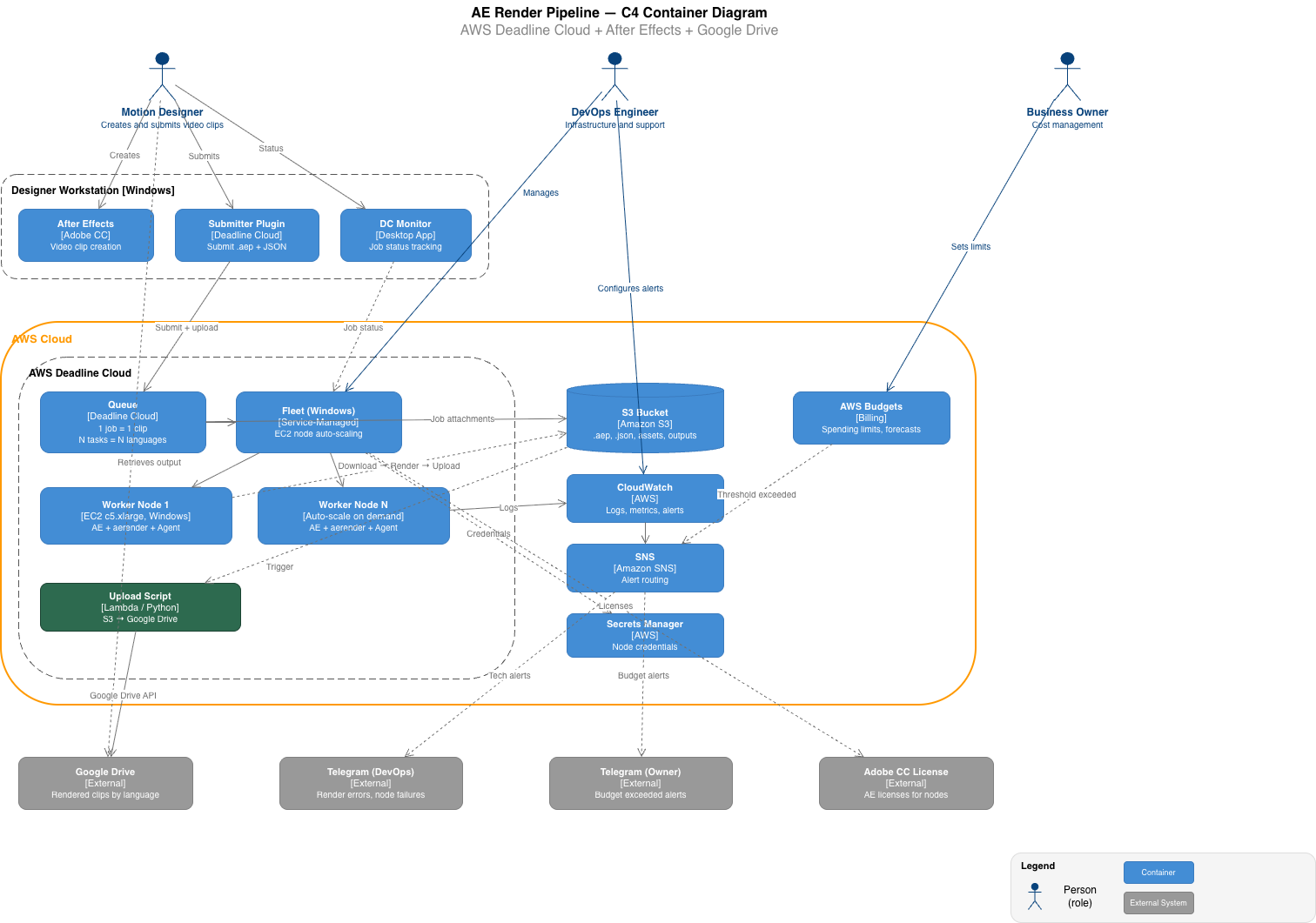
Real output: AWS Deadline Cloud render pipeline with 3 persons, 2 system boundaries, 14 containers, 4 external systems.
Installation
Option 1 — install as a plugin (recommended)
Type these inside Claude Code:
/plugin marketplace add aleksnikolaev/c4-diagram-skill
/plugin install c4-diagram@c4-diagram-skill
The owner/repo shorthand clones over SSH. If you don't have SSH keys set up on GitHub, use the full HTTPS URL instead:
/plugin marketplace add https://github.com/aleksnikolaev/c4-diagram-skill.git
To pull updates later: /plugin marketplace update c4-diagram-skill
Option 2 — copy the skill by hand
The skill lives in skills/c4-diagram/. Copy that directory, not the repository root — SKILL.md has to sit directly inside the skill folder.
Personal install, available in all your projects:
git clone https://github.com/aleksnikolaev/c4-diagram-skill.git
mkdir -p ~/.claude/skills
cp -r c4-diagram-skill/skills/c4-diagram ~/.claude/skills/c4-diagram
Single project only:
git clone https://github.com/aleksnikolaev/c4-diagram-skill.git
mkdir -p .claude/skills
cp -r c4-diagram-skill/skills/c4-diagram .claude/skills/c4-diagram
Either way you should end up with SKILL.md at ~/.claude/skills/c4-diagram/SKILL.md (or .claude/skills/c4-diagram/SKILL.md).
Using it
Run /c4-diagram in Claude Code, or just describe your system — Claude loads the skill on its own when a diagram would help.
File Structure
c4-diagram-skill/
├── .claude-plugin/
│   ├── marketplace.json            # Marketplace catalog entry
│   └── plugin.json                 # Plugin manifest
├── skills/
│   └── c4-diagram/
│       ├── SKILL.md                # Main skill definition
│       └── references/
│           ├── element-templates.md    # XML templates for each C4 element
│           ├── drawio-template.md      # Base .drawio file structure
│           └── legend-template.md      # Legend XML template
├── examples/
│   ├── ecommerce-example.drawio    # Example output
│   └── ae-pipeline-c4-en.png       # Rendered example
├── LICENSE
└── README.md
C4 Elements Supported
| Element | Color | Shape | When to Use |
|---|---|---|---|
| Person | #08427B |
Stickman | Users, actors, roles |
| Container | #438DD5 |
Rounded rect | Apps, services, APIs |
| Database | #438DD5 |
Cylinder | Any data store |
| External System | #999999 |
Rounded rect | Third-party services |
| System Boundary | transparent | Dashed rect | Groups your containers |
Connection Types
| Style | Meaning | Example |
|---|---|---|
| Solid arrow | Synchronous call | Makes API calls [REST/JSON] |
| Dashed arrow | Asynchronous flow | Publishes events [AMQP] |
Every connection is labeled with an action and protocol.
Why .drawio?
- Editable: modify the diagram after generation (move elements, change labels, add notes)
- Universal: opens in draw.io desktop (free), web app, VS Code extension, Confluence, Notion
- Version control friendly: XML diffs are readable
- Export: PNG, SVG, PDF from draw.io with one click
C4 Model Reference
This skill generates Container diagrams (Level 2 in the C4 model):
| Level | What It Shows | This Skill |
|---|---|---|
| 1. Context | System + users + external systems | No |
| 2. Container | Containers + technologies + communication | Yes |
| 3. Component | Components inside a container | No |
| 4. Code | Classes / modules | No |
For the full C4 model specification, see c4model.com.
License
MIT
Yorumlar (0)
Yorum birakmak icin giris yap.
Yorum birakSonuc bulunamadi