zotero-agent
Health Warn
- License — License: AGPL-3.0
- Description — Repository has a description
- Active repo — Last push 0 days ago
- Low visibility — Only 7 GitHub stars
Code Fail
- exec() — Shell command execution in plugin/zotero-agent-bridge/bootstrap.js
Permissions Pass
- Permissions — No dangerous permissions requested
No AI report is available for this listing yet.
Full local control of your Zotero library — from your terminal or your AI agent. No cloud, no API key. CLI + MCP server + bridge plugin.
zotero-agent
Full local control of your Zotero library — from your terminal or your AI agent.
No cloud, no account, no API key. Your library never leaves your machine.





zot gives you full read-write control of your local Zotero library:
search, bulk-edit metadata, tag, deduplicate, import by DOI/ISBN/arXiv, export,
enrich missing fields, and summarize PDFs into notes — scriptable from the shell
or drivable by an AI agent. It ships as a CLI, an MCP server, a Claude
Code skill, and portable AGENTS.md instructions.
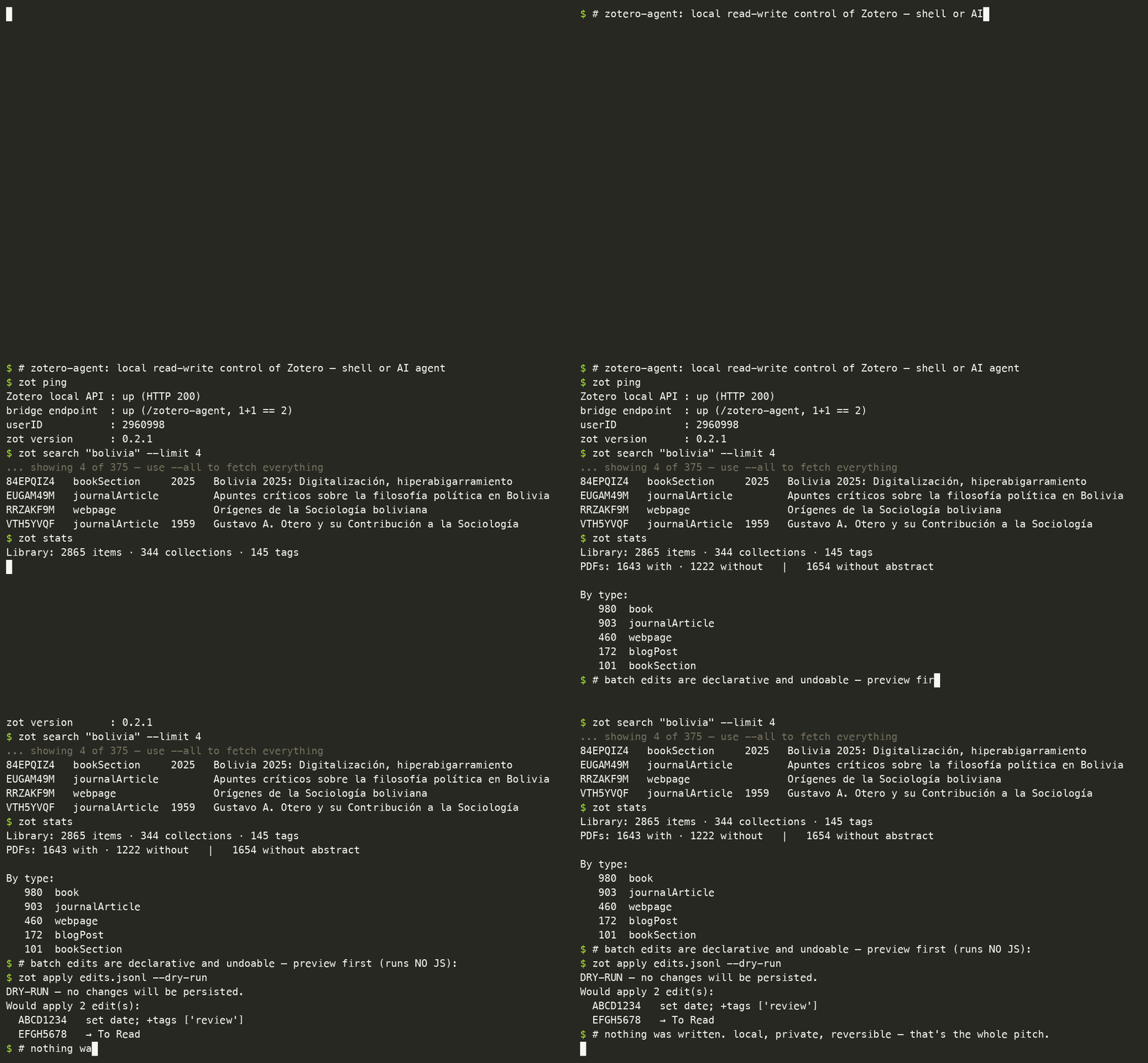
Why it's different. Zotero's local HTTP API is read-only, so the popular
tools (zotero-mcp, pyzotero) can only write through the zotero.org web API —
which needs an account, an API key, and sync. zotero-agent writes locally
through a tiny token-protected bridge plugin. Local, offline, private — and it
finally does the bulk metadata editing people have asked Zotero for since 2016.
See the honest comparison.
flowchart BT
    U(["👤 you / AI agent"])
    subgraph SURF ["zotero-agent (one package)"]
        direction LR
        MCP["MCP server (zot mcp)"]
        SKILL["agent skill"]
        CLI["zot CLI"]
    end
    READ["Zotero local API<br/>GET /api/… — fast, read-only"]
    WRITE["bridge plugin<br/>POST /zotero-agent<br/>privileged JS · token-gated"]
    LIB[("your local<br/>Zotero library")]

    U --> SURF
    SURF -->|read| READ
    SURF -->|write| WRITE
    READ --> LIB
    WRITE --> LIB
Works with your agent
Anything that speaks MCP or can run a shell command can drive your library:
| Tool | How |
|---|---|
| Claude Code | zot skill install (bundled skill), or claude mcp add zotero-agent -- zot mcp |
| Claude Desktop | add zot mcp to claude_desktop_config.json |
| Codex CLI | ~/.codex/config.toml MCP entry, or zot skill agents-md > AGENTS.md and it calls zot |
| Gemini CLI | ~/.gemini/settings.json MCP entry |
| Cursor | .cursor/mcp.json MCP entry |
| OpenCode / Windsurf / any MCP client | generic stdio server: command: "zot", args: ["mcp"] |
| Local models / custom agents | run the zot CLI directly (see AGENTS.md) — no MCP needed |
Per-client setup: docs/ai-agents.md · website.
Install
# 1) the CLI (pick one)
uv tool install zotero-agent            # recommended
uv tool install "zotero-agent[mcp]"     # + the MCP server (zot mcp)
uv tool install "zotero-agent[mcp,toc]" # + PDF outlines (zot toc)
pipx install "zotero-agent[mcp]"
brew install alex-roc/tap/zotero-agent  # macOS/Linux; ships both extras

# 2) the bridge plugin in Zotero — download the XPI (this link is permanent):
#    https://github.com/alex-roc/zotero-agent/releases/latest/download/zotero-agent-bridge.xpi
#    Tools → Plugins → gear → "Install Plugin From File" → that .xpi
#    One-click, no restart. Zotero auto-updates it from then on.

# 3) wire it up
zot init      # generates a token, writes config, auto-detects your userID
zot ping      # local API up? bridge answering? plugin version? userID known?

# 4) optional: the Claude Code skill (bundled in the package)
zot skill install           # → ~/.claude/skills/zotero  (--project for one repo)
Updating: uv tool upgrade zotero-agent (or brew upgrade zotero-agent) for the
CLI; the plugin updates itself (Zotero polls the release manifest), and zot ping
shows both versions.
Requires Zotero 7+ (tested through 9.x) running with the local API enabled
(the default), and Python 3.10+. Full guide: docs/install.md.
Use it from the shell
zot search "bolivia" --limit 10               # fast local read
zot missing abstract --collection SS5MVVB6    # items lacking a field
zot stats                                     # library analytics
zot add doi 10.1371/journal.pmed.0020124 --pdf   # import + attach an OA PDF
zot dedupe --plan merges.jsonl                # review duplicates, then `zot merge --from`
zot dedupe --by content                       # items sharing a file, whatever their titles
zot enrich --field doi --dry-run              # fill missing DOIs, verified before writing
zot disk                                      # where the attachment store's gigabytes are
zot shrink --min-mb 25 --dry-run              # downsample oversized PDFs in place
zot apply edits.jsonl                         # declarative batch edit (undoable)
zot undo last                                 # roll it back
zot tag normalize --dry-run                   # fold case/space tag variants
zot export "My Collection" --format bibtex --out refs.bib
zot bib ABCD1234 @smith2020 --style apa       # formatted bibliography (Zotero key or citekey)
Every command takes --json for scripting. Writes refuse to run
non-interactively without --yes. Full reference: docs/commands.md.
Commands at a glance
| Group | Commands |
|---|---|
| Read / analyze | search get cite pdf collections tags export missing author stats recent bib annotations related notes lint |
| Edit / organize | add dedupe merge tag (add/rm/rename/purge/normalize/from-collections) set move collection note attach pdf-fetch |
| Disk / cleanup | disk shrink gc (snapshots + unclaimed files) — shrink needs ghostscript + qpdf |
| PDF outlines | toc (show/scan/set/auto/clear) — needs the [toc] extra |
| Scanned PDFs | pdf-prep (split double pages, OCR) — needs [toc] + OCRmyPDF |
| Batch (undoable) | apply undo enrich |
| Setup / escape | ping init skill backup sync restart exec mcp completion |
Batch edits are undoable
zot apply takes a JSONL script (one edit per line) and snapshots every touched
item first, so you can reverse it:
{"key":"ABCD1234","set":{"date":"2021"},"addTags":["review"]}
{"key":"@smith2020","addToCollection":"To Read","removeTags":["old"]}
zot apply edits.jsonl --dry-run   # preview (runs NO JS — cannot write)
zot apply edits.jsonl             # apply, snapshotting first
zot undo last                     # restore exactly the prior state
This is how agents do LLM-assisted cleanup safely: the model decides the values
and writes the JSONL; zot performs the writes. The CLI never calls an LLM itself.
Give a PDF a real table of contents
Zotero's reader has an Outline tab, but it can only display bookmarks a PDF
already has — and most scanned books and reports have none. zot toc builds one
and writes it into the file, so the sidebar works in Zotero and everywhere else.
uv tool install --force "zotero-agent[toc]"   # the PDF engine is an extra
zot toc show ABCD1234                 # what the file already has
zot toc scan ABCD1234                 # what it could have, and from which evidence
zot toc auto ABCD1234 --dry-run       # build one deterministically, preview it
zot toc set  ABCD1234 --from toc.txt  # write your own (title<TAB>page, indented)
zot undo last                         # restore the previous outline
Detection prefers the book's own contents page over guessing from fonts —
those titles and that nesting are the publisher's. When the contents page prints
page numbers rather than linking, zot toc maps them onto physical pages using/PageLabels, the folios printed on each page, and a title search to confirm
each row. That matters more than it sounds: front matter is numbered i, ii, iii
and the body restarts at 1, so a single offset is wrong for half the book.
Same loop from an agent: zot toc scan --json hands over the evidence, the model
decides the hierarchy, zot toc set --from - writes it. Writes are guarded by--yes, previewable with --dry-run, and reversible with zot undo.
Make a scanned book usable
A book scanned on a flatbed arrives as one landscape page per pair of printed
pages, with no text layer: you cannot search it, cite from it, or let an agent
read it, and it is several times larger than it needs to be. zot pdf-prep does
the whole pass — split, OCR, shrink — without the file leaving the item.
brew install ocrmypdf tesseract-lang unpaper jbig2enc   # apt: ocrmypdf tesseract-ocr-spa unpaper
zot pdf-prep @bowlesIntroduccionEconomia --dry-run   # what it sees, what it would do
zot pdf-prep @bowlesIntroduccionEconomia             # split + OCR, attached beside the original
zot pdf-prep --collection "Scans" --replace          # a whole shelf; trash each original
zot pdf-prep --collection "Scans" --prune            # or trash the originals later, once reviewed
A real example — Bowles, Introducción a la economía, 147 two-up pages at
200 dpi: 294 pages, 24.7 MB → 16.4 MB, searchable, in under three minutes.
The split is the part that usually needs a human with Briss, and the reason is
that the binding is never exactly centred. pdf-prep measures the ink profile of
sampled pages, takes the median of the ones with enough ink to be
informative, and applies that one cut to the whole book — the same decision a
human makes, for the same reason: on a near-blank page the "widest gap" is
anywhere, so a per-page cut eventually slices a chapter opening in half. Each
half keeps a sliver past the cut, so the ±2% a real binding wanders never clips a
letter. Pages that must stay whole (covers, fold-outs) are listed with --single.
Nothing is thrown away by default: the processed PDF is attached beside the
original and tagged pdf-prep, because OCR is a machine's judgement call and the
scan is often the only copy. --replace trashes the original as it goes;--prune does it afterwards for items already processed, so a large library does
not quietly end up holding two copies of every book. Both use Zotero's trash, and
both leave an annotated original alone: Zotero anchors highlights to the
attachment and to page coordinates, so they cannot follow a file whose pages have
just been split apart (--trash-annotated overrides). Prepare a scan before you
read it and the question never comes up.
Use it from an agent
Ask your agent things like "tag every abstract-less item #review and merge
duplicate titles in collection X", "fill in missing DOIs", or "summarize this
paper's PDF chapter by chapter and save it as a note." It drives zot and
follows a safe workflow (backup → sync-off → dry-run → small batch), and batch
edits stay undoable.
Security
The bridge runs arbitrary privileged JavaScript inside Zotero — deliberately,
because it's the only complete local write path. It's gated by a required token,
a browser-origin/CSRF guard, loopback-only binding, and an append-only audit log.
This is a real capability: read docs/security.md before
installing. Report issues privately via SECURITY.md.
Documentation
- Website: https://alex-roc.github.io/zotero-agent/ (quickstarts, cookbook, reference)
docs/install.md·docs/ai-agents.md·docs/security.md·docs/architecture.md·docs/commands.md- JS recipe book:
skill/references/recipes.md
Contributing / development
git clone https://github.com/alex-roc/zotero-agent.git && cd zotero-agent
./install.sh                            # dev shim on PATH + skill (symlinked) + XPI + zot init
python3 -m unittest discover -s tests   # tests: fake Zotero server, no network
uvx ruff check src tests cli/zot scripts
uv build                                # wheel + sdist
bash plugin/build.sh                    # rebuild the bridge XPI
The core is stdlib-only; the optional surfaces ride behind extras ([mcp]
for the MCP server, [toc] for the PDF outline commands).
See CONTRIBUTING.md and CHANGELOG.md.
License: AGPL-3.0-or-later.
Part of heuretika
zotero-agent is part of heuretika,
a line of local-first desktop software for researchers — instruments for thinking, not machines that think for you.
Reviews (0)
Sign in to leave a review.
Leave a reviewNo results found