visualice
Health Pass
- License — License: MIT
- Description — Repository has a description
- Active repo — Last push 0 days ago
- Community trust — 14 GitHub stars
Code Pass
- Code scan — Scanned 12 files during light audit, no dangerous patterns found
Permissions Pass
- Permissions — No dangerous permissions requested
No AI report is available for this listing yet.
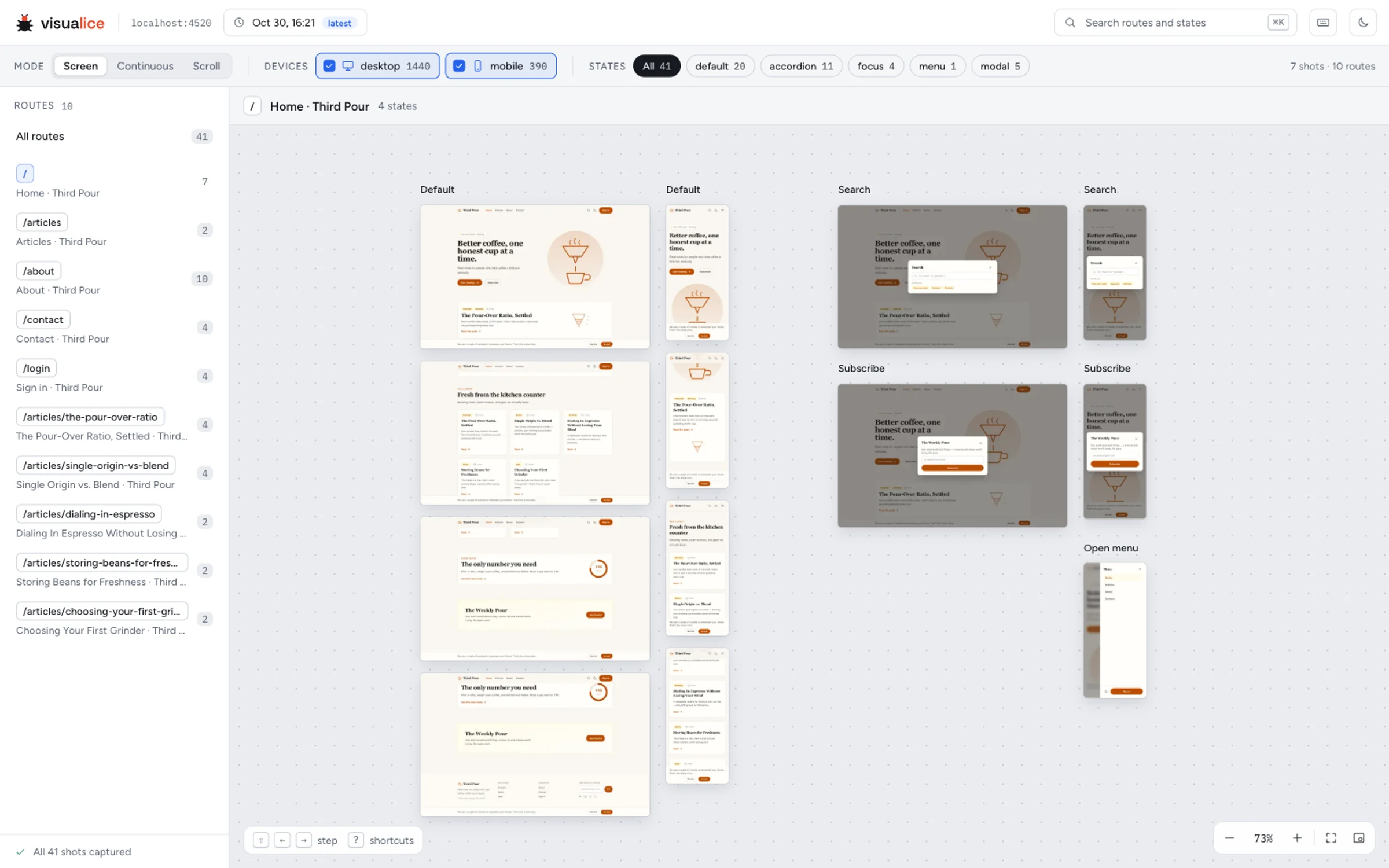
See every page and UI state of your site, on every device, on one zoomable canvas. A CLI and Claude Code plugin.

Point your agent at a website and visualice catalogues every page and every state those
pages can be in, on every device you configure: open menus and modals, but also form
errors, a cart with items in it, signed-in views and multi-step flows. Then you browse
them all on one zoomable canvas.
- Explores like a QA reviewer. The crawler maps the pages and the obvious states, then
an agent works through each kind of page and finds the ones a crawler can't. - Repeatable without the agent. Every state is saved as a recipe the engine replays,
so reruns are fast and identical, and CI can recapture the whole catalogue on every
deploy with no agent involved. - Shows what users see. Pages are captured one screen at a time, as a user scrolls, so
sticky headers, cookie bars and modal backdrops look the way they really do.
Get started with Claude Code
Needs Node 22.18 or newer.
/plugin marketplace add alexdevlabs/visualice
/plugin install visualice@visualice
Plugins from a marketplace like this one don't update on their own unless you ask: turn
it on under /plugin → Marketplaces → visualice → Enable auto-update, or update
by hand with claude plugin update visualice@visualice. The CLI also says when a newer
version is out.
Then run /visualice https://your.site, or just ask Claude to "run visualice on
https://your.site". It maps the site, shows you the plan (the kinds of page, how many
screenshots, anything exploring would change on the site) and asks once, explores each
kind of page in parallel, captures everything, and /visualice-view opens the result.
- Later runs replay what's mapped and explore only what's new.
/visualice-explore <focus>widens the catalogue on purpose: a section like/checkout*, or something to hunt for, like form errors./visualice https://your.site --quickskips exploring: the crawler on its own.
Other agents (Codex, Cursor, Gemini CLI, …): AGENTS.md points them at
the skill, which is plain Markdown and works anywhere. Agents without subagents explore
one kind of page at a time (the explore flow).
Either way, two files appear next to you: visualice.config.json for settings, andvisualice.routes.md, a list of the pages and states found. Edit the list to steer the
next run: add a page it missed, or mark one to skip. Everything else goes in a gitignored.visualice/ folder.
Without an agent
The engine is a CLI of its own: the quick path, and what CI runs.
npm i -g visualice                  # or run it without installing: npx visualice <command>
visualice doctor                    # checks Node, the browser and the viewer, and fixes what it can
visualice crawl https://your.site   # find pages and states with the heuristics, and screenshot them
visualice serve --open              # browse the results
| To… | Run or set |
|---|---|
| See how big a crawl will be first | visualice crawl <url> --dry-run |
| Recapture without rediscovering | visualice crawl --replay |
| Limit what's crawled | --max-pages=20 --exclude='/admin/**', or scope in the config |
| Capture pages only, no states | visualice crawl --no-states |
| Crawl a site behind a login | a login recipe in the config, then visualice auth (guide) |
| Add devices, browsers or dark mode | devices in the config (configuration) |
| Check accessibility as well | checks.accessibility: true |
| Share the results without a server | visualice export report/ |
| Use it in CI | --replay --json --quiet --fail-on-error (crawling) |
A good split: let your agent build the catalogue once, then have CI runvisualice crawl --replay on every deploy. The explored states live in the site model,.visualice/crawl-map.cache.json, so commit it with git add -f (or restore it from a CI
cache) next to the config and routes file.
Docs
- Crawling: commands, the routes file, discovery, output layout
- Configuration: every option worth knowing, other browsers, component shots,
accessibility - The viewer: navigation, view modes, full screen, shortcuts, sharing
- Logging in: login recipes, sessions, secrets
- CLI reference: every command and flag
- The explore flow: how agents map, explore and capture a site
- Using it as a library
- Changelog, including known limitations
Contributing
See CONTRIBUTING.md. Report security issues privately, as described inSECURITY.md.
Use it responsibly
Only crawl sites you own or are allowed to test. visualice stays on the target site, follows
robots.txt unless you turn that off, and while discovering it never submits a form or clicks
a control that looks destructive (delete, sign out, pay).
License
MIT, see LICENSE. The viewer bundles the Figtree and IBM Plex Mono fonts, both
under the SIL Open Font License 1.1; their licence texts ship in viewer/dist/licenses/.
Reviews (0)
Sign in to leave a review.
Leave a reviewNo results found