agentic-workstation-optimizer
Health Uyari
- License — License: MIT
- Description — Repository has a description
- Active repo — Last push 0 days ago
- Low visibility — Only 5 GitHub stars
Code Gecti
- Code scan — Scanned 3 files during light audit, no dangerous patterns found
Permissions Gecti
- Permissions — No dangerous permissions requested
Bu listing icin henuz AI raporu yok.
PowerShell toolkit & AI Agent Skill (Claude Code, Cursor, Antigravity, OpenCode, Codex) to optimize Windows hardware, software, gaming, network throughput, corporate Cloud AI, E2E testing ports, WSL2 & Ollama.
Agentic Workstation Optimizer
Hardware, Software, Network, Gaming, QA Automation & AI Workstation Optimization for Windows 10/11





English | Tiếng Việt
Why I Built This •
Quick Start •
What It Optimizes •
PowerShell CLI •
Benchmarks & Evidence •
Repository Structure •
License
Overview
agentic-workstation-optimizer is a collection of PowerShell scripts and AI Agent skill definitions (compatible with Google Antigravity, Claude Code, OpenCode, Cursor, OpenAI Codex CLI, Windsurf, and GitHub Copilot) designed to diagnose and fix common performance bottlenecks on Windows workstations:
- Hardware & OS Performance: Unlocks the
Ultimate Performancepower scheme, tunes foreground CPU scheduling (Win32PrioritySeparation = 38), consolidates fragmentedsvchost.exeprocesses in RAM, trims idle background working-set memory (EmptyWorkingSet), enables GPU Hardware-Accelerated Scheduling (HAGS) & DirectX Windowed Flip Model, and removes NTFSLastAccess/8.3file I/O overhead. - Network Throughput & Low Latency: Removes the default Windows 10-packet/ms multimedia cap (
NetworkThrottlingIndex), increases NIC hardwareReceive/Transmit Buffers(256/512->2048), disables Ethernet sleep states (EEE,ULP,ITR), and disables Nagle's 200ms packet buffering (TCPNoDelay = 1). - Corporate Network & Cloud AI Reliability: Fixes slow AI API calls and SSL errors on office networks by prioritizing IPv4 in Node.js (
--dns-result-order=ipv4first), configuring Git and Node.js to trust the Windows Certificate Store (schannel/NODE_USE_SYSTEM_CA=1), and probing non-fragmented VPN MTU ceilings. - Parallel E2E / API Testing & Local AI: Expands dynamic ephemeral ports from
16,384to55,535(MaxUserPort = 65534,TIME_WAIT = 30s) for Playwright/Appium/API test suites, configures WSL2 Mirrored Networking, and enables Ollama Flash Attention + 8-bit KV cache quantization. - Safe for Both Home (
-Mode All) and Office (-Mode Work) PCs: Automatically backs up all system settings tobackups/latest-snapshot.jsonbefore making any change, with 1-command rollback.
Why I Built This
Out of the box, Windows 10 and 11 configure CPU scheduling, power management, file system I/O, and network adapters for power saving and legacy compatibility rather than low latency or heavy developer/gaming workloads:
- Hardware & OS bottlenecks: Default Windows power plans park CPU cores and throttle background compilers/containers;
svchost.exesplits into dozens of separate processes on 16GB–64GB RAM machines; NTFS updatesLastAccesstimestamps and legacy 8.3 short names on every file read acrossnode_modulesor.venv; and backgroundGameDVRscreen recording + Windows Update P2P uploads consume GPU/CPU cycles and bandwidth during games or builds. - Network throttling on fast fiber connections: A 10-packet-per-millisecond multimedia cap (
NetworkThrottlingIndex), small 256/512 NIC buffers, and Ethernet sleep states (EEE/ULP) often cap a 700–1000 Mbps fiber connection at ~200–250 Mbps and cause ping spikes in games. - Slow AI API calls or SSL errors on corporate networks: Office networks frequently have partial IPv6 setups without external IPv6 routing, causing Node.js tools (Claude Code, OpenCode, MCP servers) to wait for IPv6 timeouts before falling back to IPv4 (adding 0.5–1.5s to requests). Corporate SSL inspection firewalls (Zscaler, Fortinet) also break Git and Node.js unless they are configured to trust the Windows certificate store.
- AI responses freezing mid-stream over VPN: Corporate VPN tunnels reduce maximum packet size (MTU) below 1500 bytes. When large packets are dropped, long streaming responses from Claude or OpenAI can hang.
- Port exhaustion during parallel E2E / API test runs: Windows only allocates ~16,000 dynamic ephemeral ports by default and holds closed connections in
TIME_WAITfor 120 seconds, which quickly runs out during parallel Playwright, Appium, or API load tests. - WSL2 / Docker losing internet on VPN or holding onto gigabytes of RAM, plus idle Ollama models and orphaned WebDriver processes (
chromedriver,geckodriver,msedgedriver) occupying GPU VRAM and system RAM.
Quick Start
Install Across All AI Agents
Requirements: Windows 10/11 and PowerShell.
git clone https://github.com/AlexDo96/agentic-workstation-optimizer.git
cd agentic-workstation-optimizer
powershell -ExecutionPolicy Bypass -File .\install.ps1
Usage in Your AI Agent / IDE
| AI Agent / IDE | How to Invoke | Installed Files |
|---|---|---|
| Claude Code CLI | Type /agentic-workstation-optimizer or ask @network-doctor |
~/.claude/skills/, ~/.claude/commands/, ~/.claude/agents/ |
| OpenCode CLI | Type /agentic-workstation-optimizer or call network-doctor |
~/.config/opencode/skills/, ~/.config/opencode/commands/, ~/.config/opencode/agent/ |
| Google Antigravity | Ask the agent to use agentic-workstation-optimizer or network-doctor |
~/.gemini/config/skills/, ~/.gemini/config/agents/ |
| OpenAI Codex CLI | Ask Codex to run the agentic-workstation-optimizer skill |
~/.codex/skills/ |
| Cursor IDE | Mention @agentic-workstation-optimizer in chat |
.cursor/rules/agentic-workstation-optimizer.mdc |
| Windsurf / Copilot | Open the repository; the assistant reads AGENTS.md automatically |
AGENTS.md, .agents/skills/ |
What It Optimizes
| Category | Key Settings Applied | Mode Scope |
|---|---|---|
| CPU Power & Scheduler | Unlocks Ultimate Performance power plan (100% AC min/max state), sets Win32PrioritySeparation = 38 (0x26), disables background CPU throttling (PowerThrottlingOff = 1). |
All, Work, Gaming |
| GPU & Frame Pacing | Enables GPU HAGS (HwSchMode = 2), DirectX Windowed Flip Model (SwapEffectUpgradeEnable=1;), Auto Game Mode, disables background GameDVR capture, sets MMCSS Tasks\Games (GPU Priority = 8, Priority = 6). |
All, Gaming (HAGS in Work) |
| RAM & Working Set | Sets SvcHostSplitThresholdInKB to match total physical RAM; trims idle background working-set pages via Win32 EmptyWorkingSet (psapi.dll). |
All, Work, Gaming |
| SSD & NTFS File I/O | Enables LongPathsEnabled = 1, disables NTFS LastAccess writes (disablelastaccess = 1), disables legacy 8.3 short names (8dot3name set 1), verifies SSD TRIM. |
All, Work, Gaming |
| Windows UI & Background | Sets MenuShowDelay = 10 ms, disables background Store app wakeups (GlobalUserDisabled = 1), disables Windows Update P2P uploads (DODownloadMode = 0), cleans %TEMP%. |
All, Work, Gaming |
| Network Stack, DNS Cache & NIC | Sets NetworkThrottlingIndex = 0xffffffff, SystemResponsiveness = 0, NonBestEffortLimit = 0, NIC Receive/Transmit Buffers = 2048, disables EEE/ULP/ITR, sets TCPNoDelay = 1, tunes Windows DNS Client Cache (MaxCacheTtl = 86400s, MaxNegativeCacheTtl = 5s), and tests Bufferbloat (Idle vs Loaded Ping) + IPv4 vs IPv6 (CGNAT). |
All, Work, Gaming |
| Wi-Fi Spectrum Scanner | Scans nearby 2.4GHz and 5GHz APs via native Windows netsh wlan or an attached Android device (adb) to recommend the cleanest channels (scripts/scan-wifi-channels.ps1). |
Standalone |
| Corporate Cloud AI | Sets NODE_OPTIONS=--dns-result-order=ipv4first, NODE_USE_SYSTEM_CA=1, git http.sslBackend=schannel, probes VPN MTU ceiling (never touches corporate DNS, AD, or VPN profiles). |
All, Work |
| QA Automation & Tooling | Expands ephemeral ports to 55,535 (MaxUserPort = 65534), lowers TcpTimedWaitDelay = 30s, sets git http.postBuffer = 500MB, UV_HTTP_TIMEOUT = 120s. |
All, Work |
| Local AI & WSL2 | Sets OLLAMA_FLASH_ATTENTION = 1, OLLAMA_KV_CACHE_TYPE = q8_0, unloads idle Ollama models, closes orphaned WebDrivers, configures .wslconfig (networkingMode=mirrored, autoMemoryReclaim=gradual). |
All, Work |
Running the Scripts Directly in PowerShell
You can run the scripts manually in PowerShell (Admin) without an AI agent:
# 1. Run read-only diagnostics and save a summary table to BENCHMARK_REPORT.md
powershell -ExecutionPolicy Bypass -File .\scripts\diagnose-network-ai.ps1 -SaveReport

# 2A. Optimize a HOME PC (All: Hardware, Software, Gaming, Network & AI)
powershell -ExecutionPolicy Bypass -File .\scripts\optimize-workstation.ps1 -Mode All

# 2B. Optimize a COMPANY / OFFICE PC (Work & AI only; skips gaming tweaks, safe for corporate networks)
powershell -ExecutionPolicy Bypass -File .\scripts\optimize-workstation.ps1 -Mode Work

# 2C. Optimize for GAMING only
powershell -ExecutionPolicy Bypass -File .\scripts\optimize-workstation.ps1 -Mode Gaming

# 3. Free GPU VRAM (idle Ollama models), close leftover WebDrivers, and trim idle System RAM
powershell -ExecutionPolicy Bypass -File .\scripts\free-ai-resources.ps1

# 4. Scan nearby 2.4GHz / 5GHz Wi-Fi channels (via Windows Wi-Fi or attached Android ADB)
powershell -ExecutionPolicy Bypass -File .\scripts\scan-wifi-channels.ps1

# 5. Configure WSL2 Mirrored Networking and automatic RAM reclaim
powershell -ExecutionPolicy Bypass -File .\scripts\optimize-wsl2.ps1

# 6. Revert all changes back to your original system state
powershell -ExecutionPolicy Bypass -File .\scripts\backup-and-rollback.ps1 -Action Rollback
Real-World Test Results & Evidence
Tested on an Intel Core i5-8600K / 16GB RAM / NVIDIA GeForce RTX 3060 (12GB VRAM) / Intel I219-V Gigabit Ethernet workstation connected via an SDMC AX3000 Wi-Fi 6 Mesh node (NR3053) to a Viettel GPON fiber line (NPE3036GV):
1. Before vs. After Summary
| Metric / Parameter | Before Optimization | After Optimization |
|---|---|---|
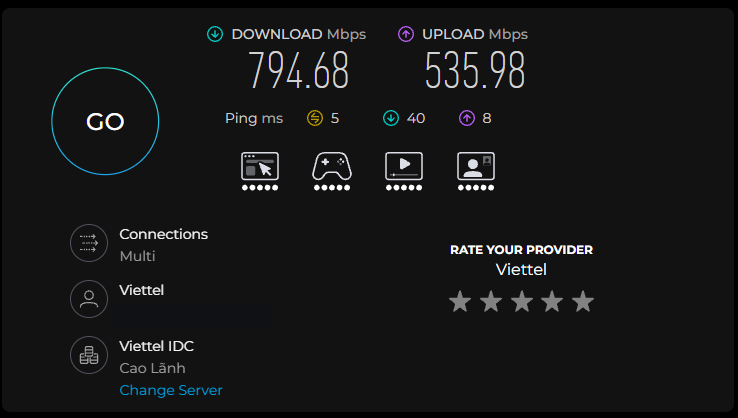
| Desktop PC Download / Upload (Ethernet) | ~220 Mbps |
794.68 Mbps Down / 535.98 Mbps Up (5 ms ping) |
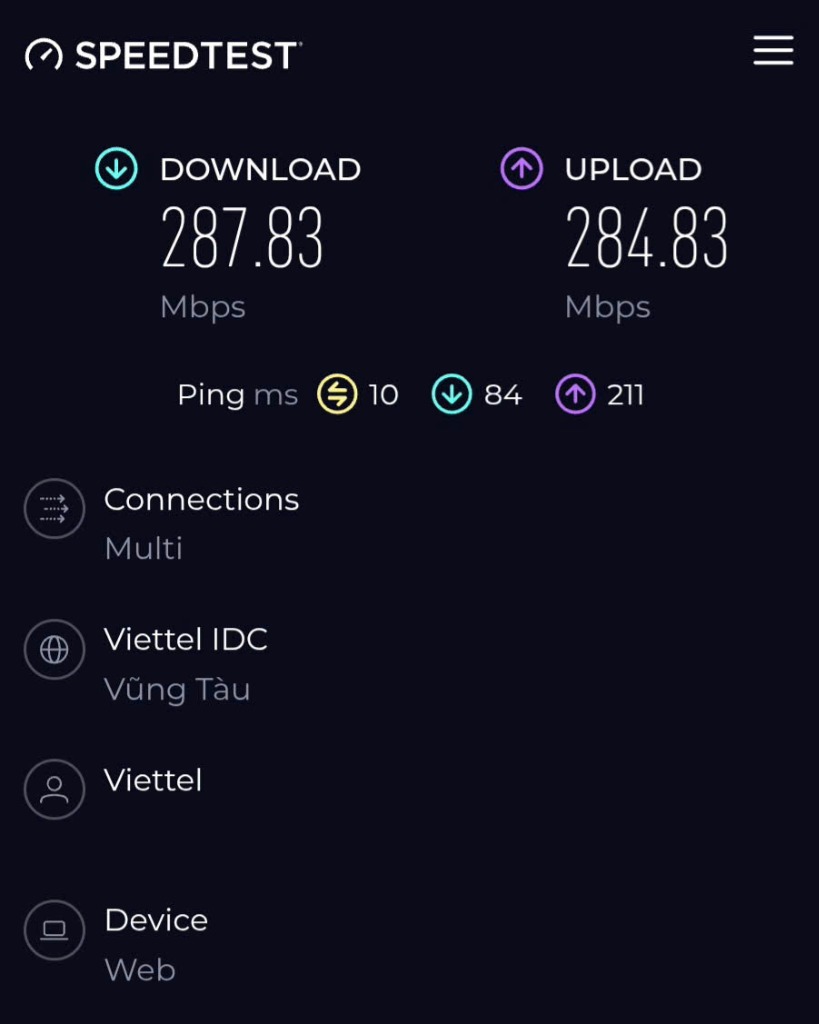
| Mobile Phone Wi-Fi (Galaxy Z Fold5) | 287.83 Mbps Down / 284.83 Mbps Up (10 ms ping) |
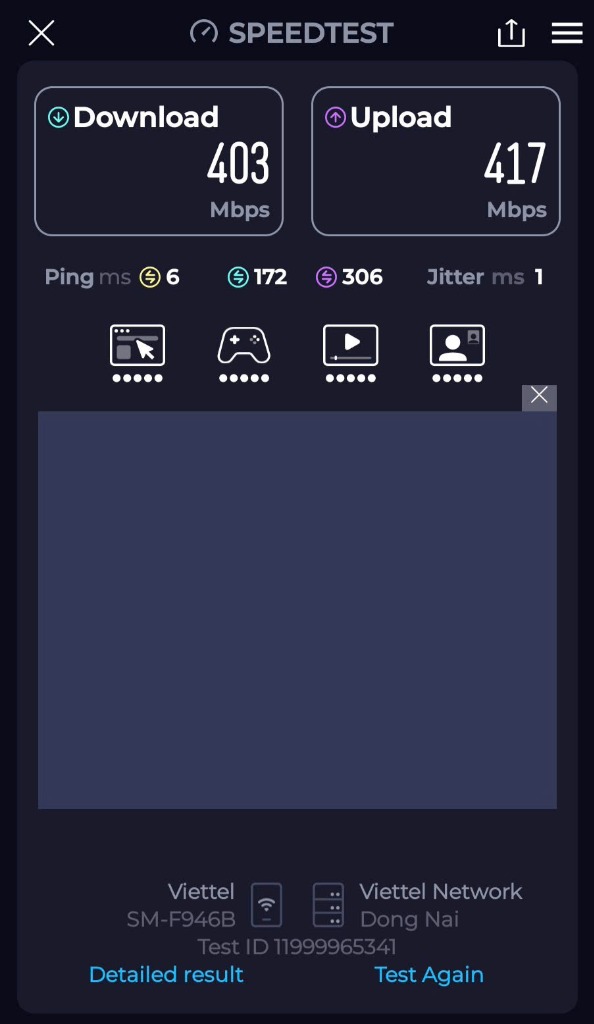
403 Mbps Down / 417 Mbps Up (6 ms ping, 1 ms jitter on dedicated 5GHz 160MHz SSID) |
Google DNS (8.8.8.8) Ping |
31 ms |
26 ms |
NIC Receive / Transmit Buffers (I219-V) |
256 / 512 (EEE On, ITR Adaptive) |
2048 / 2048 (EEE Off, ITR Off) |
Windows NetworkThrottlingIndex |
10 (10 packets/ms cap) |
4294967295 (0xffffffff — Uncapped) |
QA Ephemeral Ports (MaxUserPort / TIME_WAIT) |
16,384 ports / 120s |
55,535 ports (65534) / 30s` |
| CPU Power Plan & AC State | Balanced |
Ultimate Performance (Min/Max 100%) |
System Physical RAM Recovery (free-ai-resources.ps1) |
7,281 MB Free |
9,129 MB Free (+1,848 MB reclaimed in 2s) |
2. Speedtest Screenshots
Desktop PC (Ethernet via AX3000 Mesh Node — 794.68 Mbps Down / 535.98 Mbps Up, 5 ms Ping)
Mobile Wi-Fi 6 (Before vs. After Dedicated 5GHz 160MHz Channel Configuration)
Before (287.83 Mbps Down / 284.83 Mbps Up, 10 ms Ping) |
After (403 Mbps Down / 417 Mbps Up, 6 ms Ping, 1 ms Jitter) |
|---|---|
 |
 |
3. Actual Terminal Output Logs
System RAM & GPU VRAM Cleanup Log (scripts/free-ai-resources.ps1)
================================================================
   FREEING GPU VRAM, SYSTEM RAM & LEFTOVER PROCESSES
================================================================
System RAM Free Before : 7281 MB
GPU VRAM Before        : 1333 MiB, 10783 MiB, 12288 MiB
[OK] No idle Ollama models currently occupying VRAM.
[OK] No leftover WebDriver processes found.
[OK] Trimmed unused background memory pages across 81 processes
System RAM Free After  : 9129 MB (+1848 MB freed)
GPU VRAM After         : 1300 MiB, 10816 MiB, 12288 MiB
scripts/diagnose-network-ai.ps1)
Primary Adapter Selected: Ethernet 2 (Intel(R) Ethernet Connection (7) I219-V)
DisplayName                      DisplayValue RegistryKeyword
-----------                      ------------ ---------------
Energy Efficient Ethernet        Off          EEELinkAdvertisement
Flow Control                     Rx & Tx Enabled *FlowControl
Interrupt Moderation             Disabled     *InterruptModeration
Interrupt Moderation Rate        Off          ITR
Receive Buffers                  2048         *ReceiveBuffers
Transmit Buffers                 2048         *TransmitBuffers
Ultra Low Power Mode             Disabled     ULPMode

NetworkThrottlingIndex : 4294967295 (Default=10, Unlocked=4294967295 / 0xffffffff)
SystemResponsiveness   : 0% (Default=20%, Unlocked=0%)
QoS NonBestEffortLimit : 0 (Unlocked=0)
Ephemeral MaxUserPort  : 65534 (Default=N/A [16k ports], Target=65534 [55k ports])
TcpTimedWaitDelay      : 30s (Default=120s, Target=30s)
Win32 LongPathsEnabled : 1 (1=Enabled)
NTFS DisableLastAccess : 1 (0=Enabled [Slower I/O], 1=Disabled [Faster I/O])
Interface [Intel(R) Ethernet Connection (7) I219-V] -> TCPNoDelay=1 | TcpAckFrequency=1

--- Cloud AI Provider TLS Handshake & Connect Latency ---
Anthropic (Claude Code / API)    -> DNS:0.028191s | TCP:0.064109s | TLS:0.129211s
OpenAI (Codex / Cursor / API)    -> DNS:0.004056s | TCP:0.039815s | TLS:0.089412s
Google Gemini (Antigravity)      -> DNS:0.029252s | TCP:0.088435s | TLS:0.181140s
OpenRouter (OpenCode / Multi)    -> DNS:0.002975s | TCP:0.039081s | TLS:0.081124s
GitHub (Copilot / Git)           -> DNS:0.003105s | TCP:0.052140s | TLS:0.114502s

Active Power Plan         : Power Scheme GUID: 3d4eaba8-aede-4736-a564-5c86b303ca8a  (Ultimate Performance)
CPU PrioritySeparation    : 38 (Default=2, Target=38 [0x26 Foreground Boost])
CPU PowerThrottlingOff    : 1 (1=Disabled background throttling)
System Physical RAM       : 9.15 GB Free / 16 GB Total
RAM SvcHostSplitThreshold : 16724896 KB (Consolidates svchost.exe when >= Total RAM KB)
GPU HAGS (HwSchMode)      : 2 (1=Disabled, 2=Enabled)
DirectX Windowed Flip     : SwapEffectUpgradeEnable=1;
MMCSS Games Priority      : GPU Priority=8 (Target=8) | CPU Priority=6 (Target=6)
Background GameDVR        : 0 (0=Disabled [Higher FPS], 1=Enabled)
UI MenuShowDelay          : 10 ms (Default=400, Target=10)
Store Background Apps Off : 1 (1=Disabled background wakeups)
WSL2 Network Mode         : Enabled (Mirrored)
OLLAMA_FLASH_ATTENTION    : 1 (Target=1)
OLLAMA_KV_CACHE_TYPE      : q8_0 (Target=q8_0)
OLLAMA_NUM_PARALLEL       : 2 (Target=2)
Git Global Config         : longpaths=true | postBuffer=524288000 | sslBackend=schannel
NVIDIA GPU Status         : NVIDIA GeForce RTX 3060, 621.14, 50.00, 16.06 W, 1087 MiB, 12288 MiB
Repository Structure
agentic-workstation-optimizer/
├── .claude/
│   ├── agents/network-doctor.md                  # Claude Code subagent definition
│   └── commands/agentic-workstation-optimizer.md # Claude Code slash command
├── .cursor/
│   └── rules/agentic-workstation-optimizer.mdc   # Cursor IDE rule
├── .gemini/
│   └── agents/network-doctor.md                  # Google Antigravity subagent definition
├── .github/
│   ├── ISSUE_TEMPLATE/                           # Bug report & feature request forms
│   ├── workflows/ci.yml                          # PowerShell AST syntax & installer CI
│   └── PULL_REQUEST_TEMPLATE.md
├── .opencode/
│   └── agent/network-doctor.md                   # OpenCode subagent definition
├── assets/                                       # Real-world Speedtest benchmark images
├── references/
│   └── router-optimization.md                    # Home GPON ONT & Wi-Fi 6 (160MHz) guide
├── scripts/
│   ├── backup-and-rollback.ps1                   # Automatic JSON snapshot & 1-click rollback
│   ├── diagnose-network-ai.ps1                   # Read-only hardware, network & AI audit
│   ├── free-ai-resources.ps1                     # Win32 EmptyWorkingSet RAM trim & VRAM cleanup
│   ├── optimize-workstation.ps1                  # Main optimizer (-Mode All | Work | Gaming)
│   ├── optimize-wsl2.ps1                         # WSL2 Mirrored Networking & RAM reclaim
│   └── scan-wifi-channels.ps1                    # 2.4GHz / 5GHz Wi-Fi channel interference scanner
├── AGENTS.md                                     # Universal instructions for Windsurf / Copilot
├── CHANGELOG.md                                  # Release history
├── CONTRIBUTING.md                               # Contribution & rollback requirements
├── install.ps1                                   # Multi-agent skill & subagent installer
├── LICENSE                                       # MIT License
├── package.json                                  # Package metadata & npm scripts
├── README.md                                     # Documentation (English)
├── README.vi.md                                  # Documentation (Vietnamese)
├── SECURITY.md                                   # Security & privacy guarantees
└── SKILL.md                                      # Core Skill specification
Contributing & Security
- Please read CONTRIBUTING.md before submitting a Pull Request. Every new system tweak must include full backup and rollback support in
scripts/backup-and-rollback.ps1. - See SECURITY.md for details on privacy guarantees (zero telemetry, no TLS verification bypass, safe corporate mode).
License
Released under the MIT License. Copyright (c) 2026 Do Hoang Tuan Anh (AlexDo96).
Yorumlar (0)
Yorum birakmak icin giris yap.
Yorum birakSonuc bulunamadi