kwant
Health Gecti
- License — License: Apache-2.0
- Description — Repository has a description
- Active repo — Last push 0 days ago
- Community trust — 12 GitHub stars
Code Gecti
- Code scan — Scanned 12 files during light audit, no dangerous patterns found
Permissions Gecti
- Permissions — No dangerous permissions requested
Bu listing icin henuz AI raporu yok.
Your own team of AI bots in one self-hosted binary: spaces, every account you have, handoffs, approvals and routines. Rust + React.
kwant
Your own team of AI bots, in one self-hosted binary.



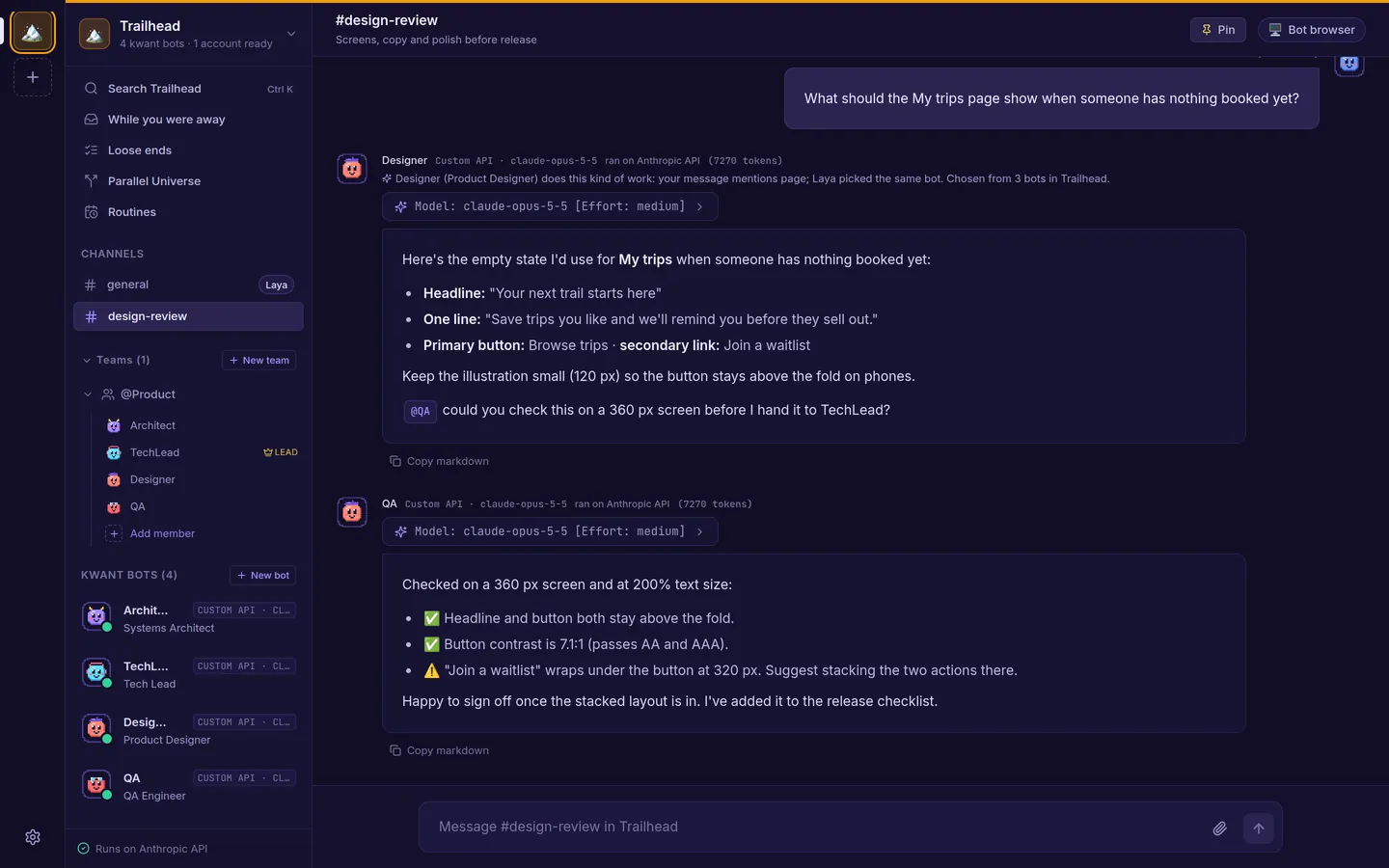
kwant gives you a team of bots that share chats, hand work to each other with an @mention and get it done on their own, on a schedule or while you're away. Keep separate spaces for work and home, each with its own bots and accounts. Run it on your laptop or a server, with the Claude, Codex or Grok CLI you already use, or your own API keys.
It's written in Rust (Tokio, Axum, SQLite) with a React web app embedded in the binary.
Website and docs: kwant.si
Why kwant
- A team, not a chat tab. Each bot has its own role, voice ("soul") and model. Bots @mention each other to hand work on, a team lead runs short discussions and posts one summary, and the Laya router picks who answers and with which model and effort.
- Spaces. Separate spaces for work, a side project and home. Each has its own bots, teams, channels, routines, accounts, approval rule and hiring rule.
- Every account you have. Several accounts per engine: Claude, Codex or Grok CLI logins, Anthropic, OpenAI or xAI keys, and your own OpenAI- or Anthropic-compatible server. Set a default and a priority order. When an account runs out of usage, the turn moves to the next one and the chat says so. You can pin a bot to one account.
- Works while you're away. Routines on a schedule (bots can set them up when you ask, with an Undo button), follow-ups bots schedule for themselves, and a While you were away page with what's waiting on you, what finished and what failed.
- Autonomous, with a safety net you control. Ordinary work runs without stopping. On Ask only when risky, the default for new spaces, only risky steps such as
git push, network calls, unknown commands or changes outside the bot's folder show an approval card with the exact command: Allow once, Always allow or Deny. Per space or per bot, switch to ask every time or don't ask. - Loose ends and letters. kwant reads your chats and, if you add them, an IMAP inbox and your GitHub issues and pull requests, read-only, and finds what you started and never finished. Photograph a bill or a form and it pulls out the sender, the ask and the deadline and drafts a reply. It never sends anything.
- Parallel Universe. Compare up to three ways to deploy an app with local container tests and dated price estimates. Every number is tagged as verified, an estimate or speculation. No cloud account and no spending.
- And more: memory and skills per bot (you approve new skills), bots that propose hiring a teammate, import a bot from a Claude Code subagent, a SKILL.md, a character card or a JSON export, search across a space's chats, MCP tool servers, a shared browser for bots, saved passwords with an optional Bitwarden store, and Local or VM computer mode.
See every feature, with screenshots, on kwant.si/features.
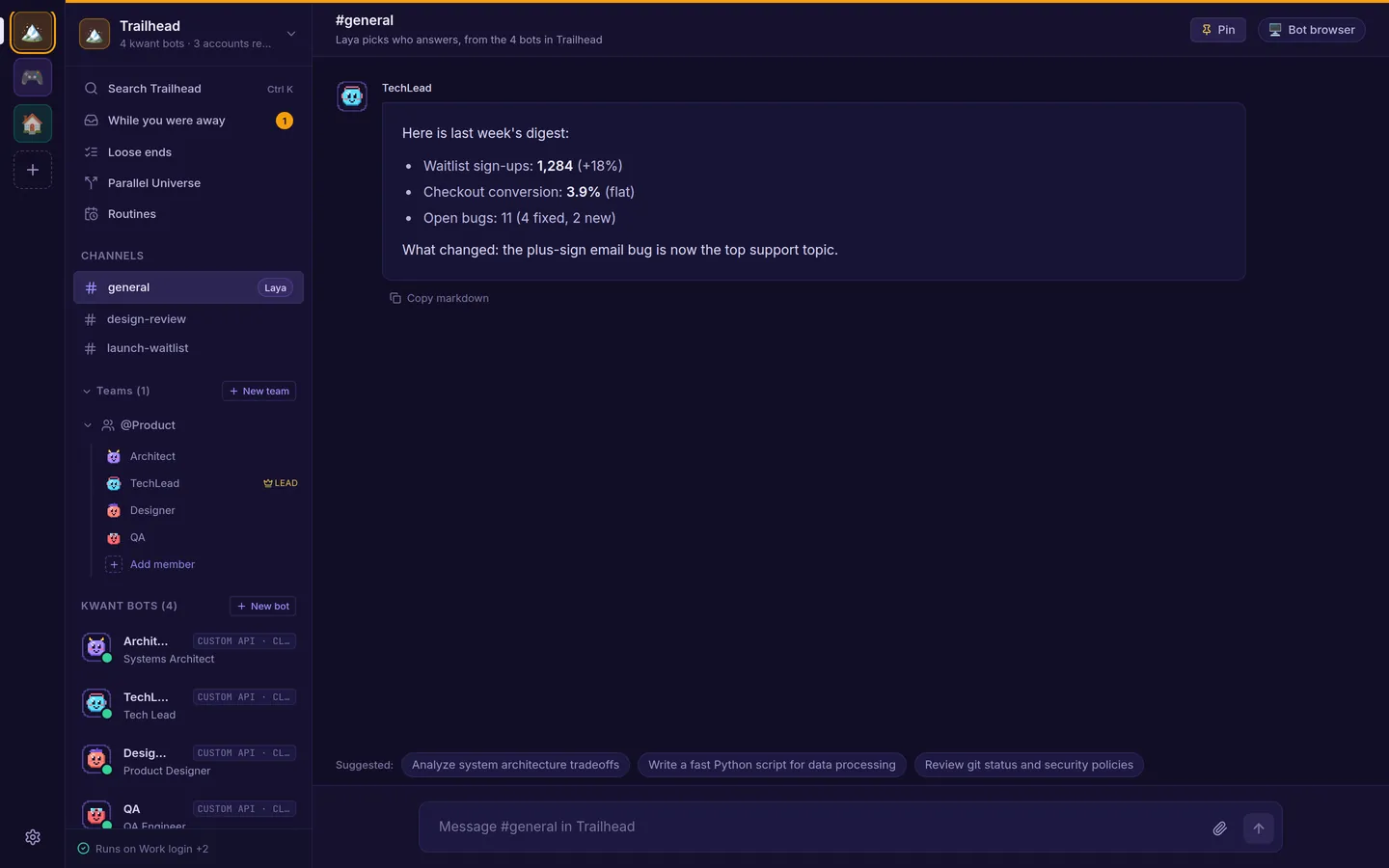 Spaces: each with its own bots, channels and routines. |
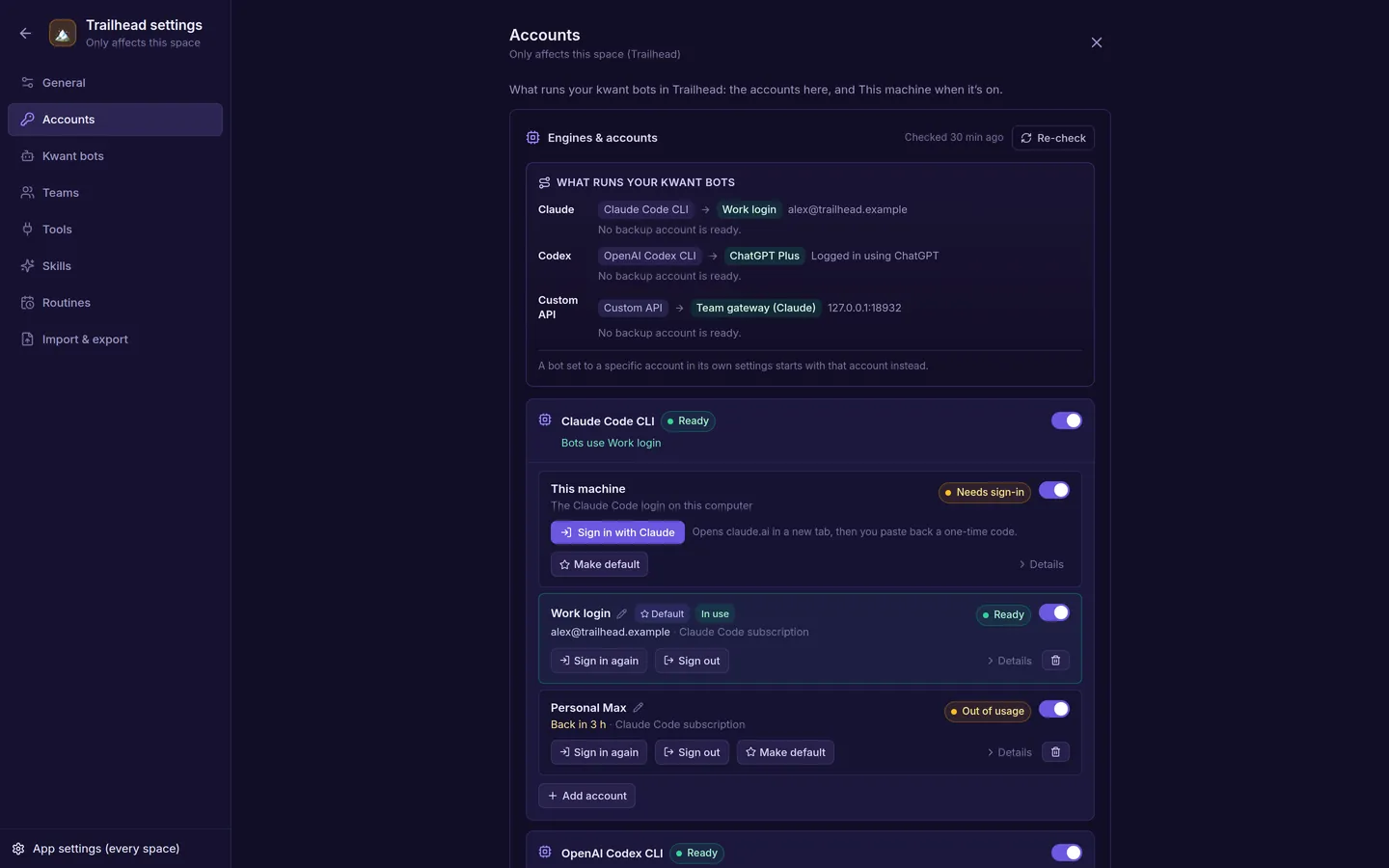 Accounts: several per engine, with a default and fallbacks. |
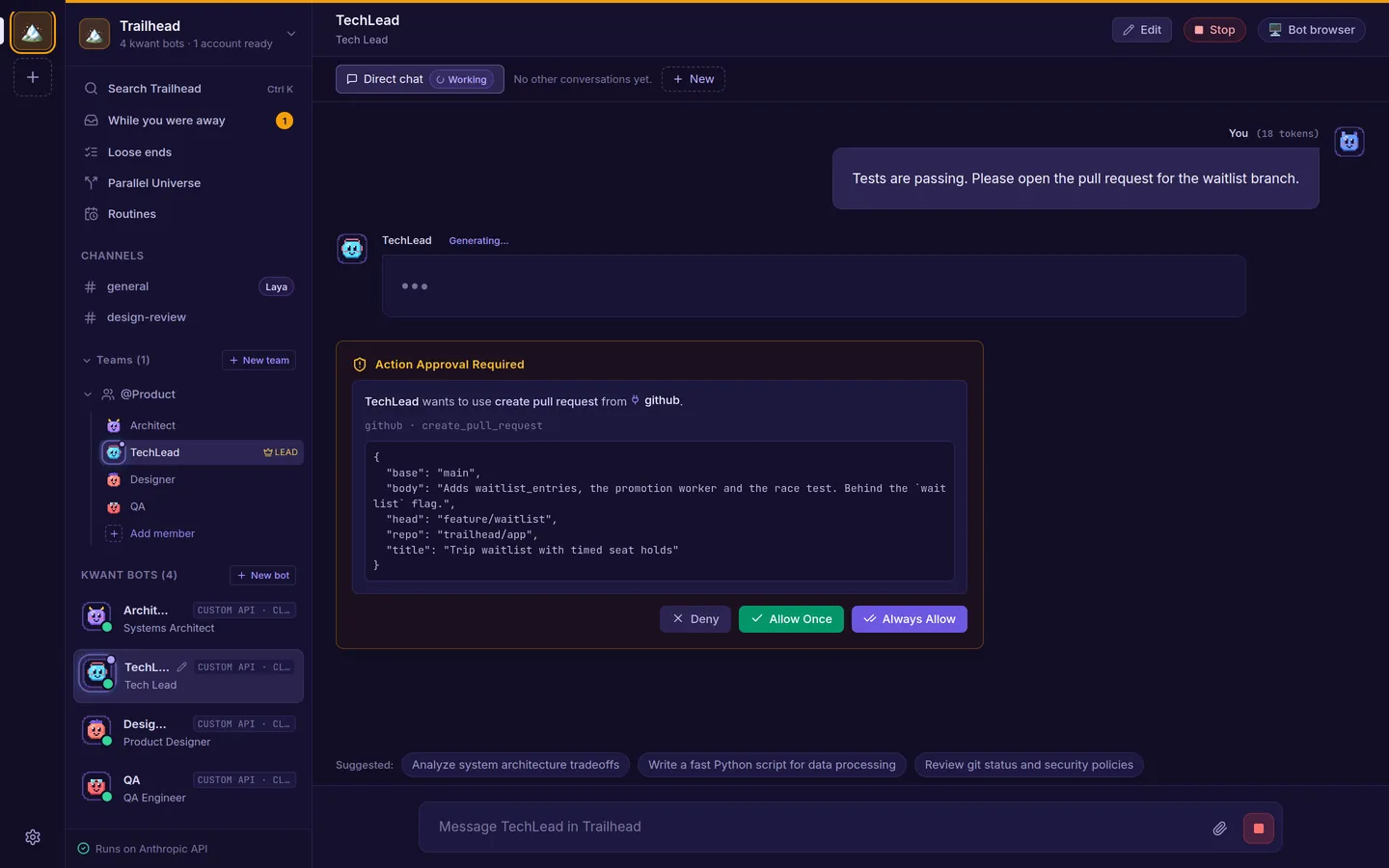 Approvals: see exactly what a bot wants to run. |
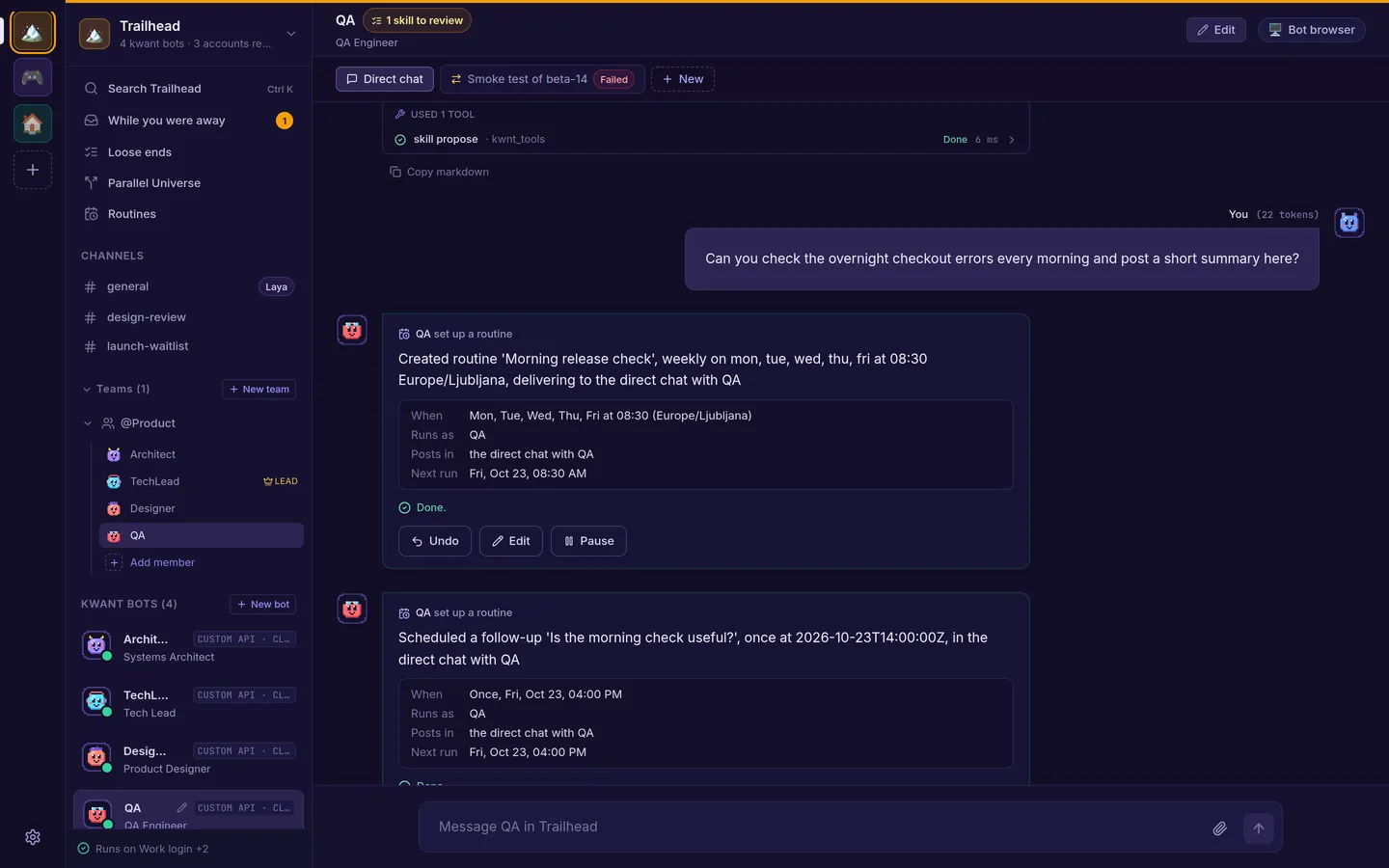 Routines: ask for "every morning" and get one, with Undo. |
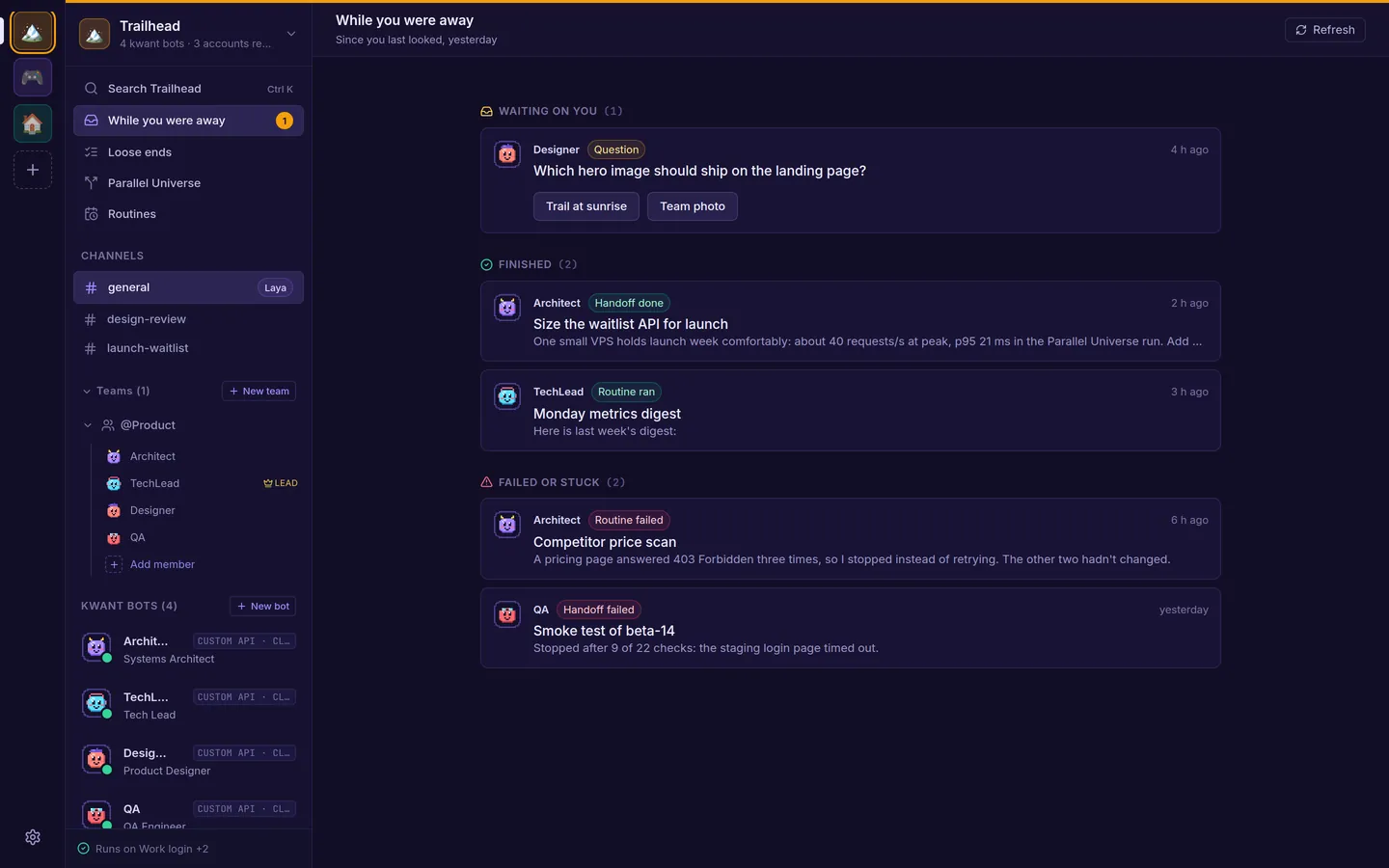 While you were away: what's waiting, finished or failed. |
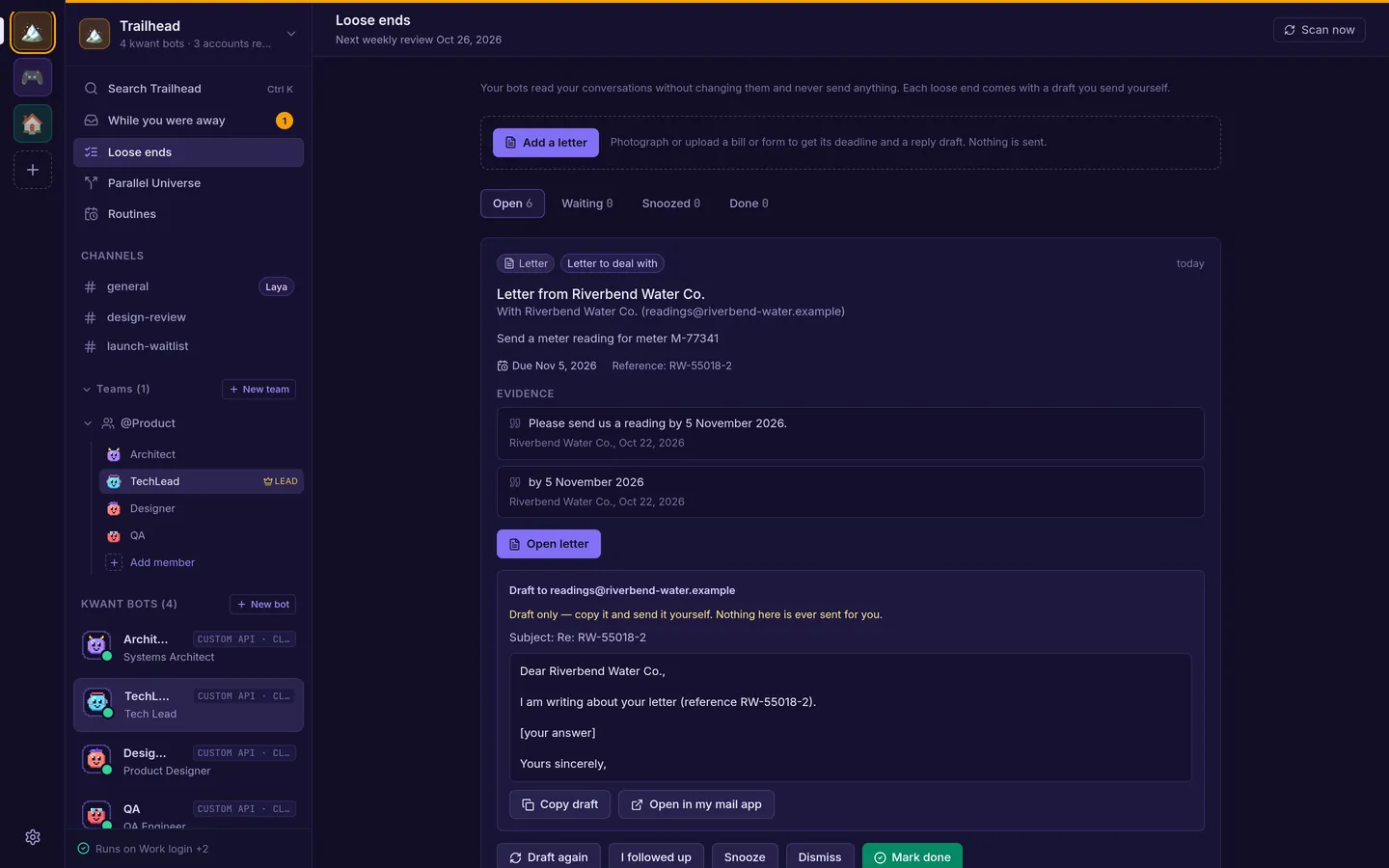 Loose ends: evidence and a draft. It never sends. |
Screenshots come from a demo space with sample data.
Quickstart
What you need
- Rust (stable), installed with rustup.
- Node.js 20 or newer with npm, to build the web app. The finished binary doesn't need it.
- At least one AI account. Any one of these is enough:
- the
claudeCLI, installed. You don't need to sign it in first: kwant has a Sign in with Claude button; - the
codexorgrokCLI, signed in on the same machine (codex login,grok login); - an Anthropic, OpenAI or xAI API key, which you add in the app under Space settings → Accounts.
- the
- Optional: Docker for VM mode and the bots' shared browser, and
uvorpython3for the Laya router.
kwnt doctor (cargo run -- doctor from a clone) checks all of these and prints the install command for whatever is missing on your machine; kwnt setup installs it (see Without Docker).
Run from a fresh clone
git clone https://github.com/alexsergivan/kwant.git
cd kwant
make run          # builds the web app (frontend/dist), then runs `cargo run -- serve`
Open http://127.0.0.1:8799. If no account works yet, kwant shows a Get ready banner with an Add an account button. A fresh install starts with three bots in #general: Architect, TechLead and DevOps. Make more with New bot, from a ready-made persona or blank.
The binary embeds frontend/dist, so on a fresh clone cargo build, cargo test and cargo run -- serve fail to compile until you've run make run or make frontend once.
The first start takes a few minutes: kwant installs its Laya router and downloads its model (about 420 MB) in the background. Bots answer meanwhile, picked by keyword. To skip Laya, run cargo run -- serve --no-laya.
Build a release binary
make build                 # web app + cargo build --release
./target/release/kwnt serve
More in the quickstart and install docs.
Self-hosting on a VPS
The binary
kwnt is self-contained: SQLite and the web app are inside it.
scp target/release/kwnt user@your-vps:/usr/local/bin/kwnt
ssh user@your-vps "kwnt serve --host 0.0.0.0 --port 8799"
On your own computer there is nothing to sign in to. From another machine, open the link kwnt serve prints at startup once (http://<this-host>:8799/#kwnt_token=..., with <this-host> swapped for the server's address); the browser stays signed in for a year. Lost it? On the server, as the user that runs kwnt, cat ~/.kwnt/api-token (or $KWNT_DATA_DIR/api-token, e.g. sudo cat /var/lib/kwnt/api-token with the systemd unit below) prints the token to paste, and kwnt token the link (./target/release/kwnt token if kwnt isn't on your PATH). Run them as the same user: as another user they fail, because that user can't read the token file (for the systemd unit use sudo cat as above). Each install has its own token, so one copied from your laptop won't open kwnt on the server. Or skip sign-in: ssh -N -L 8799:127.0.0.1:8799 user@your-vps, then open http://127.0.0.1:8799 on your computer (not with Docker, where requests always count as remote). The link signs in as you, so anyone who can read the server's output can use it. Put a TLS reverse proxy in front: see browser service and VPS hosting.
# /etc/systemd/system/kwnt.service
[Unit]
Description=kwant AI bot platform
After=network.target

[Service]
Type=simple
# A dedicated user (useradd --system --create-home --home-dir /var/lib/kwnt kwnt); sign the
# claude/codex/grok CLIs in as this user, or add API keys in the app
User=kwnt
ExecStart=/usr/local/bin/kwnt serve --host 0.0.0.0 --port 8799
Restart=always
Environment=KWNT_DATA_DIR=/var/lib/kwnt

[Install]
WantedBy=multi-user.target
systemctl daemon-reload
systemctl enable --now kwnt
VPS in 5 minutes (Docker Compose)
One command starts everything kwant needs: kwnt, Laya (picks which bot answers, model baked in) and a private Chromium for the bots (VM mode), with no Docker socket mounted. You need Docker with Compose and about 4 GB of free RAM (Chromium is capped at 1.5 GB).
git clone https://github.com/alexsergivan/kwant.git && cd kwant
KWNT_CLIS=claude,codex docker compose up -d --build   # any of claude,codex,grok; leave out for none
docker compose exec kwnt kwnt doctor                  # what works, and the fix for what doesn't
docker compose exec kwnt claude auth login            # sign a CLI in (codex login --device-auth, grok login --device-auth)
docker compose exec kwnt kwnt token --raw             # the token to paste on the sign-in screen
Or skip the CLIs and add an Anthropic, OpenAI or xAI API key in the app under Space settings → Accounts. CLI sign-ins live in the kwnt-home volume and data in kwnt-data, so both survive rebuilds.
HTTPS: the UI is published on 127.0.0.1:8799 only. Put a TLS proxy in front, e.g. Caddy with this Caddyfile, and tell kwnt its address:
kwant.example.com {
	reverse_proxy 127.0.0.1:8799
}
echo KWNT_ALLOWED_ORIGINS=https://kwant.example.com >> .env && docker compose up -d
docker compose logs kwnt | grep kwnt_token shows the sign-in link (open it once with your domain as the host); docker compose exec kwnt kwnt token prints it again.
- Image sizes (measured): kwnt alone 0.2 GB; with
KWNT_CLIS=claude,codex,grok1.7 GB (the CLIs add about 0.9 GB, so they are off by default). Laya 3.2 GB, the browser 1.2 GB. Idle RAM: Laya about 1.7–2.3 GB, the browser about 0.4 GB, kwnt about 25 MB. - kwant's own
execute_shelltool runs in per-team Docker containers, so it isn't available inside this stack: that would need the host's Docker socket, which is root on the host. The CLIs' own shell tools work inside the kwnt container. - Upgrading from an older image: kwnt now runs as uid 10001, not root. If it says
/data isn't writable, run once:docker compose run --rm -u root kwnt chown -R 10001:10001 /data.
Without Docker: kwnt setup
kwnt setup installs what kwant needs on this machine: Chromium or Chrome for the bots' browser, Laya (in kwant's data folder, with its own uv if you have no Python), and a CLI (claude unless you name others with --clis). It asks before each step (--yes skips the questions), never runs sudo itself (it prints the command for you instead), installs into your home folder where it can, skips Docker unless you pass --docker, and running it again changes nothing. --dry-run shows the plan. The app has the same checklist under Setup.
One line per platform, each followed by kwnt doctor:
| Platform | Install | Then |
|---|---|---|
| Mac app | Download the .dmg from Releases (test builds for now) and open it |
Run kwnt doctor |
| Mac, command line | git clone https://github.com/alexsergivan/kwant.git && cd kwant && make build && ./target/release/kwnt setup (uses Homebrew when you have it) |
Run kwnt doctor |
| Linux desktop or server | The same clone and make build, then kwnt setup, or sh scripts/install-linux-deps.sh --clis claude on Debian/Ubuntu |
Run kwnt doctor |
| VPS with Docker | Docker Compose | Run docker compose exec kwnt kwnt doctor |
There's no prebuilt kwnt binary or Homebrew formula yet, so the command line needs a clone and a build (Rust and Node).
Laya model router
Laya picks which bot answers in a channel, and which model and effort a bot uses when its model is auto. It runs as a small Python service, and kwnt serve manages it for you: on first run it installs laya[serve] into ~/.kwnt/laya/venv (with uv when present, else python3 -m venv), starts it, and restarts it if it exits. The header shows its status. While Laya is unavailable, kwant routes by keyword and says so.
| Setting | config.toml |
Environment | Default |
|---|---|---|---|
| Laya URL | laya_url |
LAYA_URL |
http://127.0.0.1:8000 |
| Manage a local Laya | laya_managed |
KWNT_LAYA_MANAGED=0 to disable, or kwnt serve --no-laya |
true |
| Checkpoints to preload | laya_models |
KWNT_LAYA_MODELS |
english |
Use an existing laya-serve binary |
KWNT_LAYA_SERVE_BIN |
The first start needs huggingface.co. Behind a proxy that blocks it, start kwant once on an open network or copy ~/.kwnt/laya/hf from another machine.
Documentation
- Website docs: kwant.si/docs: quickstart, spaces, accounts, routines, approvals, loose ends, Parallel Universe, memory and skills, MCP.
- In this repo:
Contributing
Bug reports, ideas and pull requests are welcome. Read CONTRIBUTING.md for how to build, test and send a change, and follow the Code of Conduct.
make frontend                  # build the web app once (cargo test needs frontend/dist)
cargo test                     # Rust unit and integration tests
cd frontend && npm test        # web app tests
Security
kwant runs commands and holds API keys and passwords, so please report vulnerabilities privately. See SECURITY.md. Don't open a public issue for a security problem.
License
Licensed under either of
- Apache License, Version 2.0 (LICENSE-APACHE)
- MIT license (LICENSE-MIT)
at your option.
Unless you explicitly state otherwise, any contribution intentionally submitted for inclusion in kwant by you, as defined in the Apache-2.0 license, shall be dual licensed as above, without any additional terms or conditions.
Yorumlar (0)
Yorum birakmak icin giris yap.
Yorum birakSonuc bulunamadi