bah-browser
Health Warn
- License — License: NOASSERTION
- Description — Repository has a description
- Active repo — Last push 0 days ago
- Low visibility — Only 5 GitHub stars
Code Fail
- exec() — Shell command execution in scripts/i18n-check.mjs
- fs module — File system access in src/main/ai-engine.ts
- network request — Outbound network request in src/main/ai-engine.ts
- fs.rmSync — Destructive file system operation in src/main/data-view.ts
- network request — Outbound network request in src/main/data-view.ts
- fs.rmSync — Destructive file system operation in src/main/image-harvester.ts
Permissions Pass
- Permissions — No dangerous permissions requested
No AI report is available for this listing yet.
Bah — navegador com IA (estilo Perplexity Comet), por VilelaLab. Comandos em linguagem natural operam o navegador. Electron + React + DeepSeek/Ollama.

Bah
AI browser — you type in plain language, it operates the web for you.
Perplexity Comet style · open / source-available · by VilelaLab.
🌐 English · Português


You give natural-language commands ("open gmail and delete the spam") and the AI operates the browser in your place — reading the screen, clicking with a real mouse, typing, and going until it's done.
💸 No GPU, no pricey setup needed. Works on any PC: by default it runs on DeepSeek's cloud API, which is extremely cheap — pay-per-use, literally cents for tons of tasks. Want 100% free + offline instead? Run a local model with Ollama (optional, needs a decent GPU). Either way, you don't need a powerful local AI to try it.

🎬 Demo
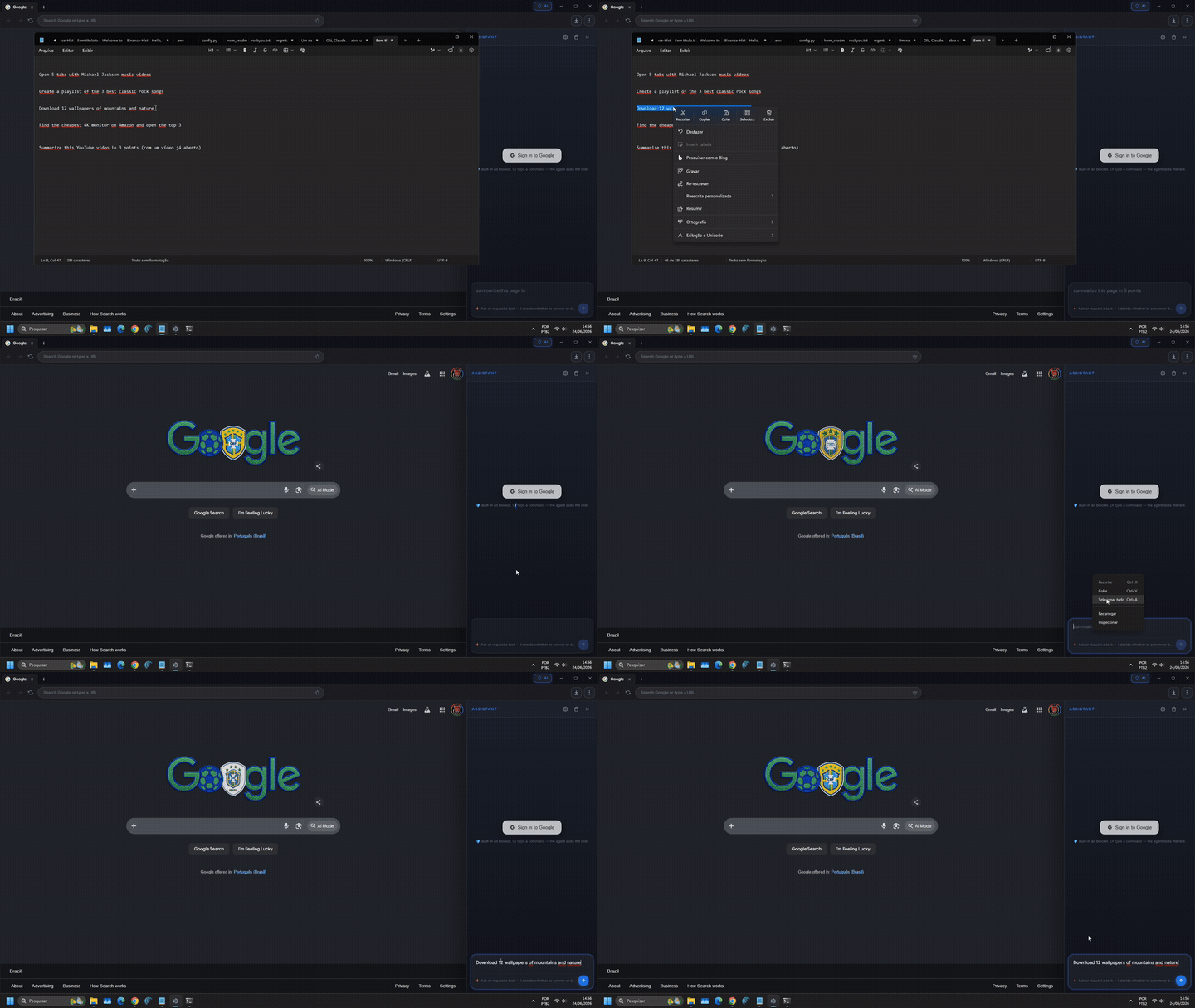
▶️ Download the full video — the agent searching and operating the web on its own. (the GIF above is a preview; GitHub doesn't play embedded video in the README.)
📥 Download
🧑 I just want to use it (Windows): grab the installer here → the Bah-Setup-*.exe file, double-click and install.
🔄 Auto-updates: after installing, Bah checks for new versions, downloads them in the background and offers "Restart now" to apply — no reinstalling.
⚠️ Windows shows a blue "protected your PC" screen (the app isn't code-signed with a paid certificate yet). Click More info → Run anyway — normal for new open-source apps. (Later updates install without that warning.)
👨💻 I want to hack on the code: clone and run it — see Running it below.
What it does
- Full browser with tabs, navigation, URL bar, dark theme
- AGENT panel on the side: type a command → the AI decides step by step until it's done
- Reads the page (DOM, numbered interactive elements, and OCR) and acts through structured tools — it doesn't rely on "seeing" the screen
- AI: DeepSeek (cloud) — tested and recommended, fast and stable — or Ollama (local/offline) to run the AI on your own machine
- One-shot skills: open N videos at once, build a "supercut" of a spoken phrase, chat about a YouTube video using its transcript, compare prices, fetch news — deterministic shortcuts that cost zero tokens
- UI in your language (English / Português / Español) — auto-detects your system language; the AI also replies in your language
- Full adblock (EasyList + EasyPrivacy) with automatic bypass for sites that break (YouTube, Twitch)
- Safe Browsing (URLhaus malicious-hosts list, updated daily)
- Real mouse clicks via Chromium
sendInputEvent(not synthetic events — goes through React, Vue, Angular without being ignored) - Stealth anti-detection (Chrome UA, masks
navigator.webdriver, etc.) - Comet-style visual overlay — pulsing border, scan line, click ripple, status label
Stack
| Layer | Tech |
|---|---|
| Browser shell | Electron 42 + Chromium |
| UI | React 19 + TypeScript + Vite |
| AI (cloud) | DeepSeek — tested and recommended |
| AI (local) | Ollama |
| Adblock | @ghostery/adblocker-electron |
| Webview | <webview> tag with persistent partition |
The agent's ReAct loop (core)
USER → "open gmail and delete the spam"
        │
        ▼
┌───────────────────────────────────────────────┐
│  for step in 1..25:                           │
│    1. observePage(webview)                    │
│       → { url, title, interactive_elements }  │
│    2. captureScreenshot()                     │
│    3. AI decides ONE action:                  │
│       { action: { type, ...params } }         │
│    4. execute action via REAL OS input        │
│    5. wait, re-observe, self-evaluate         │
│    6. if action == 'done' → return            │
└───────────────────────────────────────────────┘
Tools the AI can call
| Action | What it does |
|---|---|
click_ref(N) |
Clicks the element with id N from the observed list |
fill_ref(N, value) |
Fills input id N with value (and verifies it took) |
click_text(text) |
Finds by visible text and clicks |
click_at(x, y) |
Click at exact coordinates (visual fallback) |
type(text) / press(key) |
Type into the focused field / send a key |
navigate(url) / scroll(dir) |
Go to a URL / scroll |
new_tab / switch_tab / close_tab |
Tab management |
done(reason, success) |
End the loop |
Clicks happen through webContents.sendInputEvent in the main process — a real Chromium mouse event, not a synthetic one, so React/Vue/anti-bot sites respond normally. The AI prefers the DOM-first path (click_ref), falling back to text and then coordinates.
Running it
git clone https://github.com/alexvilelabah/bah-browser.git
cd bah-browser
npm install
npm run build
npm start        # or: npx electron .
Windows shortcut: double-click Abrir-Bah.bat.
Setting up the AI
- Open the browser, click the AI button in the address bar.
- Gear icon → pick a provider.
- Cloud (recommended): paste a DeepSeek API key (their API is very cheap, pay-per-use). → Save.
- Local (optional, free/offline): install Ollama and keep it running (it lives in the tray and serves models at
127.0.0.1:11434). Then download a model from inside Bah (☁️/🏠 → 🏠 Local AI → type a name → Download) or in a terminal (e.g.ollama pull qwen3:14b). Local works offline, but the cloud (DeepSeek) is more reliable.
Safety & limits
The agent runs with full browser privileges, so it's worth being clear about what it does and doesn't do:
It's your real session. The browser uses a persistent partition (
persist:browser), so cookies and logins are saved. If you're logged into Gmail in Bah, so is the agent. The AI can access anything you could access manually. Don't log into accounts you wouldn't trust an assistant with.Safety brake on sensitive actions. Before paying, buying, deleting, or entering card data, the agent pauses and asks for your confirmation — and this works on every path (model clicks, coordinate clicks, Enter on a checkout page, learned shortcuts, and repeated automations). It never does those silently.
Stop means stop. The ■ Stop button cancels immediately, even mid model-call or mid-loop; a late response won't "resurrect" a cancelled task.
No fake success. After a fill/type the agent checks the field actually holds the value; if an action had no real effect it switches strategy instead of reporting success.
Asks for help when blocked. On a CAPTCHA, login wall, or paywall it stops and asks you to step in, then resumes — it doesn't flail.
25-step cap per command. If a task doesn't finish in 25 actions, the agent stops on its own.
Stealth is not evasion. We mask
navigator.webdriverand use a Chrome UA only to reduce rejections. We do not break CAPTCHAs, dodge rate-limits, or automate things sites forbid in their terms.🔑 Google login — use the "Sign in to Google" button. Google blocks login inside embedded browsers (Electron/webview). Bah handles it the right way: click 🔑 Sign in to Google → it opens the login in your real Chrome/Edge (where Google trusts it), you sign in, and Bah detects it automatically, imports the session (cookies via CDP) and closes the login window. Do it once and you stay logged in.
Adblock pauses on known sites. YouTube and Twitch get automatic bypass so their player isn't blocked by anti-adblock. Everywhere else adblock stays on.
Not implemented yet (but would be nice): a "preview the plan, then approve" mode before running, a per-tab sandbox, and click rate-limiting to avoid aggressive bot-like behavior.
Comparison with other agents
| Bah | Comet | Browser-Use | |
|---|---|---|---|
| Open source | ✅ | ❌ | ✅ |
| 100% local option (Ollama) | ✅ | ❌ | ✅ |
| Runs at home | ✅ | ❌ | ❌ (lib only) |
| Cloud or local AI | ✅ | ❌ (cloud only) | ✅ |
| Real clicks (not synthetic) | ✅ | ✅ | ✅ |
| Full UI | ✅ | ✅ | ❌ |
| Adblock + Safe Browsing | ✅ | ✅ | ❌ |
| Confirmation before sensitive actions | ✅ | ⚠️ | ❌ |
ℹ️ The tested and recommended AI path is DeepSeek (cloud); local (Ollama) also works but is less validated.
License
PolyForm Small Business 1.0.0 — see LICENSE.
In short (not legal advice — the license text rules):
- ✅ Free for personal use, study, your own projects, and small businesses (under 100 people and under US$1M revenue last year).
- ✅ You may modify, improve and redistribute, keeping this license notice.
- 💼 Large company / commercial use above that size needs a commercial license — reach me at [email protected].
- ❌ No warranty. Provided "as is".
Contact
- 📧 Email (questions & commercial license): [email protected]
- 🐦 X / Twitter: @alexvilelaba
- 🐛 Bugs / ideas: open an issue
Made with 🧉 by Alex Vilela — VilelaLab.
Reviews (0)
Sign in to leave a review.
Leave a reviewNo results found