AlianHub-Project-Management-System
Health Pass
- License — License: AGPL-3.0
- Description — Repository has a description
- Active repo — Last push 0 days ago
- Community trust — 19 GitHub stars
Code Warn
- fs module — File system access in .claude/naming-conventions.test.js
- fs module — File system access in .claude/tests/test-bug-011.js
- process.env — Environment variable access in .claude/tests/test-bug-012.js
- fs module — File system access in .claude/tests/test-bug-012.js
- process.env — Environment variable access in .claude/tests/test-bug-013.js
- fs module — File system access in .claude/tests/test-bug-013.js
- fs module — File system access in .claude/tests/test-bug-014.js
- fs module — File system access in .claude/tests/test-bug-015.js
- fs module — File system access in .claude/tests/test-bug-016.js
Permissions Pass
- Permissions — No dangerous permissions requested
No AI report is available for this listing yet.
Open-source, self-hosted project management: tasks, sprints, Gantt, Kanban, docs, automations and time tracking with timesheets. Connect Claude or ChatGPT over MCP. A free Jira, ClickUp, Linear and Monday.com alternative.

Built for enterprises, startups, and growing teams — no per-seat pricing, no vendor lock-in, your data on your own servers.





Quick Start
🐳 Option 1 — Docker (recommended for self-hosting)
# Grab the compose file and run
curl -O https://raw.githubusercontent.com/aliansoftwareteam/AlianHub-Project-Management-System/main/docker-compose.yml
# Set JWT_SECRET (required) — see .env.example for full env-var reference
echo "JWT_SECRET=$(openssl rand -hex 32)" > .env
docker compose up -d
# AlianHub running at http://localhost:4000
Update to a newer version later:
docker compose pull && docker compose up -d
Images are published to GHCR:
ghcr.io/aliansoftwareteam/alianhub:latest. Multi-arch (amd64 + arm64).
🛠 Option 2 — From source (for developers)
git clone https://github.com/aliansoftwareteam/AlianHub-Project-Management-System.git
cd AlianHub-Project-Management-System
npm run setup
That's it. npm run setup will:
- Install all dependencies (root and frontend) in parallel
- Generate a
.envfile with secure random secrets - Start the server (the same entry production uses)
- Open
http://localhost:4000in your browser
On an empty database the app opens its first-run setup (/setup): create
your own owner account and company, optionally with sample data. Mail, storage,
AI and sign-in providers are configured afterwards from Settings → Instance
(product owners only) or through environment variables — see
docs/ENV.md for every variable and
docs/ADMIN-GUIDE.md for the operator walkthrough.
On a new install each person can connect their own AI (Claude, ChatGPT, Claude
Code) out of the box: the MCP tools and sign-in by address are on by default,
and an outside app's risky writes wait for a person. The AI acts only as that
person, with the permissions they grant it. Set MCP_OAUTH=off,MCP_TOOLS_DATA=off, MCP_TOOLS_MANAGE=off or MCP_TOOLS_WORK=off in .env,
or switch them under Settings → Instance → AI, to turn any of it off. An
upgraded install keeps them off until an owner turns them on there; see
docs/MCP-AGENT-GUIDE.md.
Prerequisite: MongoDB running locally on mongodb://localhost:27017. If you don't have it: docker run -d -p 27017:27017 mongo:7 or download from mongodb.com.
Available commands
| Command | What it does |
|---|---|
npm run setup |
Install deps, prepare .env, and start the server |
npm run dev |
Same as setup but skips dependency install |
npm run setup:reset |
Wipe node_modules and reinstall everything |
npm run setup -- --no-open |
Start without auto-opening a browser |
npm test / npm run lint |
Jest (unit + conventions) / ESLint — the CI gate |
cd frontend && npm test |
Vitest component specs |
For active development with hot-reload, run the backend (
npm run nodemon) and the frontend dev server (cd frontend && npm run serve) separately. Developers: docs/DEVELOPER-GUIDE.md.
What is AlianHub?
AlianHub is a full-stack, open-source project management system designed for teams that require flexibility, transparency, and ownership over their workflows.
Unlike SaaS-only tools, AlianHub is built to be:
- Self-hosted
- Extensible
- Customizable for real-world organizational needs
It supports both web and desktop environments and is suitable for internal tools, enterprise deployments, and long-term team collaboration.
Architecture
graph TB
    subgraph clients["Clients"]
        Browser["🌐 Web Browser<br/>Vue.js + Pinia"]
        Desktop["💻 Desktop App<br/>Electron"]
    end

    subgraph server["Server (Node.js + Express)"]
        API["⚙️ Express API<br/>/api/v2/*"]
        Socket["⚡ Socket.io<br/>real-time events"]
    end

    DB[("🗄️ MongoDB<br/>company-scoped<br/>multi-tenant")]
    Storage[("📦 Storage<br/>Wasabi S3 or local filesystem")]

    Browser -->|REST + WebSocket| API
    Browser -.->|live updates| Socket
    Desktop -->|REST + WebSocket| API
    Desktop -.->|live updates| Socket
    API --> DB
    API --> Storage
    Socket --> DB
Key principle: all data is scoped to
companyIdfor multi-tenancy. A single AlianHub instance can host multiple companies, each with isolated data.
Deeper architecture docs: .claude/ARCHITECTURE.md · .claude/DESIGN.md
Tech Stack
AlianHub is built using a pragmatic and scalable stack:
- Frontend: Vue
- Backend: Node.js
- Database: MongoDB
- Desktop: Electron
- Repository Structure: Single repository
Key Features
📋 Project & task management — Create projects with custom milestones, sprints, statuses, and custom fields. Track tasks across List, Board, Table, Calendar, and Workload views with drag-and-drop, sub-tasks, checklists, attachments, comments, due dates, and reminders.
👥 Team collaboration with RBAC — Assign tasks to users, manage role-based permissions per company, and create custom roles with dynamic permission rules. Multi-tenant by design — a single instance can host multiple companies, each with isolated data.
⚡ Real-time collaboration via Socket.io — Changes propagate to every connected client instantly. No polling, no stale views, no
F5refreshes.🔍 Advanced search & saved filters — Find tasks by project, status, assignee, creator, due date, or priority. Save frequently used filters for one-click reuse.
⏱️ Timesheets & reporting — Project, user, and workload timesheets. Generate milestone and performance reports. Optional productivity tracking (screenshots / keystrokes / mouse events) for time-sensitive teams.
🤖 AI assistance — Generate tasks, subtasks, checklists, descriptions, and project templates with AI. Multiple LLM providers supported.
💬 Built-in chat & channels — Real-time messaging and dedicated channels per project or team.
💻 Web + desktop (Electron) — Identical experience in the browser and as a native desktop app. Multi-language UI via vue-i18n.
🏠 Self-hosted, your data — Run on your own servers with MongoDB and Wasabi/S3 (or local filesystem) storage. No vendor lock-in, no per-seat pricing, no data leaving your infrastructure.
Features evolve continuously — see Discussions for what's next and CHANGELOG.md for what just shipped.
Feature status
| Capability | Status |
|---|---|
| List · Board (Kanban) · Table · Calendar · Workload views | ✅ Shipped |
| Sub-tasks, checklists, attachments, comments, custom fields | ✅ Shipped |
| Time tracking — timesheets + optional screenshots / activity | ✅ Shipped |
| Custom roles & per-company RBAC | ✅ Shipped |
| Sprints, milestones & reports | ✅ Shipped |
| AI task / sub-task / project generation | ✅ Shipped |
| Built-in chat & channels · real-time sync (Socket.io) | ✅ Shipped |
| Gantt / timeline view | 🔜 On the roadmap |
How AlianHub compares
Capabilities that are free and built-in here — but paid, limited, or absent in other open-source PM tools:
| Capability | AlianHub | Plane (open-source) |
|---|---|---|
| Time tracking with screenshots | ✅ Free | ❌ Not available |
| Custom fields | ✅ Free | 💲 Paid |
| Custom roles & permission matrix | ✅ Free | ❌ 3 fixed roles |
| Dashboards & widgets | ✅ Free | 💲 Paid (custom) |
| Built-in chat | ✅ Free | ❌ Not available |
| AI project generation | ✅ Free (your API key) | ❌ Not available |
| Milestones | ✅ Free | ❌ Not available |
Comparison reflects each project's open-source edition; both are AGPL-3.0. AlianHub is younger and still closing gaps of its own (e.g. Gantt) — see the table above.
📸 Screenshots
A quick tour of AlianHub. Try the live demo to explore for yourself.
Dashboard
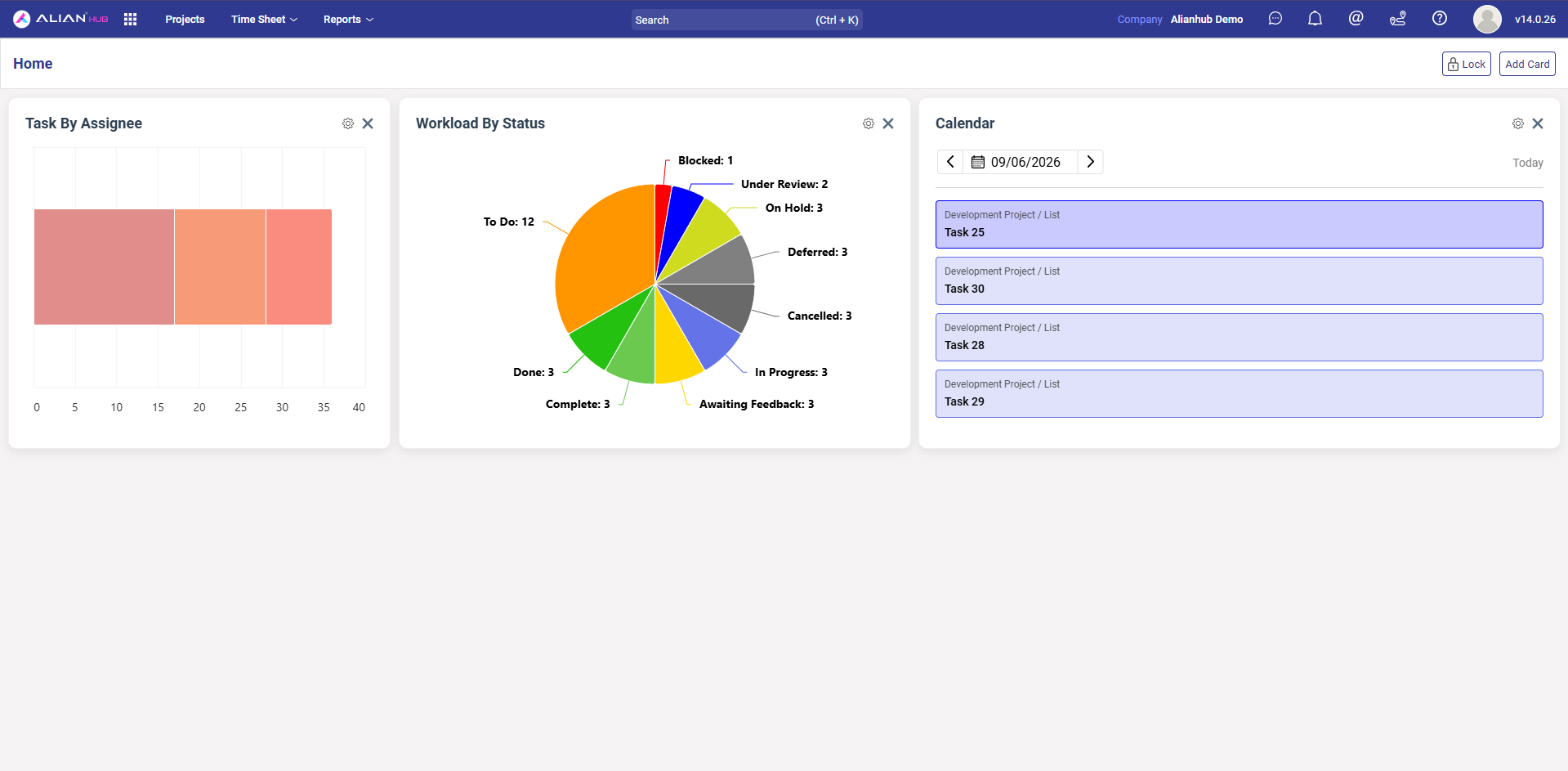
Customizable home dashboard with drag-to-arrange widgets — Task by Assignee, Workload by Status, and a live Calendar view.
Board View (Kanban)
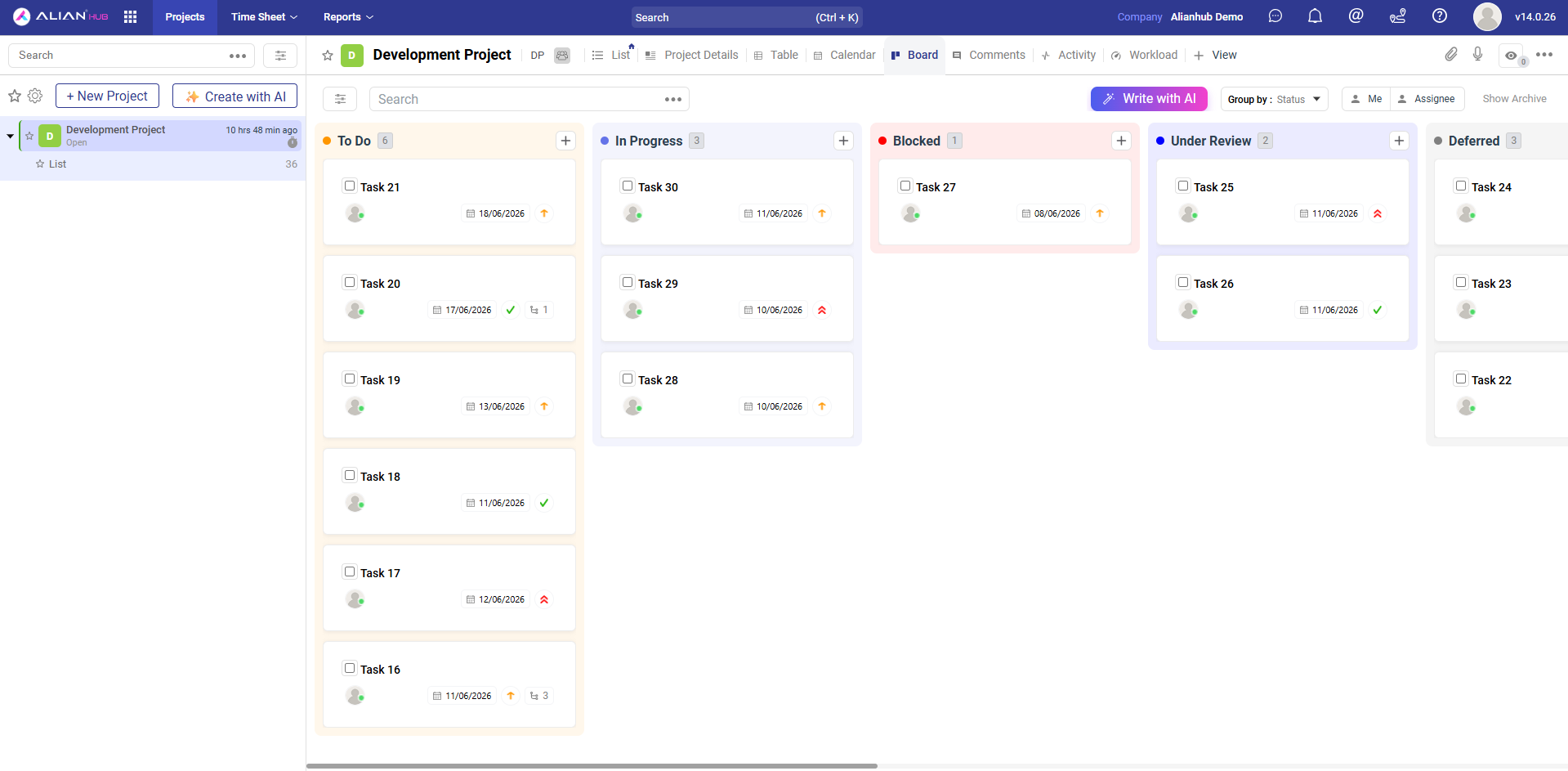
Drag-and-drop Kanban board grouped by status (or any field). Cards show due date, assignee, priority, and sub-task count. Switch the same project to List, Table, Calendar, Workload, or a custom view at any time.
List View
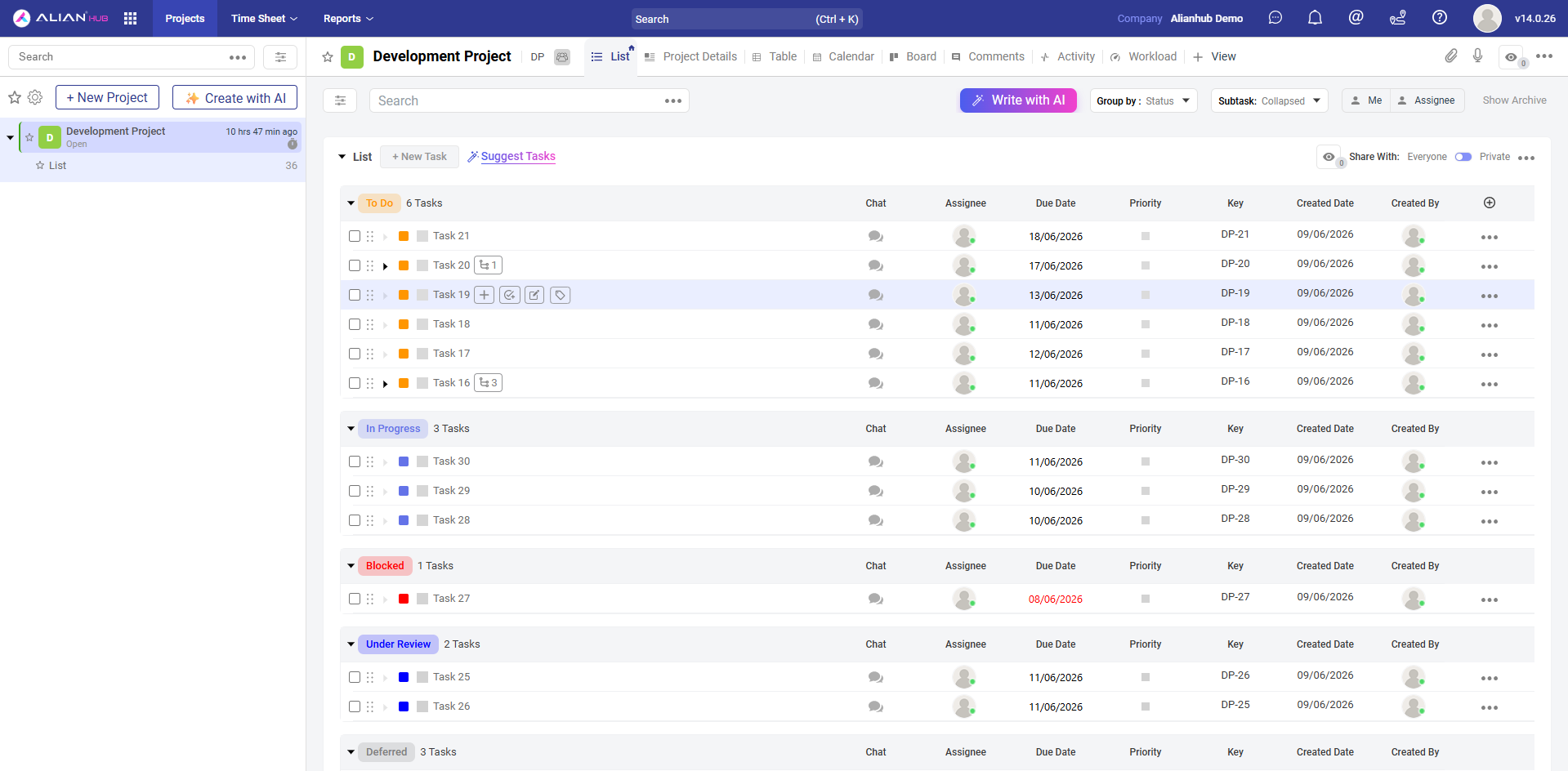
Dense list view grouped by status with sortable columns — Chat, Assignee, Due Date, Priority, Key, Created Date, Created By. Select one or many tasks to bulk-edit status, priority, assignees, due dates, tags, or delete/archive in a single click.
Calendar View
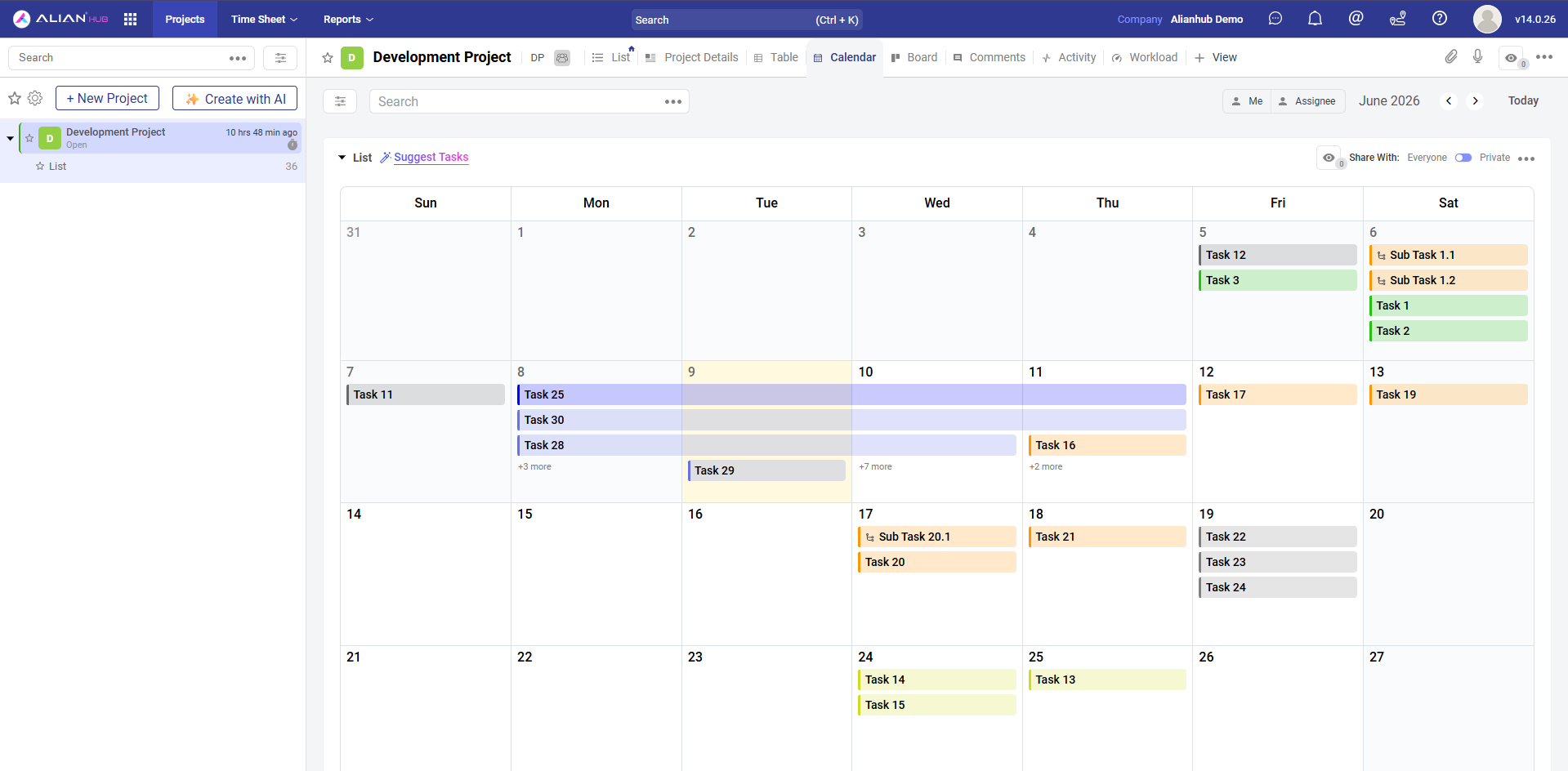
Monthly calendar with tasks rendered as color-coded bars spanning their start and due dates. Sub-tasks appear inline with their parent. Filter by yourself or any assignee, navigate month-to-month, or jump to today.
Task Detail
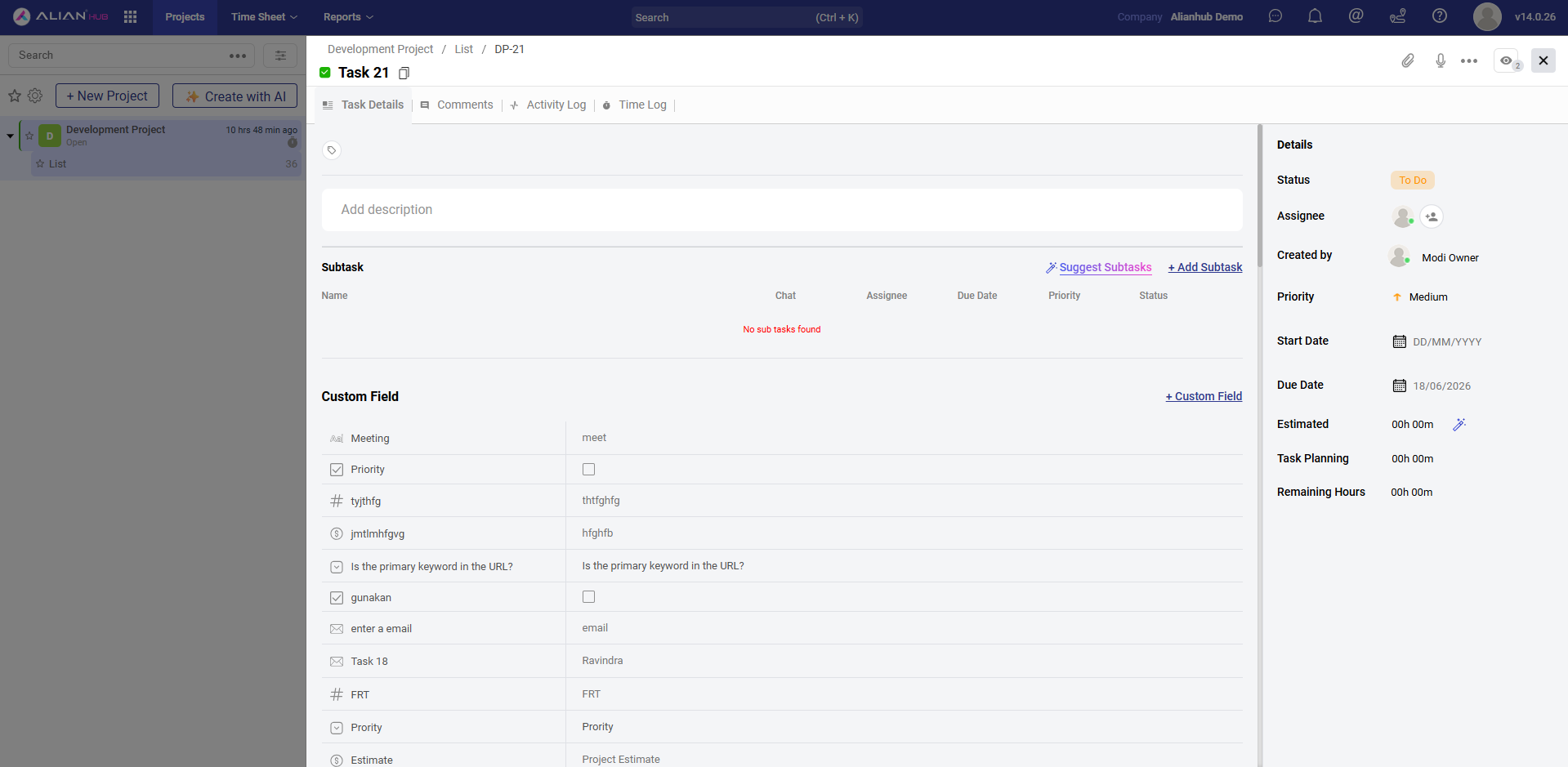
Full task editor with Task Details, Comments, Activity Log, and Time Log tabs. Add sub-tasks, define unlimited custom fields (text, number, email, checkbox, currency, etc.), attach files, and track estimated vs. actual hours in the always-visible right sidebar.
Workload Report
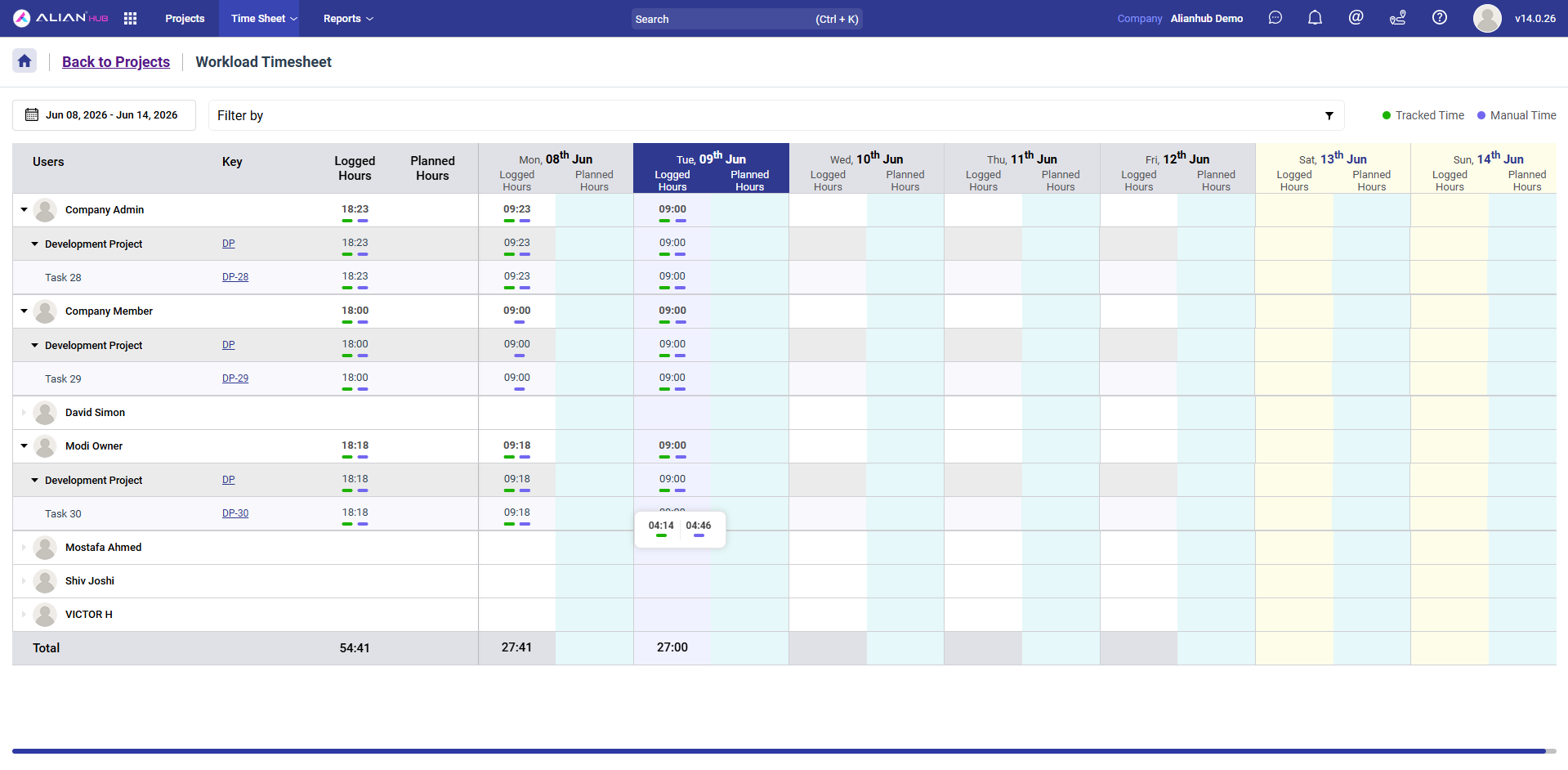
Weekly workload + timesheet in a single view — see logged vs. planned hours per user, drill down into projects and individual tasks, navigate any date range, and toggle between automatically tracked time and manual entries. A capacity-planning differentiator that most open-source PMS tools don't ship.
Settings & Customization
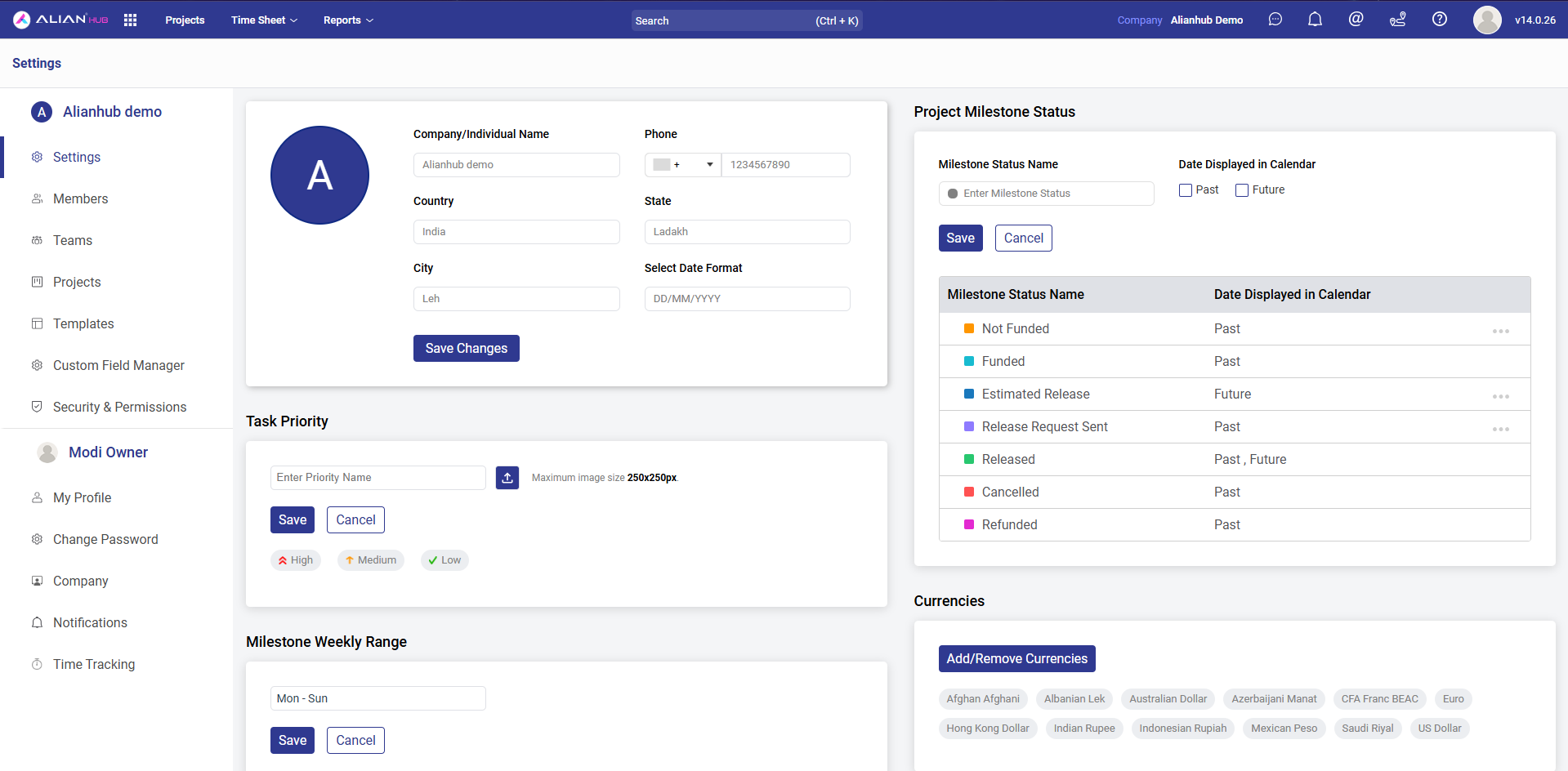
Deep, per-company customization — company info, custom task priorities with icons, milestone statuses with past/future calendar visibility, multi-currency support, members & teams, project templates, custom field manager, role-based security & permissions, time-tracking rules, and notification preferences.
AI Assist
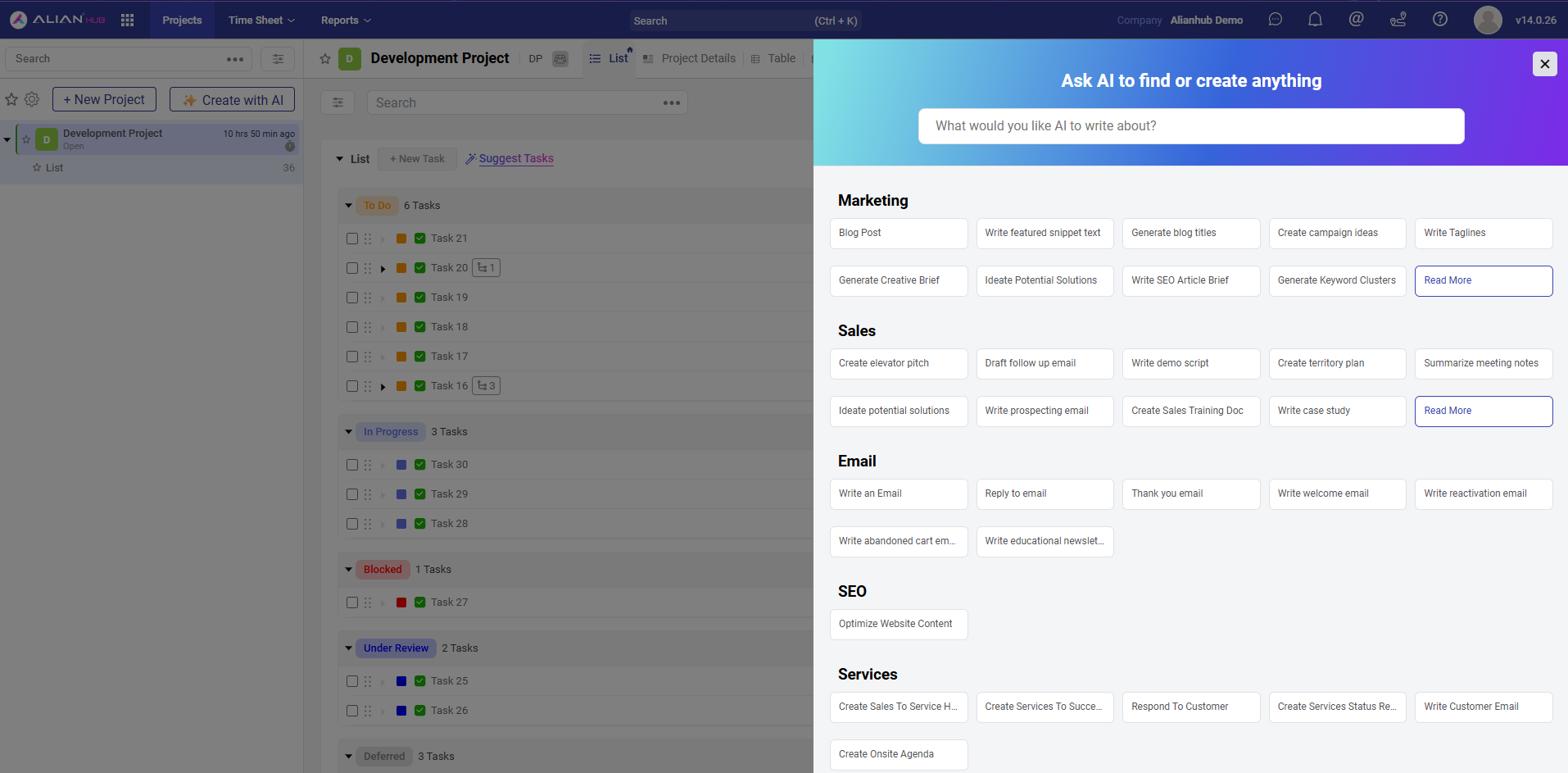
AI available everywhere — generate tasks, sub-tasks, checklists, project plans, and task descriptions from natural language. Pre-built prompt templates across Marketing, Sales, Email, SEO, and Services to jump-start your work without staring at a blank field.
Documentation
📘 Full user guide & API reference: help.alianhub.com
New to project tools? docs/guide/first-hour/ walks through your first hour, one short page at a time.
Going deeper? docs/guide/ is the guide's index. It links views, filters and saved views, custom fields and rules.
Coming from ClickUp? docs/MOVING-FROM-CLICKUP.md says what to export, what comes across and what does not.
Using Claude or ChatGPT with AlianHub? docs/guide/agents/ says how to connect it, what it can do, what waits for your approval, how to undo a change and how to pause it.
For development:
- 🤝 CONTRIBUTING.md — how to contribute
- 🌿 BRANCHING.md — branching strategy and PR workflow
- 🛡️ CODE_OF_CONDUCT.md — community standards
- 🔒 SECURITY.md — responsible disclosure for security issues
- ♿ docs/ACCESSIBILITY.md — accessibility statement, known gaps and how to report a problem
- 🆘 SUPPORT.md — where to ask questions, report bugs, request features
Demo
You can explore a live demo here:
Demo data may reset periodically.
Roadmap
What we're working on, what's planned, and what we're considering — follow along in GitHub Discussions.
Want to suggest something? Open a feature request or start a discussion.
Contributing
Contributions are welcome — bug reports, feature ideas, documentation fixes, and pull requests of all sizes.
📖 Start here:
- 🤝 CONTRIBUTING.md — how to submit issues and PRs
- 🌿 BRANCHING.md — branch model and PR workflow
- 🛡️ CODE_OF_CONDUCT.md — community standards
- 🔒 SECURITY.md — responsible disclosure for security issues
Looking for something to work on? Browse good first issues or help wanted.
Support & Community
| What | Where |
|---|---|
| 📘 Read the docs | help.alianhub.com |
| 💬 Ask a question | GitHub Discussions |
| 🐛 Report a bug | Bug Report issue |
| 🚀 Request a feature | Feature Request issue |
| 🏢 Commercial support | [email protected] |
Full guide: SUPPORT.md.
Deploy & customize with Aliansoftware
AlianHub is built and maintained by Aliansoftware. Want it run for you? We also deploy, customize, and support AlianHub for teams:
- 🚀 Managed hosting & deployment — on your infrastructure or ours
- 🛠️ Custom features & integrations — tailored to your workflow
- 🤝 Priority support & response-time targets — [email protected]
Governance
AlianHub is currently maintained by core maintainers (company-backed).
The long-term goal is to transition toward a community-driven project with dedicated maintainers.
Security
If you discover a security vulnerability, do not open a public issue.
Please report it responsibly using GitHub Security Advisories as described inSECURITY.md.
Contributors ♥️ Thanks
We extend our gratitude to all our numerous contributors who create plugins, assist with issues and pull requests, and respond to questions on GitHub Discussions.
AlianHub Project-Management-System is a community-driven project, and your contributions continually improve it.
Repo Activity




License
Licensed under the GNU Affero General Public License v3.0 (AGPL-3.0).
See the LICENSE file for the full license text and COPYRIGHT for the copyright notice.
What AGPL-3.0 means for you:
- ✅ You can use, modify, self-host, and distribute AlianHub freely.
- ✅ You can run a private modified version internally without publishing changes.
- ⚠️ If you run a modified version as a public network service (SaaS), you must publish your modifications under the same license.
- 📩 Need a different license for commercial / closed-source use? Contact us at [email protected].
Reviews (0)
Sign in to leave a review.
Leave a reviewNo results found