qz-browser-agent
Health Gecti
- License — License: Apache-2.0
- Description — Repository has a description
- Active repo — Last push 0 days ago
- Community trust — 40 GitHub stars
Code Basarisiz
- spawnSync — Synchronous process spawning in scripts/build-extension.mjs
Permissions Gecti
- Permissions — No dangerous permissions requested
Bu listing icin henuz AI raporu yok.
Local-first AI agent for Chrome: browser automation, web research, and data extraction with your own model.
qz-browser-agent (轻舟)
English · 简体中文
两岸猿声啼不住,轻舟已过万重山。
— Li Bai, Leaving Baidi City in the Morning
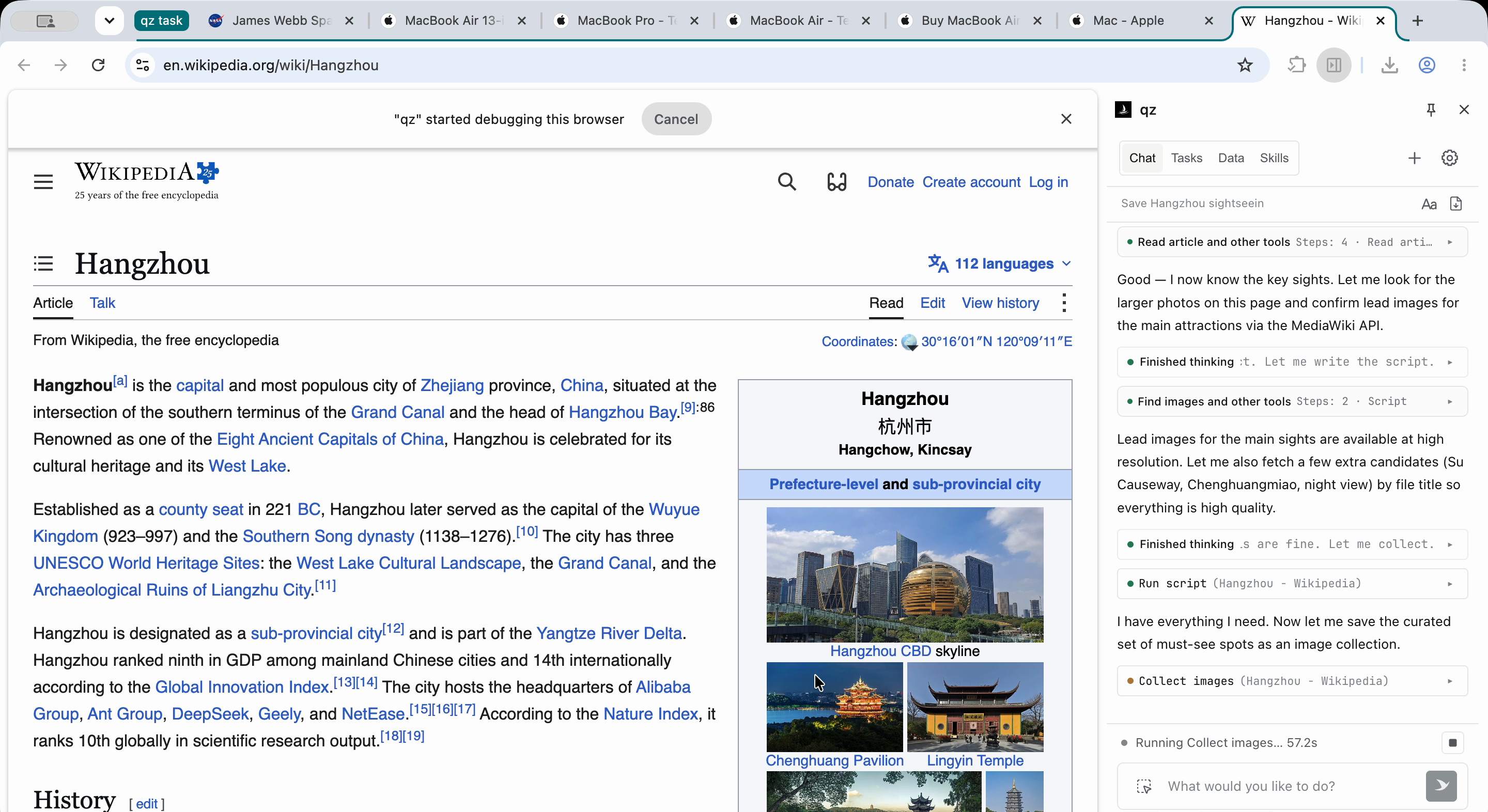
qz (轻舟, qingzhou, “light boat”) is a local-first Chrome extension for web research, browser
automation, and structured data extraction. Bring your own model, and extend it with Skills and
TypeScript capabilities.
https://github.com/user-attachments/assets/26ee85fd-540f-4427-af59-c196fadfa221
Features
- Browser automation. Interact through DOM elements or screenshots, fill forms, and work across tabs in desktop or mobile viewports.
- Parallel subtasks. Run tasks and delegate subtasks concurrently. Interrupt, redirect, or add context while a task is running.
- Structured data. Extract tables, media, and page content into local collections. Preview, edit, and export them from the side panel.
- Skills. Run JavaScript in target web pages. Package instructions, scripts, tools, and custom UI as reusable Skills, with optional site-based activation.
- Model choice. Use any provider with a supported API protocol and tool calling, including local model servers.
- TypeScript capabilities. Add agent tools, panel views, settings pages, or model providers.
- MCP bridge. Expose browser tools and task controls to external agents through the optional local MCP bridge.
Privacy and data flow
Sessions, Skills, and collected data are stored in your browser. Model requests include your input
and any page or file content added to the task context. Skills and MCP connections may also exchange
data with services you configure. See permissions and data flow.
Quick start
Install
- Download the latest release.
- Extract the ZIP.
- Open
chrome://extensionsand enable Developer mode. - Click Load unpacked and select the extracted
qz-browser-agent-extensionfolder.
Build from source
To build locally, install Node.js 24 LTS and npm, then run from a local checkout:
npm ci
npm run build
Follow the Chrome installation steps above, selecting dist/extension/ as the extension folder.
Run
- Open the qz side panel from the extension toolbar.
- In Settings, choose a provider and enter its credentials. A custom endpoint also requires a URL and protocol.
- Select a model and save.
- Try a prompt:
Open example.com and extract its main heading into a table.
Extending qz
Skills
Skills package repeatable workflows: automation scripts, interactive widgets in the side panel, and
optional activation on matching websites (Site Skills). Manage them in the UI or install them from
Git repositories.
TypeScript capabilities
Capabilities are TypeScript modules compiled into the extension. Copy the
example to src/capabilities/<your-feature>/,
rename its registrations, and keep the contributions you need:
// src/capabilities/<your-feature>/index.ts
export { default as tools } from "./tools.js";         // Agent tools
export { default as renderers } from "./renderers.js"; // Tool result views
The build discovers these declarations automatically.
Tool handlers run in the background service worker and can delegate actions or script execution to active tabs.
Renderers mount interactive result cards in the side panel.
See the capability guide for SDK details. These APIs are experimental;
see extension contracts.
Development
Set up the test environment before running tests.
npm run dev       # Rebuild on source changes
npm test          # Run the default test suites
npm run verify    # Type-check and run all automated suites with coverage
After a rebuild, reload the extension at chrome://extensions and reopen the side panel.
License
Apache-2.0. Third-party dependencies retain their own licenses; see
THIRD_PARTY_NOTICES.md.
Yorumlar (0)
Yorum birakmak icin giris yap.
Yorum birakSonuc bulunamadi