telegram-ai-bridge
Health Warn
- License — License: MIT
- Description — Repository has a description
- Active repo — Last push 0 days ago
- Low visibility — Only 5 GitHub stars
Code Fail
- network request — Outbound network request in a2a/bus.js
- exec() — Shell command execution in adapters/claude.js
- process.env — Environment variable access in adapters/claude.js
- process.env — Environment variable access in adapters/codex.js
- process.env — Environment variable access in adapters/gemini.js
- network request — Outbound network request in adapters/gemini.js
- process.env — Environment variable access in agent/providers/command.js
Permissions Pass
- Permissions — No dangerous permissions requested
This tool is a self-hosted bridge that lets you control multiple parallel AI coding sessions (like Claude Code, Codex, or Gemini) directly from Telegram on your phone. It supports shared memory across sessions and distinct personas for each bot.
Security Assessment
The overall risk is High. The tool's core design is to act as a remote terminal interface, which inherently carries significant security responsibilities. The audit successfully detected shell command execution, which is expected given it runs "actual" coding sessions, but this also means any vulnerability or malicious actor in the pipeline could lead to arbitrary code execution on your machine. It makes outbound network requests to communicate with Telegram and the AI providers. It accesses environment variables, which is necessary to read API keys, but developers must ensure their system secrets are strictly confined to a secure configuration file and not exposed elsewhere. There are no hardcoded secrets in the codebase, and no dangerous OS-level permissions are requested. However, because this tool acts as a gateway between a public messaging app and your local system's shell, an improperly secured setup could easily be compromised.
Quality Assessment
The project is very new and has minimal community validation, reflected by its low star count. It is actively maintained, with recent repository pushes. It uses the permissive and standard MIT license, which is good for open-source adoption. Because it is a young project with low visibility, it should be treated as experimental software rather than battle-tested infrastructure.
Verdict
Use with caution.
Run N parallel Claude Code sessions from your phone. Shared memory, per-bot personas, War Room mode. Self-hosted Telegram bridge for CC / Codex / Gemini.
telegram-ai-bridge
Full Claude Code. Everywhere. Anytime.
N parallel Claude Code sessions from your phone. Shared memory. War Room coordination. Always-on. Self-hosted.
A self-hosted Telegram bridge that runs actual Claude Code — not an API wrapper — with full session management, multi-backend support (Claude + Codex + Gemini), and agent-to-agent collaboration.





English | 简体中文
Remote Control = your phone watches the terminal.
Channels = the terminal receives phone messages.
This project = your phone IS the terminal.
You:      @cc-alpha Analyze this API design
Alpha:    [deep analysis, writes to shared context]

You:      @cc-beta Write integration tests based on Alpha's analysis
Beta:     [reads Alpha's analysis from shared context, writes tests]

You:      @cc-gamma Review both — any gaps?
Gamma:    [reads everything, reviews]

You:      @cc-delta Ship it — commit and push
Delta:    [reads full context, commits]
4 agents, 1 group, shared memory, zero noise. The same workflow that takes 4 terminal windows on your desk — now fits in your pocket.
What This Unlocks
Parallel Sessions — Desktop Power, Phone Form Factor
On your desktop you run 4-5 Claude Code windows simultaneously. Now do the same from your phone:
TG Bot 1 (🟣) ──→ CC Instance 1 ──┐
TG Bot 2 (🔵) ──→ CC Instance 2 ──┤── Shared: CLAUDE.md + MCP memory + ~/.claude/
TG Bot 3 (🟢) ──→ CC Instance 3 ──┤
TG Bot 4 (🟡) ──→ CC Instance 4 ──┘
Each bot runs an independent CC process with its own session. Not a thin API client — full Claude Code with all native tools (Bash, Read, Write, Edit, Glob, Grep, WebFetch), skills, hooks, and MCP servers. All instances share the same memory layer (CLAUDE.md, RecallNest, project settings) — what you tell one, the others already know. No memory fragmentation, no sync overhead.
Setup takes 30 seconds per instance: create a bot with @BotFather, copy a config, start a process. See Multi-Instance Deployment below.
Want different personalities? Point each bot's cwd to a directory with its own CLAUDE.md. CC loads global rules from ~/.claude/CLAUDE.md + per-bot persona from the workspace — just like OpenClaw's SOUL.md, but with CC's full skill/hook/MCP stack behind it.
~/.claude/CLAUDE.md              ← shared rules (memory, safety, workflow)
~/bots/researcher/CLAUDE.md      ← "You are a deep research analyst..."
~/bots/reviewer/CLAUDE.md        ← "You are a senior code reviewer..."
~/bots/writer/CLAUDE.md          ← "You are a content strategist..."
Phone-First Agent Control
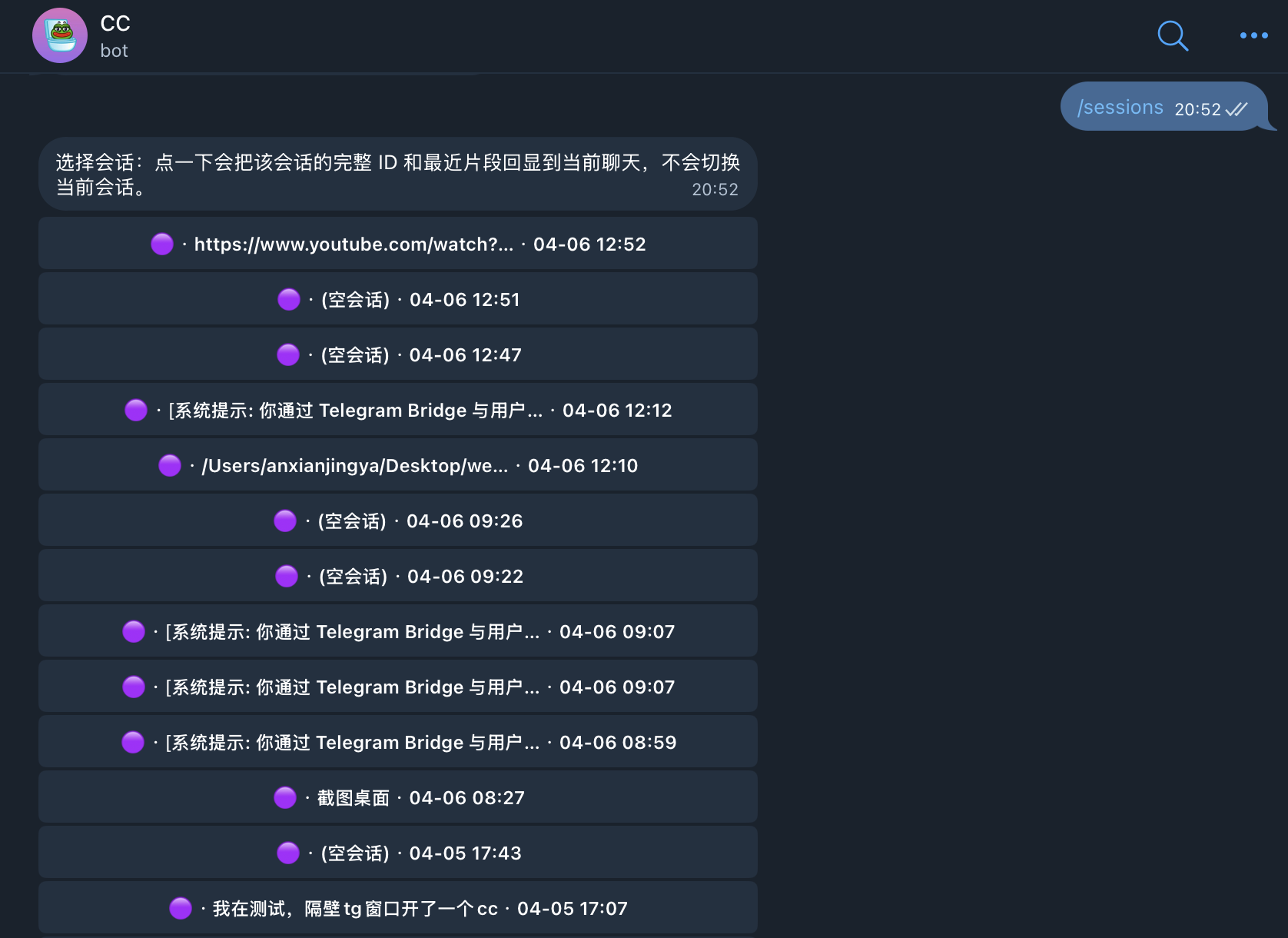
Walk away from your desk. Open Telegram. /new starts a fresh session. /resume 3 picks up where you left off. /peek 5 reads a session without touching it. /model switches models on the fly. Full session lifecycle from your phone — no terminal required.
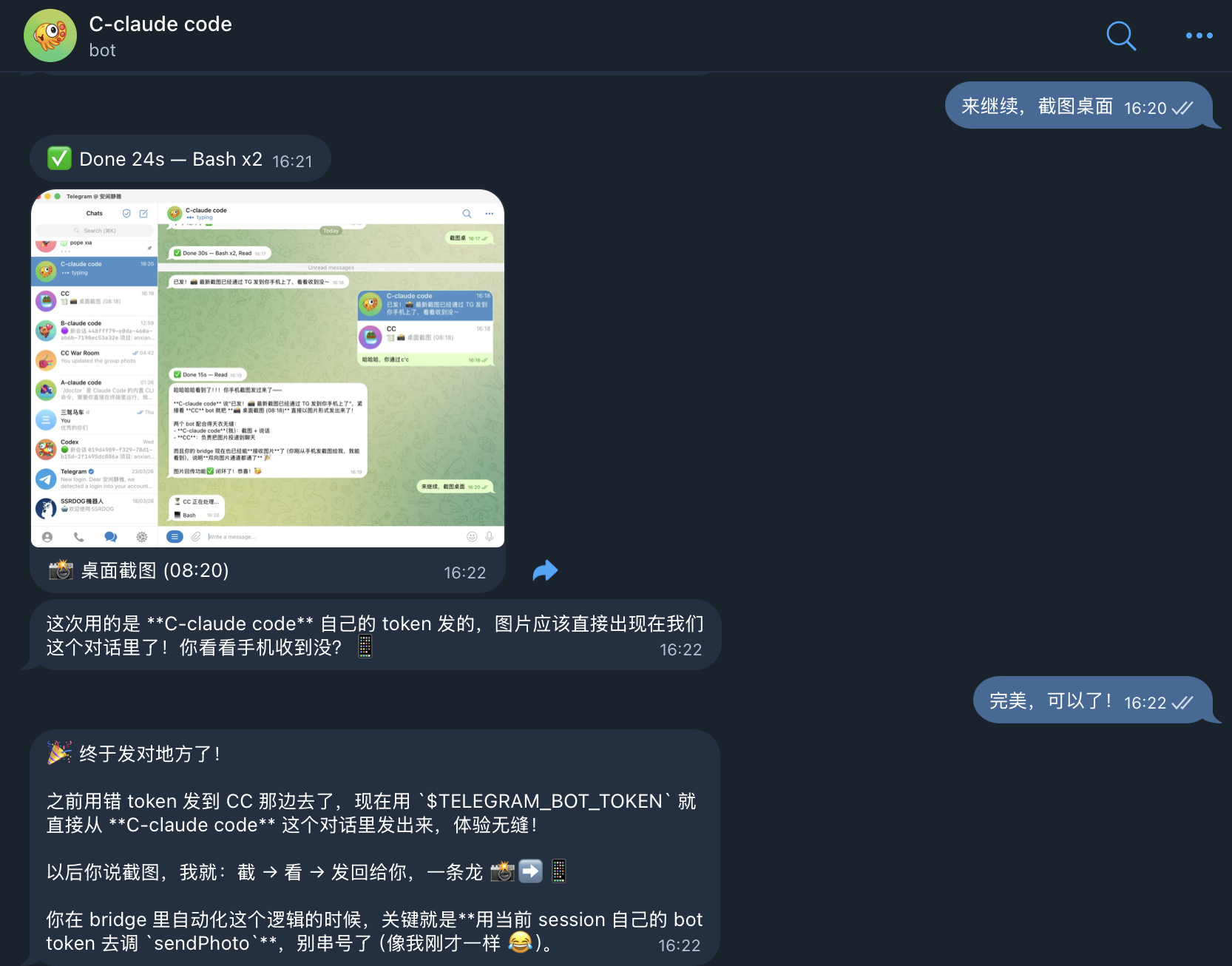
Bidirectional Media — Screenshots & Files Flow Back
Input has always been bidirectional: text, photos, documents, voice all flow to CC. Now output is too:
- Screenshots: CC takes a screenshot → image appears in your TG chat automatically
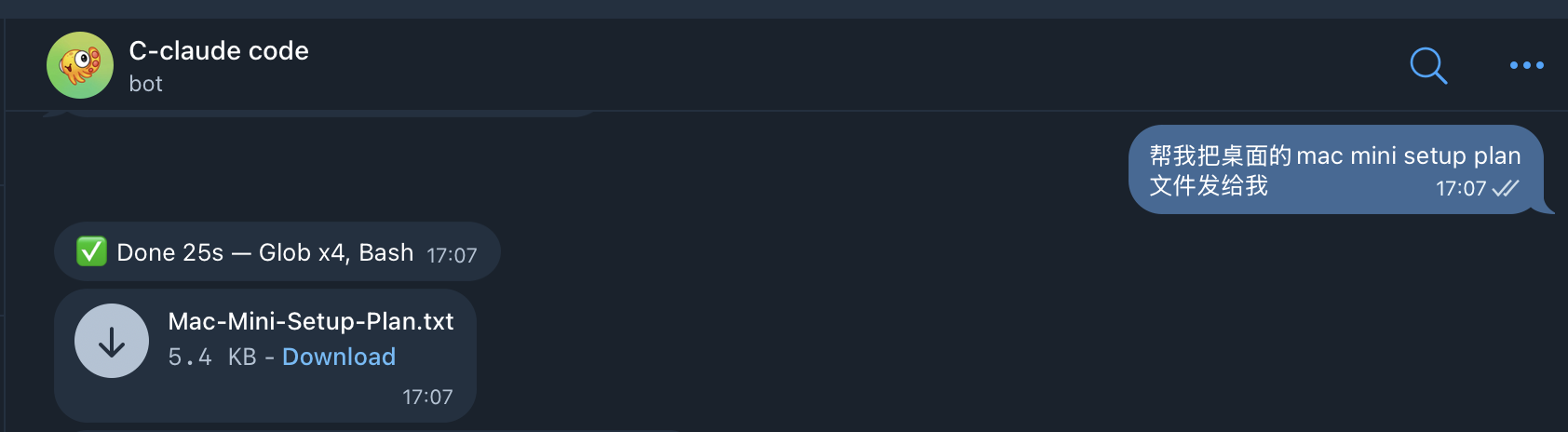
- Files: CC creates or references a file → bridge detects the path and sends it as a TG attachment
- Long code: Output >4000 chars with >60% code → sent as a file attachment with preview summary
The bridge captures images from SDK tool results (base64 data from Read/peekaboo/screenshot tools) and scans CC's response text for file paths. No manual copy-paste, no "where did you save it?" — files just appear in the chat.
Reply to cancel: Task taking too long? Send
/cancelto abort. Need context from a previous message? Reply to it — the quoted text is automatically included as context.
Multi-Agent Collaboration
Put @claude-bot and @codex-bot in the same Telegram group. Ask Claude to review code — Codex reads the reply via shared context and offers its own take automatically. Built-in loop guards and circuit breakers prevent runaway bot-to-bot conversations. For DM cross-checking, bots communicate directly via MCP/CLI — no relay needed.
War Room — Multi-CC Command Center
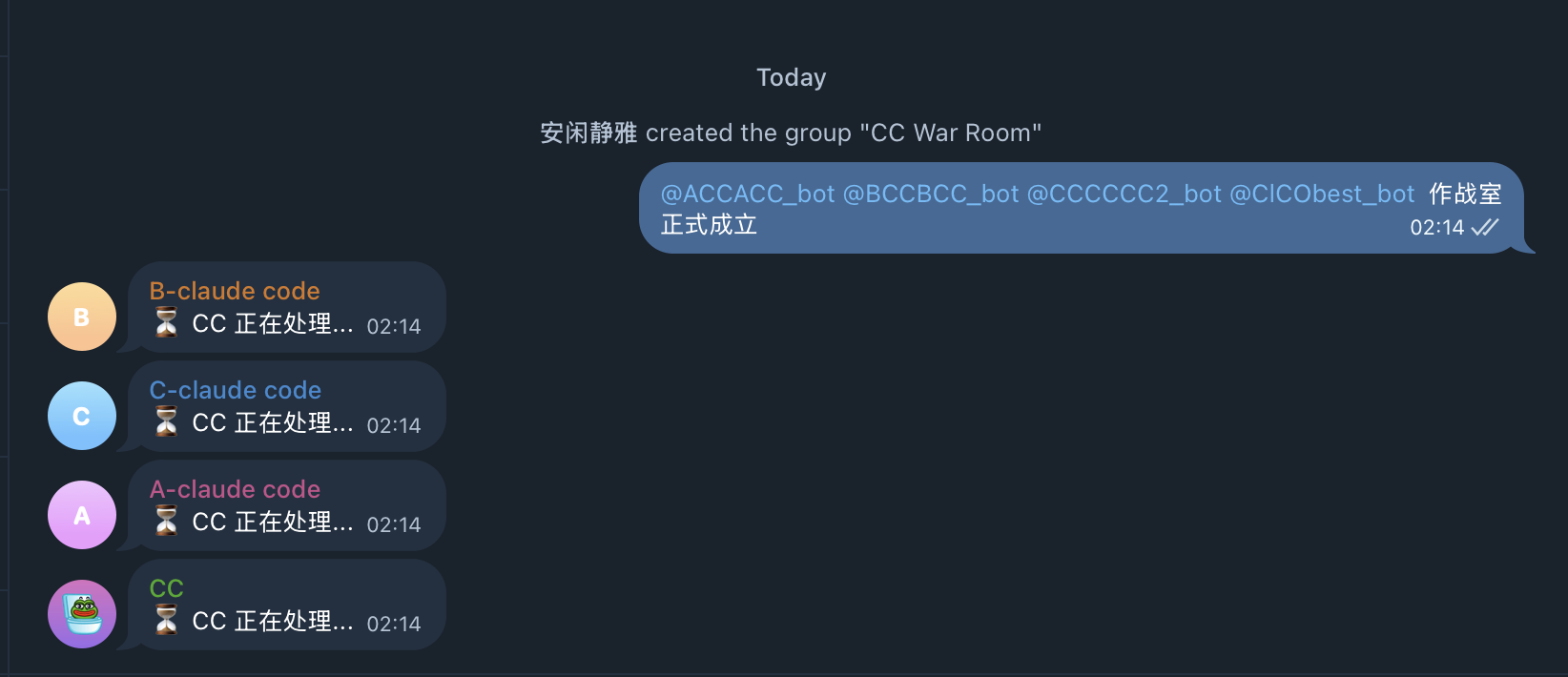
Put all 4 CC bots in one Telegram group. Each bot stays silent until @mentioned — no crosstalk, no chaos. But every bot can read what the others said via shared context (Redis-backed). You orchestrate — they execute.
Two collaboration modes in one project:
- A2A mode (CC + Codex group): bots auto-respond to each other with loop guards — for brainstorming and debate
- War Room mode (multi-CC group): @mention only — for coordinated parallel execution
Done discussing? /export dumps the entire cross-bot conversation as a Markdown file — full audit trail, every bot's contribution timestamped.
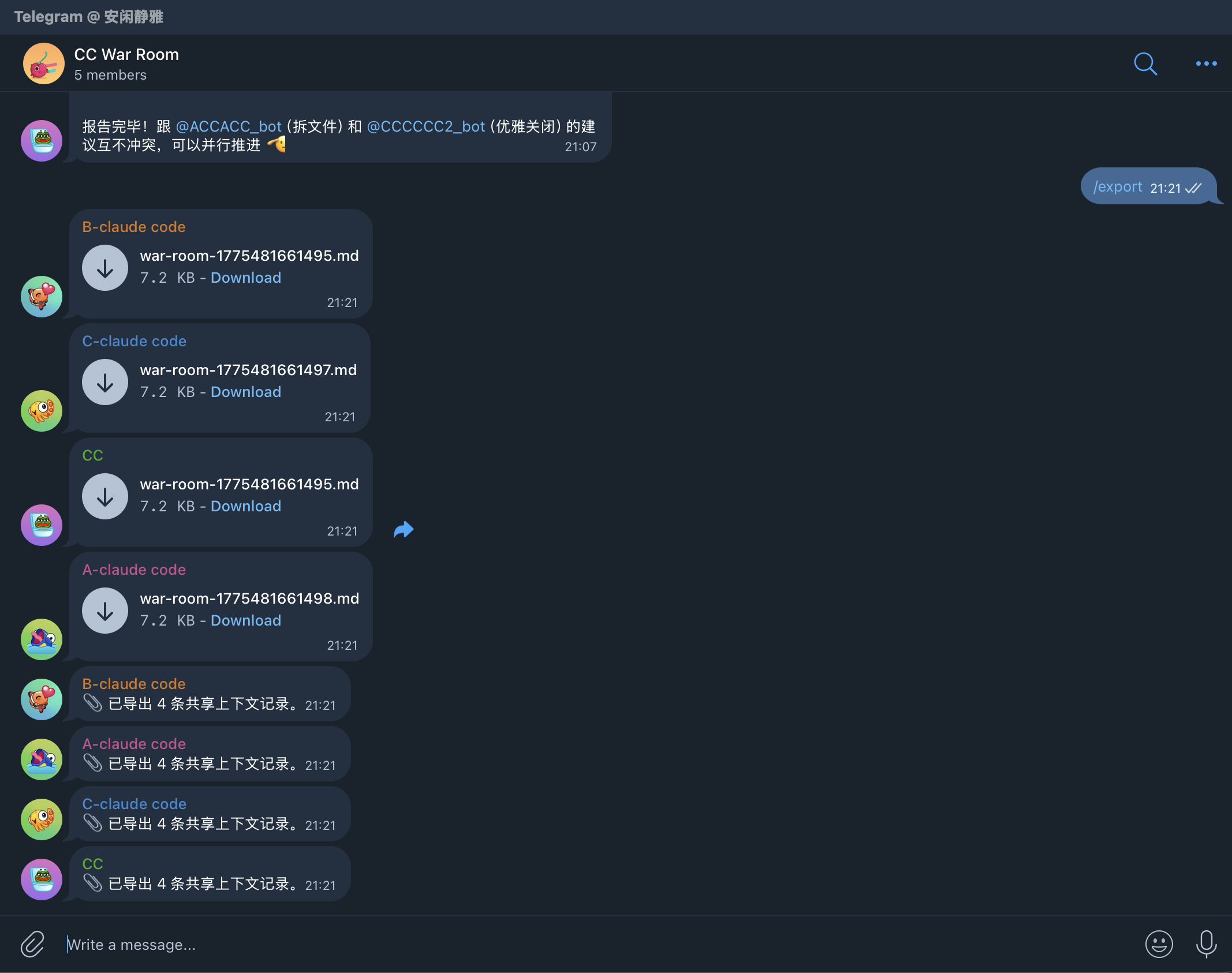
Always-On, Self-Hosted
macOS LaunchAgent or Docker keeps the bridge running in the background. Sessions persist in SQLite across restarts and reboots — pick up where you left off after a reboot, a network drop, or a flight. Code and credentials never leave your machine. Owner-only access by default.
Why this matters: Claude's official tools give you one session, tied to a terminal. OpenClaw gives you one bot per session, isolated memory. This project gives you N parallel sessions with shared memory, persistent state, and full CC capabilities — the same productive workflow you have on desktop, now available everywhere you have Telegram.
Quick Start
Prerequisites: Bun runtime, a Telegram bot token (from @BotFather), and at least one backend CLI: Claude Code, Codex, or Gemini CLI.
git clone https://github.com/AliceLJY/telegram-ai-bridge.git
cd telegram-ai-bridge
bun install
bun run bootstrap --backend claude
bun run setup --backend claude
bun run check --backend claude
bun run start --backend claude
Want parallel agents? Add a second bot in 30 seconds — see Multi-Instance Deployment.
Recommended Deployment
Run multiple bots for parallel workflows:
@cc-alpha→ Claude Code instance 1 (primary)@cc-beta→ Claude Code instance 2 (parallel tasks)@cc-gamma→ Claude Code instance 3 (parallel tasks)@your-codex-bot→ Codex (different backend)
Each Claude instance shares memory automatically. No configuration needed — CC's memory lives in ~/.claude/, not in the bot.
Supported backends:
| Backend | SDK | Status |
|---|---|---|
claude |
Claude Code (via Agent SDK) | Recommended |
codex |
Codex CLI (via Codex SDK) | Recommended |
gemini |
Gemini Code Assist API | Experimental |
Core rule: One bot = one process = one independent agent. Run as many as you need.
The bridge is transparent. Your TG bot inherits whatever skills, MCP servers, and hooks your local CC has. If CC can browse the web, generate images, or query databases in terminal — it can do the same through Telegram. The bridge adds session management; the capabilities come from CC itself.
Telegram Commands
Sessions are sticky: messages continue the current session until you explicitly change it.
| Command | Description |
|---|---|
/help |
Show all commands with descriptions |
/new |
Start a new session |
/cancel |
Abort the currently running task |
/sessions |
List recent sessions |
/peek <id> |
Read-only preview a session |
/resume <id> |
Rebind current chat to an owned session |
/model |
Pick a model for the current bot |
/status |
Show backend, model, cwd, and session |
/dir |
Switch working directory |
/tasks |
Show recent task history |
/verbose 0|1|2 |
Change progress verbosity |
/cron |
Manage scheduled tasks |
/export |
Export group shared context as Markdown file |
/doctor |
Run health check |
/a2a |
Show A2A bus status, peer health, and loop guard stats |
How It Compares
Claude Code now ships Remote Control (Feb 2026) and a Telegram channel plugin (Mar 2026). Both let you talk to Claude from your phone. Neither gives you session management, multi-backend support, or agent-to-agent collaboration.
| What you'd expect from phone control | Remote Control | Channels (TG plugin) | OpenClaw | This project |
|---|---|---|---|---|
| Parallel sessions (multi-instance) | — | — | 1 bot = 1 session | N bots, N parallel CC instances, shared memory |
| Create new sessions from phone | — | — | — | /new |
| Browse & resume past sessions | — | — | — | /sessions /resume /peek |
| Switch models on the fly | — | — | Per-bot config | /model with inline buttons |
| Claude + Codex + Gemini backends | Claude only | Claude only | Provider-locked | All three, per-chat switchable |
| Tool approval from phone | Partial (limited UI) | Yes | Yes | Inline buttons: Allow / Deny / Always / YOLO |
| War Room (multi-agent command center) | — | — | — | @mention dispatch + Redis shared context |
| Multi-agent group collaboration | — | — | — | A2A bus + shared context |
| Cross-agent collaboration | — | — | Gateway channels | A2A broadcast (groups) + MCP/CLI (DMs) |
| Real-time progress streaming | Terminal output only | — | Yes | Live text preview (editMessage streaming) + tool icons + 3 verbosity levels |
| Rapid message batching | N/A | — | — | FlushGate: 800ms window, auto-merge |
| Photo / document / voice input | — | Text only | Yes | Auto-download + reference in prompt |
| Image / file output relay | Terminal only | — | — | Screenshots & files auto-sent to TG chat |
| Cancel running task | Ctrl+C in terminal | — | — | /cancel — abort from phone |
| Message reply context | N/A | — | — | Reply to any message → quoted text as context |
| Smart quick-reply buttons | — | — | — | Yes/No + numbered options (1. 1、 1) formats) |
| Runs as background daemon | Terminal must stay open | Session must be open | Yes (Gateway) | LaunchAgent / Docker |
| Survives network interruptions | 10-min timeout kills session | Tied to session lifecycle | Gateway reconnect | SQLite + Redis persistence |
| Memory shared across instances | N/A | N/A | Per-bot isolated | All instances share CLAUDE.md + MCP memory |
| Per-bot persona | N/A | N/A | SOUL.md per bot | Per-bot CLAUDE.md workspace + shared global rules |
| Group context compression | N/A | N/A | N/A | 3-tier: recent full / middle truncated / old keywords |
| Shared context backend | N/A | N/A | N/A | SQLite / JSON / Redis (pluggable) |
| Task audit trail | — | — | — | SQLite: status, cost, duration, approval log |
| Loop guard for bot-to-bot | N/A | N/A | N/A | 5-layer: generation + cooldown + rate + dedup + AI |
| Stable release | Yes | Research preview | Yes | Yes (v3.0) |
What official tools do better: Remote Control streams full terminal output. Channels relay tool-approval dialogs natively. Claude Code on the web provides cloud compute without local setup. This project optimizes for a different job: persistent, multi-agent session management entirely from Telegram.
Migrating from OpenClaw?Every OpenClaw feature has a direct equivalent — most of them are just CC running natively behind the bridge:
| OpenClaw feature | How this project handles it |
|---|---|
| IM integration (Telegram/WhatsApp) | grammy Telegram bot + Claude Code Agent SDK — runs full CC, not an API wrapper |
| Multi-agent routing | A2A bus (auto-debate) + War Room (@mention dispatch) |
| Skills | CC native skills (~/.claude/skills/) — no conversion needed |
| Memory system | CC native (CLAUDE.md + MCP memory like RecallNest) — shared across all instances |
| Cron / scheduled tasks | CC native cron — runs inside the agent, results delivered to TG |
| Tool execution (bash/fs/web) | CC native tools — Bash, Read, Write, Edit, Glob, Grep, WebFetch, etc. |
| External agents (ACP) | CC subagents + MCP servers |
| Hooks | CC native hooks (~/.claude/settings.json) |
| Web UI | Telegram IS the UI — inline buttons, notifications, multi-device, zero deployment |
| SOUL.md persona | Per-bot CLAUDE.md workspace + shared global rules |
| Workspace memory | Per-project CLAUDE.md + MCP memory — CC loads both automatically |
The difference: OpenClaw reimplements these features on top of an API. This project runs actual Claude Code — every feature CC has, you get for free.
Multi-Bot Group Collaboration
Telegram bots cannot see each other's messages — this is a platform-level limitation. When you put Claude and Codex in the same group, neither can read the other's replies.
This project works around it with a pluggable shared context store. Each bot writes its reply after responding. When another bot is @mentioned, it reads the shared context and includes the other bot's replies in its prompt.
You: @claude Review this code
CC:  [reviews code, writes reply to shared store]

You: @codex Do you agree with CC's review?
Codex: [reads CC's reply from shared store, gives opinion]
No copy-pasting needed. Built-in limits (30 messages / 3000 tokens / 20-minute TTL) prevent context bloat.
Storage Backend Comparison
| Backend | Dependencies | Concurrency | Best For |
|---|---|---|---|
sqlite (default) |
None (built-in) | WAL mode, single-writer | Single bot, low concurrency |
json |
None (built-in) | Atomic write (tmp+rename) | Zero-dependency deployment |
redis |
ioredis |
Native concurrency + TTL | Multi-bot, Docker environment |
Set sharedContextBackend in config.json:
{
  "shared": {
    "sharedContextBackend": "redis",
    "redisUrl": "redis://localhost:6379"
  }
}
Note: Bots only respond when explicitly @mentioned or replied to. They don't auto-reply to each other.
A2A: Agent-to-Agent Communication
Beyond passive shared context, A2A lets bots actively respond to each other in group chats. When one bot replies to a user, the A2A bus broadcasts the response to sibling bots. Each sibling independently decides whether to chime in.
You:    @claude What's the best way to handle retries?
Claude: [responds with retry pattern advice]
         ↓ A2A broadcast
Codex:  [reads Claude's reply, adds: "I'd also suggest exponential backoff..."]
Built-in safety:
- Loop guard: Max 2 generations of bot-to-bot replies per conversation turn
- Cooldown: 60s minimum between A2A responses per bot
- Circuit breaker: Auto-disables unreachable peers after 3 failures
- Rate limit: Max 3 A2A responses per 5-minute window
Important: A2A only works in group chats. Private/DM conversations are never broadcast — this prevents cross-bot message leaking between separate DM windows.
Enable in config.json:
{
  "shared": {
    "a2aEnabled": true,
    "a2aPorts": { "claude": 18810, "codex": 18811 }
  }
}
Each bot instance listens on its assigned port. Peers are auto-discovered from a2aPorts (excluding self).
Architecture
Telegram bot
  → start.js
  → config.json
  → bridge.js
  → executor (direct | local-agent)
  → backend adapter (claude | codex | gemini)
  → local credentials and session files
Each bot instance keeps its own Telegram token, SQLite DBs, credential directory, and model settings.
Configuration
bun run bootstrap --backend claude generates a starter config.json. Or copy config.example.json.
{
  "shared": {
    "ownerTelegramId": "123456789",
    "cwd": "/Users/you",
    "httpProxy": "",
    "defaultVerboseLevel": 1,
    "executor": "direct",
    "tasksDb": "tasks.db",
    "sharedContextBackend": "sqlite",
    "sharedContextDb": "shared-context.db",
    "redisUrl": "",
    "streamPreviewEnabled": true
  },
  "backends": {
    "claude": {
      "enabled": true,
      "telegramBotToken": "...",
      "sessionsDb": "sessions.db",
      "model": "claude-sonnet-4-6",
      "permissionMode": "default"
    },
    "codex": {
      "enabled": true,
      "telegramBotToken": "...",
      "sessionsDb": "sessions-codex.db",
      "model": ""
    },
    "gemini": {
      "enabled": false,
      "telegramBotToken": "",
      "sessionsDb": "sessions-gemini.db",
      "model": "gemini-2.5-pro",
      "oauthClientId": "",
      "oauthClientSecret": "",
      "googleCloudProject": ""
    }
  }
}
config.json is gitignored. Sessions run until completion — no hard timeout (a soft watchdog logs after 15 minutes without aborting).
Inspect resolved config: bun run config --backend claude (secrets redacted).
Claude:
- Requires local login state under
~/.claude/ - Supports
permissionMode:defaultorbypassPermissions
Codex:
- Requires local login state under
~/.codex/ - Optional
modeloverride; empty string uses Codex defaults
Gemini:
- Experimental compatibility backend, not primary
- Requires
~/.gemini/oauth_creds.json,oauthClientId,oauthClientSecret - Uses Gemini Code Assist API mode, not full CLI terminal control
- Recommended only when you intentionally need Gemini support
Multi-Instance Deployment
Run N parallel Claude Code instances, each with its own Telegram bot:
1. Create a bot — message @BotFather on Telegram, get a token.
2. Create a config file — copy and customize:
cp config.json config-2.json
# Edit config-2.json: change telegramBotToken, sessionsDb, tasksDb
{
  "shared": {
    "ownerTelegramId": "YOUR_ID",
    "tasksDb": "tasks-2.db"
  },
  "backends": {
    "claude": {
      "enabled": true,
      "telegramBotToken": "NEW_TOKEN_FROM_BOTFATHER",
      "sessionsDb": "sessions-2.db",
      "model": "claude-opus-4-6",
      "permissionMode": "bypassPermissions"
    }
  }
}
3. Start it:
bun run start --backend claude --config config-2.json
4. (Optional) Register as LaunchAgent for auto-start:
# The run script accepts an optional config path as second argument:
# scripts/run-launch-agent.sh <backend> [config-file]
See the LaunchAgent section below for plist setup.
What's shared vs isolated:
Shared (automatic) Isolated (per-instance) ~/.claude/(CLAUDE.md, memory, skills, hooks)Telegram bot token MCP servers (RecallNest, etc.) SQLite sessions DB Project settings & rules SQLite tasks DB Git repos & file system Log files
macOS LaunchAgent
Generate and install:
./scripts/install-launch-agent.sh --backend claude --install
./scripts/install-launch-agent.sh --backend codex --install
The wrapper runs bun run check before bun run start, so bad config fails fast.
Default labels: com.telegram-ai-bridge, com.telegram-ai-bridge-codex, com.telegram-ai-bridge-gemini.
launchctl print gui/$(id -u)/com.telegram-ai-bridge
launchctl kickstart -k gui/$(id -u)/com.telegram-ai-bridge
tail -f bridge.log
If you see 409 Conflict, another process is polling the same bot token.
docker build -t telegram-ai-bridge .

docker run -d \
  --name tg-ai-bridge-claude \
  -v $(pwd)/config.json:/app/config.json:ro \
  -v ~/.claude:/root/.claude \
  telegram-ai-bridge --backend claude
Swap credential mount and --backend for other backends. See docker-compose.example.yml for a Compose starter.
start.js— CLI entry forstart,bootstrap,check,setup,configconfig.js— Config loader and setup wizardbridge.js— Telegram bot runtimesessions.js— SQLite session persistencestreaming-preview.js— Live text preview via editMessage (throttled, with degradation)send-retry.js— Outbound delivery retry with error classification and HTML fallbackfile-ref-protect.js— Prevents Telegram auto-linking filenames as domains (.md, .go, .py etc.)shared-context.js— Cross-bot shared context entry pointshared-context/— Pluggable backends (SQLite / JSON / Redis)a2a/— Agent-to-agent communication bus, loop guard, peer healthadapters/— Backend integrationslaunchd/— LaunchAgent template for macOSscripts/— Install wrapper and runtime launcherdocker-compose.example.yml— Compose starter
direct— runs the backend adapter in-process (default)local-agent— communicates with a local agent subprocess over JSONL stdio
Set in config.json at shared.executor, or override with BRIDGE_EXECUTOR.
How It Fits Together
Three ways to make AI agents talk to each other — different protocols, different scenarios:
| Layer | Protocol | How | Scenario |
|---|---|---|---|
| Terminal | MCP | Built-in codex mcp-server + claude mcp serve, zero code |
CC ↔ Codex direct calls in your terminal |
| Telegram Group | Custom A2A | This project's A2A bus, auto-broadcast | Multiple bots in one group, chiming in |
| Telegram DM | MCP / CLI | Bots call each other directly via terminal config | Direct cross-bot communication, no bridge needed |
| Server | Google A2A v0.3.0 | openclaw-a2a-gateway | OpenClaw agents across servers |
MCP vs A2A: MCP is a tool-calling protocol (I invoke your capability). A2A is a peer communication protocol (I talk to you as an equal). CC calling Codex via MCP is using Codex as a tool — not two agents chatting.
Terminal: CLI-to-CLI via MCP (No Telegram Needed)
Claude Code and Codex each have a built-in MCP server mode. Register them with each other and they can call each other directly — no bridge, no Telegram, no custom code:
# In Claude Code: register Codex as MCP server
claude mcp add codex -- codex mcp-server

# In Codex: register Claude Code as MCP server (in ~/.codex/config.toml)
[mcp_servers.claude-code]
type = "stdio"
command = "claude"
args = ["mcp", "serve"]
Telegram: This Project
Groups use A2A auto-broadcast. DMs go through MCP/CLI direct communication. See sections above.
Server: openclaw-a2a-gateway
For OpenClaw agents communicating across servers via the Google A2A v0.3.0 standard protocol. A different system entirely — see openclaw-a2a-gateway.
Development
bun test
GitHub Actions runs the same suite on every push and pull request.
Ecosystem
Part of the 小试AI open-source AI workflow:
| Project | Description |
|---|---|
| recallnest | MCP memory workbench (LanceDB + Jina v5) |
| content-alchemy | 5-stage AI writing pipeline |
| content-publisher | Image generation + layout + WeChat publishing |
| openclaw-tunnel | Docker ↔ host CLI bridge (/cc /codex /gemini) |
| digital-clone-skill | Build digital clones from corpus data |
| telegram-cli-bridge | Telegram CLI bridge for Gemini CLI |
| claude-code-studio | Multi-session collaboration platform for Claude Code |
| agent-nexus | One-command installer for memory + remote control |
| cc-cabin | Complete Claude Code workflow scaffold |
License
MIT
Reviews (0)
Sign in to leave a review.
Leave a reviewNo results found