foldline
Health Uyari
- License — License: NOASSERTION
- Description — Repository has a description
- Active repo — Last push 0 days ago
- Low visibility — Only 6 GitHub stars
Code Basarisiz
- exec() — Shell command execution in core/mcp/server.mjs
- os.homedir — User home directory access in core/mcp/server.mjs
- process.env — Environment variable access in core/mcp/server.mjs
- process.env — Environment variable access in core/render/browser.mjs
Permissions Gecti
- Permissions — No dangerous permissions requested
Bu listing icin henuz AI raporu yok.
Render HTML canvas animations to MP4 fast on a Mac, with WebCodecs hardware H.264 in headless Chrome (8.4 min 1080p60 in 161 s instead of 426 s). MCP server for Claude Code, Codex and Cursor. Ships 66 code-made film styles from LemoLab's lemo-opuscar. Free for non-commercial use.
Foldline
Render HTML canvas animations to MP4, fast, on a Mac.
With the full lemo-opuscar library of 66 film styles made in code.
Made for Unfold, an animated "What if" channel in a paper pop-up book style.

https://github.com/user-attachments/assets/05724852-c9ae-4762-90a9-634315b2b016
▶ Watch on YouTube · download the MP4 · read the deep dive on Medium
Made with Foldline itself: every frame drawn in code, a local text-to-speech voice, music synthesised in code. It renders in 34 s. Source in examples/foldline-explainer.
What it is
Foldline turns a web page that draws a film in code into an H.264 MP4. You write an HTML page with a <canvas> and a render(t) function. Foldline opens it in headless Chrome, draws every frame, and encodes the video inside the page with WebCodecs on the Mac's hardware encoder, so frames never leave the GPU. On an M1 Pro, an 8.4-minute 1080p 60 fps video renders in 161 s instead of 426 s (see Results). It's open source and free for non-commercial use, and it works well with coding agents like Claude Code.
Foldline is a project by Alireza Toghiani, built for the Unfold channel. It isn't a GitHub fork. It ships the full lemo-opuscar library by LemoLab:
- all 66 film styles in
styles/, each with a style prompt and a demo film made in code - the toolkit in
core/(render, voice, music, mix) - the guides
DIRECTOR.md,TECHNIQUE.mdandMY-STYLES.md - lemo's Claude Code plugin in
plugin/
lemo's original README is kept as LEMO-README.md. It has the style list, how to make a style your own, and the full requirements.
What Foldline adds is a faster video renderer, core/render/video.mjs, and an MCP server for coding agents, core/mcp/server.mjs.
What's new vs lemo-opuscar
- The page encodes the video itself. By default
video.mjsencodes H.264 inside the page with WebCodecs, on the Mac's hardware encoder. Each frame goes from the canvas to the encoder on the GPU. No screenshot, no JPEG, no ffmpeg decode. - It works when the film draws into one visible
<canvas id="c">of the render size. 35 of the 66 lemo demos do, and Unfold's videos do. - Automatic fallback. If the page doesn't fit that, or the browser has no hardware H.264 encoder, it falls back to the screenshot path with the Mac hardware encoder (VideoToolbox). If that isn't available either, it uses x264.
FOLDLINE_ENC=auto|wc|vt|x264picks the encoder.autois the default.x264is lemo's original path.LEMO_ENCstill works.FOLDLINE_MBPSsets the bitrate for the WebCodecs path, in Mbit/s (default 20).- New flag
--audio <file>muxes a sound file in (AAC 192k). It runs as a second ffmpeg pass from the finished mp4. The picture is never cut to the sound: a soundtrack shorter than the film is padded with silence to the end, and a longer one is cut at the end. Add--allow-short-audiowhen the sound is meant to stop early. - The finished file is checked before it's saved, not just for which streams it has: every rendered frame must decode (one frame of slack), the picture must run from 0 to the film's length, and the soundtrack must start with it and end with it (or before it, with
--allow-short-audio). A file that ends early, after a missing chunk or a muxing mistake, fails the render and isn't saved. - Output is standard bt709 limited-range H.264 mp4.
- MCP server in
core/mcp/: agents get the styles, guides, renders and sound tools as MCP tools with short results. See MCP server.
Everything else in the library works the way lemo describes it.
How it compares
Foldline is a renderer plus a style library, not a framework or a timeline editor. You write the page, Foldline renders it.
| Foldline | lemo-opuscar (original) | Remotion | Motion Canvas | HyperFrames | |
|---|---|---|---|---|---|
| You write | an HTML page with render(t) |
an HTML page with render(t) |
React components | TypeScript scenes | HTML, CSS and seekable animations (GSAP, Lottie, three.js and others) |
| How frames are made | Chrome draws the canvas, and the page hands each frame to the encoder (WebCodecs). Frames stay on the GPU. | Chrome draws the page, and each frame is taken as a JPEG screenshot | Chrome draws each frame, and FFmpeg encodes them | the browser saves each frame as an image file (PNG, JPEG or WebP) | headless Chrome (Puppeteer) seeks each frame, and FFmpeg encodes them |
| Video encoder by default | Mac hardware H.264, falling back to VideoToolbox, then x264 | x264 (software) | FFmpeg, H.264. Hardware encoding (VideoToolbox on Mac, NVENC) is available but off by default. | none built in: you turn the images into a video yourself, for example with ffmpeg | FFmpeg |
| Ready-made looks | 66 film styles, each with a demo film (lemo's library) | the same 66 film styles | starter templates | none in the core | about 450 blocks and components, plus design templates |
| Code licence | PolyForm Noncommercial: free for non-commercial use, commercial licence on request (lemo's original code stays MIT) | MIT | Remotion License: free for individuals, non-profits and companies of up to 3 employees, paid above that | MIT | Apache-2.0 |
| Speed, measured here | 2.5x faster than lemo on its Pixel RPG demo, 2.6x faster on an 8.4 min film | the baseline | not measured here | not measured here | not measured here |
Sources, checked Nov 6 2026: Remotion's encoding and hardware acceleration docs, Motion Canvas's rendering docs and the HyperFrames README. Projects change, so check their docs for the latest. Foldline's speed numbers are in Results.
Install
You need:
- macOS on Apple Silicon (recommended). The fast path needs Chrome's hardware H.264 encoder. Other systems fall back to the screenshot path.
- Node 20+
- ffmpeg 7+
- Python 3.11+, for the voice and music tools
git clone https://github.com/alireza12t/foldline.git
cd foldline
npm ci
node node_modules/playwright-core/cli.js install chromium-headless-shell
The last line installs the headless Chrome the renderer uses, the same way lemo's setup script does it. To use a different Chrome or headless-shell executable, set PLAYWRIGHT_CHROME=/path/to/chrome-headless-shell.
For the Python tools (sound effects, mix, subtitles, voice), lemo's setup script makes the .venv in tiers. Run it from the repo folder:
| Command | Adds |
|---|---|
sh plugin/skills/lemo-opuscar/scripts/setup.sh deps |
npm packages, headless browser, Python .venv core tier |
sh plugin/skills/lemo-opuscar/scripts/setup.sh deps voice |
Kokoro, edge-tts, faster-whisper, and the Kokoro model |
sh plugin/skills/lemo-opuscar/scripts/setup.sh deps music |
numba, for pluck.py |
Optional big assets
These aren't in git. Fetch them only when a film needs them. tools/fetch.sh downloads them from lemo-opuscar's assets release on GitHub.
| Command | What it gets | Size |
|---|---|---|
sh tools/fetch.sh voice |
Kokoro TTS model (English, offline) into core/tts/ |
about 354 MB |
sh tools/fetch.sh hdri |
Poly Haven HDRIs for the 3D styles into core/assets/polyhaven/ |
12 MB |
sh tools/fetch.sh instruments <lib> |
one sample library (freepats, karoryfer, salamander, vcsl, vsco2ce, or all) |
70 to 400 MB each |
Full sizes and details are in TECHNIQUE.md §1.
Usage
Run every command from the repo folder.
Render a library demo
node core/render/video.mjs styles/rubber-hose/demo --fps 24 --out out/rubber-hose.mp4
Some demos need a one-time setup in their own folder first:
npm ciif the demo has apackage.jsonnode fetch_fonts.mjsif it has one
Render your own page
node core/render/video.mjs my-film --size 1080x1920 --fps 60 --audio my-film/mix.wav --out my-film/out/video.mp4
my-film is any folder with an index.html that follows the page contract below.
Stills
node core/render/still.mjs <dir> 3 20 --out <dir>
This writes review JPEGs at 3 s and 20 s. See core/README.md for --range and --prefix.
Flags
| Flag | Default | Meaning |
|---|---|---|
--fps |
24 | frames per second |
--size WxH |
1920x1080 | render size, even numbers |
--workers |
3 | parallel browsers; up to 6 for a single render |
--out |
<demo>/out/video.mp4 |
output file; each parallel render needs its own |
--q 'k=v&…' |
none | reaches the page as location.search |
--audio <file> |
none | mux a sound file in (AAC 192k); new in Foldline |
--allow-short-audio |
off | with --audio: let a soundtrack shorter than the film end early instead of padding it with silence |
Environment variables
| Variable | Default | Meaning |
|---|---|---|
FOLDLINE_ENC |
auto |
auto (WebCodecs, else VideoToolbox, else x264), wc, vt, or x264 (lemo's original path). LEMO_ENC still works |
FOLDLINE_MBPS |
20 | bitrate in Mbit/s for the WebCodecs path |
LEMO_VTQ |
72 | quality for the VideoToolbox screenshot path |
The rest of lemo's variables (PLAYWRIGHT_CHROME, LEMO_ANGLE, RENDER_SLOTS and more) are listed in core/README.md.
The page contract
This comes from lemo. Each film is a folder with an index.html that sets:
window.DUR = 54.2;                 // film length in seconds
window.render = (t) => { ... };    // draw the frame at t seconds; may be async
window.READY = true;               // set once fonts and assets are loaded
For the fast path, draw the whole film into one visible <canvas id="c"> of the render size. Any other page still renders, through the screenshot path.
Using it with a coding agent
lemo's plugin and skill are for Claude Code. How to install them, and how to ask for a film, is in LEMO-README.md, How to use. The plugin installs lemo's own library into ~/lemo-opuscar. lemo's setup script uses the clone you're standing in when it's a library, so to work with Foldline's renderer, start your agent inside this folder (lemo's "clone the repo" option).
MCP server
Foldline has an MCP server, so Claude Code, Codex, Cursor and other agents can call its tools directly instead of reading the guides and running commands by hand. It's on npm as foldline-mcp, and it's listed in the MCP Registry as io.github.alireza12t/foldline.
You need Node 20+, ffmpeg (brew install ffmpeg) and Chrome's headless shell, installed once with npx [email protected] install chromium-headless-shell. The server tells you if one is missing.
Claude Code, as a plugin (the MCP server plus a Foldline skill):
claude plugin install foldline --marketplace alireza12t/foldline
or as a plain MCP server:
claude mcp add --scope user foldline -- npx -y foldline-mcp
Codex, in ~/.codex/config.toml:
[mcp_servers.foldline]
command = "npx"
args = ["-y", "foldline-mcp"]
Cursor (~/.cursor/mcp.json), Claude Desktop and most other clients:
{ "mcpServers": { "foldline": { "command": "npx", "args": ["-y", "foldline-mcp"] } } }
VS Code (.vscode/mcp.json):
{ "servers": { "foldline": { "command": "npx", "args": ["-y", "foldline-mcp"] } } }
To use your own clone instead of npm, point the command at it: node /path/to/foldline/core/mcp/server.mjs. Inside this folder, Claude Code finds it on its own through .mcp.json.
| Tool | What it does |
|---|---|
find_styles |
search the 66 styles, one short line each |
get_style |
a style's prompt (STYLE.md), optionally with how its demo was made |
read_guide |
a guide's table of contents, or one section of it |
render_stills |
review stills, optionally as one contact sheet image |
render_video |
the full render; returns only the done line (path, frames, time, encoder) |
check_reading |
on-screen text timing; returns only the failures |
export_events |
the page's sound cues to JSON |
make_voice, check_voice |
Kokoro or Edge TTS, then a Whisper check |
mux_audio |
mix under the video, mastered to -14 LUFS |
make_subtitles |
an .srt from cues |
fetch_assets |
downloads the voice model, the HDRI skies for 3D styles, or an instrument library |
It's built to save tokens. Results are short, a guide comes one section at a time, and renders don't stream their progress log into the chat. Renders run at low priority (nice). The voice, sheet and subtitle tools use Python from FOLDLINE_PYTHON, the library's .venv or ~/lemo-opuscar/.venv, in that order.
Results
Measured on an M1 Pro with 16 GB, nothing else running, Nov 6 2026.
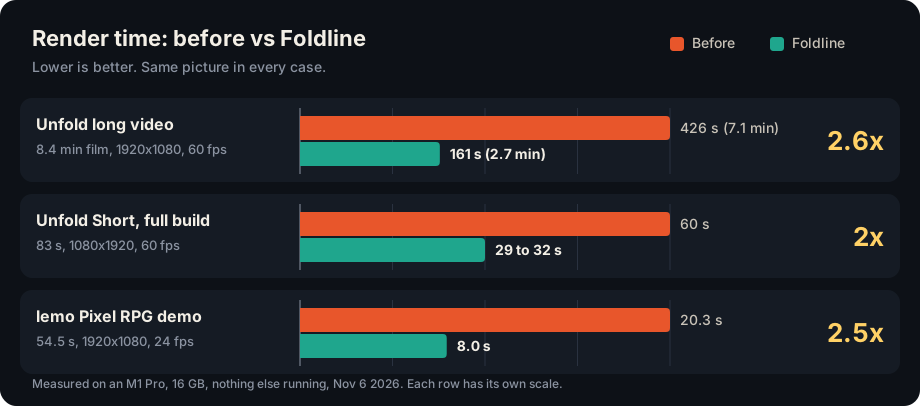
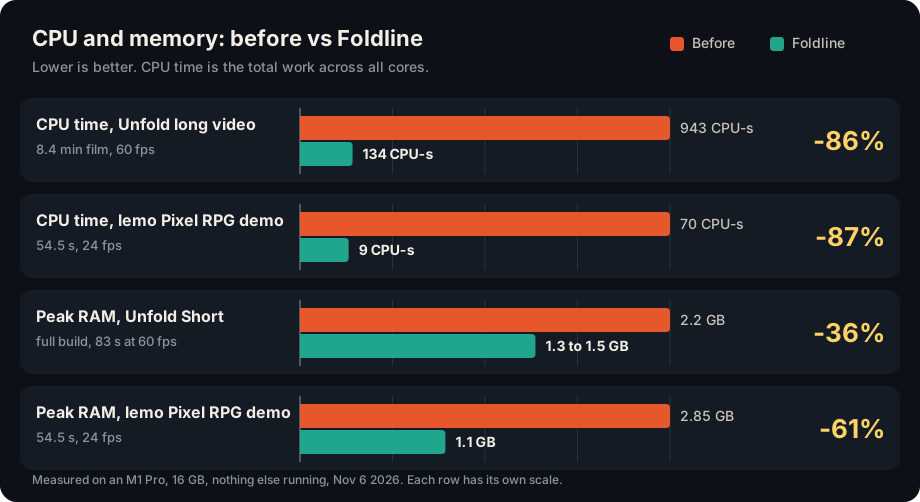
The tables below have every number behind the charts.
Unfold Short
Part 3: 83 s, 1080x1920, 60 fps, 4-sample motion blur.
| Render path | Render time | Full build | Peak RAM |
|---|---|---|---|
| Screenshots + x264 (the original) | 69-88 s | not measured | 3.0 GB |
| JPEG frames from the canvas + hardware encoder | 45 s | 60 s | 2.2 GB |
| Foldline: WebCodecs in the page | 29 s | 29-32 s (runs: 29.4, 29.0, 31.8) | 1.3-1.5 GB |
The full build also mixes the audio. Foldline's build runs the mix during the render instead of before it.
Unfold long video
EP9: the full 8.4 min, 1920x1080, 60 fps.
| Screenshots + hardware encoder | Foldline | |
|---|---|---|
| Render time | 426 s | 161 s (runs: 161.8, 161.5; 187 fps) |
| CPU time | 943 CPU-seconds | 134 CPU-seconds (-86%) |
| Peak RAM | about 1.5 GB | about 1.5 GB |
Picture quality
- Frames compared against the original canvas PNGs score 38-39 dB on both the old and the new path. That's the normal colour conversion to video, not the encoder.
- Old vs new long video: 42.3 dB on average, lowest frame 39.6 dB.
- Identical to the eye.
lemo demos
lemo's Pixel RPG demo: 54.5 s, 1920x1080, 24 fps, 3 workers, two runs each. It's the one single-canvas demo that renders without downloading extra fonts first.
| Demo | lemo original (x264) | Foldline | Speed-up | CPU time | Peak RAM |
|---|---|---|---|---|---|
| pixel-rpg | 20.8 s, 19.8 s | 8.1 s, 8.0 s (177 fps) | 2.5x | 70 to 9 CPU-seconds | 2.85 to 1.1 GB |
Picture: 47.7 dB on average between the two outputs, lowest frame 42.1 dB.
Where the time goes
Drawing a frame takes about 4 ms on the GPU. The ceiling now is the Mac's single hardware H.264 encoder. It does about 165-185 fps at 1080x1920, and all workers share it.
Tried and dropped
- Rendering without Chrome. Node + Skia on the CPU was 18x slower per frame. Node + Skia on Metal (skia-canvas) topped out at 30 fps, 3.5x slower.
- Chrome's software encoder. No faster in real renders, and it used more CPU.
- Mixing hardware and software encoders in one file. Too risky for Instagram uploads.
FAQ
How do I render an HTML canvas animation to MP4?
Make a folder with an index.html that sets window.DUR, window.render(t) and window.READY (the page contract). Draw the film into one <canvas id="c"> of the render size. Then run node core/render/video.mjs my-film --size 1920x1080 --fps 60 --out my-film.mp4. Foldline opens the page in headless Chrome, calls render(t) for every frame and writes an H.264 MP4.
Is it faster than screenshots + ffmpeg?
In our tests, yes. The 8.4-minute Unfold video took 426 s with screenshots and the Mac's hardware encoder, and 161 s with Foldline, with 86% less CPU time. lemo's Pixel RPG demo rendered 2.5x faster than lemo's original screenshots + x264 path. All numbers are in Results.
Why is it faster?
The screenshot path copies each frame out of the browser as a JPEG, then ffmpeg decodes it and encodes it again. Foldline hands the canvas straight to Chrome's WebCodecs VideoEncoder with hardware acceleration, so the frame stays on the GPU. Drawing a frame takes about 4 ms. The limit now is the Mac's hardware H.264 encoder.
Does it work on Windows or Linux?
It's built and tested on a Mac with Apple Silicon. The fast path needs Chrome's hardware H.264 encoder. When Chrome doesn't offer one, Foldline falls back to the screenshot path. VideoToolbox is Mac only, so on other systems that means x264, lemo's original path. It still renders, just not faster. We haven't tested Windows or Linux.
Does my page have to be a single canvas?
For the fast path, yes: one visible <canvas id="c"> of the render size, and nothing else visible. Any other page (DOM elements, SVG, several canvases) still renders, through the screenshot path. 35 of the 66 lemo demos fit the fast path.
Does the video look different?
Not to the eye. The old and new long video differ by 42.3 dB on average (lowest frame 39.6 dB). Output is standard bt709 limited-range H.264 mp4.
Can I add sound?
Yes. --audio my-film/mix.wav muxes the file in as AAC 192k. A shorter mix is padded with silence, never used to cut the picture; pass --allow-short-audio if it's meant to end early. Before saving, the renderer decodes the result and refuses it if it's missing a stream, has fewer frames than were rendered, or its sound doesn't line up with the start and end of the film.
What is lemo-opuscar?
lemo-opuscar is LemoLab's open library of film styles made in code, for Claude Code. Each of the 66 styles has a style prompt and a demo film drawn entirely in code, with no video model. Foldline includes all of it. Foldline changed the video renderer and added an MCP server (see NOTICE.md).
Can I use it with Claude Code or another coding agent?
Yes. lemo's Claude Code plugin is in plugin/, and agents that read AGENTS.md get the same guide. Start the agent inside this folder so it uses Foldline's renderer. Details are in Using it with a coding agent. Any agent that speaks MCP can also use the MCP server.
Is it free?
Yes, for anything non-commercial: personal projects, learning, research, hobby films and open work you don't get paid for. You can read, change and share the code in public. It needs only free tools: Node, ffmpeg and Chrome's headless shell.
Can I use it to make money?
Not without a commercial licence. That covers selling Foldline or a service built on it, and paid work made with it, like client videos or monetized channels. To ask for a licence, open an issue with "Commercial licence" in the title. lemo's original code is MIT and free for any use from lemo's repository.
Credits
- LemoLab / lemo-opuscar by Lemomo (@lemomo_ai on X). The whole style library, the toolkit, the guides, the page contract and the render pipeline Foldline builds on. lemo's styles were made with Claude Opus 5.5. Code MIT; demo films and stills CC BY 4.0.
- Playwright drives the headless browser.
- Chromium draws the frames and, through WebCodecs, encodes them.
- FFmpeg wraps, joins and muxes the video.
- three.js for the 3D styles.
- Poly Haven for the CC0 HDRIs and models.
- Kokoro TTS for offline narration.
- Google Fonts for fonts used in the demos.
- Third-party assets in the demos keep their own licences (see each demo's
CREDITS).
Foldline's changes to lemo-opuscar are listed in What's new vs lemo-opuscar.
Licence
- Foldline's code: PolyForm Noncommercial 1.0.0, copyright Alireza Toghiani. Free to use, change and share for any non-commercial purpose. Commercial use needs a licence: open an issue with "Commercial licence" in the title.
- lemo-opuscar's original code: MIT, copyright LemoLab.
NOTICE.mdsays which parts are which. - Copies downloaded before November 7, 2026 were MIT and stay MIT.
- Demo films and their stills from lemo-opuscar (in
styles/): CC BY 4.0. Credit LemoLab with a link to the lemo-opuscar repository, and say if you changed them. - Three voice tracks are not CC BY 4.0: the shouts in Game Show Flat (macOS system voices,
say), the narration in Paper-cut Lightbox (Microsoft Edge TTS), which will be re-voiced with Kokoro, and the narration in Broadcast News Package (Doubao TTS, under Volcengine's terms). They are excluded from the licence above. Don't reuse them; in your own films use Kokoro (the default) or a voice you have the right to use. - Films you make with it: yours. If you make them to earn money, you need a commercial licence for Foldline first.
Made for Unfold.
Thank you to LemoLab for lemo-opuscar, which all of this is built on.
Yorumlar (0)
Yorum birakmak icin giris yap.
Yorum birakSonuc bulunamadi