OpenSunstar
Health Gecti
- License — License: Apache-2.0
- Description — Repository has a description
- Active repo — Last push 0 days ago
- Community trust — 11 GitHub stars
Code Gecti
- Code scan — Scanned 12 files during light audit, no dangerous patterns found
Permissions Gecti
- Permissions — No dangerous permissions requested
Bu listing icin henuz AI raporu yok.
OpenSunstar is a cross-platform native desktop app (Tauri 2 + React) — a local-first, all-in-one platform for AI coding workflow engineering configuration
OpenSunstar
Local-first, all-in-one AI coding workflow engineering configuration platform
本地优先,一站式统一管理你的 AI 编程工作流工程化配置平台
跨多项目组合矩阵以AI驱动的项目驾驶舱,一站式帮你基于项目的AI资产配置&工作流编排和跨工具跨设备Agent扩展配置同步
Source provider copy: 预设22+供应商,支持用户自定义配置更多供应商(含聚合/中转站)





Repository: github.com/alisunstar/OpenSunstar
Table of Contents
1. What is OpenSunstar
OpenSunstar is a cross-platform native desktop app (Tauri 2 + React) — a local-first, all-in-one platform for AI coding workflow engineering configuration.
本地优先,一站式统一管理你的 AI 编程工作流工程化配置平台
跨多项目组合矩阵以AI驱动的项目驾驶舱,一站式帮你基于项目的AI资产配置&工作流编排和跨工具跨设备Agent扩展配置同步
Move from “edit config files by hand” to “see project health, orchestrate workflows, fill asset gaps, and keep shipping.”
GUI + CLI(TUI) dual-mode
OpenSunstar ships two independent entry points that share the same data under ~/.OpenSunstar/:
| Mode | Entry | Best for |
|---|---|---|
| Desktop GUI | OpenSunstar app | Visual provider/asset/workspace management, local proxy & HA |
CLI os |
Terminal commands + full-screen TUI dashboard | Agents, CI, SSH/headless, scripting (--json) |
Run CLI without starting the GUI — os bootstraps OpenSunstar.db on first use (os config bootstrap or automatic). Governance, provider switch, and the TUI work standalone.
Shared state, not isolated silos — changes in GUI or CLI both read/write the same SQLite DB and live CLI configs.
| Capability | CLI-only | Notes |
|---|---|---|
| Drift / readiness / flow / project | ✅ | Agent-native --json |
| Provider switch (writes live config) | ✅ | os provider switch |
| Full-screen TUI dashboard | ✅ | Run os in an interactive terminal |
Advanced local proxy :15721 |
⚠️ | Proxy process is started by the desktop app today |
| WebDAV/S3 auto-sync pull | ⚠️ | Use GUI or os sync export; full pull via GUI |
Dual-mode, independently startable; data is unified. For proxy takeover (Claude Code / Codex / Gemini), keep the desktop app running until headless
os proxyships.
Product narrative (aligned with the current sidebar)
OpenSunstar is no longer documented as a single provider switcher. Its source-of-truth navigation is the sidebar: a local-first engineering platform where projects, AI assets, workflow orchestration, Agent extensions, model access, sync, and collaboration share one cockpit.
| Sidebar entry | Submenus / entry points | Product narrative |
|---|---|---|
| Project Cockpit | Today Alerts / Project Board | AI-driven multi-project portfolio cockpit: see risks, readiness gaps, stalled repos, stages, commit activity, and portfolio health. |
| My Projects | Project list / Add project / View project / Remove project | Bring real Git repositories into OpenSunstar and persist AI assets, wiki baselines, environment snapshots, and governance state per project. |
| Project Config | AI Asset Config / Workflow Orchestration | Land assets inside a selected repo: asset links, readiness & effectiveness, project environment & Wiki, rules/context, discovery, workflow config, change recipes, and design contracts. |
| Agent Config (global) | MCP / Skills / Prompt & Rules / Commands / Hooks / Ignore / Permissions / Subagents / Convert | Global Agent asset library: install, audit, convert, and sync extensions across tools, then decide per project which assets take effect. |
| AI Models | Quick Start / Context / AI Tokens | Quick Start ships 22+ preset providers and lets users define more custom providers, including aggregators/relays; Context manages sessions, and AI Tokens tracks usage, budgets, and model costs. |
| Sync & Collaboration | Cross-device Cloud Sync / Team Collaboration (Beta) | WebDAV, S3, and GitHub Gist sync configs across devices; team config packages, members, invites, team keys, and deployments support collaboration. |
| Bottom & Settings | Sync status / Settings / Theme / Collapse sidebar | Show sync health and centralize General, Auth, Advanced, and About settings while preserving the local-first desktop workflow. |
Target users
Core personas (5 types)
| Persona | Typical profile | Primary need |
|---|---|---|
| Multi-CLI developer | Uses 2–3 tools (Claude Code, Codex, Gemini, …) | Switch providers in one place, avoid JSON / TOML / .env edits |
| AI coding newcomer | New to CLI agents, unfamiliar with vendor configs | Quick Start: pick supplier → enter key → apply in 3 steps |
| Multi-project indie dev | Several side projects or client repos | See at a glance which projects stall and which lack AI assets |
| Tech lead / full-stack owner | Parallel Git repos, needs stage & risk visibility | Project board, readiness score, AI weekly & investment reports |
| Agent power user | Heavy MCP / Skills / Prompts / Hooks usage | Unified install & sync, skills.sh leaderboard, Smithery discovery |
Who it is not for
- Teams with no AI CLI workflow (no Claude Code / Codex / Gemini need)
- Users on one official subscription only, never switching providers
- PMs needing Jira / Linear-style task boards — Workspace is an AI governance dashboard, not issue tracking
- Teams wanting a hosted SaaS config hub — OpenSunstar is local-first with optional cloud sync
Core use cases (8 scenarios)
- Project Cockpit governance — Today Alerts, Project Board, project readiness, and asset gaps
- Methodology & workflow orchestration — framework detection, preset orchestration, custom Recipe, design contract
- One-click API access — Quick Start for Claude Code / Desktop / Codex / Gemini with 22+ preset providers plus custom aggregators/relays
- Cross-tool Agent sync — 9 agent modules with bidirectional sync
- Context management — multi-CLI session browse, search, and restore
- AI usage & cost — Token dashboard, budget alerts, investment reports
- MCP & Skills discovery — Smithery, skills.sh leaderboard, ClawHub, ModelScope
- Backup & cross-device sync — WebDAV / S3 / Gist, Deep Link import
Six pain points we solve
| # | Pain point | How OpenSunstar helps |
|---|---|---|
| 1 | Different config formats per CLI, error-prone manual edits | Visual provider management + Quick Start writes live configs |
| 2 | Switching API providers means editing each tool separately | One-click switch, local proxy + format conversion, tray shortcut |
| 3 | Single provider failure breaks the workflow | Failover queue, circuit breaker, health monitoring |
| 4 | MCP / Skills / Prompts scattered and hard to unify | Unified agent panels with per-app bidirectional sync |
| 5 | No clear view of API usage and spend | AI Tokens dashboard, budget alerts, custom model pricing |
| 6 | No AI readiness or asset view across projects | Workspace readiness, asset matrix, project-scoped AI config |
Feature overview
| Feature | Description |
|---|---|
| 7 CLI tools | Claude Code · Claude Desktop · Codex · Gemini CLI · OpenCode · OpenClaw · Hermes |
| Quick Start | 22+ preset providers (Official · Global AI · China AI · Aggregator/Relay · Custom); users can add more custom providers, including aggregators/relays |
| Methodology & Orchestration | Framework detection · preset orchestration · custom Recipe · design contract |
| Agent configuration | MCP · Skills · Prompts · Commands · Hooks · Ignore · Permissions · Subagents · Convert |
| Project Cockpit | Today Alerts · Project Board · project readiness · asset-gap actions |
| Context & usage | Context sessions · AI Tokens dashboard · budget alerts |
| Skills / MCP discovery | skills.sh leaderboard · Smithery · ClawHub · ModelScope · GitHub |
| Secret storage | OS Keychain first, SQLite atomic writes |
| Sync & Collaboration | WebDAV / S3 / Gist · auto-backup · team config packages · Deep Link import |
| Cross-platform | Windows · macOS · Linux · dark/light themes · i18n |
CLI os + TUI |
Standalone binary · governance · provider switch · full-screen dashboard |
Supported CLI tools
| Claude Code | Claude Desktop | Codex | Gemini CLI | OpenCode | OpenClaw | Hermes |
|---|
Screenshots
| Project Cockpit | AI Asset Configuration |
|---|---|
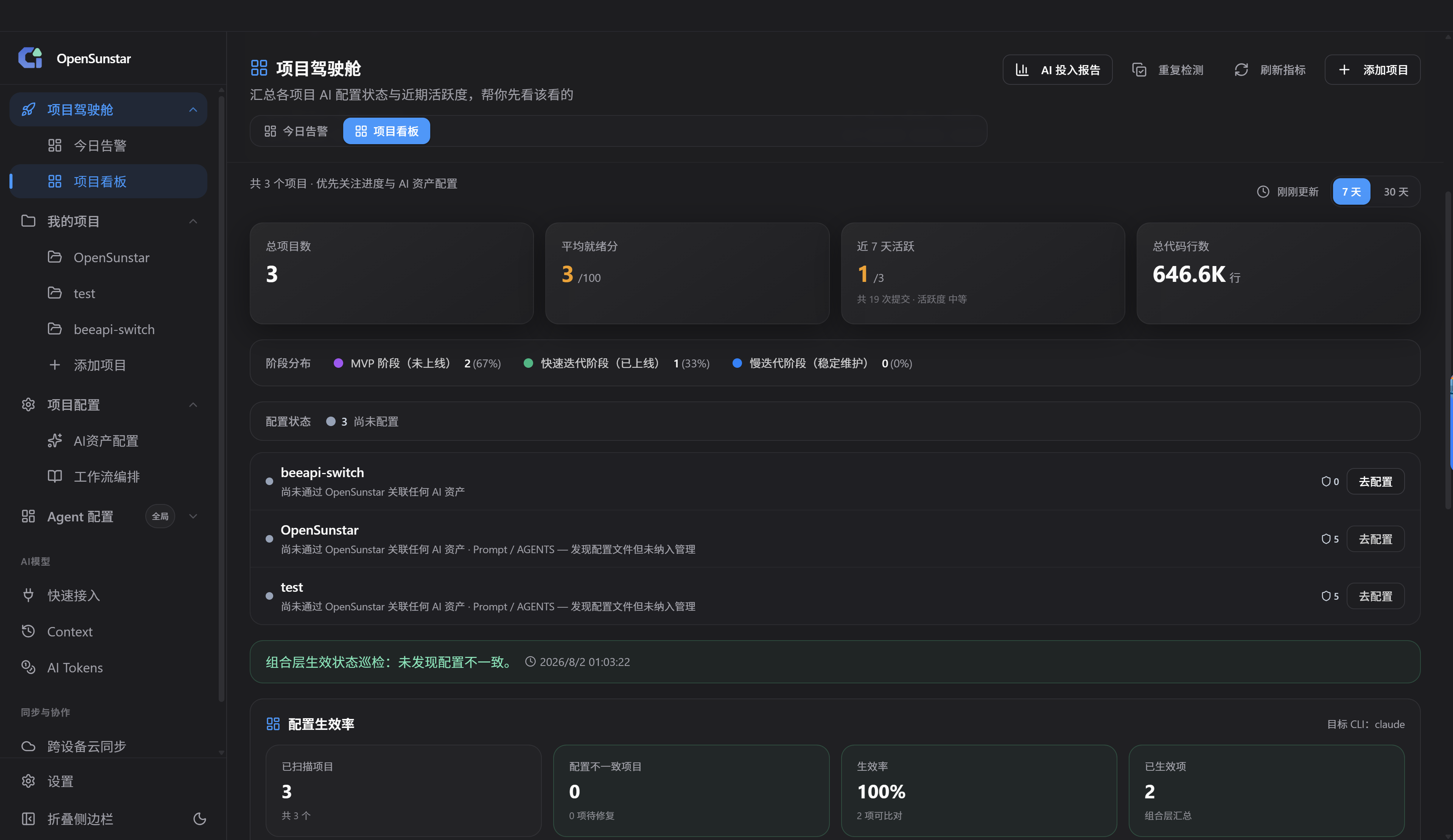 |
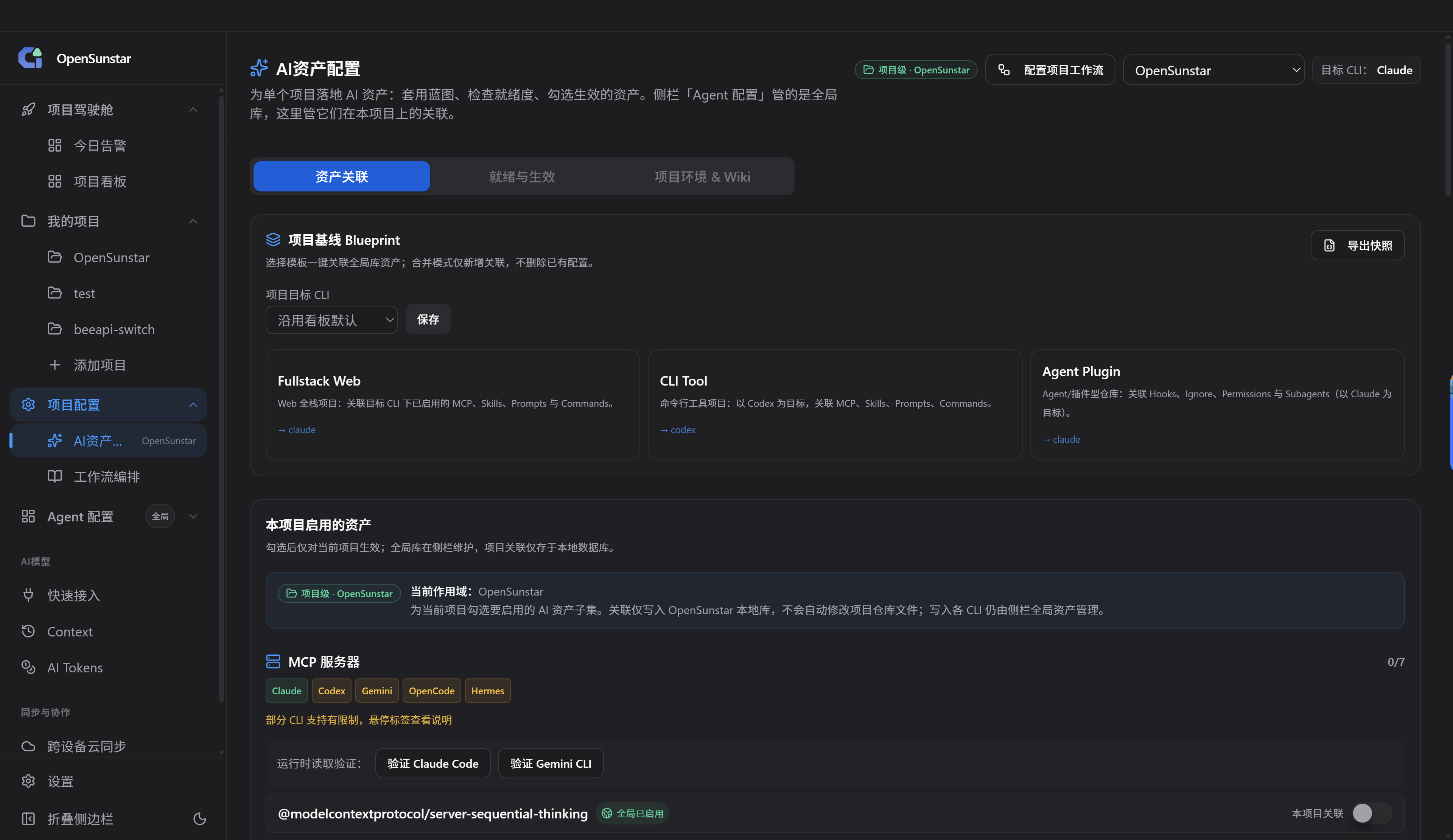 |
v1.2.0 — Project Wiki baselines, project asset workflow improvements, usage sidecar storage, and Apache-2.0 licensing; database schema v43.
2. Installation
Desktop GUI (recommended for visual management)
Get the latest build from GitHub Releases.
| Platform | Package |
|---|---|
| Windows | .msi installer or portable .zip |
| macOS | .dmg (signed & notarized) · brew install --cask OpenSunstar |
| Linux | .deb · .rpm · .AppImage · AUR OpenSunstar-bin |
Requirements: Windows 10+ · macOS 12+ · Ubuntu 22.04+ / Debian 11+ / Fedora 34+
OpenSunstar CLI (os) — standalone binary (no GUI required)
Use os without the GUI for governance checks, provider switching, and a full-screen TUI dashboard. No need to launch the desktop app first — the CLI creates ~/.OpenSunstar/OpenSunstar.db on first run.
| Platform | Release asset |
|---|---|
| Windows | OpenSunstar-v*-os-windows-x86_64.zip (os.exe) |
| macOS | OpenSunstar-v*-os-macos-aarch64.tar.gz / os-macos-x86_64 |
| Linux | OpenSunstar-v*-os-linux-x86_64.tar.gz |
Install options (pick one):
| Method | Command |
|---|---|
| npm / pnpm | npm install -g opensunstar-os — npmjs.com/package/opensunstar-os |
| GitHub Release | Download asset above, unzip, add os / os.exe to PATH |
| Scoop (Windows) | scoop install opensunstar-os — see distrib/scoop |
| Winget (Windows) | winget install OpenSunstar.OpenSunstarCLI — see distrib/winget |
opensunstar-osis a thin Node wrapper that downloads the native binary from GitHub Releases on install — not a JS reimplementation. See docs/cli-distribution-p1.md.
# npm global install (good for agents / CI)
npm install -g opensunstar-os

# or manual: unzip Release asset and add to PATH

# First run (creates ~/.OpenSunstar/OpenSunstar.db)
os config bootstrap --yes

# Full-screen TUI dashboard (interactive terminal — run with no subcommand)
os

# Common commands
os doctor --json
os drift check --json
os provider list --app claude
os provider switch --app claude --id <provider-id> --yes
See AGENTS.md for Agent integration.
Build from source
See Development in the appendix.
3. Quick Start
First launch
- OpenSunstar can auto-import existing CLI configs as your default provider on first run.
- Complete the onboarding wizard if prompted.
Connect a CLI in three steps
- Open sidebar → Quick Start (快速接入)
- Pick a target app: Claude Code, Claude Desktop, Codex, or Gemini
- Choose a curated supplier → enter API key (or follow official OAuth guidance) → Verify & Apply
For official providers (Anthropic / OpenAI / Google), Quick Start links you to Settings → Provider management for browser login.
Proxy note: When proxy takeover is enabled for Claude Code, Codex, Gemini, or Claude Desktop, keep the desktop app running so the local proxy on
:15721stays up. Pure governance andos provider switchdo not require the GUI.
Switch providers
- Use the main UI or system tray to switch active provider
- Restart the terminal for most CLIs after switching (Claude Code supports hot-switch)
Set up your workspace
- Sidebar → Workspace → Add project and point to local Git repos
- Open Project Cockpit → Today Alerts for attention items and readiness gaps
- Use Project Board for commit activity and AI portfolio reports
- Open a project's AI Assets to manage MCP / Skills / Prompts at repo level
Explore agent tooling
| Goal | Where to go |
|---|---|
| Install MCP servers | Agent config → MCP → Discovery (Smithery / registry) |
| Browse trending Skills | Agent config → Skills → skills.sh leaderboard |
| Manage prompts & hooks | Agent config → Prompts / Commands / Hooks |
| Track token spend | Sidebar → AI Tokens |
4. FAQ
Which CLI tools are supported?Seven tools: Claude Code, Claude Desktop, Codex, Gemini CLI, OpenCode, OpenClaw, and Hermes. Quick Start currently guides the first four; all seven are manageable from provider and agent panels.
Do I need to restart the terminal after switching providers?Usually yes. Claude Code is the exception and supports hot-switching without a restart.
Why must OpenSunstar stay running?For several CLIs, OpenSunstar writes a local proxy endpoint into the tool config. Closing the app stops the proxy and the CLI may show connection errors until OpenSunstar is running again.
Where is my data stored?| Path | Purpose |
|---|---|
~/.OpenSunstar/OpenSunstar.db |
SQLite database (providers, MCP, projects, assets) |
~/.OpenSunstar/settings.json |
App settings |
~/.OpenSunstar/backups/ |
Auto-backups (last 10) |
~/.OpenSunstar/skills/ |
Installed Skills cache |
~/.OpenSunstar/cache/ |
Remote data cache (e.g. skills.sh leaderboard, 6h TTL) |
Add or select an Official preset provider, switch to it, then run the CLI's Log out / Log in flow in your terminal.
Is Workspace a task kanban?No. Workspace is a multi-repo AI governance dashboard — Git health, agent readiness, project-scoped assets, and AI insights — not a drag-and-drop issue board.
How fresh is the skills.sh leaderboard?Data is fetched from skills.sh and cached locally (~6 hours). The UI shows last sync time; use refresh to force an update.
Appendix
Documentation
| Resource | Link |
|---|---|
| User manual (EN) | docs/user-manual/en/README.md |
| User manual (中文) | docs/user-manual/zh/README.md |
| User manual (繁體) | docs/user-manual/zh-TW/README.md |
| User manual (日本語) | docs/user-manual/ja/README.md |
| User manual (Deutsch) | docs/user-manual/de/README.md |
| Workspace module | docs/kanban.md |
| Release notes v1.2.0 | docs/release-notes/v1.2.0-en.md |
Development
Stack: React 18 · TypeScript · Vite · Tauri 2 · Rust · SQLite · TanStack Query
Prerequisites: Node.js 22.13+ · pnpm 11.5.2 · Rust 1.95.0 · platform Tauri dependencies
pnpm dev:doctor       # verify local toolchain
pnpm install
pnpm tauri dev        # dev mode (desktop)
pnpm dev:renderer     # frontend only
pnpm typecheck        # TypeScript
pnpm test:unit        # unit tests
pnpm tauri build      # production build
Contributing
Issues and pull requests are welcome. Before submitting:
pnpm typecheck && pnpm format:check && pnpm test:unit
See CONTRIBUTING.md. Partner and sponsor info: SUPPORT.md.
Acknowledgements
OpenSunstar builds upon the open-source cc-switch project. OpenSunstar will continue to evolve independently, anchored to its strategic positioning, value proposition, and product narrative.
License
The desktop app, os CLI, and local capabilities in this repository form the public client. The hosted commercial control plane—accounts, subscriptions and billing, multi-tenant team services, and cloud operations—is separate proprietary software and is not covered by this repository's license. See Licensing and product boundary.
Yorumlar (0)
Yorum birakmak icin giris yap.
Yorum birakSonuc bulunamadi