AgentXRay
Health Gecti
- License — License: MIT
- Description — Repository has a description
- Active repo — Last push 0 days ago
- Community trust — 14 GitHub stars
Code Gecti
- Code scan — Scanned 2 files during light audit, no dangerous patterns found
Permissions Gecti
- Permissions — No dangerous permissions requested
Bu listing icin henuz AI raporu yok.
Web dashboard for viewing AI agent session logs — supports OpenClaw, Codex, and Claude Code | 多平台 AI Agent 日志查看面板





Quick Start · Features · Screenshots · API · 中文
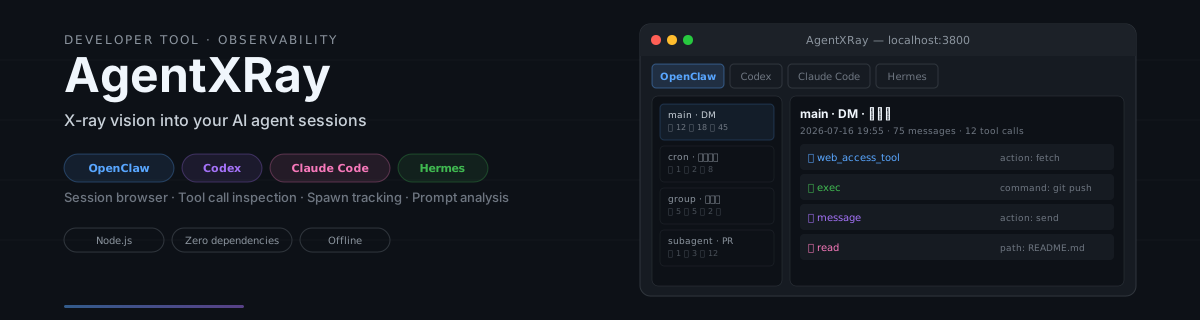
X-ray vision into your AI agent sessions. Supports OpenClaw, Codex, Claude Code, Hermes and OMP — all in one interface.
Features
- Multi-platform — Unified view across OpenClaw, Codex, Claude Code, Hermes and OMP sessions
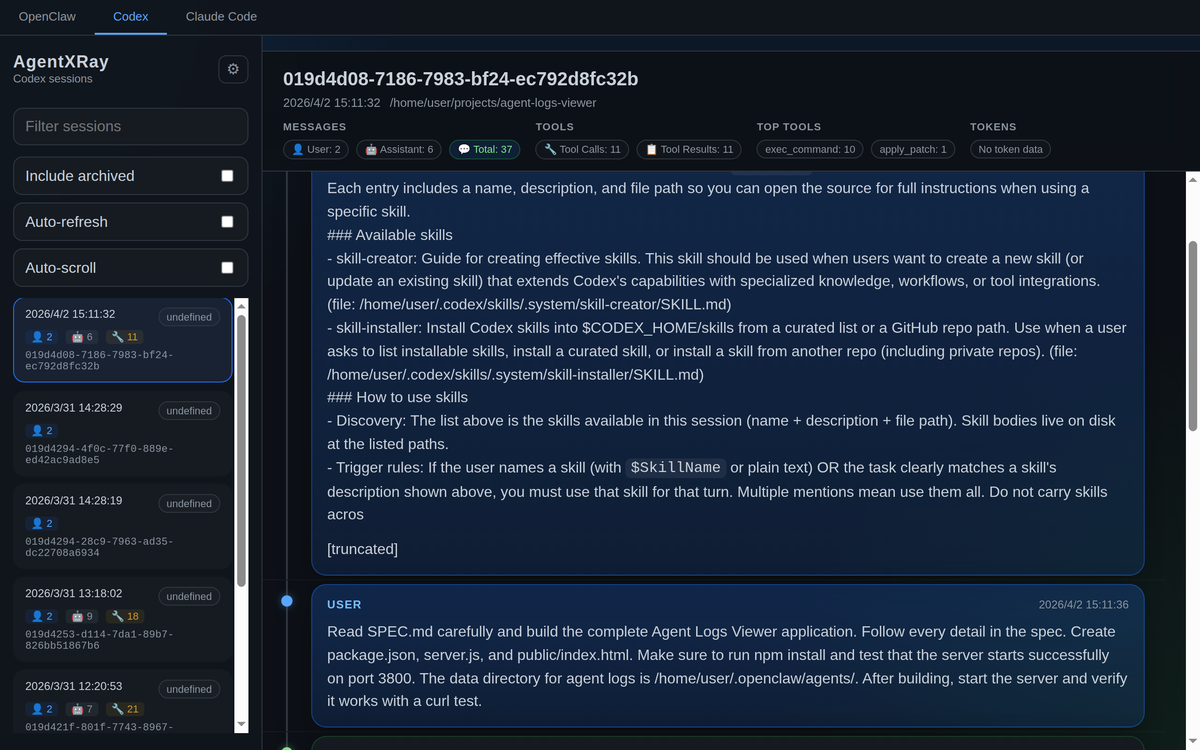
- Session browser — Browse agents, filter/search sessions, view message history
- Tool call inspection — Expandable tool calls with arguments and results
- Trace view — Per-turn waterfall of where the time went: model inference (blue) vs tool execution (green, red on error); click any bar to jump to that message
- Prompt extraction — See every real human prompt per session (tool results, slash commands and injected noise filtered out), grouped by working directory, with search / JSON export / copy
- Prompt optimization — Cluster prompts into templates, attribute session outcomes (turns, tool calls, error rate) per template, and get Claude-powered rewrite suggestions via the local
claudeCLI - Prompt library — Curate the prompts worth keeping into
~/.agentxray/library, tag / edit / search them, then install any of them as a native slash command for Claude Code, Codex or OMP with one click —$ARGUMENTSis passed through, so/name some argsworks in the target CLI - Global search — One search box across all five platforms at once, multi-keyword AND matching, colored platform badges per hit — including prompts recovered from sessions that Claude Code's cleanup already deleted
- Session insights — Aggregate analytics dashboard with tool stats, error clustering and daily trends
- Spawn tracking — Detect and navigate parent/child agent relationships
- OMP sub-agents — Sub-agents spawned by an OMP session show up as chips in the summary; click one to read the child agent's full transcript
- Message timeline — Visual graph showing conversation flow with role indicators
- Resume command — One click copies the exact command to resume a session in its own CLI (
codex resume,claude --resume,omp --resume=) - Collapsible summary — Fold the session summary away when you want the full height for messages
- Auto-refresh — Live-updating session list and messages
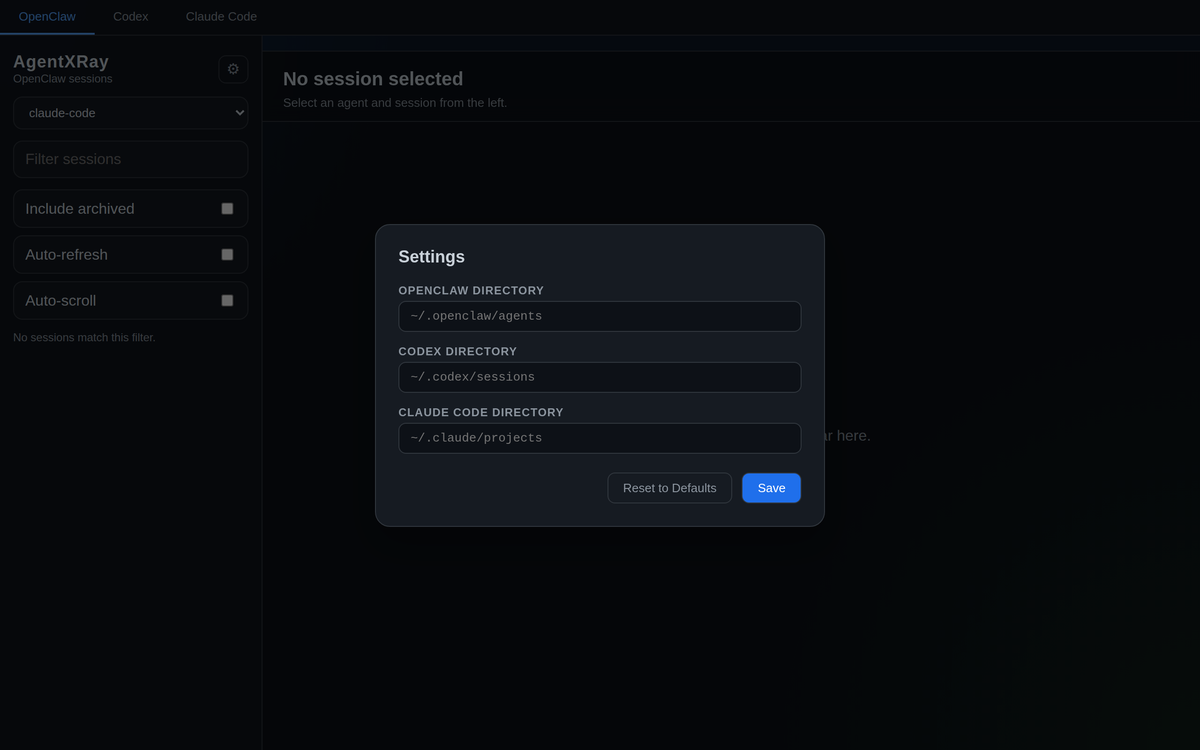
- Settings panel — Configure platform directories from the UI, persisted in localStorage
- Session backup — Incremental archive of your session logs into
~/.agentxray/archive, one click in settings (also runs automatically, daily); unchanged files are skipped - Keyboard navigation — Arrow keys to move between sessions
Screenshots
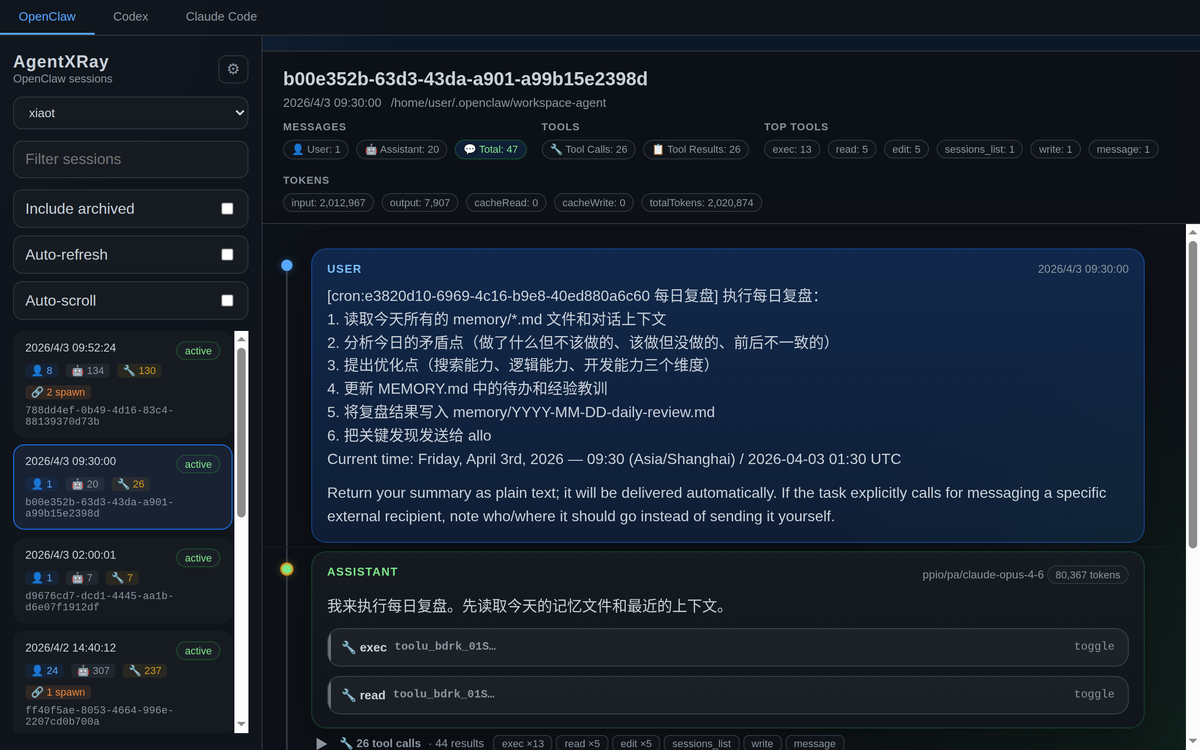
Session Browser
Browse agents and sessions in the sidebar. Each session card shows message counts by role (👤 User, 🤖 Assistant, 🔧 Tool) and spawn indicators. The main panel displays session metadata, token usage, and top tools at a glance.
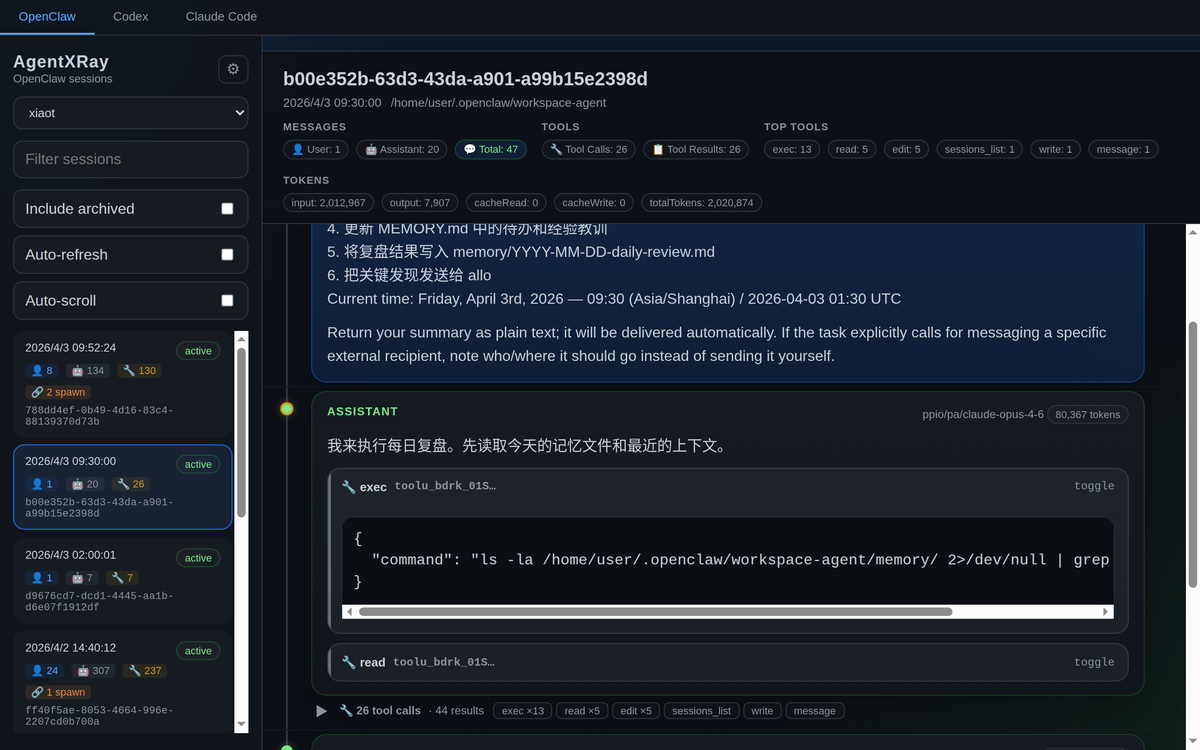
Tool Call Inspection
Expand any tool call to see its arguments and result. Collapsed groups show tool type counts for quick scanning.
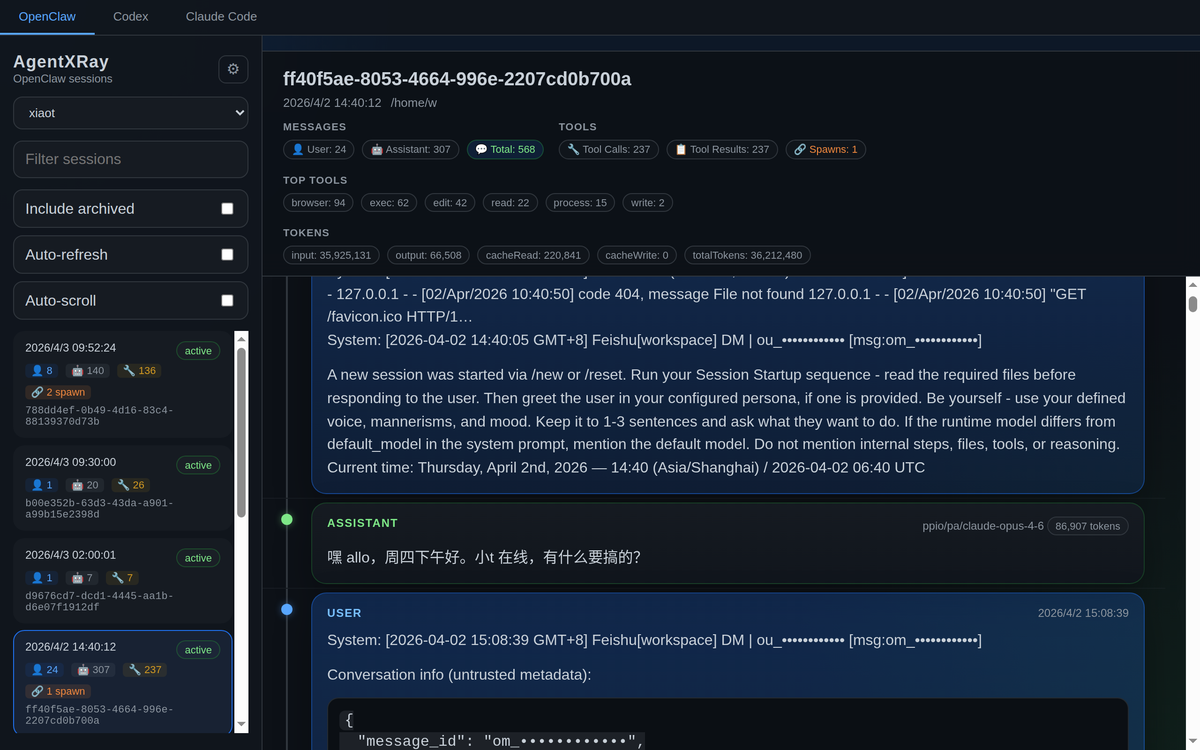
Spawn Tracking
Sessions that spawn sub-agents are marked with a 🔗 badge. Click to navigate the parent/child relationship chain.
Multi-Platform Support
Switch between OpenClaw, Codex, Claude Code, and Hermes with one click. Each platform's sessions are parsed from their native log format.
Settings
Configure platform directories from the UI. Changes are saved to localStorage — no server restart needed.
Quick Start
git clone https://github.com/alloevil/AgentXRay.git
cd AgentXRay
npm install
npm start
Usage
Basic Workflow
- Select a platform — Click
OpenClaw,Codex,Claude Code, orHermesin the top bar - Pick an agent — For OpenClaw, choose an agent from the dropdown (e.g.
xiaot,mimo) - Browse sessions — Sessions are sorted by date, newest first. Each card shows:
- Timestamp and status (
active/archived) - Message counts: 👤 User, 🤖 Assistant, 🔧 Tool calls
- 🔗 Spawn badge if the session spawned sub-agents
- Timestamp and status (
- View messages — Click a session to load its full conversation
- Inspect tool calls — Click any
🔧 tool_namebutton to expand arguments/results - Navigate spawns — Click the 🔗 link to jump to the spawned child session
Prompt View
Click the Prompts tab (next to Sessions / Insights) to see every real human prompt across all sessions, grouped by the session's working directory. Noise like tool results, slash-command echoes, system reminders and task notifications is filtered out.
- Preview & expand — Each session row shows a one-line preview of its first prompt; click to expand the full markdown-rendered prompt list
- Search — Filter prompts / directories / sessions live
- Export JSON — Download all extracted prompts for offline processing
- 分析优化 (Analyze) — Cluster prompts into templates, attribute session outcomes (avg turns, tool calls, error rate) per template, and get rewrite suggestions from Claude. Requires the
claudeCLI on the server's PATH; without it the clustering and attribution table still works - 优化 (Optimize) — Hover any single prompt and click 优化 for an inline Claude-powered rewrite
Keyboard Shortcuts
| Key | Action |
|---|---|
↑ / ↓ |
Move between sessions |
Enter |
Select highlighted session |
Filtering & Search
- Search box — Filter sessions by ID or content
- Include archived — Toggle to show/hide archived (
.reset.*/.deleted.*) sessions - Auto-refresh — Automatically poll for new sessions and messages
- Auto-scroll — Scroll to the latest message when new content arrives
Configuration
Default directories
| Platform | Default path |
|---|---|
| OpenClaw | ~/.openclaw/agents |
| Codex | ~/.codex/sessions |
| Claude Code | ~/.claude/projects |
| Hermes | ~/.hermes |
| OMP | ~/.omp/agent/sessions |
Custom directories
Via UI: Click the gear icon in the sidebar to set custom paths per platform. Saved to localStorage, no restart needed.
Via environment variables:
OPENCLAW_DIR=/custom/path/openclaw \
CODEX_DIR=/custom/path/codex \
CLAUDE_CODE_DIR=/custom/path/claude \
HERMES_DIR=/custom/path/hermes \
OMP_DIR=/custom/path/omp \
npm start
Via API: Pass ?dir=/absolute/path query parameter to any API endpoint.
API
| Endpoint | Description |
|---|---|
GET /api/agents |
List OpenClaw agents |
GET /api/agents/:name/sessions |
List sessions for an agent |
GET /api/agents/:name/sessions/:id |
Get session messages |
GET /api/codex/sessions |
List Codex sessions |
GET /api/codex/sessions/:id |
Get Codex session messages |
GET /api/claude-code/sessions |
List Claude Code sessions |
GET /api/claude-code/sessions/:id |
Get Claude Code session messages |
GET /api/hermes/sessions |
List Hermes sessions |
GET /api/hermes/sessions/:id |
Get Hermes session messages |
GET /api/omp/sessions |
List OMP (oh-my-pi) sessions |
GET /api/omp/sessions/:id |
Get OMP session messages |
GET /api/spawn-map |
Build agent spawn relationship map |
GET /api/insights |
Aggregate analytics (tool stats, error clusters, trends) |
GET /api/prompts |
Real human prompts per session, grouped by directory |
GET /api/prompts/analyze |
Template clustering + attribution + Claude suggestions (?refresh=1 to recompute, ?skipLlm=1 for clustering only) |
POST /api/prompts/rewrite |
Rewrite a single prompt via the claude CLI ({ "text": "..." }) |
GET /api/search |
Full-text search across sessions (?platform=all searches every platform at once, multi-keyword AND) |
GET /api/omp/sessions/:id/children |
List sub-agents spawned by an OMP session |
GET /api/omp/sessions/:id/children/:name |
Get a spawned sub-agent's messages |
GET /api/library |
List library prompts with their per-target install state |
POST /api/library |
Create a prompt ({ "name": "...", "content": "...", "description": "...", "tags": [...] }) |
PUT /api/library/:name |
Update / rename a prompt (newName, content, description, tags); installed copies are refreshed |
DELETE /api/library/:name |
Delete a prompt and any installed slash commands |
POST /api/library/:name/install |
Install as a slash command ({ "targets": ["claude", "codex", "omp"] }) |
POST /api/library/:name/uninstall |
Remove the installed slash commands (same body) |
POST /api/library/suggest-name |
Suggest a library name for a prompt via the claude CLI ({ "text": "..." }; null when the CLI is unavailable) |
POST /api/backup |
Run an incremental backup into ~/.agentxray/archive |
GET /api/backup/status |
Archive stats: file count, total bytes, last backup time |
All list/detail endpoints accept an optional ?dir= parameter to override the default directory.
Tech Stack
- Backend: Node.js + Express
- Frontend: Single-file HTML/CSS/JS (~70KB, no build step, no framework)
- Data: Reads JSONL session files directly from disk
- Zero external CDN — Everything is self-contained, works offline
Supported Log Formats
| Platform | Format | Path Pattern |
|---|---|---|
| OpenClaw | JSONL | ~/.openclaw/agents/{agent}/sessions/{id}.jsonl |
| Codex | JSONL | ~/.codex/sessions/{id}.jsonl |
| Claude Code | JSONL | ~/.claude/projects/*/sessions/*/session.jsonl |
| Hermes | SQLite | ~/.hermes/state.db |
| OMP | JSONL | ~/.omp/agent/sessions/*/{timestamp}_{id}.jsonl |
Archived sessions (.jsonl.reset.*, .jsonl.deleted.*) are also supported when "Include archived" is enabled.
License
⭐ Star this repo if you find it useful!
Yorumlar (0)
Yorum birakmak icin giris yap.
Yorum birakSonuc bulunamadi