EpiScope
Health Uyari
- License — License: MIT
- Description — Repository has a description
- Active repo — Last push 0 days ago
- Low visibility — Only 5 GitHub stars
Code Gecti
- Code scan — Scanned 7 files during light audit, no dangerous patterns found
Permissions Gecti
- Permissions — No dangerous permissions requested
Bu listing icin henuz AI raporu yok.
Native macOS control center for Claude Code and Codex — live monitoring, alerts, full-text search, usage analytics and local AI insights

EpiScope
The native macOS control center for your AI coding sessions.
Monitor every session, search every conversation, and understand where your
tokens, time, and money go.
Claude Code & Desktop OpenAI Codex
Free and open source · Local-first · No telemetry
No EpiScope account · No subscription
brew install --cask AlmazKo/tap/episcope
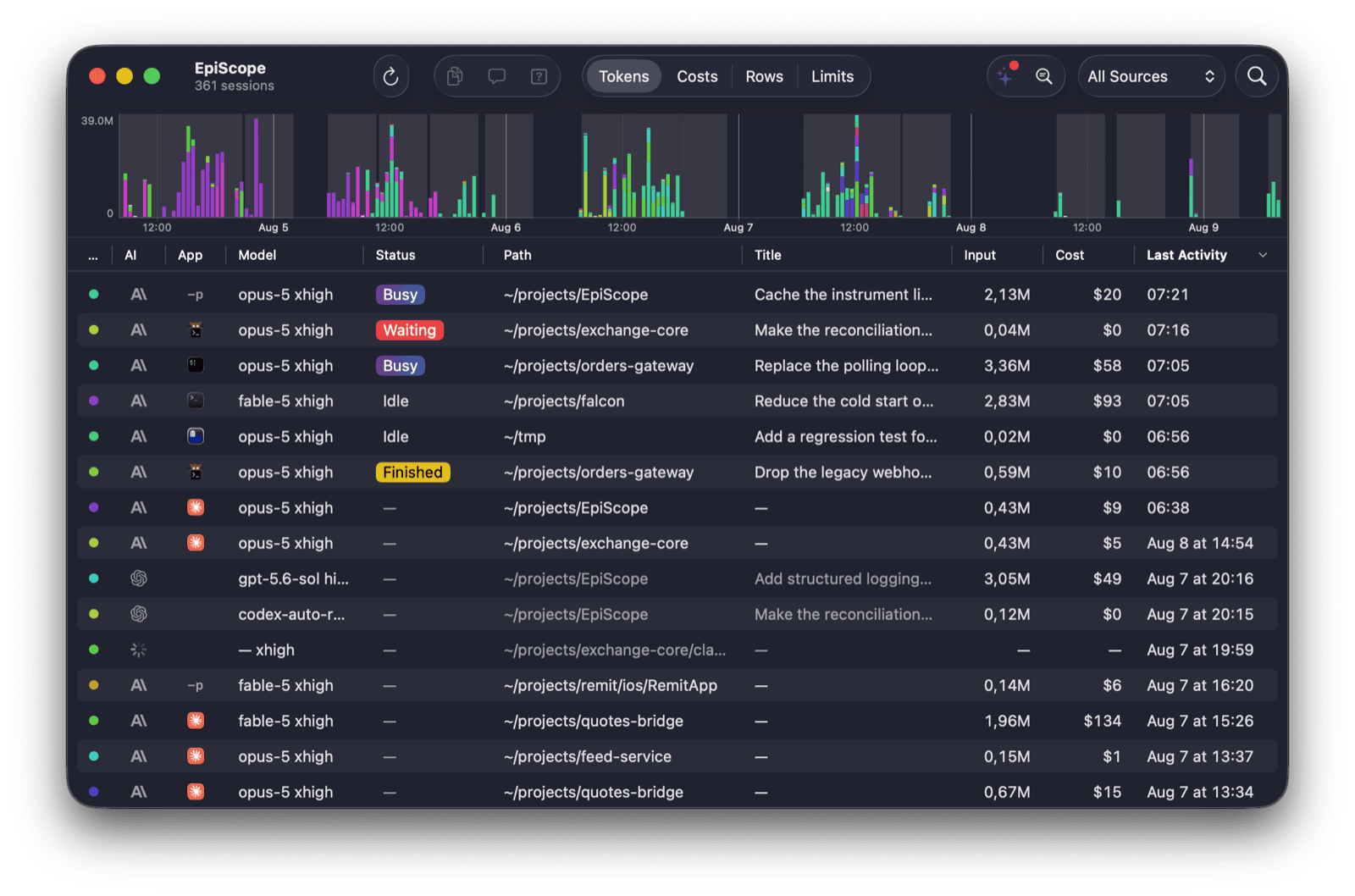
One workspace for every agent session
Running several coding agents in parallel is most useful when you can see what
each one is doing and return as soon as it needs you. EpiScope brings terminal
tabs, desktop threads, projects, and session history into one clear view.
It watches each session's live state, brings you back when attention is needed,
indexes your history, and turns agent activity into useful statistics and
AI-assisted insights.
It is more than a session switcher: EpiScope is search and analytics for your
entire local agent history.
What EpiScope brings together
Manage the whole fleetSee live and historical sessions from Claude Code, Codex, and Claude Desktop in one table. Track status, model, project, tokens, cost, turns, code changes, and last activity. |
React at the right momentThe menu bar shows which sessions are working, finished, failed, or waiting for permission. Optional sounds and macOS notifications bring you back while you stay focused on your current work. |
Search every conversationFull-text search runs across the complete local history of every supported agent. Open a result directly at the matching message. |
Understand your usageExplore token and cost timelines by session and project, monitor account limits, and understand how your agent budget is distributed. |
Get daily and weekly insightsAutomatic reports surface anomalies, expensive patterns, project health, recurring friction, and concrete candidates for improvingCLAUDE.md.
|
Jump to the exact sessionOpen the exact terminal tab or desktop thread that owns a live session. |
🔔 Know when any session needs you
The menu-bar indicator is a compact live view of the entire fleet. It animates
while agents work, turns red for a permission request, and turns amber when a
turn finishes or fails. Open it to see every active session and every session
that needs attention, alongside your Claude and Codex rate-limit meters.
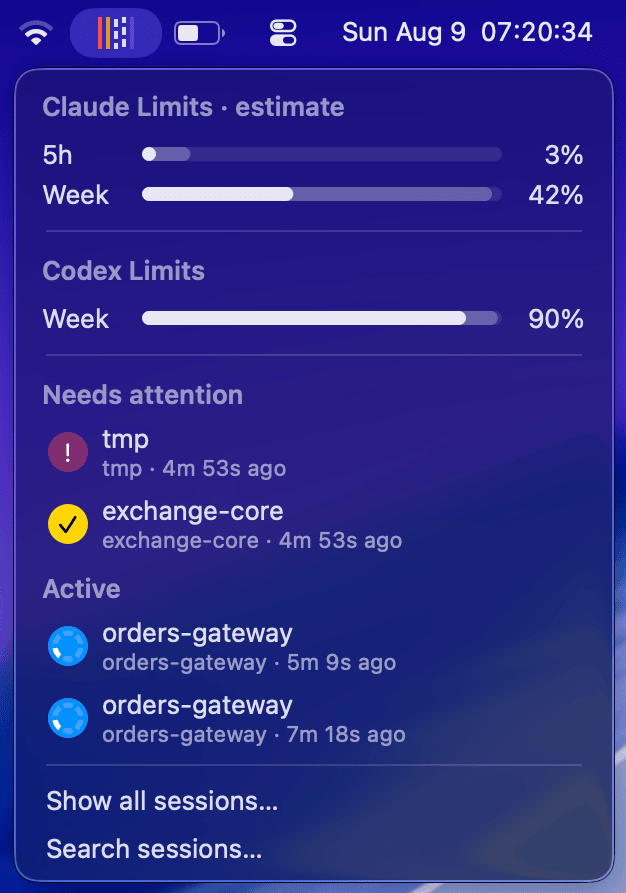
Click a session or its notification to return to it immediately. EpiScope can
focus the exact tab in kitty, iTerm2, Terminal.app, Ghostty, and Agterm, or open
the exact thread in Claude Desktop and the Codex app.
🔎 Search is a first-class feature
Session history is most useful when it is easy to retrieve. Press
⌘ F to search the full text of every indexed conversation across
providers and projects. Results appear as message-level excerpts; selecting one
opens the conversation at that exact message.
The search index is built incrementally with the system SQLite FTS5 library and
stays on your Mac.
✨ Analytics across every session
EpiScope keeps a long-term record of sessions, tokens, cost, turns, code changes,
permission wait time, and tool activity. Use the timeline and table to compare
projects, models, providers, and individual sessions through one consistent
view.
Optional AI Insights turn those statistics into one focused daily report and
one weekly review:
- what needs attention
- cost, usage, and potential savings
- anomalies and recurring hotspots
- health summaries for each project
- evidence-backed suggestions for your agent instructions
The metrics are computed locally from the index. Narrative analysis is generated
through the CLI and model you configure — claude or codex. Seedocs/insights-lab.md for the methodology.
⚡ Native, lightweight, and local-first
EpiScope is a pure AppKit application with no third-party runtime dependencies.
The universal binary is about 3 MB and uses about 30 MB of memory when
idle. It is designed to stay open all day alongside your agents.
🔐 Privacy and analytics
[!IMPORTANT]
EpiScope does not collect product analytics. There is no telemetry,
analytics SDK, tracking, EpiScope account, or remote dashboard. The app does
not report which features you use, which projects you work on, or what your
sessions contain.
The statistics shown inside EpiScope are computed for you on your Mac. Session
history is read from the agents' local files; the full-text index, usage
metrics, costs, and reports are stored locally and are never collected by the
project author.
[!NOTE]
Optional AI Insights explicitly invoke your localclaudeorcodexCLI,
whichever the chosen model belongs to. Those
requests follow the network, account, and data-handling configuration of that
CLI and the provider behind it. The EpiScope project does not receive or
collect the requests or results.
🛡️ Security by design
- Small attack surface. The app has no networking code, embedded web
service, third-party runtime dependencies, account system, or Keychain
access. - Defensive input handling. Session IDs are validated before file access,
external values are passed to AppleScript as arguments, and generated links
are limited to web URLs. - Conservative file access. EpiScope reads session data from
~/.claude
and~/.codex. Its Claude Code integration is installed additively, keeps a
backup of modified configuration, and never clobbers an existing status line.
Files owned by EpiScope are updated atomically. - Private temporary data. Analysis scratch data uses the private per-user
temporary directory and is removed after a successful run. - Verified distribution. Release builds and DMGs are developer-signed,
Apple-notarized, and stapled.
The complete read/write boundary is documented indocs/file-io.md.
🧩 Supported apps and terminals
EpiScope currently supports sessions from
Claude Code,
OpenAI Codex, and Claude Desktop,
including Code and Cowork sessions.
Exact window and tab
kitty · iTerm2 · Terminal.app · Ghostty 1.3+ · Agterm
Exact desktop session
Claude Desktop · Codex app
Detected with a universal fallback
Other terminals and IDEs open at the session directory.
Every live row carries its host application's icon, making parallel sessions
easy to distinguish at a glance.
📦 Install
Install with Homebrew:
brew install --cask AlmazKo/tap/episcope
Or download the latest DMG from
GitHub Releases and drag EpiScope
to /Applications. The app and DMG are signed, notarized, and stapled, so the
first launch works offline.
Requirements
macOS 14 Sonoma or newer. Apple Silicon and Intel Macs are supported.
Build from sourcegit clone https://github.com/AlmazKo/EpiScope.git
cd EpiScope
open EpiScope.xcodeproj
Choose your own development team in Xcode under Signing & Capabilities, then
press ⌘R. You can also build without signing by settingCODE_SIGNING_ALLOWED=NO.
💜 Free and open source
EpiScope is free to use, has no paid tier, and is released under the
MIT License. Issues, ideas, and contributions are welcome.
Yorumlar (0)
Yorum birakmak icin giris yap.
Yorum birakSonuc bulunamadi