alpacawork
Health Uyari
- License — License: MIT
- Description — Repository has a description
- Active repo — Last push 0 days ago
- Low visibility — Only 5 GitHub stars
Code Basarisiz
- fs module — File system access in .github/workflows/tag-release.yml
- rm -rf — Recursive force deletion command in apps/agent-cli/package.json
- process.env — Environment variable access in apps/agent-cli/src/cli.ts
- process.env — Environment variable access in apps/agent-cli/src/codex-home.ts
Permissions Gecti
- Permissions — No dangerous permissions requested
Bu listing icin henuz AI raporu yok.
Let AI manage your AI. Open-source task management for Claude Code, Codex and other coding agents: an AI assigns your requests to agents on your own PC and tracks their progress. Works from your phone too.
English · 日本語 · 简体中文 · Español · Português (Brasil)

Let AI manage your AI.
It assigns work to Claude Code and Codex
and tracks their progress.
You no longer have to sit at your PC to work.
Install · Getting started · How it works


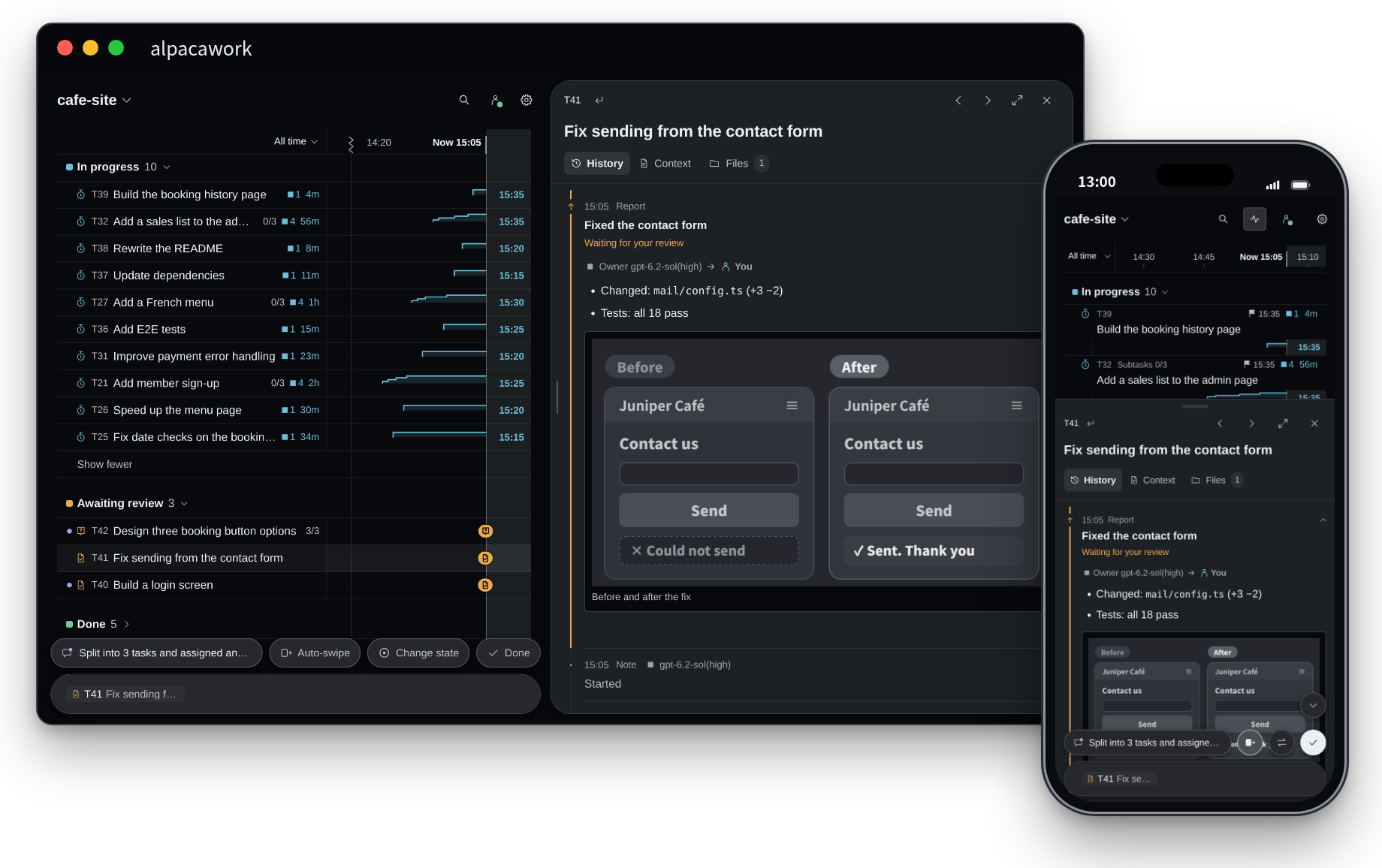
alpacawork is a tool (an AI harness) that runs the Claude Code and Codex agents already installed on your PC and assigns work to them. Write what you want in one chat box, and your point of contact, an AI called the coordinator, turns it into tasks, assigns them to other AIs and tracks progress. You do three things: ask, answer questions, and check the results. You can use it from your phone in the same way.
Install
Paste the following text into Claude Code or Codex on your PC. The AI installs alpacawork, and the setup screen opens in your browser.
Download the guide below, read all of it, and follow it to install alpacawork on this PC.
https://raw.githubusercontent.com/alpacakit/alpacawork/main/skills/alpacawork/references/setup.md
To install with commands, run these two lines in a terminal, in order.
npm install -g alpacawork
alpacawork setup
- Requirements: macOS (Apple silicon), Linux (x64) or Windows (inside WSL2). You need an AI agent you are signed in to, such as Claude Code or Codex, and Node.js 24.16 or later (if an AI does the install, it installs Node.js when it is missing). Full requirements
- After installing: Make your first request. To use it from your phone, connect to your PC over a VPN such as Tailscale (Use it from your phone).
- Stopping and uninstalling: Stop, update or uninstall
What it does
- Write every request in one chat box. The coordinator turns each request into a task and hands it to an AI. You never have to switch chats or AIs from one job to the next.
- AI manages several AIs at once. To add to or change work in progress, you only tell the coordinator. Write "For all three tasks in progress, also check the phone layout," and the coordinator gives that instruction to each AI working on them.
- Describe a workflow in words, and the AIs carry it out together. Even an involved one, such as "Make three proposals, each with a different model. Combine them into one, have another AI review it, and fix it before you report," is carried out as you described it: AI manages the steps, and the AIs hand work to one another.
- Questions from the AI come with options and a recommendation. Questions and reports arrive with images and videos. Pick an option to answer.
- A screen built for phones. Swipe right to answer a question or to mark a result done. You can take a task from request to done on your phone alone. The same screen also works in a browser on your PC.
- It runs in your usual setup.
AGENTS.md,CLAUDE.md, skills, MCP and hooks work unchanged. You don't need an account or an API key for alpacawork.
Good to know
- It is free (MIT License). AI usage is billed under your existing Claude Code, Codex or other plan.
- It runs on your PC. The AI runs on your PC, so keep the PC on and set it not to sleep while you use alpacawork.
- It runs AI agents with full permissions, so they don't stop to ask for approval. You can write what the AI should not do, or should ask you about first, in the project policy.
- Tasks, conversations and result files are kept on your PC. alpacawork does not send them to any outside server run by its developers. Your instructions to the AI, and what the AI reads, are sent to the AI's provider, just as when you use each AI agent directly (more on how data is handled).
FAQ
When an AI company releases a new model, can I add it myself?
Yes. Ask in the chat box, for example "Add Gemini 4 to the Antigravity models," and the AI adds it to the settings. You can also edit the models yourself under Settings → Server.
If you are unsure about any of the app's settings, ask the AI in the chat box as well. It can change most settings for you. A few steps, such as signing in to an AI agent and entering API keys, are left to you.
Documentation
- Getting started: from installing to your first request, using it from your phone, updating and uninstalling
- The ideas behind alpacawork: how one request moves along, and the design principles
- Troubleshooting: when something doesn't work. Please report bugs in Issues
License
Yorumlar (0)
Yorum birakmak icin giris yap.
Yorum birakSonuc bulunamadi