enso
Health Warn
- License — License: GPL-3.0
- Description — Repository has a description
- Active repo — Last push 0 days ago
- Low visibility — Only 5 GitHub stars
Code Fail
- rm -rf — Recursive force deletion command in lab/install-app.sh
Permissions Pass
- Permissions — No dangerous permissions requested
No AI report is available for this listing yet.
A friendly, native macOS terminal with workspaces, a command palette, and live process icons, built on libghostty and SwiftUI.

Enso
The terminal that keeps itself organized.



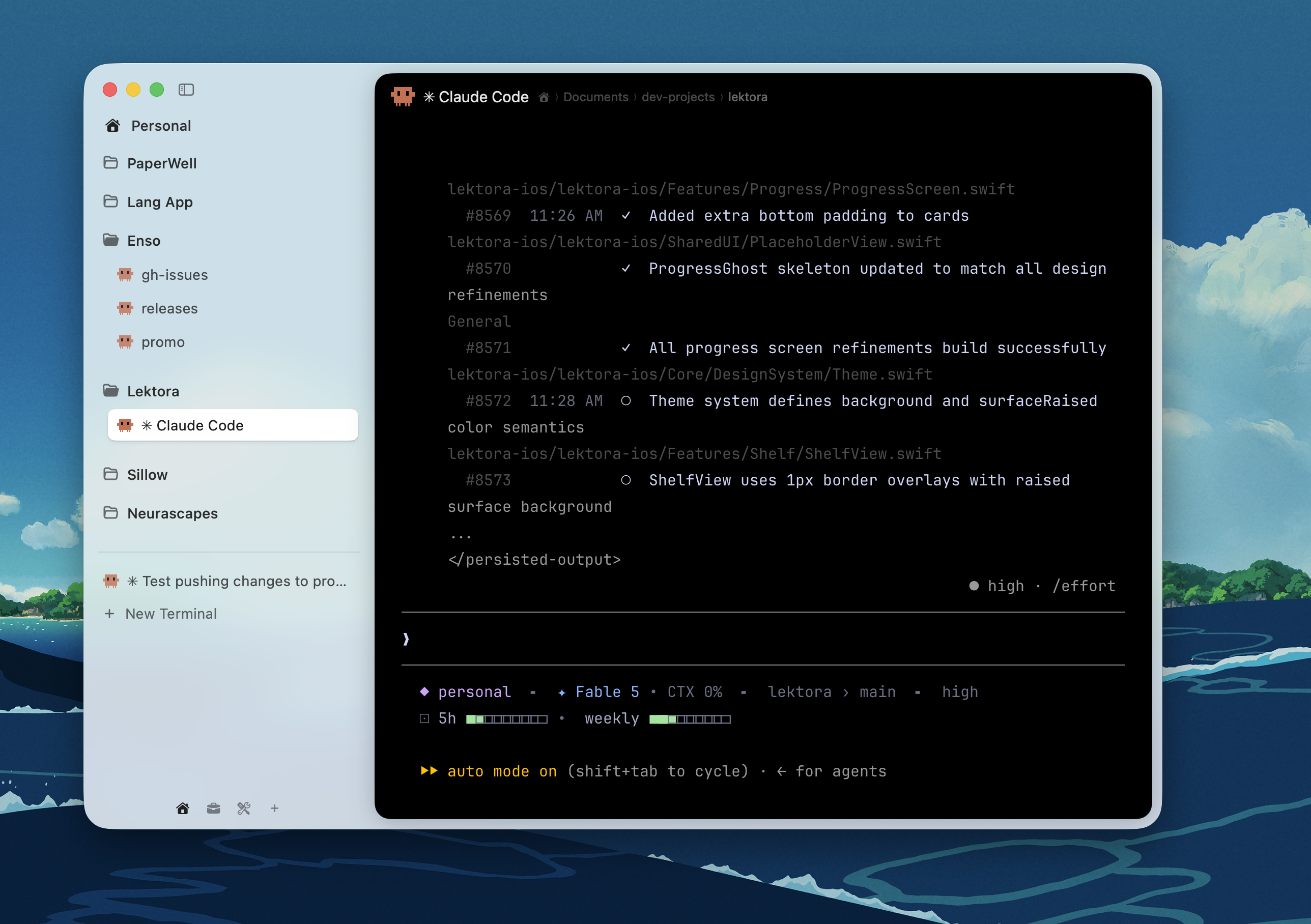
Enso is a native macOS terminal. Tabs show what's actually running in them, with names and icons instead of zsh · 80×24. Workspaces keep projects apart, the command palette finds everything, and it's all GPU-fast thanks to libghostty. If you run AI coding agents all day, Enso is especially good at that.
Download
⬇ Download Enso.dmg — signed & notarized, no security prompts. Drag to Applications, open, done.
⚠️ Enso is pre-1.0 — expect breaking changes between releases.
Highlights
🪷 Spaces: swipeable workspaces in the sidebar, each with its own tabs and folders. Swipe past the last one to create a new one.
🕵️ Icons for what's running: Claude, Codex, Gemini, and Ollama show their real logos; vim, ssh, git, and docker get glyphs; idle shells show a default terminal icon.
🔁 Tabs that survive a restart: tabs running Claude or Codex pick up right where they left off after a relaunch.
⌘T Command palette: every tab, space, and command in one search. Jump with
⌘1–9, rename inline, duplicate, close others, open in Finder.⌃Tab switcher: flip through your recent tabs with a live preview, like the app switcher but for terminals.
🌗 Feels like a Mac app: native SwiftUI chrome that follows your system's light or dark look, while the terminal keeps your Ghostty theme.
📌 A sidebar that never rots: pin tabs to keep them forever, group them into folders, double-click to rename. Unpinned tabs quietly expire after 24 hours.
Keyboard
| Shortcut | Action |
|---|---|
⌘T / ⌘P |
Command center |
⌘N |
New tab |
⌘W |
Close tab |
⌃Tab |
MRU tab switcher |
⌘1–9 |
Jump to tab |
⇧⌘P |
Pin / unpin tab |
⇧⌘[ / ⇧⌘] |
Previous / next tab |
⌘, |
Settings |
Build from source
Enso embeds Ghostty's GhosttyKit.xcframework, which isn't vendored in this repo:
git clone https://github.com/ghostty-org/ghostty references/ghostty
cd references/ghostty && zig build -Doptimize=ReleaseFast -Demit-macos-app=false
cd ../.. && ln -s ../references/ghostty/macos/GhosttyKit.xcframework macos/GhosttyKit.xcframework
xcodebuild -project macos/Enso.xcodeproj -scheme Enso build
script/release.sh cuts a signed, notarized DMG (needs a Developer ID certificate and a notarytool keychain profile).
Credits
Terminal emulation, PTY, and Metal rendering by Ghostty — Enso is UI and workflow on top of libghostty. Agent logos via Simple Icons and LobeHub.
License
Enso is open source under the GNU General Public License v3.0. Ghostty (MIT) and other bundled components retain their original licenses.
Reviews (0)
Sign in to leave a review.
Leave a reviewNo results found