LongHorizon-Harness
Health Pass
- License — License: MIT
- Description — Repository has a description
- Active repo — Last push 0 days ago
- Community trust — 267 GitHub stars
Code Pass
- Code scan — Scanned 12 files during light audit, no dangerous patterns found
Permissions Pass
- Permissions — No dangerous permissions requested
No AI report is available for this listing yet.
The long-horizon computer-use harness. Run AI agents across desktop apps and the CLI for extended periods while preserving task state and making reliable progress on complex workflows. Features fresh-context execution, durable verified state, independent auditing, recoverable progress, and native Claude Code / Codex / OpenClaw integration.
LongHorizon-Harness
Advancing Long-Horizon Agents for Real-World Tasks
Operate the whole computer like a human. Work across desktop apps and the command line for dozens of hours.
No state drift. Verifiable progress. Complex tasks carried through to completion.









Usage · What You Get · How It Works · Results · Project Website · 简体中文

The model determines what an agent can do in one round. LongHorizon-Harness determines whether that work can be verified, preserved, and continued until the task is actually complete.
Works with Claude Code and Codex. One-command install, ready to run.
LongHorizon-Harness is an execution, state-management, and result-verification system for long-horizon tasks. It does not train a new model or replace an existing agent. It runs on top of systems such as Codex and Claude Code, helping agents operate autonomously in real computer environments for extended periods and continuously move complex tasks forward.
✨ News
🚀 We’re iterating rapidly. Stay tuned!
Video Demo
https://github.com/user-attachments/assets/ca8b77ce-9220-4d85-a272-b346009b2454
Open the promotional video (1440p MP4)
Three roles. One trusted state.
LongHorizon-Harness separates planning, execution, and verification so that one growing context is not responsible for everything.
| Role | One responsibility | |
|---|---|---|
| 🧭 | Manager | Maintains the original goal, verified progress, and next step |
| ⚡ | Executor | Starts each round with a fresh context and focuses on one clearly defined task |
| 🔍 | Auditor | Independently inspects files, interfaces, logs, and tests in the real environment |
Only results that pass independent verification enter persistent task state. Even when the context is refreshed, an action fails, or a deliverable does not pass inspection, the system retains previously verified progress and continues from what remains.
Desktop apps and CLI. One continuous task.
LongHorizon-Harness supports both GUI and CLI workflows.
| 🖥️ Operate the desktop | ⌨️ Work in the terminal |
|---|---|
| 🌐 Click, type, scroll, and browse | 💻 Write and modify code |
| 📊 Operate spreadsheets | ▶️ Run commands and scripts |
| 📄 Edit documents | 📦 Install dependencies and environments |
| 🎨 Use design software | 🔧 Configure and debug systems |
| 🧊 Operate 3D tools | 📁 Process files and data |
One task can begin in a browser, move to the command line for data processing, continue in desktop software to produce an artifact, and return to the terminal for validation or debugging. The goal, progress, and evidence remain under the same state-management system throughout.
Any model. Any agent backend.
LongHorizon-Harness is not tied to a specific model or agent backend. Existing models and agents connect through configuration without changing their original workflows.
| Layer | Supported choices | |
|---|---|---|
| 🧠 | Models | Claude, GPT, Qwen, and other models exposed by an agent backend |
| 🤖 | Agent backends | Claude Code, Codex CLI, and custom AgentAdapter implementations |
| 🎛️ | Role assignment | The Manager, Executor, and Auditor can each use a different model or backend |
| 🖥️ | Execution environments | Local, with a pluggable Environment protocol |
A lightweight AgentAdapter preserves each agent's native execution loop while LongHorizon-Harness coordinates role boundaries, verified task state, and cross-round progress around it.
Use one model for all three roles, or combine different models and backends to balance quality, speed, and cost.
Hundreds of real tasks. Measured gains.
LongHorizon-Harness is not demonstrated only on a handful of carefully selected success cases.
We ran it on hundreds of complex tasks across GUI, CLI, and mixed computer environments:
| Task domain | What the tasks involve |
|---|---|
| 🌐 Web Frontend | Developing, fixing, and validating websites and web applications through browser interaction, developer tools, and code changes |
| 📊 Data Analysis & Visualization | Processing data, producing charts and dashboards, and checking analytical results and visual deliverables |
| 🛠️ Operations & Debugging | Investigating logs, networks, performance, and service failures; configuring, diagnosing, and repairing systems |
| 🎨 Design & Image Processing | Editing visual assets, matching design references, processing images, and verifying final visual quality |
| 🎮 Games & Interaction | Building, operating, and debugging games or interactive applications; checking interaction logic and runtime behavior |
| 📄 Documents & Presentations | Editing documents and slide decks, including content, formatting, references, layout, and final delivery |
| 🧊 Spatial Reasoning | Completing tasks involving spatial relationships, geometry, precise placement, and 3D operations |
| 🖥️ Desktop & System Settings | Operating desktop applications, files, and system settings across multi-application workflows |
| 🔬 Research & Education | Completing literature research, coursework, teaching materials, forms, and research-support workflows |
| 🎬 Creative Production | Producing presentations, video, audio, and other media while coordinating assets across tools |
| ⚙️ Engineering & Computing | Using CAD, EDA, scientific software, development tools, and cloud or DevOps toolchains |
| 🎫 Personal Services | Handling event ticketing, everyday services, games, and visual-search workflows |
| 🏛️ Administration & Compliance | Completing office, legal, policy-sensitive form, institutional, and safety-aware submission workflows |
| 💼 Business & Finance | Handling market analysis, procurement, loans, sales, reimbursements, and cross-application enterprise workflows |
| 🏥 Healthcare | Completing medical quality-control, insurance, immunization, and structured health-form workflows |
Same model. Same execution backend. Only the harness changes.
~50% → ~80%GUI + CLI completionWeaveBench |
3×Full desktop-task completionOSWorld 2.0 |
69.7% → 77.2%Code + CLI successTerminal-Bench 2.1 · 24% fewer tokens |
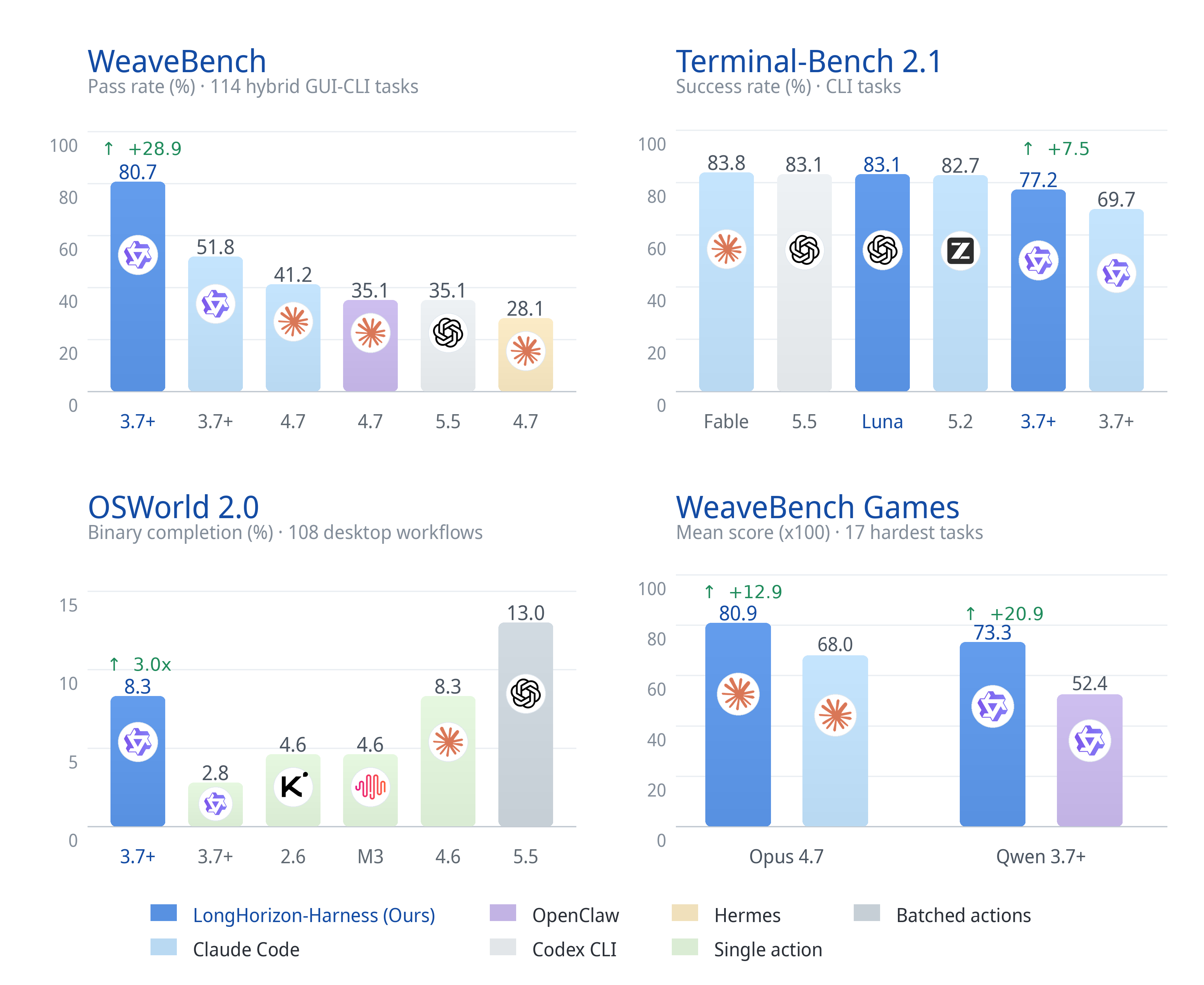
📊 Full benchmark results and experimental settings
| Benchmark | Metric | Claude Code | LongHorizon-Harness | Gain |
|---|---|---|---|---|
| WeaveBench (114 tasks) | PassRate | 51.8 | 80.7 | +28.9 |
| WeaveBench | Overall | 0.702 | 0.835 | +0.133 |
| OSWorld 2.0 (108 tasks) | Binary | 2.8 | 8.3 | 3.0× |
| OSWorld 2.0 | Partial | 21.5 | 35.2 | +13.7 |
| Terminal-Bench 2.1 | Success rate | 69.7 | 77.2 | +7.5 |
All rows use Qwen 3.7-Plus as the backbone and Claude Code as the execution backend.
Full result tables and case trajectories are available on the LongHorizon-Harness project website.
One command. Full visibility.
Quick start
For detailed setup and configuration options, see Installation.
- Install LongHorizon-Harness:
uv tool install lh-harness
- Check the environment, then explicitly install and enable the Codex GUI plugin:
lh-harness doctor
lh-harness doctor --install-codex-gui
- Enter your project and generate its configuration:
cd /path/to/your/project
lh-harness init
Open
.lh-harness/config.tomland adjust the defaults if needed. The generated configuration uses Codex,gpt-5.6-sol, and an enabled Dashboard by default.Run a task:
lh-harness run --task "hi"
The Dashboard opens automatically and shows the complete Manager → Executor → Auditor workflow.
Installation
Requirements
- Python 3.10 or later
- uv for the recommended isolated installation method
- At least one supported agent runtime available on
PATH:
Install with uv
uv tool install lh-harness
To upgrade an existing installation:
uv tool upgrade lh-harness
Install with pip
pip install lh-harness
Generate a project configuration
lh-harness init
This creates ./.lh-harness/config.toml without replacing an existing file. Use lh-harness init --force only when you want to regenerate it.
When lh-harness run starts, it reads this file automatically. Configuration precedence is:
- Explicit CLI arguments
- Values in
./.lh-harness/config.toml - Built-in defaults
The generated file includes run storage, Agent/model assignment, role timeouts, MCP, prompt language, and Dashboard defaults. Task text, run IDs, and API keys remain command-line or environment inputs and are not stored in the generated configuration.
Check the installation, Python runtime, available agent CLIs, and Codex GUI support:
lh-harness doctor
doctor also checks PyPI for updates with a 3-second timeout. When automatic detection fails, the output points to the PyPI page for a manual check.
To check for updates directly:
lh-harness check-update
Codex Computer Use setup is intentionally separate from task execution. To explicitly install and enable the official plugin:
lh-harness doctor --install-codex-gui
To remove the plugin:
lh-harness doctor --uninstall-codex-gui
Plain lh-harness doctor only checks status. Running lh-harness run never installs, removes, or changes Codex plugins.
Configure a computer-use MCP server
GUI interaction is supplied through a compatible external computer-use MCP server. LongHorizon-Harness does not bundle or enable a specific computer-use implementation by default.
Both Claude Code and Codex accept a Claude-style MCP configuration through --mcp-config. Codex translates this configuration into its native command-line overrides. Use simple server names containing letters, numbers, hyphens, or underscores.
Example configuration for a local stdio MCP server:
{
  "mcpServers": {
    "computer-use": {
      "command": "/path/to/mcp-server",
      "args": ["--option", "value"],
      "env": {
        "EXAMPLE_VARIABLE": "value"
      }
    }
  }
}
Example configuration for an HTTP MCP server:
{
  "mcpServers": {
    "computer-use": {
      "url": "http://127.0.0.1:3000/mcp"
    }
  }
}
Run the harness with the MCP configuration and any directories that the agent needs to access:
lh-harness run --task @task.md --agent claude_code \
  --mcp-config /path/to/mcp.json \
  --mcp-add-dir /path/to/mcp/files
The same configuration works with Codex:
lh-harness run --task @task.md --agent codex \
  --mcp-config /path/to/mcp.json \
  --mcp-add-dir /path/to/mcp/files
--mcp-add-dir may be repeated. MCP configuration and additional directories can also be supplied through environment variables:
| Backend | MCP configuration | Additional directories |
|---|---|---|
| Claude Code | LH_HARNESS_CLAUDECODE_MCP_CONFIG |
LH_HARNESS_CLAUDECODE_ADD_DIRS |
| Codex | LH_HARNESS_CODEX_MCP_CONFIG |
LH_HARNESS_CODEX_ADD_DIRS |
| All backends | LH_HARNESS_MCP_CONFIG |
LH_HARNESS_MCP_ADD_DIRS |
Separate multiple directories using the operating system path separator (: on macOS/Linux and ; on Windows). Avoid storing API keys directly in the MCP JSON file when the MCP server can read them from its environment.
Dashboard commands
lh-harness run --task @task.md --dashboard      # Monitor a live run
lh-harness dashboard                            # Browse completed and active runs
Common CLI options
| Option | Description |
|---|---|
--task |
Task text or @task.md |
--agent |
claude_code or codex |
--env |
local |
--max-rounds |
Maximum number of Manage-Execute-Audit rounds; the CLI default is 30 |
--dashboard |
Start live monitoring and human intervention |
--no-dashboard |
Disable a Dashboard enabled by the project configuration |
Run a task:
lh-harness run \
  --task "Inspect the current directory and summarize its files."
Run a longer task from a file and open the Dashboard:
lh-harness run --task @task.md --dashboard
The Dashboard shows every round's plan, execution result, audit evidence, and reason for rework. It also provides human gates when a task completes, becomes blocked, needs input, or fails repeatedly.
| 📋 Plan | ⚡ Execution | 🔍 Audit | ♻️ Rework |
|---|---|---|---|
| What happens next | What the agent did | What the environment proves | Why another round is needed |
Every run is stored in an isolated runs/<run-id>/ directory. The complete task state and audit trail make the agent's progress inspectable, recoverable, and reproducible.
| Run record | What it preserves |
|---|---|
| 📋 Task state | Original goal, requirements, verified progress, and remaining work |
| 🧾 Event stream | What happened throughout the run |
| 🔍 Audit reports | Evidence and acceptance decisions for every round |
| 🧠 Role trajectories | Manager, Executor, and Auditor inputs and outputs |
| 📁 Workspace | Files and artifacts produced during execution |
| ✅ Final report | The verified outcome of the task |
Evaluation Reproduction
eval/ provides frozen reproduction suites for two benchmarks:
| Directory | Benchmark | Description |
|---|---|---|
eval/WeaveBench-harness/ |
WeaveBench (114 tasks) | Hybrid GUI+CLI tasks and a reproduction skill |
eval/OSWorldv2-harness/ |
OSWorld-V2 (108 tasks) | Hybrid runner aligned with the official release |
See each directory's README.md or README.zh-CN.md for environment setup, parameters, and launch commands. The nested cua_harness packages are frozen compatibility copies used for evaluation; new integrations should use src/lh_harness/.
Citation
@article{longhorizonharness2026,
  title={LongHorizon-Harness: Advancing Long-Horizon Agents for Real-World Tasks},
  author={Ziyu Ma and Hailang Huang and Shun Zou and Yong Wang and Shidong Yang and Yiming Hu and Fei Wei and XiangXiang Chu},
  journal={arXiv preprint arXiv:2608.01964},
  year   = {2026},
  url    = {https://arxiv.org/abs/2608.01964}
}
Operate the whole computer. Preserve verified progress. Keep working until the task is done.
Reviews (0)
Sign in to leave a review.
Leave a reviewNo results found