aming-claw
Health Warn
- License — License: NOASSERTION
- Description — Repository has a description
- Active repo — Last push 0 days ago
- Low visibility — Only 7 GitHub stars
Code Pass
- Code scan — Scanned 12 files during light audit, no dangerous patterns found
Permissions Pass
- Permissions — No dangerous permissions requested
No AI report is available for this listing yet.
Shared workspace for AI agents and human developers. See, audit, and review every change AI makes to your codebase. Multi-language graph (Python/TypeScript), MCP-native, local-first.
Aming Claw
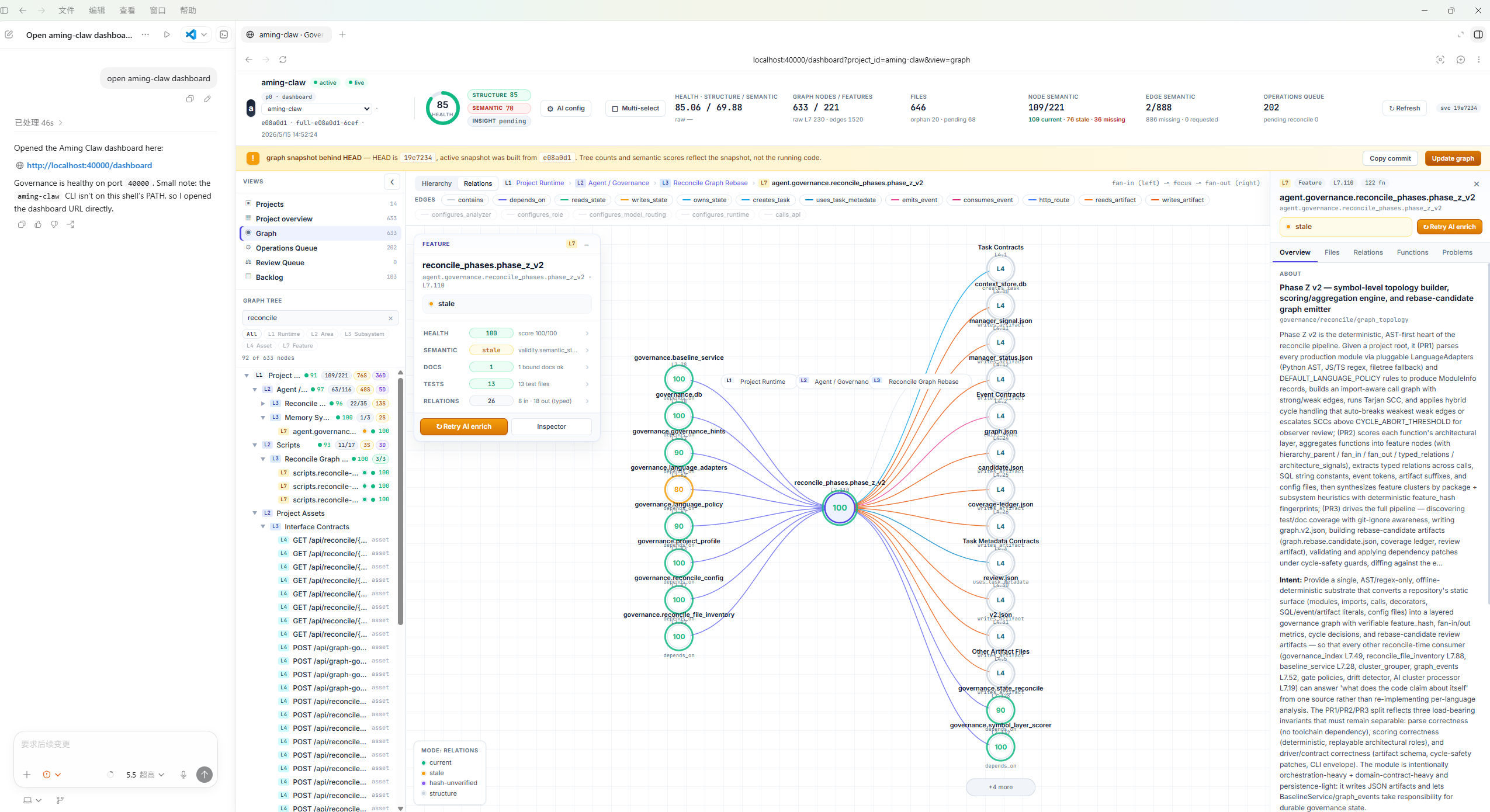
Your AI agent and you, sharing the same dashboard.
Open source workspace for AI-coded development. See what AI is touching in
real-time, audit every change, review proposals before they land in your
codebase. Multi-language (Python/TypeScript), MCP-native, local-first.
Contents
- Quick Start
- Key Terms
- Demos
- Use Cases
- V1 MVP Snapshot
- Install Details
- Runtime Boundaries
- Plugin Components
- Workflow
- CLI
- Packaging
- Governance Contract
- Status & Contributing
- Documentation
- License
Quick Start
Start with the AI host you use. The longer requirements, raw installer commands,
and troubleshooting notes are in Install Details.
Codex
Ask Codex to install from the GitHub repo:
Install the Aming Claw plugin from https://github.com/amingclawdev/aming-claw
If the aming-claw CLI is already available, you can run the same install
directly:
aming-claw plugin install https://github.com/amingclawdev/aming-claw
Reload Codex or open a new Codex session after install. First-run startup and
verification steps are in Install Details.
Claude Code
Paste this once — Claude bootstraps the plugin end-to-end:
Install aming-claw end-to-end from https://github.com/amingclawdev/aming-claw:
1. Run `/plugin marketplace add https://github.com/amingclawdev/aming-claw`
2. Run `/plugin install aming-claw@aming-claw-local`
3. pip install -e the marketplace clone at
   ~/.claude/plugins/marketplaces/aming-claw-local
   (Windows: %USERPROFILE%\.claude\plugins\marketplaces\aming-claw-local)
4. Start `aming-claw start` in a background terminal
5. Run `aming-claw open` to launch the dashboard
6. Remind me to reload Claude Code so the plugin's MCP tools and skills load
Steps 1–2 only copy the skill files; pip install adds the Python runtime,aming-claw start boots governance on port 40000, aming-claw open
launches the dashboard. After reloading, phrases like "install and start
aming-claw" or "one-shot install" trigger the launcher skill's one-shot
mode for re-bootstrap in future sessions. First-run troubleshooting and
raw installer scripts are in Install Details.
After installation: open a new Claude Code session
The Claude Code session you installed Aming Claw in won't load the plugin's
skills or MCP tools — Claude Code reads plugin paths at session start, so
changes apply only to new sessions.
Works immediately (no new session needed):
- The
aming-clawCLI on yourPATH aming-claw startbrings up governance on port40000- The dashboard at
http://localhost:40000/dashboard aming-claw opento launch a browser to it
Requires a new session:
- The
/aming-claw:aming-clawand/aming-claw:aming-claw-launcherskills - The
mcp__plugin_aming-claw_aming-claw__*MCP tools (health,runtime_status,task_*,backlog_*,graph_*, etc.)
TL;DR: After install, open a new Claude Code session to use Aming Claw
inside your Claude Code conversations. The dashboard works in the current
session.
This is a Claude Code framework behavior, not specific to Aming Claw — but it
surprises users often enough that we call it out.
Key Terms
- Commit-bound graph — graph state pinned 1:1 to a specific git commit; queries return what was true at that commit. The snapshot id encodes the commit (e.g.
scope-aefef99-a554). - Manual Fix (MF) — the audit-trailed change workflow: predeclare a backlog row → graph-first discovery → scoped edit → focused tests → commit with Chain trailers → graph reconcile → close the row. V1's default implementation path in place of chain automation.
- Update Graph / scope reconcile — re-materialize the graph snapshot to track new commits. Triggered after a Manual Fix lands so subsequent queries see the latest code.
- Operations Queue — dashboard view of in-flight graph operations: snapshot builds, semantic enrichment jobs, reconcile work, governance hint patches.
- Review Queue — dashboard view where AI-proposed semantic memories wait for human accept/reject; nothing becomes trusted project memory until an operator approves.
- Governance Hint — graph mutation written as a comment in a tracked file (committed, then applied at the next reconcile). Source-controlled, reversible, audit-trailed — the only safe way to bind orphan doc/test/config files to nodes.
- AI Enrich — request the AI provider to generate a semantic summary/intent/risk for selected nodes or edges. Proposals land in Review Queue; the AI provider is the local
claudeorcodexCLI (see AI Providers).
Demos
Recorded clips of the V1 workflows.
Install and verify
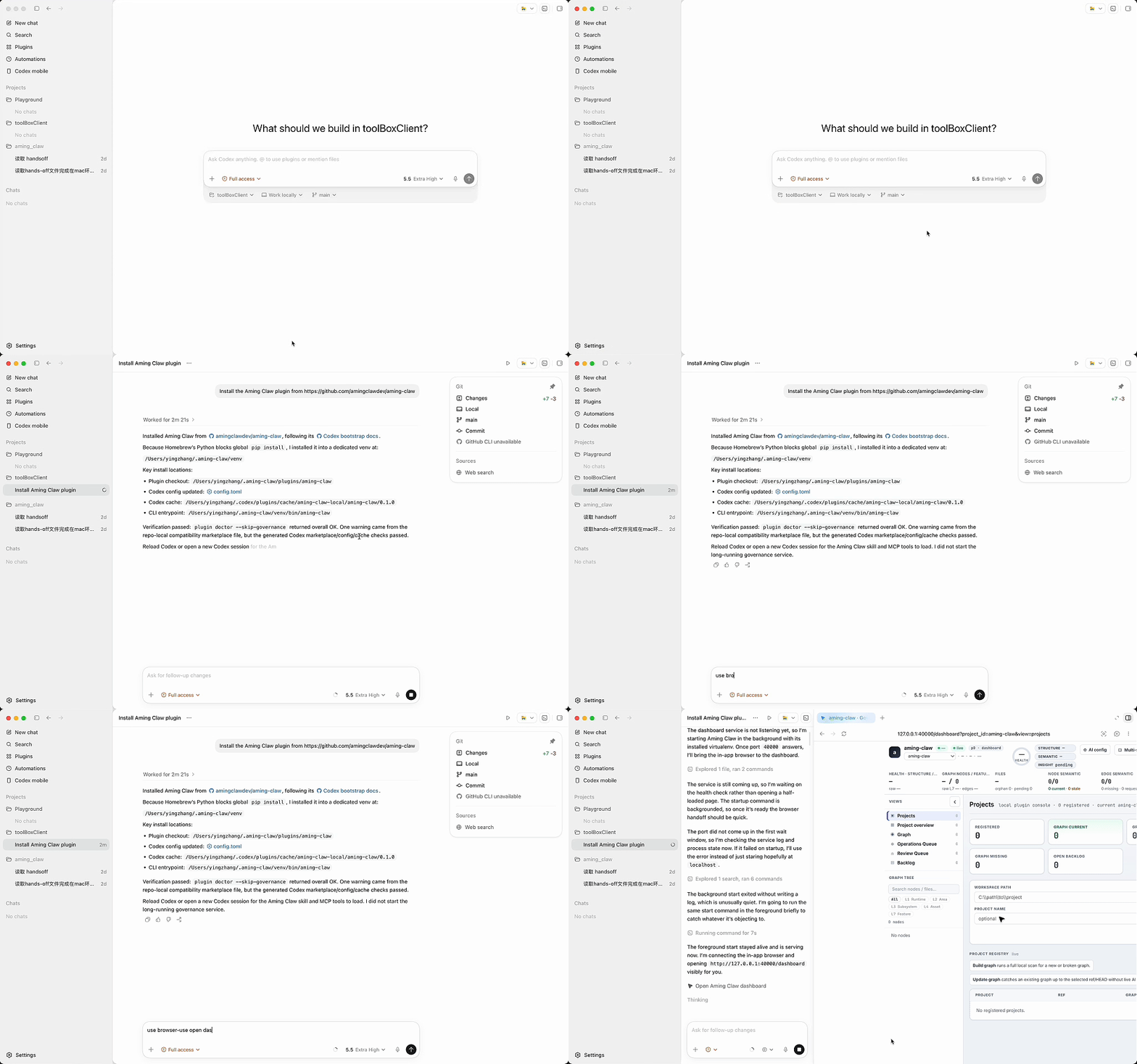
URL drop → aming-claw plugin doctor → aming-claw start → open /dashboard.
Bootstrap a project
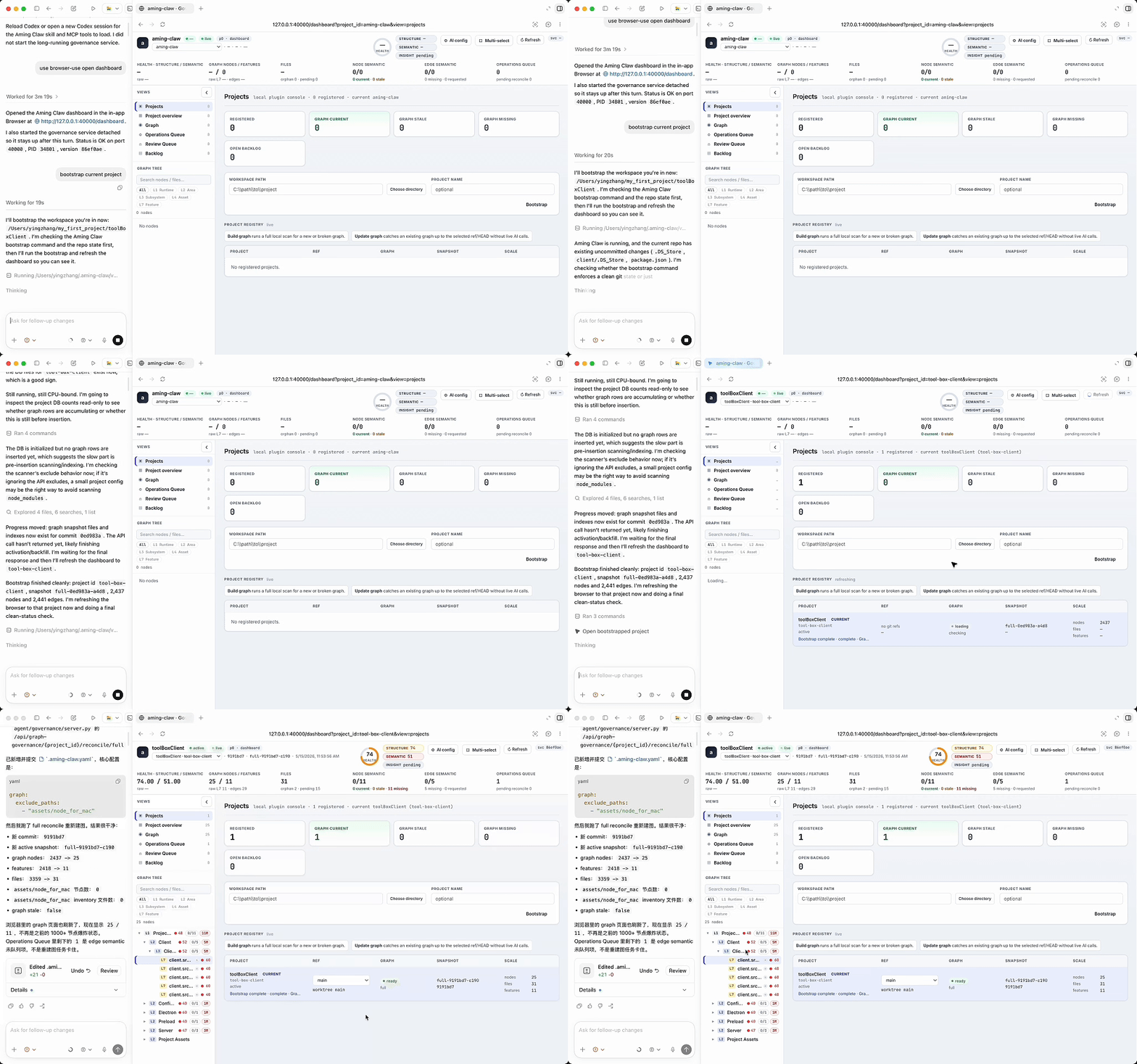
Choose a clean project, build the graph, watch nodes appear in Projects/Graph.
Inspect code through the graph
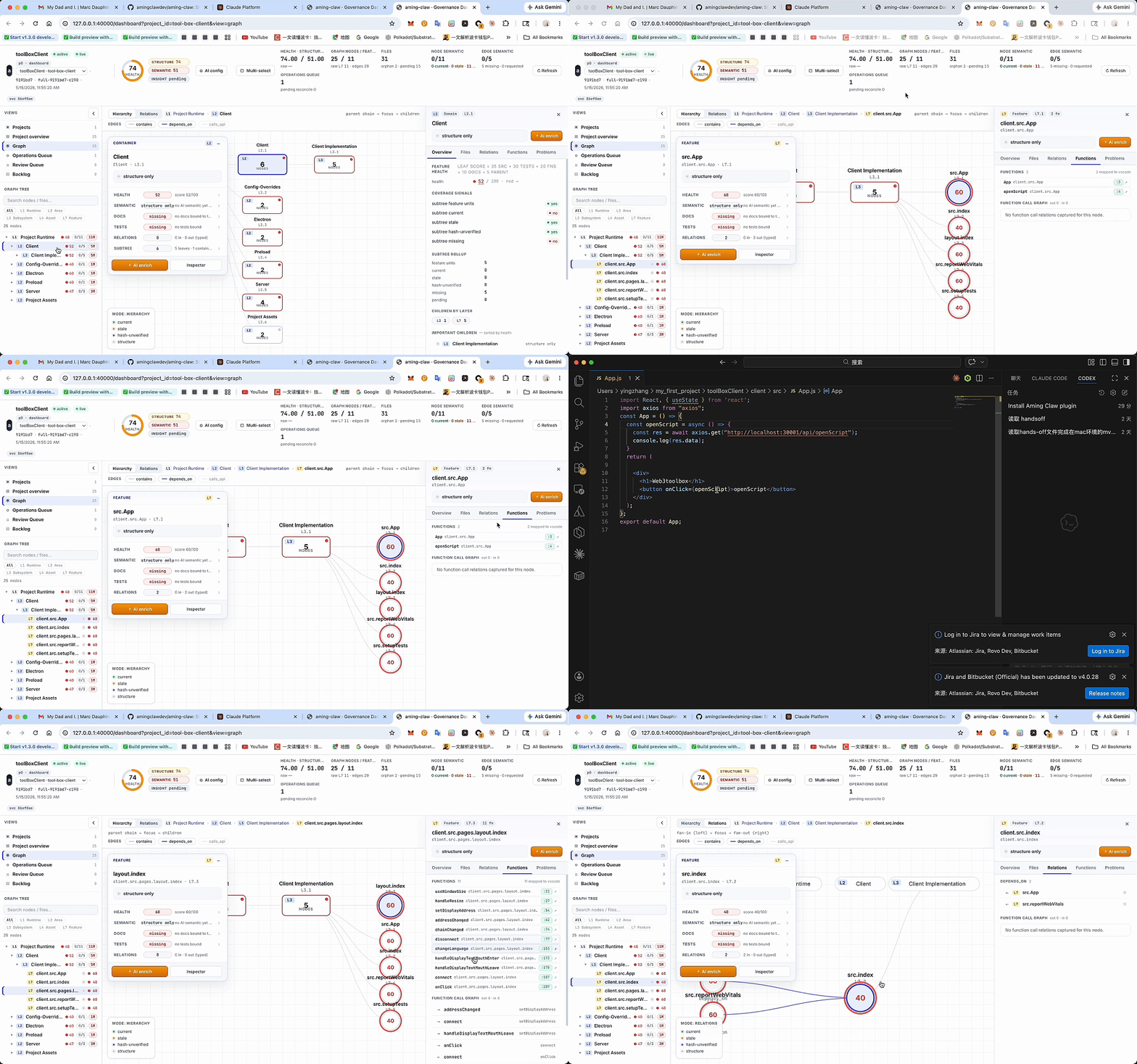
Select a node, open Files / Functions / Relations, jump to a function line in the editor.
Find a PR opportunity
Use low health, missing tests/docs, or high fan-out to file a graph-backed backlog row.
AI Enrich review
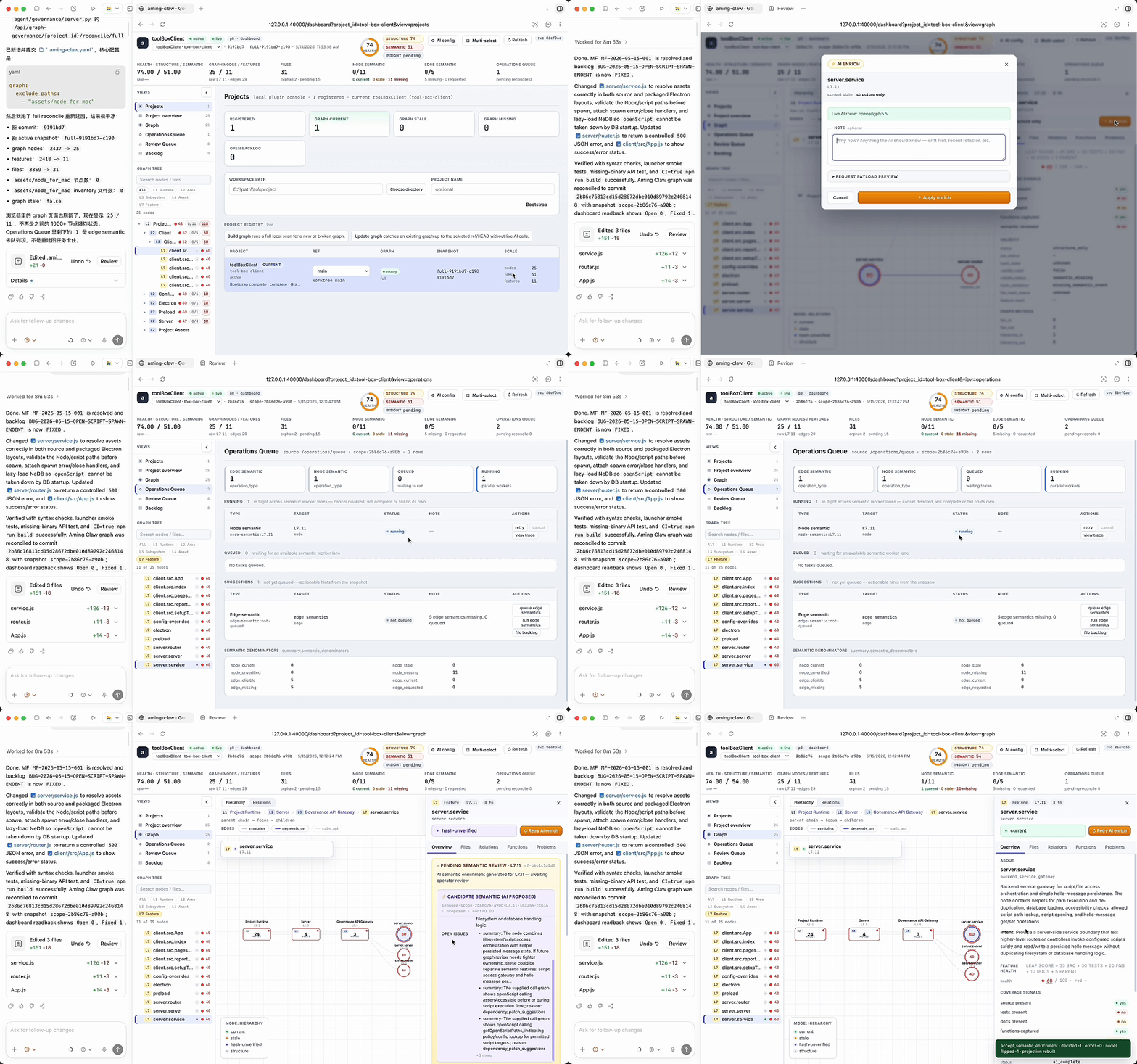
Run targeted AI Enrich, watch Operations Queue, then accept or reject the Review Queue proposal.
Governance Hint
Bind an orphan doc/test/config file to a node, commit the hint, run Update Graph.
Use Cases
Govern AI-assisted fixes
For V1, use Manual Fix rather than chain automation for normal implementation:
file/update backlog, inspect the graph first, edit only scoped files, run
focused tests, commit with evidence, then Update Graph.
Hand off work between AI agents
Use graph, backlog, queue state, and commit evidence as the shared project
ledger between Codex, Claude Code, and future agent workers. One AI can file a
backlog row, another can inspect the same graph evidence, implement a scoped
fix, and a third can review or continue the task without depending on fragile
chat history.
Share the dashboard view with an AI agent
Keep the dashboard open while Codex or Claude Code uses MCP graph tools. The
human sees project health, graph structure, queue state, review proposals, and
backlog; the AI uses the same evidence to explain and act.
Find credible PR opportunities
Use the graph to inspect unknown open-source projects, locate weak modules,
missing tests/docs, high fan-out functions, stale semantics, and isolated files.
Turn the evidence into backlog rows before implementing a focused PR.
Review semantic memory before trusting it
Run AI Enrich on selected nodes or edges, then accept or reject the proposal in
Review Queue. ai_complete means the AI produced a proposal, not that the
project memory is trusted.
Repair graph structure safely
Use Governance Hint to bind orphan doc/test/config files to an existing node.
The hint is written as source-controlled evidence and only takes effect after
commit plus Update Graph.
V1 MVP Snapshot
Aming Claw V1 is focused on one practical loop: help a human and an AI agent
understand a local project through a commit-bound graph, find credible PR
opportunities, record them in backlog, and execute small governed fixes.
Stable V1 capabilities:
- Register a target project explicitly, then build or update its local graph.
- Explore nodes, files, functions, docs, tests, relations, fan-in/fan-out, and
bounded source excerpts through the dashboard or MCP graph tools. - Use the dashboard as a shared visual control plane for the user and AI
session. - File backlog rows with graph evidence and use Manual Fix discipline for
implementation work. - Run targeted AI Enrich on selected nodes or edges, then accept or reject the
proposed semantic memory in Review Queue. - Use Governance Hint to bind orphan doc/test/config files to existing nodes
through source-controlled evidence.
V1 boundaries to keep visible:
- Chain dev/test/qa/merge automation is experimental. The recommended V1
implementation path is Manual Fix with backlog-first, graph-first, tests,
explicit commits, and Update Graph after commit. - ServiceManager/executor degraded means chain automation is degraded; it does
not mean governance, dashboard, graph query, or backlog are broken. - Full semantic coverage is not required for V1. AI-generated semantics are
proposals until reviewed and accepted. - Function-level call queries exist for supported snapshots, but dashboard
visualization is still evolving. - Governance Hint is not arbitrary graph editing. It only binds orphan
doc/test/config files that already appear in snapshot inventory. - Plugin install, governance startup, dashboard availability, MCP visibility,
ServiceManager health, and local AI CLI readiness are separate states.
Best-fit V1 use cases:
- Open-source contributors inspect unfamiliar projects through the graph, find
evidence-backed improvement opportunities (missing tests/docs, high-coupling
modules, stale semantics), and file focused PRs with graph-backed
justification. - AI agents use graph-first discovery instead of broad repository search when
onboarding to an unfamiliar project. - Maintainers use the dashboard to find missing tests/docs, high-coupling
modules, stale semantics, and reviewable backlog items. - A user and AI session share the same dashboard view while the AI performs
MCP-backed graph, backlog, and semantic operations.
Install Details
First Run And Verify
Start governance in a separate terminal:
aming-claw start
Then open:
http://localhost:40000/dashboard
Run the read-only check when you want to confirm the local install:
aming-claw plugin doctor
aming-claw start only starts the local governance service. It does not prove
that Codex/Claude loaded the plugin, MCP tools, dashboard static files,
ServiceManager, executor, or AI CLI auth.
Requirements
- Python 3.9+
- Git
- Node.js/npm when rebuilding the dashboard from source
- Codex or Claude Code as the plugin host (loads skill + MCP tools)
- A working
claudeand/orcodexCLI onPATH— Aming Claw's AI features
(AI Enrich, semantic review, chain handlers that spawn AI sub-tasks) shell
out to the local CLI rather than calling Anthropic/OpenAI directly. See
AI Providers below.
AI Providers
AI-driven features in Aming Claw call the local Claude Code or Codex CLI as
a subprocess — Aming Claw does not make direct API calls to Anthropic or
OpenAI. As a consequence:
- You need a working
claudeand/orcodexexecutable onPATH. Override
the path withCLAUDE_BIN/CODEX_BINenv vars if needed. - The CLI must be logged in. Aming Claw probes
--versionto confirm the
binary exists, but cannot verify auth —runtime_status/plugin doctor
reportauth unknownuntil a real model call succeeds. - Each project's AI config must declare a
semanticprovider/model
(GET /api/projects/{project_id}/ai-config).openairoutes use the Codex
CLI;anthropicroutes use the Claude Code CLI. AI Enrich is blocked if
the semantic route is unset. .envANTHROPIC_API_KEY/OPENAI_API_KEYare not consumed by AI
Enrich — the local CLI's own auth is the source of truth.
If a CLI is missing or routing is unset, the dashboard's AI Enrich button
surfaces the specific reason (e.g., missing, routing missing); structural
graph queries, backlog, and Manual Fix still work without any AI CLI. See
Runtime Boundaries for the full state model.
If you are starting from a plugin host, give it the repository URL:
Install the Aming Claw plugin from https://github.com/amingclawdev/aming-claw
For Codex, the lowest-friction path when aming-claw is not yet on PATH is
to ask Codex to install from GitHub (the Quick Start prompt
does this in one line). When you need the raw bootstrap script verbatim —
Windows PowerShell or macOS/Linux curl — seedocs/install/codex-bootstrap.md.
Claude Code install detail
In Claude Code, install from the Git URL:
/plugin marketplace add https://github.com/amingclawdev/aming-claw
/plugin install aming-claw@aming-claw-local
Reload Claude Code or open a new session after install. Plugin install loads
plugin/skill assets and the MCP server declaration only — it does not
install Python dependencies, start governance, or prove MCP tools are visible
in the current session. To get a fully-working install (Python package + Codex
cache when relevant + doctor-verified), pair it with aming-claw plugin install <git-url> from the CLI side, or use the clone fallback below if a
Claude Code sandbox blocks the remote URL.
If an older Aming Claw runtime is already installed, update the plugin checkout
directly:
aming-claw plugin install https://github.com/amingclawdev/aming-claw
aming-claw plugin doctor
If the host cannot install Git plugins directly yet, clone once and use the
repo-local package:
git clone https://github.com/amingclawdev/aming-claw.git
cd aming-claw
pip install -e .
Then start governance in a separate terminal and leave it running:
aming-claw start
If the aming-claw console script is not on PATH yet, run the same CLI
through Python: python -m agent.cli start.
After installing or updating the plugin, reload Codex or open a new Codex
session. Plugin load and governance startup are separate: aming-claw start
only starts the local governance service, while the Codex plugin/skill/MCP
must be loaded by Codex itself.
Run the read-only aftercare check when troubleshooting a fresh install:
aming-claw plugin doctor
Expected checks:
.codex-plugin/plugin.jsonexists..agents/plugins/marketplace.jsoncontainsaming-claw.- Codex config enables
aming-claw@aming-claw-local. - Codex plugin cache contains
plugins/cache/aming-claw-local/aming-claw/<version>/.codex-plugin/plugin.json. - The generated Codex marketplace path is valid. A repo-local marketplace file
may be reported as a compatibility warning; real Codex CLI loading uses the
installed cache plus generated marketplace/config. .claude-plugin/marketplace.jsonschema:plugins[].sourcestarts with"./"andmetadata.descriptionis present (claude plugin validate
fails or warns otherwise)..claude-plugin/plugin.jsonschema:name+version+description
present; ifmcpServersis declared, basic shape is checked (command +
args)..mcp.jsoncontainsmcpServers.aming-claw.- Dashboard static assets are present, or doctor prints the exact build fallback.
- Local Codex/Claude CLI commands are detected when available; detection still
reports AI auth as unknown. - Governance health is reachable after services are started.
/dashboardreturns200when governance is running and static assets exist.- ServiceManager is either reachable or reported as degraded for chain/executor.
- A new Codex or Claude Code session can see the Aming Claw skill and MCP tools.
Open the local launcher or dashboard:
aming-claw launcher --open-browser
aming-claw open
Dashboard URL:
http://localhost:40000/dashboard
The root path http://localhost:40000/ is not the dashboard and may return404. If /api/health is OK but /dashboard returns 503, governance is up
but dashboard static assets are missing. No build is needed when eitheragent/governance/dashboard_dist/index.html orfrontend/dashboard/dist/index.html exists. For a raw checkout missing both:
cd frontend/dashboard
npm install
npm run build
Runtime Boundaries
Keep these states separate when troubleshooting:
- Plugin assets installed on disk.
- Codex or Claude Code loaded the skill/MCP in the current session.
- Governance
/api/healthis running on port40000. - Dashboard static assets are present and
/dashboardreturns200. - ServiceManager responds on port
40101. - Executor/chain automation is available.
- Local AI CLIs are detected and the project has AI routing.
aming-claw start only starts governance. It does not prove the current
Codex/Claude session loaded the plugin, that dashboard assets exist, that
ServiceManager/executor are online, or that Codex/Claude CLI auth is valid.
Reload/open a new editor session after installing or updating plugin assets.
Plugin Components
Aming Claw ships these assets in the repo:
.codex-plugin/plugin.json+.agents/plugins/marketplace.json— Codex plugin + local marketplace.claude-plugin/plugin.json+.claude-plugin/marketplace.json— Claude plugin + local marketplace.mcp.json— MCP server contract (read when the repo is opened as a workspace; the CLI installer also generates cache-aware overrides for plugin-mode loading)skills/aming-claw/— main governance skillskills/aming-claw-launcher/— onboarding/launcher skill
After install, the plugin exposes two skills (Claude Code namespacing shown):
/aming-claw:aming-claw/aming-claw:aming-claw-launcher
What aming-claw plugin install writes
The CLI installer (aming-claw plugin install <git-url> orpython scripts/install_from_git.py <git-url>) is not just a git clone:
- Clones/updates the plugin checkout under
~/.aming-claw/plugins/<slug>. - Installs the Python package (
pip install -e .) so the CLI and MCP server
are importable. - Writes Codex config + a generated local marketplace + a versioned plugin
cache at~/.codex/plugins/cache/aming-claw-local/aming-claw/<version>/
that real Codex CLI startup reads.
Run aming-claw plugin doctor after install. If the cache or generated
marketplace is missing/inconsistent, doctor reports fail (not just ok).
A passing doctor verifies the on-disk install and generated config; still open
or reload a Codex/Claude session and confirm the skill/MCP tools are visible.
Use aming-claw plugin update --check to fetch the configured Git remote,
compare the installed checkout with the remote commit, and refresh the local
plugin update state. Use aming-claw plugin update --apply to fast-forward the
checkout, refresh the Python/Codex install surfaces, and write restart/reload
obligations for MCP, governance, or ServiceManager when changed files require
operator action. After completing those restarts/reloads, runaming-claw plugin update --check again to mark the installed commit current.
Starting governance is a separate long-running service command; keep it in its
own terminal instead of expecting plugin install to start it. On Windows use a
separate shell such as Start-Process powershell; on macOS/Linux a detached
smoke command can use nohup python3 -m agent.cli start.
Post-Install Verification
In a new Codex or Claude Code session, ask the AI to use the Aming Claw skill:
Use the Aming Claw skill. Check runtime_status(project_id="<id>"), graph_status, and backlog before changing code.
Confirm visibility:
- Skills
/aming-claw:aming-clawand/aming-claw:aming-claw-launcherresolve. - MCP tool
mcp__aming_claw__healthreturnsok. runtime_statusreturns aggregated governance + ServiceManager + version_check state.
Plugin install loads plugin/skill assets and the MCP server declaration; it
does not install Python dependencies (unless using the CLI installer above),
start governance, or validate AI CLI auth. Start governance separately withaming-claw start. See Runtime Boundaries for the full
state model.
If a Claude Code sandbox blocks the remote installer script path, use the clone
fallback from Install Details — that's an environment policy,
not a governance failure.
Workflow
- Clone and install Aming Claw.
- Start the local governance service.
- Load the Codex or Claude Code plugin.
- Bootstrap or select a project in the dashboard.
- Build or update the project graph.
- Inspect nodes, files, functions, docs, tests, and relations.
- Use AI Enrich on selected nodes or edges.
- Review and accept or reject proposed semantic memory.
- File backlog rows and PR opportunities with graph evidence.
Project bootstrap is explicit. Do not silently register a workspace just
because /api/projects is empty. Bootstrap writes Aming Claw registry/DB state,
scans the workspace, and builds a commit-bound graph snapshot throughPOST http://127.0.0.1:40000/api/project/bootstrap; ServiceManager on 40101
is not the bootstrap API. If the target workspace is a dirty git repo,
commit/stash first.
For Aming Claw internals, an active local project_id="aming-claw" graph is not
required for the plugin to be usable. Use aming-claw://seed-graph-summary as
the packaged MVP navigation map when no active self graph exists. Target/user
projects need bootstrap before graph-backed claims are available.
CLI
aming-claw launcher        # write/open the local launcher
aming-claw plugin install  # clone/update local plugin assets from Git
aming-claw plugin update --check # check Git remote and refresh update state
aming-claw plugin update --apply # fast-forward plugin checkout and write restart obligations
aming-claw start           # start governance locally
aming-claw open            # open the dashboard
aming-claw status          # check governance health
aming-claw mf precommit-check # run manual-fix plugin update guards
aming-claw bootstrap       # register a project workspace
aming-claw scan            # scan an external project
Packaging
For MVP distribution, use Git rather than PyPI:
git clone https://github.com/amingclawdev/aming-claw.git
cd aming-claw
pip install -e .
For an already-installed Aming Claw CLI, refresh a user-local plugin checkout
from Git:
aming-claw plugin install https://github.com/amingclawdev/aming-claw
For a cloned checkout before the console script is on PATH, run the installer
through Python:
python scripts/install_from_git.py https://github.com/amingclawdev/aming-claw
Python-only installation from Git is also possible:
pip install git+https://github.com/amingclawdev/aming-claw.git
The Python-only path installs CLI entrypoints, but local plugin loading is
clearest from a cloned checkout because Codex and Claude Code need access to the
repo-local plugin manifests, skills, and .mcp.json.
Before publishing a release build, rebuild the dashboard assets:
npm --prefix frontend/dashboard run build
python scripts/build_package.py --skip-dashboard-build
Governance Contract
When working on Aming Claw itself, follow the project governance contract:
- Check runtime, graph, and queue state before implementation.
- File or update a backlog row before mutating code, docs, config, dashboard
assets, or runtime state. - Query the graph before creating new modules or changing behavior.
- Follow
skills/aming-claw/references/mf-sop.mdfor manual fixes. - Evaluate whether E2E evidence is needed for dashboard or graph behavior.
Status & Contributing
Status: V1 MVP. Verified end-to-end on both Codex and Claude Code (the
Claude /plugin install path was the most recent install-blocker, now fixed).
Stable for local multi-AI dev and governance workflows. Chain dev/test/qa/merge
automation and bulk AI semantic enrichment remain experimental — see
V1 MVP Snapshot.
Bug reports / feature requests:
https://github.com/amingclawdev/aming-claw/issues
Plugin packaging deep-dive for contributors: seeskills/aming-claw/references/plugin-packaging.md.
Documentation
- Architecture
- Deployment
- Governance Overview
- Configuration Reference
- API Overview
- Plugin Packaging Notes
- Codex Bootstrap Scripts
License
Aming Claw is licensed under the Functional Source License, Version 1.1, MIT
Future License (FSL-1.1-MIT). See LICENSE.
Reviews (0)
Sign in to leave a review.
Leave a reviewNo results found