HelloChusquis
Health Gecti
- License — License: MIT
- Description — Repository has a description
- Active repo — Last push 0 days ago
- Community trust — 13 GitHub stars
Code Gecti
- Code scan — Scanned 12 files during light audit, no dangerous patterns found
Permissions Gecti
- Permissions — No dangerous permissions requested
Bu listing icin henuz AI raporu yok.
Terminal AI agent with multi-provider fallback, file management, code execution, and persistent memory. Supports OpenRouter, Ollama, OpenAI, Anthropic, Gemini, Groq and 15+ more providers.
HelloChusquis
Terminal AI agent that builds its own tools — 48 integrations, local-first.
A local-first AI agent for the terminal, the browser, and the systems around your work.
HelloChusquis brings conversation, tools, memory, web access, code execution, and integrations into one developer-controlled workspace. Run it interactively in the terminal, expose it through the authenticated web interface, or use the REST API from your own workflows.


Why HelloChusquis?
Most AI tools make you leave the place where the work happens. HelloChusquis keeps the agent close to your terminal and gives it a controlled set of tools for doing useful work: inspect a codebase, search the web, run bounded code, manage files, remember context, and connect to external services.
It is designed for people who want automation with visibility. High-impact operations can pause for approval, HTTP sessions are isolated, credentials are protected, and the public web/API surfaces expose stable readiness and error contracts.
Quick start
1. Install
python -m pip install hellochusquis
2. Configure a provider
The setup wizard stores provider configuration under ~/.hellochusquis.
hellochusquis config
For a fast OpenRouter setup:
hellochusquis --quick
3. Start chatting
hellochusquis
Then ask for something concrete:
Search the web for the latest Python release and summarize what changed.
HelloChusquis can run with different provider configurations. Keep API keys in the local setup store or environment variables; never commit them to the repository.
Three ways to use it
| Surface | Start command | Best for |
|---|---|---|
| Terminal | hellochusquis |
Interactive work, planning, tools, and fast feedback |
| Web interface | hellochusquis web |
A visual chat workspace with streaming, voice, themes, and export |
| REST API | hellochusquis api --port 8080 |
Applications, automation, isolated sessions, and service integrations |
| Telegram | hellochusquis telegram --allow <chat-id> |
Chat from Telegram, allowlisted chats only |
What it can do
Work beside your code
Use the built-in shell, code, file, browser, and web-search tools from one conversation. Multi-step tasks can be planned explicitly with /plan, while tool calls remain visible in the response stream.
Connect to the services you already use
The tools/ package contains integrations for services such as GitHub, Slack, Discord, Docker, Notion, AWS, Gmail, Jira, PostgreSQL, MongoDB, Stripe, Twilio, Supabase, Vercel, HubSpot, Shopify, Mailchimp, Airtable, Linear, Kubernetes, and Terraform. Provider-specific SDKs are kept optional where possible.
Autonomous Self-Improvement ⭐ NEW
HelloChusquis evolves on its own—without human intervention. Two breakthrough capabilities make it smarter with every interaction:
1. Active Learning: Automatically learns from failures and saves rules to avoid repeating mistakes. When it hits a security block, tool loop, or hallucination, the agent analyzes the failure in the background and injects learnings into future prompts.
2. Tool Synthesis: Generates production-ready API integrations on-demand. When you ask it to use a service it doesn't have, it researches the API, generates working Python code with proper auth and error handling, and saves it as an immediately-usable tool—no restart needed.
See AUTONOMOUS_FEATURES.md for full details and examples.
Keep context useful
Conversation history is bounded and can be compressed. SQLite-backed memory stores sessions, summaries, learnings, and search indexes locally so the agent can retain useful context without turning every prompt into a transcript dump.
Every turn is automatically saved and searchable: before answering, the agent recalls the most relevant past turns and facts into context. Say remember <fact> to pin something explicitly and forget <key> to remove matching memories — both work mid-chat without calling the model.
Reference knowledge (MDknowledge)
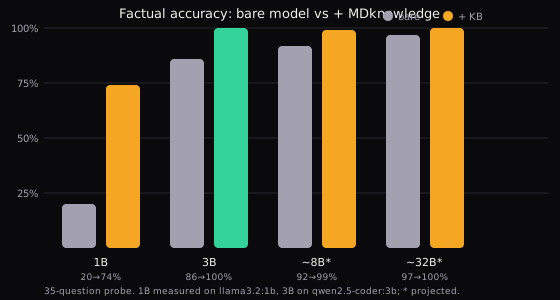
The MDknowledge/ folder ships 1200+ curated markdown files (~9900 facts: programming idioms, capitals, elements, math, science, history) that are ingested into memory at startup and recalled per turn as reference context. Add your own under the same tree, or override any file in ~/.hellochusquis/knowledge/<same/path.md>. One fact per - bullet; fenced code blocks are skipped. Measured on a 35-question factual probe with a local 3B model: 86% → 100% accuracy (retrieval coverage 97% vs 0% without it). Smaller models gain the most; reasoning-heavy tasks gain less.
Skills (SKILL.md)
Drop any standard SKILL.md folder as ~/.hellochusquis/skills/<name>/SKILL.md
(copy from examples/skills/). The agent lists them in its prompt and reads
them via the skill tool (list for catalog, show for body, prompt-only).
hellochusquis skills list
hellochusquis skills show code-review
Use the web and API safely
The web interface and REST API support streaming responses, readiness checks, request limits, isolated HTTP sessions, persistent approval audit records, and principal-based roles. Sessions are scoped to their caller rather than shared globally.
Web interface
Start the authenticated web interface locally:
hellochusquis web
Open http://localhost:7272. On first launch, the server creates a local access key. The UI asks for it the first time — copy it from:
cat ~/.hellochusquis/api_key.txt
Or provide one explicitly before starting:
HELLOCHUSQUIS_API_KEY=replace-me hellochusquis web
Authentication is enabled by default. Only disable it for an intentionally isolated local session:
HELLOCHUSQUIS_AUTH=0 hellochusquis web
The web workspace includes provider/model selection, streaming chat, voice input controls, conversation export, feedback, appearance settings, command palette actions, approvals, and a landing page that links back to the application.
Telegram
Chat with the same agent from Telegram. Create a bot with @BotFather, then start the bridge with your chat ID allowlisted (find it via @userinfobot):
hellochusquis telegram --token <bot-token> --allow <your-chat-id>
Or via environment (same values as flags):
HELLOCHUSQUIS_TELEGRAM_TOKEN=... HELLOCHUSQUIS_TELEGRAM_ALLOW=123,456 hellochusquis telegram
Only allowlisted chats get replies; everyone else is ignored. Each chat keeps its own conversation. No new dependencies — long-polling over the standard library.
REST API
Start the API:
hellochusquis api --host 127.0.0.1 --port 8080
export HC_TOKEN="$(cat ~/.hellochusquis/api_key.txt)"
Send a regular request with an explicit isolated session:
curl -X POST http://localhost:8080/chat \
  -H "Authorization: Bearer $HC_TOKEN" \
  -H "X-HelloChusquis-Session: local-demo" \
  -H "Content-Type: application/json" \
  -d '{"message":"Explain this repository in three steps.","stream":false}'
Request a streaming response:
curl -N -X POST http://localhost:8080/chat \
  -H "Authorization: Bearer $HC_TOKEN" \
  -H "X-HelloChusquis-Session: local-demo" \
  -H "Content-Type: application/json" \
  -d '{"message":"Inspect the tests and summarize the riskiest area.","stream":true}'
Check health and readiness:
curl http://localhost:8080/health
curl http://localhost:8080/health/ready
Approvals, roles, and audit
HTTP sessions use a local approval gate for high-impact actions. Shell execution, file mutation, external writes, browser submissions, MCP calls, and similar operations can require a human decision before dispatch.
Approval requests are session-local, short-lived, single-use, and shown to clients with credential-like fields redacted. Approval requests and decisions are retained in the persistent audit store for later inspection.
Named principals can be managed from the CLI:
hellochusquis users add dana --role operator
hellochusquis users list
hellochusquis users revoke dana
| Role | Access |
|---|---|
viewer |
Read history, approvals, and audit state |
operator |
Viewer access plus chat, approvals, and mutating tools through the approval gate |
owner |
Operator access plus runtime reload, provider updates, and user management |
The deployment-wide API key acts as an owner key. Named tokens are stored as hashes in ~/.hellochusquis/identity.db and are shown once when created.
Inspect pending approvals or redacted audit records:
curl http://localhost:8080/approvals \
  -H "Authorization: Bearer $HC_TOKEN" \
  -H "X-HelloChusquis-Session: local-demo"

curl 'http://localhost:8080/audit?limit=50' \
  -H "Authorization: Bearer $HC_TOKEN" \
  -H "X-HelloChusquis-Session: local-demo"
Approve one pending action:
curl -X POST http://localhost:8080/approvals/APPROVAL_ID \
  -H "Authorization: Bearer $HC_TOKEN" \
  -H "X-HelloChusquis-Session: local-demo" \
  -H "Content-Type: application/json" \
  -d '{"approve":true}'
Configuration and optional extras
Core runtime dependencies are installed with the package. Optional extras add SDKs for specific integrations:
python -m pip install 'hellochusquis[aws]'    # S3-compatible integrations
python -m pip install 'hellochusquis[voice]'  # speech recognition
python -m pip install 'hellochusquis[watch]'  # filesystem watching
python -m pip install 'hellochusquis[dev]'    # pytest and ruff
Common environment variables:
| Variable | Purpose |
|---|---|
HELLOCHUSQUIS_API_KEY |
Deployment-wide owner key for web/API clients |
HELLOCHUSQUIS_IDENTITY_DB |
Override the identity database path |
HELLOCHUSQUIS_AUTH=0 |
Disable web auth only for isolated local development |
HELLOCHUSQUIS_UNSAFE_MODE=1 |
Skip safety checks; use only in a controlled environment |
HELLOCHUSQUIS_PROFILE=aggressive |
Skip safety reviews; use only when you understand the trade-off |
DEBUG=1 |
Enable debug logging |
Configuration files and local stores are kept under ~/.hellochusquis by default. The runtime repairs managed directory/file permissions when opening protected local stores.
Command reference
hellochusquis                         Start interactive chat
hellochusquis web                     Start the web interface on port 7272
hellochusquis api --port 8080         Start the REST API
hellochusquis config                   Open the setup wizard
hellochusquis config --show            Display current configuration
hellochusquis config --api-keys        Edit provider keys
hellochusquis config --providers       Edit provider selection
hellochusquis users list               List principals
hellochusquis users add NAME --role ROLE
hellochusquis users revoke NAME        Revoke a principal
hellochusquis doctor --contracts       Run offline integration contract checks
Useful in-chat commands:
/help                                  Show available commands
/status                                Show provider status
/clear                                 Clear the current conversation
/plan <task>                           Force a multi-step plan
exit                                   Leave the terminal session
Architecture at a glance
main.py / cli.py              CLI entry points and interactive loop
core/agent.py                 Orchestration, planning, and tool dispatch
core/provider.py              Provider pool and fallback behavior
core/history.py               Bounded context and compression
core/db_memory.py             SQLite sessions, summaries, and memory
core/runtime.py               Recoverable startup and isolated HTTP sessions
core/approvals.py             Session-local, replay-safe human approvals
core/integration_contracts.py Offline integration diagnostics
web/server.py                 Authenticated FastAPI web interface
api/main.py                   Authenticated REST API and rate limits
tools/                        Service integrations and built-in tool modules
ui/                           Terminal UI and interactive presentation
Development
Clone the repository and create a virtual environment:
git clone https://github.com/aminoy77/HelloChusquis.git
cd HelloChusquis
python -m venv .venv
source .venv/bin/activate
python -m pip install -e '.[dev]'
Run the full test suite:
python -m unittest discover tests -q
Run lint checks:
ruff check .
Run offline integration diagnostics without provider credentials or third-party calls:
hellochusquis doctor --contracts
When contributing, keep changes focused, add regression coverage for behavior changes, and avoid committing local keys, databases, caches, or generated artifacts.
Project links
License
HelloChusquis is released under the MIT License.
Yorumlar (0)
Yorum birakmak icin giris yap.
Yorum birakSonuc bulunamadi