praana
Health Warn
- License — License: MIT
- Description — Repository has a description
- Active repo — Last push 0 days ago
- Low visibility — Only 5 GitHub stars
Code Fail
- rm -rf — Recursive force deletion command in .github/workflows/release-please.yml
Permissions Pass
- Permissions — No dangerous permissions requested
No AI report is available for this listing yet.
A terminal coding assistant built for real, uninterrupted work. Write code longer, stay in flow, and get the most out of cost-effective AI models.
PRAANA



A terminal coding agent that manages context like memory — curating what the model sees on every turn, and carrying learnings across sessions in a local database.
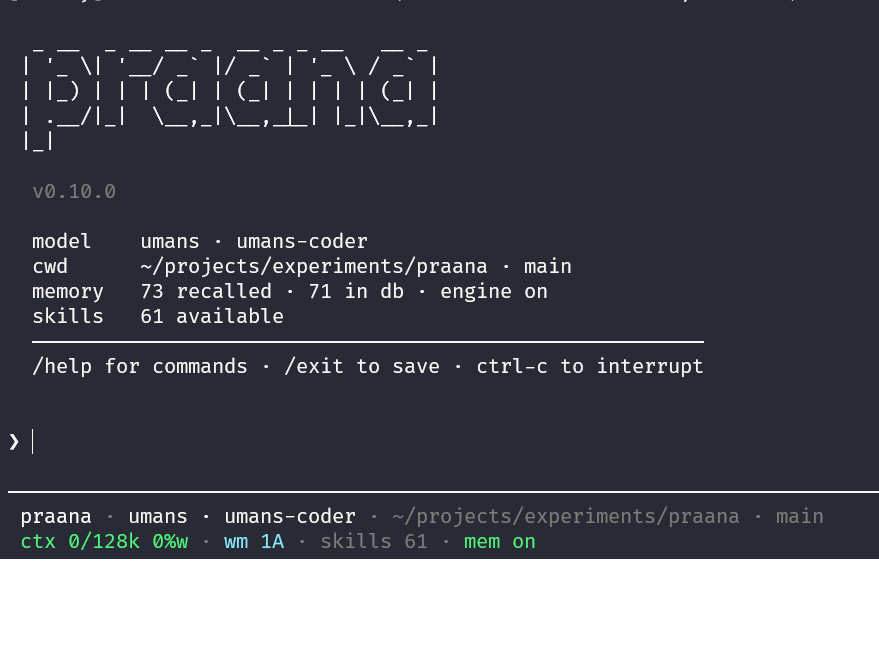
Long coding sessions burn tokens faster as they grow. The prompt fills with stale tool output and repeated context, the model drifts, and you lose the thread. Come back the next day and you re-explain everything from scratch.
PRAANA takes a different approach. A deterministic compiler curates what the model sees on every turn — tiered working memory, tool-output distillation, and a session checkpoint — instead of stuffing the full transcript into the prompt. An optional Cognitive Memory extracts learnings when a session ends and surfaces a ranked digest the next time you start, in the same repo or anywhere.
Runs on Bun. One binary, pure TypeScript, local-first, any provider.
Status: v0.15.1 — experimental. The context engine and memory are ideas we're proving in real use, not solved problems. We publish known limitations and make no benchmark claims we can't back.
How it was built: vibecoded — written by coding agents with human direction and review, not hand-coded line by line.
Quick Start
Install (no Bun)
Linux / macOS (bash, zsh, WSL):
curl -fsSL https://raw.githubusercontent.com/amitkumardubey/praana/main/install.sh | bash
Windows (PowerShell — use this instead of curl | bash):
irm https://raw.githubusercontent.com/amitkumardubey/praana/main/install.ps1 | iex
From cmd.exe:
powershell -NoProfile -ExecutionPolicy Bypass -Command "irm https://raw.githubusercontent.com/amitkumardubey/praana/main/install.ps1 | iex"
Installs praana (or praana.exe on Windows), praana-natives.node, and praana-natives.json into ~/.local/bin / %USERPROFILE%\.local\bin. Keep these files in the same directory — search, tree-sitter code_*, and native embeddings load the sidecar next to the binary. The scripts on main always download the latest GitHub Release, which can lag main by one version. Linux musl (Alpine) is not supported on this path; use bun add -g praana instead.
Upgrade later with praana upgrade (alias praana update) — it re-runs the installer into the current prefix (or ~/.local/bin if you originally installed via bun/npm). Interactive sessions toast when a newer npm version exists; /settings set auto_update on (off by default) applies that upgrade in the background and asks you to restart.
Install with Bun
# Install globally
bun add -g praana

# Or run without installing
bunx praana
Requires Bun ≥ 1.4. Install at bun.sh/install.
Global bun add -g / npm i -g installs @praana/natives as an optional dependency (Tree-sitter code_* tools). praana doctor reports whether the addon loaded.
Standalone binary (manual)
GitHub Releases attach praana-{linux-x64,linux-arm64,darwin-arm64,darwin-x64}.tar.gz, praana-windows-x64.zip, plus SHA256SUMS. Each archive contains the compiled executable, praana-natives.node, and praana-natives.json in the same folder (praana or praana.exe on Windows). Prefer install.sh on Linux/macOS or install.ps1 on Windows unless you need a custom layout.
# Example: Linux x64
curl -fsSL -o praana-linux-x64.tar.gz \
  https://github.com/amitkumardubey/praana/releases/latest/download/praana-linux-x64.tar.gz
curl -fsSL -o SHA256SUMS \
  https://github.com/amitkumardubey/praana/releases/latest/download/SHA256SUMS
sha256sum -c SHA256SUMS --ignore-missing
tar xzf praana-linux-x64.tar.gz
./praana --version
praana doctor   # native: available (…)
Set a provider key and launch
export ANTHROPIC_API_KEY="sk-ant-..."    # or any supported provider below
praana
PRAANA auto-detects which provider key is set. On first run with no config file, it runs an interactive setup wizard. The interactive UI is a terminal-native pi-tui shell with native scrollback, slash-command autocomplete, transcript rendering, and full thinking-text display when /thinking on is enabled.
PATH for global install
After bun add -g praana, ensure Bun's global bin directory is on your PATH:
export PATH="$HOME/.bun/bin:$PATH"
Build from source
git clone https://github.com/amitkumardubey/praana.git
cd praana
bun install
export ANTHROPIC_API_KEY="sk-ant-..."
bun src/main.ts
Optional standalone binary (embeds Bun + app; Solid JSX via @opentui/solid/bun-plugin). Prefer a GitHub Release archive unless you are iterating on compile itself:
bun run build:compile   # → dist/praana
./dist/praana
Unreleased / dirty trees bake --version as {package}-dev.<shortsha>[.dirty] (exact release tag + clean tree stays the package version).
Configuration
No config file is needed to start. To customise, run the setup wizard:
praana setup # Interactive provider/config setup wizard (also `praana init` alias)
Other CLI entry points: praana run "<instruction>" (headless one-shot for Harbor/CI), praana resume (continues your most recent session for the current project when given no id), praana upgrade (installs the latest GitHub Release binary + sidecar; alias praana update), praana doctor (checks config + provider keys), praana providers (lists configured providers; --all includes unconfigured), and praana models (lists models). See praana.config.example.toml for all settings. Harbor / Terminal-Bench: harbor_eval/README.md.
Supported providers
| Provider | Environment variable |
|---|---|
| Anthropic | ANTHROPIC_API_KEY |
| OpenAI | OPENAI_API_KEY |
| DeepSeek | DEEPSEEK_API_KEY |
| Groq | GROQ_API_KEY |
GOOGLE_GENERATIVE_AI_API_KEY |
|
| Mistral | MISTRAL_API_KEY |
| xAI | XAI_API_KEY |
| Fireworks | FIREWORKS_API_KEY |
| Together | TOGETHER_API_KEY |
| OpenCode | OPENCODE_API_KEY |
| OpenRouter | OPENROUTER_API_KEY |
| Amazon Bedrock | AWS credentials (AWS_ACCESS_KEY_ID / AWS_PROFILE / role) or AWS_BEARER_TOKEN_BEDROCK / Bedrock API key via /login. Optional llm.region. |
| Ollama | (local — no key needed) |
Provider resolution order: explicit config → credential store (~/.praana/credentials.json) → environment-detected key → interactive setup.
Why PRAANA vs a plain transcript agent?
| Typical transcript agent | PRAANA | |
|---|---|---|
| Long sessions | Full history in the prompt; context window fills up | Engine mode: curates the prompt every turn — tiered state, tool-output distillation, session checkpoint |
| Next session | Starts cold unless you paste notes | Cognitive Memory: at /exit PRAANA extracts what you decided and learned; start tomorrow and it surfaces without re-explaining |
| Skills | Manual or always-on | Pull model: compact catalog injected every turn (usefulness-ranked); load_skill fetches body on demand; effectiveness scores persist across sessions |
| Claims | Often marketed as solved | Known limitations published upfront; no benchmark claims we can't back |
Example workflow: session 1 — decide "use Vitest, in-memory SQLite in tests" then /exit. Session 2, same repo — /digest surfaces the decision. Engine mode stubs yesterday's task graph instead of replaying every tool result.
Five things that are genuinely different
Per-turn deterministic compiler with per-section token budgets. The prompt is assembled fresh every turn across five sections — system frame, memory digest, active state, peripheral stubs, recent turns — each with its own cap. Context pressure is density-weighted, not a raw token count.
Tiered working memory with auto-hydration. State objects (tasks, decisions, constraints, notes) demote from
activetosofttohardbased on idle turns. Two-pass hydration before each turn — substring keyword match, then BM25 — promotes them back when the current turn references them.Tool-output artifact store with stub cards. Git diffs, npm test output, TypeScript errors, search results are stored in a content-addressed artifact store. The model sees a tiny stub card (
[artifact: id | tool: command | N tokens raw]+Retrieve: retrieve_artifact("id")). Full bytes are retrievable on demand viaretrieve_artifact. Specialist truncators may still fill a storedsummaryfor stats / memory promotion; they are not embedded in the prompt.Session resume by O(1) checkpoint + event replay. A deterministic checkpoint is written every turn — active request, rolling narrative, decisions with rationale, constraints. Resume restores the checkpoint and replays only post-checkpoint events.
Agent-native cross-session memory in local SQLite. At
/exit, PRAANA's summariser extracts learnings from the transcript — not bolted-on notes, not an MCP plugin. Six taxonomy kinds:fact,preference,decision,pattern,mistake,constraint. Semantic search via native ONNX embeddings in@praana/natives. Project and global scopes queried and merged.
What it does
Two compile modes (set [context_engine] enabled in config):
| Mode | Default | Behaviour |
|---|---|---|
| Engine | Yes | Tiered working memory, stub artifact cards + retrieve on demand, session checkpoint, scored prompt compilation, progressive skills. |
| Classic | Fallback / explicit disable | Full verbatim transcript. Same shape as most coding agents. |
Cognitive Memory (optional — [memory] enabled = true):
- At
/exit, extracts facts, decisions, patterns, mistakes, preferences, and constraints from the transcript. - Next session starts with a ranked digest in the prompt.
- Project sessions query both project-scoped and global memories and merge results.
- Confidence decays 5%/day. Entries confirmed across two or more sessions promote to Consolidated Memory (10x slower decay).
Skills: discovers SKILL.md files in project and user paths. Compact catalog injected every turn, sorted by usefulness score. load_skill(id) fetches the full body on demand. Engine mode tracks whether each skill was used and updates its score in memory.db.
Project context: loads AGENTS.md / CLAUDE.md and an optional stack fingerprint on session start.
Tools: structured search_code and find_files (native addon) plus git tools (git_status, git_diff, git_commit), shell, file read/write/edit, and memory tools. Prefer the git tools over shell git … for agent decisions; git_commit is blocked in plan mode.
Session safety: plan mode gates mutating tools behind your approval; a repeat-read interceptor warns or blocks re-reading unchanged files; praana resume with no id continues your most recent session for the current project.
Architecture details: docs site · ARCHITECTURE.md · concepts.md
Known limitations (honest)
These are real gaps, not a roadmap dressed as marketing.
| Area | What's weak |
|---|---|
| Memory reinforcement | Memory stores, recalls, and applies time decay. Confidence boost on session success is wired but dormant until the session-success signal ships (#162). |
| No published A/B evals | Headless praana run and a Harbor / Terminal-Bench adapter exist. The fixed A/B task suite + scoring that would compare engine vs classic (#17) is not shipped. We don't publish benchmark claims we can't back. |
| Semantic recall | ONNX weights download on first run (~25–80MB, cached in ~/.praana/models/) after a one-time consent prompt. Ollama is opt-in. Near-duplicate or conflicting memory entries are not automatically reconciled. |
| Context engine | On by default. Falls back to classic if initialization fails or if you set [context_engine] enabled = false. |
| Background Consolidation Processor | Schema exists, not scalable yet. The learning loop is incomplete. |
| Intelligent Router | Not started. Planned for after memory is proven. |
| Shell tool | Runs with your user permissions. Optional path/command sandbox via [shell] in config — off by default. |
If Cognitive Memory doesn't help you after a few real projects, tell us. That's useful feedback, not a surprise.
Slash commands
| Command | Purpose |
|---|---|
/help |
Full list |
/exit |
End session — runs summariser when memory is on |
/clear |
Reset in-session context (same session ID; clears working memory and model-visible history) |
/new |
Start a new session (new ID, reload config, background summariser) |
/state |
Working-memory objects (engine mode) |
/digest |
Cognitive Memory digest |
/recall <query> |
Search Cognitive Memory |
/stats |
Session + memory stats |
/scorecard |
Per-session telemetry signals |
/events |
Last 20 session log events |
/model [provider] <id> |
Switch model (bare /model opens a searchable selector) |
/reasoning <level> |
Set reasoning effort (off/minimal/low/medium/high/xhigh) |
/sessions |
List sessions to resume |
/login [provider] |
Add or update a provider credential |
/logout [provider] |
Remove a provider's credentials |
/shell <cmd> |
Run a shell command inline (also ! <cmd>) |
/plan <on|off|execute> |
Plan mode: block mutating tools until you approve |
/thinking <on|off> |
Show or hide reasoning text |
/incognito <on|off> |
Disable Cognitive Memory writes |
/settings |
View/set persistent preferences (~/.praana/settings.json) |
/debug |
Verbose tooling + saved prompts |
/why <id> |
Why a context unit was included (engine + debug) |
/model syntax
/model                          # searchable selector (or show current if non-TTY)
/model gpt-4o                   # model on current provider
/model openai gpt-4o            # switch to OpenAI native
/model opencode mimo-v2.5-free  # switch to OpenCode
/model openrouter openai/gpt-4o # route via OpenRouter
Unknown ids resolve against the bundled pi-ai catalog first, then against the provider's live catalog (HTTP /models or Bedrock control-plane APIs; cached 6 hours at ~/.praana/provider-catalog-cache.json).
Development
bun dev          # run without build step
bun typecheck    # TypeScript type-check (no emit)
bun test         # 2095 tests across 177 files, ~15s
bun run test:parallel  # same suite, files across CPU cores (opt-in)
Docs site (Astro)
GitHub Pages is built from website/. Markdown sources in docs/ are rendered at build time.
cd website && bun install && bun run dev    # http://localhost:4321/praana/
cd website && bun run build                 # output → website/dist/
What's next
See ROADMAP.md. Short version: closing the memory reinforcement loop (#162), finishing the A/B eval suite on top of Harbor/praana run (#17), and semantic tier management — the work that turns "stores and recalls" into a system that measurably improves with use.
Contributing: CONTRIBUTING.md · good first issues · Discussions
Issues and PRs welcome.
License
MIT — LICENSE. Version history: CHANGELOG.md (auto-generated by release-please).
Reviews (0)
Sign in to leave a review.
Leave a reviewNo results found