claude-paste-view
Health Uyari
- License — License: MIT
- Description — Repository has a description
- Active repo — Last push 0 days ago
- Low visibility — Only 7 GitHub stars
Code Gecti
- Code scan — Scanned 8 files during light audit, no dangerous patterns found
Permissions Gecti
- Permissions — No dangerous permissions requested
Bu listing icin henuz AI raporu yok.
Claude Code mod: preview pasted images and long pasted text above the prompt
Claude Paste View
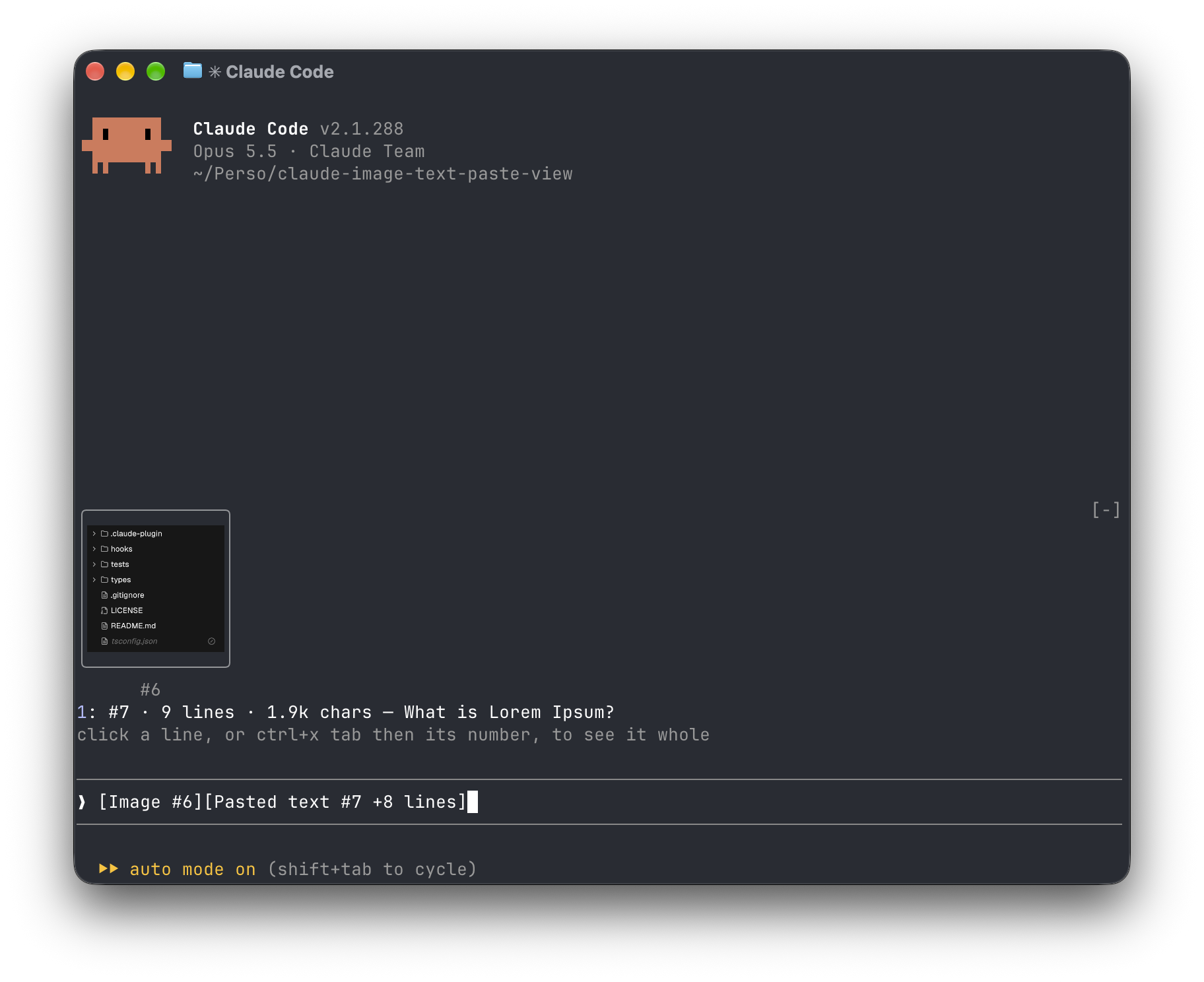
A Claude Code mod that shows what you paste, so you see image thumbnails and a preview of long text above your prompt instead of bare [Image #1] and [Pasted text #2 +41 lines] tags.
Install
Inside Claude Code, run:
/plugin marketplace add Amorfx/claude-paste-view
/plugin install paste-view
/reload-plugins
claude plugin marketplace add Amorfx/claude-paste-view
claude plugin install paste-view@claude-paste-view
Then run /reload-plugins inside a session, or start a new one.
What You See
╭────────────────────────╮
│      (screenshot)      │
│           #1           │
╰────────────────────────╯
1: #2 · 42 lines · 3.1k chars — Traceback (most recent call last):
click a paste, or ctrl+x tab then its number, to read it whole
❯ why does this fail [Image #1] [Pasted text #2 +41 lines]
- Images show as thumbnails that keep their shape and shrink to fit the space above the prompt. In a terminal that can't draw pictures (iTerm2, Terminal.app, …), each image is a line instead,
#1 · image 1630×632 — open, that opens it in your system's image viewer. A pasted JPEG, WebP or other non-PNG image is always a line,#1 · image · jpg — open, since the terminal draws only PNG files. - Long text shows as one line: its line count, its size and its first line.
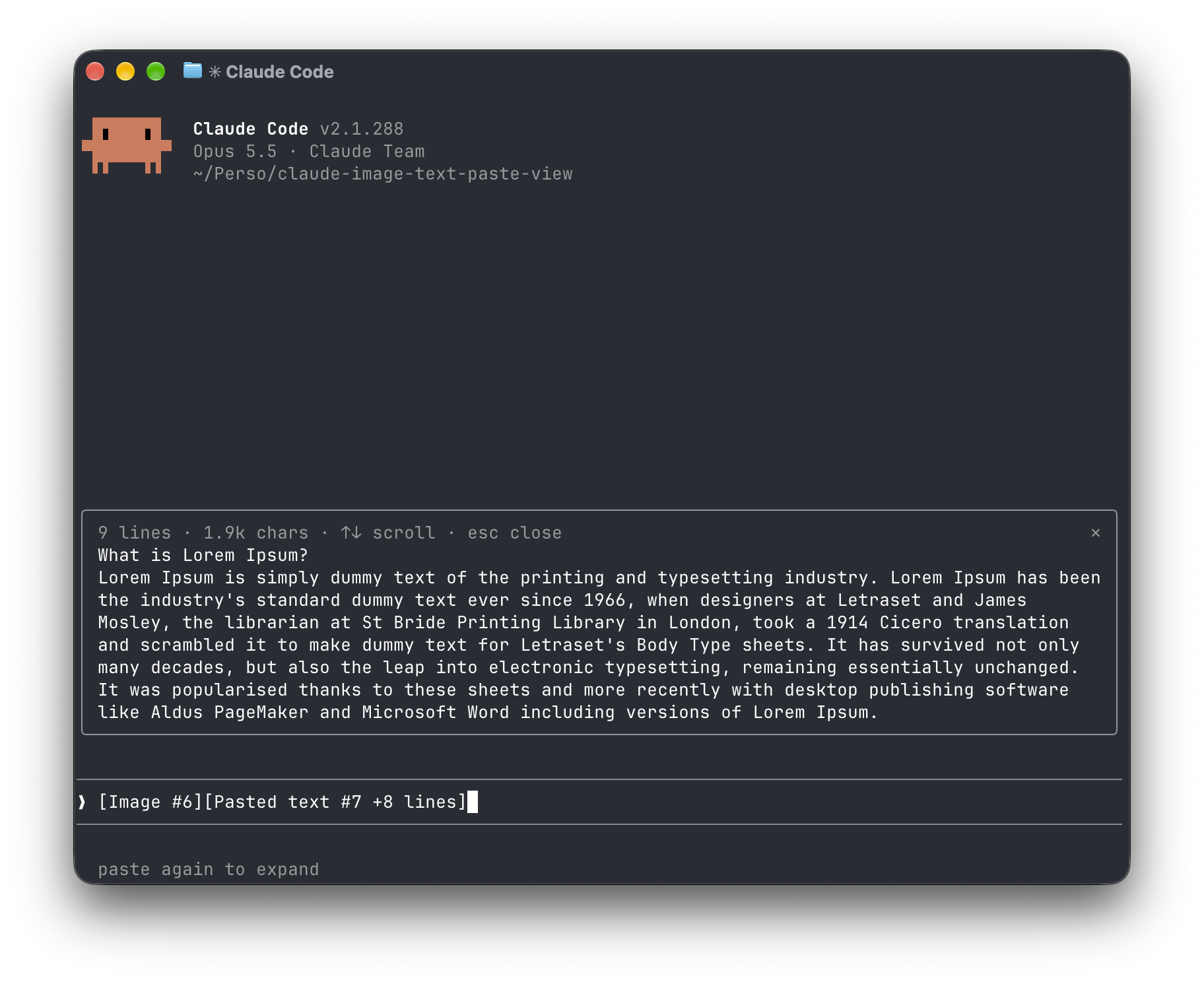
- See a paste whole by clicking its line, or with ctrl+x tab then its number. Text opens in a pane (↑↓ to scroll, Esc to close); an image opens in your system's viewer. Your draft is left as it is.
- Clears on send. Once the prompt is sent, or a tag is deleted, its preview goes away.
How It Works
- Every 200ms the mod reads the prompt box and looks for
[Image #n]and[Pasted text #n …]tags. It polls because pasting raises no edit event. - Images: Claude Code caches each pasted image as
<tmp>/<project>/<session>/images/<n>.png, or<n>.jpg,<n>.webp, … when it was pasted in another format. The mod finds that file and draws a PNG with Claude Code'sImageelement. - Text: Claude Code keeps a collapsed paste to itself until the prompt is sent, and writes no file for it before then. So when a new text tag appears, the mod reads the clipboard once (
pbpasteon macOS,wl-pasteorxclipon Linux). It keeps that text only if its line count matches the count in the tag, and holds it in memory until the tag leaves the prompt.
Limitations
- Text previews come from the clipboard. If the clipboard changes within ~200ms of pasting, or the paste didn't come from the clipboard (a tmux buffer, a remote session over SSH), the line reads
no previewrather than showing the wrong text. - A draft restored from history with several text tags shows no text preview, since one clipboard can't stand for several pastes.
- No thumbnails inside tmux or screen, or in a background session (agent view), even in Ghostty or kitty: Claude Code turns terminal pictures off there, and the mod lists images as lines instead. If your terminal speaks the kitty graphics protocol through them, add
"env": { "CLAUDE_CODE_FORCE_TERMINAL_IMAGES": "1" }to~/.claude/settings.jsonand start a new session. - The tag formats and the image cache path are Claude Code internals. A future version may change them; please open an issue if previews stop appearing.
Security
Everything stays on your machine: the mod never touches the network and never writes to disk. It reads the prompt box, lists Claude Code's temp folder to find the session's image cache and the pasted images in it, reads the first bytes of each pasted image, and reads the clipboard once per text paste. It reads TERM, TERM_PROGRAM, KITTY_WINDOW_ID, TMUX, STY, CLAUDE_CODE_SESSION_KIND and CLAUDE_CODE_FORCE_TERMINAL_IMAGES to know whether the terminal draws pictures. It runs id -u once if CLAUDE_CODE_TMPDIR isn't set, the clipboard tool for each text paste, and uname then open or xdg-open when you ask to open an image. Pasted text is kept in memory only, and dropped once its tag leaves the prompt.
Run claude plugin validate .claude-plugin/plugin.json on the repo to see every event it hooks and every call it makes.
Requirements
- Claude Code v2.1.287 or later (mods support)
- macOS, or Linux with
wl-clipboardorxclipfor text previews - For image thumbnails, a terminal with the kitty graphics protocol, such as Ghostty or kitty. The mod recognises them from
TERM,TERM_PROGRAMandKITTY_WINDOW_ID; in any other terminal, or inside tmux, it lists images as lines that open them withopen(macOS) orxdg-open(Linux).
Development
git clone https://github.com/Amorfx/claude-paste-view
cd claude-paste-view

# Load it for one session without installing
claude --plugin-dir .

# Check it and run the tests
claude plugin validate .claude-plugin/plugin.json
claude plugin test .
Once Claude Code has loaded the mod, it generates the API typings in .claude-plugin/types/ along with a tsconfig.json; after that, tsc -p . type-checks the code.
License
MIT. See LICENSE.
Yorumlar (0)
Yorum birakmak icin giris yap.
Yorum birakSonuc bulunamadi