zera
Health Uyari
- License — License: MIT
- Description — Repository has a description
- Active repo — Last push 0 days ago
- Low visibility — Only 6 GitHub stars
Code Basarisiz
- rm -rf — Recursive force deletion command in build.sh
Permissions Gecti
- Permissions — No dangerous permissions requested
Bu listing icin henuz AI raporu yok.
Your AI desktop buddy for macOS. Works with Claude Code and integrates with GitHub
Zera v2
Your Mac’s notch, wired for work.
Claude and Codex sessions, today’s links, your clipboard, files, tasks and focus, one glance away.


Download for Mac · Try the live notch in your browser · Build from source
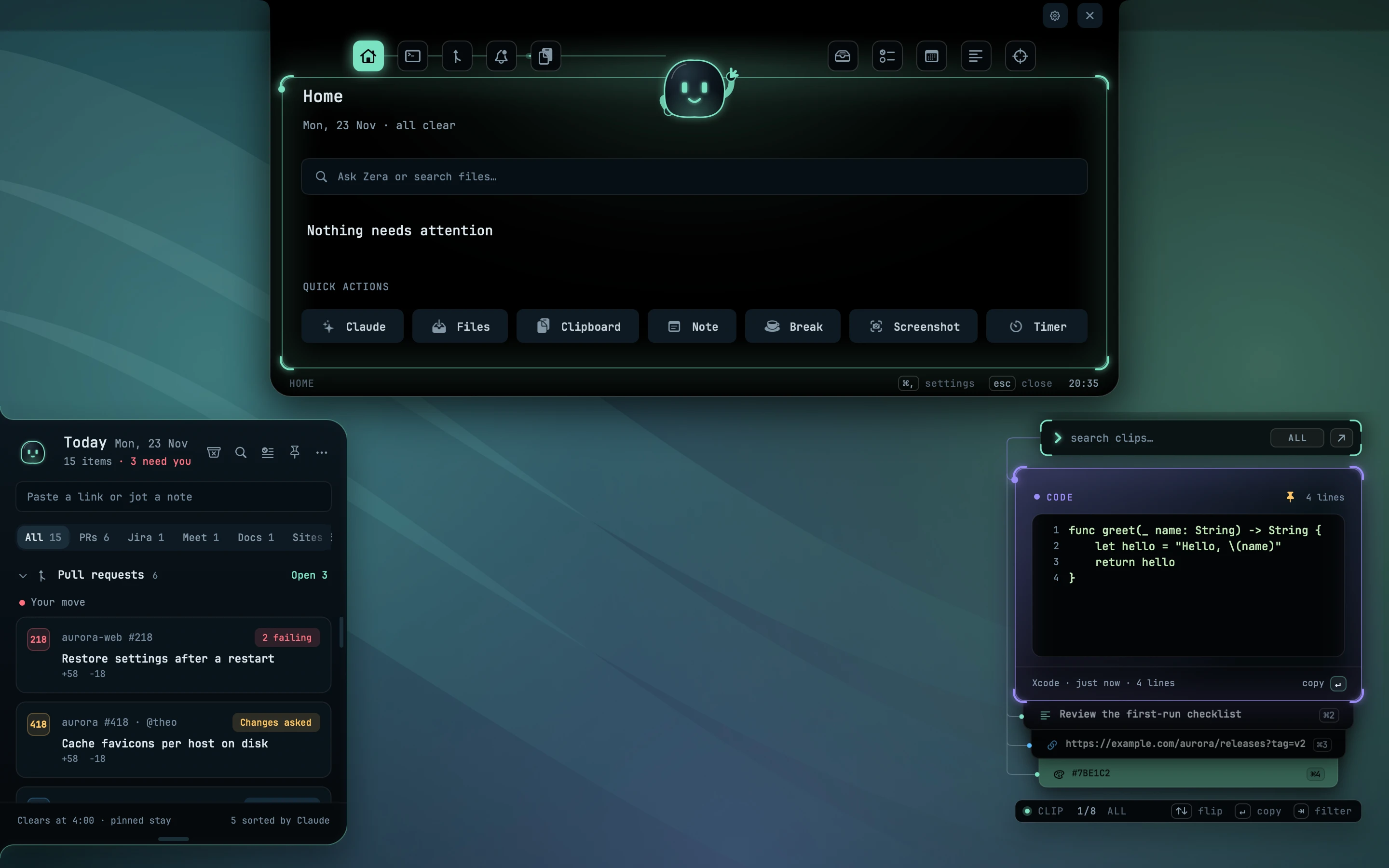
A native capture of the app with sample data: the notch, Daily Shelf and the Clipboard deck on one screen.
What Zera is
Zera is a native macOS app that lives in the notch (or the centre of the menu bar on a Mac without one). Open it and you get a rail of ten screens around a small companion. Close it and it stays out of the way until something needs you.
It is written in Swift with AppKit and SwiftUI, keeps your data on your Mac, and has no account and no telemetry.
Features
| Agents Claude and Codex in one list. A running session shows as two wings beside the notch. Sessions Zera manages take replies and approvals; desktop chats it only observes are read-only. 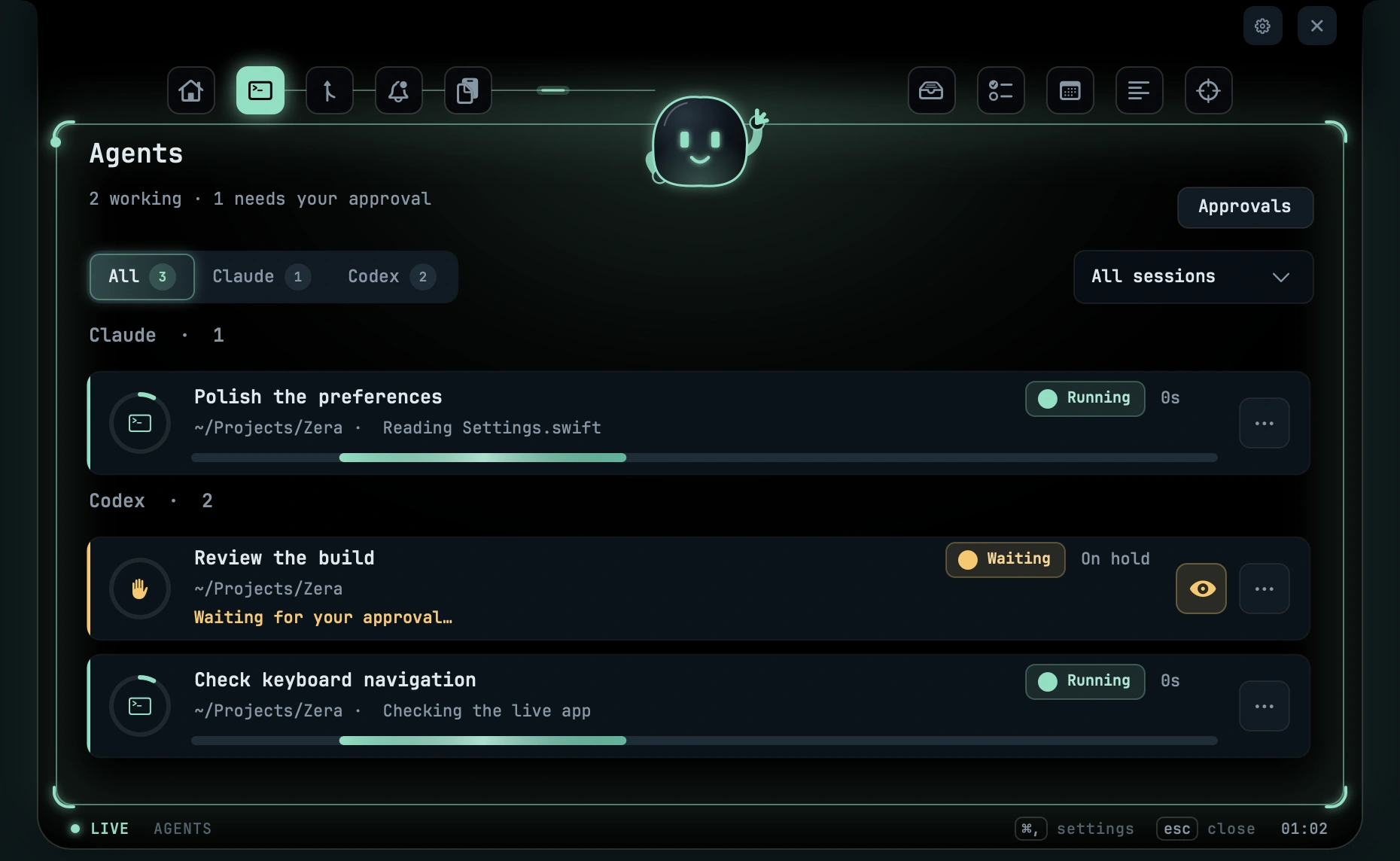 |
Daily Shelf Paste a pull request, ticket, doc or note. The shelf files links it recognises and waits at the edge of your screen. Connect GitHub to see checks and reviews for the PRs you saved. 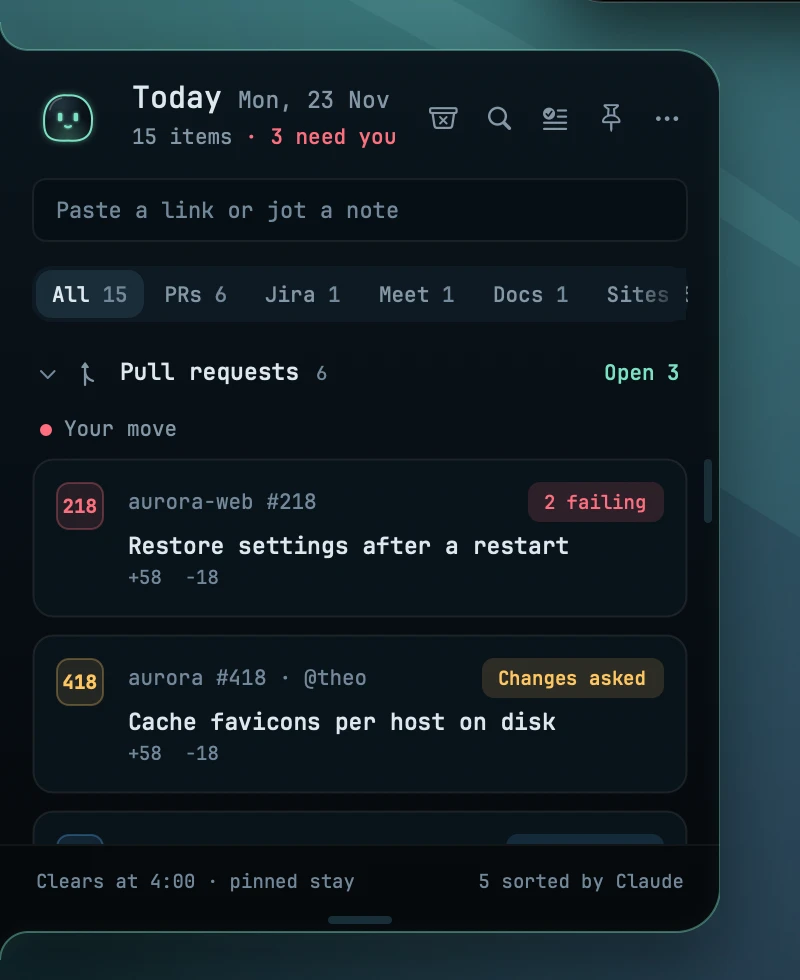 |
| Clipboard deck Your Clipboard shortcut opens a deck of cards beside the pointer. Flip with the arrow keys, press Return to copy, or use ⌘1–9. History stays on your Mac. 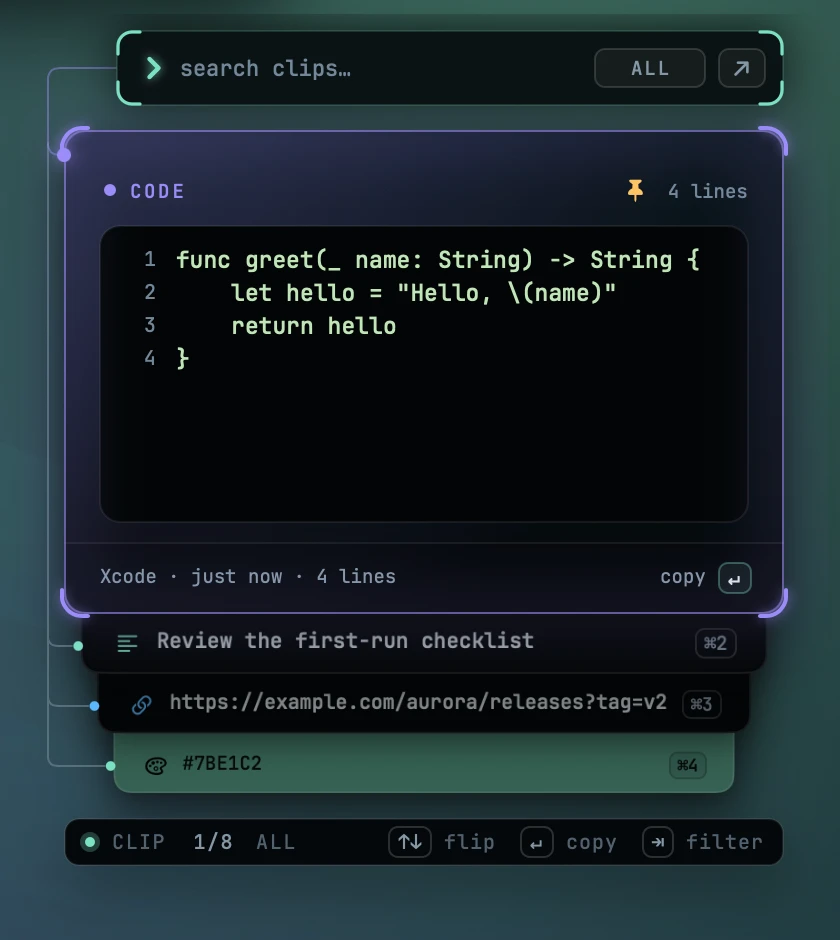 |
Pull requests Reviews, checks and approvals from your GitHub account, with every status spelled out in words. 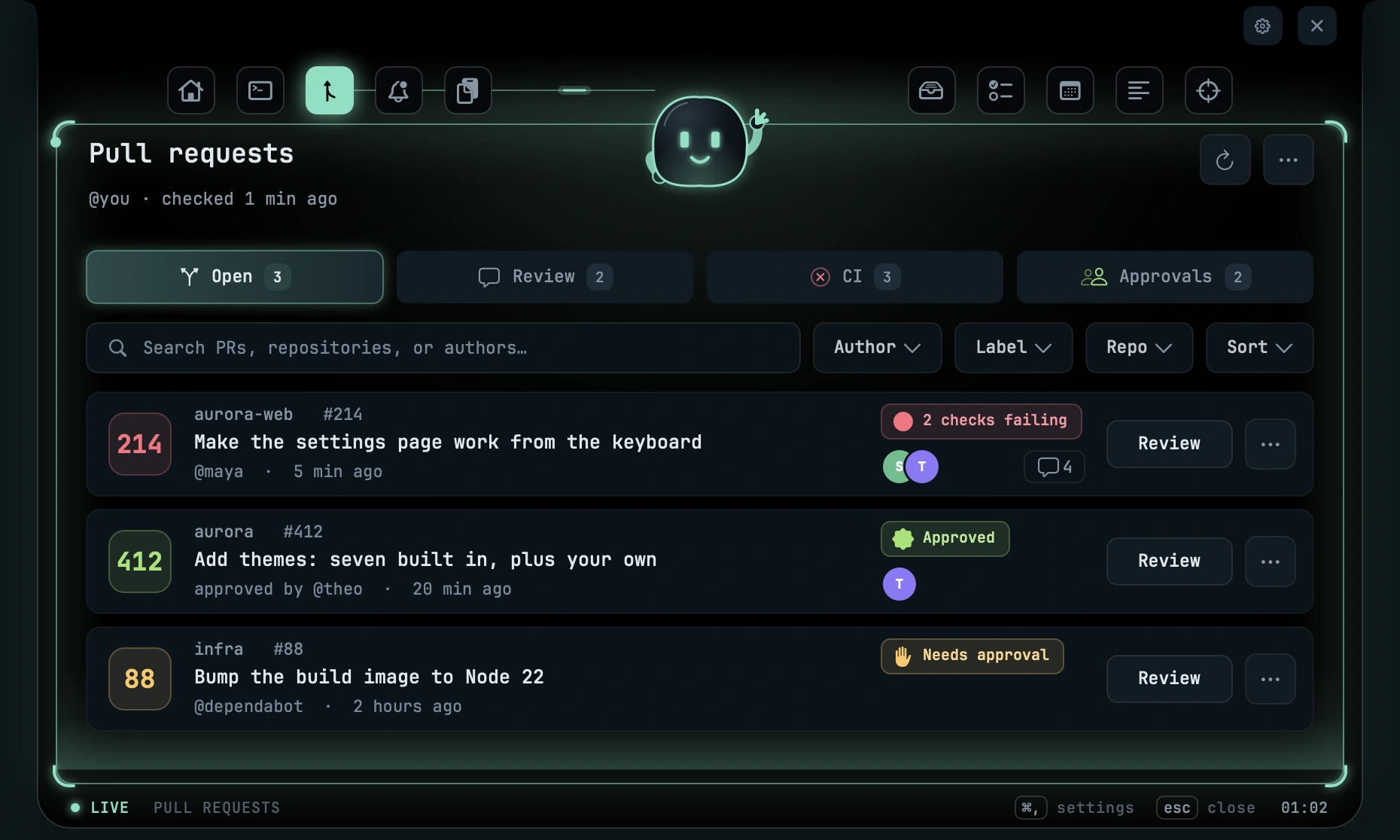 |
More on the rail:
- Launcher and App Shortcuts.
⌥ Spaceraises a launcher from the bottom of the screen: type to find an app, or type>for commands (Wallpaper, Theme, Lock, Sleep, Quit All, Kill Process, Kill Port and Zera’s own actions).>wallpapershows your pictures as a strip, previews each one on the desktop as you move through them and sets one only when you press Return;>folderschooses where the pictures come from. The launcher is the default of four looks: Minimal, Tree and Orbit stay in Settings › General › Opener style. Its flow is inspired by Caelestia shell. App Shortcuts is an optional extra that gives an app its own keys. Zera opens and focuses apps; it does not move windows. Guide - Tasks, timesheets and Focus. Add a task from anywhere with
⌥ ⌘ T, focus on one at a time, and export a range to Excel, CSV or text. - File Shelf. Carry any file, picture or video up to the notch and the Shelf opens to catch it; drag it out later. Zera reads a file only when you ask about it.
- Reminders, Alerts and Teleprompter. Your calendars in one day view, one inbox for what needs you, and a script that rolls beside the camera.
- Dictation. Hold right
⌥or⇧to dictate with Apple speech or on-device Murmur. - Signal interface. One monospaced face, a lit trace from Zera to the open screen, nine colour themes, solid or translucent. Themes · Design reference
- Android sharing. Send original photos and files from your phone over local Wi-Fi. See below.
The website has a live, clickable recreation of the notch, the Daily Shelf, the Clipboard deck and all four looks of the launcher. Release notes are in docs/releases.
Install
- Download the DMG from the latest release.
- Open it and drag Zera to Applications.
- Launch Zera. If the build is not notarized, macOS asks you to allow it under System Settings → Privacy & Security → Open Anyway.
Zera needs macOS 13 or later and runs on Apple silicon and Intel. To update, quit Zera before replacing it. Install, update and uninstall guide
Default shortcuts
| Keys | Action |
|---|---|
⌥ Space |
Launcher (type > for commands) |
⌃ Space |
Daily Shelf |
⌥ ⌘ T |
Add a task |
Right ⌥ or ⇧, held |
Dictation |
| Your choice | Clipboard deck, set in Settings → Clipboard |
Every shortcut can be changed or turned off in Settings.
Android sharing
Androp is the Android companion. Glide a photo off the edge of your phone and it arrives on the Mac as the original. Documents drop into the notch, where a liquid receipt shows progress, and then wait on the File Shelf.
- Put your phone and Mac on the same trusted Wi-Fi, or use your phone’s hotspot.
- Turn on receiving in Extras → Android sharing and enter the pairing code in Androp.
- Send from Androp’s gallery or Files tab, or use Share → Androp from another app.
Transfers stay on your local network. They are paired but not encrypted, and a file counts as saved only after its SHA-256 is verified. Androp needs Android 8 or later. Download Androp.apk · Pairing guide · Protocol · Watch the sharing film
Privacy
- Zera has no telemetry service and no account.
- Clipboard history, tasks, notes and shelf references stay on your Mac. Integration tokens are stored in the macOS Keychain.
- Claude and Codex run through the tools and logins you already have. Live activity hooks and managed sessions are enabled separately.
- A file is sent to your chosen provider only when you ask about it. Optional Daily Shelf sorting sends link URLs and titles, never your notes.
- Murmur dictation runs on a local Whisper model after a one-time download.
Details are in the privacy data map and the network data flow. Report security issues through SECURITY.md.
Build from source
You need macOS 13 or later and the Xcode Command Line Tools.
git clone https://github.com/amsynist/zera.git
cd zera
./build.sh
open dist/Zera.app
Run the checks:
swift test                                    # app
swift test --package-path Packages/AndropKit  # Android receiver
node scripts/check-site.mjs                   # website
Local builds read the version from VERSION. Release builds take it from the release tag.
Project layout
| Path | What is there |
|---|---|
Sources/Zera |
The app: island, screens, Daily Shelf, Signal interface |
Packages/AndropKit |
The in-process Android receiver |
android |
Androp, the Android companion (README) |
site |
The website, including the live demos |
docs |
Guides, design references and release notes |
Tests |
Unit tests and opt-in render tests |
AGENTS.md is the project guide for contributors and coding agents.
Contributing
Bug reports, integrations, accessibility improvements and fixes are welcome. Read CONTRIBUTING.md first, and open an issue before starting a larger change.
License and credits
Code is released under the MIT license. Zera’s original artwork has separate terms. JetBrains Mono is used under the SIL Open Font License. Film music is by Sascha Ende (CC BY 4.0) and Daily Shelf sound effects are by Kenney (CC0). The launcher’s flow (a list over a bottom search field, > for commands, the wallpaper strip) is inspired by Caelestia shell for Hyprland; it is written from scratch for macOS and uses none of Caelestia’s code. See media credits and third-party notices.
Zera is an independent project and is not affiliated with Anthropic, OpenAI, Apple, GitHub or Samsung.
Yorumlar (0)
Yorum birakmak icin giris yap.
Yorum birakSonuc bulunamadi