Snap2Link
Health Warn
- License — License: MIT
- Description — Repository has a description
- Active repo — Last push 0 days ago
- Low visibility — Only 5 GitHub stars
Code Fail
- rm -rf — Recursive force deletion command in scripts/install.sh
Permissions Pass
- Permissions — No dangerous permissions requested
This is a cross-platform desktop utility that allows you to capture a screen region via a hotkey and instantly upload it as a public link to your clipboard. It is designed to easily share screenshots with AI tools via Google Drive.
Security Assessment
Overall risk: Medium. The tool uploads visual data from your screen and interacts directly with your Google Drive via OAuth, which naturally requires access to sensitive account permissions. Network requests are a core feature of its upload functionality. There are no hardcoded secrets or broad dangerous system permissions required. However, the installation script contains a recursive force deletion command (`rm -rf`), which poses a localized risk during setup. If the script has path errors, it could accidentally delete unintended local files.
Quality Assessment
The project has a permissive MIT license and is highly active, with its most recent code push occurring today. However, it suffers from very low community visibility and adoption, currently sitting at only 5 stars on GitHub. Because the codebase is brand new and largely untested by a wide audience, its long-term maintenance and reliability remain uncertain.
Verdict
Use with caution—the screen capture and Google Drive integration appear reasonably safe and lack third-party middlemen, but the low community trust level and risky `rm -rf` flag in the install script warrant a manual code review before adopting it.
Paste screenshots into Claude Code, Cursor, or any terminal AI. Hotkey → region capture → public link in your clipboard. Cross-platform, open source.
📸 Snap2Link
Paste screenshots into Claude Code, Cursor, or any terminal AI — in one keystroke.
Hotkey → drag a region → public share link lands in your clipboard. Done.


Why Snap2Link?
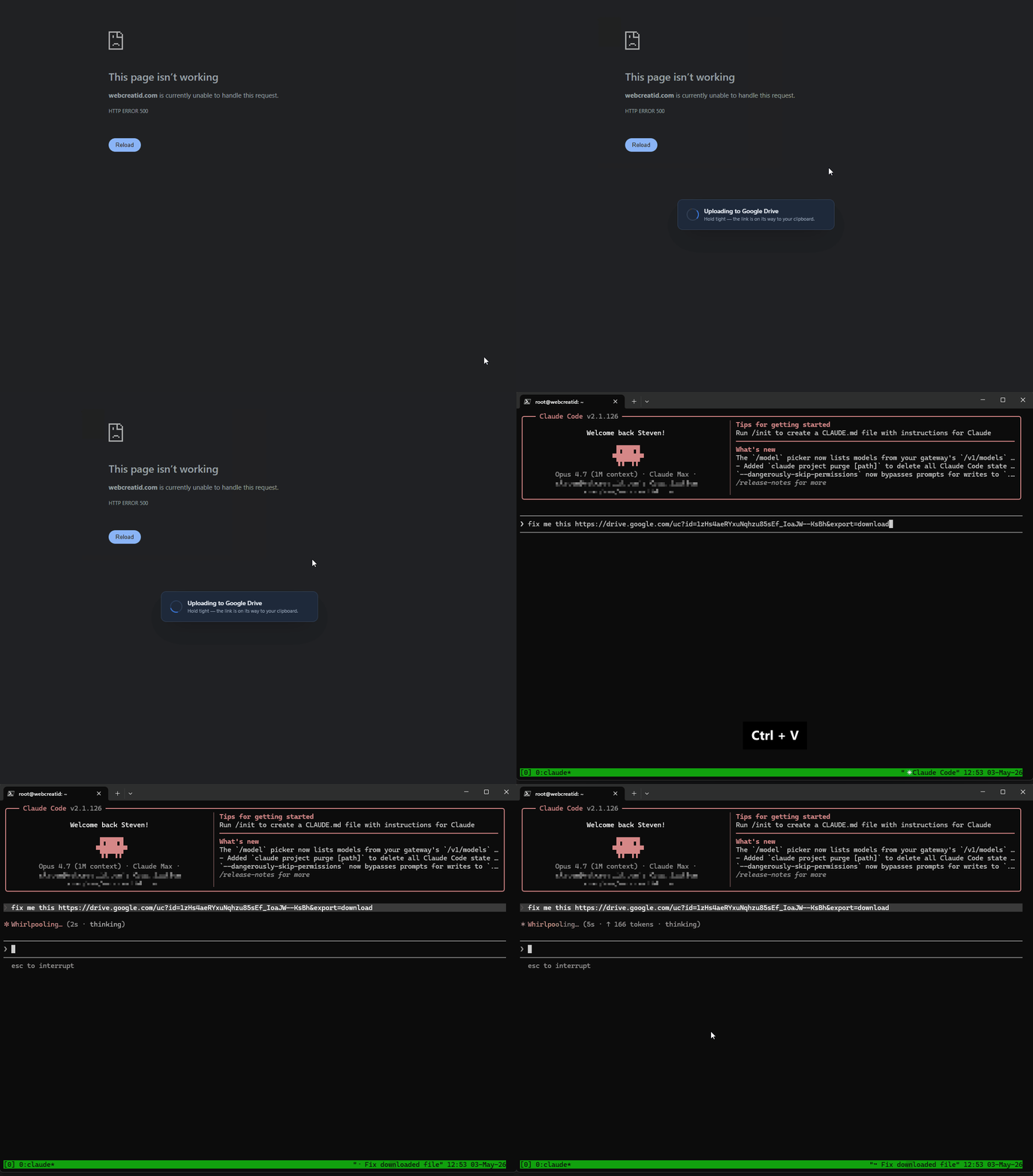
You're working with Claude Code, Cursor, or ChatGPT in a terminal — maybe on a remote VPS, maybe locally — and you need to show the model a UI bug, a design mockup, an error screen. The usual workflow is painful: screenshot, save, open the browser, upload to Imgur or Drive, copy the link, paste it. Every single time.
Snap2Link collapses that whole sequence into one keystroke. Hit your hotkey, drag a region, and a public link is already in your clipboard, ready to paste straight into your AI prompt. Uploads go to your own Google Drive with the minimum scope possible — no third-party server in the middle, no account to create, no monthly fee.
✨ Features
| 🤖 Built for AI workflows | Paste screenshots into Claude Code, Cursor, ChatGPT, Aider, or any tool that accepts an image URL |
| 🖱️ Drag-to-capture overlay | Fullscreen, semi-transparent, live size readout, ESC to cancel |
| ⚡ Instant share link | Upload → make public → clipboard, all in the background, < 1 s on broadband |
| ⌨️ Global hotkey | Default Ctrl + Print Screen, fully rebindable from Settings |
| 🖥️ Cross-platform | Windows, macOS, and Linux — single codebase, native everywhere |
| 🗂️ Auto-cleanup on Drive | Deletes screenshots older than N days (default 30) — your Drive stays tidy |
| 🚀 Built-in auto-updater | Signed updates pulled from GitHub Releases — Settings → Check for Updates |
| 🪟 Start with your OS | Toggle from Settings — always one keystroke away |
| 🔒 No third-party server | OAuth straight to your Drive. Your screenshots, your account, no middleman |
| 🌍 i18n-ready | English bundled; add a locale by translating a single JSON file |
🚀 Quick Start
# 1 · Install (see Installation section for your OS)

# 2 · Launch → wizard → "Connect Google Drive" → grant access in your browser

# 3 · Press the hotkey → drag a region → paste anywhere
That's it. Three steps, zero configuration.
📦 Installation
Windows
Via winget (recommended, Windows 10+)
winget install snap2link
# or, fully qualified:
winget install amys94fr.Snap2Link
Direct download — grab the .exe installer from the Releases page. Windows SmartScreen may flag the binary as "unrecognised app" (not yet EV-code-signed) — click More info → Run anyway.
macOS
Download the universal .dmg from the Releases page, open it, and drag Snap2Link into Applications. A single binary runs natively on both Apple Silicon and Intel.
The app is not yet notarised, so the first launch needs a manual override: right-click the app in Finder → Open → Open in the dialog. Subsequent launches behave normally.
The first capture will prompt for Screen Recording permission in System Preferences → Security & Privacy → Screen Recording. Grant it and re-launch.
Linux
One-liner install (recommended)
curl -fsSL https://raw.githubusercontent.com/amys94fr/Snap2Link/main/scripts/install.sh | bash
The script detects your distro, picks the right package (.deb, .rpm, or .AppImage as fallback), downloads it from the latest release, and installs it. Read it before running if you'd like — it's in the repo.
Manual install — grab the file you want from the Releases page:
# Debian/Ubuntu (resolves dependencies automatically)
sudo apt install ./snap2link_*_amd64.deb

# Fedora/RHEL
sudo dnf install ./snap2link-*.x86_64.rpm

# Any distro (AppImage — portable, no install needed)
chmod +x snap2link_*_amd64.AppImage
./snap2link_*_amd64.AppImage
The system tray icon requires libayatana-appindicator3-1, which is preinstalled on most desktop environments.
Build from source
You'll need Rust (stable), Node.js 20+, and the Tauri CLI (cargo install tauri-cli --version "^2").
git clone https://github.com/amys94fr/Snap2Link
cd Snap2Link
npm install
npm run tauri dev      # hot-reload dev build
npm run tauri build    # produces a signed installer in src-tauri/target/release/bundle/
💡 Use Cases
- AI prompts — paste the link directly into Claude Code, Cursor, ChatGPT, or Aider when you need visual context
- Bug reports — capture the broken UI, paste the link in Jira / GitHub Issues
- Design feedback — share mockup snippets in Slack / Discord / Notion in seconds
- Documentation — drop image links straight into READMEs, blog posts, support tickets
- Remote support — guide a colleague through their screen without launching a screen-share session
- Meeting notes — snap a slide, link it next to your notes, move on with the meeting
🔧 Configuration (Google OAuth)
End users have nothing to configure. The first launch opens a browser tab on Google's consent page; pick your account; you're done.
For developers / forks wanting to ship under their own OAuth credentials:
- Create a project on console.cloud.google.com
- Enable the Google Drive API
- Credentials → Create OAuth client → Desktop application
- Download the JSON, rename it
credentials.json, drop it at the repo root (gitignored) npm run tauri build
Snap2Link only requests the minimum scopes:
| Scope | Why |
|---|---|
drive.file |
Read/write only the files Snap2Link itself creates — never the rest of your Drive |
userinfo.email |
Display the connected account in Settings (so "Switch Account" makes sense) |
🛣️ Roadmap
- ✅ Region capture · OAuth Drive · clipboard · auto-cleanup · hotkey · tray
- ✅ Auto-updater (signed releases via GitHub)
- ✅ winget distribution
- ✅ Cross-platform — Windows, macOS, Linux
- 🔜 In-app annotations before upload — arrows, blur, text, highlight
- 🔜 History pane — last N screenshots with thumbnails and quick re-share
- 🔜 More clouds — Dropbox, OneDrive, S3-compatible
- 🔜 Full-screen / window-bound capture modes alongside region selection
- 🔜 More locales — French, Spanish, German, Portuguese …
- 🔜 Homebrew & Scoop packages
Got an idea? Open an issue — I read every one.
🤝 Contributing
PRs welcome. Quick start for contributors:
git clone https://github.com/amys94fr/Snap2Link
cd Snap2Link
npm install
npm test                            # 77 frontend tests (Vitest)
cd src-tauri && cargo test --lib    # 24 backend tests
CI (test.yml) runs on every push and PR — tests must stay green for a merge.
The full guide (bug reports, feature proposals, coding style, PR checklist) is in CONTRIBUTING.md. For the release procedure (signing, manifest, GitHub release, winget bump), see docs/RELEASE.md.
Project layout
src/                       React + TypeScript frontend
  windows/                   SetupWizard · Settings · About · Overlay · UploaderToast
  components/                HotkeyRecorder · RetentionControl · UpdateChecker
  i18n/                      i18next + locales/en.json
  store/                     Zustand global state
  lib/keyMap.ts              KeyboardEvent ↔ Tauri shortcut format

src-tauri/                 Rust backend
  src/commands/              auth · config · drive · screenshot · updater
  src/tray.rs                System tray icon + menu
  src/hotkey.rs              Global shortcut registration
  icons/                     App icons (all sizes, generated by `cargo tauri icon`)
📄 License
MIT © 2025 Steven Abittan.
Built with Tauri v2, React, Tailwind CSS, and Vitest.
Reviews (0)
Sign in to leave a review.
Leave a reviewNo results found