code-assistant-peers
Health Uyari
- License — License: MIT
- Description — Repository has a description
- Active repo — Last push 0 days ago
- Low visibility — Only 5 GitHub stars
Code Uyari
- process.env — Environment variable access in broker/reviewer.ts
- network request — Outbound network request in broker/reviewer.ts
- process.env — Environment variable access in broker/server.ts
- network request — Outbound network request in broker/server.ts
- process.env — Environment variable access in cli.ts
- process.env — Environment variable access in server.ts
- process.env — Environment variable access in shared/assistants.ts
- process.env — Environment variable access in shared/broker-client.ts
- network request — Outbound network request in shared/broker-client.ts
- process.env — Environment variable access in shared/multi-peer.ts
Permissions Gecti
- Permissions — No dangerous permissions requested
Bu listing icin henuz AI raporu yok.
MCP server for mandatory peer review between coding assistants like Claude Code, Codex, Gemini, and other CLI agents.
mcp-code-assistant-peers
Turn your coding agents into peer reviewers.
mcp-code-assistant-peers is an MCP review gate for CLI coding agents. Claude Code can implement a change, Codex can review it, findings are saved locally, and the host assistant is prompted to run a post-edit review gate before the final answer.
The GitHub repository is named code-assistant-peers; the package name remains mcp-code-assistant-peers.
Claude Code and Codex work out of the box. Gemini, GLM, DeepSeek, and other prompt-capable CLIs can be registered through adapter configuration.
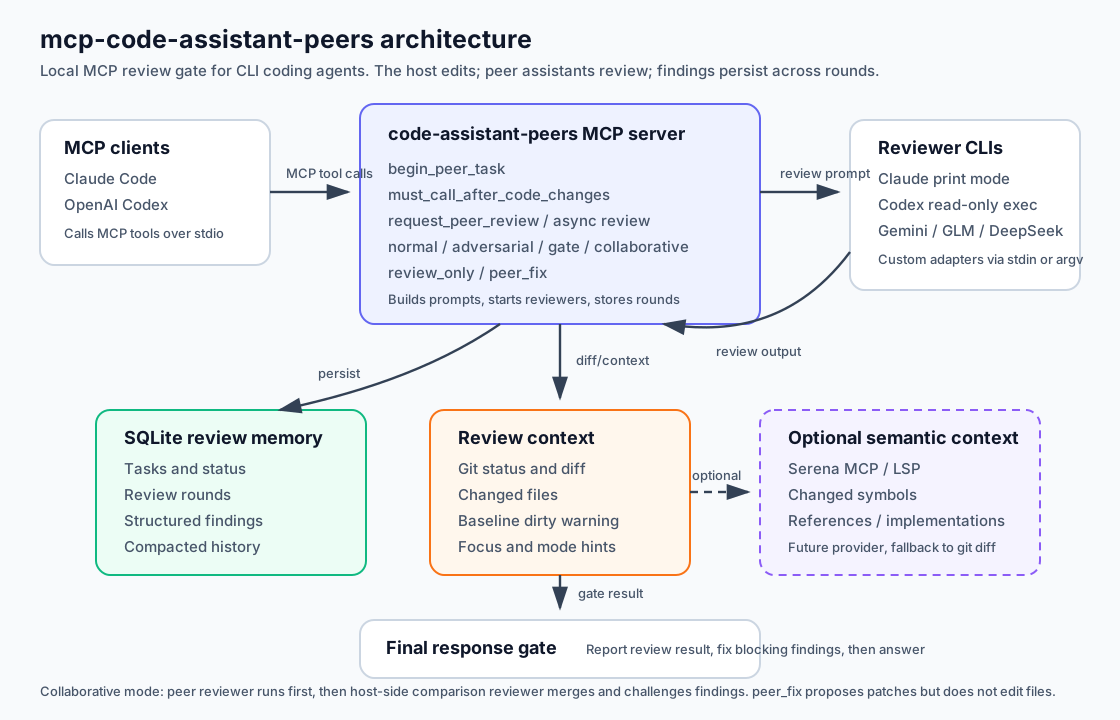
User request
   |
   v
Host assistant edits code
   |
   v
mcp-code-assistant-peers MCP gate
   |
   +--> Peer reviewer CLI checks the diff
   +--> SQLite stores rounds, findings, status
   +--> Host fixes blocking findings before final response
Why This Exists
Single-agent coding workflows are fast, but the same model that wrote the patch can miss its own assumptions. This project makes review a local, repeatable workflow:
- one assistant writes the code,
- another assistant reviews the diff,
- findings are persisted across rounds,
- review gates always run asynchronously to avoid MCP host timeout failures,
- multiple peer CLIs can review the same change through
PEER_ASSISTANTS.
Demo Scenario

Use this flow for a short demo video or terminal recording:
- Ask Claude Code to implement a small feature with an intentional edge-case bug.
- Claude calls
must_call_after_code_changes. - Codex reviews the diff and reports a concrete finding.
- Claude fixes the bug.
- A second review passes with no blocking findings.
The smallest useful terminal demo is:
bun install
bun run setup
bun cli.ts doctor
Then, inside Claude Code or Codex, make a code change and ask the assistant to verify it with the MCP review gate.
Features
- CLI assistant peer review routing with built-in Claude Code and Codex adapters.
claude-liveadapter that routes Claude reviews to a backgrounded interactive Claude session
(subscription pool, noclaude -p), with auto-start andclaude -pfallback.- Custom assistant adapters for CLIs that accept prompts through stdin or argv.
- Mandatory post-edit gate tool with strong MCP descriptions.
- Review modes:
normal,adversarial,gate, andcollaborative. - Optional
peer_fixworkflow where the reviewer proposes concrete fixes without editing files. - SQLite-backed task memory, review rounds, findings, and async status.
- Async-first review flow that avoids long blocking MCP tool calls.
- Setup helpers for MCP registration and local assistant checks.
- Project rule installer for
CLAUDE.mdandAGENTS.md.
Differentiators
Unlike single-model review plugins, this project is built as a local MCP workflow:
- Bidirectional: Claude can review Codex work, and Codex can review Claude work.
- Extensible: any CLI that accepts prompts through stdin or argv can be registered.
- Persistent: review rounds, findings, and task state are saved in SQLite.
- Gate-oriented: tools are described as mandatory post-edit gates for coding assistants.
- Multi-peer:
PEER_ASSISTANTS=claude,codex,geminifans review out to available peers. - Async-first: post-edit gates start background reviews, then hosts poll SQLite status before the final answer.
Requirements
- Bun
- Claude Code CLI:
claudefor the built-in Claude adapter - OpenAI Codex CLI:
codexfor the built-in Codex adapter - Optional additional LLM CLIs such as Gemini, GLM, or DeepSeek
- A trusted local project where the MCP client is allowed to start stdio servers
Install dependencies:
bun install
Run local checks:
bun run check
Install From Npm
The package is published as mcp-code-assistant-peers on npm. Install Bun first because the package binaries run through #!/usr/bin/env bun:
curl -fsSL https://bun.sh/install | bash
export BUN_INSTALL="$HOME/.bun"
export PATH="$BUN_INSTALL/bin:$PATH"
Then install the package globally before running setup, so MCP registration points to a stable package path:
npm install -g mcp-code-assistant-peers
code-assistant-peers status
Configure one MCP client with the npm-installed package. Choose only the block for the client you use.
For Codex:
code-assistant-peers setup codex --peers=auto
For Claude Code:
code-assistant-peers setup claude --peers=auto
Then restart the configured MCP client and call code_assistant_peers_setup from that client to verify the registered server.
One-shot usage is also possible for read-only commands such as status, but do not use npx for setup because MCP registration needs a stable installed server path:
npx mcp-code-assistant-peers status
Quick Start
The easiest path is the setup command. From a source checkout:
bun install
bun run setup
Or run the shell wrapper:
sh scripts/setup.sh
By default this registers the MCP server for both Claude Code and Codex with review_only, normal mode, and a 600 second Codex MCP tool timeout.
For a web-friendly one-line setup that also verifies Serena registration and patches Codex's MCP timeout, use:
curl -fsSL https://raw.githubusercontent.com/AnamKwon/code-assistant-peers/main/scripts/web-setup.sh | sh
The web setup script clones the project into ~/mcp-code-assistant-peers when needed, runs bun install, registers Codex by default, enables serena-auto when Serena or uvx is available, patches Codex to a 30-minute MCP timeout, and prints the relevant config lines. Useful variants:
# Use an existing checkout and set Codex MCP timeout to 30 minutes
sh scripts/web-setup.sh --dir /path/to/mcp-code-assistant-peers --timeout=1800

# Register both Claude Code and Codex when both CLIs are installed
sh scripts/web-setup.sh --target=both --timeout=1800

# Patch only Codex
sh scripts/web-setup.sh --target=codex --timeout=1800

# Detect installed peer CLIs and configure the available reviewers
sh scripts/web-setup.sh --target=codex --peers=auto

# Force Serena on, failing if neither serena nor uvx is available
sh scripts/web-setup.sh --serena=on
The built-in Claude setup command uses the POSIX env command, so the one-step setup flow is intended for macOS/Linux shells. Windows users should manually register the server with equivalent environment variables.
Common variants:
# Register only Claude Code
bun cli.ts setup claude

# Register both clients with reviewer fix proposals and compact gate reviews
bun cli.ts setup both --workflow=peer_fix --mode=gate

# Configure multi-peer review. Each host removes itself from this list at runtime.
bun cli.ts setup both --peers=claude,codex,gemini --mode=adversarial

# Let setup detect available Claude/Codex/Gemini reviewers.
# Gemini auto-selection requires GEMINI_API_KEY/GOOGLE_API_KEY.
# Use --peers=gemini to opt into Gemini CLI OAuth or Vertex credentials.
bun cli.ts setup codex --peers=auto

# Auto-enable Serena semantic context when serena or uvx is available
bun cli.ts setup both --serena=auto

# Force the standard diff/changed-files review flow
bun cli.ts setup both --serena=off

# Also install project rules into the current project
bun cli.ts setup both --install-rules

# Print the commands without changing local CLI config
bun cli.ts setup both --dry-run
setup uses --serena=auto by default. If it detects a local serena executable or uvx, it registers the MCP server with Serena available at review time:
CODE_ASSISTANT_PEERS_CONTEXT_PROVIDER=serena-autoCODE_ASSISTANT_PEERS_DIFF_BUDGET=4000CODE_ASSISTANT_PEERS_SERENA_CONTEXT_BUDGET=8000
serena-auto does not call Serena for every review. At review time it checks the changed source file count, changed source byte size, diff truncation, and risky path names. The byte-size trigger uses filesystem metadata (stat) rather than reading full file contents. Small changes stay on the standard diff/symbol path; large or high-risk changes use Serena symbol/reference context. Lightweight symbol hints may still read changed source files to extract function/class names.
If Serena is not detected, setup leaves these variables unset and the review uses the standard changed-files/diff flow. Use --serena=off to force the standard flow, or --serena=on --serena-command='["serena","start-mcp-server","--project-from-cwd"]' to force a custom Serena command.
After setup, restart Claude Code/Codex and call code_assistant_peers_setup from the MCP client to verify runtime availability.
Manual Registration
Manual registration is still available if you want full control. Register the same server in each client with HOST_ASSISTANT and, when needed, PEER_ASSISTANT or PEER_ASSISTANTS.
Claude Code:
claude mcp add --scope user --transport stdio code-assistant-peers -- env HOST_ASSISTANT=claude bun /path/to/mcp-code-assistant-peers/server.ts
Codex:
codex mcp add code-assistant-peers --env HOST_ASSISTANT=codex -- bun /path/to/mcp-code-assistant-peers/server.ts
If installed globally from a registry, use the server binary instead of a local path:
claude mcp add --scope user --transport stdio code-assistant-peers -- env HOST_ASSISTANT=claude code-assistant-peers-server
codex mcp add code-assistant-peers --env HOST_ASSISTANT=codex -- code-assistant-peers-server
Verify the server can start:
env HOST_ASSISTANT=codex bun server.ts
Check installed dependencies from an MCP client by calling:
code_assistant_peers_setup
You can also run local diagnostics without opening an MCP client:
bun cli.ts doctor
doctor checks Bun, Claude CLI, Codex CLI, Gemini CLI, local review storage, and the recommended Codex MCP timeout.
Assistant Adapters
Claude, Codex, and Gemini are built in:
claude -> claude -p --permission-mode plan ...
codex  -> codex exec --ignore-user-config --ignore-rules --sandbox read-only --skip-git-repo-check -
gemini -> gemini --skip-trust --approval-mode plan -p ""  # prompt over stdin
A fourth built-in, claude-live, routes the Claude review to a backgrounded interactive Claude
session through a localhost broker instead of spawning claude -p, so Claude reviews stay on
the subscription pool rather than the Agent SDK credit pool. The broker and reviewer worker
auto-start on the first claude-live review, sessions are per-repo and read-only, and any
broker/session failure falls back to spawning claude -p. Use it anywhere you would useclaude as a peer (PEER_ASSISTANTS=claude-live or codex,claude-live). See
broker/REVIEWER.md for setup details, tuning, and the billing verification
checklist.
gemini-live and codex-live route the same way (interactive Gemini / Codex sessions via the
broker), each falling back to its headless CLI if the broker/session is unavailable. Unlike
Claude there is no headless-vs-interactive billing split for these — the benefit is a persistent
per-repo session whose conversation memory can be kept across reviews
(CODE_ASSISTANT_PEERS_REVIEWER_CLEAR=never). Host-side passes (self-review, the aggregate pass,
collaborative comparison) can also run on the host's live session withCODE_ASSISTANT_PEERS_LIVE_HOST_REVIEWS=1. See broker/REVIEWER.md.
For other CLIs, set CODE_ASSISTANT_PEERS_ASSISTANTS to a JSON object. Each adapter needs:
command: argv array used to launch the assistant.prompt_transport:stdin,argv, orchannel(channelroutes reviews through the
live-reviewer broker instead of spawningcommand; see broker/REVIEWER.md).description: optional human-readable label.model_arg: optional CLI flag used before the model id, such as--modelor-m.models: optional model metadata shown incode_assistant_peers_setupand used byreview_model: "auto".
Example:
export CODE_ASSISTANT_PEERS_ASSISTANTS='{
  "glm": {
    "command": ["glm", "chat"],
    "prompt_transport": "stdin",
    "description": "GLM coding CLI",
    "model_arg": "--model",
    "models": [
      { "id": "glm-4.6", "quality": "high", "cost": "medium", "latency": "medium", "routing": ["balanced"] },
      { "id": "glm-4.6-air", "quality": "medium", "cost": "low", "latency": "low", "routing": ["fast"] }
    ]
  },
  "deepseek": {
    "command": ["deepseek", "chat"],
    "prompt_transport": "stdin",
    "description": "DeepSeek coding CLI",
    "model_arg": "--model",
    "models": [
      { "id": "deepseek-chat", "quality": "high", "cost": "low", "latency": "medium", "routing": ["balanced"] },
      { "id": "deepseek-reasoner", "quality": "highest", "cost": "medium", "latency": "high", "routing": ["deep"] }
    ]
  }
}'
Then choose the host and peer:
HOST_ASSISTANT=gemini PEER_ASSISTANT=codex code-assistant-peers-server
HOST_ASSISTANT=codex PEER_ASSISTANT=gemini code-assistant-peers-server
If PEER_ASSISTANT is omitted, claude pairs with codex, codex pairs with claude and gemini, and custom hosts use the first other registered adapter.
Custom Adapter Recipes
Custom adapter commands are thin wrappers around existing coding-agent CLIs. The MCP server does not normalize provider APIs by itself; it passes a review prompt to the configured command and, when requested, inserts model_arg <model> into that command.
Use stdin when the CLI supports it. Use argv only for short prompt CLIs because review prompts may include large diffs and semantic context.
GLM CLI
export CODE_ASSISTANT_PEERS_ASSISTANTS='{
  "glm": {
    "command": ["glm", "chat"],
    "prompt_transport": "stdin",
    "description": "GLM coding CLI",
    "model_arg": "--model",
    "models": [
      { "id": "glm-4.6", "quality": "high", "cost": "medium", "latency": "medium", "routing": ["balanced"] },
      { "id": "glm-4.6-air", "quality": "medium", "cost": "low", "latency": "low", "routing": ["fast"] }
    ],
    "env_allowlist": ["PATH", "HOME", "USER", "SHELL", "TERM", "TMPDIR", "GLM_API_KEY"]
  }
}'

HOST_ASSISTANT=codex PEER_ASSISTANT=glm code-assistant-peers-server
Review with an explicit GLM model:
{
  "task_id": "...",
  "review_models": {
    "glm": "glm-4.6"
  }
}
OpenRouter Wrapper
OpenRouter is an API provider, so you usually need a small CLI wrapper that accepts a prompt on stdin and forwards it to OpenRouter. The adapter should point to that wrapper. Replace the model ids below with the exact ids your OpenRouter account and wrapper support.
export CODE_ASSISTANT_PEERS_ASSISTANTS='{
  "openrouter": {
    "command": ["openrouter-review"],
    "prompt_transport": "stdin",
    "description": "OpenRouter review wrapper",
    "model_arg": "--model",
    "models": [
      { "id": "anthropic/claude-sonnet", "quality": "high", "cost": "medium", "latency": "medium", "routing": ["balanced"] },
      { "id": "anthropic/claude-opus", "quality": "highest", "cost": "high", "latency": "high", "routing": ["deep"] },
      { "id": "google/gemini-pro", "quality": "highest", "cost": "high", "latency": "high", "routing": ["deep", "long_context"] },
      { "id": "openai/gpt-mini", "quality": "high", "cost": "medium", "latency": "low", "routing": ["fast", "balanced"] }
    ],
    "env_allowlist": ["PATH", "HOME", "USER", "SHELL", "TERM", "TMPDIR", "OPENROUTER_API_KEY"]
  }
}'

HOST_ASSISTANT=codex PEER_ASSISTANT=openrouter code-assistant-peers-server
Example wrapper contract:
openrouter-review --model anthropic/claude-sonnet
# reads review prompt from stdin
# writes review text to stdout
# exits non-zero on provider or validation failure
Review with OpenRouter:
{
  "task_id": "...",
  "mode": "gate",
  "review_models": {
    "openrouter": "anthropic/claude-sonnet"
  }
}
DeepSeek CLI
export CODE_ASSISTANT_PEERS_ASSISTANTS='{
  "deepseek": {
    "command": ["deepseek", "chat"],
    "prompt_transport": "stdin",
    "description": "DeepSeek coding CLI",
    "model_arg": "--model",
    "models": [
      { "id": "deepseek-chat", "quality": "high", "cost": "low", "latency": "medium", "routing": ["balanced"] },
      { "id": "deepseek-reasoner", "quality": "highest", "cost": "medium", "latency": "high", "routing": ["deep"] }
    ],
    "env_allowlist": ["PATH", "HOME", "USER", "SHELL", "TERM", "TMPDIR", "DEEPSEEK_API_KEY"]
  }
}'
Ollama or Local CLI
For local models, keep env_allowlist small and point command at a wrapper CLI that can read stdin.
export CODE_ASSISTANT_PEERS_ASSISTANTS='{
  "ollama": {
    "command": ["ollama-review"],
    "prompt_transport": "stdin",
    "description": "Local Ollama reviewer wrapper",
    "model_arg": "--model",
    "models": [
      { "id": "qwen3-coder", "quality": "medium", "cost": "low", "latency": "medium", "routing": ["fast"] }
    ]
  }
}'
Example wrapper contract:
ollama-review --model qwen3-coder
# reads review prompt from stdin
# internally calls: ollama run qwen3-coder
# writes review text to stdout
If the local CLI expects the model as a positional argument instead of a flag, use a wrapper script. Custom adapters insert models as model_arg <model>, so positional-model CLIs are cleaner behind wrappers.
Reviewer Model Selection
code_assistant_peers_setup reports whether each configured assistant CLI supports model selection, the known model candidates, and whether live model probing was enabled. By default it performs no live model probes because those can spend tokens; set CODE_ASSISTANT_PEERS_PROBE_MODELS=1 before starting the MCP server if you want setup to test known model candidates with small probe calls.
Built-in model flags:
claude -> --model <model>  # known candidates: haiku, sonnet, opus, best, sonnet[1m], opus[1m], opusplan
codex  -> -m <model>       # known candidates: gpt-5.5, gpt-5.4, gpt-5.3-codex, gpt-5.4-mini, gpt-5.4-nano
gemini -> --model <model>  # known candidates: auto, pro, flash, flash-lite, gemini-3-pro-preview, gemini-3-flash-preview, gemini-2.5-pro, gemini-2.5-flash, gemini-2.5-flash-lite
The host coding agent that calls the MCP review tool should choose the reviewer model when it has enough context. The MCP server exposes the known candidates in code_assistant_peers_setup, including quality, cost, latency, and routing metadata.
Selection precedence:
review_models[reviewer] > review_model > reviewer CLI default
If neither review_model nor review_models is provided, the reviewer CLI default model is used.
Use review_model with an explicit model id only when that same id is valid for every targeted reviewer CLI. In mixed-provider review, prefer review_models because model ids are provider-specific.
Pick explicit per-reviewer models when the host can make a clear cost/quality tradeoff:
{
  "task_id": "...",
  "mode": "adversarial",
  "focus": "security and migration risk",
  "review_models": {
    "claude": "opus",
    "codex": "gpt-5.5"
  }
}
Use automatic model routing only when the host wants to delegate the choice to this MCP server:
{
  "task_id": "...",
  "review_model": "auto"
}
With auto, the server chooses from the hardcoded candidate list per reviewer:
fast: small docs, tests, lint, copy, or low-risk diffs.balanced: normal review, gate review, and self-review.deep: adversarial/collaborative review, peer-fix requests, or focus areas like security, auth, data loss, migrations, rollback, secrets, privacy, race conditions, databases, releases, or performance.long_context: truncated diffs, very large diffs, or changes touching many files.
Pick one model for a review request:
{
  "task_id": "...",
  "review_model": "sonnet"
}
Or pick models per reviewer:
{
  "task_id": "...",
  "review_models": {
    "claude": "opus",
    "codex": "gpt-5.4"
  }
}
The selected model is included in the recorded reviewer command. Explicit per-reviewer models override the global model. If a per-reviewer value is "auto", only that reviewer uses automatic routing.
If a custom adapter should support model selection, add model_arg and optional models metadata to its CODE_ASSISTANT_PEERS_ASSISTANTS entry. Model metadata can include routing tags (fast, balanced, deep, long_context) so automatic routing can choose an appropriate model for that custom reviewer.
Reviewer subprocesses are started with a recursion guard. Claude reviewers run with a strict MCP config that only exposes the optional read-only Serena server, Codex reviewers ignore user config and local rules, and all reviewer subprocesses receive CODE_ASSISTANT_PEERS_REVIEWER_SUBPROCESS=1 so this MCP server refuses to start recursively inside a reviewer.
For multi-peer review, set PEER_ASSISTANTS to a comma-separated list. When this variable is present, it takes precedence over PEER_ASSISTANT. The server removes the host from the list, checks which peer CLIs are available, sends reviews to the available peers, and stores one review round per reviewer plus a final aggregate round.
HOST_ASSISTANT=claude PEER_ASSISTANTS=codex,gemini,glm code-assistant-peers-server
Multi-peer outcomes:
reviewed: every available peer and the aggregate pass succeeded.partial_failed: at least one peer was skipped or failed, but at least one review succeeded.review_failed: no peer review succeeded, or the aggregate pass failed.
Custom adapters cannot override built-in ids (claude, codex, or gemini). For backwards compatibility, a legacy custom gemini entry is ignored and the safer built-in Gemini adapter is used. Use a distinct id such as gemini-custom when experimenting with a different command.
Custom adapter model metadata example:
export CODE_ASSISTANT_PEERS_ASSISTANTS='{
  "my-reviewer": {
    "command": ["my-reviewer", "review"],
    "prompt_transport": "stdin",
    "model_arg": "--model",
    "models": [
      { "id": "fast", "quality": "medium", "cost": "low", "latency": "low" },
      { "id": "deep", "quality": "high", "cost": "high", "latency": "high" }
    ]
  }
}'
Prefer stdin transport for code review CLIs when possible. Review prompts can include large diffs and sensitive source context. The built-in Gemini adapter uses -p "" plus stdin because Gemini appends stdin to the prompt flag. argv transport is still available for custom CLIs, but it is subject to process-list exposure and operating-system argument length limits. The server refuses argv prompts above CODE_ASSISTANT_PEERS_ARGV_PROMPT_BUDGET to fail with a clear error instead of an opaque process spawn failure.
Recommended Codex Timeout
Long reviews can exceed Codex's default MCP tool timeout. Codex supports per-server MCP timeouts in ~/.codex/config.toml:
[mcp_servers.code-assistant-peers]
command = "bun"
args = ["/path/to/mcp-code-assistant-peers/server.ts"]
startup_timeout_sec = 30
tool_timeout_sec = 600

[mcp_servers.code-assistant-peers.env]
HOST_ASSISTANT = "codex"
CODE_ASSISTANT_PEERS_WORKFLOW = "peer_fix"
CODE_ASSISTANT_PEERS_REVIEW_MODE = "normal"
Restart Codex after editing the config.
The setup command writes this timeout automatically for Codex:
bun cli.ts setup codex --timeout=600
To patch timeout and verify Serena registration in one step:
sh scripts/web-setup.sh --target=codex --timeout=1800
Workflow
- The host assistant calls
begin_peer_taskbefore editing when feasible. - The host assistant implements the requested change.
- The host assistant calls
must_call_after_code_changesbefore the final answer. - The server starts or reuses an async peer review job:
- Claude host uses Codex in read-only exec mode.
- Codex host uses Claude Code and Gemini CLI in multi-peer mode, skipping unavailable peers.
- Custom hosts use the configured
PEER_ASSISTANTadapter.
- The host assistant calls
wait_for_peer_revieworget_peer_review_statusuntil the task reachesreviewed,partial_failed, orreview_failed. - The host assistant reports the peer review result and fixes any blocking findings.
MCP cannot technically force every final answer through a tool call. For stronger behavior, install project rules:
bun cli.ts install-rules /path/to/project
This creates or updates CLAUDE.md and AGENTS.md with instructions requiring the MCP gate after edits. Preview the rule:
bun cli.ts rules
Async Reviews
All post-edit review gates are async-first. This avoids Codex/Claude MCP host timeouts and prevents duplicate reviewer processes when the same task is already queued or running:
must_call_after_code_changes,finalize_code_changes_with_peer_review,verify_code_changes_after_edit,request_peer_review, andstart_peer_review_asyncstore the task asqueued, start the review in the background, and return immediately.- The background review updates SQLite to
running, thenreviewed,partial_failed, orreview_failed. wait_for_peer_reviewpolls for a bounded time. Repeat it until the task reaches a terminal state.get_peer_review_statusreturns the current task status, latest round preview, and open findings.
The host assistant should not give the final response while the async task is still queued or running.
Review Modes
normal: standard correctness review.
adversarial: skeptical design and failure-mode review.
gate: compact ALLOW: or BLOCK: result for final-response gating.
collaborative: both CLIs participate. The peer reviewer first reviews skeptically, then the host-side reviewer compares the peer review, defends reasonable choices, rejects false positives, and produces a combined review. This is more expensive because it runs multiple model passes, so it is not the default.
Set a default mode:
CODE_ASSISTANT_PEERS_REVIEW_MODE=adversarial
Per-call mode arguments override the environment default.
You can also narrow a review with a focus:
focus: "security and data loss only"
or set a default:
CODE_ASSISTANT_PEERS_REVIEW_FOCUS="migration and rollback risk"
Token Cost Control
Peer review can use a lot of tokens because the MCP server sends a full review prompt to each configured reviewer subprocess. In normal and adversarial modes, the host may also run a host self-review and then run an aggregate pass that merges the peer outputs. With multiple peers, one code change can therefore become several model calls.
Main cost drivers:
PEER_ASSISTANTS=claude,codex,geminifans out one review prompt per available peer.- Host self-review adds another host pass in
normalandadversarialmodes. Which hosts self-review is set byCODE_ASSISTANT_PEERS_SELF_REVIEW(defaultcodex;all/*,none/off, or a comma list such asclaude,codex). - The aggregate pass receives peer outputs plus repository/task context.
CODE_ASSISTANT_PEERS_DIFF_BUDGETcontrols how much raw diff is included. The default is12000characters.serena-automay add semantic context.CODE_ASSISTANT_PEERS_SERENA_CONTEXT_BUDGETdefaults to8000characters.- Reviewers are allowed to inspect the repository directly when the included diff is insufficient, so Claude print mode or Codex exec may read additional files.
- Previous review memory is included in later rounds so reviewers can verify earlier findings.
Billing pool note: starting 2026-06-15, spawned claude -p reviews draw from the separate Agent
SDK monthly credit instead of the Claude subscription. The claude-live adapter keeps Claude
reviews on the subscription pool by routing them to a backgrounded interactive session — see
broker/REVIEWER.md.
Low-token recommended setup:
# Single external peer, compact gate output
bun cli.ts setup codex --peers=claude --mode=gate

# Or use Gemini explicitly as the only peer
bun cli.ts setup codex --peers=gemini --mode=gate
For tighter prompt budgets:
CODE_ASSISTANT_PEERS_DIFF_BUDGET=4000
CODE_ASSISTANT_PEERS_SERENA_CONTEXT_BUDGET=2000
CODE_ASSISTANT_PEERS_CONTEXT_PROVIDER=off
Use normal, adversarial, collaborative, multi-peer review, and Serena-rich context when you want deeper review coverage and are willing to spend more tokens. Use gate mode and a single peer for routine final-response checks.
Review Quality Model
The reviewer prompt is aligned with Codex-style review heuristics:
- Prefer findings the author would actually fix.
- Require concrete, actionable bugs tied to the reviewed change.
- Avoid speculative issues, pre-existing defects, and style-only comments.
- Keep line references narrow and useful.
- End with an overall correctness verdict.
gate mode keeps the first line as ALLOW: or BLOCK: and then asks the reviewer for a compact JSON summary containing findings, priority, confidence, and overall correctness. This keeps final gates easy to parse while preserving enough context for humans.
Semantic Context
The default review context is still git-first: the server collects status, changed files, and diff. To reduce token waste and make reviews more impact-aware, the prompt can also include semantic context inspired by Serena's symbol-level workflow.
Reviewer CLIs are launched as separate subprocesses from the host assistant's MCP session. They should not assume access to the host's MCP tools or task tools. Serena support therefore works primarily by having the host MCP server collect optional semantic context before the review prompt is sent, then passing that compact context through the normal semantic_context prompt field. When a reviewer runtime is explicitly configured with its own Serena MCP command, it may use those read-only tools as an extra inspection path, but reviews must remain correct without that capability.
Current behavior:
getReviewDiffcollects the changed files and diff.buildSemanticContextscans only changed TypeScript/JavaScript source files to identify likely changed symbols.extractSymbolHintsfinds lightweight symbol hints such as classes, interfaces, functions, methods, and exported arrow functions.- If
serena-autodecides the change is large, truncated, or risky, or ifserena-directis enabled, the server starts a Serena MCP stdio server and asks for targeted symbol overviews, definitions, references, and implementations for the changed files and symbols. - The review prompt receives a compact
Semantic contextsection before the raw diff, including a status line that says whether Serena was used, skipped, or unavailable.
This is intentionally a targeted hint layer, not a full dependency graph. Reviewers should use it to decide where to inspect next, while still relying on the diff and repository reads for final findings. serena-direct is designed to avoid inefficient full-file loading for large repositories; it asks Serena for the smallest useful code context first and falls back to local symbol hints if Serena is unavailable.
The setup flow treats Serena as an optimization, not a hard dependency. With Serena enabled, the reviewer receives smaller diffs plus symbol/reference context. Without Serena, the reviewer receives the normal diff and changed-file list and can inspect files directly.
You can inject richer Serena-style context yourself:
semantic_context: "Changed symbol: PaymentService.calculateFee\nReferences: CheckoutController.createOrder, RefundService.estimateRefund"
or through an environment variable:
CODE_ASSISTANT_PEERS_SEMANTIC_CONTEXT="Changed symbols and references collected from Serena"
Set a provider mode:
CODE_ASSISTANT_PEERS_CONTEXT_PROVIDER=symbols  # default lightweight symbol hints
CODE_ASSISTANT_PEERS_CONTEXT_PROVIDER=serena   # add Serena lookup guidance to reviewer prompt
CODE_ASSISTANT_PEERS_CONTEXT_PROVIDER=serena-auto  # call Serena only for large/truncated/risky reviews
CODE_ASSISTANT_PEERS_CONTEXT_PROVIDER=serena-direct  # call a Serena MCP stdio server directly
CODE_ASSISTANT_PEERS_CONTEXT_PROVIDER=off      # disable semantic hints
For direct Serena calls, point the provider at the command that starts your Serena MCP server:
CODE_ASSISTANT_PEERS_CONTEXT_PROVIDER=serena-direct
CODE_ASSISTANT_PEERS_SERENA_COMMAND='["serena-mcp-server"]'
Use the exact command for your Serena installation. JSON array form is recommended because it avoids shell quoting ambiguity. The direct provider performs this sequence:
- starts Serena over stdio,
- calls
activate_projectwith the repository root, - calls
get_symbols_overviewfor changed source files, - calls
find_symbol,find_referencing_symbols, andfind_implementationsfor changed symbols when those tools are available, - compacts the result to the configured context budget.
If Serena is missing, too slow, or lacks a specific tool, the review continues with local symbol hints and a short availability note instead of failing the MCP review.
Compared with similar review plugins and MCP servers, this project now includes:
- local
doctordiagnostics for setup drift and Codex timeout issues, - per-review
focuscontrols inspired by review/delegation plugins, - persistent review rounds and findings,
- multi-peer fan-out through
PEER_ASSISTANTS, - async status tools for long-running reviews.
Workflows
review_only: the peer only reviews.
peer_fix: the peer still cannot edit files, but it should include concrete fix proposals or patch-style guidance.
Set a default workflow:
CODE_ASSISTANT_PEERS_WORKFLOW=peer_fix
Switch registered MCP mode/workflow:
bun cli.ts apply-mode claude adversarial
bun cli.ts apply-mode codex gate peer_fix
bun cli.ts apply-mode both collaborative peer_fix
Generate commands without applying them:
bun cli.ts mode-command both collaborative peer_fix
bun cli.ts reinstall-command codex review_only gate
Tools
Primary async workflow tools:
begin_peer_taskmust_call_after_code_changesfinalize_code_changes_with_peer_reviewverify_code_changes_after_editrequest_peer_reviewstart_peer_review_asyncwait_for_peer_reviewget_peer_review_status
Review memory tools:
peer_task_statusget_peer_task_contextlist_peer_review_roundsget_peer_review_roundget_open_findingsrecord_peer_reviewcompact_peer_historygc_peer_store
Setup tool:
code_assistant_peers_setup
Persistent Storage
Task and review memory are stored in SQLite:
~/.mcp-code-assistant-peers/store.sqlite
The store includes:
- task metadata and status
- baseline/current review context
- review rounds
- structured findings
- compacted task summaries
Override the store location:
CODE_ASSISTANT_PEERS_HOME=/path/to/store
Environment Variables
| Name | Default | Description |
|---|---|---|
HOST_ASSISTANT |
required | Assistant id for the current host, for example claude, codex, gemini, glm, or deepseek. |
PEER_ASSISTANT |
inferred | Assistant id for the reviewer. Required for explicit custom pairings. |
PEER_ASSISTANTS |
unset | Comma-separated reviewer ids for multi-peer review. Takes precedence over PEER_ASSISTANT. |
CODE_ASSISTANT_PEERS_ASSISTANTS |
built-ins only | JSON object defining custom CLI assistant adapters. |
CODE_ASSISTANT_PEERS_PROBE_MODELS |
unset | Set 1 to make code_assistant_peers_setup run small live probes for known model candidates. |
CODE_ASSISTANT_PEERS_MODEL_PROBE_TIMEOUT_MS |
30000 |
Timeout for each live model probe when CODE_ASSISTANT_PEERS_PROBE_MODELS=1. |
CODE_ASSISTANT_PEERS_WORKFLOW |
review_only |
review_only or peer_fix. |
CODE_ASSISTANT_PEERS_REVIEW_MODE |
normal |
normal, adversarial, gate, or collaborative. |
CODE_ASSISTANT_PEERS_REVIEW_FOCUS |
unset | Optional default review focus, such as security, data loss, migration risk, UI regressions, or performance. |
CODE_ASSISTANT_PEERS_CONTEXT_PROVIDER |
symbols |
Semantic context mode: symbols, serena, serena-auto, serena-direct, or off. |
CODE_ASSISTANT_PEERS_SEMANTIC_CONTEXT |
unset | Optional precomputed Serena-style context injected into review prompts. |
CODE_ASSISTANT_PEERS_SERENA_COMMAND |
unset | JSON array or command string used by serena-direct to start a Serena MCP stdio server. |
CODE_ASSISTANT_PEERS_SERENA_TIMEOUT_MS |
90000 |
Per-request timeout for direct Serena MCP calls. |
CODE_ASSISTANT_PEERS_SERENA_CONTEXT_BUDGET |
8000 |
Character budget for direct Serena semantic context. |
CODE_ASSISTANT_PEERS_SERENA_AUTO_SOURCE_BYTES |
32768 |
Changed source byte threshold for serena-auto. The threshold check uses stat; lightweight symbol hints may still read source files. |
CODE_ASSISTANT_PEERS_SERENA_AUTO_SOURCE_FILES |
4 |
Changed source file count threshold for serena-auto. |
CODE_ASSISTANT_PEERS_HOME |
~/.mcp-code-assistant-peers |
SQLite and task mirror directory. |
CODE_ASSISTANT_PEERS_DIFF_BUDGET |
12000 |
Character budget for included diffs. |
CODE_ASSISTANT_PEERS_REVIEW_OUTPUT_BUDGET |
6000 |
Character budget for tool responses. |
CODE_ASSISTANT_PEERS_REVIEW_TIMEOUT_MS |
adapter default, otherwise 600000 |
Hard timeout for each reviewer CLI process. Built-in Gemini defaults to 180000. |
CODE_ASSISTANT_PEERS_ARGV_PROMPT_BUDGET |
60000 |
Maximum prompt size for custom adapters using prompt_transport: "argv". |
CODE_ASSISTANT_PEERS_INCLUDE_SUCCESS_STDERR |
unset | Set 1 to include successful reviewer stderr in MCP responses. |
CLI
bun cli.ts status
bun cli.ts tasks
bun cli.ts show <task-id>
bun cli.ts rounds <task-id>
bun cli.ts findings <task-id>
bun cli.ts compact <task-id>
bun cli.ts gc 30
bun cli.ts env peer_fix claude collaborative
bun cli.ts install-command claude peer_fix adversarial
bun cli.ts reinstall-command codex review_only gate
bun cli.ts mode-command both collaborative peer_fix
bun cli.ts apply-mode both collaborative peer_fix
bun cli.ts setup both --workflow=peer_fix --mode=gate --timeout=600
bun cli.ts rules
bun cli.ts install-rules /path/to/project
Project Layout
server.ts              MCP stdio server and tool handlers
cli.ts                 setup/status/mode management CLI
shared/git.ts          git status and diff helpers
shared/review.ts       reviewer prompts and CLI invocation
shared/assistants.ts   assistant adapter registry
shared/store.ts        SQLite persistence
shared/types.ts        shared TypeScript types
test/                  Bun test suite
Packaging Notes
This package exposes three binaries:
mcp-code-assistant-peers: package-name management CLI aliascode-assistant-peers: management CLIcode-assistant-peers-server: MCP stdio server
The scripts use Bun via shebangs, so Bun must be available on the user's PATH.
Security
This server launches local assistant CLIs and passes repository context to them for review. It tries to use read-only or plan-oriented reviewer modes, but users should still review their local client permissions, project trust settings, and sandbox configuration before using it on sensitive code.
See SECURITY.md for reporting guidance.
Development
bun install
bun run typecheck
bun test
License
MIT
Yorumlar (0)
Yorum birakmak icin giris yap.
Yorum birakSonuc bulunamadi