arbor
Health Pass
- License — License: MIT
- Description — Repository has a description
- Active repo — Last push 0 days ago
- Community trust — 158 GitHub stars
Code Fail
- rm -rf — Recursive force deletion command in .github/workflows/benchmarks.yml
Permissions Pass
- Permissions — No dangerous permissions requested
No AI report is available for this listing yet.
Graph-native code intelligence that replaces embedding-based RAG with deterministic program understanding.

Arbor
Graph-native intelligence for codebases.
Know what breaks before you break it.






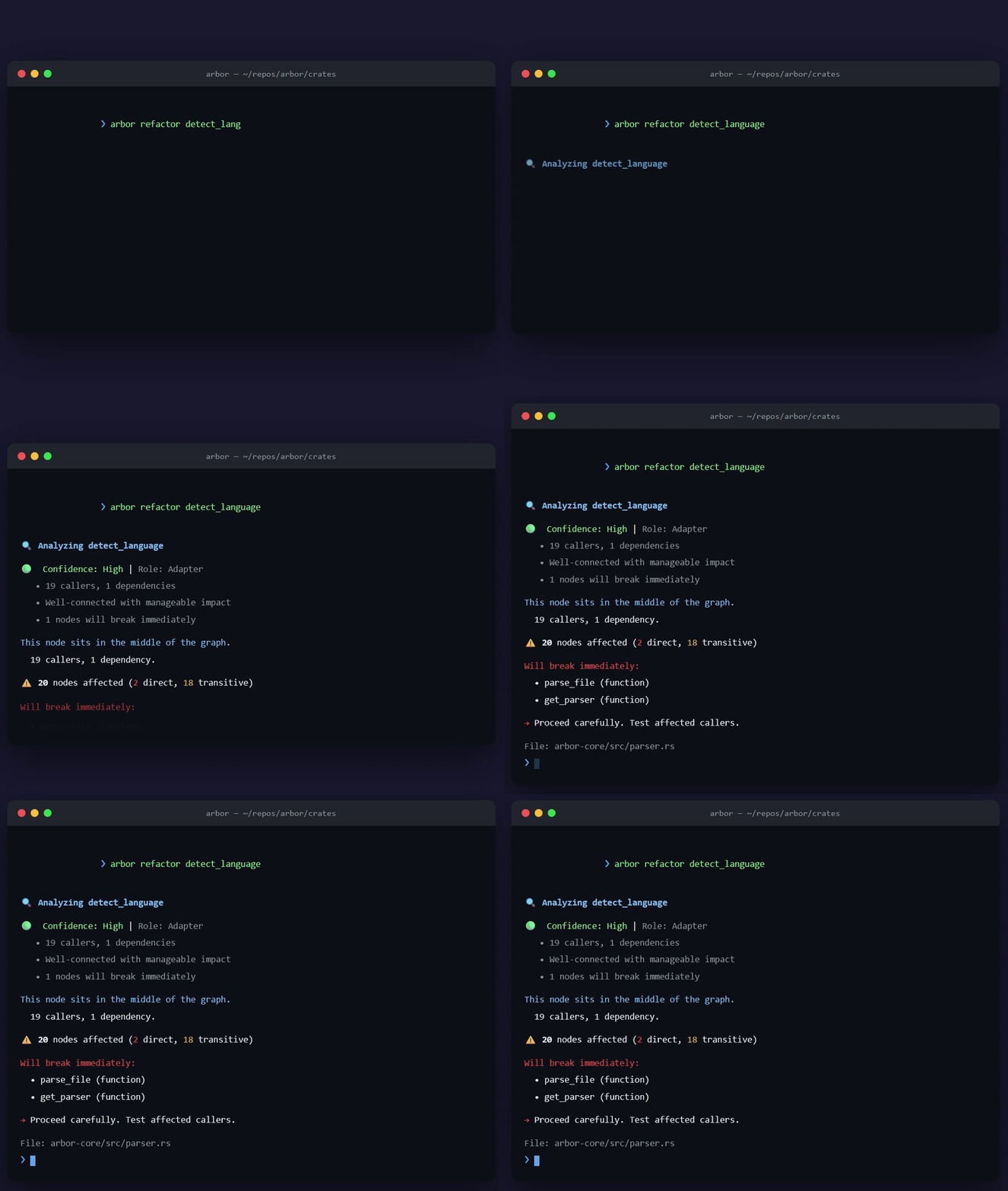
Simulated replay — the arbor commands and their output are real (tokio @ 178k LOC). Methodology: BENCHMARKS.md
v3.0.0 — The Right Node · v2.6.0 stopped dropping colliding symbols. It did not stop resolving them to the wrong one. When a bare name matched several modules, resolution fell through to "same directory" and confidently attached the edge to whichever definition happened to sit next to the caller. On a graded fixture the three largest hubs reported zero downstream impact while unrelated siblings inherited their centrality. A file's own imports now settle it. Reproduce it yourself: getArbor-dev/arbor-torture
Why Arbor
Most AI coding tools treat code as text. Arbor builds a semantic dependency graph — functions, classes, and modules as nodes; calls, imports, and inheritance as edges — then answers execution-aware questions with deterministic precision:
| Question | Arbor answer |
|---|---|
| If I change this symbol, what breaks? | Blast radius with depth, confidence, and risk level |
| Who calls this — directly and transitively? | Caller/callee traversal on the call graph |
| What's the shortest path between A and B? | A* path through real dependencies |
| Is this PR too risky to merge? | CI gate on blast-radius thresholds |
No keyword guessing. No embedding hallucinations. One graph, every interface.
Where the graph is unsure, it says so — edges carry a confidence, and ambiguous resolutions are labelled rather than hidden. An honest unknown beats a confident wrong answer.
What's new in v3.0.0
One fix, measured.
Symbol resolution consults the importing file. When a bare name matched
definitions in several modules, resolve_ref fell through to SameDir and
attached the edge to whichever definition sat in the caller's own directory —
not a dropped edge, a confidently misrouted one, stamped at 0.55 confidence.
GraphBuilder already kept a per-file import map, but onlyapply_import_validation read it, and that scores an edge after one has been
chosen. It never saw the references going to the wrong node. Consulting it
between the same-file and same-directory checks keeps a local definition
shadowing an import, while letting a written import beat mere adjacency.Resolution::ViaImport scores 0.93, above SameDir's 0.55.
Measured
A fixture of 260 modules across 10 layers, each layer defining the same 26
function names. Ground truth is derived from the generator's own edge list, so
the expected answer is exact rather than estimated.
| True downstream | v2.6.0 | v3.0.0 |
|---|---|---|
| 179 | 0 | 163 |
| 178 | 0 | 161 |
| 161 | 0 | 133 |
| 143 | 22 | 133 |
| 122 | 22 | 119 |
| 36 | 22 | 61 |
| 16 | 22 | 46 |
Previously flat at about 22 regardless of the real answer. Now it tracks. Risk
on the largest hub moves from LOW to CRITICAL.
Total edge count barely moves (1335 → 1334). That is the signature of
misrouting rather than loss: the edges were always there, pointing at the wrong
nodes.
Breaking
Resolutiongains aViaImportvariant — an exhaustive match will not compile- Edges land on different nodes, so cached graphs, stored node ids, and
centrality baselines from 2.6.0 will differ
Known and still open
Written down rather than left to be discovered:
- Small targets now over-report (36 → 61, 16 → 46). Safer direction than
silence, but not yet correct. - PageRank has no escape from a closed cycle. Every member of a 500-function
ring scores above 90% centrality on one caller each, so mutually recursive
clusters — parsers, tree walkers, state machines — crowd the top of any
ranking. - Inheritance produces no edges.
class Middle(Base)is invisible, so changing
a base class shows zero blast radius. - Dynamic and reflective imports (
importlib,__import__,import(),eval(require(...))) are unresolvable by construction and are documented as
expected misses in the fixture rather than counted as defects.
Correctness, not speed. Each of these was silently wrong before.
| Fix | Why it mattered |
|---|---|
| Colliding symbols are kept | SymbolTable used HashMap::insert, so a second handler, new, or process replaced the first. The loser had zero callers and was invisible to blast radius. |
| Resolution is deterministic | Same-directory locality was decided by iterating a HashMap. Rust seeds RandomState per process, so the same binary on the same input could build different edges between runs. Now asserted across eight fresh processes. |
| Edges carry confidence | A proven same-file call and a same-directory guess were identical evidence. Each edge now scores [0,1] by how it resolved. |
| Exported TS symbols indexed once | export_statement recursed into its children, then the generic loop recursed again — every exported symbol became two vertices sharing one node id. 133 phantom nodes on a 149-file app, 25% of the graph. |
| Method calls on untyped receivers resolve | obj.method() was dropped outright, leaving the graph nearly edgeless on TS/JS — and an empty graph reports a blast radius of zero, which reads as "safe" rather than "unknown". |
| Centrality is a percentile rank | Scores were divided by the graph maximum, so the top node was 1.0 by construction and a 0.6 threshold meant nothing consistent between repos. Adding one hub rescaled every other node. |
| Resolution is O(1), not O(refs × nodes × files) | Unresolvable references — stdlib and third-party calls, most call sites in real code — paid the worst case. Suffixes are now indexed. |
New capability — concept search. Substring matching cannot find get_authenticated from login; they share no substring. Identifiers are now tokenized and expanded through curated concept clusters, and docstrings, signatures, and paths are indexed alongside names. Deterministic, offline, no model. Available on the library as ArborGraph::search_ranked (arbor query remains literal-substring for now).
New capability — hunk-level impact. changed_node_ids_for_ranges keeps only symbols whose lines actually changed, instead of every symbol in a touched file.
Measured on identical node sets, after the duplicate-extraction fix:
| Codebase | Before | After |
|---|---|---|
| TypeScript (149 files) | 172 edges | 196 (+14%) |
| Rust (arbor-graph) | 116 edges | 167 (+44%) |
Graph caches from earlier versions are invalidated — centrality now means something different, so a stale cache would be read wrong.
v2.5.0 — The Last Excuse (PageRank 23x, parallel indexing, warm-start centrality)| Change | Measured |
|---|---|
| PageRank rewrite — flat call-graph adjacency replaces per-iteration traversal | 149.8ms → 6.6ms on a 10k-node graph (23x), verified side-by-side vs the old implementation |
| Parallel indexing — parse fans out across all cores, deterministic assembly | Arbor: 253ms → 95ms · tokio (178k LOC): 2.7s → 1.6s |
| Warm-start centrality — watcher recomputes seed from previous scores | Converges in ~2 rounds after a one-file patch instead of the full 20-iteration budget |
| Convergence early-exit | Iteration stops at 1e-9 max delta — the budget is a ceiling, not a sentence |
Think a number is wrong? cargo bench -p arbor-graph and prove it: BENCHMARKS.md.
2026-07-28, HTTP transport, Tasks, MCP Apps)
| Feature | What it does |
|---|---|
MCP 2026-07-28 |
Stateless server/discover, response caching (ttlMs/cacheScope), dual-version fallback for 2025-03-26 clients |
| Tasks extension | tasks/get · tasks/update · tasks/cancel — cold-start indexing returns task handles, not errors |
| MCP Apps | Interactive blast-radius graph (ui://arbor/blast-radius) and architecture map (ui://arbor/architecture-map) inside agent hosts |
| HTTP transport | arbor bridge --http --port 3333 — stateless MCP behind load balancers |
Real get_blast_radius |
Git-diff-aware impact analysis via shared arbor-graph::compute_blast_radius |
| Pagination | offset / limit / hasMore on search_symbols and get_map |
| Benchmarks | Criterion suite + CI regression gate — see BENCHMARKS.md |
Quickstart
# Install
cargo install arbor-graph-cli

# Index your project (one command)
cd your-project && arbor setup

# Explore before you edit
arbor map . --exclude-test          # ranked project skeleton (~1k tokens)
arbor refactor parse_file           # blast radius of changing a symbol
arbor diff                          # impact of uncommitted git changes

# Wire up your AI agent
claude mcp add --transport stdio --scope project arbor -- arbor bridge
Agent workflow: call get_map first → search_symbols / get_file_graph to locate code → Read only the target file. Full MCP guide →
For AI agents (MCP)
Arbor ships a production MCP server via arbor bridge. Stdio is the default; HTTP is opt-in for remote/enterprise.
# Stdio (Claude, Cursor, VS Code)
arbor bridge

# HTTP (MCP 2026-07-28)
arbor bridge --http --port 3333
Cursor / VS Code
{
  "mcpServers": {
    "arbor": {
      "type": "stdio",
      "command": "arbor",
      "args": ["bridge"]
    }
  }
}
Templates: templates/mcp/ · Setup scripts: scripts/setup-mcp.sh · scripts/setup-mcp.ps1
16 MCP tools
| Tier | Tools | Use when |
|---|---|---|
| Orientation | get_map |
First call — token-budgeted project skeleton ranked by PageRank |
| Surgical | list_entry_points · get_callers · get_callees · search_symbols · get_file_graph · get_node_detail |
Navigate to a specific symbol or file |
| Broad | get_logic_path · analyze_impact · find_path · get_knowledge_path |
Trace dependencies, blast radius, paths |
| Agent-native | get_blast_radius · explain_symbol · audit_security · get_architecture_overview · batch_query |
PR impact, onboarding, security audit, bulk lookup |
Every tool returns { ok, tool, data, meta: { suggested_next_tool, suggested_next_args } } so agents chain calls without re-prompting.
Registry: io.github.Anandb71/arbor · Official API lookup · Glama listing
CLI reference
| Command | Description |
|---|---|
arbor setup |
One-shot init + index |
arbor map |
Ranked, token-budgeted project skeleton |
arbor query <term> |
Fuzzy symbol search (supports | OR) |
arbor callers / callees <sym> |
One-hop graph traversal |
arbor entry-points |
HTTP handlers, main, jobs, webhooks |
arbor file-graph <path> |
Symbols + edges in one file |
arbor inspect <sym> |
Full symbol detail |
arbor path <a> <b> |
Shortest call-graph path |
arbor refactor <sym> |
Blast radius before refactoring |
arbor diff |
Git-change impact report |
arbor check |
CI safety gate (--max-blast-radius N) |
arbor summary |
Auto-generate PR description |
arbor agent review |
Autonomous PR architecture review |
arbor agent onboard |
Codebase onboarding guide |
arbor agent guard |
Real-time architectural safety gate |
arbor bridge |
MCP server (add --http for HTTP transport) |
arbor watch |
Live re-index on file changes |
arbor gui |
Native desktop UI |
All query commands support --json. map additionally supports --tokens N, --focus "pattern", --focus-changed.
Visual tour
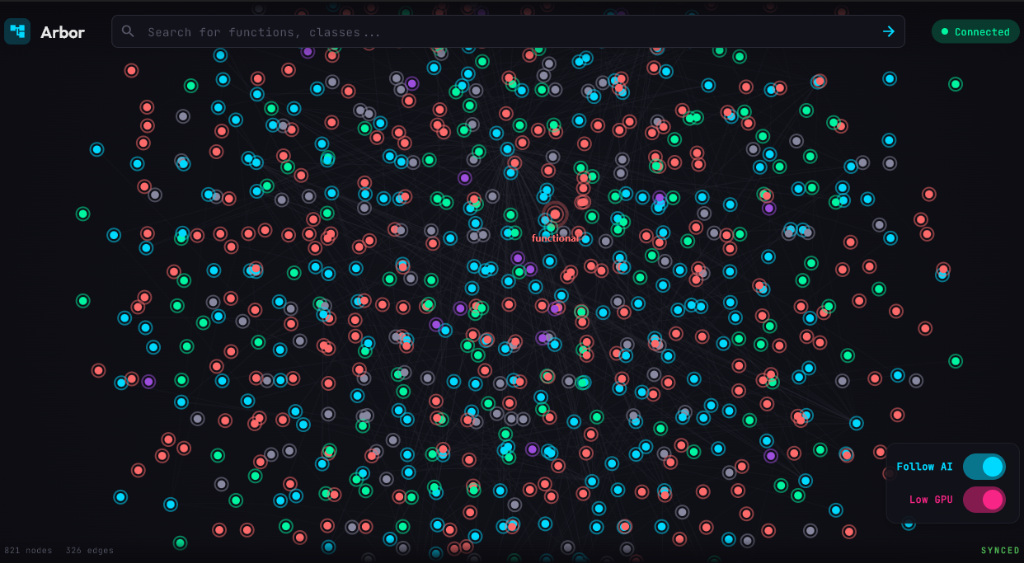
Full recording: media/recording-2026-01-13.mp4
Installation
# Rust / Cargo
cargo install arbor-graph-cli

# Homebrew (macOS/Linux)
brew install Anandb71/tap/arbor

# Scoop (Windows)
scoop bucket add arbor https://github.com/Anandb71/arbor && scoop install arbor

# npm wrapper (cross-platform)
npx @anandb71/arbor-cli

# Docker
docker pull ghcr.io/anandb71/arbor:latest
No-Rust installers:
- macOS/Linux:
curl -fsSL https://raw.githubusercontent.com/Anandb71/arbor/main/scripts/install.sh | bash - Windows:
irm https://raw.githubusercontent.com/Anandb71/arbor/main/scripts/install.ps1 | iex
Pinned installs: docs/INSTALL.md
Language support
Production parsers: Rust · TypeScript / JavaScript · Python · Go · Java · C / C++ · C# · Dart
Fallback parsers: Kotlin · Swift · Ruby · PHP · Shell
CI & pull requests
arbor diff --markdown
arbor check --max-blast-radius 30 --markdown
arbor summary
GitHub Action (pre-built binary, ~5s vs ~3–5min compile):
name: Arbor Check
on: [pull_request]

jobs:
  arbor:
    runs-on: ubuntu-latest
    steps:
      - uses: actions/checkout@v4
        with:
          fetch-depth: 0

      - uses: getArbor-dev/[email protected]
        with:
          command: check . --max-blast-radius 30 --markdown
          comment-on-pr: true
          github-token: ${{ secrets.GITHUB_TOKEN }}
Architecture
arbor-core (Tree-sitter parsing)
    └── arbor-graph (petgraph + PageRank + impact analysis)
            ├── arbor-cli      — CLI + MCP bridge
            ├── arbor-mcp      — MCP protocol server
            ├── arbor-server   — WebSocket JSON-RPC
            ├── arbor-watcher  — incremental file watcher
            └── arbor-gui      — desktop UI
Docs: Quickstart · Architecture · Graph schema · MCP integration · Benchmarks · Roadmap · Philosophy
Release channels: GitHub Releases · crates.io · GHCR · npm · VS Code / Open VSX · Homebrew · Scoop — Releasing guide
Philosophy
- Consumer first — beautiful, intuitive, instantly useful
- Accessibility second — works across ecosystems, runs anywhere
- Affordability next — minimal overhead, from laptops to monoliths
Arbor is local-first: no mandatory data exfiltration, offline-capable, open source. Security policy →
Contributing
cargo build --workspace
cargo test --workspace
cargo clippy --workspace --all-targets --all-features
CONTRIBUTING.md · Good first issues · Code of conduct
Contributors


7 contributors | View all
License
MIT — see LICENSE.
Reviews (0)
Sign in to leave a review.
Leave a reviewNo results found