ide-relay-mcp
Health Pass
- License — License: MIT
- Description — Repository has a description
- Active repo — Last push 0 days ago
- Community trust — 39 GitHub stars
Code Pass
- Code scan — Scanned 12 files during light audit, no dangerous patterns found
Permissions Pass
- Permissions — No dangerous permissions requested
No AI report is available for this listing yet.
The missing human checkpoint for AI coding agents. Give your AI agent a "pause & ask" button — review, correct, or enrich every step before it runs.

Relay
The missing human checkpoint for AI coding agents.
Give your AI agent a "pause & ask" button — review, correct, or enrich every step before it runs.





Author: andeya · [email protected]
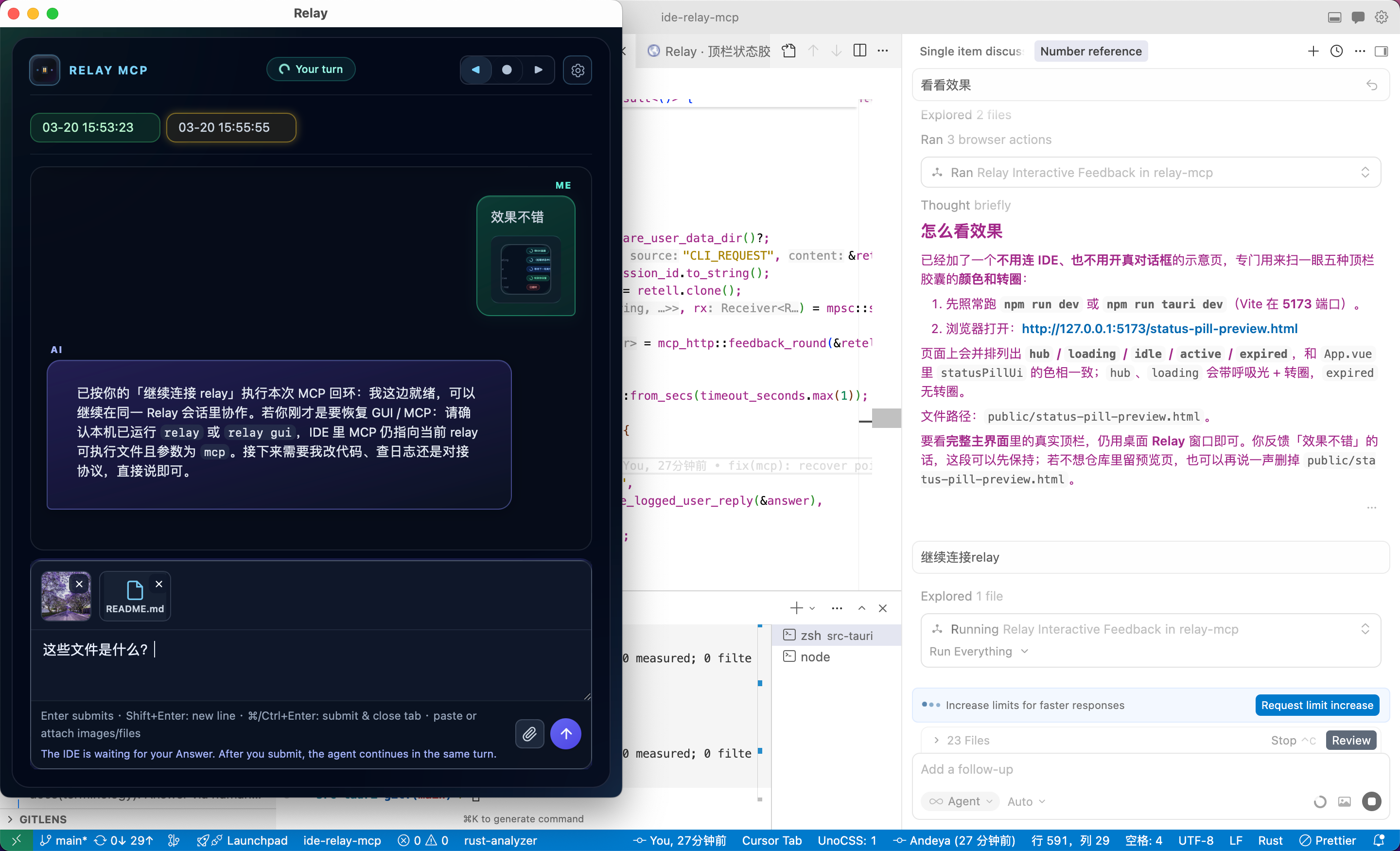
Relay beside your IDE — the agent pauses, you review & answer, it continues. All in one tools/call.
Why Relay?
AI coding agents are powerful — but blindly autonomous agents are risky and wasteful. Without a checkpoint, agents go on tangents, make mistakes that cascade into multiple correction rounds, and burn through your precious plan quota on wasted requests.
Relay adds a human-in-the-loop (HITL) checkpoint to any MCP-capable agent. The agent calls one tool — relay_interactive_feedback — and blocks until you submit your Answer (text, images, files). The result returns on the same JSON-RPC round trip. You catch issues early, guide accurately, and make every request count — no cloud dashboards, no extra SaaS, just a native desktop window beside your IDE.
Key advantages
| Works with any MCP IDE | First-class support for Cursor, Claude Code, Windsurf, and a generic mode for others. |
| 100% local | All data stays on your machine — loopback HTTP only, zero telemetry, no phone-home. |
| One resident GUI | A single persistent window (not a popup per request) with multi-tab session management. |
| No ARG_MAX limits | retell travels as HTTP JSON body (up to 16 MiB), not shell argv. |
| Session continuity | relay_mcp_session_id links turns into coherent sessions with MM-DD HH:mm:ss tab labels. |
| Rich feedback | Text, screenshots, file attachments — everything the agent needs in one round trip. |
| Save your plan quota | Catch mistakes early and guide precisely — no more wasted correction rounds burning through premium requests. |
Multi-IDE support
Launch Relay and pick your IDE. Each mode unlocks IDE-specific features — one-click MCP injection, tailored rule prompts, and (for Cursor) real-time usage monitoring.
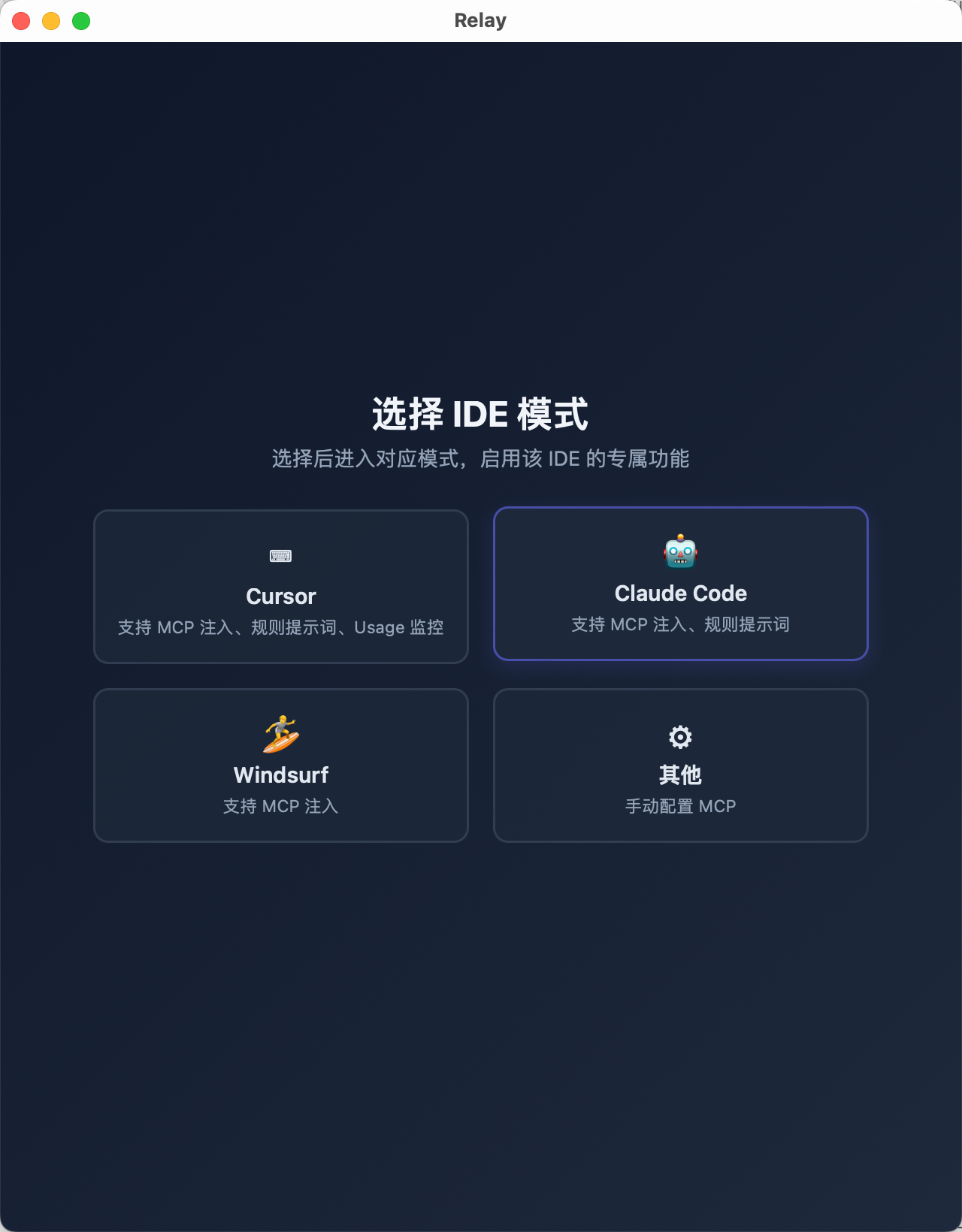
Click a card to enter that IDE mode — all settings, CLI commands, and MCP config adapt automatically.
| IDE | MCP injection | Rule prompts | Usage monitoring |
|---|---|---|---|
| Cursor | ✅ | ✅ | ✅ |
| Claude Code | ✅ | ✅ | — |
| Windsurf | ✅ | — | — |
| Other | manual | — | — |
Quick start
1. Install — Grab the latest release (macOS, Linux, Windows) or build from source.
2. Launch & choose IDE — Run relay and click your IDE card, or go directly:
relay gui-cursor        # Cursor mode
relay gui-claudecode    # Claude Code mode
relay gui-windsurf      # Windsurf mode
3. Wire MCP — Point your IDE at the Relay binary. Example for Cursor:
{
  "mcpServers": {
    "relay-mcp": {
      "command": "/path/to/relay",
      "args": ["mcp-cursor"],
      "autoApprove": ["relay_interactive_feedback"]
    }
  }
}
Cursor uses
.cursor/mcp.json(per-repo, merged with~/.cursor/mcp.json).
For WSL agent + Windowsrelay.exe, add--exe_in_wsl:["mcp-cursor", "--exe_in_wsl"].
See docs/HTTP_IPC.md for details.
Or use Settings → Environment & MCP inside Relay for one-click setup and to copy the MCP JSON directly:
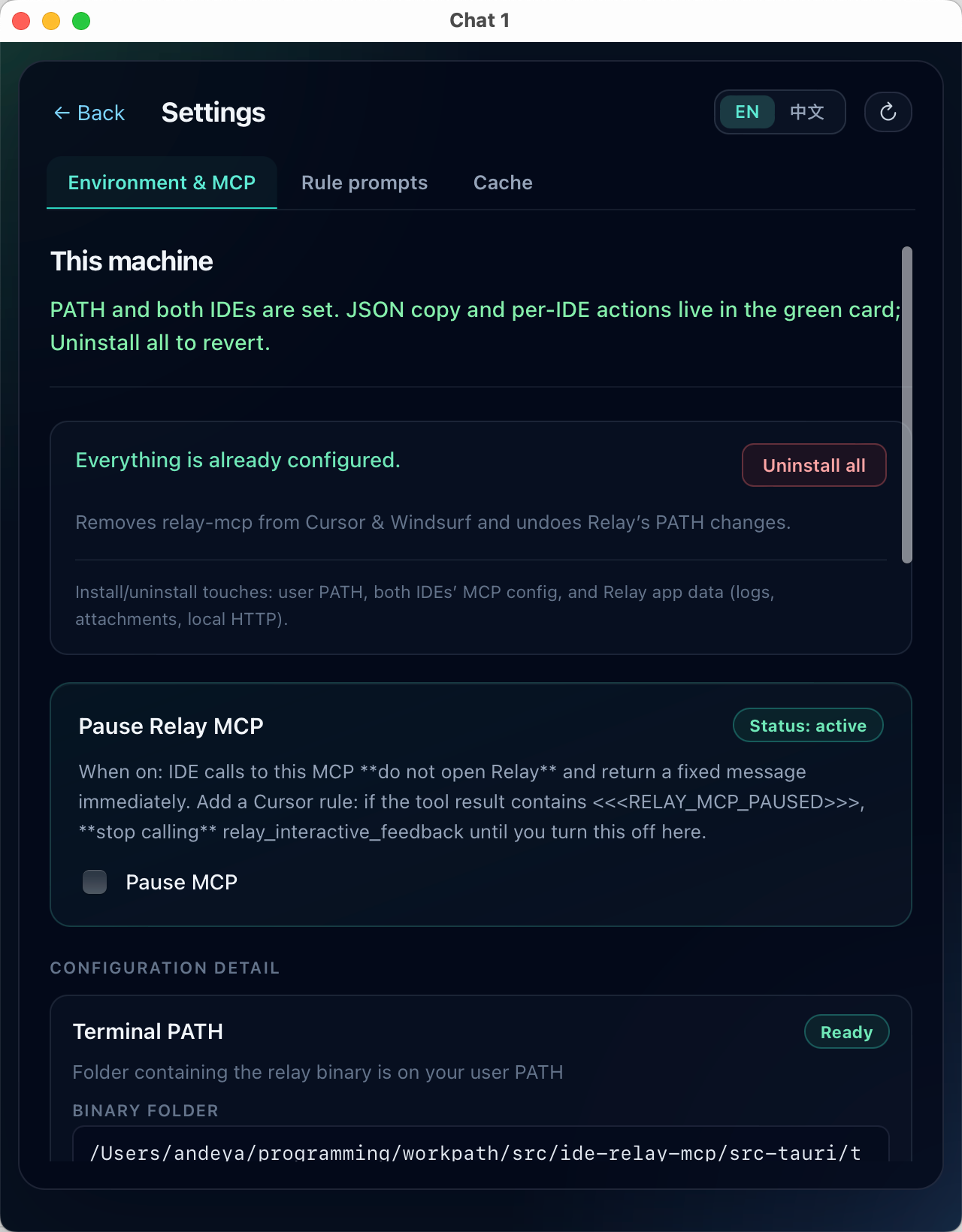
Settings → Environment & MCP — PATH detection, one-click MCP injection, copy JSON, pause MCP.
4. Install rule prompts — Go to Settings → Rule prompts and install with one click. This teaches the agent to call relay_interactive_feedback every turn and maintain relay_mcp_session_id.
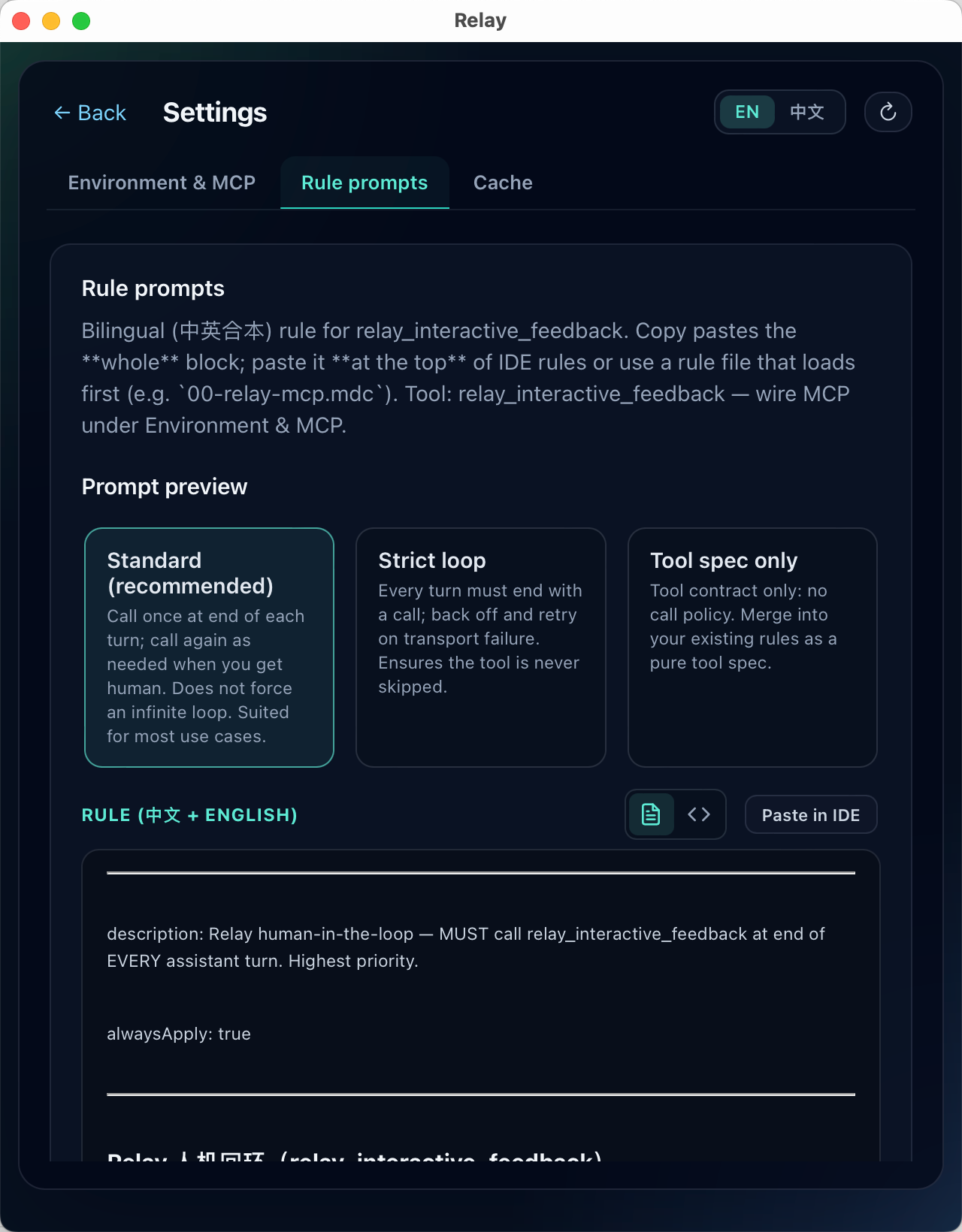
Settings → Rule prompts — one-click install into your IDE's rule configuration.
Architecture
flowchart LR
  IDE[IDE / Agent] -->|stdio JSON-RPC| MCP["relay mcp-{ide}"]
  MCP -->|read or spawn| GUI["relay gui-{ide}"]
  MCP <-->|127.0.0.1 Bearer| HTTP[Tauri HTTP API]
  HTTP <--> UI[Vue tabs]
  UI --- User((You))
  MCP -->|JSON result| IDE
relay mcp-{ide}— Stdio MCP server (clap). Handlesinitialize,tools/list,tools/call. Concurrent human rounds on one connection. Optional auto-reply rules.relay/relay gui-{ide}— Tauri app + HTTP on127.0.0.1:0. Writesgui_endpoint_{ide}.jsonwith{ port, token, pid }; cleans up on exit.- Bridge — MCP reads the endpoint file; if missing, spawns
gui-{ide}and polls up to ~45 s. ThenPOST /v1/feedback→GET /v1/feedback/wait/:id. The wait resolves on submit, dismiss, supersede, or ~60 min idle.
MCP tool: relay_interactive_feedback
| Argument | Required | Meaning |
|---|---|---|
retell |
yes (non-empty) | This turn's user-visible assistant reply, verbatim. |
relay_mcp_session_id |
if you have one | Continue the same session; returned in the JSON result. |
commands |
new tab: required | Array of IDE commands for slash-completion. [] only if the host truly has none. |
skills |
same as commands | Array of IDE skills. Same merge/dedupe rules. |
Pause MCP (Settings): sentinel <<<RELAY_MCP_PAUSED>>> — do not call again until resumed.
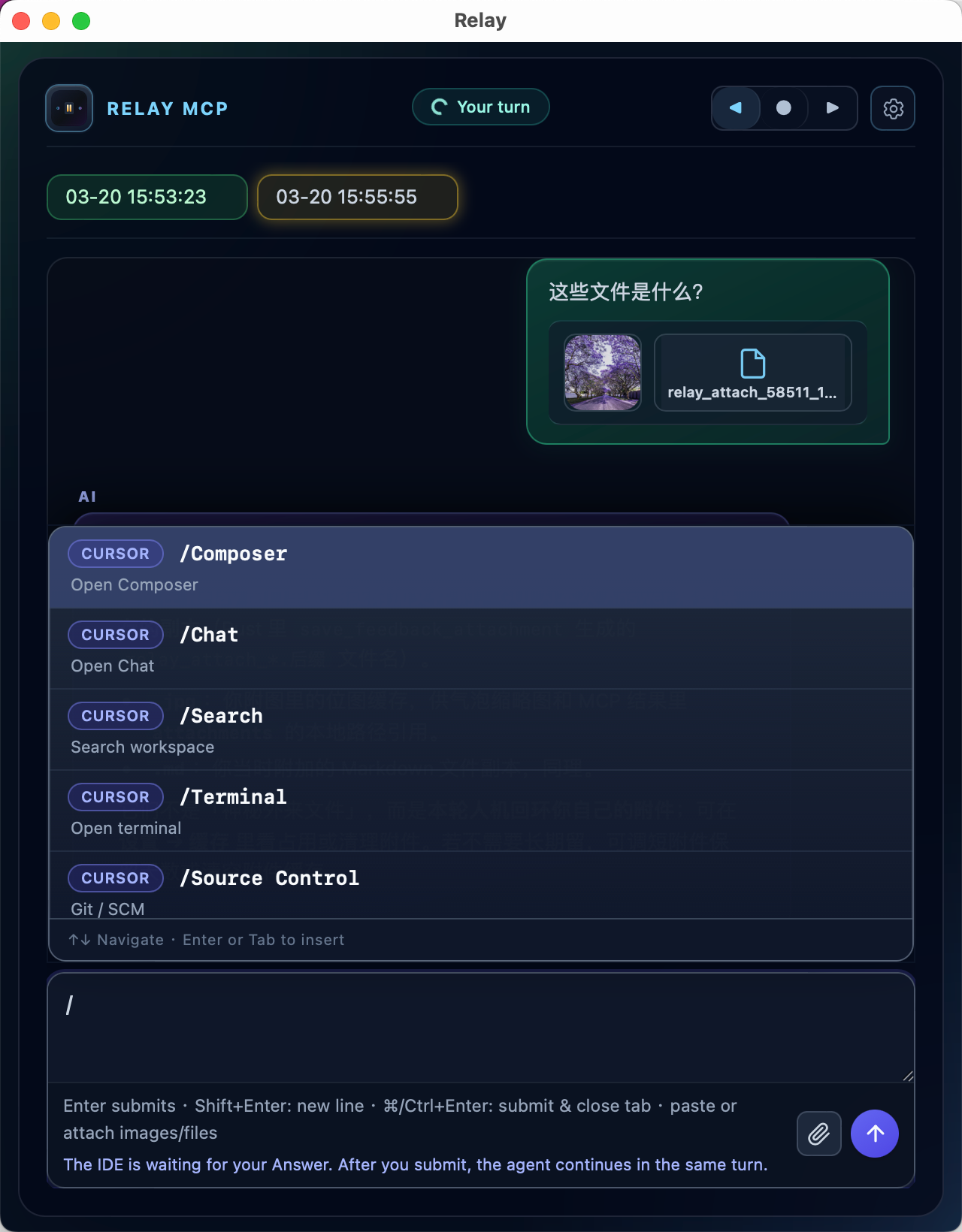
Slash completion — commands and skills populate the palette with optional category badges.
Features at a glance
- Multi-tab hub — Each request opens or refreshes a tab.
relay_mcp_session_idmerges streams. Labels show MM-DD HH:mm:ss with turn-status color indicators. - Rich composer — Enter to submit, Shift+Enter for newline, ⌘/Ctrl+Enter to submit & close. Paste images, attach files — they appear as
attachmentsin the tool result. - Cursor Usage monitoring — Auto-detect your Cursor token (cross-platform decryption), view plan quotas, request history, and predicted quota exhaustion in a live popover.
- Auto-reply —
auto_reply_oneshot.txt/auto_reply_loop.txtfor instant0|replyresponses without opening the UI. - Local storage —
feedback_log.txt,qa_archive/<session_id>.jsonl, configurable attachment retention (default 30 days). - CLI —
relay feedback --retell "…"prints JSON on stdout;--timeoutfor CI/automation.
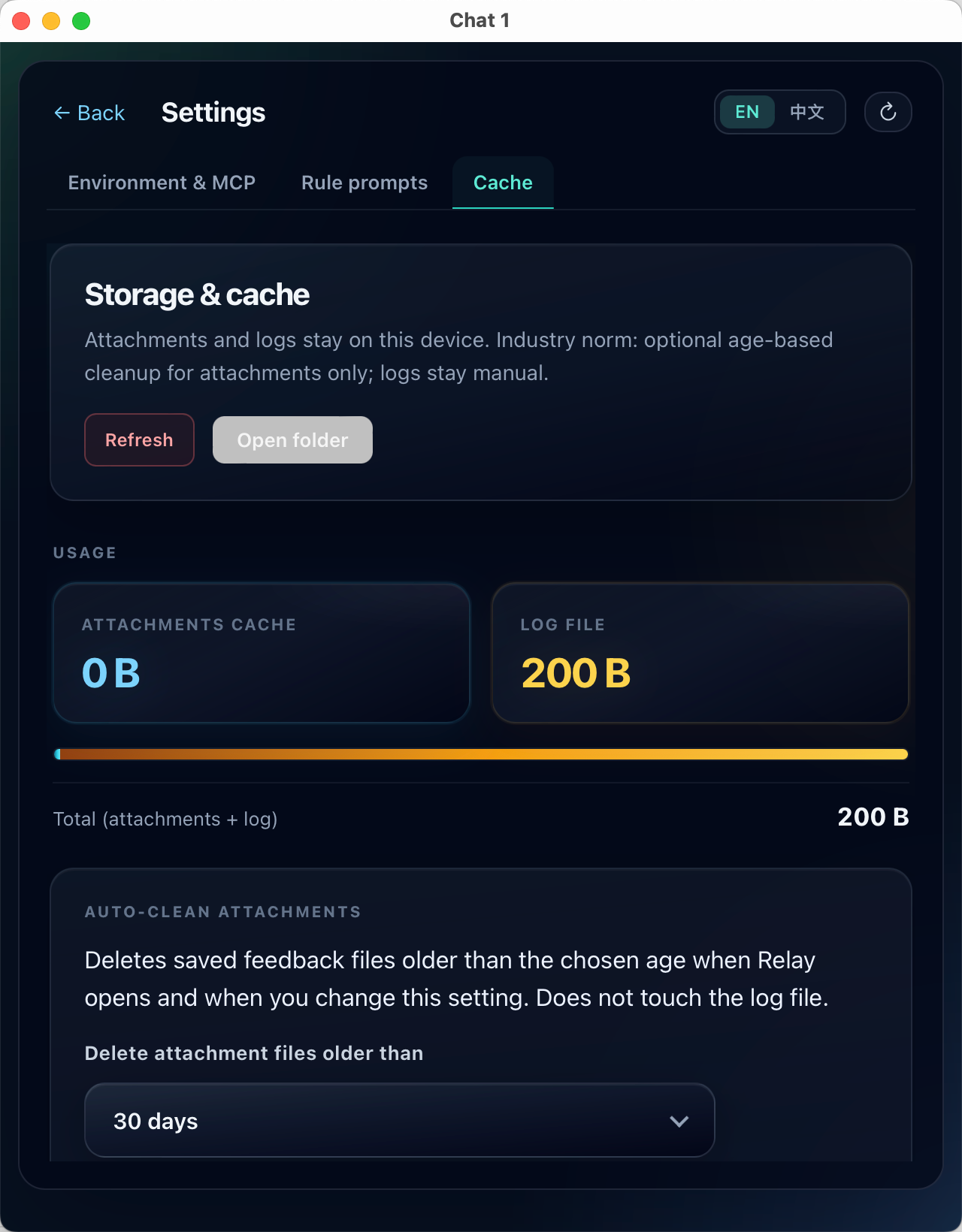
Settings → Cache — attachment + log usage, open folder, auto-clean.
CLI reference
| Command | Role |
|---|---|
relay |
Open IDE selection page |
relay gui-cursor |
Launch GUI in Cursor mode |
relay gui-claudecode |
Launch GUI in Claude Code mode |
relay gui-windsurf |
Launch GUI in Windsurf mode |
relay mcp-cursor |
MCP stdio server for Cursor (what the IDE runs) |
relay mcp-claudecode |
MCP stdio server for Claude Code |
relay mcp-windsurf |
MCP stdio server for Windsurf |
relay feedback --retell "…" |
Terminal tryout; --timeout, --relay-mcp-session-id |
Only one GUI process per IDE mode is allowed; bare relay (no mode) can run multiple instances.
Configuration & paths
Data lives under your OS application-data directory (directories::ProjectDirs → config_dir()):
| OS | Path |
|---|---|
| macOS | ~/Library/Application Support/com.relay.relay-mcp/ |
| Linux | ~/.config/relay-mcp/ |
| Windows | %APPDATA%\relay\relay-mcp\config\ |
Key files: feedback_log.txt, qa_archive/*.jsonl, ui_locale.json, gui_endpoint_{ide}.json, relay_gui_{ide}_alive.marker, mcp_pause.json, attachment_retention.json, auto_reply_*.txt.
Build
npm install
npm run build          # Vite frontend
cargo build --manifest-path src-tauri/Cargo.toml --release
npm run tauri build    # installers / .app / etc.
Develop:
npm run lint && npm run typecheck
npm run tauri:dev
Icons (from src-tauri/icons/source/relay-icon.svg):
npm run icons:build
CI: lint, typecheck, Vite, cargo fmt, clippy -D warnings, cargo test — see docs/RELEASING.md.
Documentation
| Doc | Content |
|---|---|
| docs/HTTP_IPC.md | HTTP API, timeouts, WSL path rewrite |
| docs/RELAY_MCP_SESSION_ID.md | Session ID & tab labels |
| docs/TERMINOLOGY.md | Vocabulary |
| docs/RELEASING.md | Releases & CI |
Privacy
Data stays on device. All answers, logs, attachments, and settings are written only under your OS user paths. The GUI and MCP process communicate over 127.0.0.1 — nothing leaves your machine.
No telemetry. Relay ships no analytics SDKs, crash reporters, or remote instrumentation. Local files like feedback_log.txt may contain sensitive content — handle them accordingly.
Acknowledgements
Inspired by interactive-feedback-mcp. Relay replaces per-request subprocess UIs with a resident GUI and a Bearer-authenticated local HTTP layer.
License
Reviews (0)
Sign in to leave a review.
Leave a reviewNo results found