teamxray
Health Pass
- License — License: MIT
- Description — Repository has a description
- Active repo — Last push 0 days ago
- Community trust — 11 GitHub stars
Code Warn
- process.env — Environment variable access in .github/workflows/pr-check.yml
- fs module — File system access in .github/workflows/pr-check.yml
- process.env — Environment variable access in evals/evalite.config.ts
Permissions Pass
- Permissions — No dangerous permissions requested
No AI report is available for this listing yet.
Human discovery through code analysis - VS Code extension that reveals team expertise.
Team X-Ray
"Feeling like a stranger on my own team, surrounded by brilliant minds whose talents hide in code and commits."
Transform your repository into a team expertise map. Discover who knows what, reveal hidden collaboration patterns, and get AI-powered management insights — all from your git history.

Features
- 🔍 File Expert Discovery — Right-click any file to find who knows it best
- 🧠 Team Expertise Analysis — AI-powered profiles with communication styles, specializations, and collaboration patterns
- 📊 Management Insights — Actionable recommendations: bus factor risks, growth opportunities, efficiency gaps
- 🤖 GitHub Copilot SDK Integration — Uses the Copilot SDK with custom tools for deep, context-aware analysis
- 🤖 Agent & Bot Detection — Automatically identifies bot/agent contributors (Dependabot, Copilot, Renovate) with visual distinction
- 📄 Dark-themed Reports — Exportable HTML reports with SVG charts and an X-Ray visual identity
- ⚡ Smart Fallback Chain — Copilot SDK → BYOK (OpenAI/Anthropic/Azure) → GitHub Models API → Local-only analysis
How It Works
Team X-Ray reads your git history — commits, contributors, file ownership — and feeds it to an AI agent through custom tools. The agent calls back into your repo data to build expertise profiles, identify risks, and generate management-ready insights.
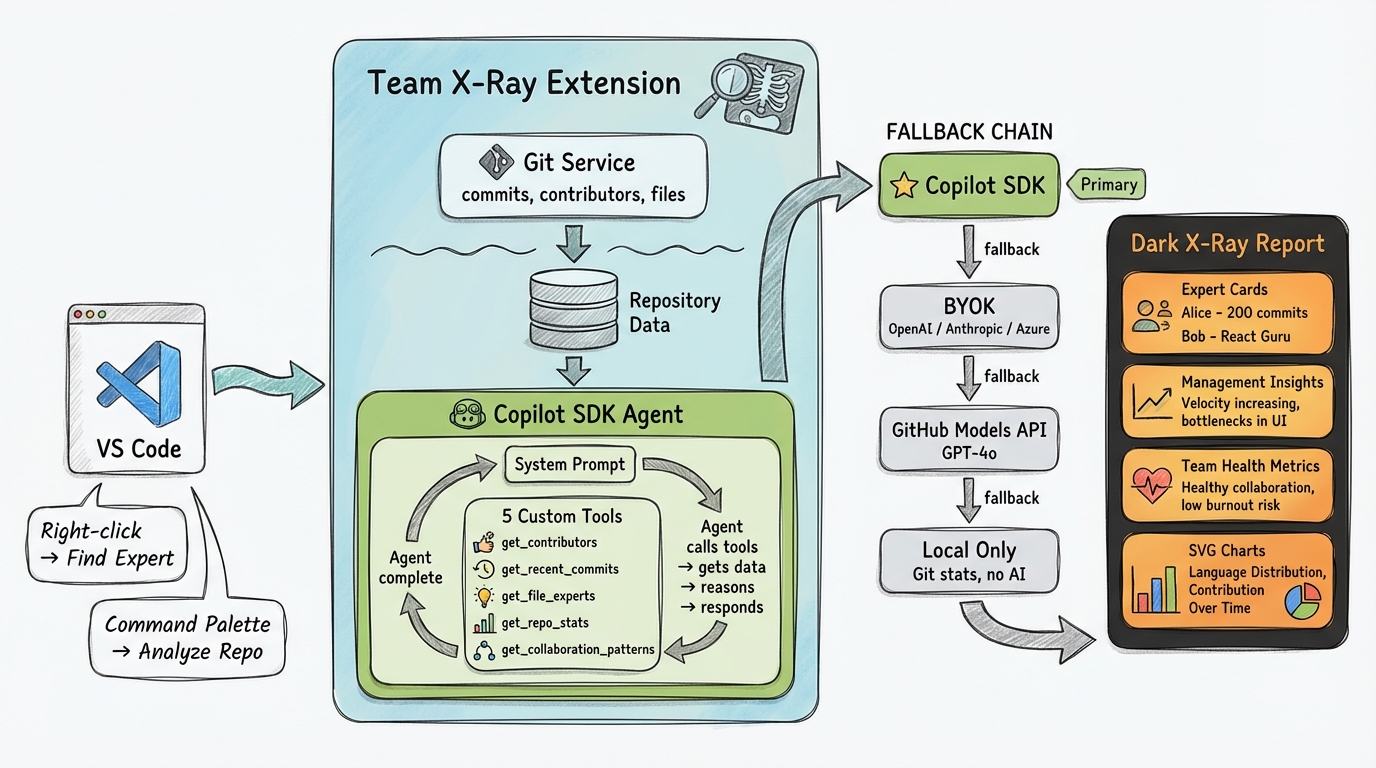
AI Provider Fallback
| Priority | Provider | Requirements |
|---|---|---|
| 1 | GitHub Copilot SDK | Copilot CLI installed + authenticated |
| 2 | BYOK | Your own API key (OpenAI, Anthropic, or Azure) |
| 3 | GitHub Models API | GitHub token with models access |
| 4 | Local-only | No AI — git stats only |
Installation
ext install AndreaGriffiths.teamxray
Or install from the VS Code Marketplace.
Requirements: VS Code 1.100.0+, Node.js 20+
Usage
| Command | How |
|---|---|
| Analyze Repository | Command Palette → Team X-Ray: Analyze Repository Expertise |
| Find File Expert | Right-click a file → Team X-Ray: Find Expert for This File |
| Team Overview | Command Palette → Team X-Ray: Show Team Expertise Overview |
| Set API Key | Command Palette → Team X-Ray: Set GitHub Token |
| Export Report | Click export button in the analysis webview |
Documentation
| Doc | Description |
|---|---|
| Setup | Installation & AI provider configuration |
| Architecture | Components, tools, worker threads, bot detection |
| AI Providers | Copilot SDK, BYOK, GitHub Models, local-only |
| Reports | Webview, HTML export, dark X-Ray theme |
| Troubleshooting | Common issues & fixes |
Links
Stop being a stranger on your own team. 🔬
Reviews (0)
Sign in to leave a review.
Leave a reviewNo results found