webmcp-demo
Health Uyari
- No license — Repository has no license file
- Description — Repository has a description
- Active repo — Last push 0 days ago
- Community trust — 13 GitHub stars
Code Gecti
- Code scan — Scanned 10 files during light audit, no dangerous patterns found
Permissions Gecti
- Permissions — No dangerous permissions requested
Bu listing icin henuz AI raporu yok.
Shoe store WebMCP Demo for Google Chrome
Shoe store WebMCP Demo for Google Chrome
https://andreinwald.github.io/webmcp-demo
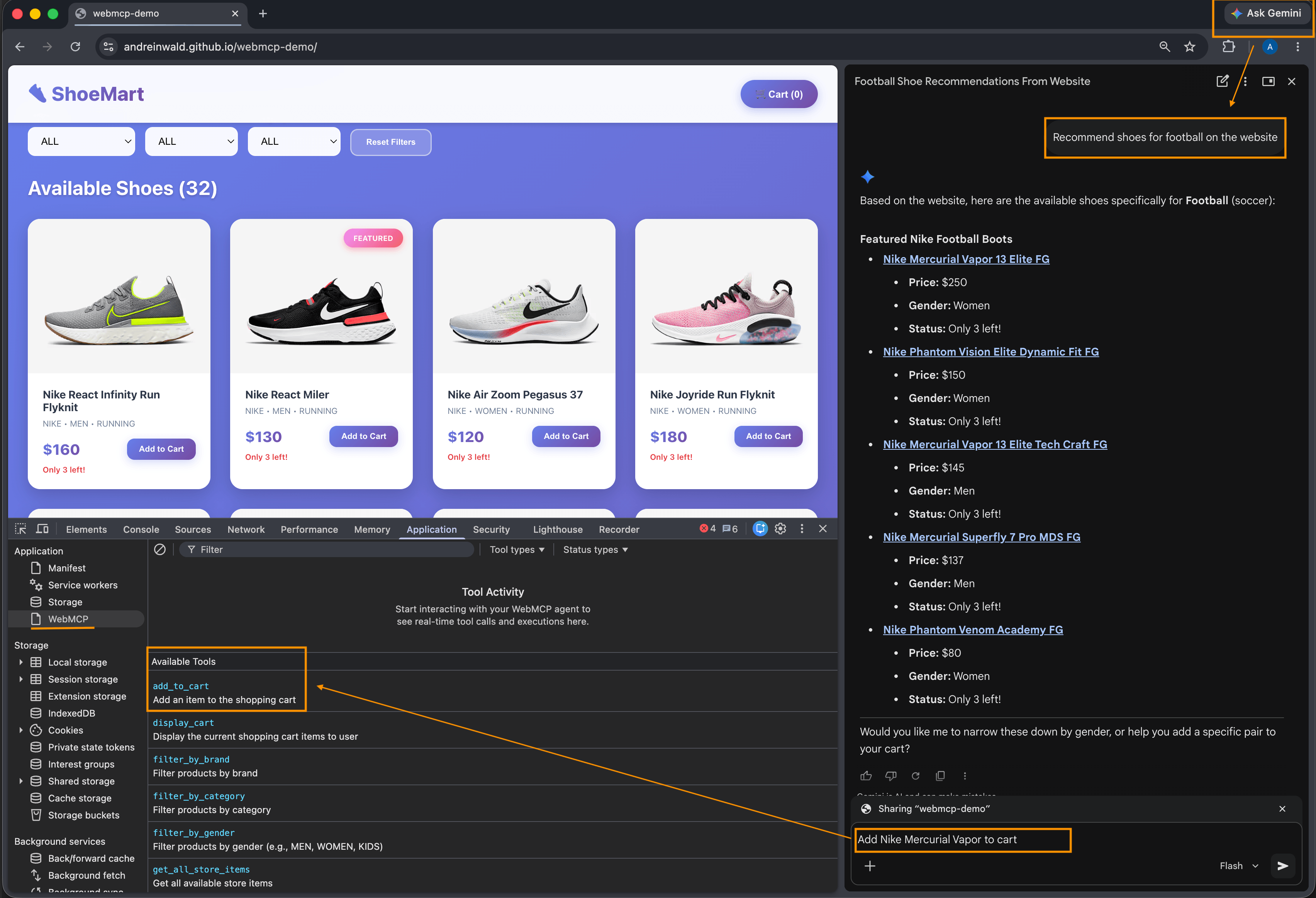
WebMCP requires an "instance" of website that has JavaScript runtime and likely a DOM tree. In other words, the browser opened the site in some form. It's designed for agentic browsers (like Google Chrome).
How to test
Right now for testing you need:
- Google Chrome version 146 or higher
- Go to chrome://flags and enable "WebMCP for testing"
- Use browser extension to call actions chromewebstore
Example Prompt:
Suggest the 3 best pairs of soccer shoes (foot size 45) available on this site. Add (one of suggestions) to cart and complete purchase.
Registering tools
It's very handy istead of manually writing JSON schema format for inputSchema WebMCP param, to use validator like Zod, that generates JSON schema for you.
This repo has helper function registerMCP that allows you build ZOD schema which way easier and also doin validation of input from LLM model.
Usage:
registerMCP({
    name: "filter_by_brand",
    description: "Filter products by brand",
    paramsSchema: z.object({
      brand: z.string().describe("The brand to filter by")
    }),
    execute: ({ brand }: { brand: string }) => {
      setSelectedBrand(brand)
      return `Successfully filtered by brand ${brand}`
    }
})
Registering tools in React components
For React, a more typical approach is to register tools directly in components, so its useRegisterMCP wrapper created also:
useRegisterMCP({
    name: "add_to_cart",
    description: "Add an item to the shopping cart",
    paramsSchema: z.object({
      id: z.number().describe("The ID of the item to add to the cart")
    }),
    execute: ({ id }: { id: number }) => {
      addToCart(id)
      return `Successfully added item ${id} to cart`
    }
})
See more examples in DemoStore.tsx
Read more
Yorumlar (0)
Yorum birakmak icin giris yap.
Yorum birakSonuc bulunamadi