bluedoc
Health Warn
- License — License: MIT
- Description — Repository has a description
- Active repo — Last push 0 days ago
- Low visibility — Only 5 GitHub stars
Code Pass
- Code scan — Scanned 12 files during light audit, no dangerous patterns found
Permissions Pass
- Permissions — No dangerous permissions requested
No AI report is available for this listing yet.
Agent skill: engineering docs, plans, code reviews, designs, decks and websites as JSON, rendered by a local server you comment on, decide and approve.
bluedoc
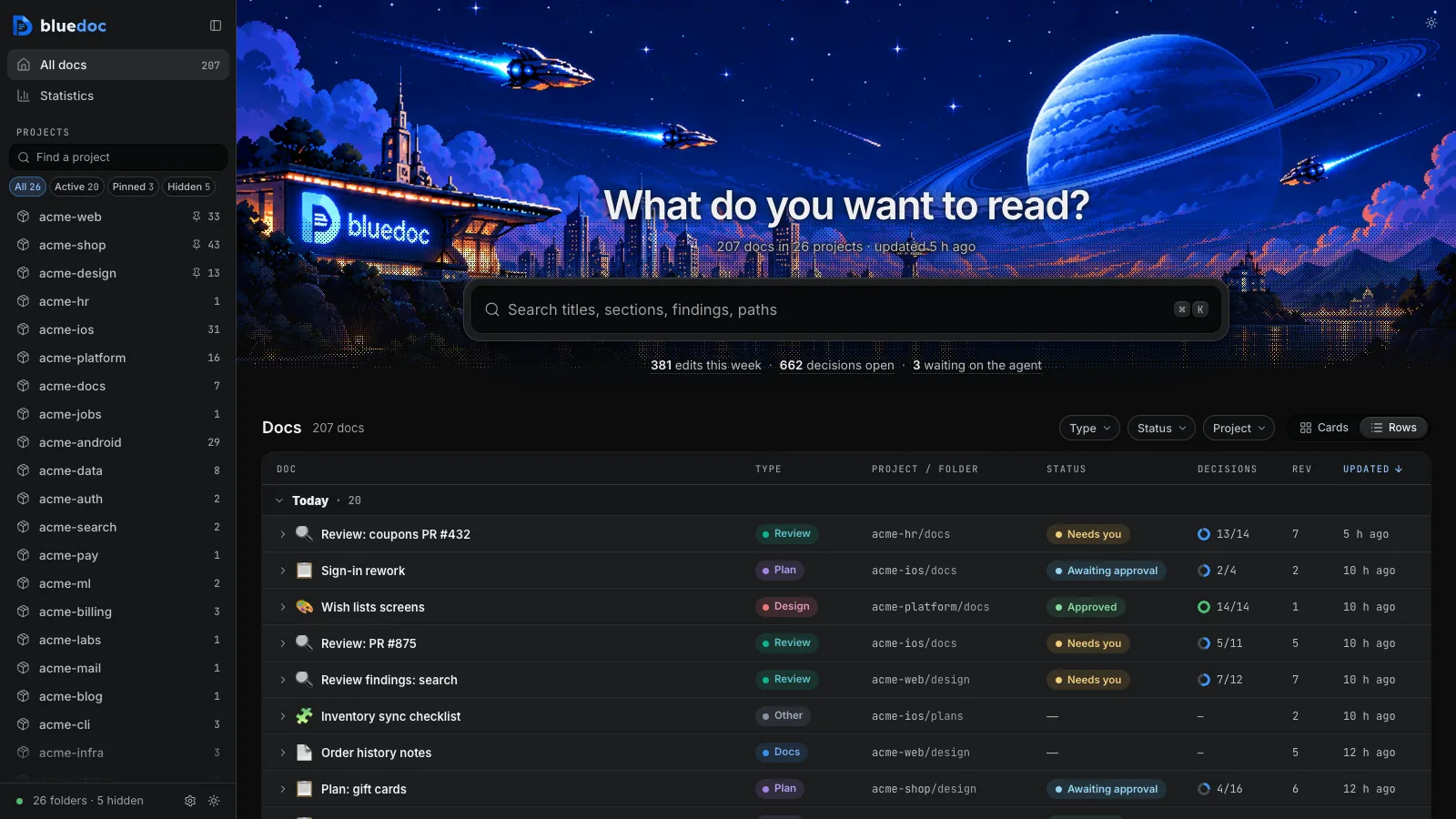
An agent skill for engineering docs, plans, code reviews, UI designs, slide decks, website reviews, app icons and app store listings. The agent writes one JSON file, plus small HTML fragments for screens and SVG layers for icons; a local server renders it as a page. You tick checklists, pick options, comment on any element and approve or send back; your answers and change requests go to the agent, and each revision can be compared with the last. Works with Claude Code, Codex, pi, omp, Copilot CLI and Antigravity CLI.
bluedoc 1.1 is tested on macOS; Linux and Windows are untested. Issues and feedback are welcome on GitHub.
Doc types
| Type | What it's for | Page | |
|---|---|---|---|
docs |
Architecture pages, walkthroughs, runbooks, setup guides, change proposals | docs | 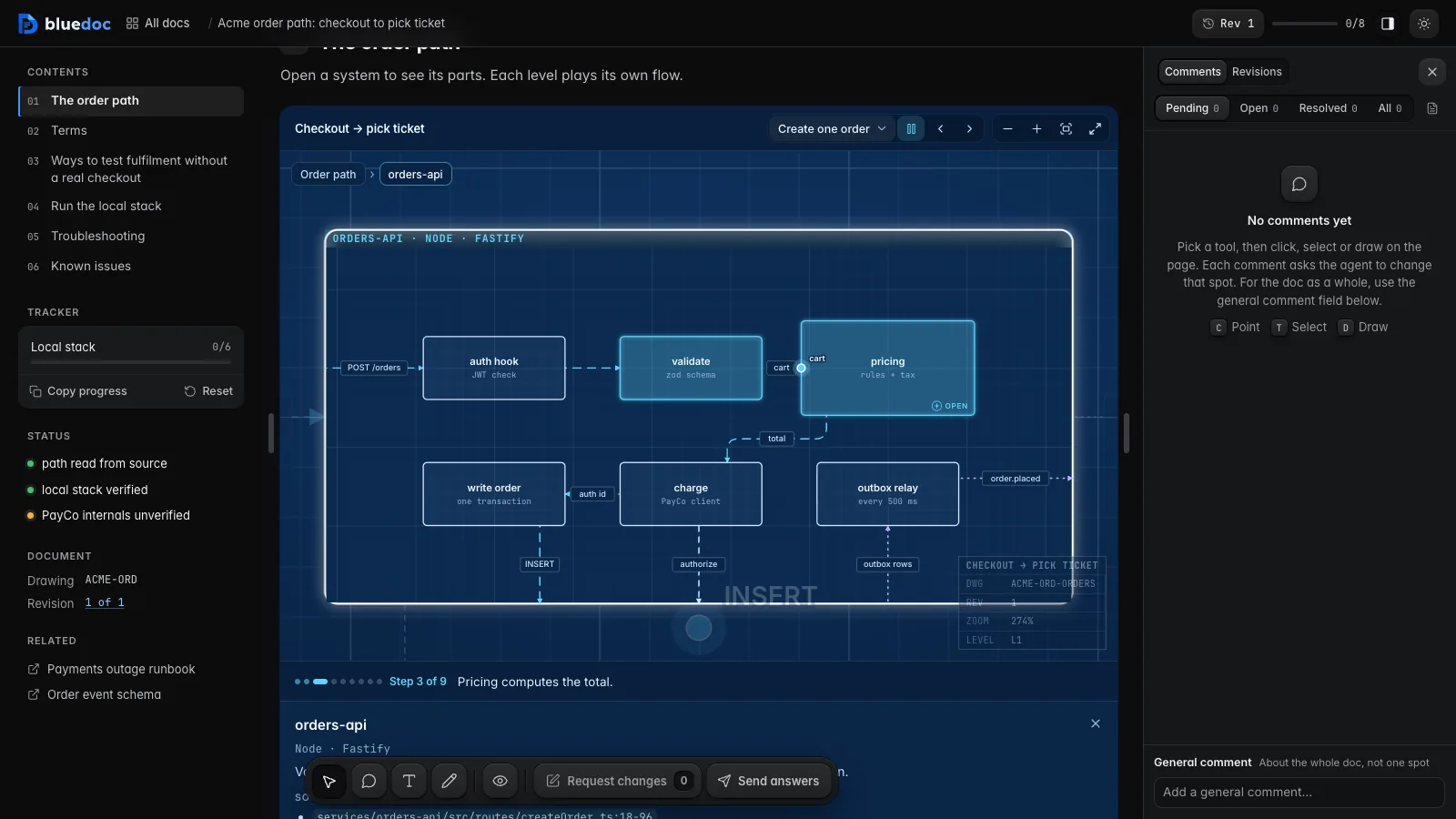 |
plan |
A plan you approve or send back before the agent writes code | plan | 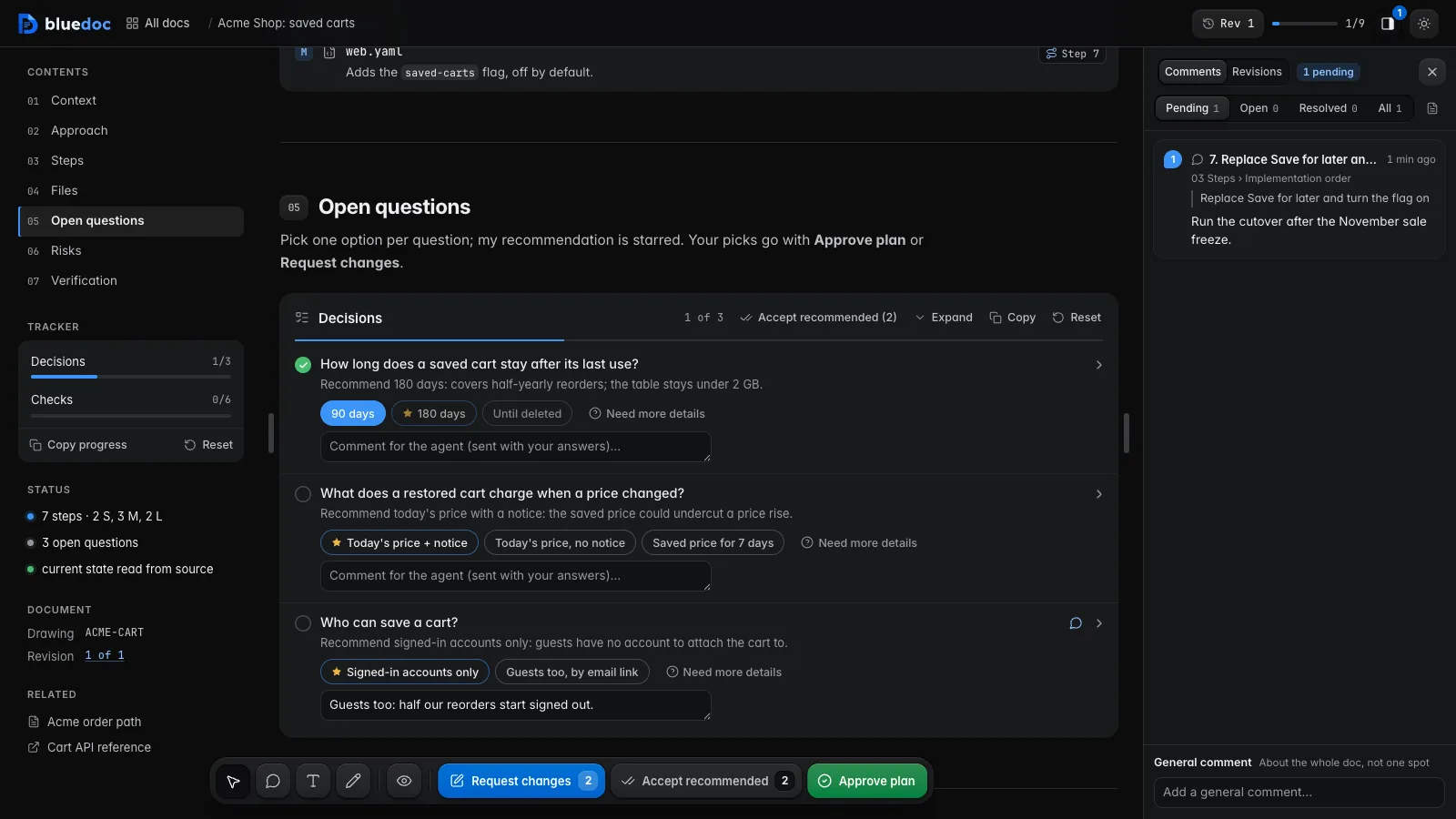 |
review |
Review findings pinned to their lines from git, one decision per finding | review | 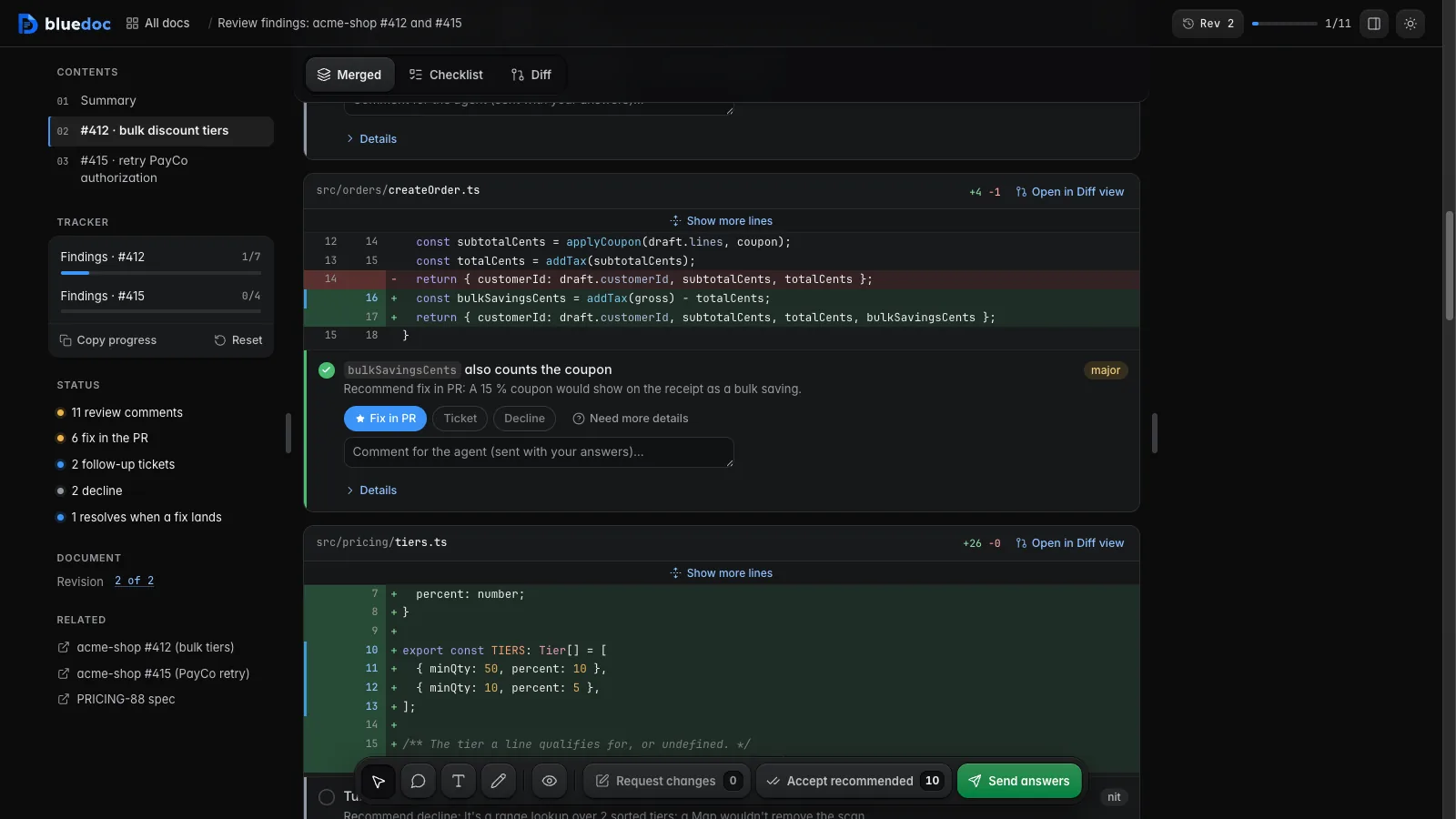 |
design |
UI screens on a board and app icons | design | 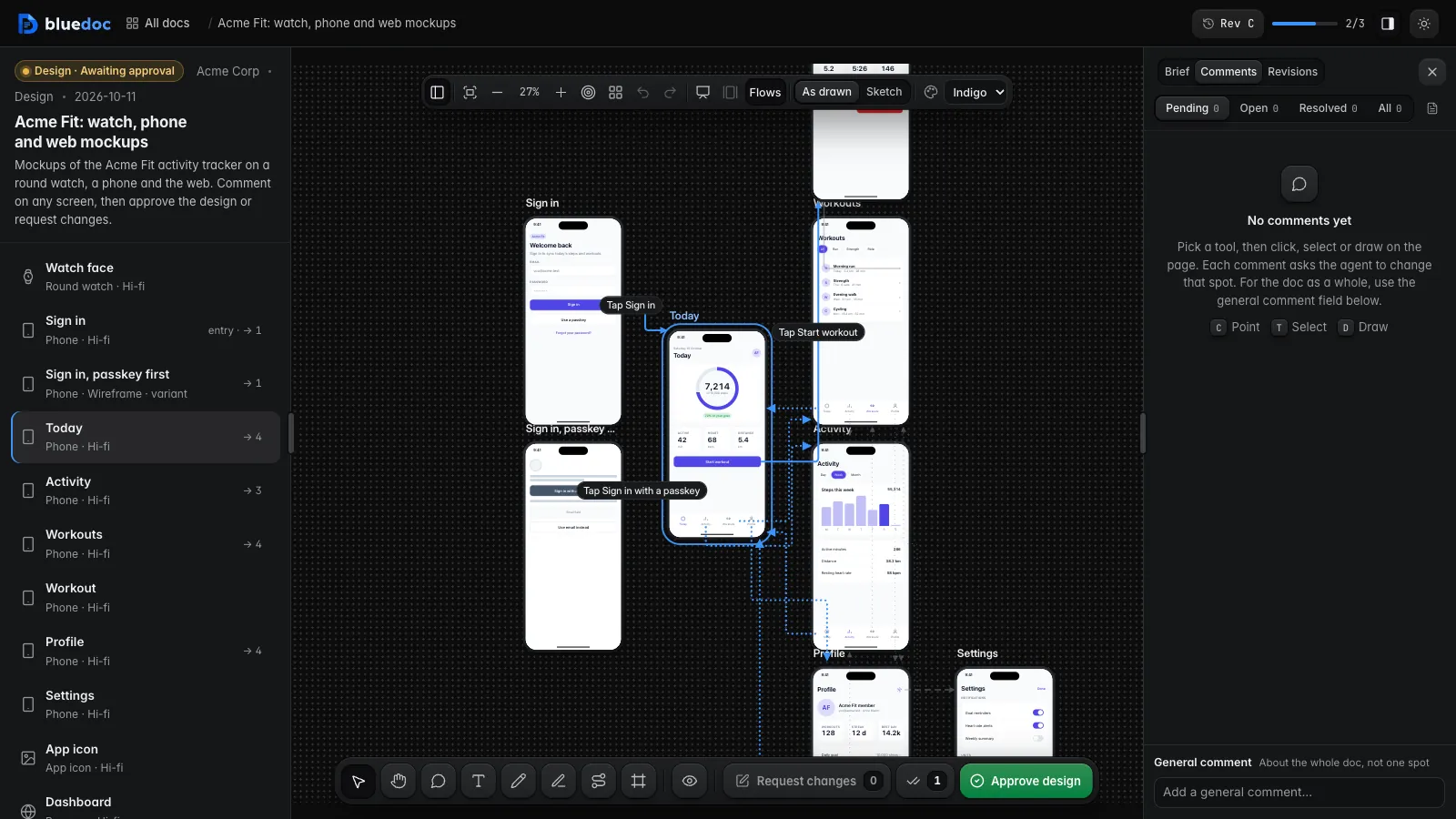 |
website |
A site's pages, live from its dev server: comment on sections, pick versions in place, each comment names the source to edit | website | 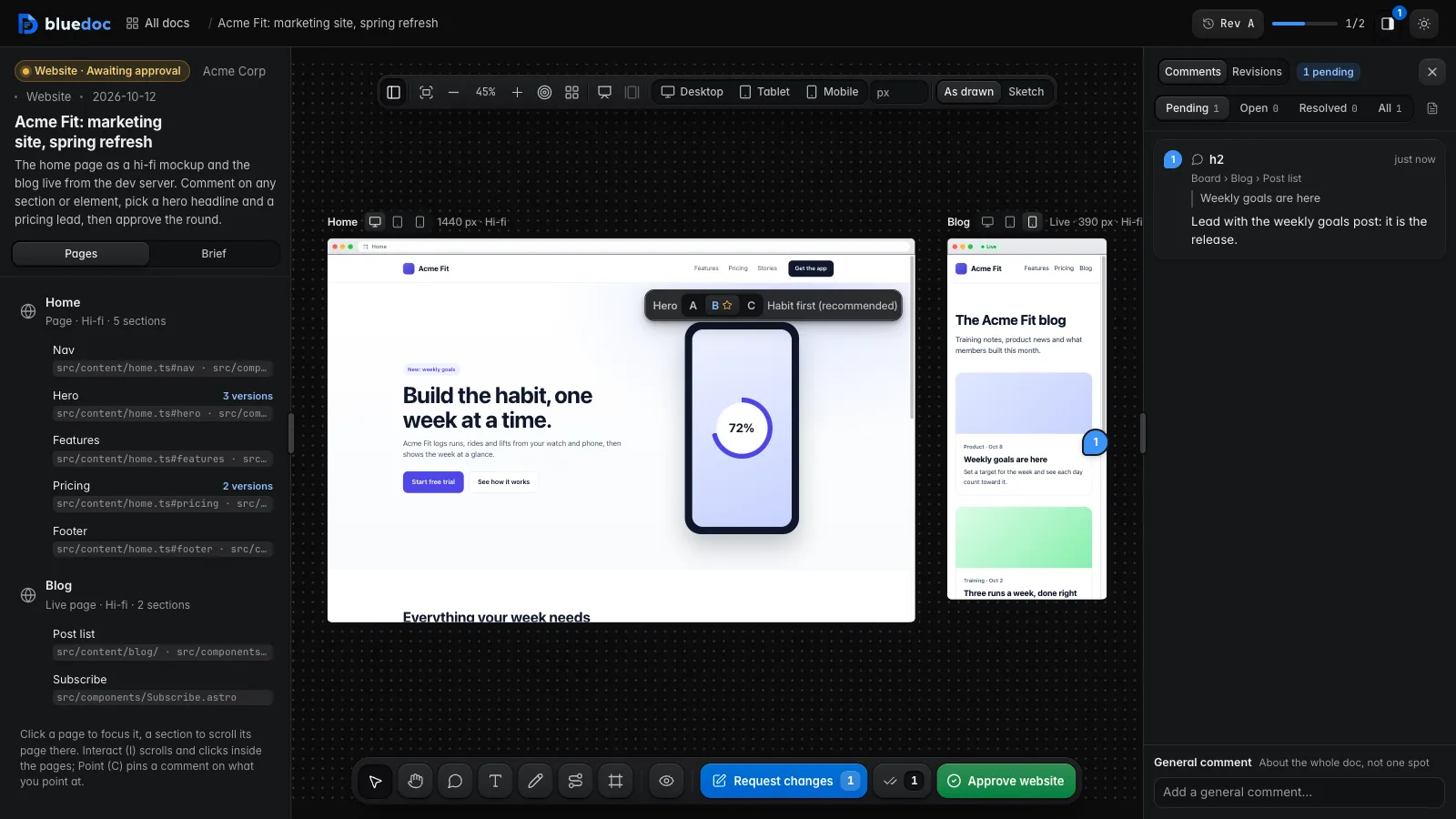 |
presentation |
Slide decks with speaker notes, played in Present | presentation | 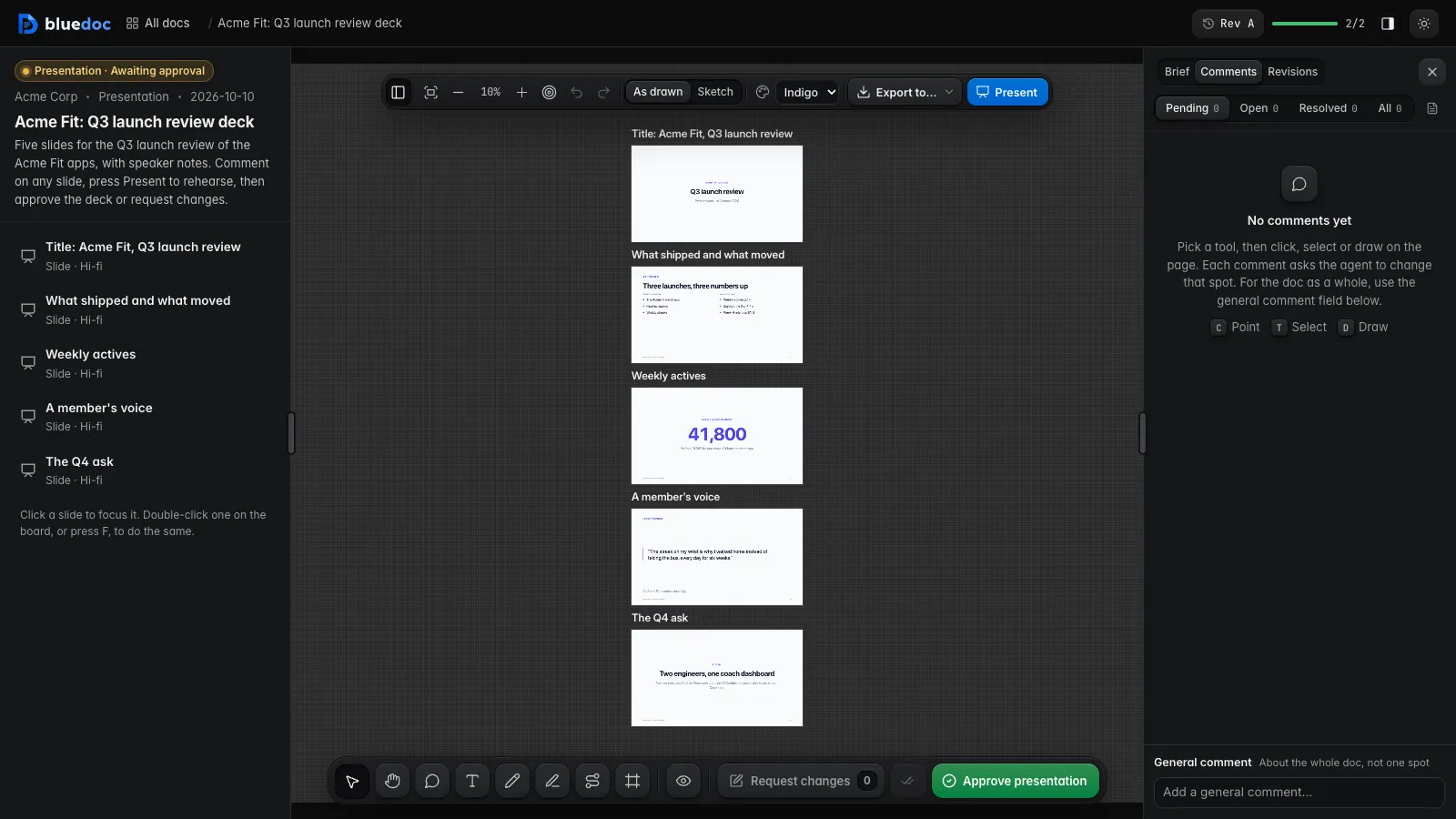 |
storelisting |
An app's Google Play and App Store listing: screenshots per device, store text per locale, store checks, fastlane export | storelisting | 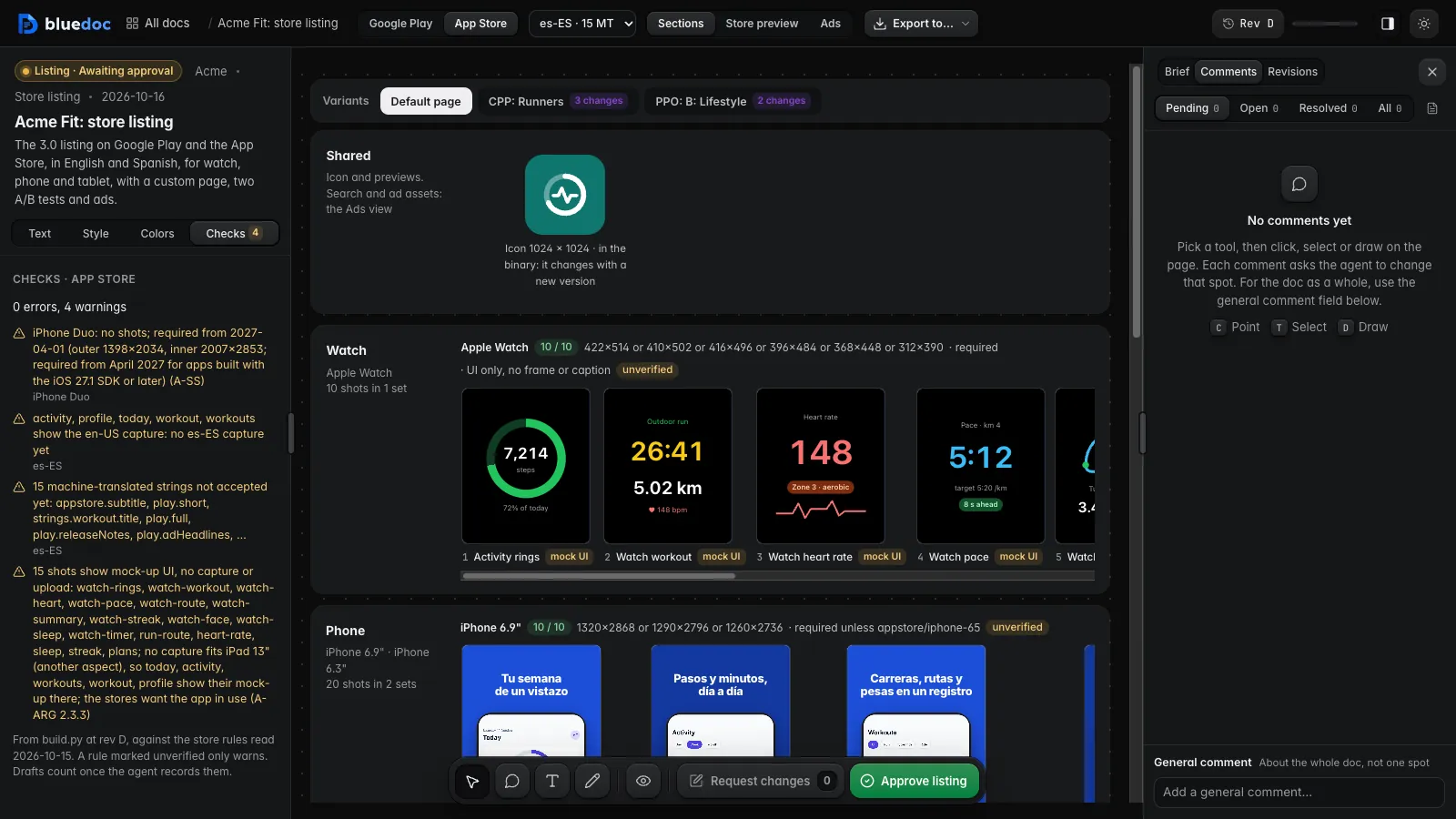 |
other |
Status pages, incident reports, inventories, meeting notes, comparisons | other | 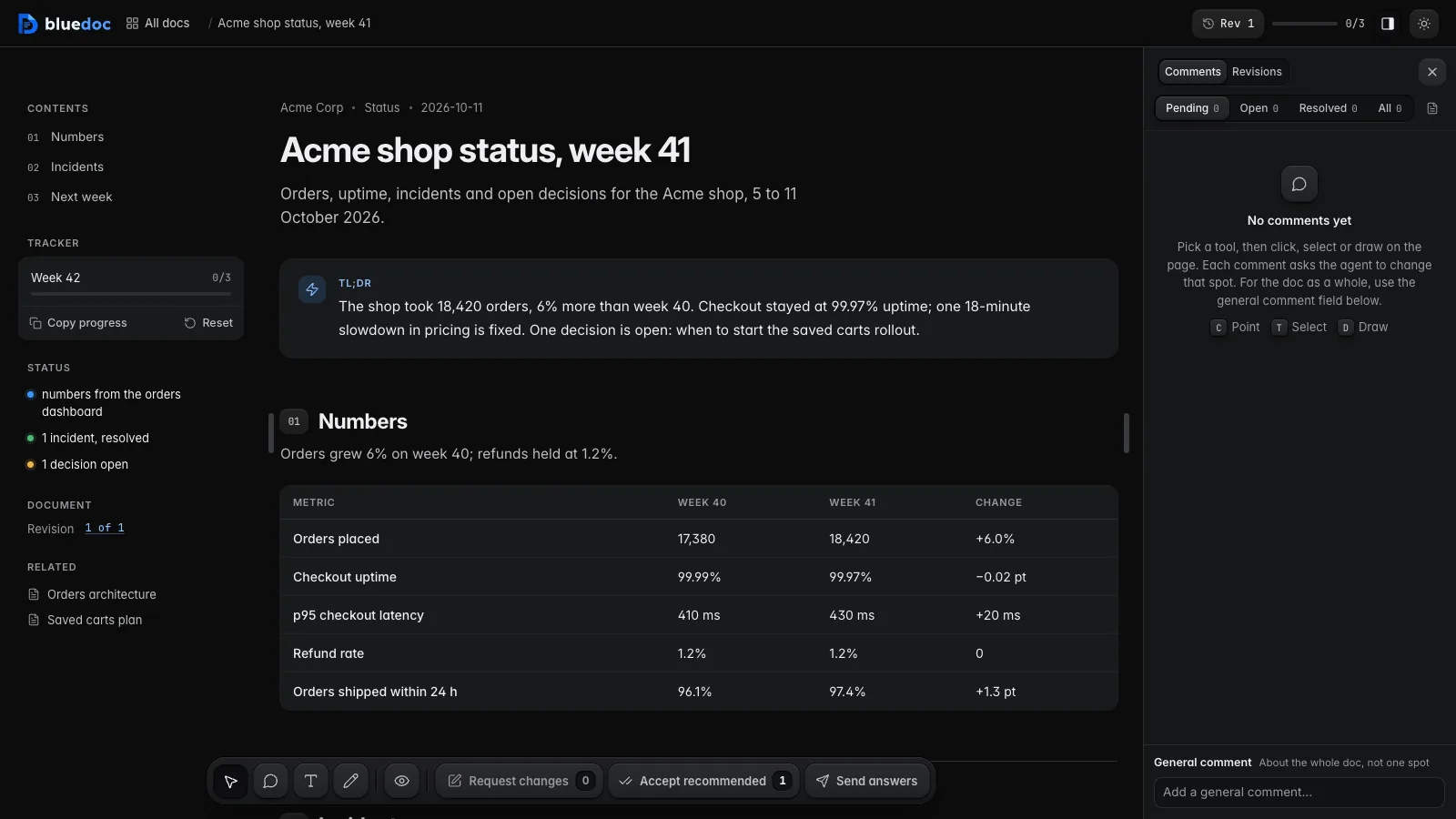 |
What you get
- A home page.
http://127.0.0.1:8740/lists every doc the server knows, from a local index it keeps up to date in the background, so it opens at once even after a restart. It opens on a pixel-art banner of a bay with a ringed planet, a night version for the dark theme and a day version for the light one, with the title, the search field (it searches the docs' text too) and a line of what waits on you over it. A sidebar lists the projects, pinned ones first; temporary and missing folders stay hidden until you show them. The docs are a table grouped by date (type, status, decisions, rev, age; a row opens in place with its summary, what is left and its actions) or cards whose hero draws a figure for the doc's type, filled with its numbers (a review's +/− lines, a plan's step timeline, a canvas doc's boxes, a design's screens by device); more load as you scroll. Statistics charts edits, decisions and types by project and range. - Blueprint canvas. Open a system to see its parts; each level plays its own animated flow (request, event, data). Nests 3 levels deep. Edges are routed at right angles around the nodes, with labels that don't overlap.
- Checklists as task trackers. Each item is a two-line row (the action, then why it matters) that opens to show details, commands, checks, tables or a sub-checklist. Ticks persist on the local server; Copy in a list's header exports it as Markdown for a PR or issue. A finished step or check can carry its evidence: the test it ran and its output, a screenshot, a link to a log or review. Adding evidence after approval keeps the plan approved. Evidence is pinned to the commit it checked: once the code it covers changes, the page marks it stale and doesn't count it as done until the agent re-runs it.
- Decisions. When the agent needs you to choose, it asks in a decision list, apart from the work checklists. Its header is a review's findings header: the answered count, then Open, Done and All with counts, Accept recommended, Expand all, and Copy and Reset under ⋯. Every question is one answer card: its answers as rows with the agent's recommendation starred, Other for your own answer, and a chip under the title counts the questions still open. Picking an answer opens it, with a field for a comment on it; a comment on an answer you didn't pick asks about it and picks nothing. One conversation per question shows your messages and the agent's replies, each marked with the answer it is about. Pick one, or press Accept recommended to take every starred option at once. Change a pick after approving and the plan says so until you send it.
- Tell me more. Every question has a Tell me more pill under its answers. It clears the pick, turns the question amber and asks what you need to know; the agent answers in the next revision with a fuller description and options. A plan, design or website can't be approved while a question asks for more. Pressing it again withdraws a sent request.
- One app bar. Every key sits in raised trays in the app bar. The left tray holds the home key, then the keys of the left pane: Contents (sections, tracker, status, links; its ring shows progress), or a board's Brief (ringed with the decisions picked) and Screens. The right tray holds Share, the light/dark switch, Comments and Revisions, and ⋮ (Export, Archive).
[and]toggle each side. A doc's panes dock beside the page where it keeps its width; a board's lie over it. Comments lists your notes as Pending (saved), Open (sent) or Resolved, sorted newest first, oldest first or in page order; the box at its foot writes to the agent about the whole doc. Revisions switches to any earlier revision or compares two: new, changed and removed parts are marked in place with a word-level diff, next to the author's note on what changed. - Comments on anything. The tray of keys at the bottom holds View and the four comment tools, Element, Region, Text and Pen (six colours, a custom one, three widths), on every page: pin a comment on an element, box a region, comment on a selected passage (in View too, from the Comment button by a selection) or draw a mark. On a phone the four fold into one key. Request changes sends the pending comments to the agent as edits to make, with comments on questions and Tell me more; Send answers sends your picks, ticks and comments on steps. Save keeps a comment as not sent, with Edit and Delete; text still in a box goes with the send.
- The agent resolves what it addressed. Each comment in a reply carries an id. The agent lists the ids it addressed in the new revision (
build.py patch … --resolves <id>); on load, those comments move to Resolved with "Resolved by the agent in rev X". - Plans you approve on the page. The goal, the proposed design on a canvas, before/after panes, mockups, a numbered timeline of steps, the files each step touches, open questions, risks and checks. Approve or Request changes; the agent waits for approval before it writes code.
- Code review. A
diffblock shows a change with each finding as a comment on its lines and its options on the card. The doc stores only the git range (gitdiff.pywrites it); the server expands it from git on each render, falling back togh pr diff. GitHub review threads come in throughghthreads.py. - Charts drawn in the page. A
chartblock holds the numbers and the page draws them in HorizonUI's look and the theme's colours: stat cards with a change pill and a sparkline, lines and areas, bars side by side or stacked, ranked bars, a donut and progress rows. Hover or the arrow keys show the values at a point, and the legend hides and shows a series. Nothing to download: they draw the same in shared pages,-ofiles and print, and the compare view lists the values that moved. - Designs on a board. Screens for a watch, phone, tablet, desktop window or browser, side by side on a pan-and-zoom board, at sketch, wireframe or hi-fi fidelity. Comment on a button, draw a box to ask for a new screen, compare a screen with an earlier revision, then Approve.
- Design navigation and editing. A tappable element names the screen it opens. The board draws each link as a connector routed around the screens, and Present follows the taps. Drag a link's end to another screen, draw a new link, move screens or press Tidy up: each edit is a draft that goes to the agent with Request changes, as a
build.py patchcommand that writes it into the doc. - Edit text and delete elements on the board. On a design, presentation or website, double-click a screen's text to change it in place (in View, Element or Link), or pick an element with Element and press Delete (or Delete element in its comment box). Each change is a plain-text draft the agent applies, with a
patchcommand for screen files and the source file for a live page. The screens' own clicks, typing and scrolling run in Present, never on the board. ⌘Z and ⇧⌘Z (Ctrl+Z, Ctrl+Y) undo and redo every draft, moves and Tidy up included, from one history per doc that survives a reload. A deck's Export to… can include the unapplied edits. - App icons.
--iconsadds an icon artboard of SVG layers. The board shows the iOS light, dark and tinted icons, Android's masks and themed icon, the store icons and four home screens. Export writes every PNG withContents.jsonand the adaptive-icon XML. - Presentations.
build.py new presentationscaffolds a deck of 16:9 slides with speaker notes. Present plays them full-window: ← → to step,Nfor notes, Esc to leave. Request changes where a slide needs work; a deck isn't approved, you export it. - Websites.
build.py new website --url http://localhost:4321/puts a site's pages on a board, live from its dev server through a local proxy, hot reload included. Switch every page between desktop, tablet and mobile widths, pick between versions of a section in place, and point at anything: each comment carries its section's source file and the width you saw it at. Then Approve. - Store listings.
build.py new storelistinglays out an app's Google Play and App Store pages: every device's screenshot set at its store size and maximum, the icon and feature graphic, the store text with live counters, each locale with its machine-translated strings badged until accepted. Screenshots come from HTML mock-ups, fromcapture.pyon simulators, emulators or headless Chrome, or from PNGs you drop; the build checks every store rule. Edit any store text or caption in place and Save it as a draft the agent writes in, pick caption styles, the font and colors, compare A/B treatments and custom pages, send them with Request changes, then export the fastlane ZIP. - HeroUI and Tailwind ship with the skill. A screen uses the plain kit, HorizonUI, HeroUI with Tailwind, Tailwind alone or your project's own CSS, all offline.
- Your input stays on your machine. Ticks, picks, comments and replies live in
~/.bluedoc/state.db, a SQLite file the server owns, never in the repo; a shared link carries only the answers you let it (below). Only a browser that opened a link fromserve.py openorserve.py unlockcan save. Design screens run sandboxed, with no network; a website's live pages load only from its dev server on this machine. - JSON only.
serve.pyrenders each doc from its JSON on every request; agents never write the page HTML.build.py -owrites a standalone HTML file when you need to send one, and the app bar's Export downloads it, a PDF or the doc as Markdown, from any page but a deck or a listing (they have Export to…). A page with no server, a shared link or an-ofile, has Download instead: the page itself, its PDF through the print dialog, or the Markdown; on a shared link it also copies the gist's link. - Share a link. The app bar's Share (or
serve.py share <doc>) puts the doc's current revision in a secret GitHub gist throughghand gives a shortbluedoc.ai/g/…link that opens it in any browser, nothing to install. The page there is view-only: its reader reads, prints and downloads it, with nothing to pick, tick or comment on, and no earlier revisions. Each project shares as one GitHub account: with several signed in togh, Share as picks it (first guess: the account that owns the repo's remote or belongs to its org), and every gist call runs as that account without switchinggh's active one. Anyone with the link can read it, and bluedoc isn't responsible for this share method or for secrets leaked through gists. The link keeps its revision until you update it: while the doc is newer the key reads Update with21 → 22in a small well inside it, and the sheet's Update puts the new revision behind the same link; Stop sharing deletes the gist. - Your answers go with it. A share carries your picks, ticks and sent comments, shown read-only as the share account's; Include my answers in the Share sheet has a switch per kind (pending comments and attached images too, off until you turn them on), remembered per doc, and
serve.py share --answers …/--no-answersdoes the same. No file path ever leaves the machine. - Copy a shared doc. A colleague with bluedoc presses Make a copy on the shared page (or their agent runs
serve.py import <link>): it lands in their repo'sdocs/plans/with its media and screens, says whose it was, shows the sharer's answers as theirs, and offers Pull when the sharer updates it. Download's bluedoc file (.zip) works without GitHub. - Within GitHub's limit. GitHub allows about 100 gist updates an hour per account; bluedoc sends at most 90, one a minute per doc. An update that doesn't fit waits and goes out by itself with the revision you asked for (the sheet says when); after 4 refusals in a row updates pause until you press Resume updates (
serve.py share --resume).serve.py shareruns through the server, with theghsign-in it started with: restart the server after changingghaccounts. - Readable pages. Light and dark theme, clean print, keyboard and screen-reader outline. The build flags filler, vague words, long sentences and checklist items that don't start with a verb.
Built examples to open in a browser: acme-orders.html (architecture and runbook), acme-review-findings.html (review findings for two PRs), acme-saved-carts-plan.html (a plan to approve), acme-status.html (a weekly status page) and acme-site.html (a website board; its live page needs the server). Download the file, then open it; GitHub shows HTML as source. Their JSON sources sit in skills/bluedoc/examples/, with the design board (acme-fit-design.bluedoc.json), the deck (acme-fit-deck.bluedoc.json) and the store listing (acme-fit-listing.bluedoc.json). serve.py open <json> opens any of them.
Install
Pick your agent. Each one installs the same skill from this repository.
Claude Code
claude plugin marketplace add andreiverdes/bluedoc
claude plugin install bluedoc@bluedoc
Inside a session the same commands are /plugin marketplace add andreiverdes/bluedoc and /plugin install bluedoc@bluedoc. Start a new session to load the skill.
Plan mode. With the plugin installed, every plan Claude finishes in plan mode opens as a bluedoc plan page in your browser. Claude waits for your answer on the page, revises the doc on Request changes and leaves plan mode once you Approve. If the plan names a *.bluedoc.json Claude already wrote, that doc opens; otherwise the plan is imported into ~/.bluedoc/plans/<project>/. The plan-mode hook stays out of the way in CI, over SSH without a display and in bypassPermissions mode; the Plan mode opens plans here switch in Settings, or BLUEDOC_PLAN_HOOK=0, turns it off. In those cases, and on any error, Claude Code shows its own plan dialog. Plannotator installed too means two reviews open for one plan. The other agents below get the same plan-mode hook, each through its own hook file.
Patch-only edits. Once a doc has been built (it has its .bluedoc.history.json), the plugin's hook refuses an edit or write tool on its *.bluedoc.json and hands the agent the build.py get and build.py patch commands instead: a patch changes one object, bumps the rev and records it, where a hand edit rewrites the whole one-line file. A new doc, a scaffold not built yet and a doc that doesn't validate stay open to edits; shell commands aren't checked. The Patch-only edits switch in Settings, or BLUEDOC_PATCH_ONLY=0, turns it off, and any error in the check lets the edit through. The other agents below get the same check, each through its own hook file (pi and omp through the bundled extension).
Codex
codex plugin marketplace add andreiverdes/bluedoc
codex plugin add bluedoc@bluedoc
Restart Codex. The skill is listed as bluedoc:bluedoc; mention it with $bluedoc or let Codex pick it from your request.
Plan mode. The plugin's Stop hook opens the plan Codex proposes in Plan mode (/plan) as a bluedoc plan page; Codex waits for your answer on the page, revises the doc on Request changes and, after Approve, goes on with your decisions. Its PreToolUse hook on apply_patch makes built docs patch-only. Codex runs a plugin's hooks only once you trust them: open /hooks and trust bluedoc's Stop and PreToolUse hooks (again after an update changes them).
The sandbox. In Codex's default workspace-write sandbox, every serve.py wait (it calls the server on 127.0.0.1) and build.py patch (it writes ~/.bluedoc) asks you to approve running outside the sandbox. A plugin can't widen the sandbox, so to skip those prompts add this to ~/.codex/config.toml (Codex sandbox settings):
[sandbox_workspace_write]
writable_roots = ["~/.bluedoc"]
network_access = true
network_access lets sandboxed commands reach any host. To allow only the local server, use a permissions profile instead (beta; it replaces sandbox_mode and [sandbox_workspace_write]):
default_permissions = "bluedoc"

[features]
network_proxy = true

[permissions.bluedoc]
extends = ":workspace"

[permissions.bluedoc.filesystem]
"~/.bluedoc" = "write"

[permissions.bluedoc.network]
enabled = true

[permissions.bluedoc.network.domains]
"127.0.0.1" = "allow"
pi
pi install git:github.com/andreiverdes/bluedoc
Restart pi. Run it as /skill:bluedoc or let pi pick it from your request.
Plan mode: /bluedoc-plan-mode [file.md] turns on plan mode; the agent writes its plan and calls bluedoc_submit_plan, which opens it as a bluedoc page and returns your approval or change request. /bluedoc-<name> commands come from the bundled extension.
omp
omp plugin marketplace add andreiverdes/bluedoc
omp plugin install bluedoc@bluedoc
Added the marketplace before? Run omp plugin marketplace update bluedoc first: omp installs from its cached catalog.
Run /reload-plugins in an open session, or start a new one.
Plan mode: the bundled extension opens omp's plan reviews as bluedoc pages: Approve executes the plan, Request changes refines it; the terminal picker stays live. The /bluedoc-<name> commands come from the extension too.
Copilot CLI
copilot plugin install andreiverdes/bluedoc
Start a new session. Plan mode: when Copilot calls exit_plan_mode, its plan.md opens as a bluedoc plan page; Copilot waits for your answer there and leaves plan mode after Approve. If the hook takes longer than its 120 s timeout, Copilot shows its own plan prompt.
Antigravity CLI
git clone https://github.com/andreiverdes/bluedoc.git
agy plugin install bluedoc/antigravity
Restart agy. antigravity/ is the Antigravity plugin: its manifest, its hooks and the skill (a link to skills/bluedoc, copied on install). Plan mode (agy --mode plan or /plan): when the agent writes its implementation plan for your review, the plan opens as a bluedoc plan page instead; the agent waits for your answer there, revises the doc on Request changes and, after Approve, writes the plan again and implements it with your decisions. agy asks you before each serve.py wait and build.py patch the plan-mode hook has it run.
Any other agent
With the skills CLI:
npx skills add andreiverdes/bluedoc
Or copy the skill folder by hand. Codex, pi and omp read ~/.agents/skills; Claude Code reads ~/.claude/skills.
git clone https://github.com/andreiverdes/bluedoc.git
ln -s "$PWD/bluedoc/skills/bluedoc" ~/.agents/skills/bluedoc
Requirements
- Python 3.9 or later on
PATH(the build and diff scripts use the standard library only). git, for code reviews.gh, signed in, only for importing GitHub review threads, diffing a PR whose repo isn't checked out, and Share (an account with thegistscope).
Use
Ask in plain words. The skill triggers on requests for HTML docs, architecture pages, walkthroughs, runbooks, status pages, plans, browsable reviews, UI mockups, slide decks, website reviews, app icons and store listings.
- "Write a bluedoc of how a request flows through this service."
- "Make a runbook for setting up the local stack, as a bluedoc with checklists."
- "Review PR 412 and give me a bluedoc where each finding sits on its code."
- "Put the open review threads on PR 412 in a bluedoc so I can decide what to do with each."
- "Plan saved carts as a bluedoc and wait for my approval."
- "Mock up the sign-in screen for the phone and the web as a bluedoc design."
- "Make a five-slide launch review deck as a bluedoc presentation."
- "Open our marketing site as a bluedoc website so I can comment on it."
- "Design the app icon for iOS and Android in the bluedoc design."
- "Make the App Store and Google Play listing for our app as a bluedoc, in English and Spanish."
The agent scaffolds docs/<topic>/<name>.bluedoc.json from the type's skeleton (the only file it edits, plus any images the doc shows and a design's screen files; the revision history <name>.bluedoc.history.json and a review's diff cache <name>.diffcache.json sit next to it), fills it in, validates it and opens it on the local server:
python3 <skill>/scripts/build.py new plan docs/plans/saved-carts.bluedoc.json --title "Saved carts"   # skeleton with <<…>> to fill
python3 <skill>/scripts/build.py docs/plans/saved-carts.bluedoc.json        # validate, record the revision
python3 <skill>/scripts/serve.py open docs/plans/saved-carts.bluedoc.json   # start the server, print the URL (with a key good for an hour)
When you send comments back, the agent revises one object at a time, and the revision bumps itself:
python3 <skill>/scripts/build.py patch docs/plans/saved-carts.bluedoc.json item:decisions/retention \
  --set recommend=d90 --change "Retention: recommend 90 days, as asked."
Every doc the server knows is listed at http://127.0.0.1:8740/. When another program already holds port 8740, the server takes the next free port up to 8759, and the links serve.py open prints carry it; set BLUEDOC_PORT to pin a port of your own. Edit the JSON and reload; there is no build output to keep in sync. For a file you can send to someone, add -o <name>.html to the build command.
Per doc, the agent reads about 1.5k tokens of instructions (SKILL.md) plus one type guide (types/<type>.md), and greps the schema only for the fields it needs.
<skill> is the installed skill folder, for example ~/.agents/skills/bluedoc.
Settings
The gear at the foot of the home page's sidebar opens Settings (http://127.0.0.1:8740/settings): the folders the home page lists, the repo names in docs' code links, the frameworks design boards can use, the switches for the plan-mode hook and patch-only edits, Chrome's path (for PDFs, decks, website snapshots and screen captures), the font folders, each project's GitHub account for Share with the accounts gh is signed in to, and the server's version, address and data folder with a Restart server button. The page keeps its switches in ~/.bluedoc/settings.json. An environment variable that is set wins over the file, and Settings shows that row locked: BLUEDOC_PLAN_HOOK=0 (plan mode), BLUEDOC_PATCH_ONLY=0 (patch-only edits), BLUEDOC_CHROME and BLUEDOC_FONT_DIRS (folders separated by :, ; on Windows).
Reviews and the Inbox
The home's sidebar has Inbox (below All docs, with its unread count) and Reviews (above Statistics, with the reviews running now). Reviews hooks GitHub projects and runs your review flows from one page: PRs colleagues ask you to review, the reviews you asked for, and your working tree. Add a project walks through the disclaimer, repo, posting account (the project's Sharing account by default), profiles (each a list of runners, a harness and a model: Claude, Codex or omp), review agents (a scan proposes them, the harness's own /review among them), the review and comment-shaping prompts, autopilot, merging, notifications, concurrency and markers. Every step stays editable in the project's settings.
The server polls GitHub every 2 minutes (every minute while the page is open; Refresh polls at once). Each runner reviews the PR headless in a worktree under $BLUEDOC_HOME, never in your checkout, and their findings merge into one review doc whose findings name the runners that found them. Autopilot has two switches: one starts reviews at once, the other (with its own acknowledgement) posts the recommended answers as one review, Request changes when a blocker or major is posted, else Approve. Each row shows the PR's reviewers, decision, checks and round, and a Merge key that is live only when GitHub allows the merge. On your own PR's threads review, Request new review replies on the threads you fixed or declined, resolves the fixed ones, pushes and asks the reviewers again.
The Inbox keeps every notification and every question an agent needs answered. bluedoc asks the browser for permission to notify; installed as an app (the home page offers Install when the browser allows it), its notifications carry its own name and icon. With no bluedoc window open, macOS notifications come from osascript.
Disclaimer. bluedoc isn't responsible for bugs, leaked secrets, wrong reviews, wrong posts or wrong merges that agents or autopilot cause. You are. PR titles, diffs and comments are untrusted input to your agents; turn on autopilot posting only for repos whose contributors you trust. Adding a project needs that acknowledged; posting and auto-merge each need their own. The MIT license's "AS IS" clause applies.
Slash commands
Every bluedoc feature is also a command. The prompt commands start an agent turn with the skill; the action commands run a script and show its output.
| Command | What it does |
|---|---|
/bluedoc-plan <what> |
writes a plan doc, opens it and waits for your approval or changes |
/bluedoc-review [PR, branch or paths] |
reviews code (default: uncommitted changes) as a review doc |
/bluedoc-docs <what> |
documents a system, flow or runbook |
/bluedoc-design <screens> |
designs UI screens on a board |
/bluedoc-deck <topic> |
makes a slide deck |
/bluedoc-website <URL> |
opens a website from its dev server for review |
/bluedoc-icons <app> |
designs an app icon |
/bluedoc-listing <app> |
lays out the Google Play and App Store listing |
/bluedoc-status <project> |
writes a status page |
/bluedoc-last [notes] |
turns the agent's previous reply into a docs page |
/bluedoc-open <doc> |
opens a doc in the browser |
/bluedoc-home |
opens the home page in your default browser, with a link that lets that browser save |
/bluedoc-replies [doc] |
prints the newest reply to the doc, or to any doc |
/bluedoc-export <doc> [format] |
writes the doc's file next to it: a deck (html, pdf), a listing (zip, folders, pdf, html) or a page (html) |
| Agent | How you run them |
|---|---|
| Claude Code | /bluedoc:bluedoc-plan …; Claude Code prefixes plugin commands with the plugin name |
| omp, pi | /bluedoc-plan …, from the bundled extension |
| Copilot CLI | /bluedoc-plan …; an action asks the agent to run its script |
| Antigravity CLI | /bluedoc-plan …; each command is a skill, and an action asks the agent to run its script |
| Codex | no commands; ask for $bluedoc <request>, e.g. $bluedoc plan saved carts |
In any agent you can also just ask in words, and bdoc is short for bluedoc: "bdoc plan saved carts", "bdoc design the onboarding screens", "bdoc review this branch".
The commands are generated from commands/commands.json by tools/gen_commands.py; edit the spec and run it, never the generated files.
Design mockups
A design doc is a brief and one board of screens. Each screen is an HTML fragment in <name>.design/<artboard id>.html beside the JSON; the server wraps it in the chosen kit (plain, HorizonUI, HeroUI with Tailwind, Tailwind or your own CSS) and runs it sandboxed. Screens link to each other with data-nav, and --icons adds an app-icon sheet with PNG export. A presentation is the same page with a board of slides only; a website, with a board of web pages, live from the dev server or mocked up as screens.
Frameworks, navigation, board editing, app icons and the sandbox are covered in docs/types/design.md; decks in docs/types/presentation.md; live sites in docs/types/website.md; store listings in docs/types/storelisting.md.
Update and remove
| Agent | Update | Remove |
|---|---|---|
| Claude Code | claude plugin marketplace update bluedoc then claude plugin update bluedoc@bluedoc |
claude plugin uninstall bluedoc@bluedoc |
| Codex | codex plugin marketplace upgrade bluedoc |
codex plugin remove bluedoc@bluedoc |
| pi | pi update --extension git:github.com/andreiverdes/bluedoc (plain pi update updates pi itself, not its packages) |
pi remove git:github.com/andreiverdes/bluedoc |
| omp | omp plugin marketplace update bluedoc && omp plugin upgrade bluedoc@bluedoc (omp upgrades from its cached catalog, so refresh it first) |
omp plugin uninstall bluedoc@bluedoc |
| Copilot CLI | copilot plugin update bluedoc |
copilot plugin uninstall bluedoc |
| Antigravity CLI | git -C bluedoc pull && agy plugin install bluedoc/antigravity |
agy plugin uninstall bluedoc |
| skills CLI | npx skills update |
npx skills remove bluedoc |
What's in the repo
skills/bluedoc/
  SKILL.md               the workflow card the agent reads first
  types/<type>.md        one guide per doc type: plan, review, docs, design, presentation, website, storelisting, other
  references/schema.md   every JSON field and command, for lookup
  references/kits.md     the plain kit's classes, HorizonUI in a screen, bringing your own framework, the store shot kit
  assets/skeletons/      fill-in skeleton per doc type (build.py new), plus review-area.json (--shape area)
  scripts/build.py       new, validate, lint, patch, from-md (a Markdown plan → a plan doc), build the HTML
  scripts/mdplan.py      the Markdown plan importer behind build.py from-md
  scripts/hook.py        agent hooks: the plan-mode hook for Claude Code, Codex, Copilot CLI and Antigravity CLI, `ext open|wait` for the pi/omp extension, Claude's Bash allowance
  scripts/listing.py     store listings: the rules file, store checks, l10n, sections and variants, the fastlane export plan
  scripts/capture.py     store screenshots from capture recipes: simctl, adb and emulator, headless Chrome
  scripts/fonts.py       the fonts installed on this machine, for a listing's caption font
  scripts/gitdiff.py     git range + findings -> diff block (a git reference)
  scripts/diffref.py     expands diff references from the cache, git or gh
  scripts/migrate.py     one-off: embedded diffs -> references, reports contract gaps; --decks: slide-only designs -> presentations
  scripts/ghthreads.py   GitHub review threads -> findings + diff comments
  scripts/serve.py       local server: renders docs and design screens, proxies a website's dev server, home page and Settings, answers and change requests
  scripts/settings.py    ~/.bluedoc/settings.json, which Settings writes; a set environment variable wins over it
  scripts/share.py       a doc as a secret GitHub gist (gh) for its short bluedoc.ai/g/ link: serve.py share and the app bar's Share
  scripts/importer.py    a shared doc copied in: serve.py import, the local import page, Pull from the sharer
  scripts/gistbudget.py  the gist update budget per GitHub account (90 an hour, one a minute per doc), GitHub's retry times and pauses
  scripts/statedb.py     the reader's input and replies in ~/.bluedoc/state.db (SQLite)
  assets/template.html   the page runtime (styling, canvas, checklists, diff browser, design board, annotator)
  assets/board-geo.js    board layout and orthogonal edge routing, shared by design boards and blueprint canvases
  assets/home.html       the home page (HorizonUI)
  assets/store-rules.json  every store set, asset, text limit, variant and locale rule, each with its source and date
  assets/listing.html    a listing's HTML export and its print view (the PDF)
  assets/kits/           what a design screen is wrapped in: shell, plain kit CSS, wireframe CSS, inspector (also injected into live website pages), the store shot kit and its styles
  assets/kits/icon-sheet.*  the app-icon sheet: every iOS and Android tile, drawn from the icon's layers
  assets/vendor/         files the pages load from the local server, never the network:
    horizon-ui/          HorizonUI browser build (Apache-2.0, see its NOTICE)
    heroui/              HeroUI's CSS and Tailwind's browser build, for design screens
    hero/                the home page's pixel-art banners, dark and light
    fonts/               the sketch hand font, Inter (store shot captions) and Lexend's licence (Lexend-OFL.txt), all OFL-1.1
  examples/              Acme examples (JSON, history, diff cache, the review's git bundle)
  examples/*.design/     the design, deck, website and store listing examples' screen files
  examples/*.listing/    the store listing example's captures (capture.py writes them; uploads go here too)
  examples/media/        images the examples show (media blocks)
docs/types/              one page per doc type, for GitHub readers
docs/media/              the screenshots those pages and this README show
docs/examples/           the examples built to HTML, for GitHub readers
commands/commands.json   the slash commands' spec, the one place they're edited
commands/bluedoc-*.md    Claude Code's commands, generated by tools/gen_commands.py
com.github.copilot/commands/  Copilot CLI's commands, generated
antigravity/skills/bluedoc-*/  Antigravity CLI's commands (skills), generated
tools/gen_commands.py    writes every agent's command files from the spec (--check: are they up to date)
tests/                   the test suite (python3 -m unittest discover -s tests)
.claude-plugin/          Claude Code plugin and marketplace (omp reads it too)
hooks/hooks.json         Claude Code hooks: the plan-mode hook (omp doesn't run them)
codex/hooks.json         Codex hooks: the plan-mode hook (Stop), wired from .codex-plugin/plugin.json
.codex-plugin/plugin.json  Codex plugin manifest (skills, hooks)
.plugin/plugin.json      Copilot CLI plugin manifest (skills, com.github.copilot/ commands and hooks)
com.github.copilot/hooks/  Copilot CLI hooks: the plan-mode hook (preToolUse on exit_plan_mode; agentStop after an approval)
antigravity/             Antigravity CLI plugin: manifest, hooks.json (the plan-mode hook), skills/ (the commands and a link to the skill)
extensions/bluedoc.ts   pi and omp extension: the plan-mode hook and /bluedoc-* commands
.agents/plugins/         Codex marketplace
package.json             pi package manifest (skills, extension)
LICENSE                  MIT
TRADEMARK.md             what the bluedoc name and logo may be used for
CONTRIBUTING.md          DCO sign-off, tests, generated commands
The examples describe Acme Corp, a fictional company.
License
bluedoc's core is MIT and stays MIT: every version in this repository, now and later. A separate paid app, bluedoc Desktop, is planned. It will live in its own repository under its own license and doesn't change anything here. The MIT license covers the code, not the bluedoc name, wordmark or logo; see TRADEMARK.md. Contributions come in under MIT with a DCO sign-off; see CONTRIBUTING.md.
bluedoc's own code: MIT (LICENSE). The vendored HorizonUI build under skills/bluedoc/assets/vendor/horizon-ui/ is Apache-2.0 (its LICENSE and NOTICE), and the Inter and JetBrains Mono fonts it ships are OFL-1.1 (its THIRD_PARTY_NOTICES.md). Under skills/bluedoc/assets/vendor/heroui/, Tailwind's browser build (@tailwindcss/browser 4.3.3) is MIT, and HeroUI's CSS (@heroui/styles 3.2.6) declares MIT in its package.json while its LICENSE file is the Apache-2.0 text; both licence files sit in licenses/ there, unchanged. The Architects Daughter hand font and Inter (the store shots' default caption font) under skills/bluedoc/assets/vendor/fonts/ are OFL-1.1 (their licence files sit beside them). The bluedoc wordmark is "bluedoc" set in Lexend Bold and outlined to paths in home.html and template.html; Lexend is OFL-1.1 (vendor/fonts/Lexend-OFL.txt). The manifests declare MIT AND Apache-2.0 AND OFL-1.1, which covers both readings.
Reviews (0)
Sign in to leave a review.
Leave a reviewNo results found