ag.sh
Health Warn
- License — License: MIT
- Description — Repository has a description
- Active repo — Last push 0 days ago
- Low visibility — Only 5 GitHub stars
Code Pass
- Code scan — Scanned 1 files during light audit, no dangerous patterns found
Permissions Pass
- Permissions — No dangerous permissions requested
This is a shell-based CLI tool that orchestrates multiple AI agents (like Claude Code) in parallel by spawning each into an isolated git worktree within a tmux session. It allows developers to manage concurrent AI-driven development tasks without overwriting each other's changes.
Security Assessment
Overall Risk: Low
The tool primarily functions by executing local shell commands to manage `git worktrees` and `tmux` sessions. The code scan (1 file audited) found no dangerous patterns and detected no hardcoded secrets, malicious payloads, or hidden network requests. Because it is a shell script designed to wrap other CLI tools, it inherently executes commands on your system, but it does so transparently based on the user's direct input. No dangerous permissions are required.
Quality Assessment
The project is very new and has extremely low community visibility (only 5 GitHub stars). However, it is actively maintained (last pushed 0 days ago) and is properly licensed under the permissive MIT license. As a lightweight shell script rather than a complex compiled package, it is easy to inspect and audit manually.
Verdict
Safe to use, though its low community adoption means you should quickly review the shell script yourself before adding it to your workflow.
Command-line ADE tooling to run multiple Claude Code/AI agents in parallel - each in its own isolated git worktree. Spawn, manage, and orchestrate AI-powered development across concurrent tasks without stepping on your own changes.
🛠️ ag.sh
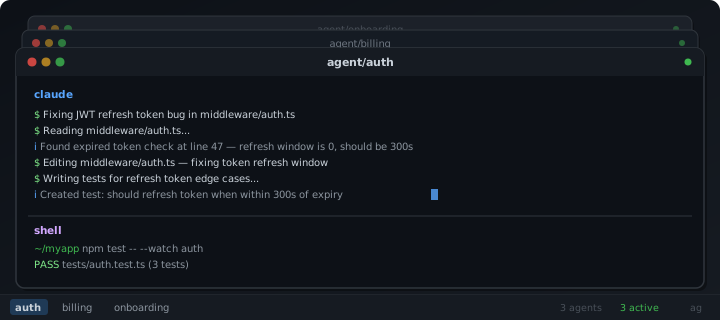
Command-line ADE tooling to run multiple Claude Code/AI agents in parallel - each in its own isolated git worktree.
Spawn, manage, and orchestrate AI-powered development across concurrent tasks without stepping on your own changes.
One command gives you everything: a git worktree, a branch, and a tmux window with the agent and shell running in the same window. Spawn as many as you need. Detach, come back tomorrow, and everything is still there.
- Isolated - Every task runs in its own branch and worktree. Agents can't collide or overwrite each other.
- Persistent - tmux keeps agents alive when you close your terminal. Worktrees survive reboots.
ag resumerebuilds everything from disk. If a tmux session dies,agattempts to resume conversations forclaudeandcodex. - Stateless - Git worktrees are the state. No databases, no config files, no daemon. If tmux disappears, your work is still intact.
- Combined API - One CLI tool -
ag spawn,ag kill,ag open,ag rm,ag ls. Nothing more.
# Get started with...
ag spawn auth --prompt "Fix the JWT refresh token bug"
ag spawn billing onboarding
That's three agents, three isolated checkouts, three tmux windows. Switch between them, zoom in, detach, resume.
Requirements
- bash 4+ or zsh 5+
- git 2.15+ (worktree support)
- tmux 3.3a+ (pane title support)
- An agent CLI (Claude Code, or any command)
Installation
- Download
ag.shto somewhere permanent:
curl -o ~/.ag.sh https://raw.githubusercontent.com/andrewhathaway/ag.sh/refs/heads/main/ag.sh
- Source it in your shell config:
# ~/.bashrc or ~/.zshrc
source ~/.ag.sh
Restart your shell or
source ~/.bashrc.cdinto any git repo and runag help.
Commands
| Command | Description |
|---|---|
ag |
Show agent status (same as ag ls) |
ag spawn <task> [--prompt "..."] |
Create worktree + branch, run optional prepare hook, then start the agent in tmux |
ag spawn <t1> <t2> <t3> |
Spawn multiple agents at once |
ag kill <task> [-f] |
Kill tmux window, keep worktree + branch (pause) |
ag rm <task> [-f] |
Kill window + remove worktree + delete branch (full cleanup) |
ag ls |
List all agents with colored status |
ag cd <task> |
cd into a task's worktree in your current shell |
ag open <task> |
Open a task's worktree in your IDE (AGENT_IDE) |
ag push <task> |
Push task branch to origin (before creating a PR) |
ag diff <task> [--stat] |
Show diff of task branch vs base branch |
ag attach |
Attach to this repo's tmux session |
ag resume [task ...] |
Respawn tmux windows for worktrees that lost their windows |
ag shell <task> |
Open a shell-only tmux window in a worktree (no agent) |
ag layout [h|v|even-h|even-v] |
Change the pane split in the current window |
ag help |
Show command reference |
Both ag kill and ag rm support multiple tasks (ag rm auth billing -f) and require confirmation unless --force / -f is passed.
Configuration
Set these environment variables before sourcing ag.sh:
| Variable | Default | Description |
|---|---|---|
AGENT_CLI |
claude |
The command to run in each agent pane |
AGENT_WORKTREE_PARENT |
(auto) | Override where worktrees are stored |
AGENT_BRANCH_PREFIX |
agent |
Branch namespace (agent/auth, agent/billing). Set to an empty string for no prefix |
AGENT_DEFAULT_LAYOUT |
main-horizontal |
Default layout used by ag layout |
AGENT_IDE |
code |
IDE command for ag open (e.g. cursor, zed, windsurf, idea) |
AGENT_IGNORE_BRANCHES |
main master develop |
Branches to exclude from ag ls when prefix is empty |
AGENT_SHELL_HEIGHT_PERCENT |
30 |
Percent of the task window height used for bottom shell panes during spawn |
AGENT_SHELL_PANES |
1 |
Number of shell panes to create side-by-side below the agent pane |
Examples
# Use Claude with permissions skipped (for sandboxed environments)
export AGENT_CLI="claude --dangerously-skip-permissions"

# Store all worktrees in a central location
export AGENT_WORKTREE_PARENT="$HOME/worktrees"

# No branch prefix (branches named directly: auth, billing)
export AGENT_BRANCH_PREFIX=""

# Exclude additional branches from ag ls when using no prefix
export AGENT_IGNORE_BRANCHES="main master develop trunk release"

# Use a 70/30 agent/shell split with two shell panes underneath
export AGENT_SHELL_HEIGHT_PERCENT=30
export AGENT_SHELL_PANES=2
Prepare Worktree Hook
Prepare a worktree for development (install deps, build) by commiting a .agrc script in the root of each repository you're working on. This file must executable, and will run when ag spawns a worktree for a new task.
#!/usr/bin/env bash
set -euo pipefail

npm install
npm run build
Create a .agrc file and make it executable using chmod +x .agrc. Variables AG_TASK (the task name) and AG_WORKTREE (the task worktree path) are available to the script when executed as part of the spawning of a new task.
Tab completion
Tab completion is registered automatically for both bash and zsh:
ag <tab>-- completes subcommandsag kill <tab>-- completes task names from existing worktreesag layout <tab>-- completes layout options- Works for:
kill,rm,cd,open,push,diff,shell,resume
Workflow
Start a session
cd ~/projects/myapp

# Spawn an agent with an initial prompt
ag spawn auth --prompt "Fix the JWT refresh token expiry bug in middleware/auth.ts"

# Spawn another
ag spawn billing

# Check what's running
ag
  myapp  (2 agents, 2 active)

  TASK           STATUS         BRANCH                   WORKTREE
  auth           ● active       agent/auth               ../myapp-worktrees/auth
  billing        ● active       agent/billing            ../myapp-worktrees/billing
Come back later
cd ~/projects/myapp
ag resume    # rebuilds tmux windows from worktrees on disk
Or if the session is still alive:
ag attach
Review and ship
# See what the agent changed
ag diff auth --stat

# Push the branch
ag push auth

# Create a PR (your usual flow)
gh pr create ...

# Clean up after merge
ag rm auth -f
Pause and resume
# Stop the agent but keep the worktree
ag kill auth

# Later, bring it back
ag resume auth
Architecture
The design is deliberately stateless. There are no databases, lock files, PID files, or config directories. Two existing systems provide the durable state:
- Git worktrees are the durable source of truth. They survive tmux crashes, reboots, and terminal closures.
ag lsandag resumediscover agents by parsinggit worktree list --porcelain. - tmux is the ephemeral UI layer. It can be destroyed and rebuilt at any time from the worktrees on disk. Pane titles (
agent:<task>,shell:<task>,shell:<task>:2) are used to track which pane belongs to which task.
This means recovery is always possible: if tmux dies, ag resume scans for worktrees and recreates windows. If a worktree is manually deleted, git worktree prune cleans up and ag ls adapts.
Compatibility
- bash 4+ and zsh 5+ -- tested in both. A runtime check warns and exits early if sourced in bash 3.x (the macOS system default). Install a newer bash via
brew install bashor use zsh. - macOS and Linux -- uses POSIX utilities plus git and tmux. No platform-specific dependencies.
- Any agent CLI -- defaults to
claudebut works with any command viaAGENT_CLI. The agent runs in a tmux pane;ag.shdoesn't care what the command is.
Contributing
See CONTRIBUTING for the contributing guide/information.
License
Copyright (c) 2026 Andrew Hathaway. Licensed under MIT license, see LICENSE for the full license.
Contact
Reviews (0)
Sign in to leave a review.
Leave a reviewNo results found