team-memory
Health Uyari
- License — License: MIT
- Description — Repository has a description
- Active repo — Last push 0 days ago
- Low visibility — Only 5 GitHub stars
Code Uyari
- network request — Outbound network request in frontend/src/app.js
- network request — Outbound network request in frontend/src/pages/setup.js
Permissions Gecti
- Permissions — No dangerous permissions requested
Bu listing icin henuz AI raporu yok.
AI memory for teams, git version controlled with web UI and CLI skills
team-memory
Shared, version-controlled knowledge base your whole team builds together
Locally run in your CLI or UI, backed up to your git knowledge repo automatically

Most team knowledge lives in people's heads, scattered Slack threads, or stale wikis nobody trusts. team-memory is different: it lives in a Git repo your team already owns, every entry is a commit, and anyone can open the web UI and jot something down in seconds.
Two ways to build it up:
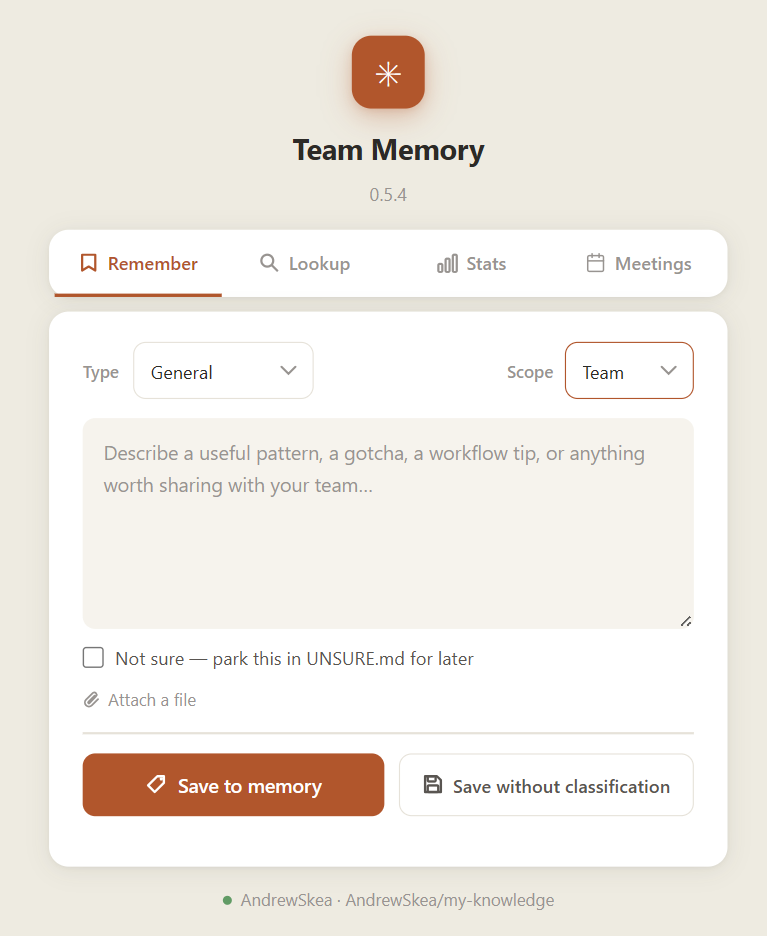
- Web UI — lightweight note-taking interface at
http://team-mem. Capture a decision, a gotcha, a workflow pattern — whenever it crosses your mind, not just at the end of a session - Claude Code hook — fires automatically when a session ends, summarises what was built, and commits a structured entry hands-free
Features
| Auto-save sessions | Hook fires when Claude Code ends, summarises with Claude, commits structured entry to your repo |
| Web UI | Browse, save, lookup, and flag stale entries at http://127.0.0.1:7438 |
| Smart categorisation | LLM picks the right file from your index — or skip it and save directly |
| GitHub-backed storage | Plain Markdown in a repo you own — edit, search, and version-control it directly |
| MCP server | Claude Code can read and write your knowledge base mid-session |
| No telemetry | Binds 127.0.0.1 only, never phones home |
Install
macOS / Linux
curl -LsSf https://raw.githubusercontent.com/AndrewSkea/team-memory/master/install.sh | sh
Windows (PowerShell)
irm https://raw.githubusercontent.com/AndrewSkea/team-memory/master/install.ps1 | iex
The installer downloads the binary, adds it to ~/bin (or %USERPROFILE%\bin on Windows), prompts for your GitHub PAT and memory repo, wires Stop/PreCompact hooks into ~/.claude/settings.json, and registers the MCP server in ~/.claude.json. Config is written with mode 600 on Unix.
Prerequisites: a GitHub repo and a fine-grained PAT with
contents:writeon that repo.What needs elevated privileges? On Linux/macOS,
install.shonly callssudoif you pick service mode — to append127.0.0.1 team-memto/etc/hostsand (Linux)setcap cap_net_bind_serviceon the binary so it can bind port 80. Skip service mode to avoidsudoentirely. On Windows,install.ps1requires no admin by default; running it elevated additionally configuresnetsh portproxyand the hosts entry.Binary install location trust: the binary lives under your user profile (
~/binor%USERPROFILE%\bin). Anything that can write there can replace the binary — keep that directory's ACL/permissions as they default for your user. For a multi-user machine, install to a system path manually and run from there instead.
Service mode (always-on web UI)
The installer offers two run modes. Service mode keeps the web UI available at all times:
| Non-admin (default) | Admin (Run as Administrator) |
|
|---|---|---|
| Autostart | Registry HKCU\...\Run key |
Task Scheduler (RunLevel Highest) |
| Browser URL | http://127.0.0.1:7438/ |
http://team-mem/ |
team-mem hostname |
Manual (see below) | Auto-added to hosts file |
| Port 80 redirect | — | netsh interface portproxy 80 → 7438 |
To get the http://team-mem/ shortcut without re-running as admin, add one line to C:\Windows\System32\drivers\etc\hosts (requires admin once):
127.0.0.1 team-mem
Then access via http://team-mem:7438/ (no portproxy without admin).
Usage
After install, use Claude Code normally. When a session ends, team-memory-mcp automatically summarises it and commits a structured entry to your memory repo. Open http://127.0.0.1:7438 to browse your knowledge base, save entries manually, or search by keyword.
Model & cost
All LLM calls (categorisation, summary, reminders) go through the claude CLI pinned to Haiku (--model haiku). Haiku is roughly an order of magnitude cheaper than Sonnet/Opus and is more than adequate for these short, structured generations. Override per-process with the TEAM_MEMORY_MODEL env var if you ever want a bigger model:
TEAM_MEMORY_MODEL=sonnet team-memory-mcp
Privacy & Security
- PAT and Anthropic key stored in
~/.config/team-memory/config.json(CLI) and browserlocalStorage(web UI) - Binary binds
127.0.0.1only — never exposed to the network - No telemetry, no third-party scripts
See SECURITY.md for the full threat model.
Contributing
See CONTRIBUTING.md for build instructions, project layout, and code style.
make build   # build binary locally
make test    # run all tests
MIT License · © Andrew Skea
Yorumlar (0)
Yorum birakmak icin giris yap.
Yorum birakSonuc bulunamadi