jeview
Health Uyari
- License — License: MIT
- Description — Repository has a description
- Active repo — Last push 0 days ago
- Low visibility — Only 5 GitHub stars
Code Basarisiz
- network request — Outbound network request in demo/game.js
- network request — Outbound network request in demo/pixel-knight.ts
- network request — Outbound network request in demo/support-desk.ts
- exec() — Shell command execution in src/jeview.ts
- network request — Outbound network request in test/jeview.test.ts
Permissions Gecti
- Permissions — No dangerous permissions requested
Bu listing icin henuz AI raporu yok.
An unofficial local visualizer for Jev (TypeSafe): a live view of every call your code makes. Not affiliated with TypeSafe AI.
Jeview
Agents: llms.txt says how to use a running Jeview, and AGENTS.md how to work on this repository.
An unofficial local visualizer for Jev (TypeSafe System One): a live view of every call your code
makes. Jeview is an independent project. It is not affiliated with TypeSafe AI, nor made or endorsed by it.
your code → Jeview (127.0.0.1:4777) → TypeSafe (api.typesafe.ai)
Jeview is a gateway: it sits between your code and TypeSafe and answers nothing itself. Point your Jev client at
Jeview instead of TypeSafe. Jeview sends each request on to Jev with your key, hands Jev's answer back, keeps every
call in a local SQLite database, and draws the calls on a live map as they happen.
Run it
Needs Node 24 or later, and nothing else: Jeview has no dependencies to install.
./launch.sh
That finds a suitable Node (on your PATH, or installed by nvm or Homebrew), starts Jeview and opens the viewer at
http://127.0.0.1:4777/ (or http://jeview.localhost:4777/, a name your browser already knows). npm start does the same
without opening a browser. Add your TypeSafe API key (the key icon,
top right). The first time you open it, the viewer explains itself.
See it working
Two demos send real Jev calls through Jeview. Run one in a second terminal and put its window beside Jeview's. Each
plays only while its page is open, costs about ten cents an hour while it does, and stops with Ctrl-C.
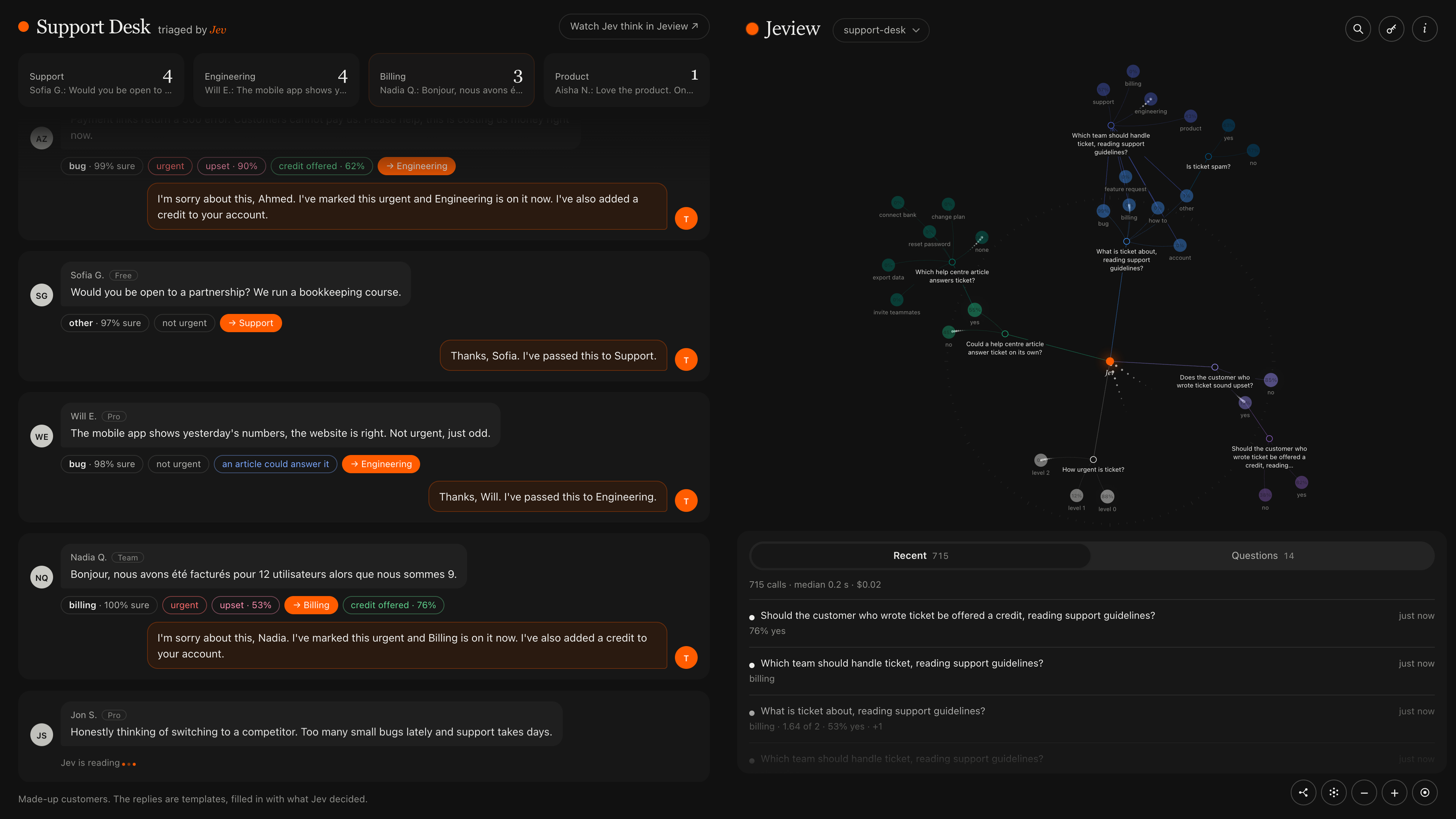
npm run demo, then open http://127.0.0.1:4781/: Jev plays Pixel Knight, a tiny side-scroller, deciding every move.npm run demo:support, then open http://127.0.0.1:4782/: Jev triages a made-up support inbox, deciding what each
message is about, how urgent it is, which team takes it and whether to offer a credit.
Send requests to it
Send Jev requests to http://127.0.0.1:4777/v1/systemone instead of https://api.typesafe.ai/v1/systemone: the same
requests and the same answers, with no key needed from the caller.
- Group requests under a project or label by adding it to the path:
http://127.0.0.1:4777/my-project/v1/systemone.
The viewer can then show one group at a time. - Link calls. Every answer comes back with an event id in
events. When a later request follows from one of
those answers, send its event id in aJeview-Triggerheader, and the map grows that request off the answer.
Jeview drops its own headers before calling Jev and sends the body on unchanged. - Show names, not keys. The map labels each answer with its option's key, such as
c14. When the criteria behind
the keys are objects, aJeview-Displayheader says which part to show instead:Jeview-Display: name, or a field
per question,Jeview-Display: category=name, kind=title. An option without that field keeps its key, and so does
everything sent without the header. The header is only for show: one that cannot be read is ignored, never refused.
Agents can read http://127.0.0.1:4777/llms.txt: a running Jeview serves it with its own address and whether a key is
set. llms.txt here is the same text, for the default address.
Options
Given to either launcher: ./launch.sh --port 4800, or npm start -- --port 4800.
--port 4777--dir ~/.local/share/jeview: where the database lives--jev-endpoint URL: another Jev endpoint, such as a local mock
Your data
Nothing is stored anywhere but your own machine. Jeview runs locally, has no accounts and no tracking, and the only
place it sends anything is TypeSafe, to make the calls you asked for.
Calls and your key are kept in jeview.sqlite in the data folder. The file is readable only by you, and the key is
stored in it as plain text. To erase everything, key included, stop Jeview and delete jeview.sqlite* from that folder.
A long history stays cheap: the viewer opens on the latest 20,000 calls, and search reaches the rest. Two Jeviews may
share a data folder, for instance on two ports, and each shows the calls of both.
Jeview listens on 127.0.0.1 only and has no login: anything running on your machine can read the recorded calls and
send calls with your key. It refuses requests from web pages on other sites, so a page you visit cannot. Do not put it
behind a public address.
Develop
npm install # only the type checker
npm test
npm run typecheck
npm run check:pages # the viewer's and the demos' browser scripts parse
License
MIT
Yorumlar (0)
Yorum birakmak icin giris yap.
Yorum birakSonuc bulunamadi