avocado-park
Health Uyari
- License — License: MIT
- Description — Repository has a description
- Active repo — Last push 0 days ago
- Low visibility — Only 5 GitHub stars
Code Basarisiz
- rm -rf — Recursive force deletion command in scripts/fetch-or-build.sh
Permissions Gecti
- Permissions — No dangerous permissions requested
Bu listing icin henuz AI raporu yok.
herdr plugin: park idle Claude Code, Codex and OpenCode sessions to free memory without closing their panes, then resume them in place.
avocado-park


Park idle Claude Code, Codex and OpenCode sessions to free memory, without closing their herdr panes.
Resume them later in the same pane, with the full conversation. No session ids to copy, and no
guessing which pane held which work.
| What it frees | 150–500 MB per Claude Code session: the agent, its MCP servers and the shells it spawned |
| Park | Exits the agent (/exit, or /quit for Codex). The pane stays as a plain shell in the same folder |
| Agents | Claude Code, Codex and OpenCode |
| Unpark | Runs claude --resume <id> (codex resume <id>, opencode --session <id>) in that same pane |
| Where | A herdr popup panel, herdr actions with toasts, a CLI, and a skill for your agent |
| Runs on | macOS and Linux, herdr 0.9.3+ |
Contents
- Why
- Demo
- Quick start
- The panel
- How it works
- herdr actions
- CLI reference
- Codex and OpenCode
- Agent skill
- Configure
- Safety
- State and privacy
- Troubleshooting
- Develop
Why
An open Claude Code session keeps a Node process running, along with every MCP server and shell it
started. That memory stays in use even when you haven't touched the session in a week. With ten
agent panes open, it adds up to a few GB.
Closing idle panes frees it, but then you have to remember which folder, which workspace and which
session id each one had. So most people leave everything running.
avocado-park adds a third option:
park   = exit the agent, keep the pane, remember the session
unpark = resume that session in the same pane
Demo
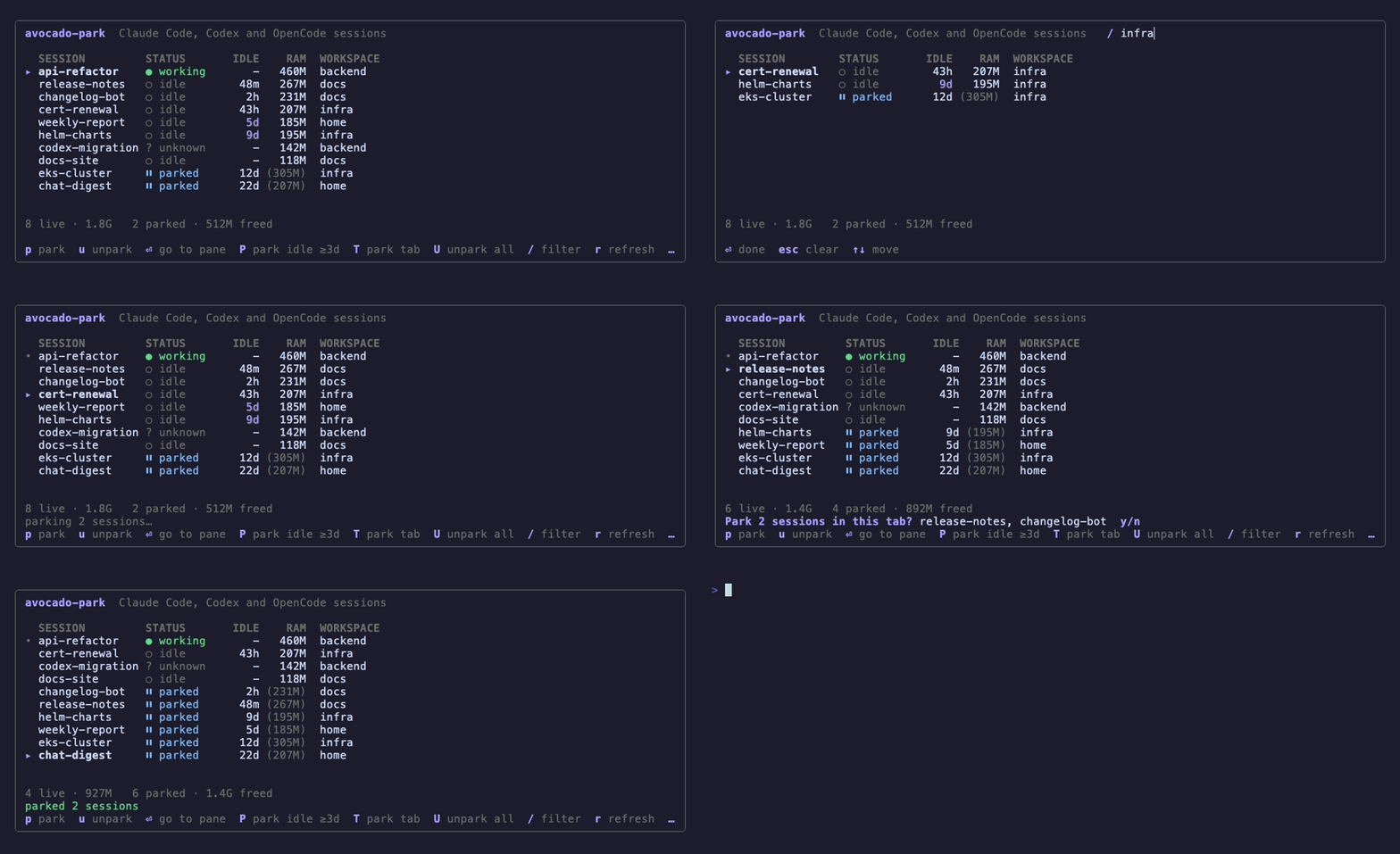
In the recording:
/filters the list by workspace.Pparks every session idle for 3 days or more. Each one's RAM cell shows the memory it freed,
in brackets, and the footer adds up the total.Tparks every idle session in the selected session's tab.uresumes a parked session in its pane, with the full conversation.
The sessions are made up (scripts/demo), so the recording never touches real ones. Outside the
panel, focusing a parked pane shows a toast naming the session, so the plain shell there isn't
mistaken for a finished one.
Quick start
herdr plugin install andymartinezot/avocado-park
herdr integration install claude     # so herdr knows each pane's session id
herdr integration install codex      # optional, for Codex
herdr integration install opencode   # optional, for OpenCode
The install downloads a checksum-verified binary for macOS or Linux (arm64 or amd64). If
Go 1.24 or newer is installed, it builds from source instead.
What you're trusting: release binaries are built by GitHub Actions from this repository
(actions pinned to commit SHAs). The install downloads over HTTPS and checks the sha256 published
with the release, which catches corrupted downloads; the trust root is GitHub and this repository.
If anything doesn't verify, it builds from source instead of installing the binary. Prefer to
check first? Readscripts/fetch-or-build.sh.
Then open herdr's action list and pick Park: show sessions. To open it with a key instead, add
this to ~/.config/herdr/config.toml, using a key that is free in your setup:
[[keys.command]]
key = "prefix+shift+p"
type = "plugin_action"
command = "andymartinezot.avocado-park.open-panel"
description = "avocado-park: sessions"
herdr reads config.toml only when it starts, so run herdr server reload-config after adding
the key. Until you do, the key does nothing.
The panel
╭───────────────────────────────────────────────────────────────────────────────╮
│ avocado-park  Claude Code, Codex and OpenCode sessions                        │
│                                                                               │
│   SESSION                 STATUS       IDLE    RAM  WORKSPACE                 │
│ ▸ api-refactor            ● working       -   460M  backend                   │
│ • release-notes           ○ idle        48m   267M  docs                      │
│   cert-renewal            ○ idle        43h   207M  infra                     │
│   weekly-report           ○ idle         5d   185M  home                      │
│   helm-charts             ○ idle         9d   195M  infra                     │
│   k8s-cluster             ⏸ parked      12d (305M)  infra                     │
│   chat-digest             ⏸ parked      22d (207M)  home                      │
│                                                                               │
│ 5 live · 1.3G   2 parked · 512M freed                                         │
│                                                                               │
│ p park  u unpark  ⏎ go to pane  P park idle ≥3d  T park tab  U unpark all  …  │
╰───────────────────────────────────────────────────────────────────────────────╯
| Key | Action |
|---|---|
p |
Park the selected session |
u |
Resume the selected parked session |
⏎ |
Jump to the session's pane |
P |
Park every session idle for 3+ days (asks first) |
T |
Park every idle session in the selected session's tab (asks first) |
U |
Resume every parked session (asks first) |
F |
Force-park the selected session even if herdr doesn't report it idle (asks first) |
/ |
Filter by session or workspace name |
r / q |
Refresh / quit |
- An idle time in purple marks a session idle for 3 days or more. Those are the ones
Pparks. •marks the pane you opened the panel from. You can't park it from the panel, so you won't exit
the session you're typing in.- The panel fills the popup and refreshes every 3 seconds. The cursor stays on the same session
when rows move.
How it works
Parking
sequenceDiagram
    participant U as You
    participant P as avocado-park
    participant H as herdr
    participant A as Agent (claude / codex)
    U->>P: p (or P, or an action)
    P->>P: take the park lock
    P->>H: check the pane again
    H-->>P: still idle, same session
    P->>P: save session id, folder, pane, memory used
    P->>H: type /exit (/quit for Codex)
    H->>A: /exit
    A-->>H: process exits
    P->>H: wait until the agent is gone
    Note over H: The pane stays open as a shell in the same folder
Only sessions that herdr reports as idle or done are parked. A session that is working, or waiting
for your answer, is refused unless you force it. Right before sending /exit, avocado-park checks the
pane again. If you used the session in the meantime, it is skipped.
Unparking
flowchart TD
A[Unpark a session] --> B{Is that session<br/>already running?}
B -- yes --> X[Refuse: already resumed]
B -- no --> C{Is the original pane<br/>still there?}
C -- no --> T[Open a new tab<br/>in the same workspace]
C -- yes --> D{Is it an idle shell?}
D -- no, e.g. vim --> X2[Refuse: pane is busy]
D -- yes --> E[cd back to the session's folder]
T --> E
E --> F["claude --resume <id><br/>(codex resume <id>)"]
Claude Code looks up conversations by folder, so avocado-park changes back to the session's folder
before resuming. It starts the agent through herdr agent start, so herdr tracks it again right away.
Where the data comes from
- Sessions: herdr's agent list. Names, last activity and session ids come from Claude Code's
~/.claude/sessions/<pid>.jsonwhen available. - Memory: the agent's process plus everything it spawned (MCP servers, shells).
- Parked sessions: a small JSON file (see State and privacy). If you resume
a parked session by hand, it drops off the list on its own.
herdr actions
Every action is in herdr's action list. The headless ones report the result in a toast.
| Action | What it does |
|---|---|
| Park: show sessions | Opens the panel |
| Park: this session | Parks the session in the focused pane |
| Park: resume this session | Resumes the focused pane's parked session |
| Park: this tab | Parks every idle session in the focused tab. Busy ones keep running, and the toast names them |
| Park: resume this tab | Resumes every parked session of the focused tab |
| Park: all idle sessions | Parks every session idle for 3+ days, except the focused one |
| Park: resume all parked sessions | Resumes every parked session |
When you focus a pane that holds a parked session, a toast names it and says how to resume it.
CLI reference
The same binary works from any terminal while herdr is running:
avocado-park list [--json]              # live and parked sessions
avocado-park park [--force] [TARGET]    # park one session
avocado-park park --tab [TARGET]        # park every idle session in a tab
avocado-park park --idle [--days N]     # park every session idle N+ days (default 3)
avocado-park unpark [TARGET]            # resume one parked session
avocado-park unpark --tab [TARGET]      # resume a tab's parked sessions
avocado-park unpark --all               # resume every parked session
avocado-park panel                      # the interactive panel
avocado-park version
TARGET is a pane id (w3:p14), a session name, or a session id (8+ characters). Inside herdr it
defaults to the focused pane. list --json is meant for scripts and other tools.
Add --dry-run to any park or unpark command to see what it would do, without changing anything:
$ avocado-park park --tab release-notes --dry-run
would park release-notes (claude, idle, idle 48m, in pane w2:p3)
would park changelog-bot (claude, idle, idle 2h, in pane w2:p4)
Run from a terminal inside herdr, park --tab never parks the pane it runs in.
Codex and OpenCode
Codex sessions appear next to Claude Code ones. They park with /quit and resume withcodex resume <id>.
herdr can't always tell when a Codex turn has ended, so it often reports Codex as unknown instead
of idle. avocado-park doesn't park those on its own. Once you know a Codex session is done, park it withF in the panel or avocado-park park --force <name>.
Codex keeps part of its memory in a shared background process, so parking a Codex session frees less
than parking a Claude Code one.
OpenCode sessions park with /exit and resume with opencode --session <id>. They need herdr's
OpenCode integration (herdr integration install opencode) so herdr knows their session ids.
Idle times come from Claude Code's session files, so Codex and OpenCode sessions show no idle time
and P doesn't pick them up. Park them with p, T or the CLI.
Agent skill
skills/avocado-park/SKILL.md teaches your coding agent to use the CLI,
so you can ask it to "park my idle sessions" or "resume the infra tab". It dry-runs first, never
parks its own session, and never forces a park without asking you.
mkdir -p ~/.claude/skills && cp -R skills/avocado-park ~/.claude/skills/ # Claude Code
Other agents that read SKILL.md folders (Codex, OpenCode) use the same folder in their own skills
directory.
Configure
~/.config/herdr/plugins/config/andymartinezot.avocado-park/config.toml. Every setting is optional:
park_idle_days = 3     # threshold for P, the purple marker and park --idle
auto_park_days = 0     # park sessions idle this many days on their own; 0 = off
refresh_seconds = 3    # panel refresh interval
claude_dir = "~/.claude"
Auto-park: herdr has no timers, so auto-park runs when you switch panes, at most once an hour. It
never parks the pane you just focused, and nothing runs while you aren't using herdr. A toast lists
what was parked.
Safety
Parking stops a process, so avocado-park is careful about what it parks and where it types.
- Refuses busy sessions: a session that is working or waiting on you is only parked with
F/--force, and the panel asks first. - Checks again before acting: each park and unpark re-reads the pane right before it types
anything, so a session you started using again in the meantime is left alone. - One action at a time: a lock file stops two parks or unparks (say, the panel and auto-park)
from touching the same session at once. - Never resumes twice: if a parked session is already running somewhere, unpark refuses.
- Only types into a shell: unpark won't type into a pane running another program, such as vim.
If the pane is gone, it opens a new tab. - Validates what it types: session ids must be plain ids, and folders containing control
characters are refused, so nothing unexpected reaches the shell. It only typescdinto POSIX
shells (sh, bash, zsh, dash, ksh); in fish, nu or csh it opens a new tab in the folder instead. - Cleans what it shows: session names come from terminal titles, which any program can set, so
control characters are stripped before they reach your terminal.
State and privacy
Parked sessions live in ~/.local/state/avocado-park/parked.json (or $XDG_STATE_HOME/avocado-park),
created readable only by you (0600 file, 0700 folder). It holds session names, folders, pane ids
and session ids. Don't commit or share it.
avocado-park makes no network calls. It only talks to herdr's local socket.
Troubleshooting
| Symptom | Fix |
|---|---|
| A session is missing from the panel | Install the herdr integration (herdr integration install claude), then restart that agent so herdr learns its session id |
| "is not idle" when parking | herdr reports it working or waiting. Wait for it, or use F / --force if you know it's done |
A Codex session shows unknown |
Expected, see Codex and OpenCode. Use F |
| Listed as parked (pending) | The agent didn't exit within 20 s. Check the pane, then park it again |
| "pane … is running vim" on unpark | Quit that program so the pane is back at the shell prompt, then unpark again |
| Unpark opened a new tab | The original pane was closed (or, after a herdr restart, its id now belongs to another workspace) |
Develop
go test -race ./...
go build -o bin/avocado-park ./cmd/avocado-park
herdr plugin link "$PWD"                 # link does not run the build step; run it again after adding event hooks
bin/avocado-park panel --print --width 84  # render one frame without a popup
go run ./scripts/demo                    # the panel with made-up sessions, no herdr needed
vhs scripts/demo/demo.tape               # re-record docs/avocado-park-demo.gif (brew install vhs)
Releases are cut by pushing a vX.Y.Z tag that matches version in herdr-plugin.toml. GoReleaser
then publishes the binaries and SHA256SUMS.
License
MIT
Yorumlar (0)
Yorum birakmak icin giris yap.
Yorum birakSonuc bulunamadi