botference
Health Gecti
- License — License: MIT
- Description — Repository has a description
- Active repo — Last push 0 days ago
- Community trust — 19 GitHub stars
Code Gecti
- Code scan — Scanned 12 files during light audit, no dangerous patterns found
Permissions Gecti
- Permissions — No dangerous permissions requested
Bu listing icin henuz AI raporu yok.
One room, three minds: a multi-LLM planning council for your terminal — you, Claude Code, and Codex debate and ship an implementation plan.
Botference



Website: botference.com · If botference is useful to you, consider sponsoring its development.
[!NOTE]
This README was AI-generated. I (Angadh) have skimmed and supervised its creation.
Multi-LLM planning where you and the AIs collaborate in a council — a
free-form group chat where the bots can also hand each other the floor and
hash things out directly, with you steering. The result is animplementation-plan.md and checkpoint.md you can take into any workflow.
The primary contribution of this repository is plan mode — a multi-LLM
planning session where Claude and Codex collaborate in real time. This is the
part that works well and is ready for use.
[!WARNING]
This is vibe-coded. Use at your own risk. Research-plan mode and build mode
are deeply experimental — under active development, will change without
notice, and not recommended for general use. If you are here to get things
done, usebotference planand take the resulting plan into your own
workflow.
Ink TUI — projects panel (left), full-width council panel (right), input
field and status line at the bottom. This is the primary interface and
default planner UI:
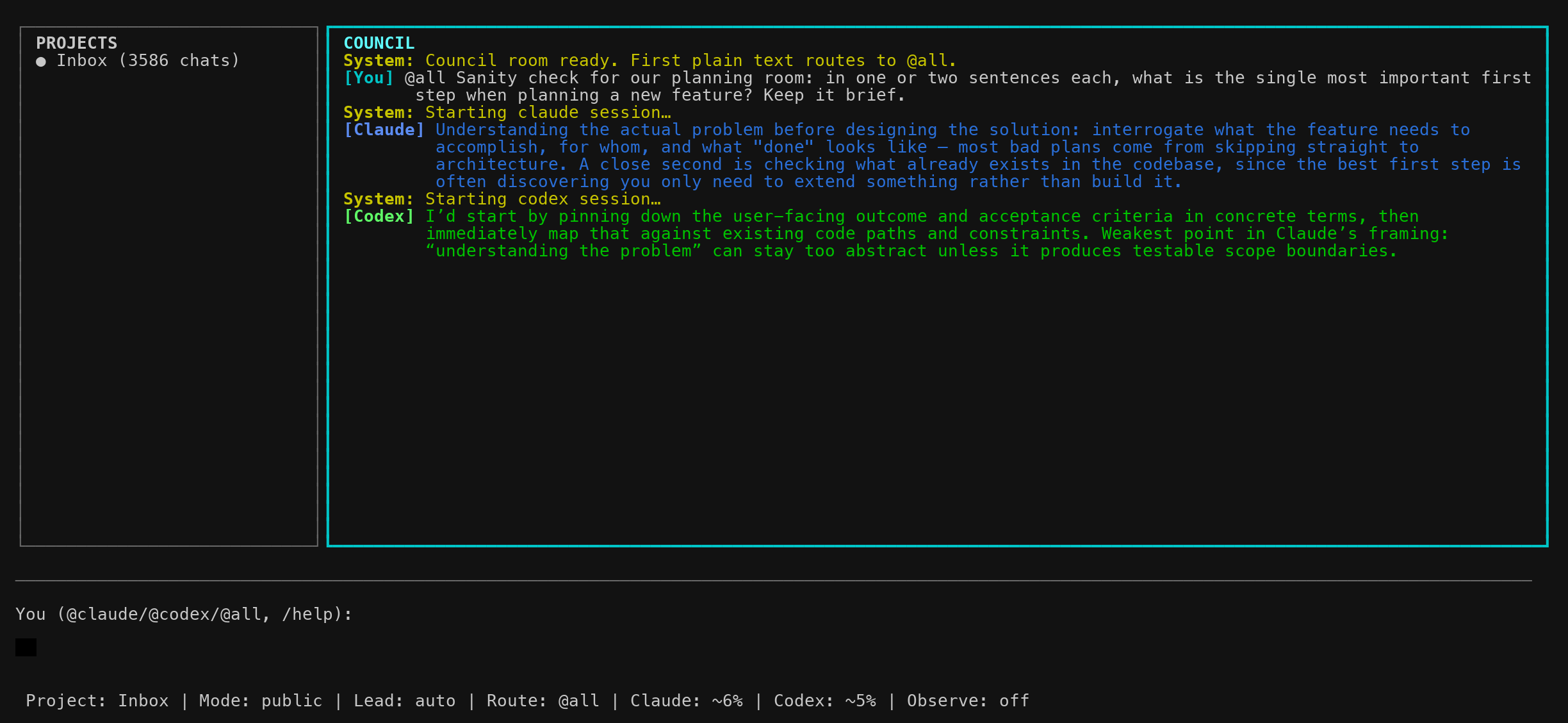
The Projects panel lists Inbox plus every folder under projects/ and
expands the active project to show its 8 most recent resumable chats. Pane
controls in Ink:
| Key | Action |
|---|---|
Tab / Shift+Tab |
Toggle focus between Council and Projects (when visible) |
↑ / ↓ |
Navigate the Projects list while it has focus |
| type | Filter projects and chats by title while the panel has focus (Esc clears; / still starts a command) |
Enter |
Open the highlighted project, switch to Inbox, or resume the highlighted chat |
Ctrl+P |
Toggle the Projects panel's visibility |
Chats under the active project are sorted newest-first and show a compact
age (5m, 3h, 2d); the chat you're currently in is marked ▸ … · open.
Selecting Inbox runs /project clear; selecting a project header runs/project open <id>; selecting a session row runs /resume <session-id>.
You can switch sessions mid-chat — the current session is persisted on every
turn, so you can /resume <its-id> to come back later.
The Ink TUI is the only frontend. First use after clone: cd ink-ui && npm install. It supports app-level pane-clamped text selection, multiline input
(Shift+Enter), streaming, and activity status. Use --claude to skip Codex
and run a solo Claude session (no TUI, just the Claude CLI).
Project-local runtime behavior and the long-term packaging direction are
documented in docs/project-model.md anddocs/distribution-roadmap.md.
Default planning behavior in project-local mode is intentionally lazy: plan
and research-plan do not scan the whole project up front, and vault-style
projects keep writes confined to Botference-owned paths unless you explicitly
expand them in botference/project.json.
Approach
Botference is built around one metaphor: the council — an open room where
you and the AIs all talk, like a three-person group chat. You steer the
conversation, ask questions, push back, and direct who speaks; the bots can
also hand each other the floor and debate directly (budgeted, and you can
always interrupt) until they bring you a coherent proposal instead of
conflicting opinions. When they agree on who should write the plan, the lead
is set automatically.
Quick Start
Prerequisites
- Claude Code CLI installed and authenticated
- Codex CLI installed and authenticated
- Python 3 available on your
PATH - Node.js + npm for the default Ink UI (
plan/research-plan)
Running From This Repo Checkout
If you cloned this repository and want to try Botference immediately, run
it from the repo root with the local launcher:
./botference plan                          # Ink TUI (default)
./botference plan --claude                 # Solo Claude
./botference plan --claude-interactive     # Experimental: mirror interactive Claude through tmux
./botference research-plan                 # Structured planning in Ink (experimental)
./botference --help
Do not run botference init in the Botference source repo. This checkout
uses the legacy self-hosted layout (work/, build/, archive/) rather than
a top-level botference/ state directory.
Before the first planning run from a fresh clone:
cd ink-ui && npm install
Using Botference In Another Project
From a target project root:
botference init                            # Create project-local botference/ state
botference init --project-dir=spaceship    # Or create botference-spaceship/ instead
botference plan                            # Council: you + Claude + Codex (Ink default)
botference --project-dir=spaceship plan    # Use botference-spaceship/
botference plan --claude                   # Solo Claude (no Codex)
botference plan --claude-interactive       # Experimental interactive-Claude tmux transport

# Building (experimental)
botference build                           # Interactive build loop
botference -p build                        # Headless build loop
botference -p build 10                     # Headless, max 10 iterations
botference -p build --parallel             # Phase-level parallelism

botference --help                          # Full usage + supported models
After botference init, Botference stores its state inside ./botference/ in
that target project. This is the right workflow for brownfield or greenfield
projects outside the Botference engine repo.
If you use --project-dir=<slug>, pass the same option on later Botference
commands for that project, or set BOTFERENCE_PROJECT_DIR_NAME=<slug> in your
shell/project environment. Slugs may contain letters, numbers, hyphens, and
underscores. Bare slugs are prefixed, so --project-dir=spaceship resolves tobotference-spaceship/; explicit names like botference-spaceship are accepted
as-is.
If you move the Botference framework itself to a new directory later, target
projects do not need to be re-initialized. Their local ./botference/ state
stays valid. Just make sure the launcher points at the new framework path, for
example:
export BOTFERENCE_HOME=/new/path/to/botference-main
There is no extra “run it once from the framework repo” step. The framework
path is resolved at launch time from BOTFERENCE_HOME or from the botference
script you actually invoked.
Project Scoping
In a project initialized with botference init, the local policy lives inbotference/project.json.
With a custom state directory, the policy file moves with it. For example,botference init --project-dir=spaceship createsbotference-spaceship/project.json.
Workspace-style repos can also put policy at the project root asproject.json. This is useful for portfolio workspaces where the models should
be able to clone or edit under top-level folders such as projects/ without
creating a separate botference/ state directory.
Default write scope:
{
  "write_roots": {
    "plan": ["botference"],
    "build": ["botference"]
  }
}
This means:
planandresearch-planmay write anywhere underbotference/buildmay write anywhere underbotference/- the rest of the project stays read-only by default
- anything outside declared
write_rootsis blocked at runtime and by post-run audit
In practice, this gives you two common workflows:
- greenfield work happens naturally inside
botference/, where planning can
create notes, exports, scratch files, and plan artifacts without
touching the project tree yet - brownfield work keeps the existing project read-only by default; actual
project-file edits happen only if you explicitly widenwrite_roots,
typically forbuild, or if you make the edits manually yourself
If you want to opt into another Botference-owned writable area later, add it
explicitly. For example:
{
  "write_roots": {
    "plan": ["botference"],
    "build": ["botference", "assets/generated"]
  }
}
If you want a narrower boundary, reduce the roots instead, for example"build": ["botference/build"].
If the whole workspace is intentionally writable, use ".":
{
  "write_roots": {
    "plan": ["."],
    "build": ["."]
  }
}
Visual Verification For Generated Plots And HTML
Rendered artifacts have a stricter definition of done than ordinary text or
code. For HTML, plots, charts, PDFs, LaTeX files that produce PDFs, web UI,
generated images, and inline document figures, agents must followspecs/visual-verification.md:
- use Changed, Generated, Structurally checked,
Visually verified, and User-review needed precisely - do not say "done", "fixed", "ready", or "verified" for visual work unless
the rendered output was inspected - default to static SVG/PNG figures inside prose documents; keep interactive
Plotly/D3/Chart.js views as standalone linked pages unless browser-verified - batch likely visual fixes before asking the user to reload
Botference also enforces this after each agent turn. If Claude or Codex changes
or generates a rendered artifact and the turn does not include a matching render
check, Botference adds a system-level Visual verification gate warning and
marks the artifact as User-review needed. For .tex edits, the generated
PDF is the rendered artifact: a compile step alone is not enough; the PDF must
also be inspected with view_pdf_page, a screenshot, or an equivalent visual
check.
Verification actions are marked in the tool stack as [verify] and rendered
with a distinct bright accent in the Ink UI, so visual checks are easier to
spot while a turn is running or after it completes.
Botference includes a deterministic HTML visual gate:
python3 "$BOTFERENCE_HOME/tools/cli.py" visual_check_html '{"html_file":"botference/projects/spaceshipengineering/index.html"}'
The tool renders the page at desktop, tablet, and mobile widths, saves
screenshots plus report.json under $BOTFERENCE_WORK_DIR/visual-checks/,
and reports layout failures such as horizontal overflow, clipped text,
overlapping visible text, console errors, and page errors. It is intentionally
usable from plan and research-plan mode through Bash, so agents can inspect
their own generated HTML without another model turn.
Install the browser dependency once when you want automatic visual checks:
python3 -m pip install playwright
python3 -m playwright install chromium
If Playwright is unavailable, agents must report User-review needed and
tell you which artifact to reload.
For a fresh clone, install Ink's Node dependencies once before using the
default planner UI:
cd ink-ui && npm install
API keys: If your terminal already has Claude Code and Codex configured
via subscription accounts (e.g. Claude Max, OpenAI Plus), Botference works
out of the box with no extra setup. In build mode, subscription users run
through the MCP fallback path (fallback_agent_mcp.py→claude -p).If you provide an API key, build mode uses the direct agent runner
(botference_agent.py) instead, which owns the tool-calling loop and
gives finer control over retries, context tracking, and token accounting.
Copy the example env file and add your keys:cp .env.example .env # Then edit .env with your ANTHROPIC_API_KEY and/or OPENAI_API_KEYBotference will auto-load keys from
.envwhen they are not already in
your environment. Do not commit.envto version control.Warning
IfOPENAI_API_KEYis present in.envor your shell environment,
Botference will prefer API-key auth for Codex and re-runcodex login --with-api-keyon startup. That overrides a subscription/device login for
the local Codex CLI. If you want Codex to use your subscription login
instead, removeOPENAI_API_KEYbefore launching Botference.
Using the Chat
Messaging
Type freely to send a message. By default your first message goes to both
models; after that, messages are sticky to whoever you last addressed.
| Input | Effect |
|---|---|
@all <msg> |
Send to both Claude and Codex |
@claude <msg> |
Send to Claude only |
@codex <msg> |
Send to Codex only |
<msg> |
Auto-routed (first message → @all, then sticky to last target) |
Messages in the council panel are labelled by speaker:
- Claude — Claude's responses
- Codex — Codex's responses
- You — your messages
- System — the framework talking to you, not an LLM. Covers:
- Session lifecycle (starting, relaying, or tearing down a model)
- Mode changes (draft started, draft complete)
- Errors and warnings
- Command feedback (lead set, usage info)
- Deterministic file-write feedback (
implementation-plan.md, reviewer comments,checkpoint.md)
Tool activity in the council is shown as a short folded summary under the
model response rather than a raw command/output transcript. Deliberate code
excerpts still render as code blocks.
Free-form planning
The council behaves like a real group chat: you send a message, the addressed
model(s) reply, and a bot's reply can hand the floor to the other bot, who
replies immediately, recursively, until someone hands the floor back to you.
Every bot-to-bot thread is seeded by one of your messages — the bots never
start talking while the room is idle — but within a thread they exchange as
many turns as the budget allows without any prompting from you.
Mechanics:
- Every bot reply ends with a small JSON footer (stripped from the display)
declaringstatus(continuing/converged/blocked),next
(@claude/@codex/@user), and a one-line summary.next: "@codex"
gives Codex the floor;next: "@user"— or no footer and no mention —
returns it to you. A prose@mentionof the other bot works as a fallback
if a model forgets the footer. - Budgets, not hard stops. A bot-to-bot thread gets 6 bot turns and ~8K
output tokens; each turn prompt shows the countdown so the models pace
themselves. On exhaustion the controller grants one automatic extension
(+3 turns / +4K tokens), then forces the floor back to you with the last
footer summary. The thread pauses rather than dies — reply (even just
"continue") and they pick up with a fresh budget. - You always preempt. If you type while the bots are talking, the thread
pauses at the next turn boundary and the floor is yours. - Conciseness is enforced by measurement. If a bot's turn exceeds ~400
output tokens, its next prompt carries a cap nudge. - Writer consensus sets the lead. The footer has an optional
writer: "@claude"|"@codex"field. When both bots vote for the same
writer, the lead is set automatically (a manual/leadalways wins).
Turn-based behavior is the degenerate case of free-form: a reply with no
handoff (no footer, no mention) simply returns the floor to you.
Commands
| Command | What it does |
|---|---|
/lead @claude|@codex |
Manually set which model writes the plan. You can also use /lead auto to let the bots' writer consensus decide. |
/draft [rounds] |
Update the project-local implementation-plan.md via the lead model, with optional AI review rounds. Defaults to 2; /draft 0 writes the plan with no AI review, /draft 1 does one review/revise cycle, and so on. Review rounds run in the council like free-form turns: the reviewer's footer can end rounds early (converged — sign-off, no revision needed) or pause the draft and hand the floor to you (blocked), and typing mid-draft pauses at the next round boundary. Reviewer comments are saved beside the plan in the Botference state directory. |
/finalize |
Lead-only finalization. The lead addresses all active reviewer comment files, rewrites the project-local implementation-plan.md if needed, creates checkpoint.md, and archives reviewer comments under the Botference archive directory. |
/relay @claude|@codex |
Tear down a model's session, generate a structured handoff, and restart that model immediately in the current botference process. Useful when context is getting long. |
/projects |
List project folders under projects/ and show the active project marker, status, priority, chat count, and next action when known. |
/project [open <id>|clear|current|create <title>|create-from-chat] |
Set, clear, show, or create the current project context. The status bar and Projects panel show the selected project; Inbox means no project is selected. |
/project assign [<session-id-prefix>] <project-id> |
File this chat (or any saved one) under a project without switching the active context. Writes only to projects/session-index.json. |
/adopt [<id-prefix>] |
Continue a pre-existing native Claude Code chat inside the council. Opens a picker of recent claude sessions for the current folder; the adopted chat becomes the room's Claude session (full native memory), Claude writes a handoff into the shared transcript, and Codex joins from that brief. Run it from a fresh chat in the folder where the original conversation happened. |
/resume [latest|<number>|<title>|<session-id-prefix>] |
Restore a previously saved planning session. With a project selected, project-associated and project-local sessions are shown first, while old unassigned sessions remain visible. You can resume mid-chat — the current session is persisted on every turn, so the chat you're leaving stays recoverable via /resume <its-id>. Selecting a session row in the Ink Projects panel runs this command for you. |
/rename <name> |
Name the current planning session for future /resume lookup. Sessions also get an automatic title from the first user message or task. |
/permissions |
Show the current planner write roots and any runtime grants approved for this session. |
/status |
Show context usage, lead, mode, and session state. |
/help |
Show the command reference. |
/quit |
Exit without writing files. |
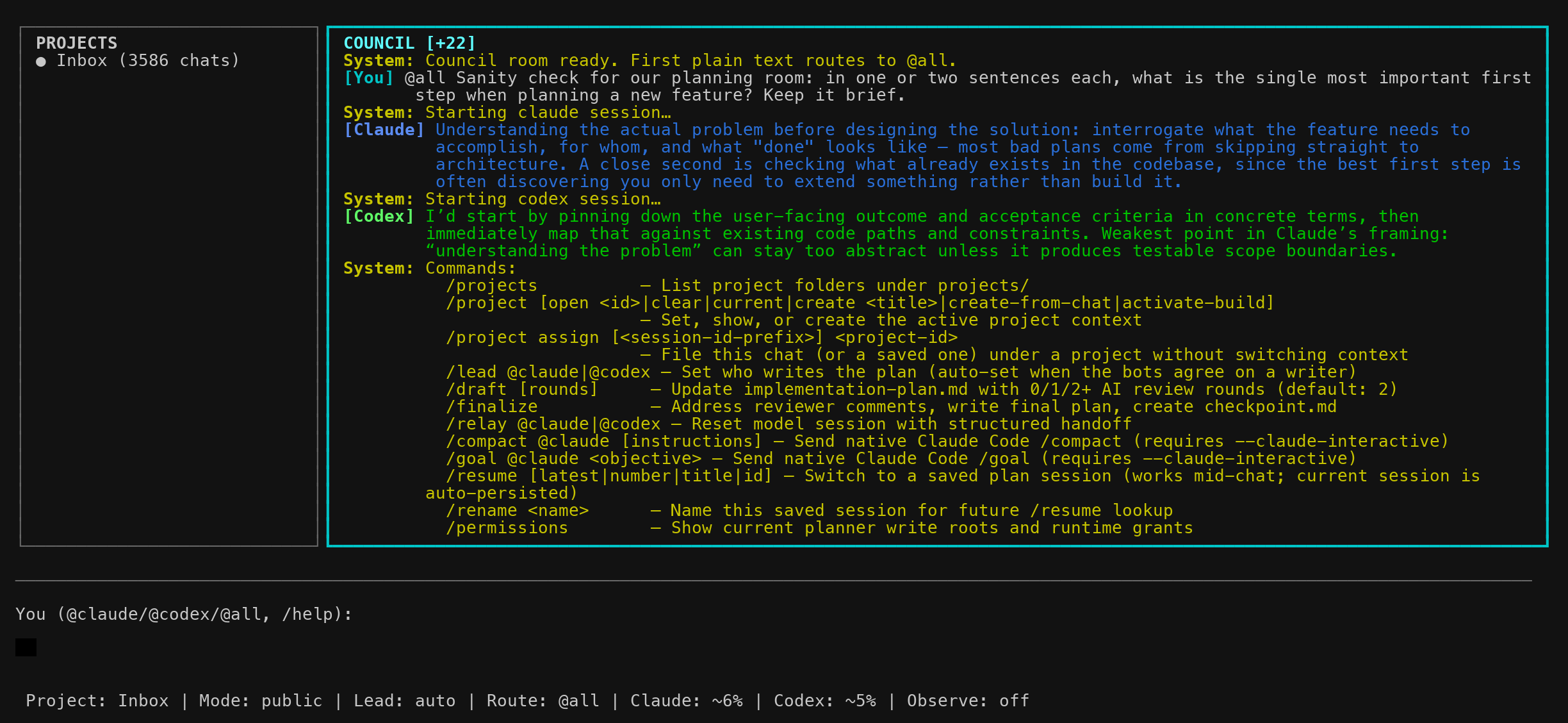
Typical workflow: discuss (the bots hand each other the floor and
converge on a writer) → /draft [rounds] → iterate with human comments as
needed → /finalize.
Project Skills
Plan-mode participants discover repo-local skills at session start. Add Codex
skills under .agents/skills/<skill-name>/SKILL.md and Claude skills under.claude/skills/<skill-name>/SKILL.md. When Claude or Codex sees a matching
request, it is instructed to read the relevant SKILL.md before responding.
For shared behavior, keep the same name and description frontmatter in both
directories. The built-in grill-me skill follows this layout, so prompts like
"grill me on this plan" can trigger the same workflow for either participant.
Project Portfolio
Botference can treat projects/ as a lightweight portfolio of durable work
containers. This is separate from a single chat session: a project can have many
resumable planning sessions, imported work artifacts, and future build/delegation
threads.
In plan mode the TUI is laid out as Projects | Council. The left
Projects panel is persistent: it shows Inbox, discovered projects, the active
project marker, and the active project's resumable chats. New controller
sessions start in Inbox; Botference does not create a new project until you
ask it to.
On the first message of an Inbox chat, Botference shows an arrow-key picker
asking where the chat should live: existing projects whose title or
next-action matches your message, "Create a new project from this chat", or
"Stay in Inbox" (Esc dismisses). Picking a project sets it as the active
context and files the chat there. Nothing is ever filed automatically.
Run /projects in plan mode to list directories under projects/. A directory
appears even without metadata; Botference infers its title from, in order:
PROJECT.mdfirst# HeadingREADME.mdfirst# Heading- the directory slug, title-cased
Use /project open <id> to select a project:
/projects
/project open spaceship-engineering
/resume
The status bar will show the selected project. /project clear returns to the
default Inbox context, and /project current prints the active project root.
Create a project from plan mode with:
/project create My New Project
Botference creates projects/my-new-project/PROJECT.md, adds a stableprojects/portfolio.json entry, sets the new project active, and persists the
current session with that project_id. If the slug already exists, creation is
refused and the existing project is left untouched.
Use /project create-from-chat to create a project from the current session
title, or from the first user message if the session has not been renamed. This
is deterministic; it does not call a model.
PROJECT.md is the human-readable project card. New project cards include
placeholders for Status, Priority, Cadence, Why This Matters, Desired Outcome,
and Next Action. Optional portfolio metadata lives in projects/portfolio.json;
use it for status, priority, cadence, desired outcome, and next action. Optional
session associations live in projects/session-index.json, which lets old chats
in work/sessions/ show up under a project without moving the session files.
Project-local sessions under projects/<id>/sessions/*.json are also supported.
Relay Semantics
/relay is now eager. When you relay @claude or @codex, botference
generates the handoff, tears down that model's old session, and immediately
starts a fresh session in the same running controller.
- Successful relays keep only a timestamped history copy under the project-local Botference handoff history directory.
- Fresh
./botference planlaunches do not auto-load persisted handoff notes. - The live
handoff-claude.mdandhandoff-codex.mdfiles are failure-only artifacts used to preserve a retry payload if the immediate restart fails.
Resume and crash recovery
Plan-mode sessions are snapshotted under work/sessions/ after each turn by
default. Project-local sessions under projects/<id>/sessions/ can also be
listed and restored when that project is selected. A small sidecar file atwork/sessions/.metadata-index.json caches per-session metadata (mtime,project_id, transcript length) so the Projects panel can render counts
quickly without re-parsing every session JSON on every refresh — it's
maintained automatically and is safe to delete (it'll be rebuilt on next
launch). Each snapshot includes:
- the shared transcript
- council panel history
- route, lead, mode, and status state
- the active
project_id, when the session belongs to a project - Claude
session_idand Codexthread_idfor native CLI resume
Use /resume in any ./botference plan session to list saved sessions,
then /resume latest, /resume <number>, /resume <title>, or/resume <session-id-prefix> to restore one. Resume works mid-chat — the
current session is persisted on every turn, so the chat you're leaving stays
on disk and can be re-resumed by id. If a project is selected with/project open <id>, /resume lists that project's local or indexed sessions
first and leaves unassigned legacy sessions visible underneath. In the Ink
Projects panel you can also press Enter on a chat row to do the same thing.
Use/rename <name> during a session to set a durable title; otherwise Botference
derives a title from the first user message or task.
When a resumed session includes project_id, Botference restores that active
project context and updates the status line and Projects panel.
What the models actually remember after a resume: Botference stores each
model's native CLI session id, so on your next message a resumed model
continues its own CLI session (claude --resume <session_id> / the Codex
thread) — full private context, including its earlier reasoning and tool
output, not a replay. If a model's native session is missing (resumed on
another machine, or the CLI purged it), that model is restarted fresh with
the shared transcript backfilled into its initial prompt — it re-reads the
whole conversation but loses its private context. The tell: aStarting claude session… / Starting codex session… system message means
that model was bootstrapped fresh with backfill; no such message means it
picked up its native session where it left off.
Unhandled plan-mode crashes are appended to work/sessions/crash.log.
If you also run with debug panes, the model stream logs remain:
build/logs/debug-claude.logbuild/logs/debug-codex.log
Experimental interactive Claude transport
By default, Botference plan mode still talks to Claude through the structured
programmatic Claude Code path. To opt into a screen-scraped interactive Claude
Code session instead, run:
botference plan --claude-interactive
# or
BOTFERENCE_CLAUDE_TRANSPORT=tmux botference plan
This starts or reuses a dedicated tmux session running interactive claude,
pastes prompts into it with tmux load-buffer / paste-buffer, captures the
pane with tmux capture-pane, and mirrors newly detected Claude output back
into the Council pane. Codex remains on the existing structured adapter path.
Limitations: this is a best-effort mirror, not a structured Claude stream. Idle
detection is heuristic, Claude tool activity is not available with the same
JSON structure as the default transport, and terminal wrapping can make prompt
echo removal imperfect. Logs are written to debug-claude-tmux.log under the
current Botference run/log directory, or .botference/logs/ when no run
directory is available.
To inspect or recover the underlying Claude session:
tmux ls | grep botference-claude
tmux attach -t <session-name>
tmux kill-session -t <session-name>   # only when you want to clean it up
Botference does not kill the tmux Claude session on normal exit, so the
interactive Claude context can continue across Botference restarts.
Protected write approvals
Plan mode still starts with the write roots from botference/project.json (or
the default Botference work directory in legacy layouts). If a model wants to
edit somewhere else, it must first request a runtime grant for the narrowest
directory it needs.
In the Ink UI, this appears as an allow/deny prompt. Choosing Allow once
expands the planner write roots for the rest of the current session and records
that grant in the resumable session snapshot. Choosing Deny keeps the current
roots unchanged and the model must continue without writing there.
Navigation and input
The TUI shows the projects panel (left, toggleable) and the full-width
council panel, with a text input field at the bottom.
- Arrow keys do not move between panels. Use the mouse to scroll within
each panel. - Ink text selection: app-level mouse selection is the default Ink
behavior. Dragging inside a pane selects text from that pane only, keeps mouse
scrolling enabled, highlights the selected range, and copies the selected
plain text on release. On local macOS this usespbcopy; in tmux it also
triestmux load-bufferand an OSC 52 passthrough; otherwise it writes OSC
52 as a best-effort fallback. Copy diagnostics are appended to.botference/ink.logunlessBOTFERENCE_INK_LOG=0is set. SetBOTFERENCE_INK_LOG=/path/to/logto put those diagnostics elsewhere. - Ink activity line: while a turn is running, the status line shows a
small animated glyph and action phrase. It uses whimsical fallback verbs
such asPrestidigitating..., but switches to concrete activity when bridge
events expose it, for exampleCodex is reading README.md...orClaude is responding.... - Native terminal selection: press Ctrl+Y to enter mouse selection
mode, drag-select with the mouse/trackpad, and copy using your terminal's
normal shortcut (for example Cmd+C on macOS). Press Ctrl+Y again or
Esc to return to Botference mouse scrolling. Native selection can span
panels; it does not clamp copied text to the active pane. - Shift+Enter inserts a newline.
- Esc interrupts the current in-flight turn. It no longer clears the
input buffer. - When a protected write is requested, use Left/Right or Tab to switch
betweenAllow onceandDeny, then press Enter. - The Ink text field can be glitchy when resizing the terminal window — if it
gets stuck, try narrowing and re-widening the window.
Ink intentionally keeps Botference's existing renderer and bridge protocol
rather than vendoring the larger CC custom renderer. The app-level selection
code keeps a pane-local representation of rendered lines for hit-testing,
clamps drags to the starting pane, and borrows the CC renderer's terminal
lessons for clipboard routing and exit cleanup. A full screen-buffer renderer
remains deferred unless the lighter pane-line layer proves insufficient.

The status line fields:
| Field | Meaning |
|---|---|
| Mode | Current session state: public (normal chat), draft (lead writing), review (other model reviewing) |
| Lead | Which model will write the plan when you /draft or /finalize. Set manually with /lead or auto-set when the bots agree on a writer. |
| Route | Where your next message goes (@all, @claude, or @codex) |
| Claude / Codex | Context usage as percentage of the model's window |
| Observe | Debug observation mode (off by default) |
Note: @claude in the input field is who you're talking to — the Lead in
the status bar is who will write the plan. These are independent.
[!WARNING]
Claude reports a point-in-time occupancy snapshot. Codex has no native
occupancy signal, so Botference estimates it: tool-free turns give an exact
reading (the thread re-sends the full conversation per API call), while
tool-heavy turns get an approximation that the next tool-free turn
corrects. Expect the Codex figure to be steady but occasionally a turn
behind.
Overview
Botference has two main modes: planning and building.
Planning
There are two options for planning:
Plan mode (./botference plan) — Freeform planning room. Multi-agent mode
(Claude + Codex TUI) is the default; use --claude for solo Claude. No
structured prompts or system instructions are injected.
Plan mode keeps the project tree read-only, but the models may write inside the
Botference work directory (botference/ in project-local mode, work/ in the
self-hosted layout). /draft [rounds] still drives the main plan-writing flow
and updates:
- the project-local
implementation-plan.md - reviewer comment files beside the plan in the Botference state directory
Then /finalize updates:
- the project-local
implementation-plan.md - the project-local
checkpoint.md
and archives active reviewer comments under the Botference archive directory.
Nothing else in your repo is touched by this draft/finalize workflow.
Research-plan mode (./botference research-plan) — ⚠️ Experimental.
Structured planning with prompts/plan.md and .claude/agents/plan.md,
following the multi-step planning workflow. Multi-agent mode by default; use--claude for solo Claude.
Freeform Planning
A chat session with no system prompts to seed the conversation:
./botference plan                          # Freeform planning (Claude + Codex)
./botference plan --claude                 # Freeform planning (solo Claude)
Research Planning
A structured session guided by the plan agent and prompt templates:
./botference research-plan                 # Structured planning (Claude + Codex)
./botference research-plan --claude        # Structured planning (solo Claude)
Building ⚠️ Experimental
Build mode uses the Ralph Loop: a managed iteration cycle that executes the
plan one task at a time. Each iteration picks the next unchecked task fromimplementation-plan.md, runs the appropriate agent, and updatescheckpoint.md before yielding.
Two execution paths
The build system has two agent runners that serve the same role through
different mechanisms:
botference_agent.py(primary) — A direct API agent runner that loads
per-agent tool registries and runs its own tool-calling loop. Requires anANTHROPIC_API_KEY. This follows
ghuntley's coding agent architecture: colocated
tool definitions and handlers, registered per-agent, with the agent runner
owning the full loop.fallback_agent_mcp.py(fallback) — Exposes the same per-agent tool
registry as an MCP server, soclaude -pcan call botference's tools
natively. Used automatically when no API key is present (OAuth/Max plan
users). Same tools, same boundaries, different execution substrate.
Botference detects which path to use at runtime: if an Anthropic API key is
set, the primary agent runner handles the task directly; otherwise, it falls
back to the MCP path through the Claude CLI.
The ghuntley philosophy — that a coding agent with the right tools is the core
unit of work — originally targets software engineering. Botference extends this
to research agents (scout, deep-reader, critic, paper-writer, etc.) by giving
each agent its own scoped tool registry. For most people building software, the
coder agent alone may be sufficient. Whether that holds for research workflows
is an open question this project is exploring.
Context management
Botference includes context-aware session management that monitors token usage
and yields before exhausting the context window. The thresholds are:
- 20% of the window for 1M-token models (Opus 4.6, Sonnet 4.6)
- 45% of the window for 200K-272K models (Haiku, GPT-5.4, o3, o4-mini)
Interactive Mode
Launches an interactive Claude session that builds using the instructions inprompts/build.md:
./botference build # Interactive build loop
Headless Mode
Runs non-interactively (suitable for CI or unattended execution):
./botference -p build                      # Non-interactive build loop
./botference -p build 10                   # Max 10 iterations
Architecture Modes
Botference supports serial (default), parallel, and orchestrated architectures.
Parallel and orchestrated modes are experimental:
./botference -p build --serial             # One task at a time (default)
./botference -p build --parallel           # Phase-level parallelism
./botference -p build --orchestrated       # AI-driven dispatch
Repo Structure
botference/
├── botference           # Entry point (shell script)
├── work/                # Active thread state (checkpoint, plan, inbox)
├── build/               # Generated outputs, logs, runtime (gitignored)
├── archive/             # Archived completed threads
├── core/                # Python modules (controller, Ink bridge, adapters, agent runner)
├── ink-ui/              # Ink (Node.js/React) terminal UI
├── prompts/             # Dispatcher prompts for plan and build modes
├── .claude/agents/      # Agent definitions (plan, coder, orchestrator, etc.)
├── .claude/skills/      # Claude Code repo-local skills
├── .agents/skills/      # Codex repo-local skills
├── lib/                 # Shell libraries (config, detection, monitoring, post-run)
├── tools/               # Python tool implementations (MCP server, file ops, search, etc.)
├── scripts/             # Utility scripts (archive, evaluation, usage extraction)
├── specs/               # Specifications and design documents
├── templates/           # Blank templates for checkpoint and plan files
└── tests/               # Test suite
Directory Roles
work/— Legacy active thread state for the self-hosted repo layout. In project-local mode these files live underbotference/.build/— Generated and runtime artifacts:AI-generated-outputs/,logs/,run/. Fully gitignored.archive/— Legacy archive path for the self-hosted repo layout. In project-local mode archives live underbotference/archive/.
Tracked Code LOC
The header badge is generated from docs/badges/loc.json, which is refreshed by.github/workflows/update-loc-badge.yml on pushes to main.
It measures tracked source lines in the repo's own code, not docs or runtime
artifacts. The counter includes shell, Python, and TypeScript/JavaScript source
files that are tracked by git, and excludes generated or vendored paths such asbuild/, archive/, work/, docs/, templates/, specs/, ink-ui/dist/,
and ink-ui/node_modules/.
If you want to refresh it locally, run:
python3 scripts/update_loc_badge.py
Environment Variables
| Variable | Purpose |
|---|---|
BOTFERENCE_HOME |
Path to this framework (auto-detected) |
ANTHROPIC_MODEL |
Global model override (default: claude-opus-4-8) |
OPENAI_MODEL |
Codex participant model (default: gpt-5.5) |
OPENAI_REASONING_EFFORT |
Codex participant reasoning effort for planner sessions (default: high) |
ANTHROPIC_API_KEY |
API key for Claude models (only if not using subscription) |
OPENAI_API_KEY |
API key for OpenAI models. If set in .env or your shell, Botference prefers API-key auth for Codex and will override local subscription login on startup. |
BOTFERENCE_CLAUDE_TRANSPORT |
Claude plan-mode transport: programmatic (default) or experimental tmux interactive mirror |
BOTFERENCE_CLI_TIMEOUT |
Timeout in seconds for both CLI adapters unless a model-specific override is set |
BOTFERENCE_CLAUDE_TIMEOUT |
Timeout in seconds for Claude CLI turns (default: 3600) |
BOTFERENCE_CLAUDE_TMUX_TIMEOUT |
Timeout in seconds for experimental interactive Claude tmux turns |
BOTFERENCE_CLAUDE_TMUX_POLL_SECONDS |
Poll interval for tmux pane capture in interactive Claude mode |
BOTFERENCE_CLAUDE_TMUX_IDLE_SECONDS |
Idle grace period before Botference treats the tmux Claude turn as complete |
BOTFERENCE_CODEX_TIMEOUT |
Timeout in seconds for Codex CLI turns (default: 3600) |
Yorumlar (0)
Yorum birakmak icin giris yap.
Yorum birakSonuc bulunamadi