netclode
Health Uyari
- No license — Repository has no license file
- Description — Repository has a description
- Active repo — Last push 0 days ago
- Community trust — 108 GitHub stars
Code Gecti
- Code scan — Scanned 12 files during light audit, no dangerous patterns found
Permissions Gecti
- Permissions — No dangerous permissions requested
This tool is a self-hosted, cloud-based coding agent. It uses microVM sandboxes managed via Kubernetes to let you run AI coding tasks from a native iOS or macOS app, featuring deep GitHub integration and local LLM support.
Security Assessment
The overall risk is Medium. The agent operates in "full yolo mode," which explicitly includes root access, shell execution, and Docker within its isolated Kata microVMs. It makes extensive network requests, connecting to LLM APIs, S3 storage for JuiceFS, and GitHub. The architecture actively mitigates risk by preventing API keys from entering the sandbox, instead injecting them securely via a proxy. A light code scan found no hardcoded secrets or dangerous patterns.
Quality Assessment
The project is actively maintained, with its most recent push occurring today. It has earned just over 100 GitHub stars, indicating a small but present level of community validation. However, it completely lacks a license file, meaning the legal terms of use and distribution are undefined, which may restrict its suitability for business environments.
Verdict
Use with caution due to its intentionally privileged sandbox execution, the inherent risks of self-hosting complex cloud infrastructure, and the complete absence of a formal software license.
Self hosted cloud coding agent with k3s + kata containers + cloud hypervisor microVMs + tailscale + any harness + a nice iOS app
Netclode
Self-hosted coding agent with microVM sandboxes and a native iOS and macOS app.
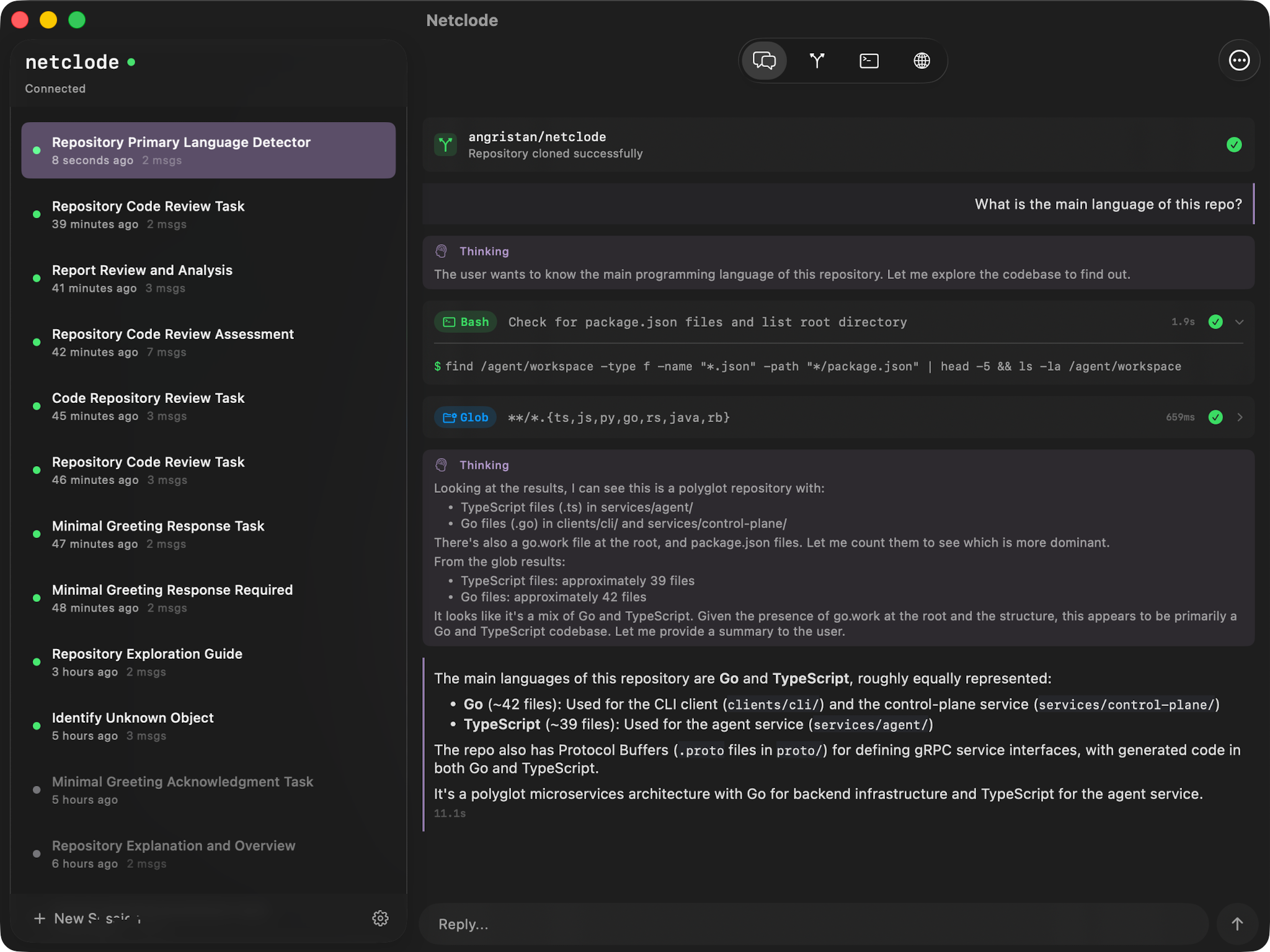
Why I built this
I wanted a self-hosted Claude Code environment I can use from my phone, with the UX I actually want. The existing cloud coding agents were a bit underwhelming when I tried them, so I built my own!
I wrote a blog post about how it works: Building a self-hosted cloud coding agent.
What makes it nice
- Full yolo mode - Docker, root access, install anything. The microVM handles isolation
- Local inference with Ollama - Run models on your own GPU, nothing leaves your machine
- Tailnet integration - Preview URLs, port forwarding, access to my infra through Tailscale
- JuiceFS for storage - Storage offloaded to S3. Paused sessions cost nothing but storage
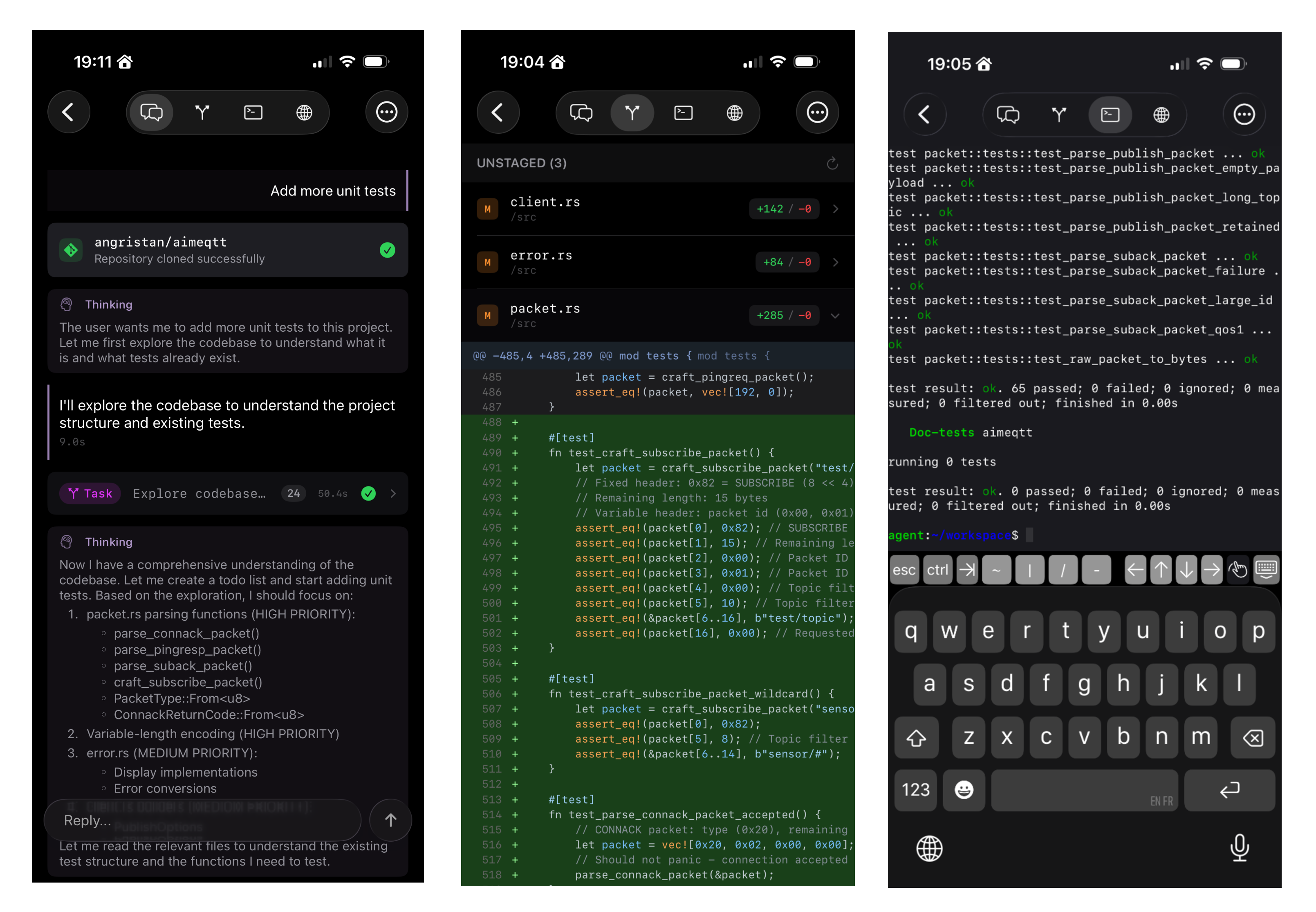
- Live terminal access - Drop into the sandbox shell from the app
- Session history - Auto-snapshots after each turn. Roll back workspace and chat to any previous point
- GitHub integration - Clone private repos, push commits, create PRs. Per-repo scoped tokens generated on demand via a GitHub App
- GitHub Bot - @mention on PRs/issues to spin up a sandbox and get a response as a comment. Auto-reviews dependency update PRs from Dependabot/Renovate
- Multiple SDKs & providers - Claude Code, OpenCode, Copilot, Codex SDKs with Anthropic, OpenAI, Mistral, Ollama, and more
- Secrets can't be stolen - API keys never enter the sandbox. A proxy injects them on the fly for allowed hosts
How it works
flowchart LR
    subgraph CLIENT["Client"]
        APP["iOS / macOS<br/><sub>SwiftUI</sub>"]
    end

    subgraph VPS["VPS - k3s"]
        TS["Tailscale Ingress<br/><sub>TLS - HTTP/2</sub>"]
        CP["Control Plane<br/><sub>Go</sub>"]
        BOT["GitHub Bot<br/><sub>Go</sub>"]
        REDIS[("Redis<br/><sub>Sessions</sub>")]
        POOL["agent-sandbox<br/><sub>Warm Pool</sub>"]
        JFS[("JuiceFS")]

        subgraph SANDBOX["Sandbox - Kata VM<br/><sub>Cloud Hypervisor</sub>"]
            AGENT["Agent<br/><sub>Claude / OpenCode / Copilot / Codex SDK</sub>"]
            DOCKER["Docker"]
        end
    end

    GH["GitHub Webhooks"]
    S3[("S3")]
    LLM["LLM APIs"]

    APP <-->|"Connect RPC<br/>HTTPS/H2"| TS
    TS <-->|"Connect RPC<br/>h2c"| CP
    GH -->|"Webhooks"| BOT
    BOT <-->|"Connect RPC<br/>h2c"| CP
    CP <-->|"Redis Streams"| REDIS
    CP <-->|"Connect RPC<br/>gRPC/h2c"| AGENT
    POOL -.->|"allocate"| SANDBOX
    JFS <--> SANDBOX
    JFS <-->|"POSIX on S3"| S3
    AGENT --> LLM
The control plane grabs a pre-booted Kata VM from the warm pool (so it's instant), forwards prompts to the agent SDK inside, and streams responses back. Redis persists events so clients can reconnect without losing anything.
When pausing, the VM is deleted but JuiceFS keeps everything in S3: workspace, installed tools, Docker images, SDK session. Resume mounts the same storage and the conversation continues as if nothing happened. Dozens of paused sessions cost practically nothing.
Stack
| Layer | Technology | Purpose |
|---|---|---|
| Host | Linux VPS + Ansible | Provisioned via playbooks |
| Orchestration | k3s | Lightweight Kubernetes, nice for single-node |
| Isolation | Kata Containers + Cloud Hypervisor | MicroVM per agent session |
| Storage | JuiceFS → S3 | POSIX filesystem on object storage |
| State | Redis (Streams) | Real-time, streaming session state |
| Network | Tailscale Operator | VPN to host, ingress, sandbox previews |
| API | Protobuf + Connect RPC | Type-safe, gRPC-like, streams |
| Control Plane | Go | Session and sandbox orchestration |
| Agent | TypeScript/Node.js | SDK runner inside sandbox |
| GitHub Bot | Go | Webhook-driven bot for @mentions and dep reviews |
| Secret Proxy | Go | Injects API keys outside the sandbox |
| Local LLM | Ollama | Optional, local models on GPU |
| Client | SwiftUI (iOS 26) | Native iOS/macOS app |
| CLI | Go | Debug client for development |
Project structure
netclode/
├── clients/
│   ├── ios/              # iOS/Mac app (SwiftUI)
│   └── cli/              # Debug CLI (Go)
├── services/
│   ├── control-plane/    # Session orchestration (Go)
│   ├── agent/            # SDK runner (Node.js)
│   │   └── auth-proxy/   # Adds SA token to requests (Go)
│   ├── github-bot/       # GitHub webhook bot (Go)
│   └── secret-proxy/     # Injects real API keys (Go)
├── proto/                # Protobuf definitions
├── infra/
│   ├── ansible/          # Server provisioning
│   └── k8s/              # Kubernetes manifests
└── docs/
Getting started
See docs/deployment.md for full setup. I tried to make it as easy as possible: ideally a single playbook run.
Quick version:
- Provision a VPS with nested virtualization support
- Run Ansible playbooks to provision the server
- Configure secrets (API keys, S3 credentials, Tailscale OAuth)
- Deploy k8s manifests
- Connect via Tailscale and you're good to go
Docs
- Deployment - Full setup
- Operations - Day-to-day management
- Sandbox Architecture - Kata VMs, JuiceFS, warm pool
- Session Lifecycle - How sessions work
- Session History - Snapshots and rollback
- GitHub Integration - Clone repos and push commits
- GitHub Bot - @mention bot and dependency review automation
- Network Access - Internet and Tailnet access control
- Secret Proxy - API key protection architecture
- Web Previews - Port exposure via Tailscale
- Terminal - Live shell access
- SDK Support - Claude, OpenCode, Copilot, Codex
- Agent Events - Event types and streaming
- iOS App
- CLI - Debug CLI
- Control Plane
- Agent
- Infrastructure
Demo
All videos from the blog post:
Warm pool instant start
No cold start, sandboxes are pre-booted
Session pause & resume
Older sessions are automatically paused to save resources. Resume brings everything back instantly
Local inference with Ollama
Run models on your own GPU
CLI shell
Instant sandbox access from the terminal, inspired by sprites.dev
| Git diff view Diff view with multi-repo support |
Live terminal Drop into the sandbox shell from iOS |
| Speech input Speech recognition for prompts |
Tailscale port preview Expose sandbox ports to the tailnet |
Yorumlar (0)
Yorum birakmak icin giris yap.
Yorum birakSonuc bulunamadi