animspark
Health Pass
- License — License: Apache-2.0
- Description — Repository has a description
- Active repo — Last push 0 days ago
- Community trust — 19 GitHub stars
Code Warn
- fs module — File system access in .github/workflows/release.yml
Permissions Pass
- Permissions — No dangerous permissions requested
No AI report is available for this listing yet.
The open-source video engine your coding agent can write films in: a film format, a frame-exact renderer, a music engine and skills for Claude Code, Codex and Cursor.



The open-source video agent. A film format, a frame-exact renderer, a music engine and the
skills that let Claude Code, Codex or Cursor make motion graphics, product videos and explainers — on your machine.
Quick start · How it works · Examples · Use with your agent · Voice & media · AnimSpark app
The banner above is a film made with this engine. See examples for finished films you can open and play live.
A film here is a folder of plain files: film.json places clips on tracks, and each motion-graphics
scene is a React component animated with GSAP. Because it is code, a coding agent can write it,
read its own errors, look at the frames it made and fix them — and you can review the diff.
my-film/code/
├── film.json          the running order: tracks of mg / video / audio clips
├── mg/intro.tsx       a scene — React + GSAP, every frame a pure function of time
├── assets/            footage, images, audio, fonts (yours, or fetched with `anim` commands)
├── skills/            the manuals your agent reads before it writes
└── AGENTS.md          the editor's manual (CLAUDE.md is the same file)
The engine owns the clock. Scenes never run their own timers, so every frame is reproducible:
what you see in the preview is exactly what anim render writes to the mp4.
Quick start
Requirements: Node.js 22+ and ffmpeg on your PATH. The first anim check, look orrender downloads the headless Chromium every frame is drawn with (via Playwright, about 100 MB,
once).
npm install -g animspark
anim new "a 20-second launch video for a note-taking app" --sec 20 --dir notes-launch
cd notes-launch/code
Open the folder in your agent and ask for the film. It reads AGENTS.md and the skills, writesfilm.json and mg/*.tsx, and checks its own work with anim check and anim look.
While it works, watch the film take shape:
anim preview
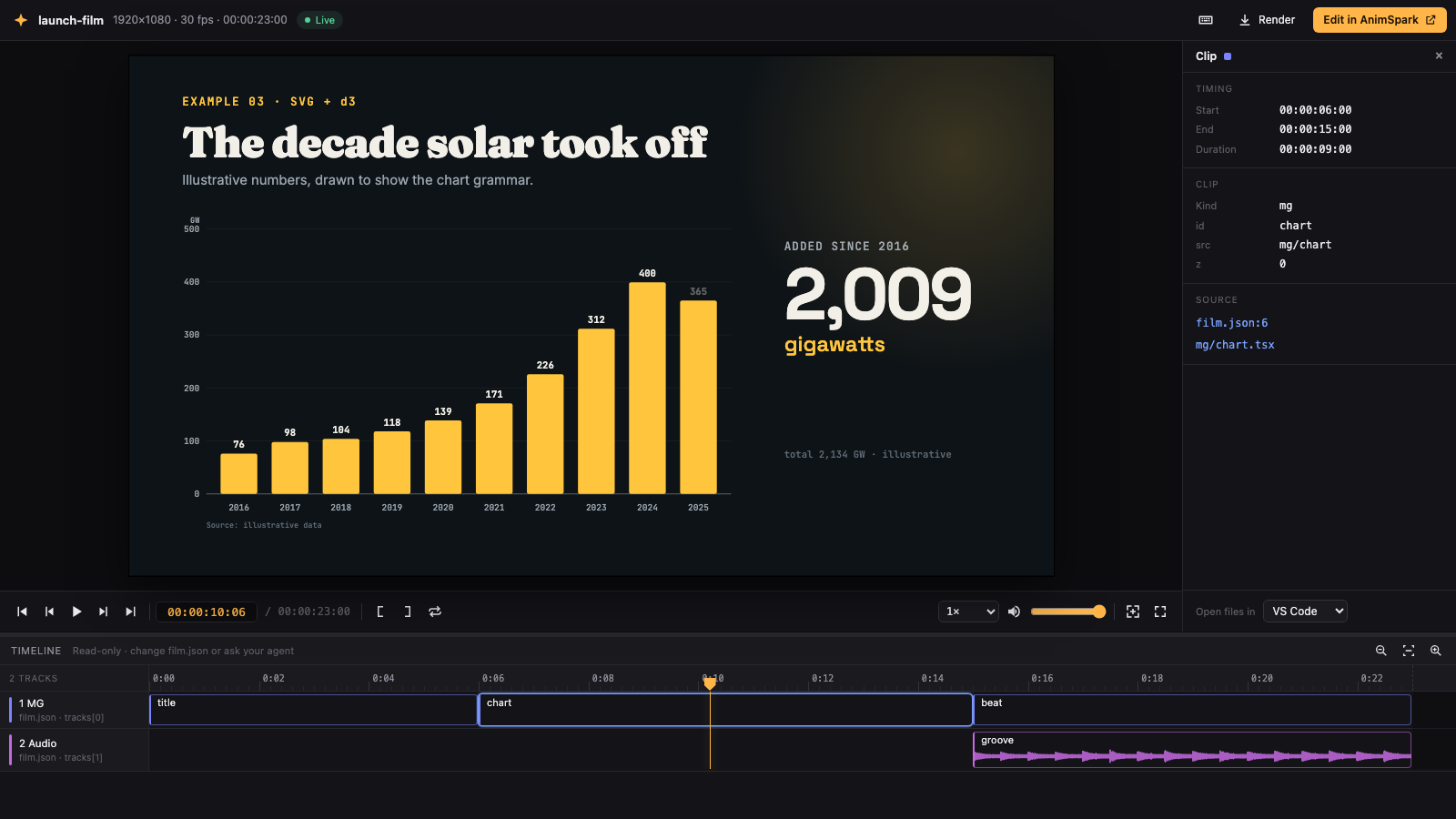
anim preview is a timeline player that follows every save: the picture refreshes in place, the
timeline re-evaluates, and compile or runtime errors appear with links to the exact line in your
editor. It is read-only on purpose — the source is the single place a film changes.
When it's right:
anim render # → .anim-out/film.mp4
Commands
| Command | What it does |
|---|---|
anim new "<brief>" [--sec 30] [--aspect 16:9] |
Create a workspace with the manual and skills installed |
anim check [--timeline] |
Validate film.json and compile every scene the way the player will |
anim look [--from s --to s] [--fps n] |
Contact sheet of frames — how the agent sees pacing |
anim look --at <s> |
One full-resolution frame |
anim look --sound |
Draw the mix: loudness, which sound sits where |
anim preview [--port n] |
Live timeline player in the browser |
anim render [--fps n] [--width px] |
Burn the mp4 (and poster, and audio) into .anim-out/ |
anim clip <id> [--format webm|prores|png] |
Export one clip, with transparency |
anim mcp |
Run as a local MCP server for agents that prefer tools |
anim login |
Connect AnimSpark Cloud for voice, sound effects, images and fonts |
Every command takes --help.
How a film is made
film.json is the edit. Clips have a start (at), an optional source window (time) and atransform; tracks stack top to bottom.
{
  "stage": { "w": 1920, "h": 1080 },
  "tracks": [
    { "kind": "mg", "clips": [
      { "id": "intro", "src": "mg/intro", "at": 0 },
      { "id": "card",  "src": "mg/card",  "at": 4.2 }
    ] },
    { "kind": "audio", "clips": [
      { "id": "bed", "src": "assets/audio/music/bed.ts", "at": 0, "volume": 0.4 }
    ] }
  ]
}
A scene is a component. Animate with useGSAP; the host drives the timeline, so seeking to any
frame gives the same picture.
import { useRef } from 'react';
import { gsap } from 'gsap';
import { useGSAP } from '@gsap/react';

export const durationSec = 4;

export default function Intro() {
  const root = useRef<HTMLDivElement>(null);
  useGSAP(() => {
    gsap.from('.word', { yPercent: 120, stagger: 0.08, duration: 0.9, ease: 'expo.out' });
  }, { scope: root });
  return (
    <div ref={root} style={{ position: 'absolute', inset: 0, display: 'grid', placeItems: 'center', background: '#0b0b10' }}>
      <h1 style={{ fontFamily: 'Inter', fontSize: 140, color: '#fff', overflow: 'hidden' }}>
        {'Write films in code'.split(' ').map((w) => <span key={w} className="word" style={{ display: 'inline-block', marginRight: 32 }}>{w}</span>)}
      </h1>
    </div>
  );
}
Music is code too. assets/audio/music/bed.ts above is a muspark score —
chords, arpeggios, drums, a General MIDI soundfont — rendered to audio on your machine. No
account, no samples to license.
Fonts from a library of 200+ open-licensed families (Latin, Chinese, Japanese, Korean) load by
name — write fontFamily: 'Playfair Display' and the preview and render both fetch it.
Scene libraries ship in the box: formulas, code and scientific plots (@animspark/stem), score
views (@muspark/ui), plus three.js, p5, d3, world-atlas and the rest of the allow-listed npm
packages — charts and maps are drawn straight with d3, and the skills show how.
Voice, sound effects and images
Everything above runs offline. Some things can't be written as code: narration, sound effects,
transcription, stock images. Those are anim commands backed by
AnimSpark Cloud — run anim login once with an API key — or by
your own provider keys through an open provider interface. See docs/cloud.md.
anim audio voice --language en --prompt "warm, confident narrator"   # pick a voice
anim audio tts --voice <voiceId> --text "Meet Notes. The fastest way to think."
anim audio sfx --prompt "soft UI click" --sec 1
Use with your agent
anim new writes AGENTS.md and CLAUDE.md, so Claude Code, Codex and Cursor pick up the manual on
their own. Prefer tools? anim mcp exposes check, look, render and the media commands over
MCP. Setup snippets for each agent are in docs/agents.md.
What's in this repository
| Package | |
|---|---|
packages/engine |
The anim CLI: check, look, render, clip, preview, MCP, cloud providers |
packages/film-build |
Evaluates and compiles films; mixdown |
packages/film-runtime |
The runtime scenes run in: clock, useGSAP bridge, useStage, useLocal |
packages/core |
The film contract: film.json schema, audio manifests, shared types |
packages/player |
Play a film in any React app: host iframe, audio clock, transport |
packages/muspark · muspark-ui |
Music as code: scores, synthesis, soundfont rendering |
packages/scene-engine |
Shared scene primitives |
scene-packages/* |
Scene libraries: stem (formulas, code, plots), three, p5 |
packages/engine/prompts/skills |
The skills: motion graphics and video editing, plus formula, sciplot, code-explainer and map |
examples/ |
Complete films you can open, preview and render |
Open source and the AnimSpark app
This repository is the engine and the language: everything needed to write, preview and render a
film locally. AnimSpark is the product built on it — a desktop and web app
with a visual timeline editor, direct manipulation on the canvas, an AI director that plans and
writes the film for you, a media library, and cloud rendering. Films are the same files in both:
start here, open them there, or the other way round.
Contributing
Issues and pull requests are welcome — see CONTRIBUTING.md. To run from source:
pnpm install
pnpm anim new "test" --dir /tmp/anim-test --sec 4
License
Apache-2.0. Scenes animate with GSAP, which is free to use under its own
Standard License rather than Apache — see NOTICE for
GSAP, fonts and the soundfont.
Reviews (0)
Sign in to leave a review.
Leave a reviewNo results found