blumi-cli
Health Warn
- License — License: Apache-2.0
- Description — Repository has a description
- Active repo — Last push 0 days ago
- Low visibility — Only 5 GitHub stars
Code Pass
- Code scan — Scanned 12 files during light audit, no dangerous patterns found
Permissions Pass
- Permissions — No dangerous permissions requested
No AI report is available for this listing yet.
Local-first, provider-agnostic agentic AI coding assistant in Rust — TUI, web UI, an always-on gateway, and a Flutter phone app (blugo). A LAN grid fans agent tasks across your machines; semantic long-term memory diffuses across the grid (SEDM) with local embeddings + RAG, plus a native code knowledge base. MCP + BYOK (Claude/OpenAI/Gemini).
blumi

Bring your own everything. What you configure is what you get.
A local-first, provider-agnostic agentic coding companion —
one Rust core, three faces: a terminal UI, a web UI, and a phone app.






🌸 rose → lavender → violet → cyan — the Living Rose palette across every surface 🩵
⭐ If blumi puts your idle compute to work, give it a star — it helps others find it.
blumi is a single Rust binary whose UI-agnostic core emits one typed event stream, so every
surface shows the same session: a crush-inspired
terminal UI, an embedded React web UI, an always-on gateway, and blugo — a
Flutter phone app that's a 1:1 mirror of the TUI, optimized for foldables.
Terminal UI (blumi tui) |
Phone app (blugo) |
|---|---|
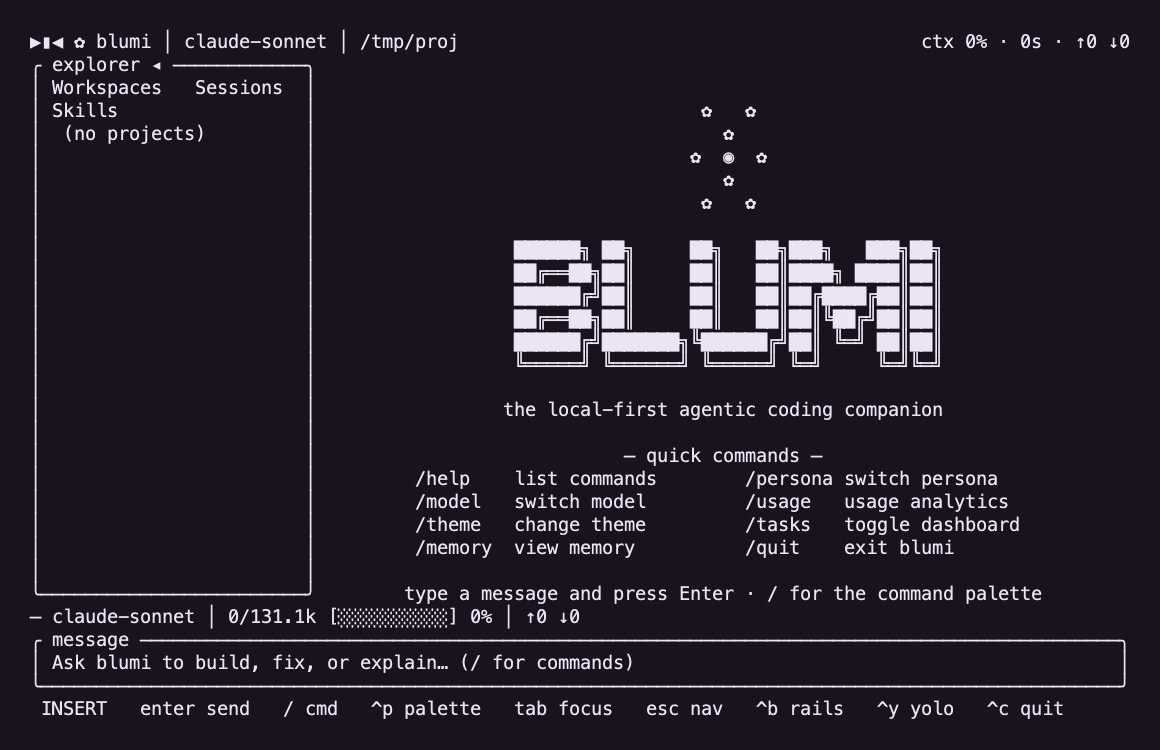 |
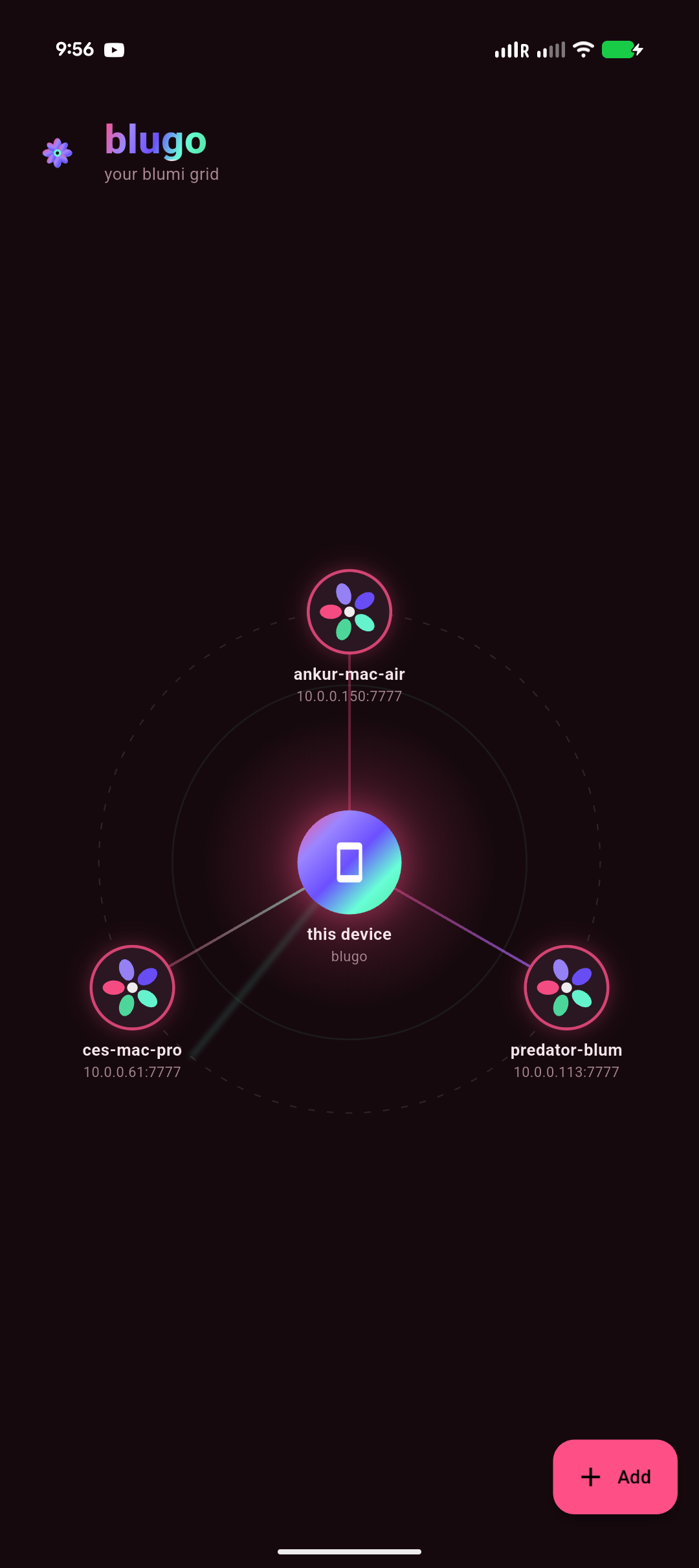 |
📖 Docs ·
Install ·
Configure ·
CLI ·
Gateway ·
Mobile ·
Grid ·
Memory ·
Voice ·
Self-Management ·
Troubleshooting ·
FAQ
Full setup & step-by-step guides → the Wiki
🌐 One grid, every machine you own
blumi turns the idle compute on your LAN into a single distributed AI grid. Point severalblumi serve gateways at the same secret and they auto-discover each other; then fan one task
across all of them — from the terminal, the web UI, or right from your phone — and each machine
runs its share and reports back, tagged by hostname and OS. When compute is expensive, none of
yours sits idle. → jump to Grid (distributed).
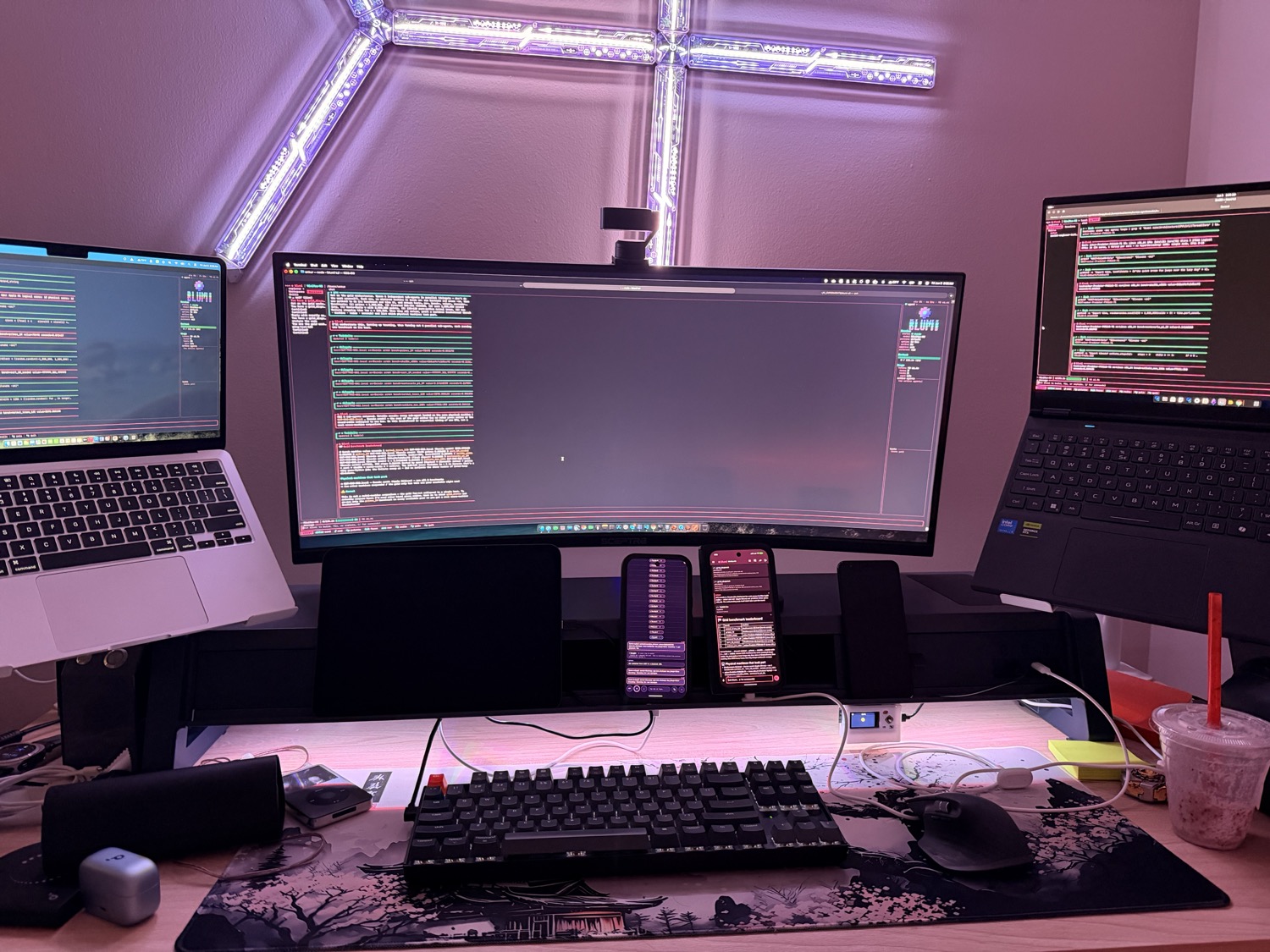
One job, four faces: a MacBook Air (Apple Silicon), a MacBook Pro (the orchestrator), a Linux laptop (x86_64),
and the blugo phone app — every node running blumi, sharing the work.
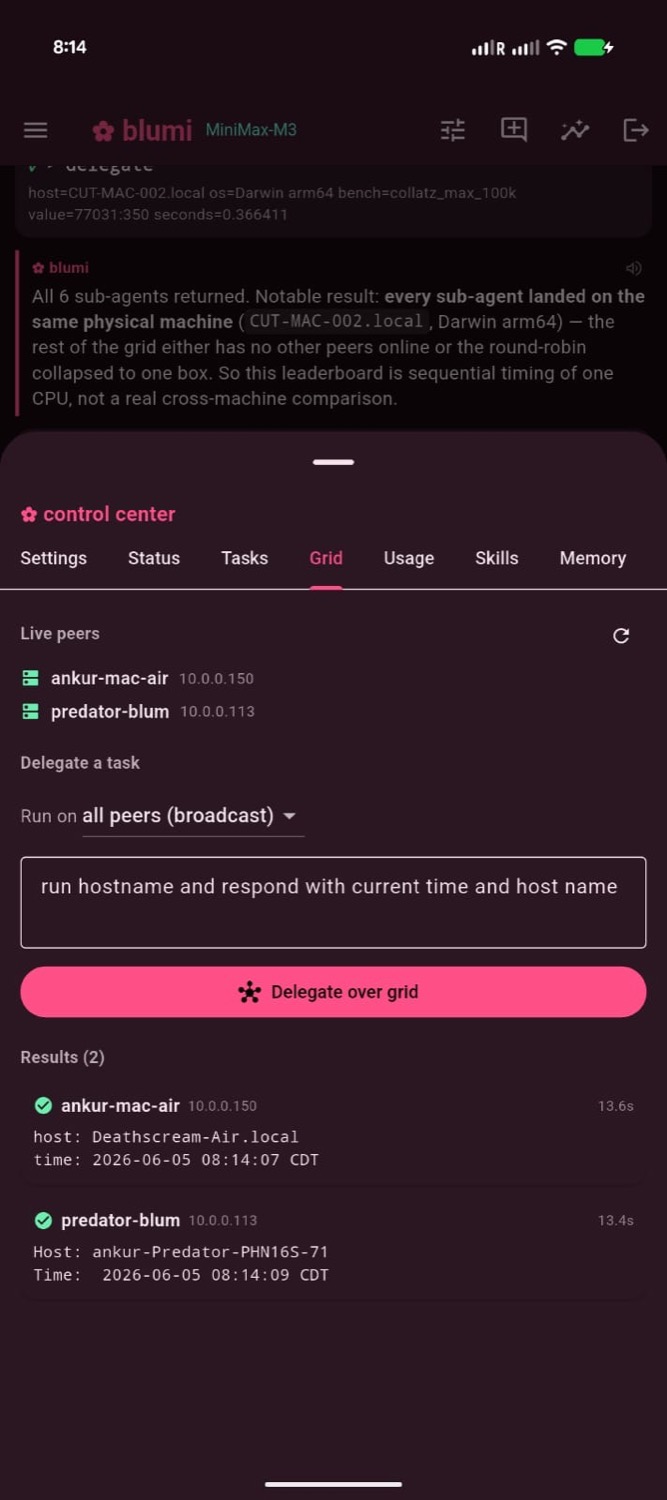
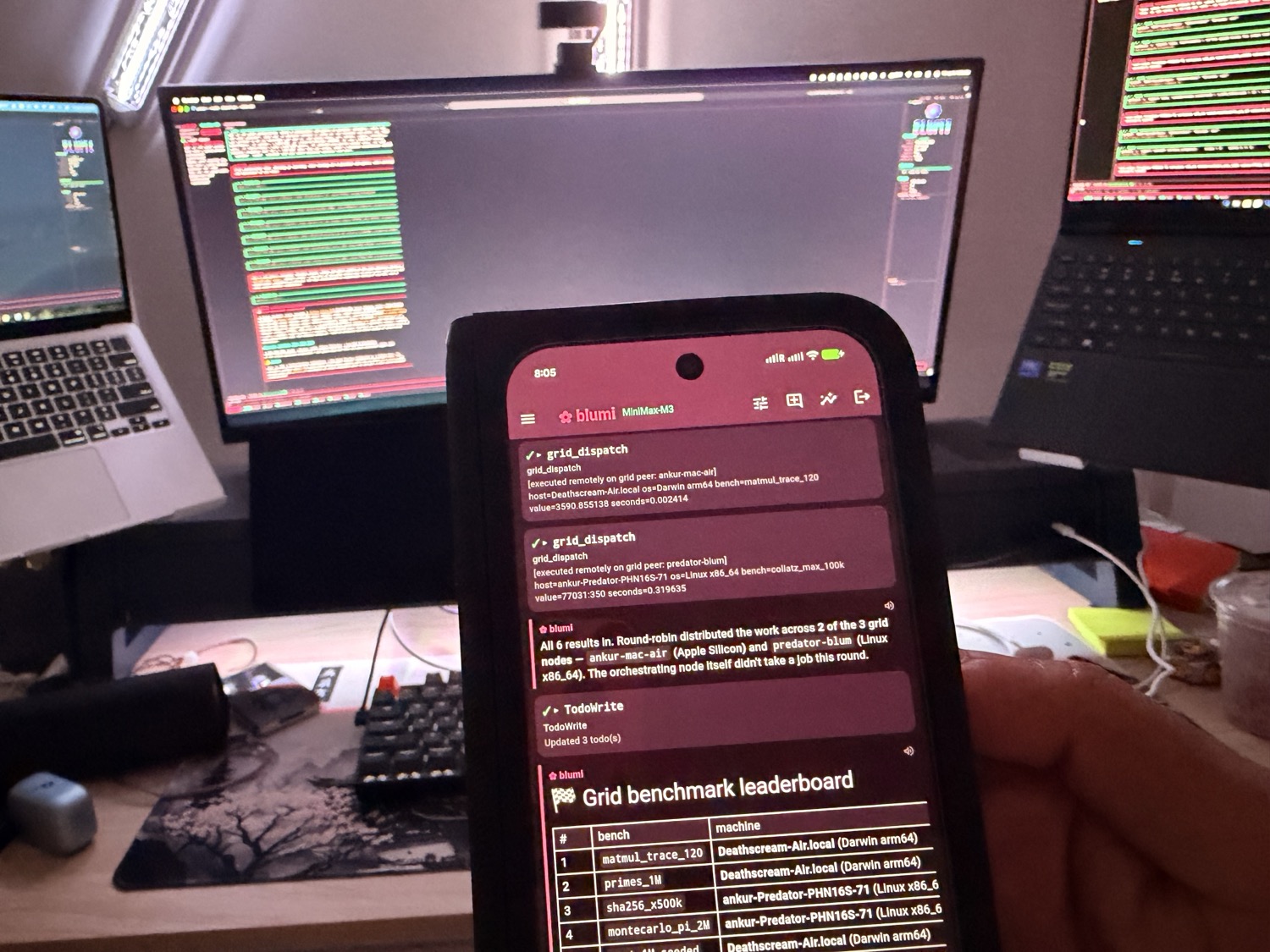
Delegate a task across the grid from your phone (left) — pick a peer or broadcast to all — and watch every machine answer (right). No model tool-calling required.
🧠 Private memory that compounds — and code it understands
blumi remembers across sessions with a bundled local embedding model (no API, nothing leaves
your machines): each turn it recalls what's relevant and folds it into context. With SEDM
governance those memories are deduped on write, utility-scored, consolidated, and diffused across
the grid — what one machine learns, the others pick up — while your private user notes never
leave the node. It also indexes your repos into a local code knowledge base, so the agent cancode_search where something lives before it edits. → Memory and code intelligence.
⚕ Heals its own failures — and uses your GPU
When a tool call fails, blumi classifies it, takes a budgeted recovery action, and emits a
trace you can watch (⚕ self-heal …) — then remembers the fix so a similar failure recalls it
next time, shared across the grid. Recurring failures get mined into auto-written recovery skills
(low-risk; risky changes ask first). Meanwhile the bundled embedder runs on the GPU when present —
Apple CoreML/Metal out of the box on Apple Silicon, NVIDIA CUDA opt-in — falling back to CPU
otherwise. → Self-healing & evolution · GPU acceleration.
Part 1 — blumi CLI
The agent itself: a terminal UI, a one-shot headless runner, an embedded web UI, and an
always-on gateway. One binary, no daemon required.
Install
curl -fsSL https://raw.githubusercontent.com/ankurCES/blumi-cli/main/install.sh | sh
Installs the blumi binary into ~/.local/bin (override with BLUMI_INSTALL_DIR) — a prebuilt
release when available, otherwise a cargo build from source (needs a Rust toolchain,
https://rustup.rs).
# from source with cargo (needs Rust)
cargo install --git https://github.com/ankurCES/blumi-cli --locked blumi

# or clone and build
git clone https://github.com/ankurCES/blumi-cli && cd blumi-cli
cargo install --path crates/blumi --locked
See Installation for per-OS notes.
Quick start
blumi login          # pick a provider, paste a key/endpoint, choose a model
blumi                # start the terminal UI (default when attached to a TTY)
blumi run "explain src/main.rs"     # one-shot / pipeable / headless
blumi web            # embedded React web UI + HTTP/SSE server
Configuration lives in ~/.blumi/settings.json (and a per-project .blumi/). Providers, keys,
models, personas, permissions, executor, voice, and the grid are all set there or via blumi login / the in-app settings. See Configuration.
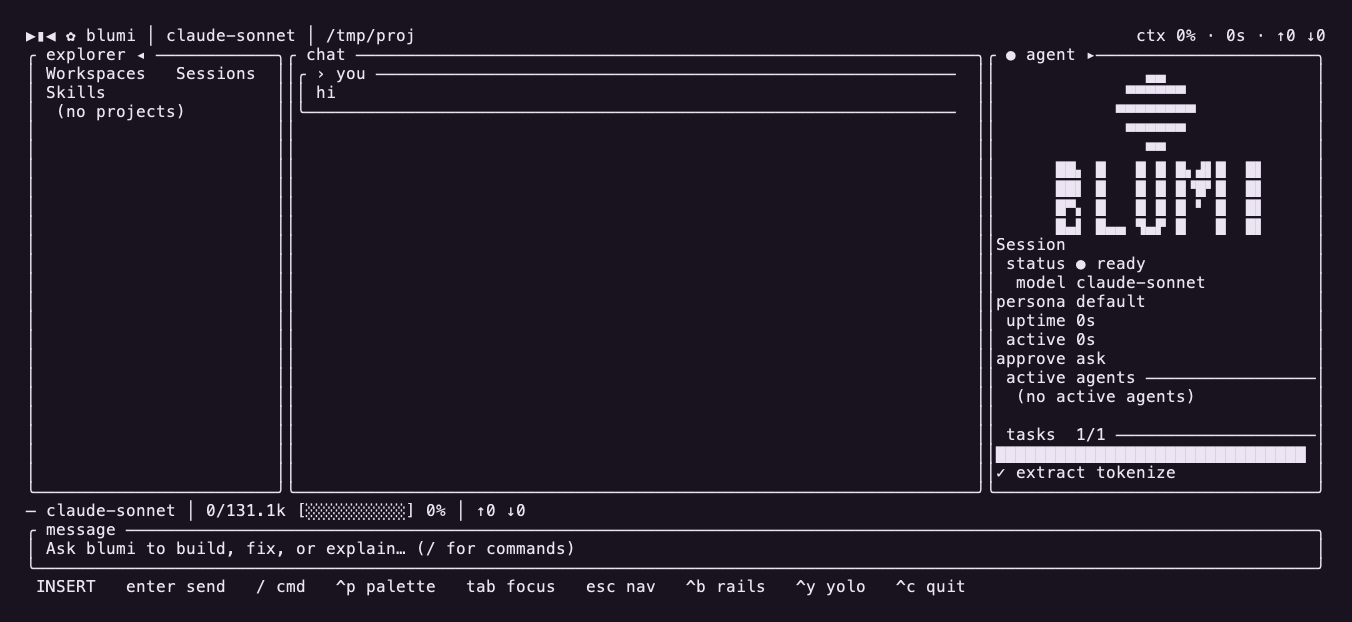
Fold-open / wide layout: explorer │ chat │ agent rail.
Surfaces
| Command | What it does |
|---|---|
blumi / blumi tui |
Interactive terminal UI (default on a TTY) |
blumi run "<prompt>" |
One-shot / headless / pipeable agent run |
blumi web |
Embedded React web UI + HTTP/SSE server |
blumi serve |
Always-on gateway for the blugo phone app (run/pair/install/start/stop/status) |
blumi loop |
Autonomously work the task board: select → run → advance, repeat |
blumi task |
Manage the task board (the work queue for blumi loop) |
blumi gateway |
Run as a messaging bot (Telegram/Discord/Slack/WhatsApp) |
blumi accel |
Inspect the GPU/accelerator: detect / status / doctor (setup hints) |
blumi cron / playbook / skills / mcp / session / stats |
Automations & management |
Run blumi <command> --help for any subcommand. Full reference:
CLI Usage.
Architecture
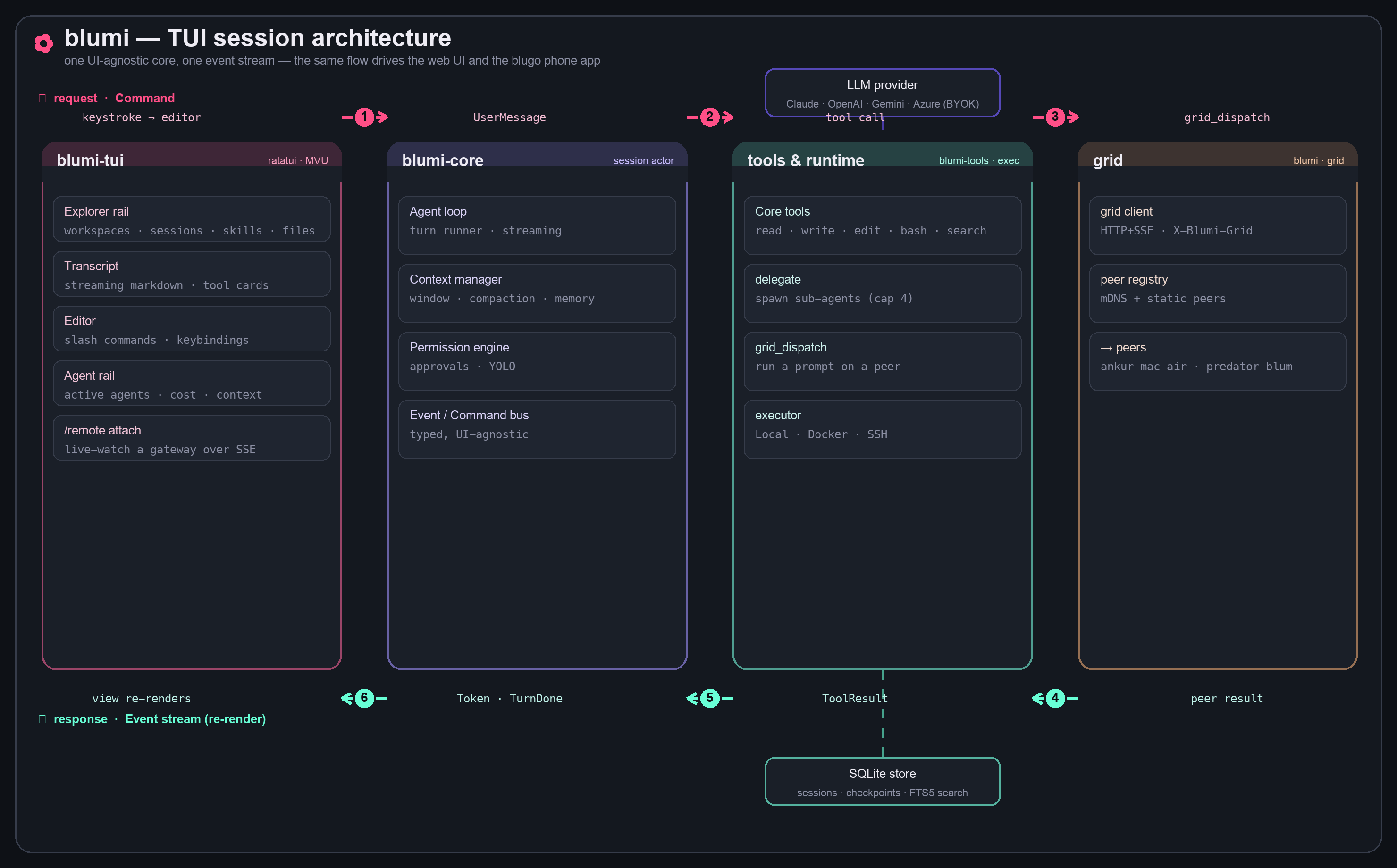
One UI-agnostic core emits a single typed event stream, so the terminal UI, the web UI, and
the blugo phone app are all just renderers of the same session. A turn flows Command → session
actor → tools → grid, and streams back as Events that re-render every surface.
Always-on gateway
Run blumi as a background service so a phone (or browser) can reach it over your LAN:
blumi serve pair                       # set a password, print the LAN URL + QR for blugo
blumi serve install --host <LAN-ip>    # install as a launchd (macOS) / systemd-user (Linux) service
blumi serve status                     # is it up? URL + pid
It auto-advertises over mDNS (_blumi._tcp) so blugo discovers it on the same Wi-Fi.
Guide: Gateway (blumi serve).
Grid (distributed)
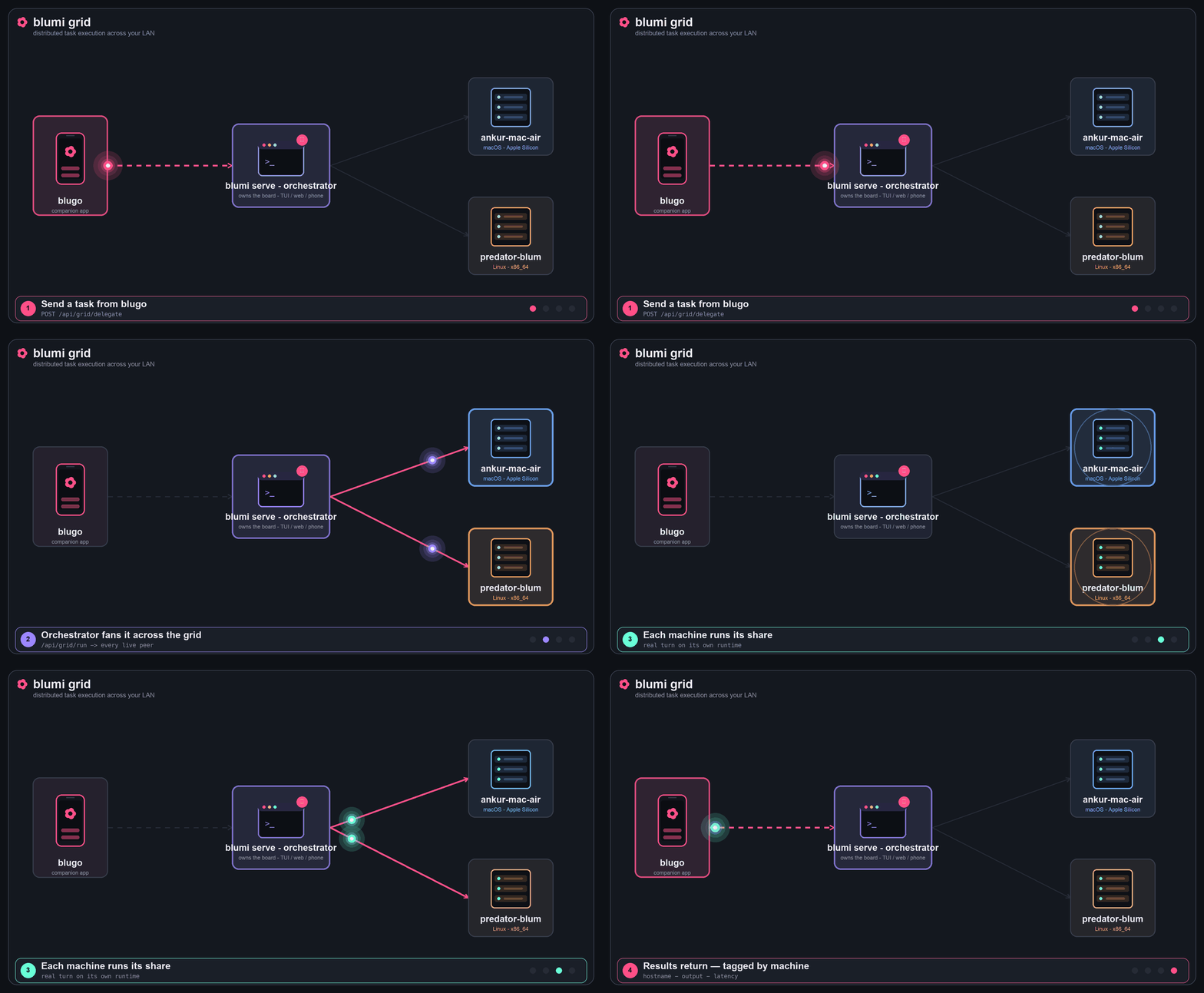
Grid task execution: a task from blugo → the orchestrator → fanned to every live peer → results return, tagged by machine.
Several gateways that share one grid secret form a grid: they auto-discover each other on the
LAN and hand work off for execution on remote runtimes (orchestrator-dispatch). Discovery is mDNS
(_blumi._tcp) with optional static peers for networks where multicast is locked down. Every
result comes back tagged with the machine that produced it (hostname + OS), and live runs stream
into any TUI/blugo via /remote attach.
Three ways to distribute work across the grid:
- From the phone — blugo's
Gridtab (deterministic, model-independent): pick all peers or
one, type a task, tap Delegate over grid → each machine runs it and reports back. It's a
direct dispatch over the API, so it works on any model (no tool-calling required). - From chat — the
grid_dispatchtool: the agent spreads sub-tasks across peers and collates
the per-machine results into one reply (terminal, web, or phone). - Distributed task board —
blumi loop(grid mode): round-robins the task board across live
peers; the board shows which machine ran (and is running) each task.
Enable per node in settings.json — same secret = same grid:
"grid": {
  "enabled": true,
  "secret": "one-shared-secret-on-every-node",
  "peers": ["10.0.0.150:7777", "10.0.0.113:7777"]
}
peers is optional (mDNS finds peers automatically); list IP:port of the other nodes when
multicast is unavailable. Restart each gateway after editing —launchctl kickstart -k gui/$(id -u)/com.blumi.serve (macOS) /systemctl --user restart blumi-serve (Linux). Full walkthrough:
Grid (distributed).
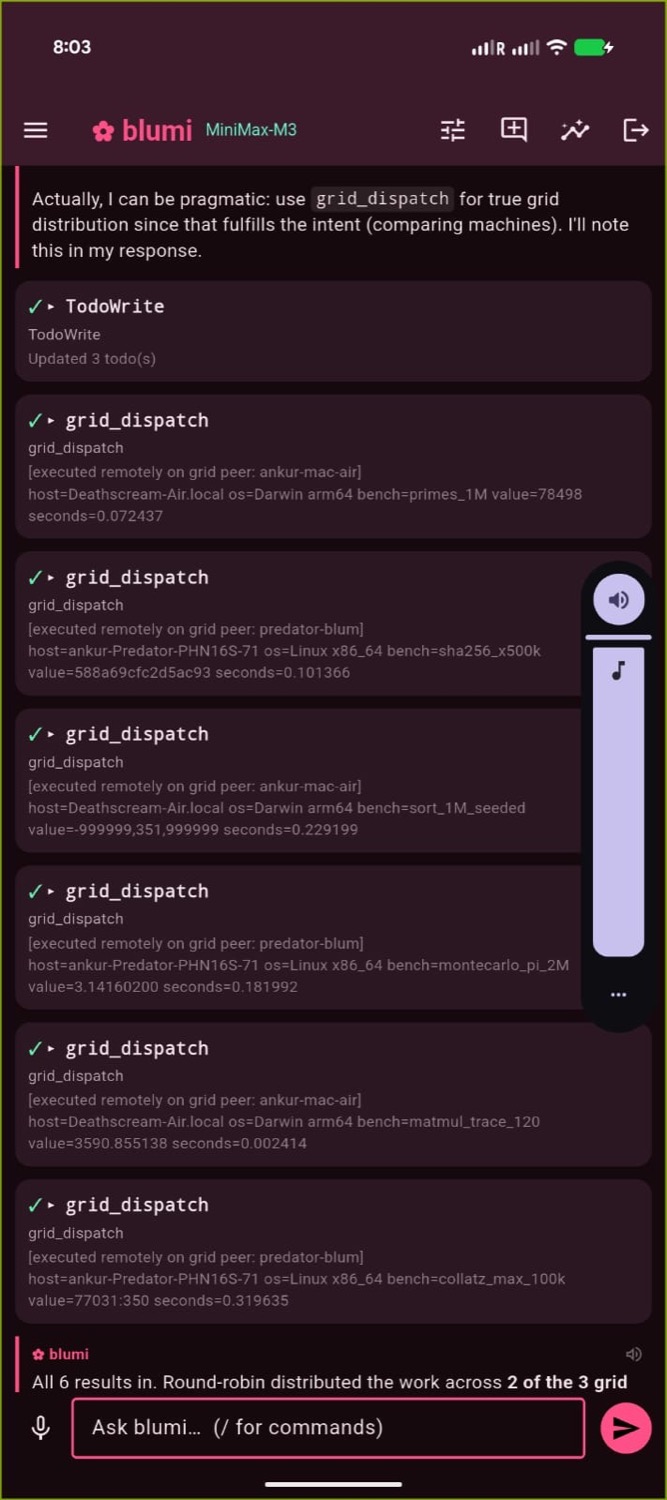
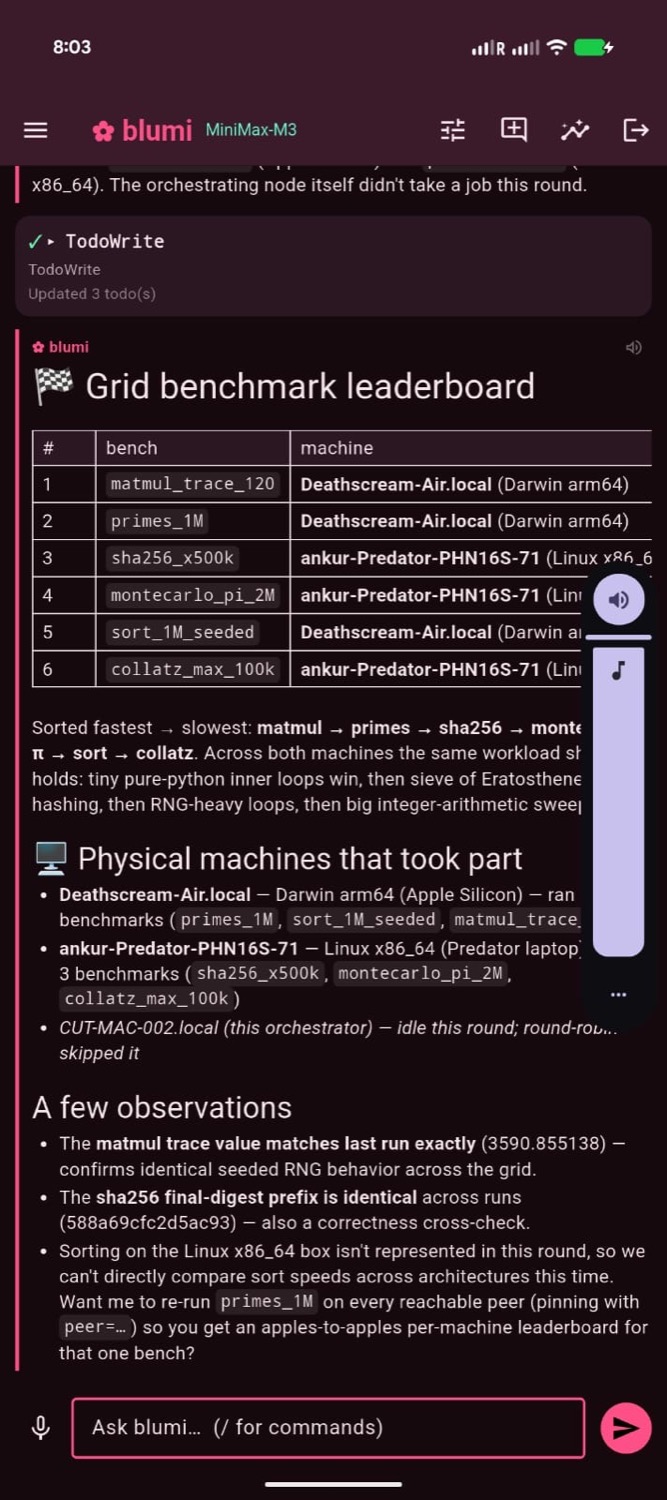
From the phone: the Grid delegation tab with live per-machine results (left),
a chat-driven grid_dispatch fan-out (center), and a per-machine leaderboard (right).
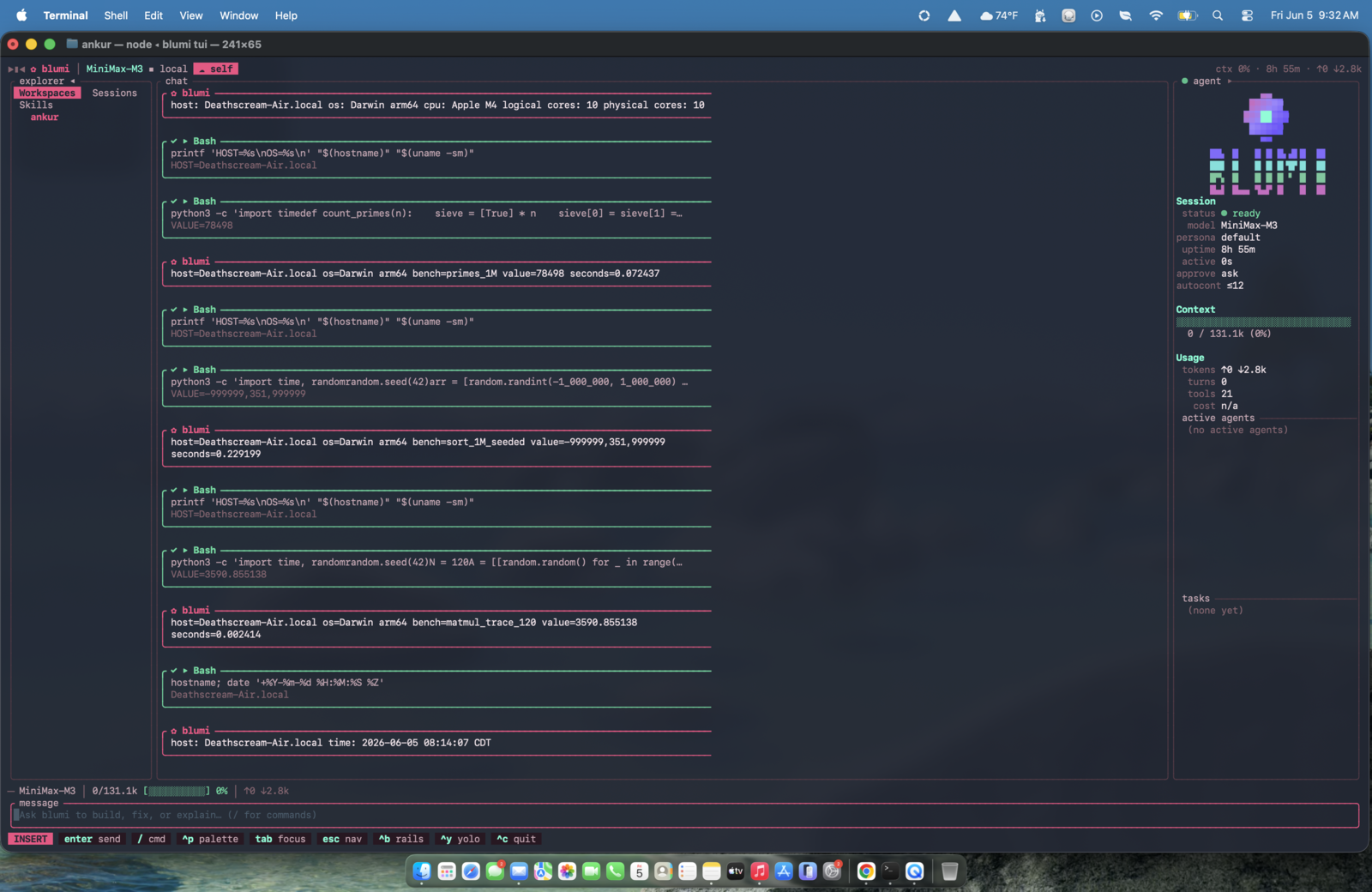
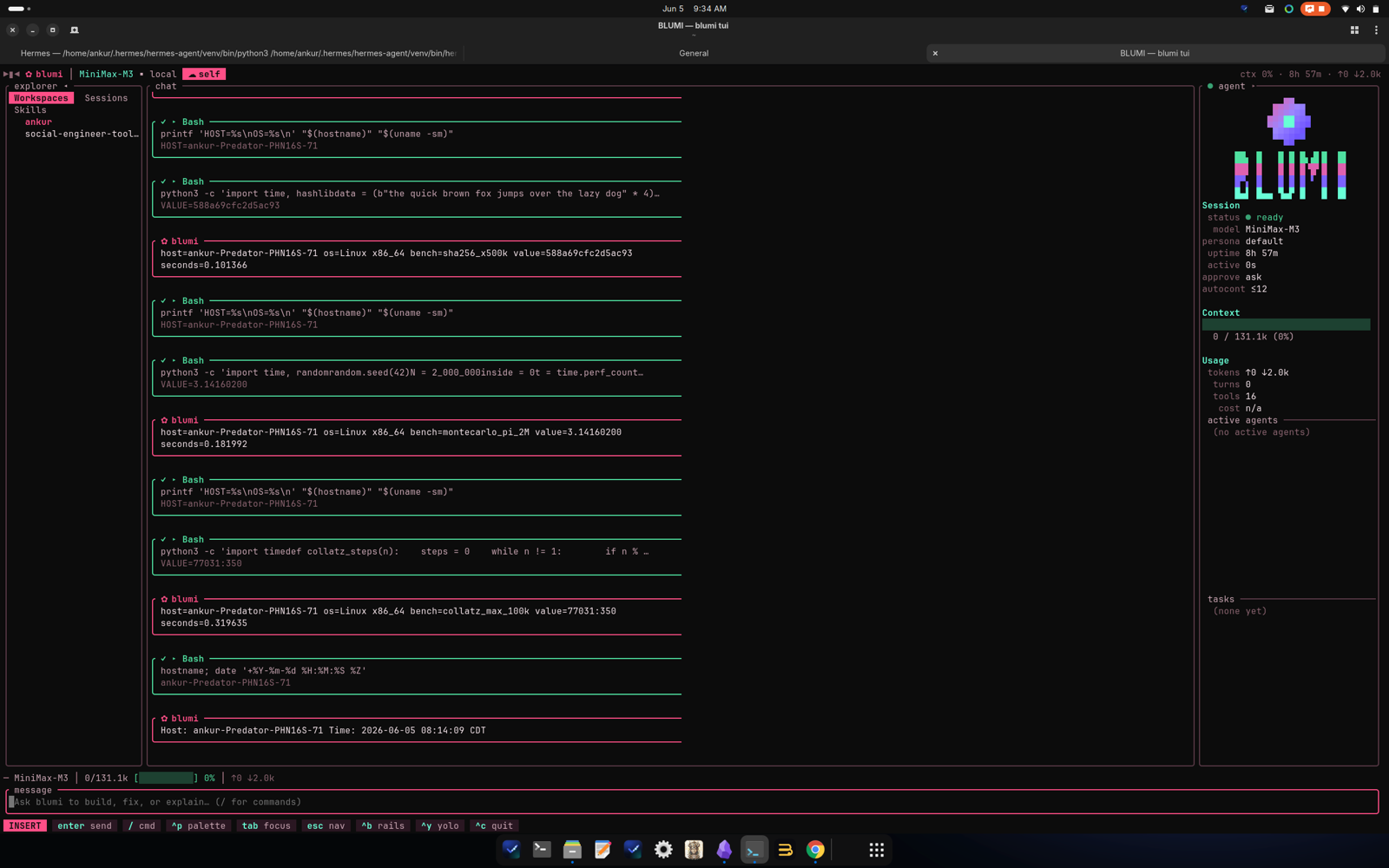
The same job executing live on two peers — macOS / Apple Silicon (left) and Linux / x86_64 (right).
Memory and code intelligence
Long-running, distributed agentic work needs memory that survives crashes, learns over time, and
travels across machines — plus a way to actually understand a codebase. blumi ships all of it
local-first: a bundled embedding model means no API key, and nothing leaves your machines.
Durable execution. Every tool step in a turn is checkpointed to SQLite, so a crash or a gateway
restart resumes mid-turn instead of replaying it — the backbone for long autonomous runs.
Semantic long-term memory (RAG). A vector store over the bundled local model (bge-small, 384‑dim)
recalls the memories relevant to each request and injects them as background context — cache-safe, so
the cached system prompt stays byte-identical. It degrades to keyword (FTS5) search when embeddings are
off. The agent reads/writes it with the memory tool (add / query).
SEDM — self-evolving, distributed memory (inspired by the SEDM paper):
- write-admission — a near-duplicate write merges (and bumps utility) instead of piling up;
- utility + consolidation/eviction — memories that get used rise; near-dupe clusters fold into the
best member; the weakest are pruned past a per-namespace cap; - cross-peer diffusion — high-value, non-personal memories spread across the grid: what one
machine learns, the others pick up (re-admitted through each peer's own dedup gate and origin-tagged,
so they never loop). Your privateusernamespace never leaves the node.
Self-healing & evolution
Reliability as a bounded control problem (after the
self-healing-orchestrators paper), wired into the failure
taxonomy and the memory above:
- Reflex recovery — a failed tool result is classified (bad args, state conflict, crash, empty)
and gets a budgeted, targeted recovery action plus an observability trace (⚕ self-heal …
inline in the TUI;/api/healfor the gateway). Only idempotent tools auto-retry; the rest escalate.
It composes with the doom-loop guard rather than duplicating it. - Learns from failures — a recovery is stored as a failure→fix episode in the
agent
namespace, so it diffuses across the grid; a similar future failure recalls the known fix
and injects it. Paths/secrets are redacted before anything is stored. - Evolves — recurring failure clusters are mined into auto-written recovery skills (low-risk,
with a notice); anything risky (config / providers / secrets / deletes) raises an approval instead.
Kill switch:heal.evolve = "off". - Confirmed — with
heal.verifyon, a recovery is marked verified only when the retried tool
actually succeeds on a later step (ground truth, not just "a fix was suggested"), and the fix
that worked has its utility reinforced.
See it in the TUI with /heal (or the inline ⚕ self-heal traces as they happen), the blugo
Heal tab, or GET /api/heal.
Native code knowledge base. Index a repo into a local knowledge.db and search it by meaning or
keyword (hybrid vector + FTS5), with gitignore-aware, diff-aware (re-)indexing:
blumi knowledge ingest ~/code/my-repo      # index incrementally (only changed files)
blumi knowledge search "where is auth handled"
blumi knowledge status                      # files · symbols · vectors
The agent gets code_search / code_retrieve to locate code before editing; from the phone, the
blugo Code tab indexes a repo and searches it with file:line + snippet results.
Everything is on by default (first use downloads the ~130 MB model once, then runs fully offline);
turn any of it off in settings.json:
"embeddings":   { "enabled": true, "backend": "local", "model": "bge-small-en-v1.5" },
"acceleration": { "mode": "auto" },
"memory":       { "enabled": true, "diffuse": true, "dedup_threshold": 0.92 },
"heal":         { "enabled": true, "recovery_budget": 2, "evolve": "auto" },
"router":       { "mode": "off", "light": { "model": "" }, "heavy": { "model": "" } },
"always_on":    { "enabled": false, "autonomy": "off", "cadence_secs": 900 },
"knowledge":    { "enabled": true, "max_file_kb": 256 }
Pin what matters; the agent edits the rest. Memory is now white-box: list,
edit, pin, or delete individual entries (TUI Memory tab / POST /api/memory/*).
Pinned entries are exempt from eviction + consolidation; editing one re-embeds it.
Full guide: Memory & Knowledge.
GPU acceleration
blumi uses your GPU for the bundled embedder when one is detected, and falls back to CPU otherwise.blumi accel doctor prints exactly what's detected and how to wire more:
- Apple Silicon — CoreML/Metal is on by default (no flag — the execution provider is baked
into the ONNX Runtime blumi already downloads, so ≈zero extra binary size). - NVIDIA / Linux — the recommended path is lean blumi + a local server: the default Linux
install builds without the heavy ONNX dep (FTS5 locally), and you run Ollama for the real win —
LLM inference on the GPU — plus GPU embeddings. The in-process CUDA embedder is best-effort opt-in
(curl … | BLUMI_CUDA=1 sh): CUDA's ONNX Runtime is a shared lib, so the installer ships it next to
the binary, verifies it loads, and auto-falls back to a lean build if it can't. - The model itself — blumi is BYOK, so the biggest GPU win is running the LLM on a local server
(Ollama / vLLM / llama.cpp) and pointing a provider at it (theollama,local-mlx,local-cuda
presets ship in config). The bundled embedder only handles embeddings. - Grid-aware offload — every node reports its accelerator in
/api/grid/metrics(strongest =
CUDA > Apple CoreML > CPU; shown in the TUI/accel,/api/status, blugo). A CPU node can setembeddings.backend = "grid"to offload embedding to the strongest GPU peer (with a local/FTS5
fallback) — so a lean Linux box rides a Mac/CUDA peer for vectors.
The heavy embedder build is Apple-default + opt-in elsewhere, so a plain Linux/CI install stays
lean (FTS5 fallback) and never does a multi-GB native link unless you ask for GPU.
Cost-aware routing & always-on
Two PilotDeck-inspired controls, both off by default — opt in per settings.json:
- Smart routing — per turn a fast heuristic (and, on ambiguous turns, a local judge) picks a
difficulty tier and routes to a light vs flagship model; delegated sub-agents default to the
cheap tier. Setrouter.modetoheuristic/hybrid/judgeand giverouter.light/heavya
provider+model. Watch the savings live: TUI/route(per-tier counts +$ savedvs all-heavy),GET /api/route. Model swaps are prompt-cache-safe; the judge fails safe to the cheap tier. On a grid,router.prefer_grid_lightcan run the light tier on a peer's local model. - Always-on discovery — with
always_on.enabled+autonomy = "propose", the gateway periodically
(gated) runs a read-only pass that surfaces candidate tasks onto the board (Discovered: …) and
lands a report in~/.blumi/reports/. See it withblumi serve status,GET /api/always-on, or the
TUI/discoveriesoverlay. It never mutates anything (autonomous execution is a planned follow-up).
Workspace layout
crates/
  blumi-protocol   wire contract: Command / Event / Message / ToolResult (pure serde)
  blumi-core       the brain: traits + session actor (agent loop) + context mgmt + permissions + self-healing
  blumi-llm        provider clients (OpenAI-compatible, Anthropic, Gemini, …) + local embeddings (GPU: CoreML/CUDA)
  blumi-tools      built-in tools (incl. code_search/code_retrieve) + JSON-Schema + pipeline
  blumi-exec       execution backends (Local; Docker/SSH feature-gated)
  blumi-mcp        MCP client (rmcp) + tool adapters
  blumi-lsp        generic LSP client (feature-gated)
  blumi-persist    SQLite (sqlx): sessions, messages, checkpoints, semantic memory + FTS5
  blumi-knowledge  code knowledge base: symbol extraction + hybrid vector/FTS5 search
  blumi-skills     SKILL.md skills + dual memory (MEMORY/USER) + self-management tools
  blumi-cron       scheduler → headless sessions → delivery
  blumi-gateway    messaging gateways + voice (feature-gated)
  blumi-task       persistent task board (the queue for `blumi loop`)
  blumi-config     layered configuration (figment)
  blumi-tui        ratatui terminal UI
  blumi-web        axum server + embedded React build
  blumi            the binary (clap) — incl. `serve` gateway, `grid` discovery/dispatch, `accel` GPU doctor, self-heal evolution
blugo/             the Flutter phone app (outside the cargo workspace)
Develop
cargo build
cargo test --all-features
cargo clippy --all-targets --all-features -- -D warnings
cargo fmt --all --check
Releases are tracked in CHANGELOG.md (Keep a Changelog + SemVer).
CI runs the Rust gate + the blugo Flutter gate on every push/PR (.github/workflows/ci.yml).
The web UI lives in crates/blumi-web/frontend (React + Vite + TS); its built dist/ is
committed and embedded via rust-embed, so a plain cargo build needs no JS toolchain.
Contributing notes: Development.
Part 2 — blugo (phone app)
blugo is a Flutter app that mirrors the TUI on your phone, talking to a blumi serve gateway
over your LAN (REST + SSE, token auth). Built for the Pixel 9 Pro Fold — single-pane in portrait,
multi-pane when unfolded.
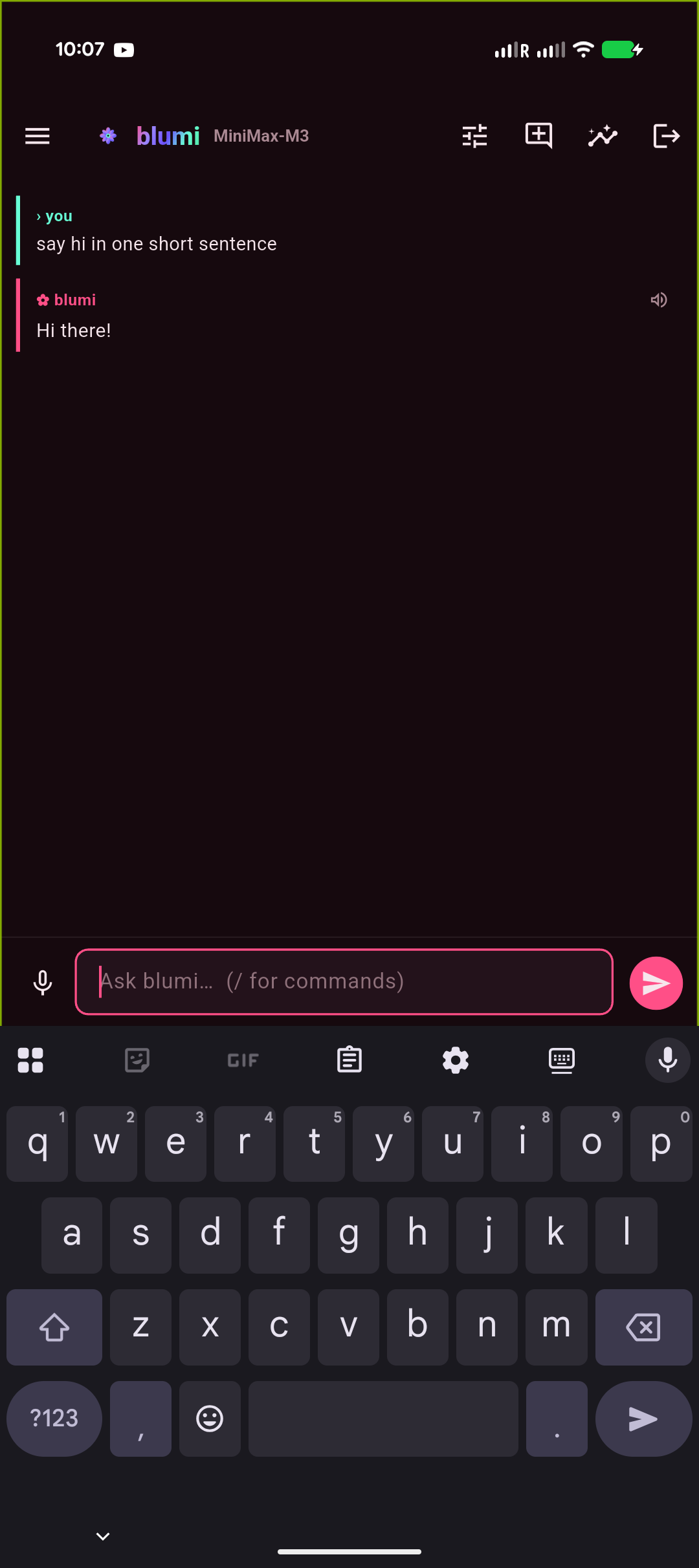
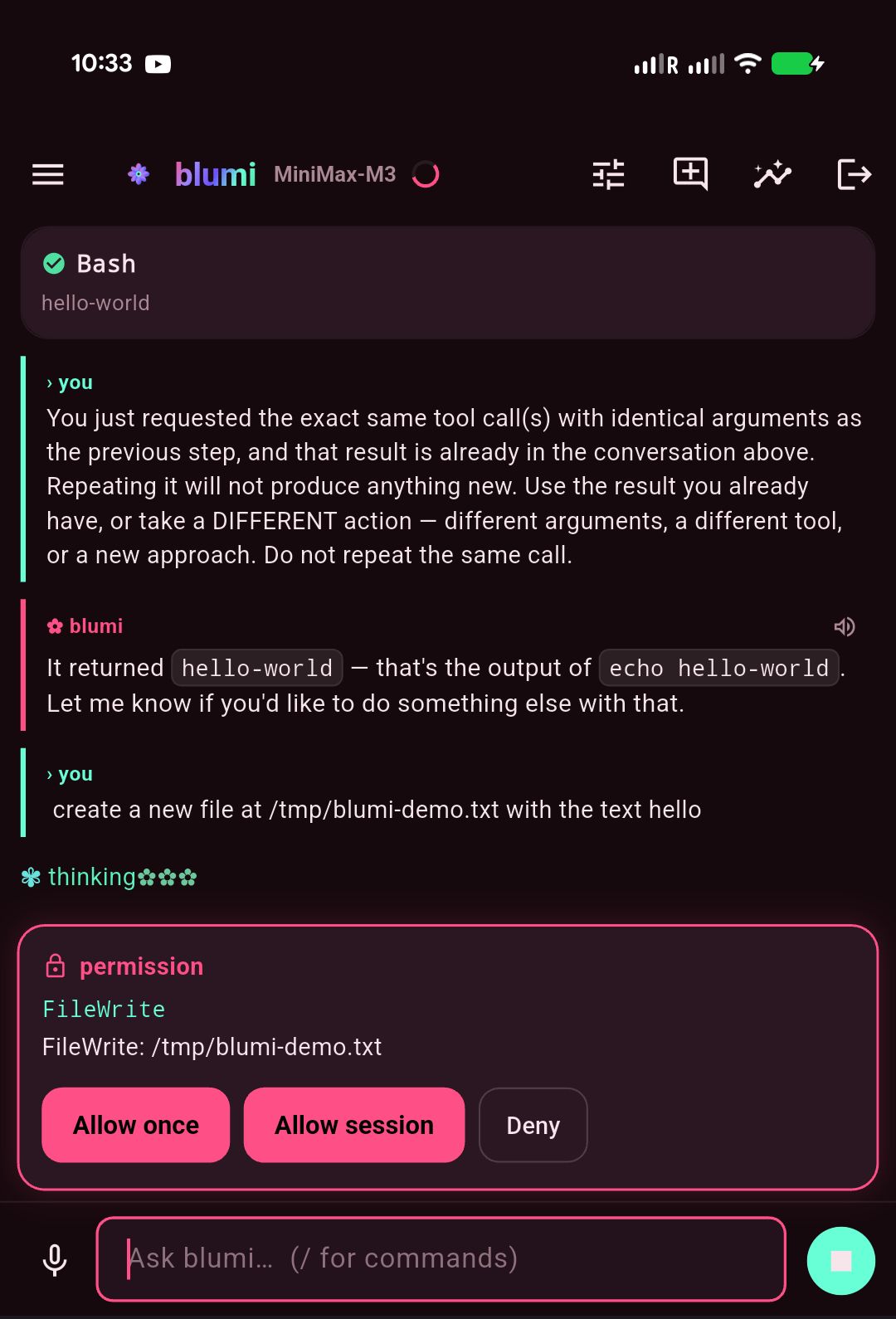
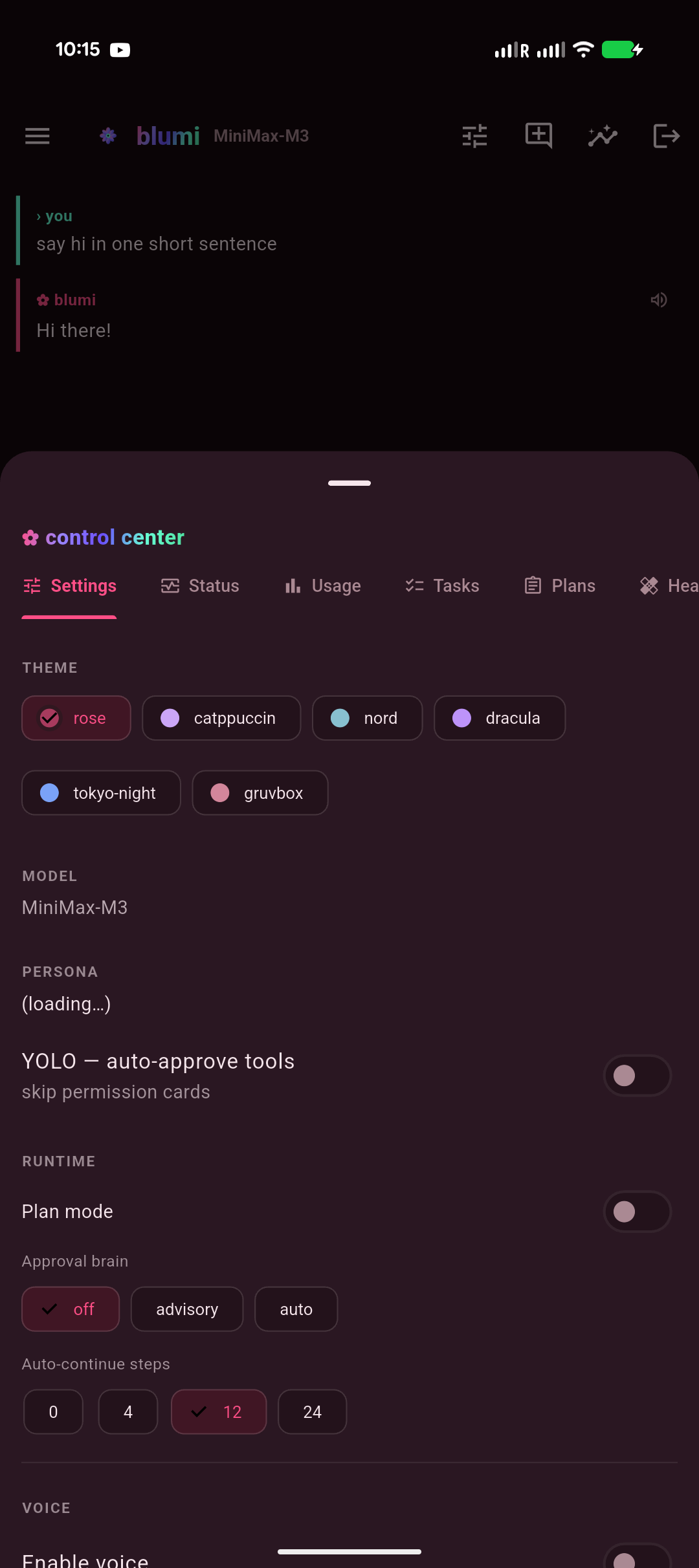
| Welcome · interactive grid | Chat · streaming | Approvals · permission | Control center |
|---|---|---|---|
|
 |
 |
 |
The welcome screen is an interactive grid diagram: this device sits at the hub, your saved
gateways orbit it, and auto-discovered ones appear as dashed nodes — tap any node to
connect / edit / forget, tap a dashed one to sign in (password only; the rest is auto-filled), or
+ to add by IP. The whole app rides one design system (Living-Rose tokens + a reusable widget
kit) for a consistent, animated look across every screen.
Highlights: streaming chat with markdown + syntax-highlighted code, tool cards, approval /
clarify / plan cards, the animated thinking mascot, a / command palette, sessions, a control
center (model / persona / theme / YOLO / voice / tasks / grid / usage / skills / memory),
a Grid tab that delegates a task across your LAN grid and shows each machine's result (works on
any model), LAN auto-discovery of gateways, multiple saved instances, and voice (ElevenLabs /
OpenAI TTS + Whisper STT).
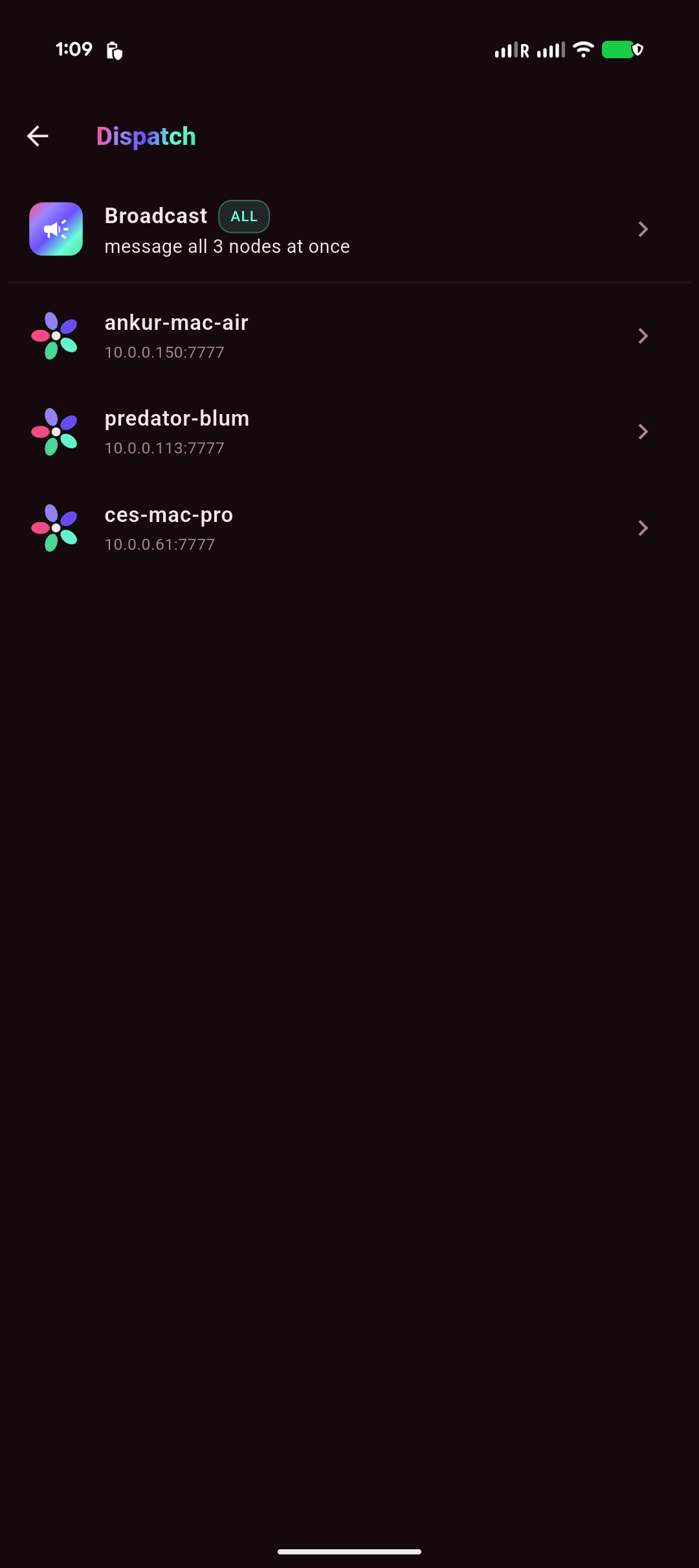
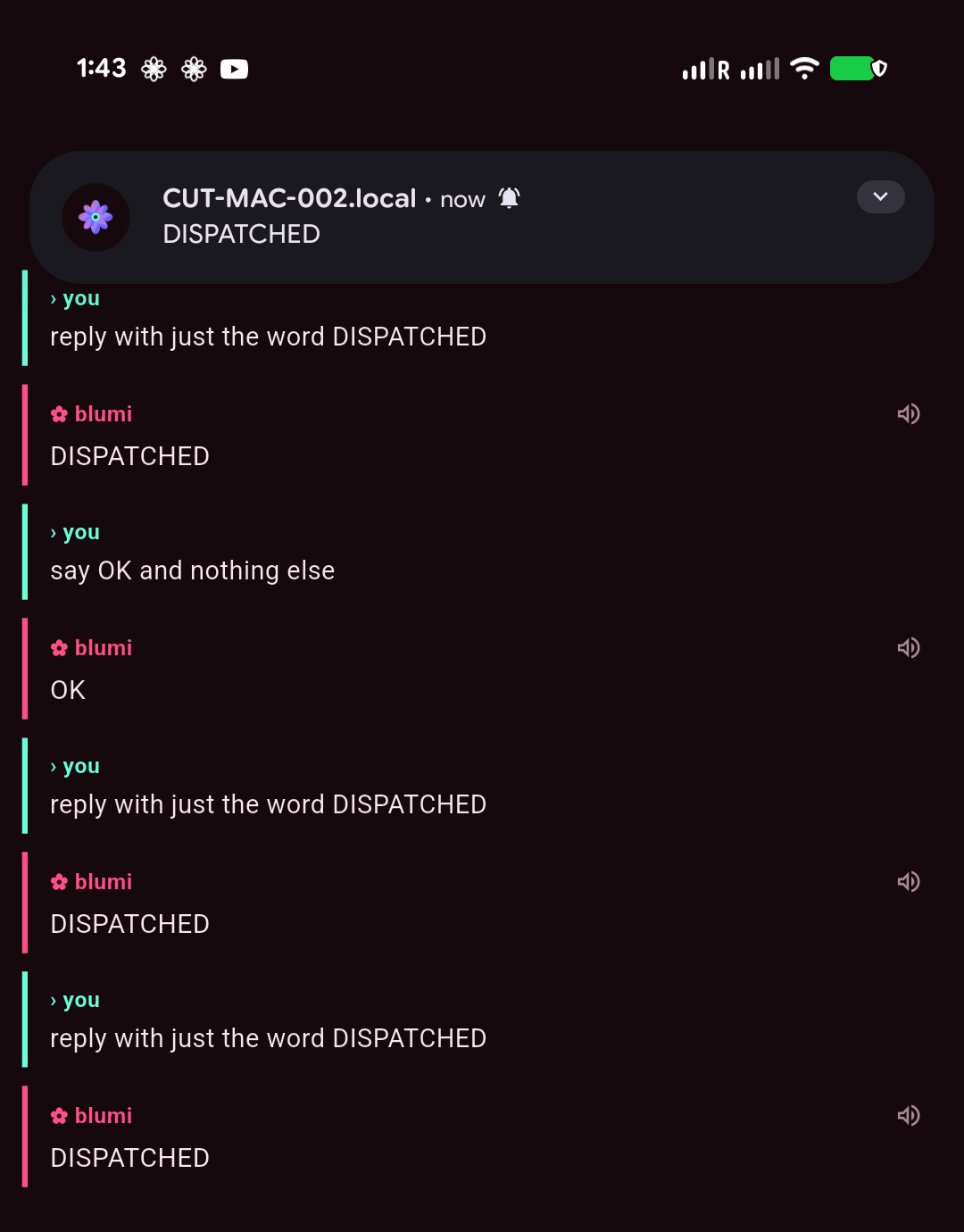
Dispatch — Telegram-style chat with each node + push
| Dispatch inbox | Thread + push | Broadcast · all nodes |
|---|---|---|
 |
 |
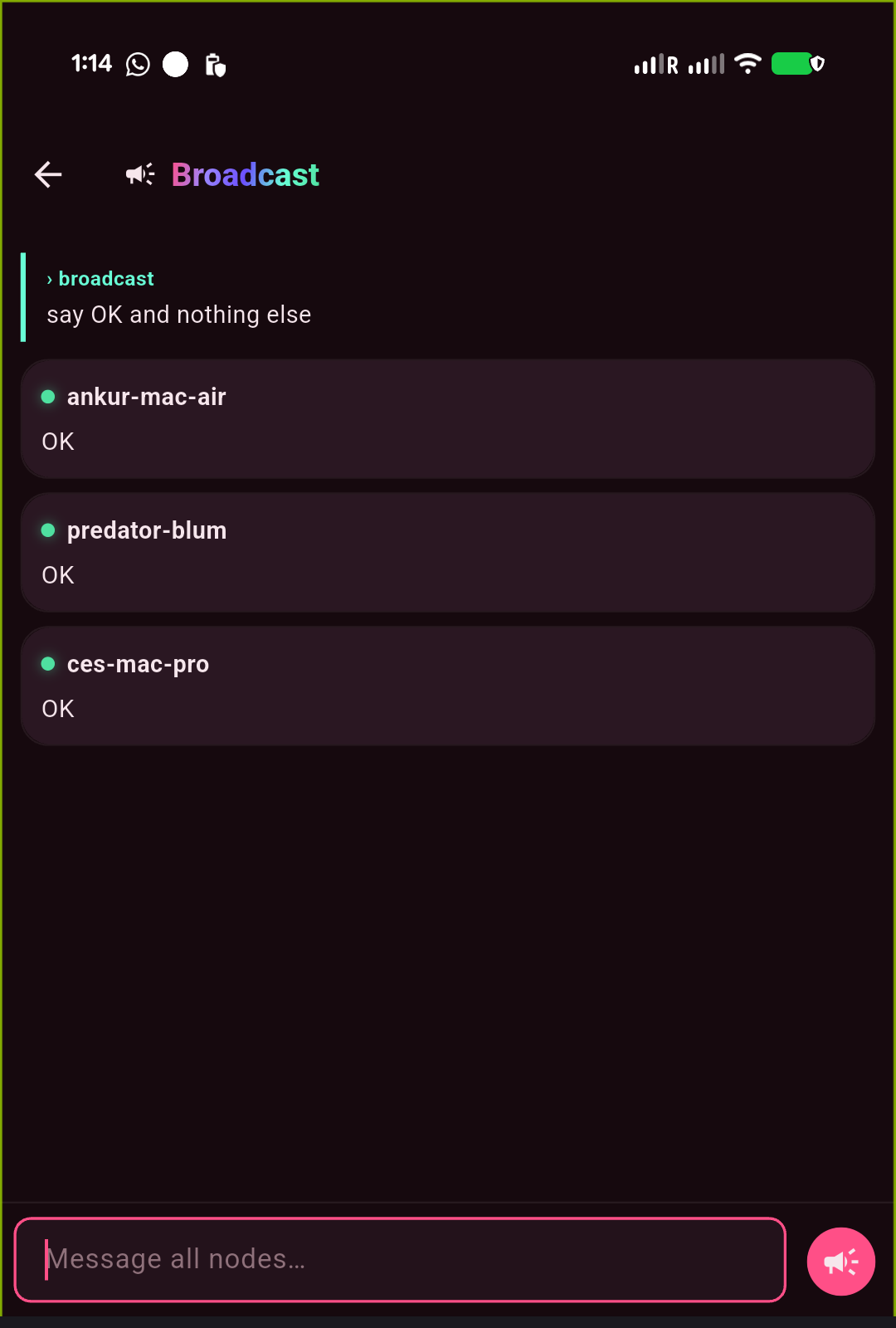 |
Dispatch is a lightweight inbox: a row per saved gateway (each its own isolated quick-chat
thread) plus a Broadcast channel that fans one message to every node and shows each one's reply.
Fire-and-forget — send, background the app, and a push notification (FCM) brings the reply back,
then a tap drops you into that thread. On by default on the LAN with zero config; drop a Firebase
service account on the gateway (~/.blumi/fcm-service-account.json) to turn push on (it's a silent
no-op without it). Reachable from the welcome diagram (a node's Dispatch action) and a Dispatch
icon on every screen.
Connect it
- On your machine:
blumi serve pairthenblumi serve install --host <LAN-ip>. - Open blugo → it auto-discovers gateways on your Wi-Fi (or add one by IP) → enter the password.
- Chat. The same session is live in the TUI, the web UI, and the phone at once.
Build & run
cd blugo
flutter pub get
flutter run -d <device>          # debug to a connected device
flutter build apk --release      # signed release APK (see blugo/README.md)
Details, signing, and on-device tips: blugo/README.md and the
Mobile App wiki page.
Status
Active development; usable end-to-end. The core spine (session actor + single event stream), the
TUI, the embedded web UI, the full provider matrix (OpenAI-compatible, Anthropic, Azure Foundry,
Gemini), sub-agents, MCP, SKILL.md skills + dual memory, FTS5 session search, cron, Docker/SSH
executors, LSP, playbooks, messaging gateways + voice, the task board + autonomous blumi loop,
the local-LLM approval brain, the blumi serve gateway, the blugo phone app, and the
distributed grid (LAN peer discovery + chat / phone / loop task delegation, each result tagged
by machine) are all in place.
Permissions are interactive by default; a toggleable YOLO mode skips prompts (ctrl+y //yolo in the TUI, the web header toggle, or --yolo for headless runs). When a turn stops only
because it hit the per-turn tool cap, the runtime auto-continues in the same session and
narrates each step, bounded by a step budget and a token ceiling — so long tasks finish without
nudging. See the Wiki for the full feature tour.
License
Licensed under the Apache License 2.0 © 2026 ankurCES — see LICENSE
and NOTICE. Permissive, with an explicit patent grant. Contributions welcome.
⭐ Star us
blumi is built so the machines you already own — an old laptop, a spare desktop, even your phone —
add up to one private AI grid. If that's useful to you, star the repo:
it's the simplest way to support the project and help others discover it. Got a question or an idea?
Open an issue or discussion — contributions welcome.
Star history
If you made it this far — ⭐ star blumi 🌸
Reviews (0)
Sign in to leave a review.
Leave a reviewNo results found