bordr
Health Warn
- License — License: MIT
- Description — Repository has a description
- Active repo — Last push 0 days ago
- Low visibility — Only 5 GitHub stars
Code Warn
- network request — Outbound network request in e2e/back.e2e.ts
- network request — Outbound network request in e2e/conversation.e2e.ts
Permissions Pass
- Permissions — No dangerous permissions requested
No AI report is available for this listing yet.
bordr for Herdr: a self-hosted mobile workspace for reading and driving Herdr coding agents from your phone over Tailscale.
Read and drive every coding agent on your machine, from your phone.
Your faithful, playful, roaming sheepdog - Herd(r) your flock from anywhere!
A mobile web workspace for herdr, served over Tailscale.
Waggy Tail, Happy Dev :)
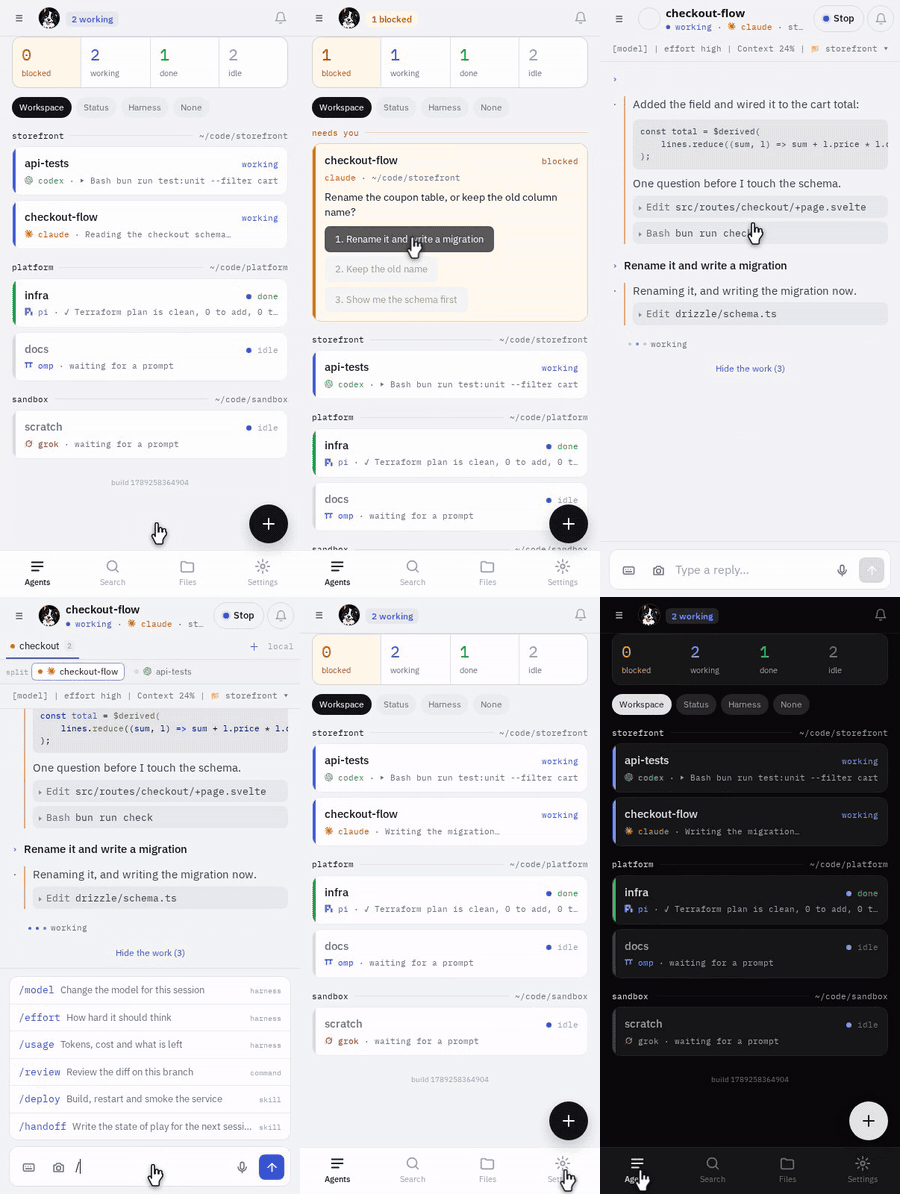
A blocked agent, answered from the list. No typing, no terminal.
Why I made this
I come from tmux and zellij, often accessing my PC via SSH apps on my phone. Tiny, cramped, but workable in a pinch.
Then using Claude Code via the mobile app felt like a game-changer. Why couldn't all remote dev work be so easy?
Then herdr came along and the way it manages agents and workspaces inspired me to try and get it working remotely.
This is the result, I love it and use it every day. I hope you'll like it too!
Who this is for
Anyone who runs multiple harnesses on their PC and wants to access them from anywhere.
You need a Linux or macOS machine running Herdr, Bun and at least one supported agent, and Tailscale
to reach it; Prerequisites has the detail.
What it does
Answer without opening anything
- A blocked agent is pinned to the top of the list with its options inline — tap one.
- Push the moment it blocks, and the notification carries those options too.
- Claude Code, codex, pi, omp, grok, copilot and agy in one list, each with its own mark.
Read what happened
- Sessions render as chat, not terminal soup, with tool calls folded away.
- Syntax highlighting from VS Code's own grammars; open a tool call for its arguments, diff and result.
- Search every session at once:
"quoted phrases",-exclusions, filters by speaker and harness.
Drive it properly
- Terminal mode shows the pane exactly as the machine draws it.
- A tab's real split, dividers and all, not a row of chips.
- An on-screen key strip for anything the TUI insists on handling itself.
- Type
/for the harness's commands and your own skills, with descriptions. - Type, dictate, attach any file from the camera, gallery or files, or share a photo in from another app.
Your whole estate
- Machines, workspaces, tabs and panes, in herdr's own shape.
- Other machines over SSH: the ones herdr already knows, or just those
BORDR_MACHINESnames. - Browse and preview files: Markdown, images, PDFs, and agent-built HTML, sandboxed.
Make it yours
- Swipe between agents; back always returns to the list.
- Light, dark, chat bubbles, and a live preview under every setting.
Installs to the home screen as a PWA. The automated browser tests run in Chromium; other phone
browsers are used day to day but not tested automatically.
What it looks like
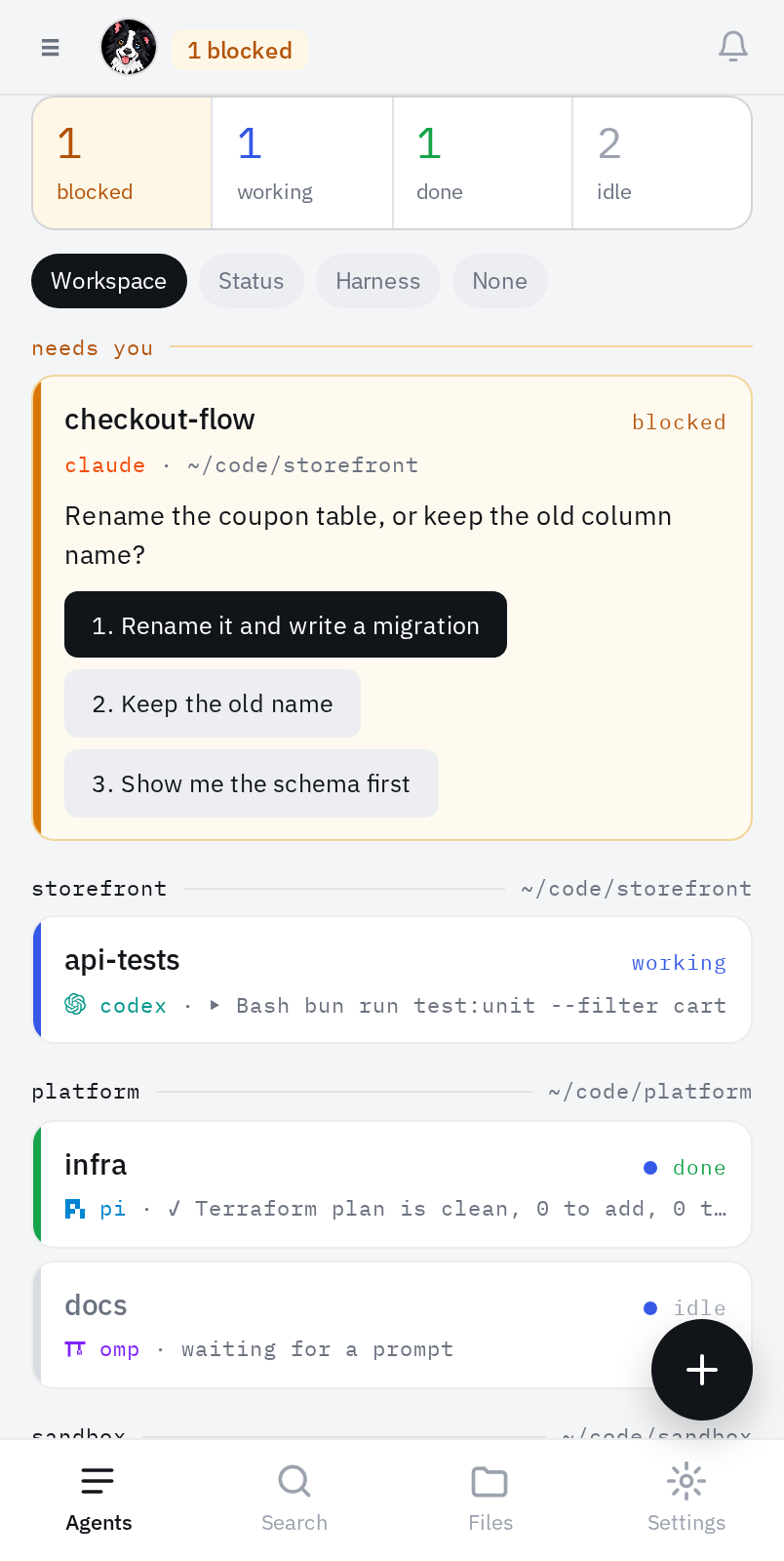
The list Blocked agents first, answerable in place. |
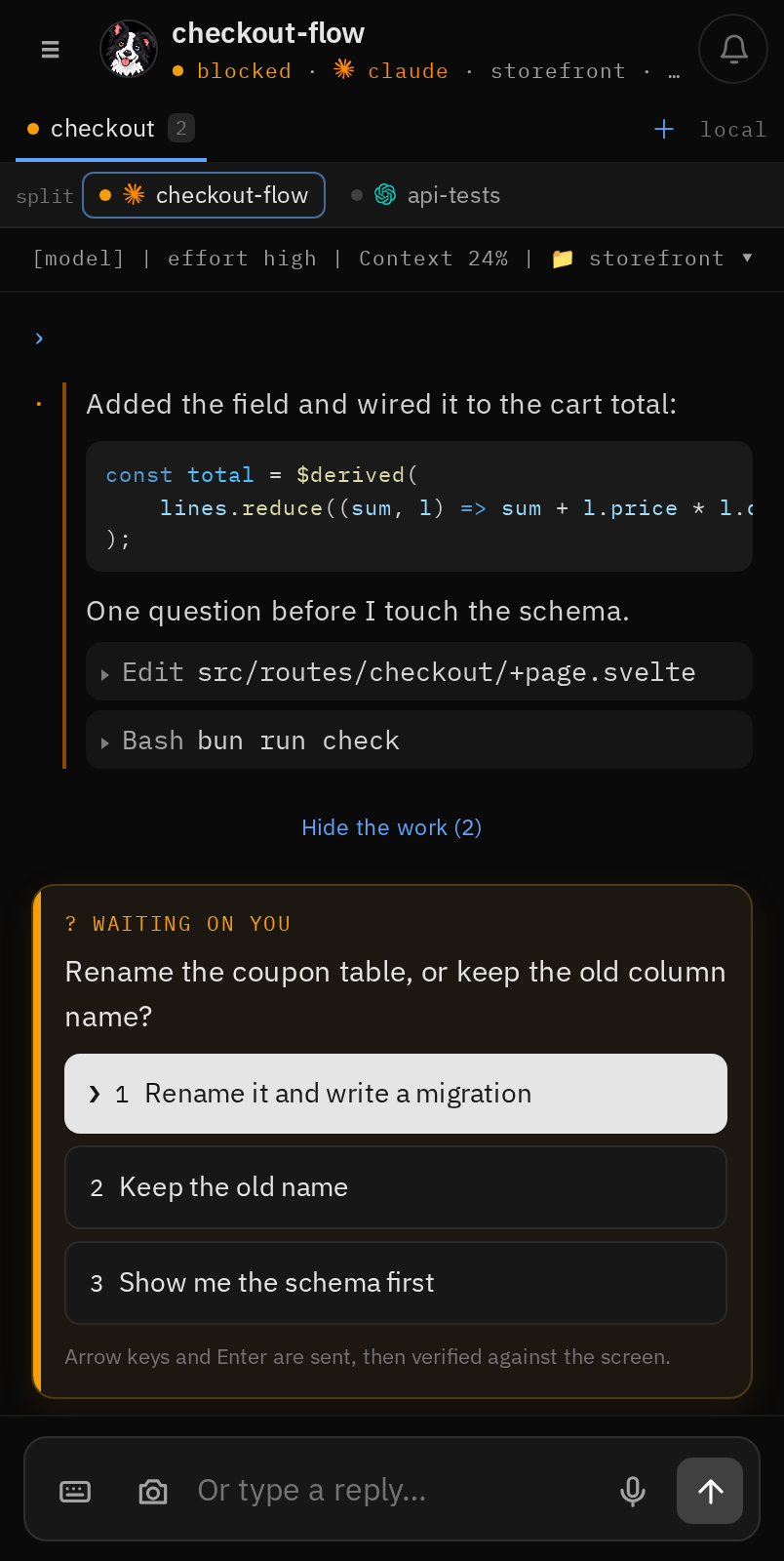
A conversation Prose first, code highlighted, tools folded away. |
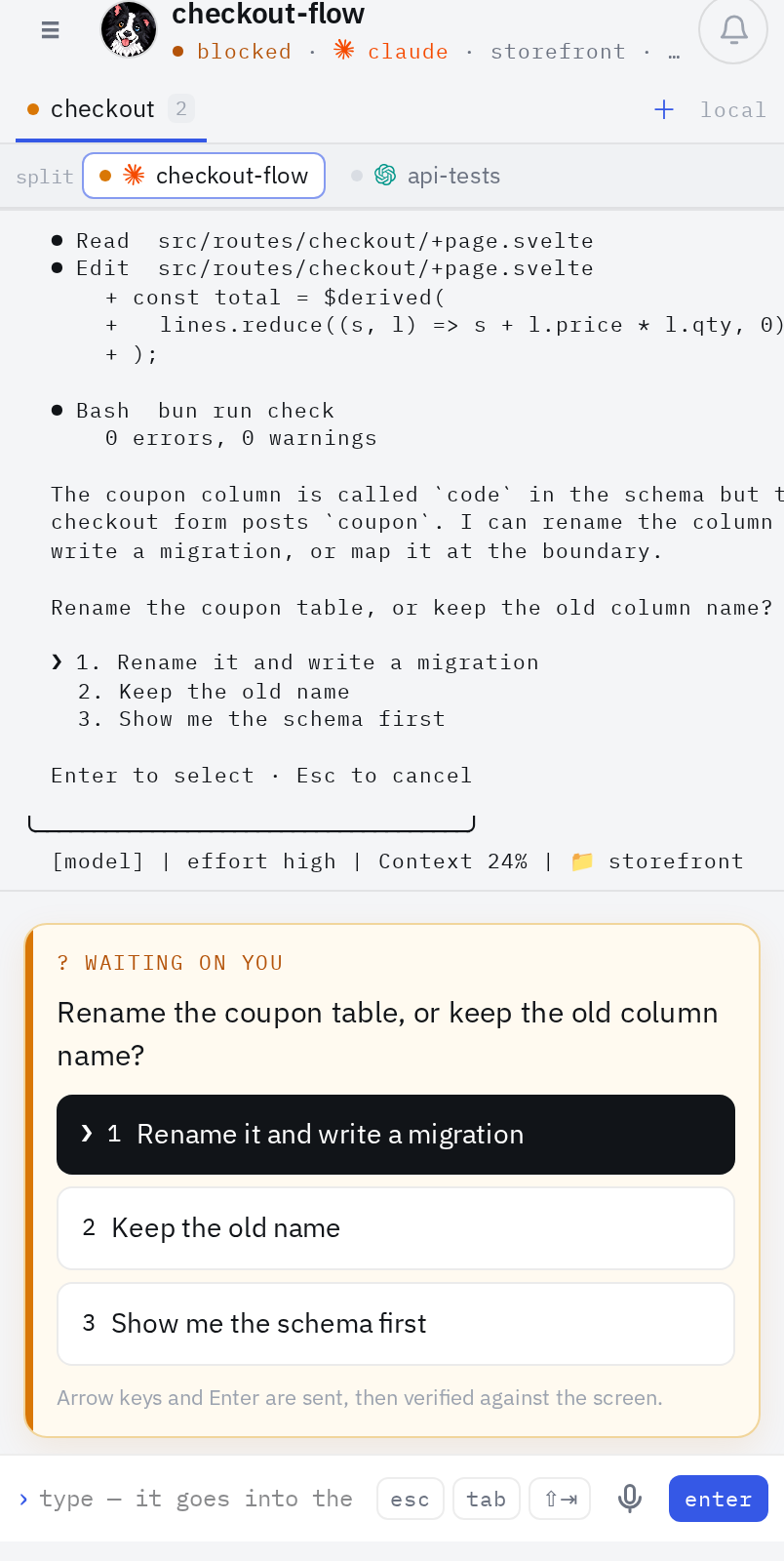
Terminal mode The pane as the machine draws it. |
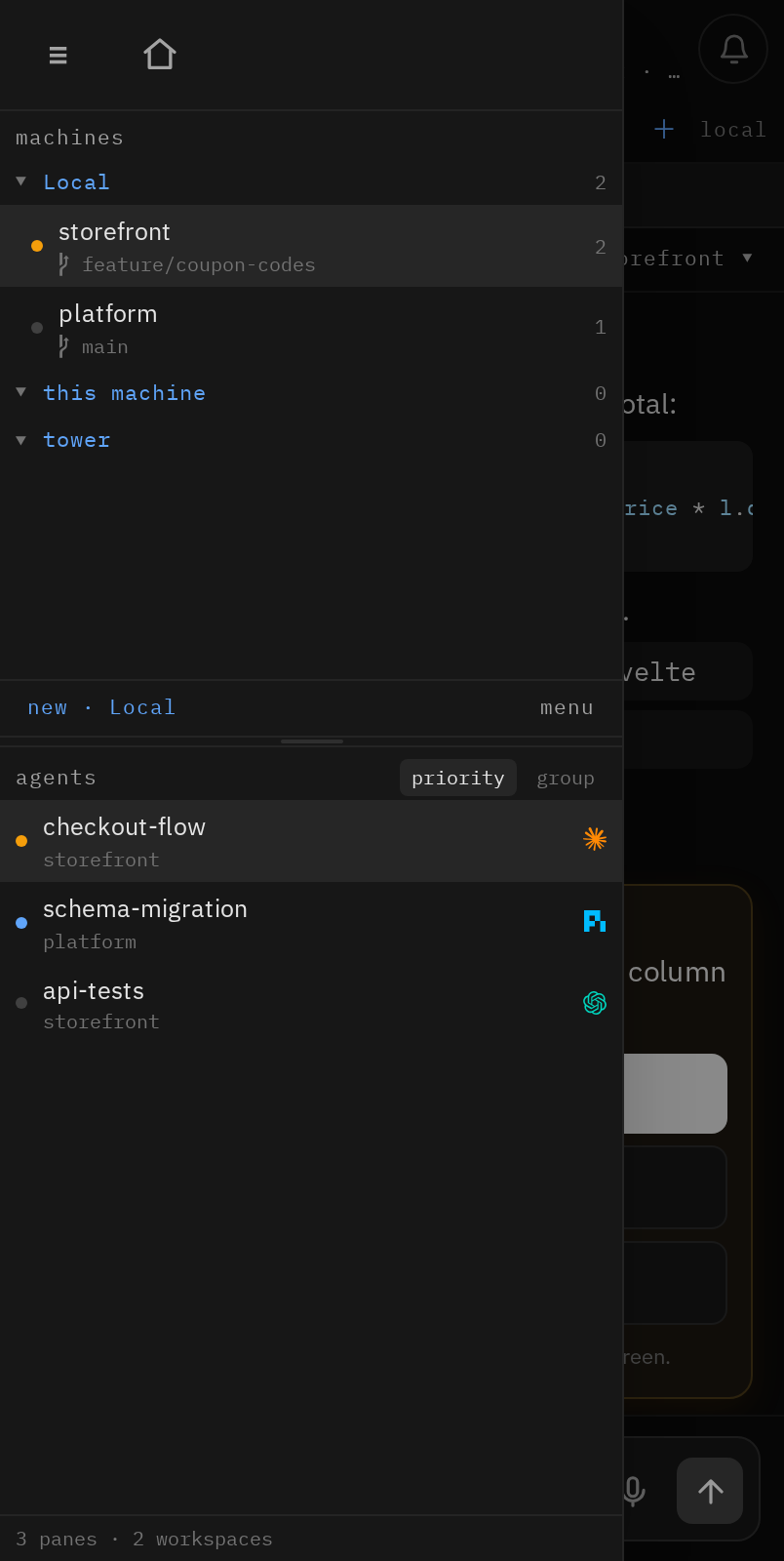
The panel Machines, workspaces, tabs and panes. |
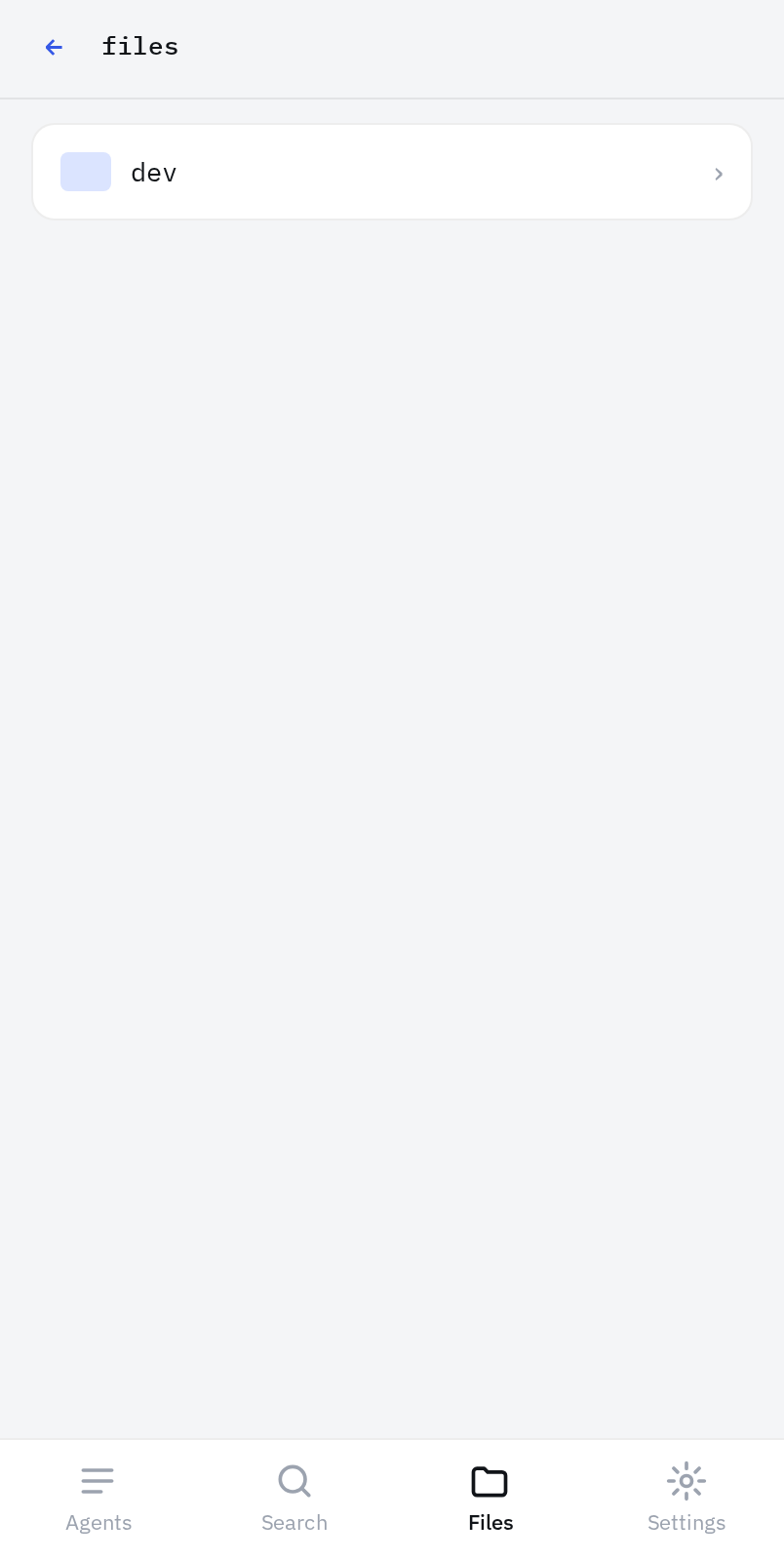
Files Browse and preview, confined to roots you choose. |
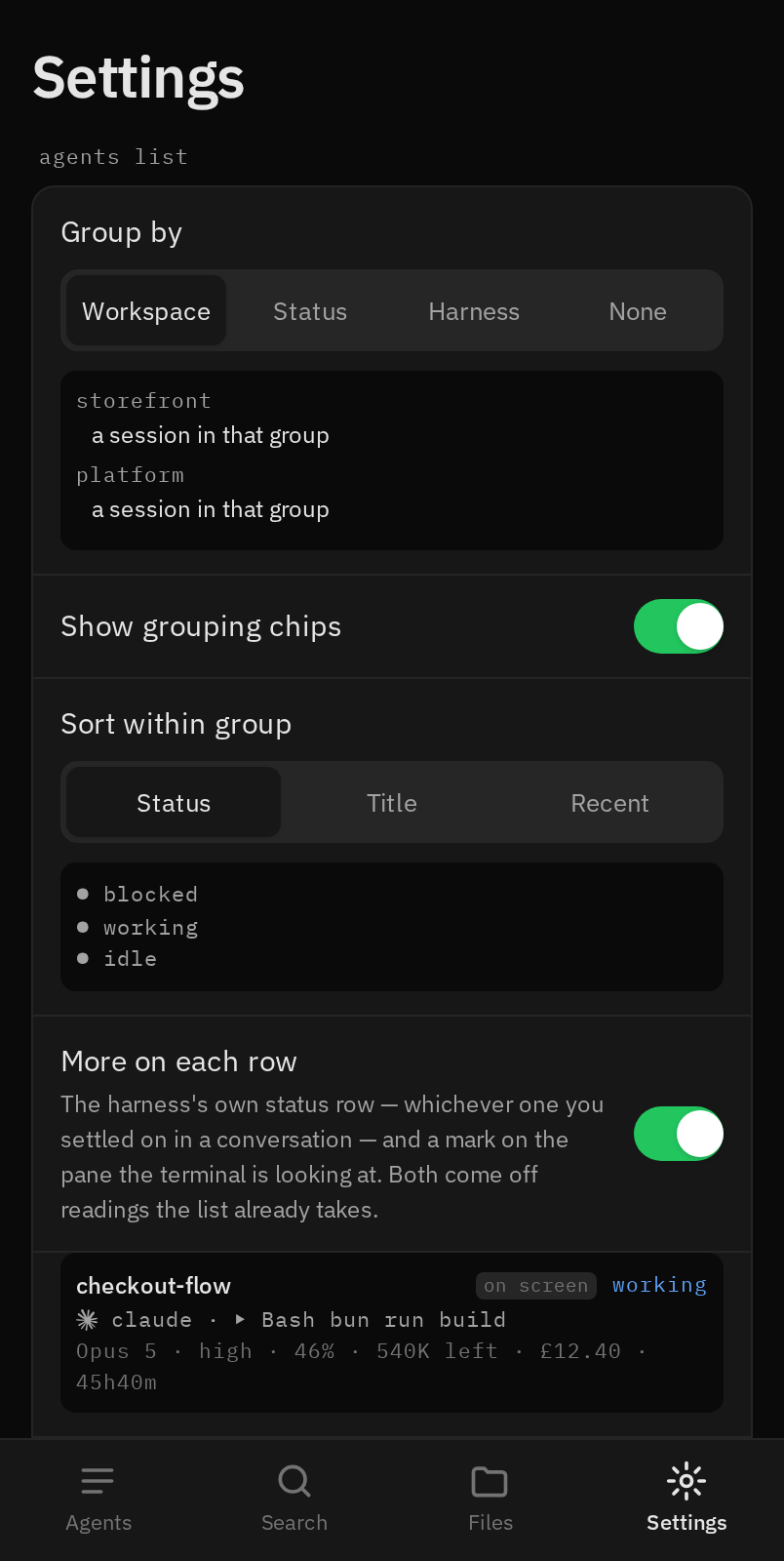
Settings Every control shows what it does. |
Light and dark throughout; the shots above mix the two on purpose. Every image is captured against invented data by scripts/screenshots.ts.
How it works
herdr (this host) ──unix socket──┐
                                 ├─> bordr (SvelteKit on Bun) ──HTTPS/SSE──> your phone
herdr (named machines) ──ssh -L──┘
- Read. Each harness's own session transcript, straight off disk: Claude
Code, codex, pi, omp, agy (Antigravity), grok and copilot today. Harnesses
without an adapter fall back to a cleaned terminal snapshot. - Write. Always through herdr's socket API:
agent.promptfor text,agent.send_keysfor pickers and the key strip,pane.send_textfor typing
in terminal mode. - Reach. Other machines over an SSH forward to each one's own herdr socket:
the ones herdr lists, or only thoseBORDR_MACHINESnames.
SECURITY.md says when bordr refuses herdr's list. - Live. One herdr event stream, fanned out to phones over SSE.
- Push. A boot-time watcher fires a Web Push the moment any agent turns
blocked.
Before you start
bordr has no login. Anyone who can reach its port can run any command on
this machine, and on every other machine bordr reaches, and can read
the files you point it at. That is deliberate: the tailnet is the boundary.
Three things follow.
- Serve, never funnel.
tailscale servekeeps the address inside your
tailnet.tailscale funnelpublishes it to the whole internet, and because
it proxies to loopback it walks straight past bordr's own bind guard. - Sharing a tailnet? Restrict who can reach the host and port with
Tailscale grants,
and setBORDR_ALLOWED_USERSso bordr checks the caller's identity itself. - Never put it on a network you do not control. It refuses to serve on a
public address unless you explicitly override it.
SECURITY.md is the whole argument, and it is short. Read it
before you install.
Prerequisites
| Thing | Why | Notes |
|---|---|---|
| Bun 1.2+ | runtime + package manager | install per the Bun docs |
| herdr | the terminal workspace bordr drives | must be running; protocol 19 or newer, tested on 20 |
| At least one coding agent | the point of it all | Claude Code, codex, pi, omp, grok… running inside herdr panes |
| herdr's integration per harness | how bordr finds each transcript | herdr integration install claude (and codex, pi, omp…) |
| Tailscale | the security boundary + HTTPS | optional for a loopback-only trial, required to use a phone |
| Linux or macOS host | herdr's socket API | the phone is any modern browser |
Quickstart
If you have a coding agent
Point it at this repository and give it this:
Install bordr from this repository. Read
README.mdandSECURITY.mdfirst.
Install dependencies with Bun, create.envfrom.env.example, setHERDR_SOCKETto my herdr session socket, keepHOSTon127.0.0.1, build
it, and run the smoke test. Then tell me the exacttailscale servecommand
for my machine and what to open on my phone. Do not bind to0.0.0.0.
Then read what it did before trusting it. Everything below is the same work by
hand, in order.
By hand
1. Get it and install.
git clone https://github.com/AnnasCookies/bordr.git
cd bordr
bun install
2. Find your herdr socket. herdr keeps one per session:
ls ~/.config/herdr/sessions/*/herdr.sock
If that prints nothing, herdr is not running. Start a session
(herdr --session main) and look again.
While you are there, install herdr's integration for each harness you use.
It is how herdr learns which session file an agent is writing, and without it
bordr can only show the terminal:
herdr integration install claude   # and codex, pi, omp, grok, ...
herdr integration status
3. Configure.
cp .env.example .env
Then edit .env:
HERDR_SOCKET, the path from step 2.HOST, leave it as127.0.0.1. See the warning above. bordr answers503
to everything with it unset, because the adapter's own default is every
interface.PORT, anything free;7682by default.BORDR_FILE_ROOTS, optionalname:pathpairs the file browser may serve,
comma separated, defaultdev:~/Documents/Dev. Point it only at directories
you would be content to read over the network. Dotfiles are refused outright,
so.envand.sshare never served even inside a configured root.
4. Build and run.
bun run build
bun ./build/index.js
Open http://127.0.0.1:7682 on the same machine. You should see your agents.
If untrusted containers can reach host loopback, do not use this TCP trial.
Follow the private Unix-socket setup
instead. Docker Desktop's host gateway can bypass the proxy and forge identity
headers; BORDR_ALLOWED_USERS does not repair that network boundary.
5. Reach it from a phone. A phone needs HTTPS, both for notifications and
to install the app to the home screen. On a tailnet:
sudo tailscale serve --bg --https=8444 http://127.0.0.1:7682
tailscale serve status
That prints the URL. Open it on your phone and add it to the home screen.
6. Notifications (optional). Web Push needs its own keys:
bunx web-push generate-vapid-keys
Put them in .env as VAPID_PUBLIC_KEY, VAPID_PRIVATE_KEY andVAPID_SUBJECT (any URL you control, or a mailto:). Restart, then tap the
bell in the app. Without these keys everything else works and the push endpoint
returns 503.
BODY_SIZE_LIMIT and IDLE_TIMEOUT in .env raise two adapter defaults that
are too small for phones (a 512KB request cap refuses every camera photo). Bun
reads .env when you run the build by hand, and the unit below sets the same.
Keep it running
Pick one. Bordr works with either and finds whichever you installed; Settings →
System shows which one it is driving.
System units (recommended on a machine that stays up):
deploy/install-system-units.sh --session main   # renders deploy/system/* into /etc/systemd/system
bun run build && bun scripts/publish-build.ts   # the copy the unit runs
sudo systemctl enable --now herdr-session bordr
sudo tailscale serve --bg --https=8444 unix:/run/bordr/bordr.sock
User units (a single-user desktop, no root needed):
mkdir -p ~/.config/systemd/user
cp deploy/user/[email protected] deploy/user/bordr.service ~/.config/systemd/user/
# edit WorkingDirectory, EnvironmentFile and ExecStart (`which bun`, `which herdr`)
bun run build && bun scripts/publish-build.ts
systemctl --user daemon-reload
systemctl --user enable --now herdr-session@main bordr
loginctl enable-linger "$USER"   # so it runs without a login and starts at boot
sudo tailscale serve --bg --https=8444 unix:"$XDG_RUNTIME_DIR/bordr/bordr.sock"
--session / herdr-session@<name> is the herdr session bordr follows —default for the one plain herdr attaches to. Run only one of the two:
two servers for one session fight over the same socket.
Both shipped bordr units use a private Unix socket, not the TCP port from the
manual trial. Set BORDR_URL in .env to the HTTPS URL printed by Tailscale sobun run deploy smoke-tests the same route the phone uses. When upgrading an
existing unit, replace its TCP Tailscale target with the socket target above;
restarting bordr alone does not migrate that proxy. Check tailscale serve status
and verify the former TCP port no longer accepts connections. Do not enable a
TCP fallback on a host with untrusted containers.
Why system units are recommended. A user unit dies with the systemd user
manager, and that is not hypothetical: on 2026-09-20 a stray SIGTERM touser@1000 made it run exit.target, which stopped herdr, bordr and all 18
agent panes at once and SIGKILLed six agents. loginctl enable-linger keeps a
manager alive across logouts but never resurrects one that has exited, so
nothing came back until the next login.
The system installer also adds a polkit rule
(/etc/polkit-1/rules.d/50-bordr.rules) letting your user start, stop and
restart herdr-session and bordr — those two units, those three verbs —
without a password. Settings → System and bun run deploy need it: they run as
you, with no terminal to answer a sudo prompt.
Editing the units by hand is not required: the installer fills in your user,
group, home, this checkout's path, and the bun and herdr it finds on PATH
(override with BUN_BIN=… HERDR_BIN=…). Do it in deploy/system/ if you need other changes, not in/etc/systemd/system, or your next install quietly reverts them.
The herdr unit runs herdr --session <name> server headlessly so the
session exists at boot, and its ExitType=cgroup is what lets a live-handoff
restart (Settings → System → Restart herdr) keep your agents running. This
matters more than it looks: if you reach herdr
through a browser terminal such as ttyd, that spawns herdr --session main
per connection, so after a reboot no herdr server exists until a human
opens the terminal, and bordr comes up pointing at nothing.
On macOS there is no systemd; a launchd agent or a herdr pane that runsbun ./build/index.js does the same job.
To deploy a change, bun run deploy builds, copies the result to~/.local/lib/bordr (BORDR_LIVE_DIR moves it) with its own production
dependencies, stages the release completely, then switches the release symlink,
restarts the service and smoke tests it. The unit runs that copy
rather than build/, so a build for a check never swaps files under the running
app. A phone that has the app open keeps running the old code until it
reloads, so the app checks for a new build every 30 seconds (and whenever it
comes back to the foreground) and offers a "tap to reload" pill.
Already-installed units must be upgraded too: re-rundeploy/install-system-units.sh (or copy deploy/user/bordr.service and runsystemctl --user daemon-reload if you kept the user-unit layout), then restart
after publishing. bun run deploy finds the unit in whichever manager holds it.
For a custom BORDR_LIVE_DIR, set the unit's ExecStart to Bun plus<BORDR_LIVE_DIR>/index.js; changing the environment variable alone does not move
the unit. An existing real directory requires the one-time commandbun scripts/publish-build.ts --migrate: it stages first, stops the user bordr
service, switches, and starts it. A failed activation restores the previous pathname
and restarts the old release. Use the same stop/switch/start sequence for custom
service managers. Normal publication refuses real directories; later symlink
switches are atomic. Failed staging/installation leaves the active release untouched.
Previous self-contained releases remain beside it in <BORDR_LIVE_DIR>.releases
for rollback/running processes; remove old releases only after verifying no service
uses them. Retired hashed client assets are retained for seven days after retirement, not
from build time. Emitted-asset manifests keep inherited chunks from being renewed.
Local OMP slash-command discovery remains automatic and invokes OMP_BIN (defaultomp) directly. This can execute installed extensions and session-start hooks;
it is not a read-only filesystem listing. Remote panes never run that probe or
scan their project paths on this host.
Model badges show the latest recorded model metadata, including local switches
outside the visible transcript window. Remote reads remain bounded; if no model
record is available, the badge is unknown rather than using an opening guess.
Pi's customizable status display cannot prove idle. Herdr lifecycle remains
authoritative; a stopped transcript conflicting with Working is diagnostic only.
If something is wrong
| Symptom | Cause |
|---|---|
503 and a message about authentication |
HOST is unset, or not loopback or a tailnet address; the guard is doing its job |
421 and a message about the hostname |
you reached bordr by a name it does not serve; BORDR_ALLOWED_HOSTS if it is yours |
| "herdr is not running" | HERDR_SOCKET points at nothing; re-run step 2 |
| "herdr version not supported" | herdr older than protocol 19 |
| No agents listed and no error | herdr is running but has no agent panes |
| Notifications do nothing | no VAPID keys, not HTTPS, or on an iPhone not installed to the home screen |
| Conversation shows terminal text, not chat | the label says why: no adapter for that harness, or herdr integration install not run |
Using it
Mostly it is what it looks like. The parts that are not:
- Swipe left and right across a conversation for the next and previous
agent in the list. Swiping from a screen edge still goes back. - Long-press a file row for Download, Share, Send and Copy path.
- Search needs every word to match;
"quote a phrase",-excludea word,
and the chips narrow to you, the agent, or one harness. Results are capped
per session so one chatty pane cannot crowd out the rest, and say when they
are. - Slash commands come in three kinds: print-style ones show their output
inline, panel-style ones (/usage,/config) render in the screen peek, and
selector menus (/model,/effort) become tappable cards. - A
!draft is a shell command, not a message to the agent. The box says
so before you send it. - Settings has a Connection screen showing exactly what bordr is talking
to, and a button to send yourself a test notification.
Security model
The tailnet is the entire boundary, treat bordr like an open terminal on
every machine that can reach it, and on every machine it can reach. Other
machines come from herdr's own list, narrowed by BORDR_MACHINES;
SECURITY.md covers when bordr will not inherit it.
There is no login. Served artifacts render in
a sandboxed opaque origin and cannot call bordr's APIs; the file browser is
traversal- and symlink-proofed to its configured roots and refuses dotfiles at
the resolver, so .env cannot be listed or fetched; the keypad endpoint
accepts only inert navigation keys. Upload ingress accepts any file type within
the size limit; same-origin download egress permits only verified raster images.
Attachments are host-local/shared-storage paths: a remote pane must already
share those paths. Bordr does not transfer files to a remote machine.
If you ever expose bordr beyond your tailnet, add real authentication first.
Development
bun run dev          # against your live herdr
bun run test:unit    # protocol, client, parsers, adapters (vitest)
bun run test:e2e     # phone-viewport Playwright against the adapter output; some tests need a live herdr with agents
bun run lint && bun run check
bun run deploy       # build + restart + smoke-test the deployed page
bun run smoke <url>  # load the deployed page in a real browser and assert it works
bun run scripts/probe-harness.ts <kind>   # drive one harness through the whole phone flow and report
test:e2e and smoke drive a real Chromium; the first run downloads it
(bunx playwright install chromium).
smoke exists because every server-side check can pass while the app is broken:
a build that left stale asset hashes in the HTML served 200 for the document,
the API and the SSE stream while every JS bundle 500'd, so the page never
hydrated. Always finish a deploy with it.
Licence
MIT. See LICENSE.
Reviews (0)
Sign in to leave a review.
Leave a reviewNo results found