claude-threads
Health Gecti
- License — License: Apache-2.0
- Description — Repository has a description
- Active repo — Last push 0 days ago
- Community trust — 34 GitHub stars
Code Gecti
- Code scan — Scanned 12 files during light audit, no dangerous patterns found
Permissions Gecti
- Permissions — No dangerous permissions requested
Bu listing icin henuz AI raporu yok.
Think of it as screen-sharing for AI pair programming, but everyone can type.
Claude Threads

Claude Code × Slack & Mattermost







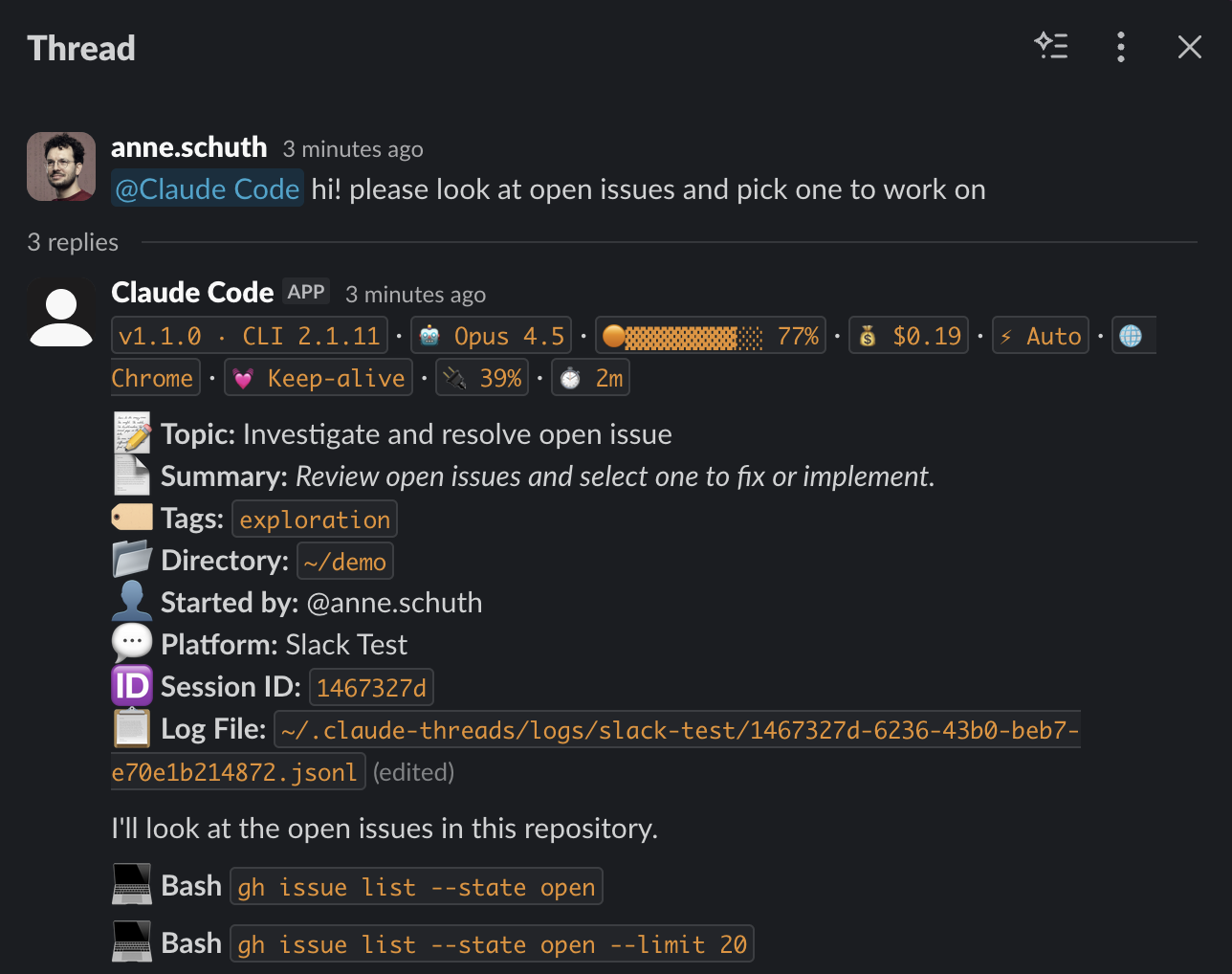
Run Claude Code from your team's chat. The bot lives on your machine, next to your checkout and your local tools. Sessions stream live into Slack or Mattermost threads where teammates watch and steer what Claude does. No cloud sandbox and no enterprise plan required: it works with the Claude subscription or API key you already have.
Think of it as screen-sharing for AI pair programming, but everyone can type.
 |
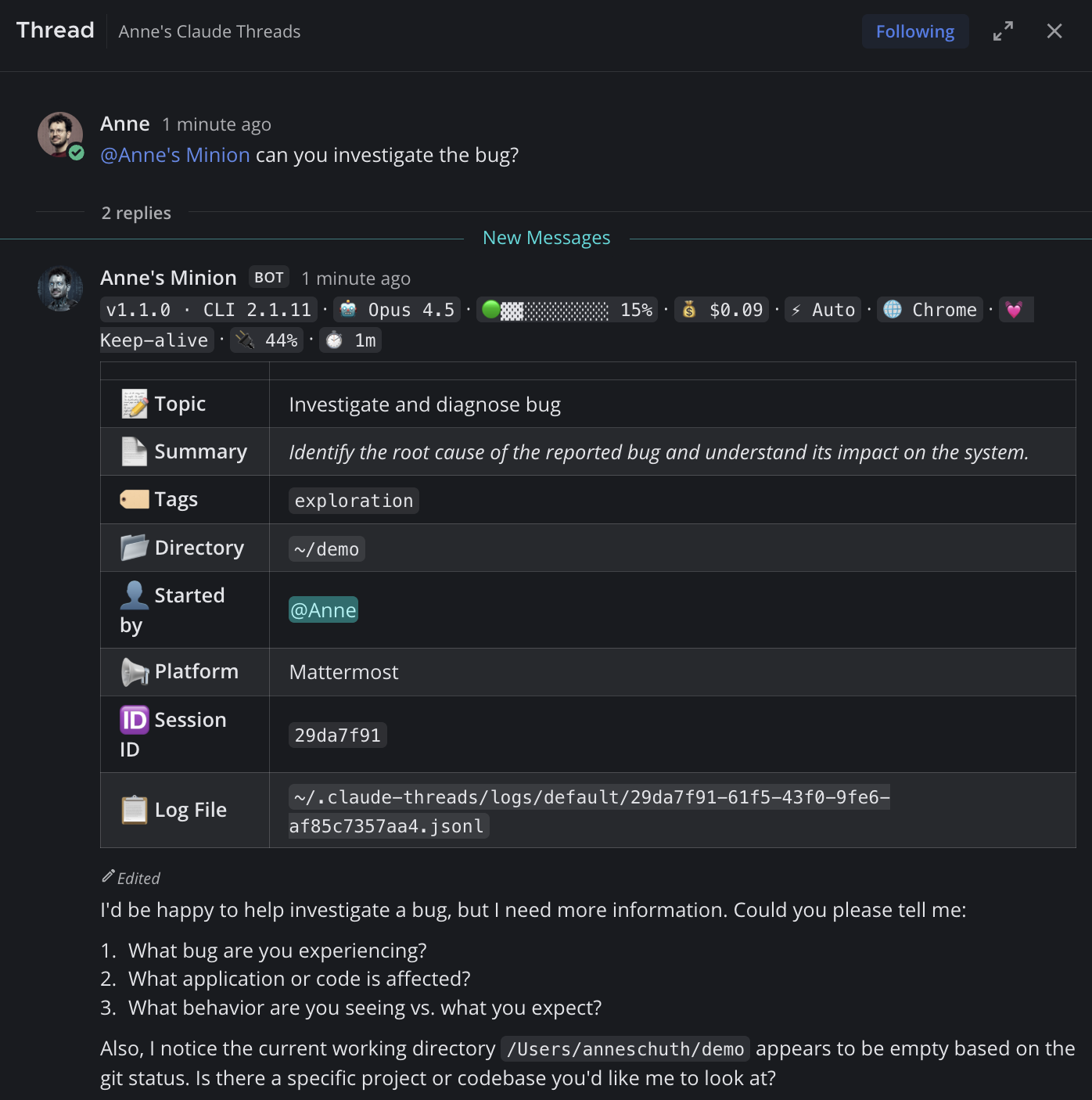 |
| Slack | Mattermost |
How it works
- Mention the bot in a channel:
@claude fix the flaky test in ci.yml - It spawns a real Claude Code session in a working directory on your machine.
- Everything streams into the thread: output, diffs, task lists, permission prompts.
- Steer by replying in the thread or reacting with emoji. Anyone you invite can do the same.
Features
- Live streaming - Responses, tool calls, diffs, and a sticky task list render in the thread as the session runs
- Slack and Mattermost - Connect multiple workspaces at once. Mattermost support means this also works where chat is self-hosted and cloud assistants cannot go
- A session per thread - Concurrent sessions, each with its own working directory, resumed automatically after a bot restart
- Your machine, your setup - Sessions use your local checkout plus whatever MCP servers and plugins you already configured
- Your existing subscription - Any Claude Pro/Max account or API key works. An optional multi-account pool routes each new session to the account with the most subscription headroom and cools down rate-limited ones (docs)
- Permission control by emoji -
defaultprompts the thread for every tool use (👍/✅/👎),autolets Claude's classifier approve low-risk actions,bypassskips prompts entirely. Switch per session with!permissions - Collaboration -
!inviteteammates into a session; commits Claude makes getCo-Authored-By:trailers for everyone involved - A real chat citizen - Nine MCP tools let Claude post files, follow permalinks, react, and DM, each behind its own guardrail (see What Claude can do in your chat)
- Git worktrees -
!worktree feature/fooisolates Claude's changes on a branch - Files both ways - Drop any file into the chat for Claude to read, with full multimodal for images and PDFs; Claude posts screenshots, plots, or PDFs back with
send_file(100 MB cap) - Quiet mode and verbosity dials -
!mentions onmakes a session respond only when mentioned; session headers and the channel sticky each havefull/minimal/hiddenmodes - Runs on macOS, Linux, and Windows - Windows via Git Bash or WSL
- Auto-update - The bot watches npm for new versions;
!update nowapplies one from chat
What Claude can do in your chat
Each session runs its own MCP server, giving Claude tools that act on the chat platform. Every tool carries its own guardrail; nothing reaches beyond the channels the bot can already see.
| Tool | What Claude does with it | Guardrail |
|---|---|---|
send_file |
Post a file from the working directory into the thread | Path validated against the session working directory |
read_post |
Resolve a Slack or Mattermost permalink to its content | Bot's channel plus public channels only |
list_thread |
Read the current thread, or a permalinked one | Same channel scoping |
read_channel_history |
Read recent messages from a channel | Bot's channel plus public channels, capped at 100 messages |
search_messages |
Search messages | Mattermost only, capped at 25 results |
react_to_post |
Add an emoji reaction | Defaults to the message that triggered it |
update_own_post |
Edit one of its earlier posts | Bot-authored posts only |
send_dm |
Send a direct message to a channel member | 3 per recipient per session; the thread approves each one |
permission_prompt |
Ask the thread to approve a tool use | This one is the approval flow (👍/✅/👎) |
The full reference, including inputs and scoping rules, is in docs/MCP-TOOLS.md.
Quick Start
# Install (pick one)
bun install -g claude-threads   # with Bun (recommended)
npm install -g claude-threads   # with Node

# Run the setup wizard
cd /your/project
claude-threads
The interactive wizard configures your Slack or Mattermost bot, tests the credentials, and gets you running in minutes. For creating the bot account itself, follow the Setup Guide.
Prerequisites
- Bun 1.2.21+ or Node 20+ - Install Bun or Install Node
- Claude Code CLI - test with
claude --version(needs a subscription or API key)
Then mention the bot in your channel:
@claude help me fix the bug in src/auth.ts
Session Commands
Type !help in any session thread:
| Command | Description |
|---|---|
!help |
Show available commands |
!release-notes |
Show what changed in the running version |
!context |
Show context usage |
!cost |
Show token usage and cost |
!compact |
Compress context to free up space |
!cd <path> |
Change working directory (restarts Claude) |
!permissions <mode> |
Set permission mode: default / auto / bypass |
!mentions [on|off] |
Quiet mode: only respond when @mentioned (bare !mentions toggles) |
!worktree <branch> |
Create and switch to a git worktree (also: list, switch, remove, cleanup, off) |
!plugin <list|install|uninstall> [name] |
Manage Claude Code plugins (restarts Claude) |
!invite @user |
Invite a user to this session (added as Co-Authored-By: on commits) |
!kick @user |
Remove an invited user |
!github-email <email> |
Register your GitHub noreply email so !invite can attribute commits to you |
!update |
Show auto-update status (!update now / !update defer) |
!bug <desc> |
Report a bug with context (creates a GitHub issue) |
!approve |
Approve pending plan (alternative to 👍; also !yes) |
!escape |
Interrupt current task, session stays active (also !interrupt) |
!stop |
Stop this session (also !cancel) |
!kill |
Emergency shutdown (kills ALL sessions and exits the bot) |
Unknown !commands are checked against Claude Code's own slash commands and passed through when they match.
Interactive Controls
Permission approval - When Claude wants to run a tool:
- 👍 Allow this action
- ✅ Allow all future actions
- 👎 Deny
Plan approval - When Claude presents a plan: 👍 approve, 👎 request changes
Questions - React with 1️⃣ 2️⃣ 3️⃣ 4️⃣ to answer multiple choice
Session control - ⏸️ interrupt, ❌ or 🛑 stop, 🔄 resume a timed-out session
Housekeeping - 🔽 collapses long task lists and subagent output; 🐛 on an error post opens a bug report
Collaboration
!invite @colleague    # Let them participate
!kick @colleague      # Remove access
Messages from users outside the session can be approved one at a time by the session owner with a 👍 reaction.
Invited collaborators end up as Co-Authored-By: trailers on commits Claude makes during the session. Each collaborator runs !github-email <their-noreply-address> once (find yours at https://github.com/settings/emails) and the bot remembers it across sessions.
Git Worktrees
Keep your main branch clean while Claude works on features:
@claude on branch feature/add-auth implement user authentication
Or mid-session: !worktree feature/add-auth
Access Control
Restrict who can use the bot during setup, or reconfigure later with claude-threads --setup. An empty allowlist lets anyone in the channel start sessions, so leave it empty only in channels you trust.
Who may do what (start sessions, react to permission prompts, approve guest messages) is written down in the authorization model.
Documentation
- Setup Guide - Creating the bot account on Mattermost or Slack, step by step
- Configuration Reference - Every
config.yamloption, environment variables, CLI flags - MCP Tools Reference - The nine tools Claude gets in chat, with their guardrails
- Security Model - Authorization matrix and vulnerability reporting
- Changelog - Detailed release history
Updates
npm install -g claude-threads
The bot checks npm for new versions on its own and offers the update in chat.
License
Apache-2.0
Yorumlar (0)
Yorum birakmak icin giris yap.
Yorum birakSonuc bulunamadi