mate
Health Gecti
- License — License: Apache-2.0
- Description — Repository has a description
- Active repo — Last push 0 days ago
- Community trust — 45 GitHub stars
Code Uyari
- network request — Outbound network request in server/rate_limit_middleware.py
Permissions Gecti
- Permissions — No dangerous permissions requested
This tool is a production-ready multi-agent orchestration engine built on Google ADK. It allows developers to configure, manage, and connect AI agents using a web dashboard and the MCP protocol without requiring code changes.
Security Assessment
The project does not request dangerous system permissions. However, the automated scan flagged an outbound network request within the rate-limiting middleware, which is an expected behavior for an application routing LLM API calls to 50+ external providers. The quick start guide includes hardcoded default login credentials (admin/mate) for local deployment. While standard for initial setup, these default credentials must be changed immediately if deployed in a live environment. Overall risk: Low.
Quality Assessment
The project is under active development, with its most recent push occurring today. It uses the standard and permissive Apache-2.0 license, making it safe for commercial and private use. The repository has a modest but growing community footprint with 45 stars, which is typical for a relatively new, niche infrastructure tool.
Verdict
Safe to use, but ensure you change the default admin password before deploying the web dashboard in any shared or public environment.
Production-ready multi-agent orchestration engine built on Google ADK. Database-driven agent config, 50+ LLM providers, MCP protocol, persistent memory, web dashboard, RBAC.
MATE (Multi-Agent Tree Engine)





A production-ready multi-agent orchestration engine built on Google ADK. Configure agents, tools, and LLM providers from a web dashboard — no code changes needed. Supports 50+ LLM providers including local Ollama, full MCP protocol integration, persistent memory, RBAC, and multi-tenant project isolation.
Quick Start
# Clone and setup
git clone https://github.com/antiv/mate.git && cd mate
python -m venv .venv && source .venv/bin/activate
pip install -r requirements.txt

# Configure (minimum: set your API key)
cp .env.example .env
# Edit .env: set GOOGLE_API_KEY (or any supported LLM provider key)

# Run (uses SQLite by default, migrations auto-apply)
python auth_server.py
# Open http://localhost:8000 — login with admin/mate
Why MATE?
| Challenge | Raw ADK | MATE |
|---|---|---|
| Adding/modifying agents | Edit Python code, redeploy | Web dashboard or database, no redeploy |
| Switching LLM providers | Code changes per agent | Change model_name in config (e.g. ollama_chat/llama3.2) |
| Multi-team isolation | Manual | Project-scoped agent hierarchies |
| Access control | Build your own | Built-in RBAC per agent |
| Memory persistence | In-memory only | DB-backed conversation history + persistent memory blocks |
| Token cost tracking | DIY | 4-type token tracking with analytics dashboard |
| MCP interop | Not included | Agents as MCP servers + MCP tool consumption |
| Self-building agents | Not included | Agents create/update/delete other agents at runtime |
| Deployment | Scripts | Docker Compose, auto-migrations, health checks |
Screenshots
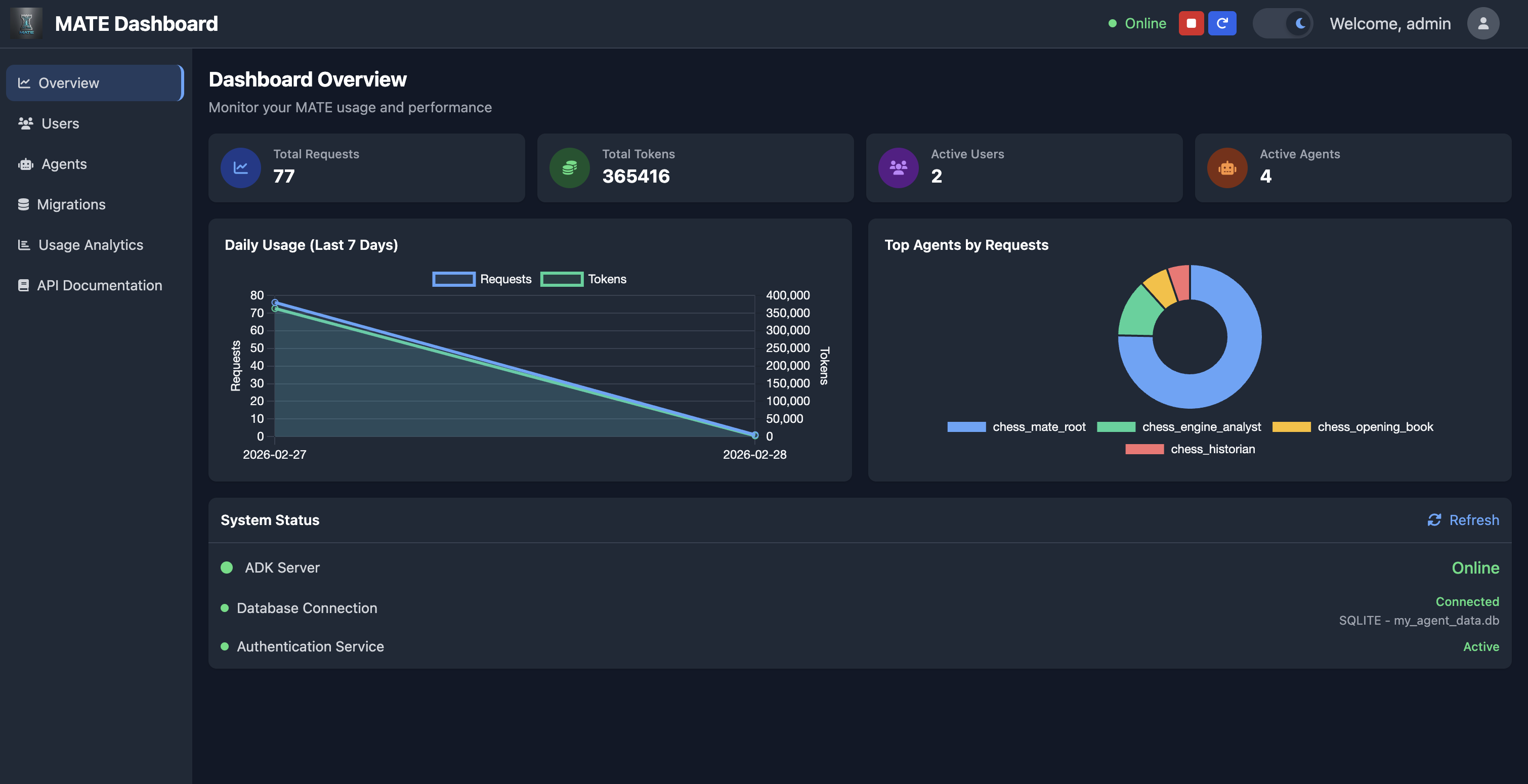
Dashboard Overview
Monitor usage, active agents, system health, and request trends at a glance.
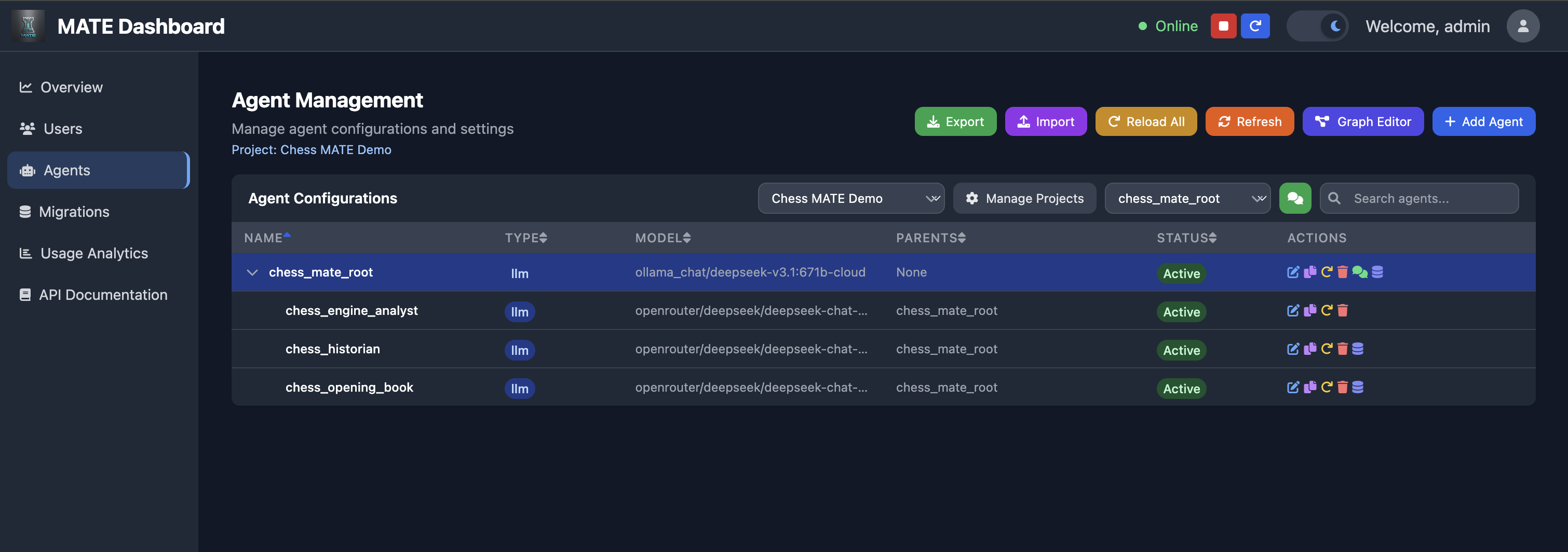
Agent Management
View and manage your full agent hierarchy — models, parent relationships, and status per project.
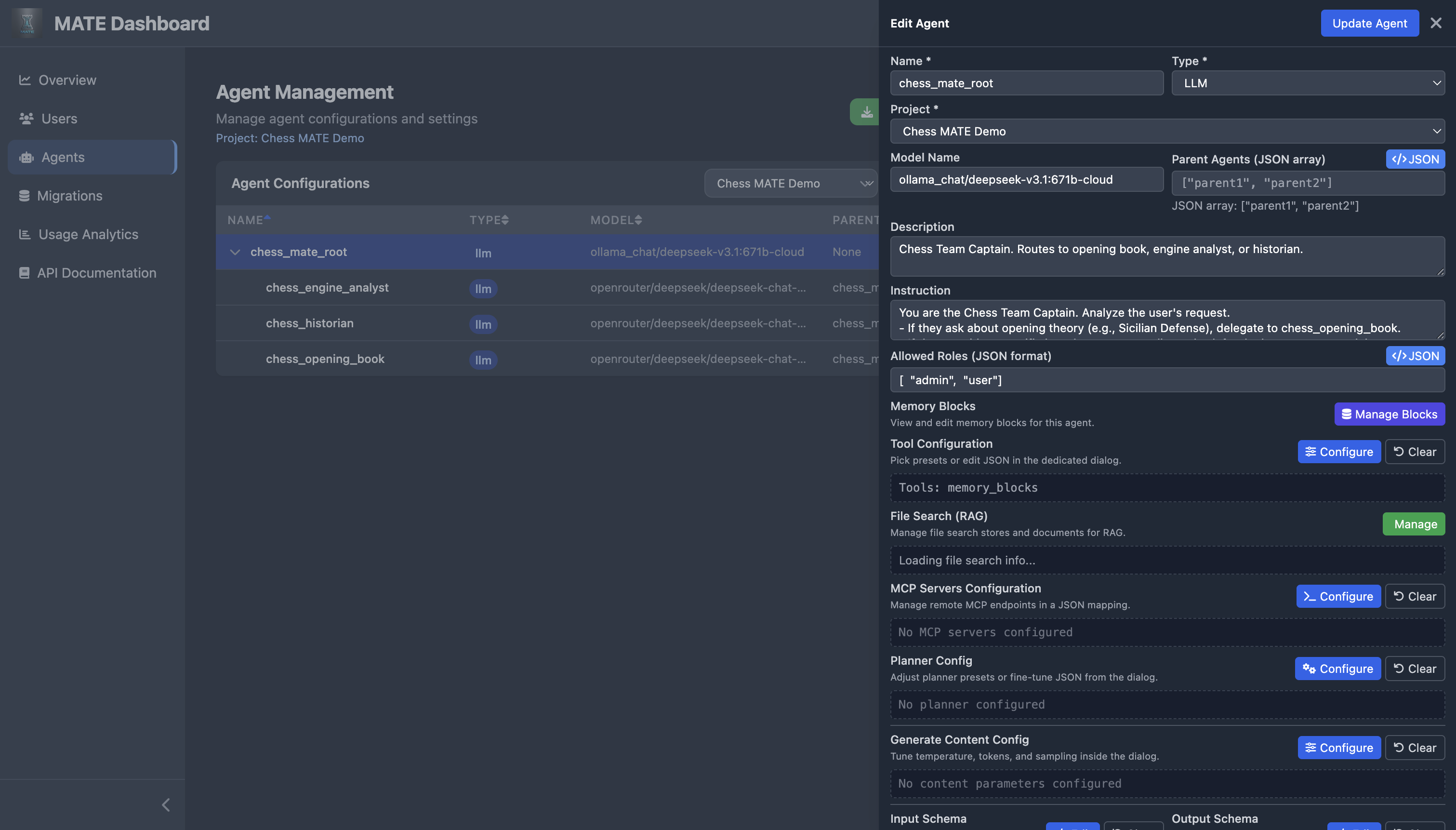
Agent Configuration
Edit every aspect of an agent: model, instruction, RBAC roles, memory blocks, tools, MCP servers, planner, content config, and schemas.
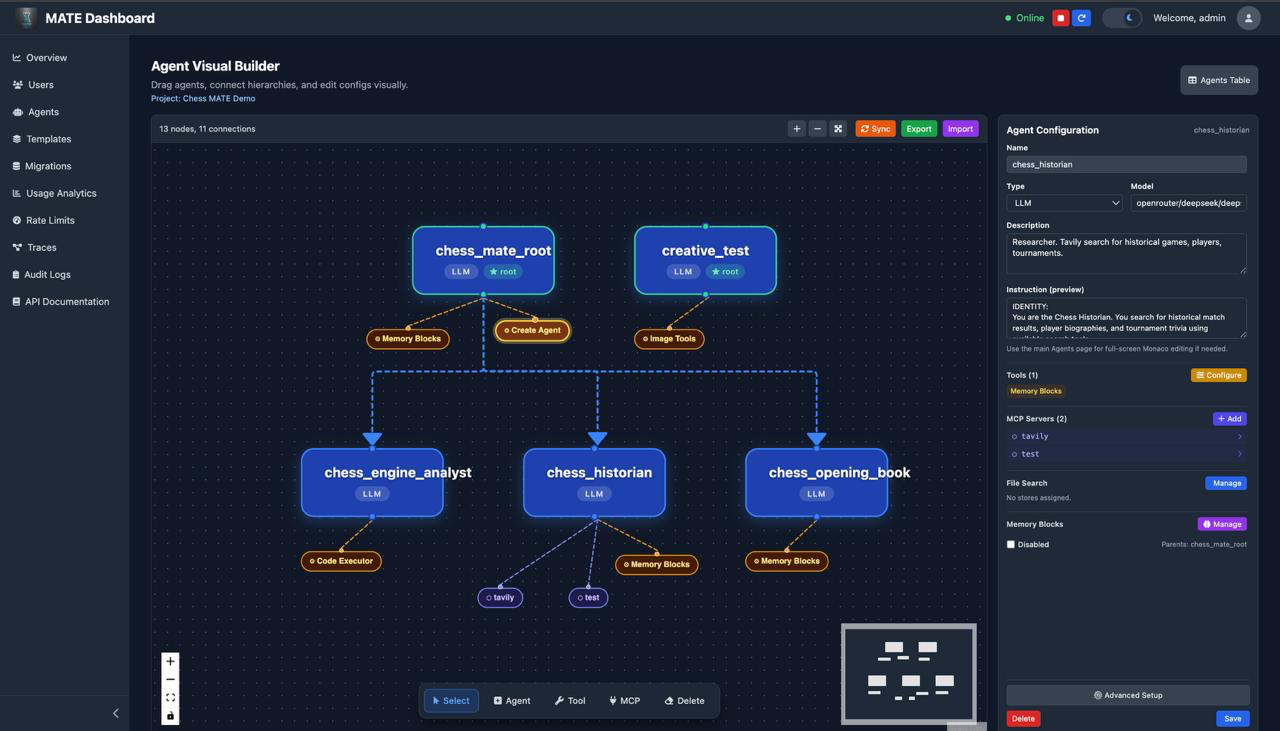
Agent Visual Builder
Drag-and-drop canvas for building agent hierarchies visually. See tool and MCP nodes attached to each agent, click to configure them inline, and create connections between agents without touching any JSON.
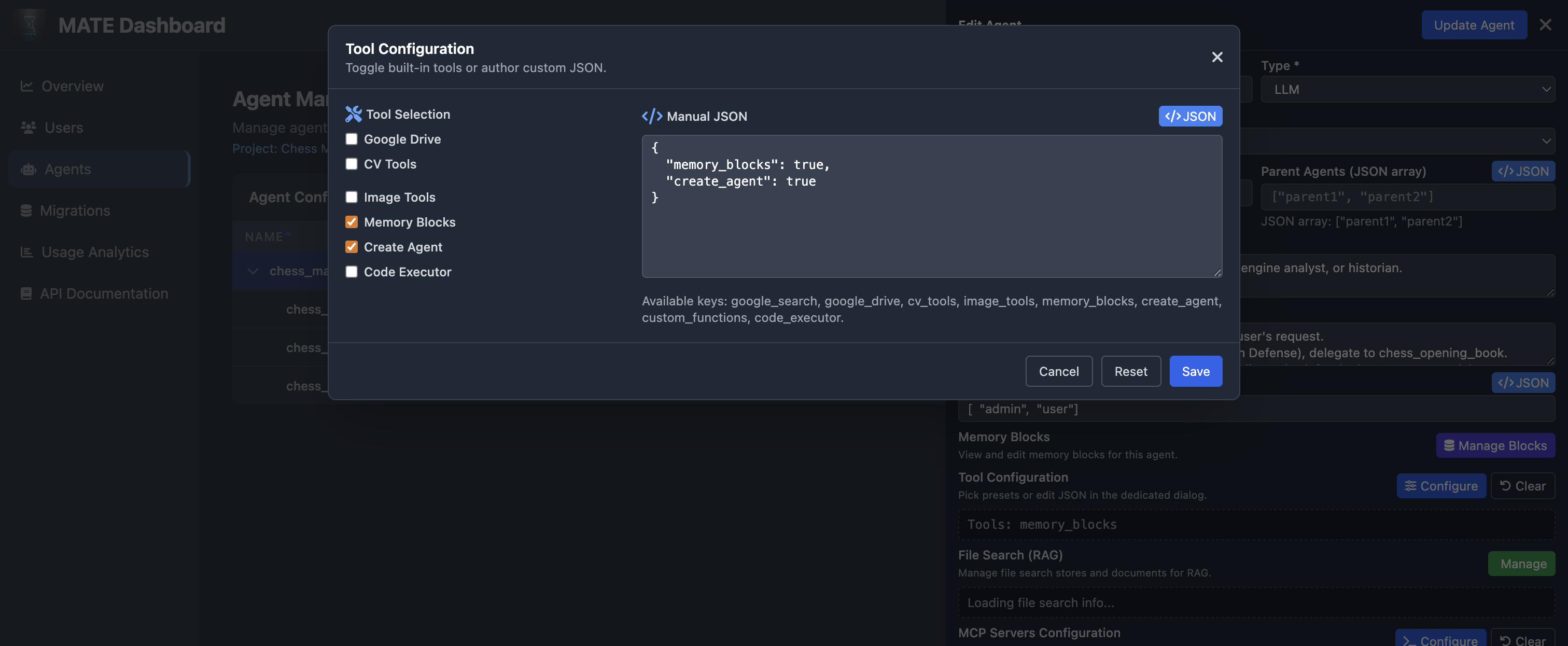
Tool Configuration
Toggle built-in tools or provide custom JSON — Google Drive, Search, CV, Image, Memory Blocks, Code Executor, and more.
Chat Interface
Multi-agent chat with event tracing, tool calls, and persistent memory — here a chess team delegates to specialized sub-agents.
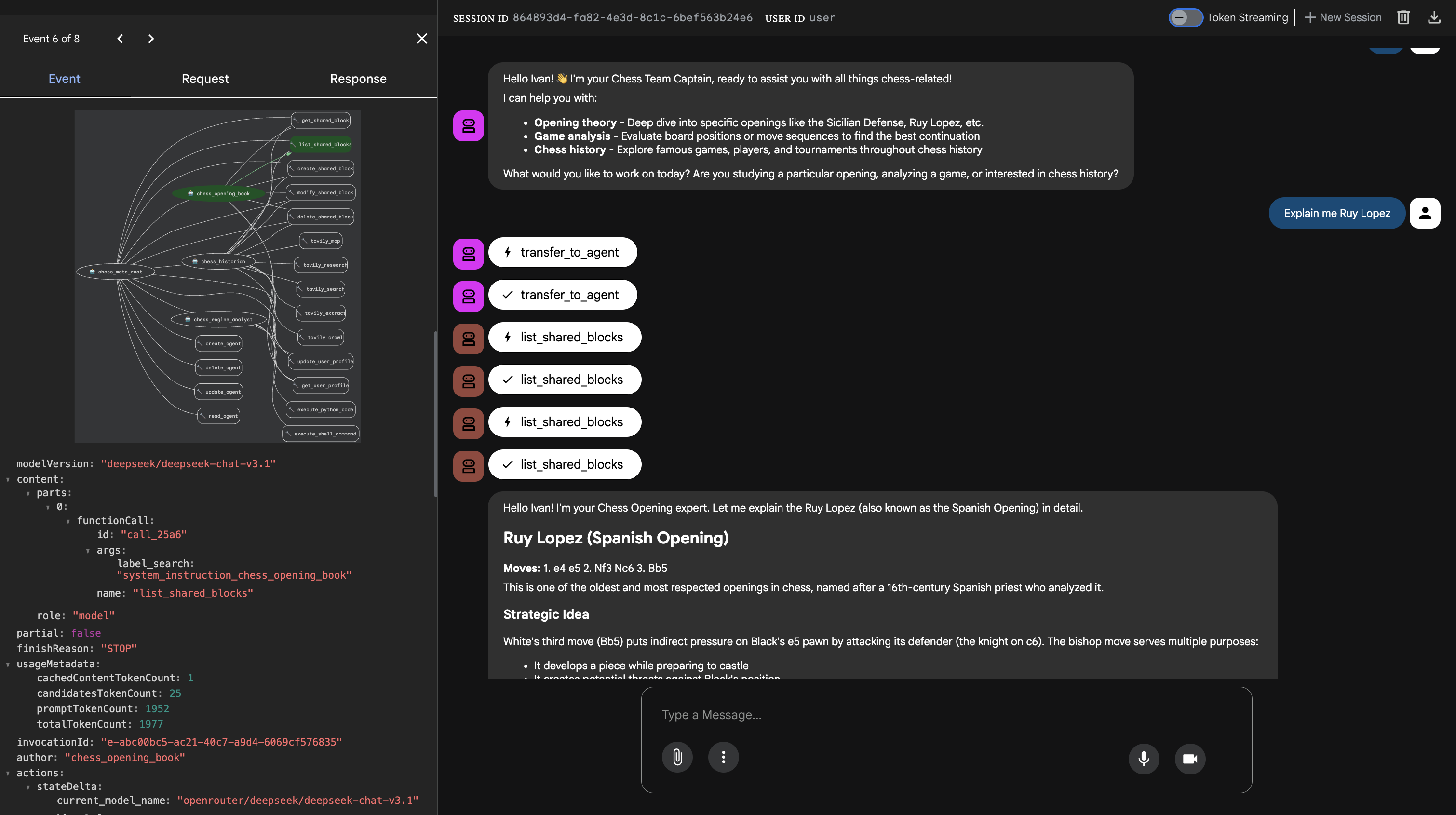
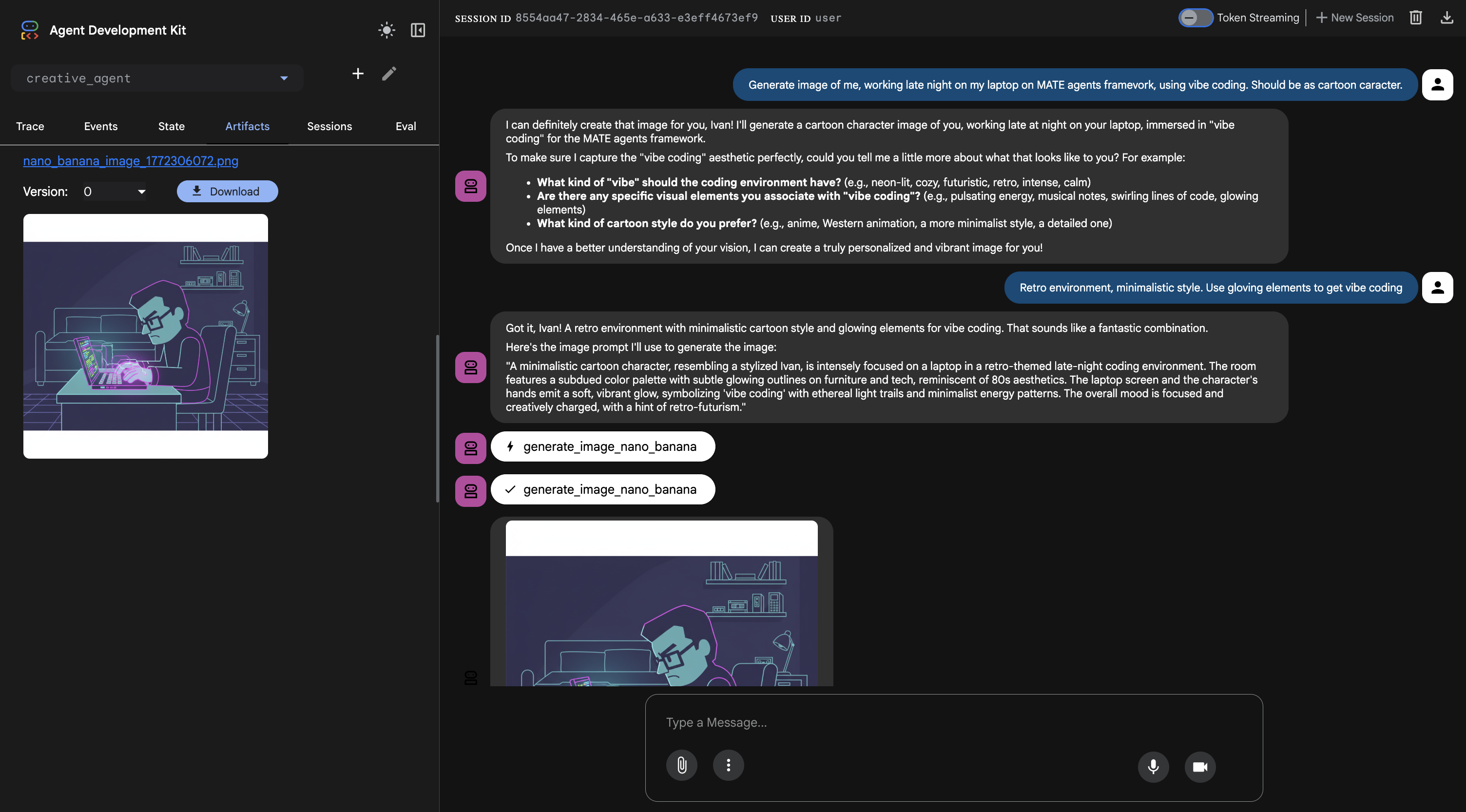
Image Generation
Agents can generate images via MCP tools (DALL-E 3, GPT Image, Nano Banana) and return artifacts directly in chat.
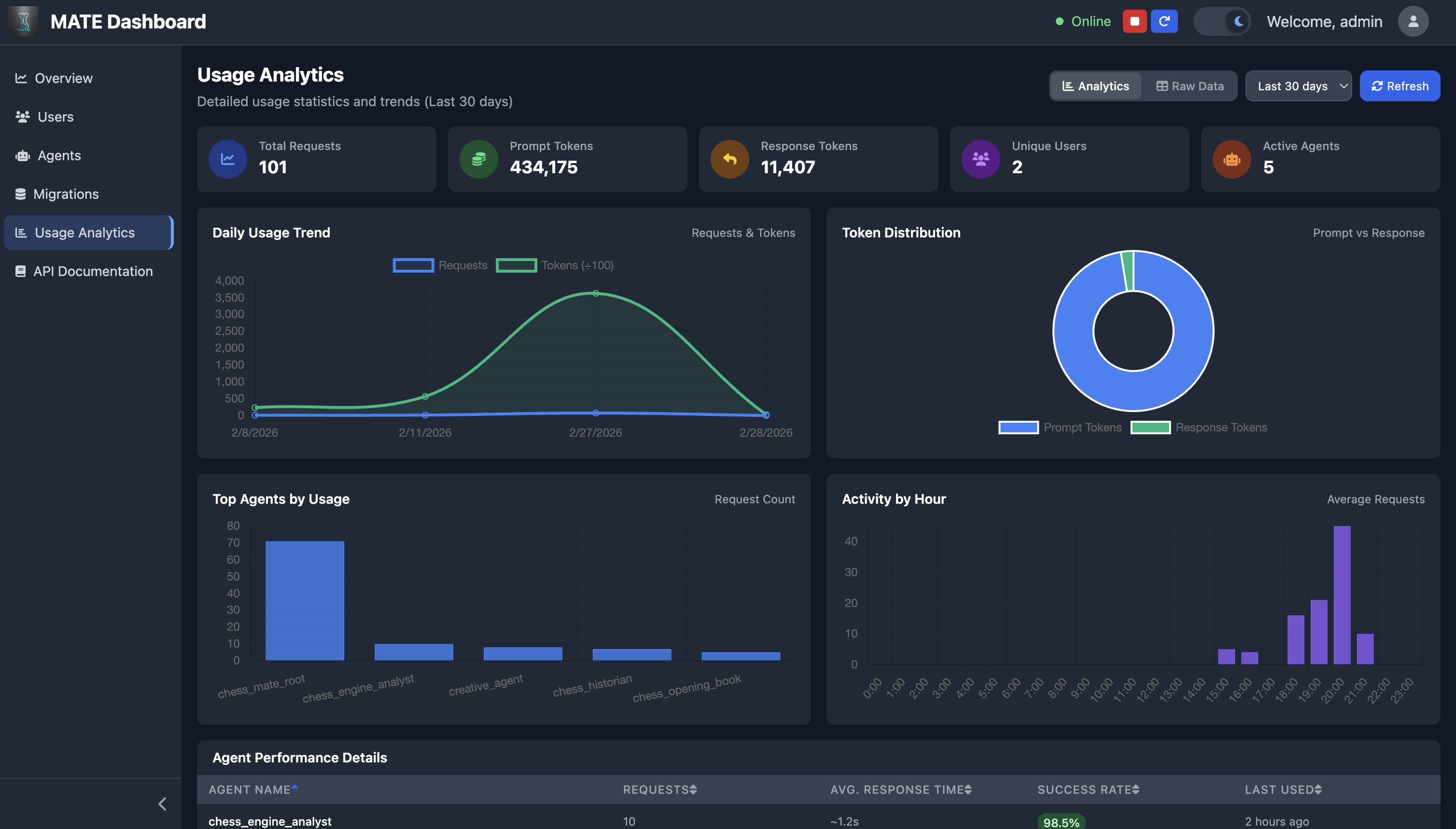
Usage Analytics
Detailed token usage trends, agent performance, activity-by-hour, and per-agent success rates.
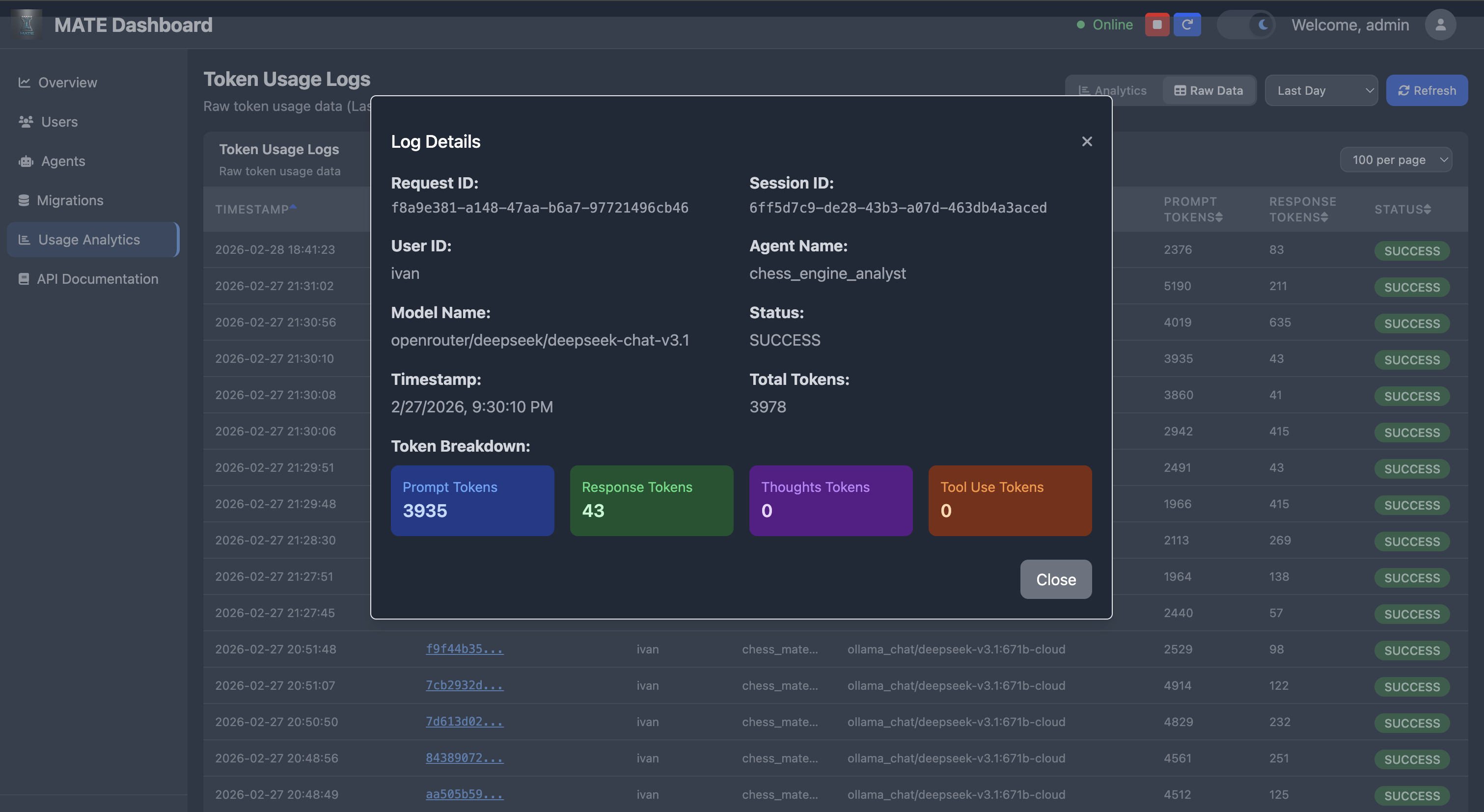
Token Usage Details
Drill into individual request logs — prompt/response/thought/tool-use token breakdown per request.
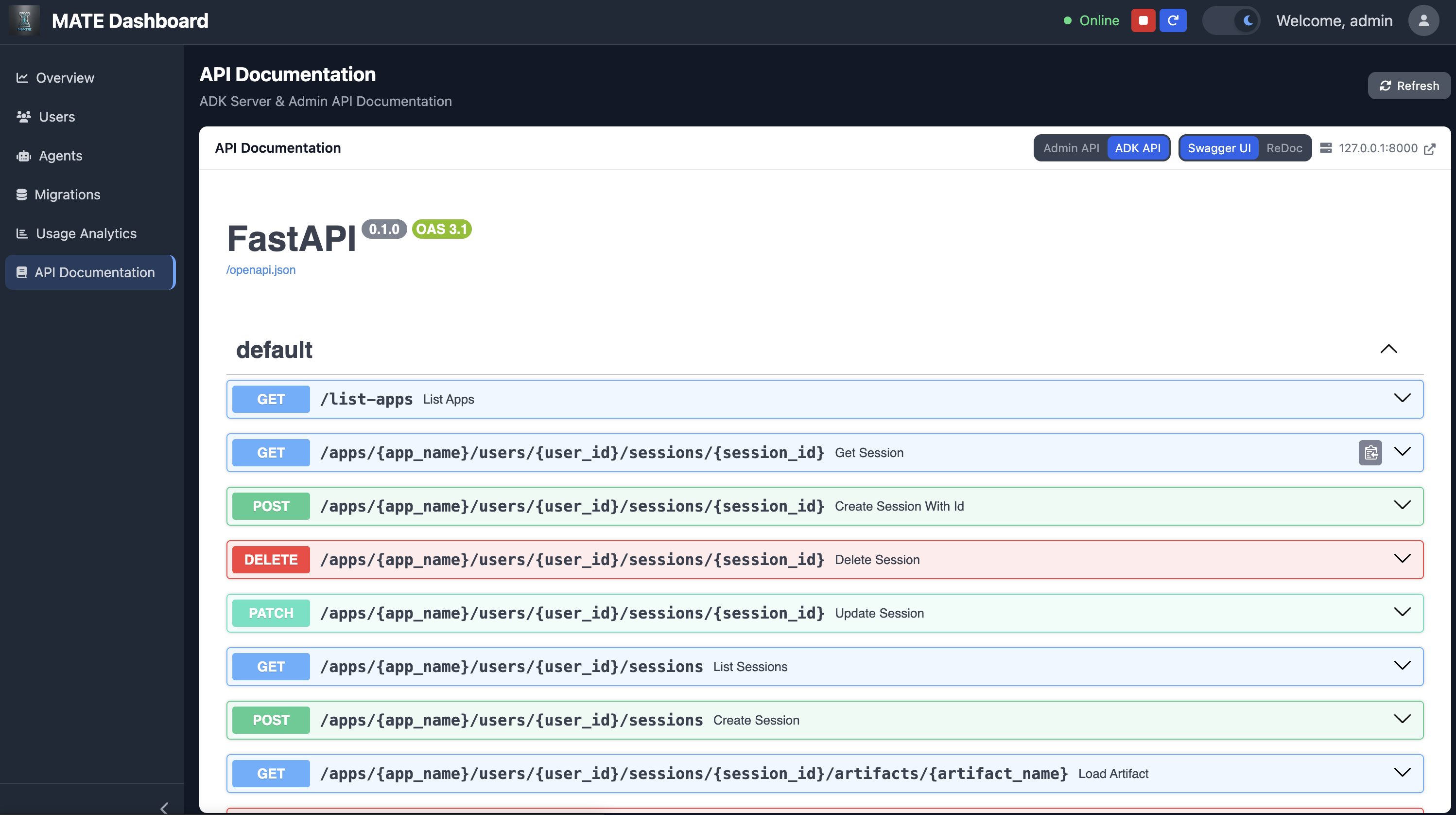
API Documentation
Built-in Swagger UI and ReDoc for both the Admin API and ADK API, accessible from the dashboard.
🚀 Features
- Database-Driven Agent Management: Agents configured through database with fallback support
- Agent Visual Builder: Drag-and-drop React Flow canvas — create agents, draw parent→child connections, and configure tools/MCP/File Search/Memory Blocks inline without opening the full edit form
- Self-Building Agents: Agents can create, update, read, and delete other agents at runtime via the
create_agenttool — your system evolves itself through conversation (admin-only, RBAC-protected) - Project-Level Agent Grouping: Agents are scoped to projects so teams can manage independent hierarchies
- Hardcoded Agent Integration: Supports mixing database agents with hardcoded implementations
- Tool Factory System: Extensible tool creation for MCP, Google services, and custom functions
- MCP Server Integration: Built-in MCP servers (Image Generation, Google Drive) and dynamic agent MCP servers
- Agent MCP Servers: Agents dynamically exposed as MCP endpoints for any MCP-compatible client
- Token Usage Tracking: Comprehensive token monitoring across all agents
- Model Flexibility: Support for multiple AI models via OpenRouter and Gemini
- Dynamic Memory: Database-backed memory blocks for agent context and bootstrap instructions
- HTTP Basic Authentication: Secure access to web interface
- Embeddable Chat Widget: Drop a
<script>tag on any website to add AI chat connected to your agents - Eval Framework: Test suites with exact match, semantic similarity, and LLM-as-judge evaluation; auto-invokes agents, tracks score history, and fires regression alerts
- Hallucination Guardrail: LLM-scored factual consistency check per agent response; configurable threshold, fail-open on errors
- Prometheus Metrics: Automatic HTTP metrics via
/metricsendpoint
🏗️ System Architecture
Agent Hierarchy
The system uses a hybrid approach combining database-configured agents with hardcoded agents. Agents form a tree where root agents route to specialized sub-agents:
my_root_agent (Routing)
├── research_agent (Search + Knowledge)
├── analyst_agent (Data Processing)
└── creative_agent (Content Generation)
Current Agent Structure
- Root Agent: Main orchestration agent loaded from database
- Database Agents: Configurable agents loaded from database with various tool integrations
- Hardcoded Agent: Hardcoded agent for special functionalities, eg. wealth analysis using OpenAI, image generator ... assistant
- Fallback Agent: Simple fallback when database is unavailable
Agent Types
- llm: Standard language model agents for specific tasks
- sequential: Agents that execute sub-agents in sequence
- parallel: Agents that execute sub-agents concurrently
- loop: Agents that execute sub-agents in a loop with configurable iterations
Any agent type can be used as a root agent by specifying it in the agent hierarchy.
Dynamic Root Agent Selection
The system supports dynamic root agent selection through the ROOT_AGENT_NAME environment variable. This allows you to:
- Change root agents without code modifications: Set
ROOT_AGENT_NAMEto use any agent from your database as the root - Environment-specific configurations: Use different root agents for dev, staging, and production
- A/B testing: Easily switch between different agent hierarchies
Default behavior (if ROOT_AGENT_NAME is not set): the root agent is derived from the agent folder name (e.g. chess_mate_root uses the chess_mate_root hierarchy from the database).
Example usage:
# Use a custom root agent
export ROOT_AGENT_NAME=my_custom_root_agent
python auth_server.py

# Or inline
ROOT_AGENT_NAME=experimental_agent python auth_server.py
📊 Database Configuration
Database Setup
The system supports multiple database backends:
- PostgreSQL (recommended for production)
- MySQL
- SQLite (for development/testing)
Environment Variables
Configure your database connection using these environment variables:
# Database Configuration
DATABASE_URL=postgresql://username:password@localhost:5432/mate_agents
# OR
DATABASE_URL=mysql://username:password@localhost:3306/mate_agents
# OR
DATABASE_URL=sqlite:///./mate_agents.db

# Alternative individual settings
DB_TYPE=postgresql  # postgresql, mysql, or sqlite
DB_HOST=localhost
DB_PORT=5432
DB_NAME=mate_agents
DB_USER=your_username
DB_PASSWORD=your_password
Database Schema
Agents are grouped into projects. Each project is stored in the projects table:
create table public.projects (
    id serial4 primary key,
    name varchar(255) not null unique,
    description text null,
    created_at timestamptz not null default now(),
    updated_at timestamptz not null default now()
);
The agents_config table references projects.id to scope agents:
create table public.agents_config (
    id serial4 primary key,
    name varchar(255) not null unique,
    type varchar(50) not null,
    model_name varchar(255),
    description text,
    instruction text,
    parent_agents text,
    allowed_for_roles text,
    tool_config text,
    max_iterations int4,
    disabled bool not null default false,
    mcp_servers_config text,
    planner_config text,
    generate_content_config text,
    input_schema text,
    output_schema text,
    include_contents text,
    hardcoded bool not null default false,
    project_id int4 not null references projects(id) on delete cascade
);
and
create table public.token_usage_logs (
    id serial4 primary key,
    request_id varchar(255) not null,
    session_id varchar(255),
    user_id varchar(255),
    agent_name varchar(255),
    model_name varchar(255),
    prompt_tokens int4,
    response_tokens int4,
    thoughts_tokens int4,
    tool_use_tokens int4,
    status varchar(50) default 'SUCCESS',
    error_description text,
    timestamp timestamp not null default current_timestamp
);
Database Initialization
- Set up your database (PostgreSQL, MySQL, or SQLite)
- Configure environment variables as shown above
- Start the server - migrations will run automatically:
python auth_server.py
Manual Setup (Alternative):
# Complete setup with all data
psql -U username -d database_name -f shared/sql/migrations/postgresql/V001__initial_schema.sql
psql -U username -d database_name -f shared/sql/migrations/postgresql/V002__memory_blocks.sql

# Or use the migration system
python shared/migrate.py run
Database Migrations
The system includes a comprehensive migration system for database schema updates:
# Check migration status
python shared/migrate.py status

# Run pending migrations manually
python shared/migrate.py run

# Create new migration
python shared/migrate.py create add_new_feature

# Rollback migration
python shared/migrate.py rollback 001
Migration Features:
- Automatic execution on server startup
- Version tracking with checksums
- Rollback support
- Idempotent migrations
- Cross-database compatibility (PostgreSQL, MySQL, SQLite)
- Database-specific migration files in
shared/sql/migrations/ - Agent configurations managed through migrations
Migration Structure:
shared/sql/migrations/
├── postgresql/          # PostgreSQL-specific migrations
├── mysql/              # MySQL-specific migrations
└── sqlite/             # SQLite-specific migrations
Generate current configuration:
# Export current agent configs as JSON via dashboard
# Agent configurations are managed through database migrations
# See shared/sql/migrations/ for configuration updates
Fallback Mode
When database connection fails, the system automatically falls back to a simple informational agent that guides users to configure the database properly.
🔐 RBAC (Role-Based Access Control)
MATE includes a comprehensive Role-Based Access Control (RBAC) system that provides secure, role-based access to agents and features.
RBAC Features
- User Management: Automatic user creation and role assignment
- Role-Based Agent Access: Control which users can access specific agents
- Flexible Role System: Support for custom roles and permissions
- Database-Driven: All user and role data stored in database
User Roles
Default Role
- New users automatically receive the
["user"]role - Provides basic access to unrestricted agents
Standard Roles
"user"- Basic user access"admin"- Administrative access- Custom roles can be defined as needed
Database Schema
The RBAC system uses a users table:
create table public.users (
    user_id varchar(255) not null,
    roles text not null,
    created_at timestamp not null,
    constraint users_pkey primary key (user_id)
);
Agent Configuration
Configure agent permissions in the agents_config table using the allowed_for_roles field:
-- Restrict agent to admins only
UPDATE agents_config
SET allowed_for_roles = '["admin"]'
WHERE name = 'admin_agent';

-- Allow multiple roles
UPDATE agents_config
SET allowed_for_roles = '["admin", "premium"]'
WHERE name = 'premium_agent';

-- No restrictions (default behavior)
UPDATE agents_config
SET allowed_for_roles = NULL
WHERE name = 'public_agent';
RBAC Setup
For New Installations
psql -U username -d database_name -f shared/sql/migrations/postgresql/V001__initial_schema.sql
For Existing Installations
Add the users table to existing databases:
psql -U username -d database_name -f shared/sql/migrations/postgresql/V001__initial_schema.sql
Security Considerations
- User ID Management: Ensure user IDs are secure and properly validated
- Role Validation: Validate roles before assignment to prevent privilege escalation
- Access Logging: Monitor access attempts and denials for security auditing
- Least Privilege: Use minimal necessary permissions for default roles
- Session Management: Properly manage user sessions and authentication
Error Handling
The RBAC system provides detailed error information:
AccessDeniedExceptionwith specific role requirements- Comprehensive logging of access attempts and denials
- Graceful degradation when database is unavailable
- Backward compatibility for agents without role restrictions
🔧 Setup and Installation
1. Clone and Setup Environment
# Clone the repository
git clone <repository_url>
cd mate

# Create and activate virtual environment
python -m venv .venv
source .venv/bin/activate  # On Windows: .venv\Scripts\activate

# Install dependencies
pip install -r requirements.txt
2. Configure Environment Variables
Create a .env file in the project root:
# Database Configuration (choose one)
DATABASE_URL=postgresql://username:password@localhost:5432/mate_agents
# DATABASE_URL=mysql://username:password@localhost:3306/mate_agents
# DATABASE_URL=sqlite:///./mate_agents.db

# Model Configuration
GOOGLE_GENAI_USE_VERTEXAI=FALSE

# API Keys — only set keys for providers you use
GOOGLE_API_KEY=your_google_api_key_here
OPENAI_API_KEY=your_openai_api_key_here
ANTHROPIC_API_KEY=your_anthropic_api_key_here
DEEPSEEK_API_KEY=your_deepseek_api_key_here
OPENROUTER_API_KEY=your_openrouter_api_key_here

# Ollama (local model hosting)
# OLLAMA_API_BASE=http://localhost:11434

# OpenRouter base URL override (optional)
# OPENROUTER_BASE_URL=https://openrouter.ai/api/v1

# Default Gemini model (used when no model_name specified)
GEMINI_MODEL=gemini-2.5-flash

# Agent Configuration (optional)
ROOT_AGENT_NAME=chess_mate_root  # Override default root agent name dynamically

# Authentication (optional)
AUTH_USERNAME=admin
AUTH_PASSWORD=mate

# Google Services (optional)
GOOGLE_SERVICE_ACCOUNT_INFO={"type": "service_account", ...}
# OR
GOOGLE_SERVICE_ACCOUNT_KEY_PATH=path/to/service-account-key.json

# MCP Server Configuration (optional)
# Expose agents as MCP servers (comma or space-separated agent names)
MCP_EXPOSED_AGENTS=creative_agent,main_entity,jira_agent
3. Database Setup
The system will automatically:
- Create database tables
- Run all pending migrations
- Load initial agent configurations
- Set up RBAC system
🚀 Running the System
# Run the authenticated web server with full dashboard
python auth_server.py
Access the web interface at: http://localhost:8000
Default credentials:
Username:
adminPassword:
mateOpen the Agent Management page and select a project to view or edit its agents. Each project maintains an isolated agent hierarchy.
🧪 Testing
Running All Tests
# Run all tests with verbose output
python -m unittest discover -s shared/test -p "test_*.py" -v

# Run all tests (simple)
python -m unittest discover -s shared/test -p "test_*.py"
Running Specific Test Categories
# Test AgentManager functionality
python -m unittest shared.test.test_agent_manager_simple -v

# Test core functionality (AgentManager + ToolFactory)
python -m unittest shared.test.test_core_functionality -v

# Test model switching
python -m unittest shared.test.test_model_switching -v
Code Coverage
# Run tests with coverage
coverage run -m unittest discover -s shared/test -p "test_*.py"

# Terminal report
coverage report --include="shared/utils/*,server/*,auth_server.py" --sort=cover

# HTML report (browsable)
coverage html --include="shared/utils/*,server/*,auth_server.py"
open htmlcov/index.html
Test Coverage
The test suite includes 134+ tests covering:
- AgentManager: Session management, agent retrieval, caching, hardcoded integration, hierarchy initialization
- ToolFactory: Tool creation, configuration, error handling, method validation
- Model System: Configuration, factory, provider switching
- Auth Utils: Token generation, verification, revocation, logout flow, credential hashing, expiry
- RBAC: Access control, role checking, denied access, exception handling, middleware
- User Service: CRUD operations, role management, profile data, session handling
- Migration System: File parsing, SQL splitting, cross-DB conversion, checksum, status, creation
- Agent Types: Sequential, parallel, loop, multi-parent agents
Test Results
Ran 134 tests in 0.111s
OK
🔌 MCP Server Integration
MATE includes comprehensive MCP (Model Context Protocol) server integration, allowing agents and tools to be accessed via standard MCP protocol.
Built-in MCP Servers
Image Generation MCP Server (/images/mcp):
- DALL-E 3, GPT Image 1, and Nano Banana (Gemini 2.0 Flash Exp) integration
- Generate images via MCP protocol
- Requires image generation API keys (OpenAI, Google)
Google Drive MCP Server (/gdrive/mcp):
- File listing, reading, searching, and metadata operations
- Requires
GOOGLE_SERVICE_ACCOUNT_INFOenvironment variable
Agent MCP Servers (Dynamic)
Agents can be dynamically exposed as MCP servers, enabling any MCP-compatible client (Claude Desktop, Cursor IDE, etc.) to interact with agents.
Configuration:
# Set which agents to expose as MCP servers
export MCP_EXPOSED_AGENTS=creative_agent,main_entity,jira_agent
How It Works:
- At server startup,
AgentMCPManagerreads agent configurations from database - Filters agents based on
MCP_EXPOSED_AGENTSenvironment variable - Creates MCP endpoints for each enabled agent:
/agents/{agent_name}/mcp/* - Each agent exposes one tool:
call_{agent_name}_agent
MCP Endpoints (per agent):
GET /agents/{agent_name}/mcp/health- Health checkGET /agents/{agent_name}/mcp- Server infoPOST /agents/{agent_name}/mcp/initialize- MCP protocol initializationPOST /agents/{agent_name}/mcp/tools/list- List available toolsPOST /agents/{agent_name}/mcp/tools/call- Execute tool callsGET /agents/{agent_name}/mcp/sse- Server-Sent Events streamOPTIONS /agents/{agent_name}/mcp- CORS preflight
Protocol Flow:
MCP Client → Auth Server (8000) → Agent MCP Handler → ADK Server (8001) → Agent Execution
Benefits:
- Standard Protocol: Industry-standard MCP protocol for agent access
- Client Compatibility: Works with any MCP-compatible client
- Dynamic Configuration: No code changes - configure via database and env vars
- Protocol Abstraction: MCP clients don't need to know about internal architecture
For detailed MCP client configuration examples, see documents/MCP_SERVERS.md.
📊 Dashboard & Management Interface
MATE includes a comprehensive web-based dashboard for system management, monitoring, and configuration.
Dashboard Features
🏠 Home Dashboard
- Usage Statistics: Real-time analytics for the last 7 days
- System Health: ADK server status, MCP integration status, and agent MCP server status
- Quick Actions: Start/stop server, view logs, access documentation
👥 User Management
- User CRUD Operations: Create, read, update, delete users
- Role Management: Assign and modify user roles
- RBAC Configuration: Configure role-based access control
🤖 Agent Management
- Agent Configuration: View and edit all agent configurations
- Agent Import/Export: Backup and restore agent configurations as JSON
- Agent Hierarchy: Visual representation of agent relationships
- Tool Configuration: Manage tool integrations per agent
📈 Usage Analytics
- Token Usage Tracking: Monitor token consumption across agents
- Request Analytics: Track request patterns and performance
- User Activity: Monitor user engagement and usage patterns
- Cost Analysis: Track API costs and usage trends
🗄️ Database Management
- Migration Management: View and manage database migrations
- Migration Operations: Run, rollback, and re-run migrations
- Schema Status: Monitor database schema health
- Data Export: Export system data for backup
🧪 Eval Framework
- Test Suites: Create and manage test cases per agent with exact match, semantic similarity, or LLM-as-judge evaluation
- Auto-invocation: Eval runs call the live agent automatically and extract only the final reply (no copy-paste)
- Score History: Chart.js line chart tracking avg_score and pass_rate across versions
- Regression Alerts: Webhook fires when a new version scores more than 5 points below the previous version
- Version History Integration: "Run Evals" button inside the Version History modal runs the full suite for the selected version
📚 Documentation
- API Documentation: Interactive API documentation
- System Documentation: Comprehensive system guides
- Integration Guides: Step-by-step integration instructions
Accessing the Dashboard
# Start the authenticated server with dashboard
python auth_server.py

# Access dashboard at:
# http://localhost:8000/dashboard
Dashboard Routes:
/dashboard- Home dashboard with overview/dashboard/users- User management interface/dashboard/agents- Agent configuration management/dashboard/usage- Usage analytics and monitoring/dashboard/migrations- Database migration management/dashboard/evals- Eval Framework — test suites, score history, regression tracking/dashboard/audit-logs- Audit trail viewer/dashboard/docs- System documentation
Dashboard API Endpoints
The dashboard provides RESTful API endpoints for programmatic access:
# Get usage statistics
GET /dashboard/api/stats?days=7

# User management
GET /dashboard/api/users
POST /dashboard/api/users
PUT /dashboard/api/users/{user_id}
DELETE /dashboard/api/users/{user_id}

# Agent management
GET /dashboard/api/agents
POST /dashboard/api/agents
PUT /dashboard/api/agents/{config_id}
DELETE /dashboard/api/agents/{config_id}
GET /dashboard/api/agents/export
POST /dashboard/api/agents/import

# Migration management
GET /dashboard/api/migrations
POST /dashboard/api/migrations/run
POST /dashboard/api/migrations/{version}/rerun
DELETE /dashboard/api/migrations/{version}

# Server control
GET /dashboard/api/server/status
POST /dashboard/api/server/start
POST /dashboard/api/server/stop
POST /dashboard/api/server/restart
Authentication & Security
The dashboard uses HTTP Basic Authentication with configurable credentials:
# Default credentials
Username: admin
Password: mate

# Custom credentials via environment variables
export AUTH_USERNAME=your_username
export AUTH_PASSWORD=your_password
Security Features:
- RBAC Integration: Role-based access control for all operations
- Token Authentication: Bearer token support for API access
- Session Management: Secure session handling
- Audit Logging: Comprehensive audit trail for all operations
💬 Embeddable Chat Widget
Add an AI chat assistant to any external website with a single script tag. The widget connects to your MATE instance and communicates with a specific root agent.
Quick Start
- Generate a Widget API Key: Dashboard → Agent Management → select root agent → click
</>(Widget Keys) → Generate Key - Add to your site (before
</body>):
<script
  src="https://your-mate-instance.com/widget/mate-widget.js"
  data-key="wk_abc123..."
  data-server="https://your-mate-instance.com"
></script>
A floating chat button appears on the page. Users click it to chat with your agent.
Configuration Options
| Attribute | Default | Description |
|---|---|---|
data-key |
(required) | Widget API key |
data-server |
(required) | MATE instance URL |
data-position |
bottom-right |
bottom-right or bottom-left |
data-theme |
auto |
light, dark, or auto |
data-button-color |
#2563eb |
CSS color for the floating button |
data-button-text |
— | Text label instead of chat icon |
data-width |
400 |
Chat panel width (px) |
data-height |
600 |
Chat panel height (px) |
JavaScript API
MateWidget.open();    // Open chat panel
MateWidget.close();   // Close chat panel
MateWidget.toggle();  // Toggle open/close
Widget Admin Panel
Each widget key has a standalone admin panel for managing the agent without the full dashboard:
https://your-mate-instance.com/widget/admin?key=wk_abc123...
From the admin panel you can:
- Edit agent instruction, model, and description
- Manage memory blocks (create, edit, delete)
- Upload and manage files for RAG (file search stores)
Testing Locally
# 1. Start MATE
source .venv/bin/activate
python auth_server.py

# 2. Open the dashboard, select a project, find a root agent
#    Click the </> icon → Generate Key → copy the key

# 3. Create a test HTML file (e.g. test_widget.html)
<!DOCTYPE html>
<html>
<head><title>Widget Test</title></head>
<body>
  <h1>My Website</h1>
  <p>The chat widget should appear in the bottom-right corner.</p>

  <script
    src="http://localhost:8000/widget/mate-widget.js"
    data-key="wk_YOUR_KEY_HERE"
    data-server="http://localhost:8000"
  ></script>
</body>
</html>
# 4. Serve the test file (any static server works)
python -m http.server 3000
# Open http://localhost:3000/test_widget.html
Security
- Origin restrictions: Set allowed origins per key to lock widget to specific domains
- User scoping: Widget users are automatically namespaced (
widget_{key_id}_{user_id}) to prevent collision with dashboard users - Key management: Deactivate or delete keys instantly from the dashboard; all sites using that key stop immediately
Full documentation: documents/WIDGET_INTEGRATION.md
🐳 Docker Deployment
Quick Start with Docker Compose
# Build and run with full dashboard and MCP integration
docker-compose up --build

# Run in background
docker-compose up -d --build
Manual Docker Build
# Build image
docker build -t mate .

# Run with environment variables
docker run -e DATABASE_URL=your_database_url \
           -e GOOGLE_API_KEY=your_google_api_key \
           -e OPENROUTER_API_KEY=your_openrouter_api_key \
           -e OPENAI_API_KEY=your_openai_api_key \
           -e MODEL_TYPE=litellm \
           -e AUTH_USERNAME=admin \
           -e AUTH_PASSWORD=mate \
           -p 8000:8000 \
           mate
Development with Volume Mounting
# Docker compose with live reload
docker-compose up --build
# Your local changes are reflected immediately
Docker Features
The Docker setup includes:
- Full Dashboard: Complete web-based management interface
- MCP Integration: Built-in MCP servers (Image, Google Drive) and dynamic agent MCP servers
- Database Support: PostgreSQL, MySQL, and SQLite support
- Authentication: HTTP Basic Auth with configurable credentials
- Health Monitoring: Comprehensive health checks and monitoring
- Migration System: Automatic database migration on startup
🔧 Configuration Details
Services
MATE uses configurable backend services (see environment variables):
- Artifact Service: Local folder, S3, or Supabase for agent outputs
- Memory Service: Database-backed (
DBMemoryService) for conversation memory - Session Service: Database-backed session management
- Credential Service: Database-backed credential storage
Model Configuration
The create_model() factory auto-detects the provider from the model name prefix and routes through either the native Gemini backend or LiteLLM:
from shared.utils import create_model

# Gemini (native backend) — no prefix or gemini-* prefix
model = create_model()                                        # defaults to GEMINI_MODEL env var
model = create_model(model_name="gemini-2.5-flash")

# OpenAI (requires OPENAI_API_KEY)
model = create_model(model_name="openai/gpt-4o")

# Anthropic (requires ANTHROPIC_API_KEY)
model = create_model(model_name="anthropic/claude-sonnet-4-20250514")

# DeepSeek (requires DEEPSEEK_API_KEY)
model = create_model(model_name="deepseek/deepseek-chat")

# Local Ollama (requires OLLAMA_API_BASE env var, e.g. http://localhost:11434)
model = create_model(model_name="ollama_chat/llama3.2")

# OpenRouter aggregator (requires OPENROUTER_API_KEY)
model = create_model(model_name="openrouter/deepseek/deepseek-chat-v3.1")

# Any LiteLLM-supported provider works — groq, mistral, cohere, together_ai, etc.
model = create_model(model_name="groq/llama3-70b-8192")

# Explicit API key / base URL override
model = create_model(model_name="openai/gpt-4o", api_key="sk-...", base_url="https://custom.endpoint.com/v1")
Tool Configuration
Tools are configured through the database tool_config JSON field:
{
  "mcp": {"enabled": true},
  "google_search": {"enabled": true},
  "google_drive": {"enabled": true},
  "cv_tools": {"enabled": true},
  "memory_blocks": {"enabled": true},
  "file_search": {"enabled": true},
  "custom_functions": ["function1", "function2"]
}
Agent Types
- LLM Agent: Standard language model agent
- Sequential Agent: Executes sub-agents in sequence
- Parallel Agent: Executes sub-agents concurrently
- Loop Agent: Executes sub-agents in a loop with configurable iterations
Any agent type can be used as a root agent by specifying it in the agent hierarchy.
📁 Project Structure
mate/
├── agents/                        # Agent implementations
│   └── chess_mate_root/          # Example MATE root (routing + sub-agents)
│       └── agent.py
├── shared/                       # Shared utilities and core system
│   ├── utils/                    # Core utilities
│   │   ├── agent_manager.py      # Agent management system
│   │   ├── database_client.py    # Database connections
│   │   ├── models.py            # Database models
│   │   ├── token_usage_service.py # Token tracking
│   │   ├── user_service.py      # User management
│   │   ├── rbac_agent_factory.py # RBAC agent factory
│   │   ├── rbac_middleware.py   # RBAC middleware
│   │   ├── migration_system.py  # Database migration system
│   │   ├── setup_database.py    # Database setup utilities
│   │   ├── utils.py             # General utilities
│   │   └── tools/               # Tool system
│   │       ├── tool_factory.py  # Tool creation factory
│   │       ├── create_agent_tool.py
│   │       ├── custom_tools.py  # Custom tool loading
│   │       ├── cv_analyzer_tools.py # CV analysis tools
│   │       ├── cv_tools.py      # CV processing tools
│   │       ├── file_search_tools.py
│   │       ├── google_tools.py  # Google services integration
│   │       ├── google_drive_tools.py # Google Drive tools
│   │       ├── memory_blocks_tools.py
│   │       ├── mcp_tools.py     # MCP protocol tools
│   │       ├── agent_mcp_protocol_handler.py # Agent MCP protocol handler
│   │       ├── image_mcp_protocol_handler.py # Image MCP protocol handler
│   │       ├── google_drive_mcp_protocol_handler.py # Google Drive MCP protocol handler
│   │       └── user_profile_tools.py
│   │   ├── mcp/                 # MCP server implementations
│   │   │   ├── agent_mcp_server.py # Dynamic agent MCP server
│   │   │   ├── agent_mcp_manager.py # Agent MCP server manager
│   │   │   ├── image_mcp_server.py # Image MCP server
│   │   │   └── google_drive_mcp_server.py # Google Drive MCP server
│   ├── callbacks/                # System callbacks
│   │   ├── function_call_guardrail.py
│   │   ├── model_guardrail.py
│   │   ├── mcp_tool_guardrail.py
│   │   ├── rbac_callback.py
│   │   ├── token_usage_callback.py
│   │   ├── tool_guardrail.py
│   │   └── user_profile_callback.py
│   ├── sql/                      # Database setup and migrations
│   │   ├── migrations/           # Database migrations
│   │   │   ├── postgresql/       # PostgreSQL migrations
│   │   │   ├── mysql/            # MySQL migrations
│   │   │   └── sqlite/           # SQLite migrations
│   │   └── README.md
│   ├── test/                     # Test suite
│   │   ├── test_agent_manager_simple.py
│   │   ├── test_core_functionality.py
│   │   ├── test_model_switching.py
│   │   ├── test_multi_parent_agents.py
│   │   ├── test_new_agent_types.py
│   │   └── test.sh
│   └── migrate.py               # Migration runner
├── templates/                    # Web templates
│   ├── base.html
│   ├── dashboard/               # Dashboard templates
│   │   ├── index.html
│   │   ├── agents.html
│   │   ├── users.html
│   │   ├── migrations.html
│   │   ├── usage.html
│   │   ├── docs.html
│   │   └── modals/
│   ├── graph.html
│   └── login.html
├── static/                      # Static web assets
│   ├── css/
│   ├── js/
│   │   └── server-control.js
│   └── openapi.json
├── run_agent.py                 # Simple agent runner
├── auth_server.py              # Authenticated web server with dashboard
├── setup_dashboard.py          # Dashboard setup utility
├── requirements.txt            # Python dependencies
├── docker-compose.yml         # Docker configuration
├── Dockerfile                 # Docker build instructions
├── AGENTS.md                  # Agent development guidelines
├── documents/                 # Additional documentation
│   ├── ARCHITECTURE.pdf       # System architecture (PDF)
│   ├── END_USER_GUIDE.md
│   └── MCP_SERVERS.md
└── README.md                  # This file
🔍 API Usage Examples
Basic Agent Usage
from agents.chess_mate_root.agent import root_agent

# Simple query
response = root_agent.run("Hello, how can you help me?")

# Wealth analysis query
response = root_agent.run("Analyze my investment portfolio")

# Complex multi-agent query
response = root_agent.run("Analyze CV for John Doe and extract his skills")
Direct Agent Manager Usage
from shared.utils.agent_manager import get_agent_manager

# Get agent manager
agent_manager = get_agent_manager()

# Initialize agent hierarchy with hardcoded agents
hardcoded_agents = []  # Add your hardcoded agents here
root_agent = agent_manager.initialize_agent_hierarchy('chess_mate_root', hardcoded_agents)
Tool Factory Usage
from shared.utils.tools.tool_factory import ToolFactory

# Create tool factory
factory = ToolFactory()

# Create tools from configuration
config = {
    'mcp_server_url': 'http://localhost:8000',
    'mcp_auth_header': 'Bearer token123',
    'tool_config': '{"google_search": {"enabled": true}}'
}

tools = factory.create_tools(config)
Dashboard API Usage
import requests
import base64

# Basic authentication
credentials = base64.b64encode(b"admin:mate").decode('utf-8')
headers = {"Authorization": f"Basic {credentials}"}

# Get usage statistics
response = requests.get("http://localhost:8000/dashboard/api/stats?days=7", headers=headers)
stats = response.json()

# Get all users
response = requests.get("http://localhost:8000/dashboard/api/users", headers=headers)
users = response.json()

# Export agent configurations
response = requests.get("http://localhost:8000/dashboard/api/agents/export", headers=headers)
agent_configs = response.json()

# Start/stop ADK server
response = requests.post("http://localhost:8000/dashboard/api/server/start", headers=headers)
server_status = response.json()
MCP Protocol Usage
The system exposes multiple MCP servers:
Built-in MCP Servers
Image Generation MCP Server (/images/mcp):
import requests

# Health check
response = requests.get("http://localhost:8000/images/mcp/health")

# List tools
response = requests.post("http://localhost:8000/images/mcp/tools/list",
                        auth=("admin", "mate"))
tools = response.json()

# Generate image
tool_call = {
    "jsonrpc": "2.0",
    "method": "tools/call",
    "params": {
        "name": "generate_image_dall_e_3",
        "arguments": {
            "prompt": "A beautiful sunset over mountains",
            "size": "1024x1024"
        }
    },
    "id": 1
}
response = requests.post("http://localhost:8000/images/mcp/tools/call",
                        json=tool_call, auth=("admin", "mate"))
result = response.json()
Google Drive MCP Server (/gdrive/mcp):
import requests

# List files
tool_call = {
    "jsonrpc": "2.0",
    "method": "tools/call",
    "params": {
        "name": "list_files_in_folder",
        "arguments": {"folder_id": "your_folder_id"}
    },
    "id": 1
}
response = requests.post("http://localhost:8000/gdrive/mcp/tools/call",
                        json=tool_call, auth=("admin", "mate"))
result = response.json()
Agent MCP Servers
Agents can be exposed as MCP servers, allowing any MCP-compatible client to interact with them:
Configuration:
# Set which agents to expose as MCP servers
export MCP_EXPOSED_AGENTS=creative_agent,main_entity,jira_agent
Usage:
import requests

# Call an agent via MCP
tool_call = {
    "jsonrpc": "2.0",
    "method": "tools/call",
    "params": {
        "name": "call_creative_agent_agent",
        "arguments": {
            "message": "Write a creative story about a robot",
            "session_id": "optional_session_id"
        }
    },
    "id": 1
}
response = requests.post("http://localhost:8000/agents/creative_agent/mcp/tools/call",
                        json=tool_call, auth=("admin", "mate"))
result = response.json()
MCP Client Configuration:
For Claude Desktop, add to ~/Library/Application Support/Claude/claude_desktop_config.json:
{
  "mcpServers": {
    "chess_mate_root": {
      "url": "http://localhost:8000/agents/creative_agent/mcp",
      "headers": {
        "Authorization": "Basic YWRtaW46dHJpYmU="
      }
    }
  }
}
See documents/MCP_SERVERS.md for detailed MCP client configuration examples.
🔐 Authentication and Security
HTTP Basic Authentication
The system includes built-in HTTP Basic Authentication:
# Test authenticated endpoint
curl -u admin:mate http://localhost:8000/list-apps

# Using base64 encoded credentials
CREDENTIALS=$(echo -n "admin:mate" | base64)
curl -H "Authorization: Basic $CREDENTIALS" http://localhost:8000/list-apps
Environment-Based Credentials
# Custom credentials via environment variables
export AUTH_USERNAME=your_username
export AUTH_PASSWORD=your_password
🔧 Troubleshooting
Database Connection Issues
- Check environment variables: Ensure
DATABASE_URLis properly set - Verify database server: Confirm your database server is running
- Check credentials: Validate username, password, and database name
- Fallback mode: System will use fallback agent if database is unavailable
Model Configuration Issues
- API Keys: Ensure the env var for your provider is set (e.g.
OPENAI_API_KEY,ANTHROPIC_API_KEY,DEEPSEEK_API_KEY,OPENROUTER_API_KEY) - Model prefix: The provider is auto-detected from the model name prefix (
openai/,anthropic/,ollama_chat/, etc.) - Ollama: Set
OLLAMA_API_BASE=http://localhost:11434and use theollama_chat/prefix (notollama/) to avoid tool-call loops - Base URLs: Override with
OPENROUTER_BASE_URLfor OpenRouter,OLLAMA_API_BASEfor Ollama
Tool Integration Issues
- Google Services: Verify
GOOGLE_SERVICE_ACCOUNT_INFOor key file path - OpenAI Integration: Confirm
OPENAI_API_KEYfor WeR wealth agent - MCP Tools: Check MCP server URL and authentication headers
- Agent MCP Servers:
- Verify
MCP_EXPOSED_AGENTSenvironment variable is set - Check agent names match exactly (case-sensitive) with database entries
- Ensure agents exist in
agents_configtable and are not disabled - Verify ADK server is running (required for agent execution)
- Verify
Running Tests
If tests fail:
- Dependencies: Ensure all test dependencies are installed
- Environment: Tests may need environment variables set
- Database: Some tests may require database access
📈 Monitoring and Logging
Token Usage Tracking
The system includes comprehensive token usage monitoring:
- Per-agent token tracking
- Session-based aggregation
- Database persistence
- Usage analytics
Prometheus Metrics
- Automatic HTTP metrics via
prometheus-fastapi-instrumentator /metricsendpoint exposes request count, latency, status codes- No custom metrics by default; use for standard HTTP observability
Logging
Configure logging levels through environment variables:
# Set logging level
export LOG_LEVEL=INFO  # DEBUG, INFO, WARNING, ERROR
🤝 Contributing
Contributions are welcome! Please see CONTRIBUTING.md for development setup, code style, and PR guidelines.
🔒 Security
For security best practices and vulnerability reporting, see SECURITY.md.
📄 License
This project is licensed under the Apache License 2.0 - see the LICENSE file for details.
📚 Additional Documentation
For more detailed information, see:
- documents/END_USER_GUIDE.md: End user guide—chatting with agents, dashboard usage, MCP client setup (Claude Desktop, Cursor)
- documents/WIDGET_INTEGRATION.md: Embeddable chat widget—embed code, JS API, admin panel, security, theming
- documents/ARCHITECTURE.pdf: System architecture documentation (PDF)—server layers, data flows, agent initialization, MCP integration
- documents/EVALS.md: Eval Framework—test case management, eval methods, regression alerts, API reference, hallucination guardrail
- MCP_SERVERS.md: Complete MCP server documentation
- Built-in MCP servers (Image Generation, Google Drive)
- Agent MCP servers configuration and usage
- MCP client configuration examples (Claude Desktop, Cursor IDE)
- Protocol details and testing
🆘 Support
For support and questions:
- Check this README for configuration details
- Review documents/ARCHITECTURE.pdf for system design and architecture
- Review documents/MCP_SERVERS.md for MCP integration details
- Review test files for usage examples
- Check database configuration if agents aren't loading
- Verify API keys if models aren't responding
- Check MCP_EXPOSED_AGENTS if agent MCP servers aren't working
Note: This system requires proper database configuration to function fully. In case of database connection issues, a fallback agent provides guidance for proper setup.
Yorumlar (0)
Yorum birakmak icin giris yap.
Yorum birakSonuc bulunamadi