agent-tmux-web
Health Uyari
- License — License: MIT
- No description — Repository has no description
- Active repo — Last push 0 days ago
- Community trust — 13 GitHub stars
Code Basarisiz
- process.env — Environment variable access in scripts/capture-marketing.mjs
- network request — Outbound network request in scripts/capture-marketing.mjs
- spawnSync — Synchronous process spawning in scripts/verify-public-apk.mjs
- network request — Outbound network request in src/client/App.tsx
Permissions Gecti
- Permissions — No dangerous permissions requested
Bu listing icin henuz AI raporu yok.
Agent Tmux Web

Run long-lived Codex, Claude, Gemini, and custom terminal agents from your phone
without keeping an SSH client open.
Terminal agents are powerful, but they are awkward on mobile: SSH sessions resize
panes, disconnects break the flow, file upload is clumsy, and switching between
multiple agent sessions takes too much ceremony. Agent Tmux Web keeps the real
work inside tmux on your server and gives your phone or desktop a focused browser
control surface.
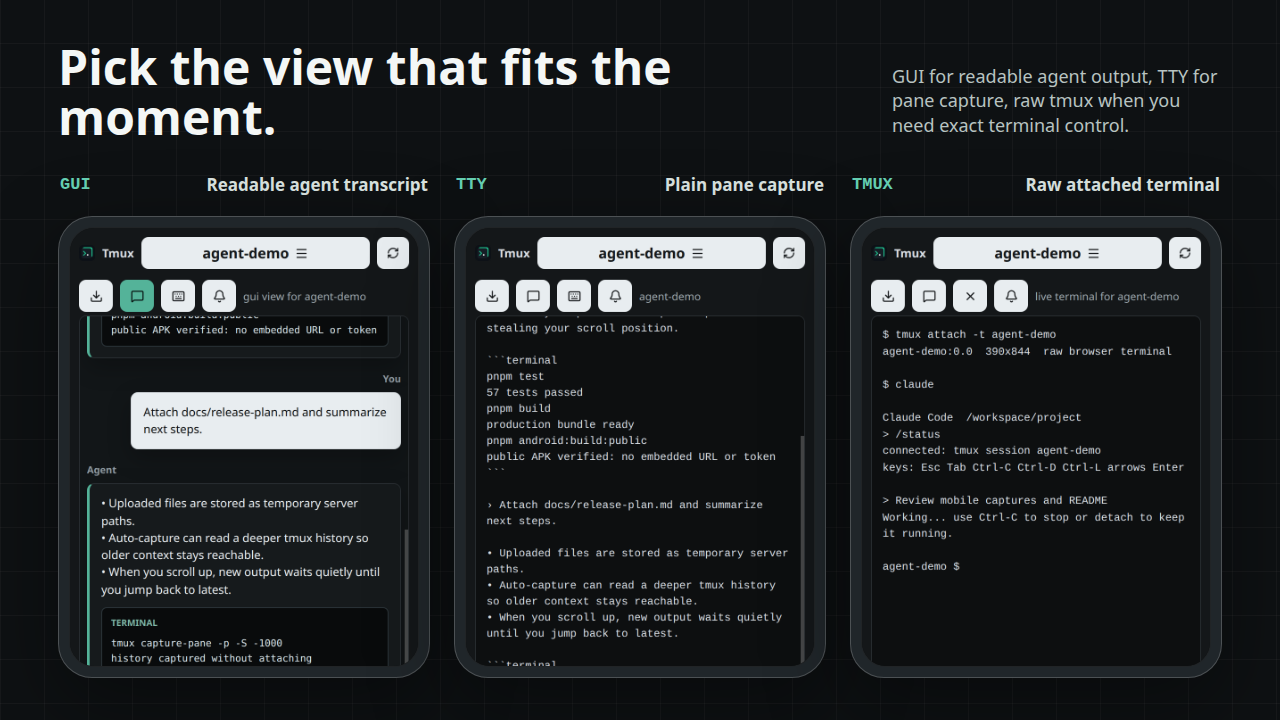
Use the normalized chat view when you want readable CLI output. Attach to raw
tmux when you need exact terminal behavior, arrow keys, Ctrl-C, or a full TUI.
The session keeps running either way.
Demo
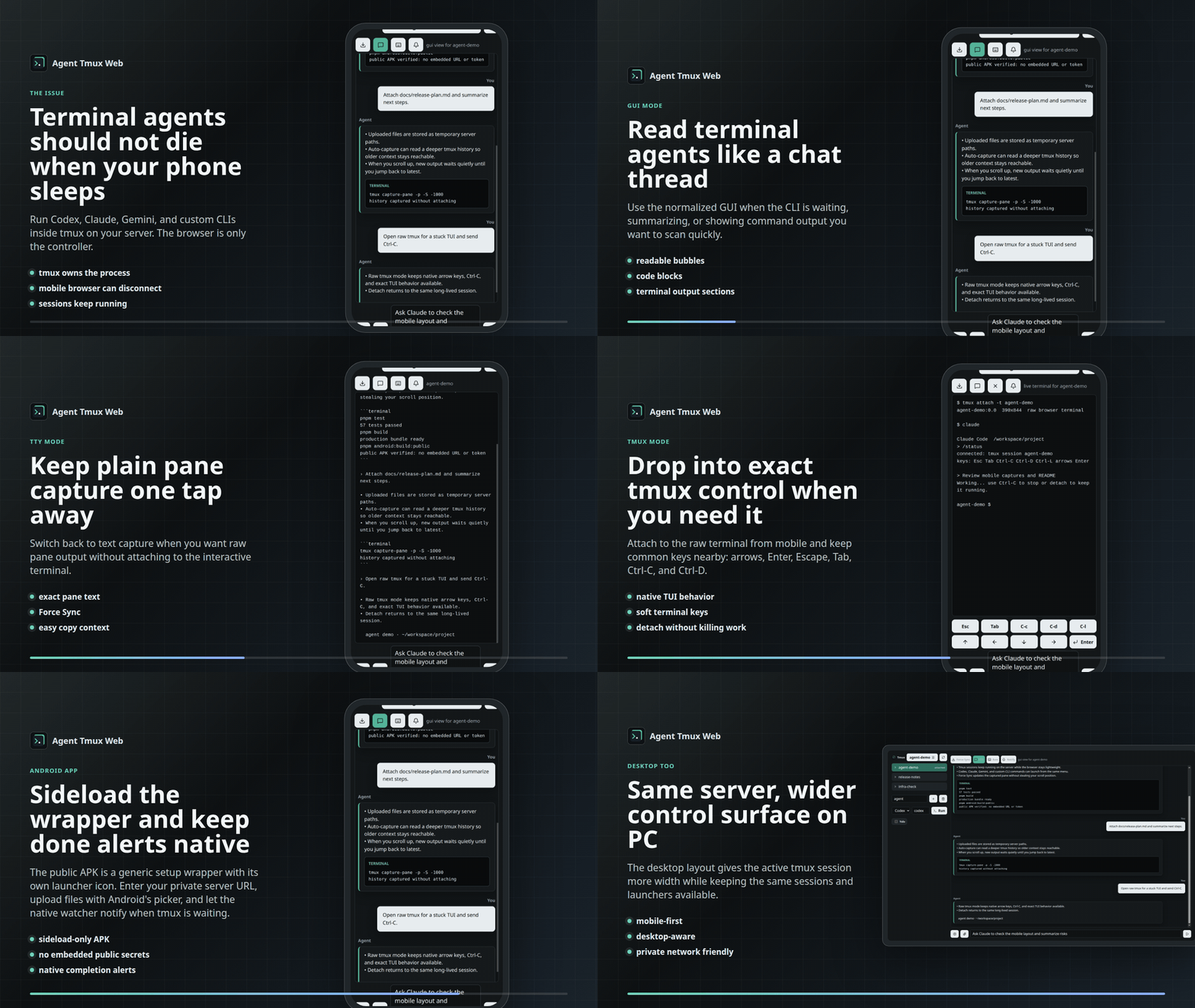
The showcase walks through the mobile GUI, stable scroll behavior, TTY capture,
raw tmux attach, launcher menu, Android wrapper, and desktop layout.
What It Solves
- Keeps terminal agents alive on the server even if your browser disconnects.
- Makes active tmux sessions visible and switchable from mobile.
- Launches Codex, Claude, Gemini, or custom commands in the selected
tmux session. - Gives you both a readable chat-style transcript and raw tmux attach mode.
- Lets you scroll back through tmux output while new capture updates keep
running, with a jump-to-latest button when you are ready to return. - Uploads files from Android, iOS, or desktop browsers to temporary server paths
you can paste into prompts. - Sends browser or Android notifications when watched tasks return to an input
prompt. - Works over Tailscale, a VPN, an SSH tunnel, a LAN bind, or a private reverse
proxy.
Modes
Android App
The repo includes a native Android wrapper in android/. It loads
your running Agent Tmux Web server in a WebView, stores the server URL/token on
the device, supports Android file picking for uploads, and uses a native bridge
for task-done notifications.
The APK is sideload-only. It is not published through Google Play, does not run
tmux locally, and does not include any maintainer server credentials in public
builds. Install it, enter your own private server URL on the setup screen, then
enable Notify if you want background task-complete alerts. The Android build
uses the same minimal Agent Tmux icon as the browser favicon and app header.
pnpm android:build:public
For setup details, see android/README.md.
Features
- Lists tmux sessions and switches between them.
- Creates and destroys tmux sessions.
- Launches configured CLI tools inside the selected tmux session.
- Ships with default launchers for Codex and Claude.
- Supports custom launch commands from the UI.
- Supports optional per-tool mode toggles for extra CLI flags.
- Captures tmux panes as either terminal text or a normalized chat-style view.
- Captures a deeper 1000-line tmux history so older context stays reachable.
- Preserves your scroll position while sessions are active and shows a
jump-to-latest button when you are not at the bottom. - Includes Force Sync for manually refreshing the current pane capture.
- Attaches a raw browser terminal to tmux for exact native CLI behavior.
- Can notify when any watched tmux send/run action returns to an input prompt.
- Uploads files from Android/desktop browsers to a temporary server path and
inserts that path into the prompt. - Optionally starts the Codex app-server for Codex-specific thread/model/skill
APIs. The tmux workflow works without it.
Requirements
- Node.js 22+
- pnpm
- tmux
- A CLI tool to run in tmux, such as
codex,claude,gemini, or a shell
script - Optional: Tailscale or another private network path to the server
Quick Install
On Linux, inspect and run the installer:
curl -fsSL https://raw.githubusercontent.com/antonlobanovskiy/agent-tmux-web/main/scripts/install-linux.sh
curl -fsSL https://raw.githubusercontent.com/antonlobanovskiy/agent-tmux-web/main/scripts/install-linux.sh | bash
It clones or updates the app, installs dependencies, builds the server, writes a
private .env with a generated auth token, and starts a systemd user service
when available. See INSTALL.md for options such as binding to
a Tailscale IP for phone access.
Setup
For AI-assisted setup, point your assistant at AI_SETUP.md and
ask it to install Agent Tmux Web on your server. That file is written as a
step-by-step checklist for getting the app running privately and verifying tmux,
launchers, raw mode, uploads, and notifications.
git clone <your-agent-tmux-web-repo-url>
cd agent-tmux-web
pnpm install
cp .env.example .env
pnpm build
HOST=127.0.0.1 PORT=6174 pnpm start
Open http://127.0.0.1:6174 in a browser on the same machine.
For phone access, bind HOST to a private interface and use a private network
path:
127.0.0.1for local-only or SSH tunnel use.- A Tailscale IP such as
100.x.y.zfor tailnet-only access. 0.0.0.0only behind a firewall, VPN, or authenticated reverse proxy.
When anyone else can reach the bind address, set AGENT_TMUX_WEB_AUTH_TOKEN and
open the app with ?token=.... Use a generated token, not the placeholder below:
export AGENT_TMUX_WEB_AUTH_TOKEN="$(openssl rand -hex 32)"
HOST=100.x.y.z PORT=6174 pnpm start
Then open:
http://100.x.y.z:6174/?token=<the generated token>
Sideload APK
Download the latest public APK from
GitHub Releases,
or build one locally without a default server URL or auth token:
pnpm android:build:public
That command forces blank Android defaults and runsscripts/verify-public-apk.mjs against the release APK. The resulting APK is:
android/app/build/outputs/apk/release/agent-tmux-web-v<version>-release.apk
For private personal builds, you may prefill the setup screen withandroid/local.properties, but do not upload or publish those APKs. Public APKs
should always show the setup screen first.
Configuration
Copy .env.example or set environment variables in your service manager.
Useful variables:
HOST: HTTP bind host. Defaults to127.0.0.1.PORT: HTTP port. Defaults to6174.CLI_WEB_DEFAULT_CWD: working directory used for new tmux sessions.CLI_WEB_TOOLS: JSON array of launchers shown in the tmux menu. Each
launcher can define optionalmodes; each enabled mode appends itsargsto
the base command.AGENT_TMUX_WEB_AUTH_TOKEN: optional shared token for browser access.AGENT_TMUX_WEB_UPLOAD_DIR: optional upload directory. Defaults to/tmp/agent-tmux-web/uploads.AGENT_TMUX_WEB_UPLOAD_TTL_MS: upload expiry. Defaults to 24 hours.CODEX_APP_SERVER_PORT: optional Codex app-server port.CODEX_APP_SERVER_AUTOSTART: set to1to start Codex app-server on boot.
Example CLI_WEB_TOOLS:
[
  {
    "id": "codex",
    "label": "Codex",
    "command": "codex",
    "defaultSessionName": "codex",
    "modes": [{ "id": "yolo", "label": "Yolo", "args": "--yolo" }]
  },
  { "id": "claude", "label": "Claude", "command": "claude", "defaultSessionName": "claude" },
  { "id": "gemini", "label": "Gemini", "command": "gemini", "defaultSessionName": "gemini" }
]
For flags that do not deserve a reusable toggle, select Custom in the tmux
menu and enter the full command, for example:
codex -C /workspace/project -m gpt-5.5
Use the bell button in the tmux toolbar to enable browser notifications. After
permission is granted, the server watches tmux send/run actions and emits a done
event when the captured pane looks ready for input again. In the Android app,
that also starts a low-importance foreground watcher so notifications can still
arrive while the WebView is backgrounded or the phone is locked.
Mobile browsers usually require a secure browser context for notifications. Use
HTTPS, localhost, or an installed/private browser context that your browser
treats as secure.
systemd
ops/systemd/agent-tmux-web.service is an example user service. Before installing
it, change WorkingDirectory, HOST, and any environment values for your
machine.
mkdir -p ~/.config/systemd/user
cp ops/systemd/agent-tmux-web.service ~/.config/systemd/user/agent-tmux-web.service
systemctl --user daemon-reload
systemctl --user enable --now agent-tmux-web.service
Security Notes
- This repository is just the application code. Publishing or cloning it does
not expose anyone's running server, tmux sessions, uploads,.env, auth token,
or local systemd service. - Public sideload APKs are generic WebView wrappers. They should be built with
pnpm android:build:public, which verifies that no default server URL or auth
token is embedded. Private APKs built withandroid/local.propertiescan
contain a personal URL/token and should not be shared. - Do not expose this app directly to the public internet.
- Treat browser access as terminal access to the server user running the app.
- Use a VPN, SSH tunnel, or authenticated reverse proxy.
- Set
AGENT_TMUX_WEB_AUTH_TOKENif the app can be reached by anyone else. - Uploads are temporary by default and are cleaned on startup and hourly.
- Keep each deployment separate from the repo: do not commit local
.envfiles,
uploads, build output, generated logs, or service files with real IPs,
usernames, tokens, or private paths.
License
MIT
Yorumlar (0)
Yorum birakmak icin giris yap.
Yorum birakSonuc bulunamadi