fishbowl
Health Uyari
- License — License: MIT
- Description — Repository has a description
- Active repo — Last push 0 days ago
- Low visibility — Only 7 GitHub stars
Code Basarisiz
- rm -rf — Recursive force deletion command in .github/workflows/release.yml
- rm -rf — Recursive force deletion command in install.sh
- rm -rf — Recursive force deletion command in scripts/demo.sh
Permissions Gecti
- Permissions — No dangerous permissions requested
This tool wraps AI coding agents like Codex and Claude Code in a Docker container to audit credential access, environment variable changes, and outbound network connections. It is designed as an observation-only security perimeter.
Security Assessment
The tool inherently handles highly sensitive data by design. It scans your home directory and projects for credential files (like `.env` and SSH keys) to monitor agent access. It also executes shell commands to manage Docker containers and uses eBPF for runtime monitoring. No hardcoded secrets were detected, and it does not request dangerous host permissions. However, the audit flagged multiple `rm -rf` recursive force deletion commands in the installation script, demo script, and release workflow, which poses a risk of unintended data deletion. The README explicitly states this is a "vibe coded project" and warns users to evaluate it before production use. Overall risk: Medium.
Quality Assessment
The project is new but active (last updated today). It uses the permissive MIT license and is written in Rust. However, it has extremely low community visibility, with only 7 GitHub stars. Combined with the author's own warning about its experimental nature, this indicates the tool has not undergone significant community testing or auditing.
Verdict
Use with caution — the experimental nature and destructive shell commands mean it should only be run in isolated, non-production environments after a thorough code review.
Containerized credential auditing perimeter for AI coding agents. Wraps Codex/Claude Code in Docker, audits every credential access via eBPF.
Fishbowl






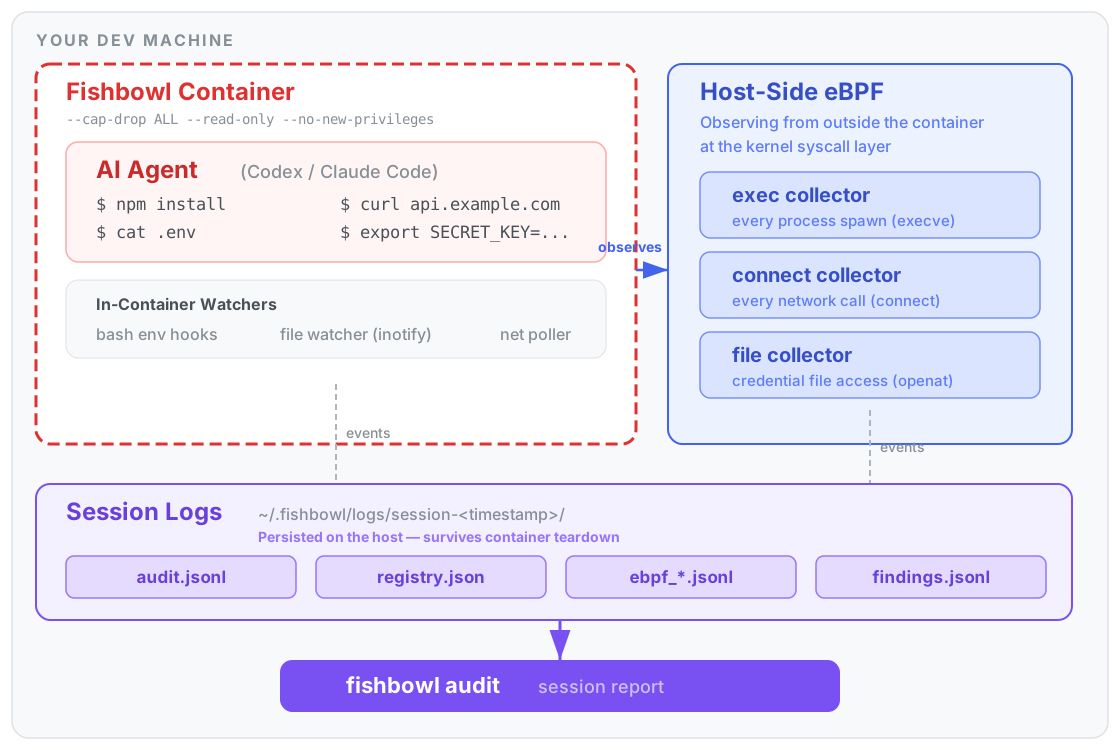
A containerized credential auditing perimeter for AI coding agents. Validated with Codex and Claude Code on both macOS and Linux.
Fishbowl wraps your AI agent in a Docker container, audits every credential access, environment variable mutation, and outbound network connection, then gives you a session report. It's observation-only — it doesn't block or kill anything the agent does.
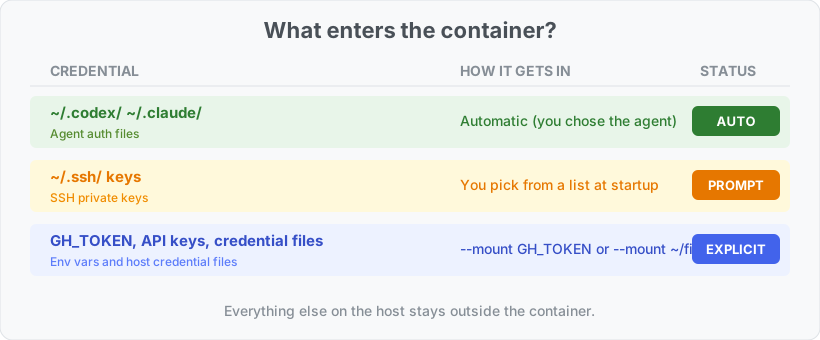
The container is the security boundary. The agent can see your project directory, its own auth files (auto-mounted copies of ~/.codex/ or ~/.claude/), any credentials you explicitly --mount, and the session logs — but not the rest of your home directory or system. The container filesystem is read-only, all Linux capabilities are dropped, and privilege escalation is disabled.
NOTE - fishbowl is a vibe coded project, please evaluate and test it before utilizing it in production use-cases
How it works
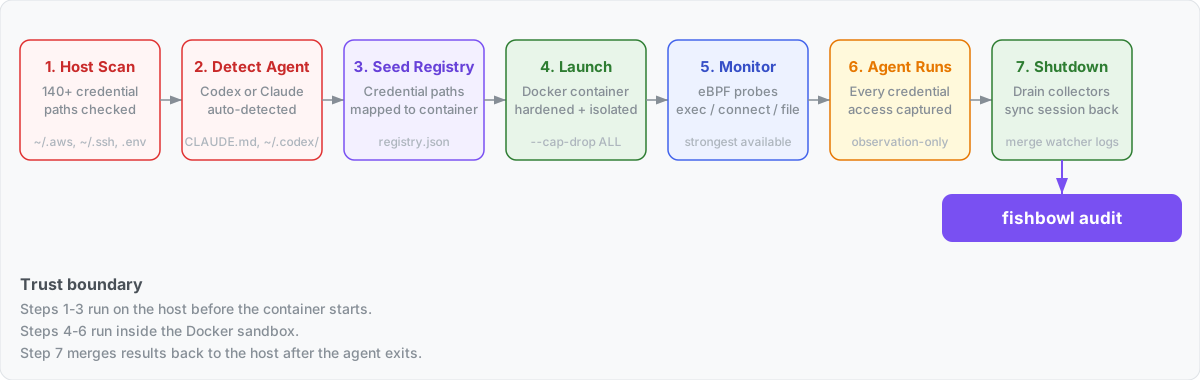
When you run fishbowl run ~/my-project, this is what happens:
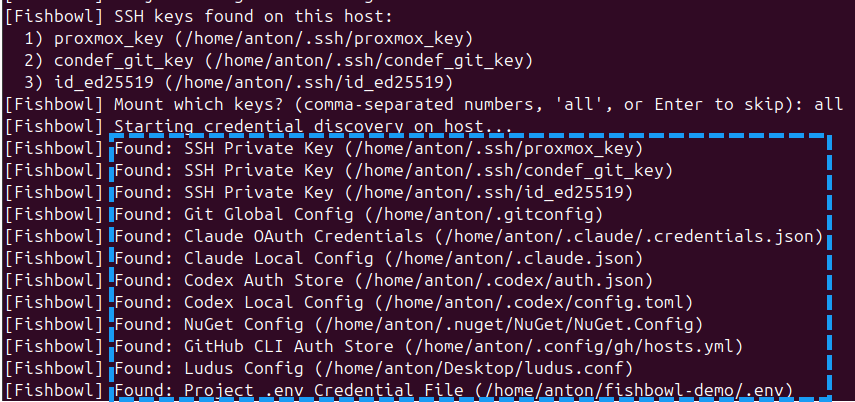
Host credential scan. Fishbowl walks your home directory and project for known credential files (
.env,~/.aws/credentials,~/.codex/auth.json, SSH keys, etc.) and prints what it finds. The scan report is saved to a host-only location (~/.fishbowl/host-scans/) — it is NOT visible inside the container.See docs/credential-scanning.md for the full list of paths and classification rules.
Agent auto-detection. Based on project markers (
CLAUDE.md,AGENTS.md), host auth artifacts (~/.codex/,~/.claude/), and environment variable references, Fishbowl picks the agent type and auto-mounts the relevant auth files into/fishbowl/home/inside the container.See docs/agent-detection.md for the detection priority cascade and what each agent gets. On macOS, Claude Code stores its OAuth token in the login Keychain under service
"Claude Code-credentials"rather than in~/.claude/.credentials.json; Fishbowl extracts it viasecurity find-generic-password -winto the per-session runtime auth dir (0o600, parent 0o700, cleaned up with the rest of the session) so Claude running inside the Linux container can read it as a regular file. First run may trigger the standard macOS "allow security to access your keychain" dialog. Credential env vars and SSH keys referenced in project text are NOT auto-passed — Fishbowl prints them as recommendations but requires explicit--mountto avoid a malicious repo silently importing host secrets.

Registry seeding. Credential paths from the host scan are translated to their in-container equivalents and written to the runtime credential registry (
registry.json). This is how the file collector knows whichopenat()events are interesting.Container launch. Docker runs the agent inside a hardened container:
--cap-drop ALL --security-opt no-new-privileges- Project bind-mounted at
/<project-name>and/workspace - Selected credentials at
/fishbowl/creds/and/fishbowl/ssh/(read-only) - Agent auth at
/fishbowl/home/(the container's$HOME) - Session logs at
/var/log/fishbowl/
Monitoring starts. Fishbowl picks the strongest monitoring available:
- Linux: host-side bpftrace via a
sudohelper, scoped to the container's cgroup - macOS: bpftrace in a privileged sidecar container inside the Docker VM (auto-detects Docker Desktop, Colima, OrbStack, Rancher Desktop)
- Fallback: if the strong path fails (no root, Docker not running, collector image missing), prints the reason and continues with container-local telemetry (bash env hooks, inotify file watchers,
ssnetwork polling)
- Linux: host-side bpftrace via a
Agent runs. Your agent does its work inside the container. Every
execve(),connect(), andopenat()on a monitored credential is captured.Shutdown. When the agent exits, Fishbowl gracefully drains the bpftrace collectors (SIGINT + 1.5s grace period) and tears down the helper container. Session state is synced back to the host for Codex/Claude.
Install
curl -fsSL https://raw.githubusercontent.com/Antonlovesdnb/fishbowl/main/install.sh | sh
The script auto-detects your OS and architecture, downloads the right binary and the collector image from the latest GitHub release, verifies the SHA256 checksum, and installs to /usr/local/bin (or ~/.local/bin if no write access).
Supported platforms: macOS (Apple Silicon) and Linux (x86_64 + arm64). Linux binaries are fully static (musl libc) so they run on any distro including Alpine.
Requirements: a container runtime — Docker Desktop, Colima, OrbStack, or Rancher Desktop — must be running before fishbowl run.
Options: pin a version with FISHBOWL_VERSION=v2.1.1, override the install directory with FISHBOWL_BIN_DIR=....
That's the whole install. The container image gets built automatically the first time you run fishbowl run (a few minutes; one-time). If you'd rather get that out of the way up front, run fishbowl build-image after installing.
Building from source:
cargo install --path .(requires Rust >= 1.85). Only needed if you're contributing or want to modify the container image. The firstfishbowl runwill build the container image automatically, same as the prebuilt-binary path.
Uninstall
curl -fsSL https://raw.githubusercontent.com/Antonlovesdnb/fishbowl/main/install.sh | sh -s -- --uninstall
Removes the binary, Docker images, and optionally ~/.fishbowl/ (prompts before deleting session data).
Usage
# Run the current directory
fishbowl run

# Run a specific project
fishbowl run ~/projects/my-app

# Mount a credential (auto-detects type: env var, SSH key, or credential file)
fishbowl run --mount GH_TOKEN --mount ~/.ssh/id_ed25519 --mount ~/secrets/service.json

# Use host networking (for VPN/lab routes)
fishbowl run --network host
Mounted credentials appear inside the container at /fishbowl/creds/<filename> (credential files) and /fishbowl/ssh/<filename> (SSH keys). Environment variables are passed through directly.
Reviewing sessions
After a run, review what happened:
fishbowl audit              # most recent session
fishbowl audit <SESSION>    # specific session directory
The audit report shows:
- Credentials — each discovered credential, its classification, access count, and expected destinations
- Alerts — medium/high/critical severity events (env mutations, credential access by suspicious processes)
- Network — outbound destinations with connection counts and alert flags
Note - fishbowl audit is meant to be run outside of the container.
Session log location
All session data lives under ~/.fishbowl/logs/:
~/.fishbowl/
  logs/
    latest -> session-1775780487       # symlink to most recent
    session-1775780487/                # one directory per run
      audit.jsonl                      # all audit events (JSONL)
      registry.json                    # credential registry (live state)
      findings.jsonl                   # credential-egress correlation findings
      ebpf_exec.jsonl                  # host eBPF: process exec events
      ebpf_connect.jsonl               # host eBPF: network connect events
      ebpf_file.jsonl                  # host eBPF: credential file access events
      ebpf_scope.json                  # eBPF container scope metadata
      ebpf_*.stderr.log                # bpftrace stderr (empty = probes attached OK)
  host-scans/
    session-1775780487.json            # host credential path enumeration (host-only)
  runtime/
    session-1775780487-<nonce>/        # runtime auth copies (cleaned up after 6h)
Log formats
audit.jsonl — one JSON object per line, every event from both in-container watchers and host eBPF collectors:
{
  "timestamp": "2026-04-10T00:21:29+00:00",
  "event": "process_exec",
  "severity": "info",
  "agent": "host-ebpf",
  "command": "/bin/cat",
  "path": "/usr/bin/cat",
  "process_name": "cat",
  "observed_pid": "40643",
  "process_chain": "cat(pid=40643) <- bash(pid=40626) <- tini <- containerd-shim <- systemd",
  "env_findings": [{"variable": "BASH_ENV", "value_preview": "/age...(redacted,len=23)"}],
  "discovery_method": "host_ebpf_exec",
  "verdict": "observed"
}
Event types: process_exec, env_mutation, env_enumeration, credential_discovery, credential_access, network_egress, workspace_credential_access.
Full credential values are not intentionally logged. Environment variable findings include a short preview (first 4 characters + length) for classification purposes — e.g. sk-p...(redacted,len=48). Credential env vars are passed to Docker via --env-file (not CLI args) to avoid exposure in the host process table.
registry.json — live credential registry, updated as credentials are discovered and accessed:
{
  "credentials": [
    {
      "id": "file::/fishbowl-smoke/.env",
      "classification": "Project .env Credential File",
      "discovery_method": "project_scan",
      "path": "/fishbowl-smoke/.env",
      "access_count": 3,
      "last_accessed_at": "2026-04-10T00:21:29+00:00"
    }
  ]
}
ebpf_file.jsonl — credential access events from the kernel file collector:
{
  "event": "credential_access",
  "process_name": "cat",
  "raw_path": "/workspace/.env",
  "resolved_path": "/fishbowl-demo/.env",
  "operation": "openat",
  "classification": "Project .env Credential File",
  "process_chain": "cat <- bash <- tini <- containerd-shim <- systemd",
  "collector": "bpftrace_file"
}
ebpf_exec.jsonl — every process spawn inside the container:
{
  "event": "process_exec",
  "process_name": "bash",
  "filename": "/usr/bin/curl",
  "cmdline": "curl -sS https://example.com/",
  "process_chain": "curl <- bash <- tini <- containerd-shim <- systemd",
  "env_findings": [
    {
      "variable": "BASH_ENV",
      "classification": "Dangerous Execution Environment Variable",
      "value_preview": "/age...(redacted,len=23)"
    }
  ],
  "collector": "bpftrace_exec"
}
audit.jsonl — env mutations caught by the bash hooks:
{
  "event": "dangerous_env_mutation",
  "severity": "medium",
  "command": "export PAGER=\"evil-pager\"",
  "variable": "PAGER",
  "new_value": "\"evi...(redacted,len=12)",
  "reason": "dangerous variable mutation command observed"
}
findings.jsonl — credential-access-then-network-connect correlation findings (e.g., "process read ~/.codex/auth.json then connected to 185.x.x.x:443").
Platform support
| Platform | Monitoring | Notes |
|---|---|---|
| Linux (source or binary) | Host-side eBPF via sudo helper |
Full exec/connect/file coverage, cgroup-scoped. No collector image needed — bpftrace runs as the host binary. |
| macOS (source or binary) | eBPF sidecar in Docker VM | Full coverage. install.sh downloads the pre-built collector image from the release and docker loads it; source installs build it via fishbowl build-image. Auto-detects Docker Desktop/Colima/OrbStack/Rancher. |
| Any host, fallback | Container-local watchers | If the eBPF path fails (no root on Linux, Docker not running, etc.), Fishbowl falls back to bash env hooks, inotify file watchers, and ss network polling. |
Container images are platform-specific. After cloning to a different architecture, run fishbowl build-image before fishbowl run.
Known limitations
In-container audit log is writable by the agent. The in-container watchers write
audit.jsonlandregistry.jsonto a writable subdirectory (/var/log/fishbowl/watcher/) inside the container. A compromised agent could tamper with this watcher output. However, the host-side eBPF logs (ebpf_*.jsonl) are protected — the parent session logs directory is mounted read-only into the agent container, and the eBPF logs are written by the helper container via its own mount. So the high-fidelity event data (exec, connect, file access from the kernel layer) is tamper-proof; only the in-container watcher events are at risk.Fallback monitoring has coverage gaps. When strong monitoring (the default) is unavailable — no root on Linux, or collector image missing on macOS — Fishbowl falls back to container-local watchers. These have known gaps: bash env hooks don't fire for
sh/python/node, thessnetwork poller misses sub-50ms connections, and UDP/DNS isn't covered. Strong monitoring covers all of these via kernel-level eBPF probes.Tested agents. Only Codex and Claude Code have been validated end-to-end. Cursor, Windsurf, and Copilot have scaffolded enum variants in the code but the wrapped-session flow hasn't been exercised for them.
Security model
Fishbowl provides visibility into opportunistic credential exfiltration — malicious npm/pip postinstall scripts, env-var poisoning (CVE-2026-22708), MCP config tampering via prompt injection (CVE-2025-54135/54136), and prompt injection that runs curl/wget to exfiltrate credentials.
Out of scope: determined adversaries who specifically target the monitoring stack, the agent encoding credentials into its own API channel (e.g. to api.anthropic.com), and sophisticated multi-step exfil chains.
Fishbowl is observation-only at runtime. It does not block, terminate, or interfere with the agent. For kernel-level prevention with enforcement, see owLSM, Falco, or Tetragon — Fishbowl is complementary to these tools, not a replacement for them.
CI/CD integration
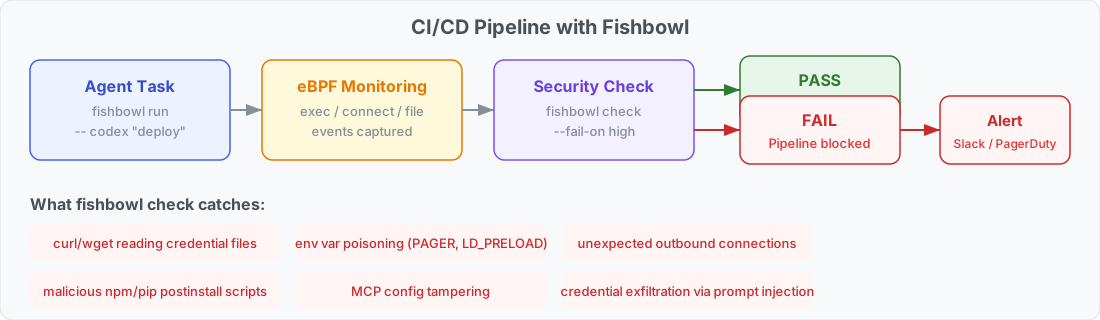
Use fishbowl check to gate CI/CD pipelines on session security. It reads the session logs, counts events by severity, and exits non-zero if the threshold is exceeded.
# Run the agent task inside Fishbowl
fishbowl run ~/my-app --mount API_KEY -- codex "run the deploy script"

# Gate the pipeline — fail if any high-severity events occurred
fishbowl check --fail-on high
Severity levels: low, medium, high, critical. The default threshold is high.
Fishbowl Check
Session:  /Users/dev/.fishbowl/logs/session-1775954089
Threshold: --fail-on high

Events:   12 total (2 info, 0 low, 9 medium, 1 high, 0 critical)
eBPF:     9 exec, 2 file, 1 connect

Result:   FAIL (1 events at or above high severity)

  HIGH      credential_access_by_network_tool: curl accessed credential file /workspace/.env
What it catches:
- Credential exfiltration —
curl/wget/pythonreading credential files - Env var poisoning —
PAGER,LD_PRELOAD,GIT_ASKPASSmutations - Supply chain attacks — malicious postinstall scripts accessing secrets
- MCP config tampering — unauthorized server additions during agent sessions
- Prompt injection — agent tricked into running exfiltration commands
In a GitHub Actions workflow:
- name: Deploy with Fishbowl
  run: |
    fishbowl run . --mount DEPLOY_KEY -- codex "deploy to staging"
    fishbowl check --fail-on high
If fishbowl check exits non-zero, the pipeline stops and the full session audit log is available for investigation.
Yorumlar (0)
Yorum birakmak icin giris yap.
Yorum birakSonuc bulunamadi