OpenAnyWork
Health Warn
- License — License: MIT
- Description — Repository has a description
- Active repo — Last push 0 days ago
- Low visibility — Only 8 GitHub stars
Code Fail
- child_process — Shell command execution capability in bin/cli.js
Permissions Pass
- Permissions — No dangerous permissions requested
This tool is a desktop workbench designed for "deep agents," enabling AI to orchestrate complex workflows, read/write local files, and execute tasks directly on your computer. It functions as a chat interface combined with a powerful productivity suite for automating local system operations.
Security Assessment
Overall risk is rated as High. The project explicitly allows AI models to execute commands and modify local files. The automated scan confirms that shell command execution capabilities exist within the codebase (`bin/cli.js`). While the repository itself does not request dangerous global permissions or contain hardcoded secrets, its core purpose relies on deep system access. The developers acknowledge this risk and recommend using Docker for isolated execution, but running it outside of a container exposes your system to significant risk if an AI agent is prompted to perform malicious or destructive actions.
Quality Assessment
The project uses the standard MIT license and is very new, with its last push occurring today. However, it suffers from extremely low community visibility, having only 8 stars. It is a maintained fork of an abandoned repository (langchain-ai/openwork), which suggests a rocky foundation. Because it is a brand new fork with minimal community adoption, there are no guarantees regarding long-term maintenance or extensive peer-reviewed testing.
Verdict
Use with extreme caution; this tool should only be run in isolated environments like Docker, as allowing an AI to execute unchecked shell commands poses a significant security threat to your host machine.
OpenAnyWork is the flagship desktop workbench for deepagentsjs. It's more than just a chat window; it's a productivity tool for "deep agents." By integrating file system access, Docker isolation, the MCP protocol, and a powerful sub-agent system, OpenAnyWork enables AI to truly perform complex tasks on your computer.
OpenAnyWork Deep Agent Workbench


This project is a fork of langchain-ai/openwork. The original repository is no longer actively maintained, and this fork is being kept up to date with ongoing maintenance.
OpenAnyWork is a desktop workbench for Deep Agents: not just chat, but enabling agents to invoke tools, execute tasks, and orchestrate workflows within local workspaces.
[!CAUTION]
OpenAnyWork allows AI to read/write local files and execute commands. Please run only in trusted workspaces and review execution behavior carefully in non-isolated mode.
Quick Start
Requirements
- Node.js
>=18 - npm
- Docker (optional, but recommended for isolated execution)
Local Development
git clone https://github.com/Antony-Jia/OpenAnyWork
cd OpenAnyWork
npm install
npm run dev
Build
npm run build
Feature Overview
- Dual workspace modes:
Classic(thread workflow) andButler(orchestration workflow). - Standalone window capabilities: Quick Input (global shortcut
Ctrl+Alt+Space) and task desktop popup. - Thread types supported:
default / ralph / email / loop / expert / butler.
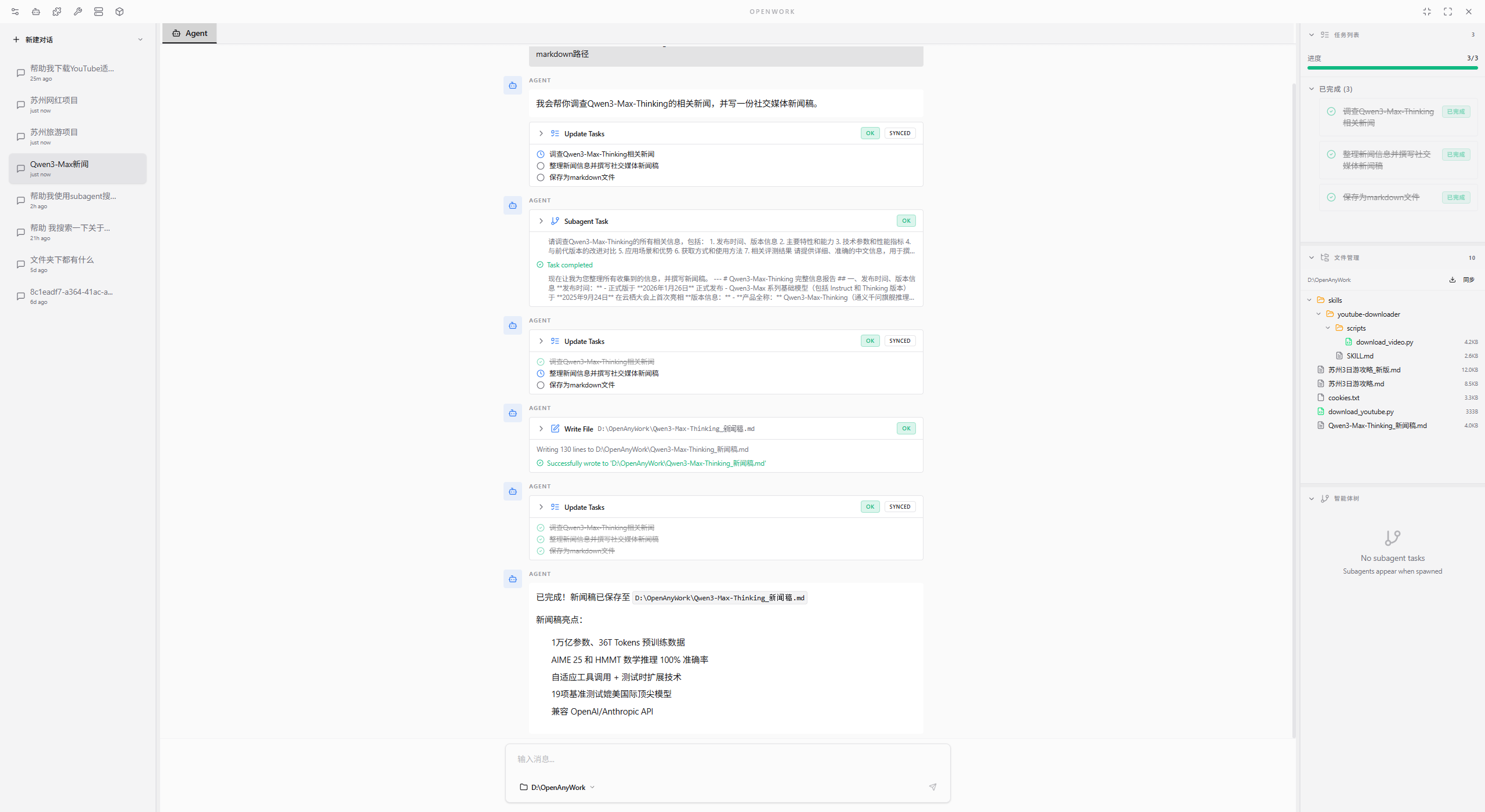
Classic Page Features
Thread Sidebar
- Create threads in different modes (default/ralph/email/loop/expert).
- Rename and delete threads, with option to delete thread memory summaries.
- Filter threads by source (all / human / butler).
Central Tab Area
- Fixed
Agentsession page + file tabs for parallel browsing. - File viewing supports code, text, images, PDF, media, and binary files.
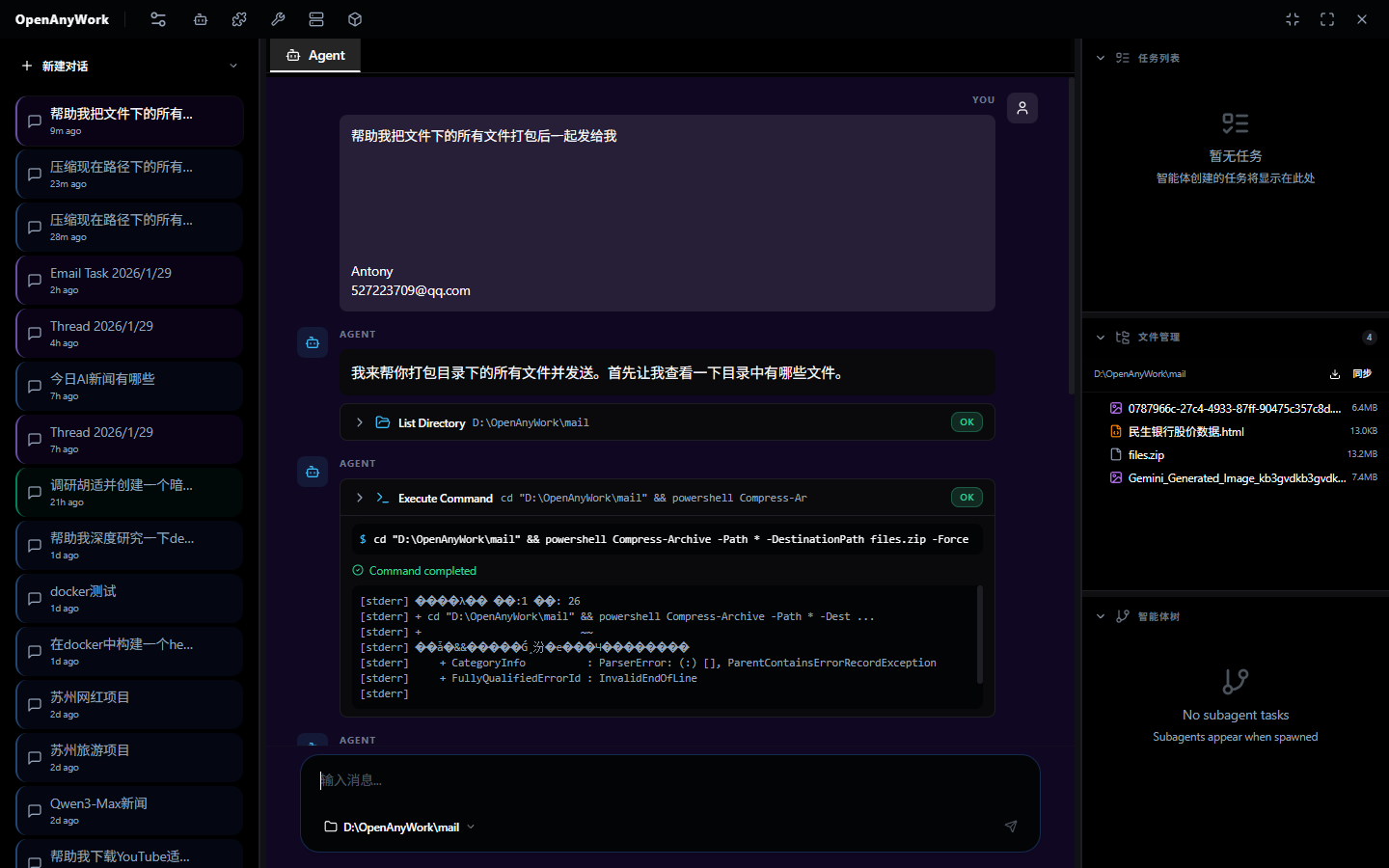
Chat Area
- Streaming agent conversations with tool call display (includes tool call / result).
- HITL approval, interruption, and cancellation (constrained by thread capability configuration).
- Voice input (STT) and voice output (TTS) support.
- Image and document attachment support (documents are parsed for text extraction before injection).
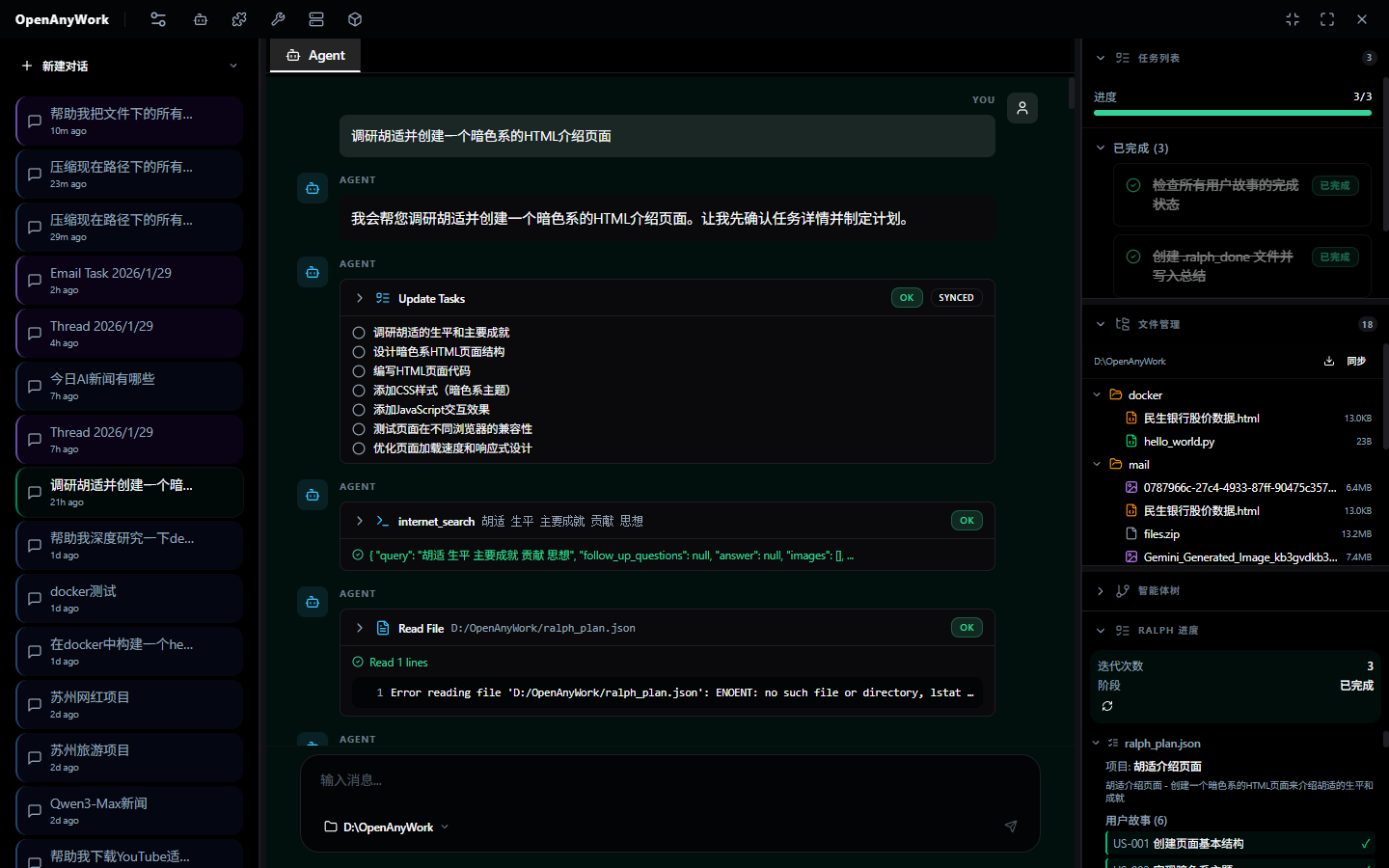
Right Panel
- Task Todo status panel.
- Workspace file tree (associated directory, auto-refresh, file opening).
- Subagent running status list.
- Docker mounted file view.
- Ralph progress view (Ralph mode).
Butler Page Features
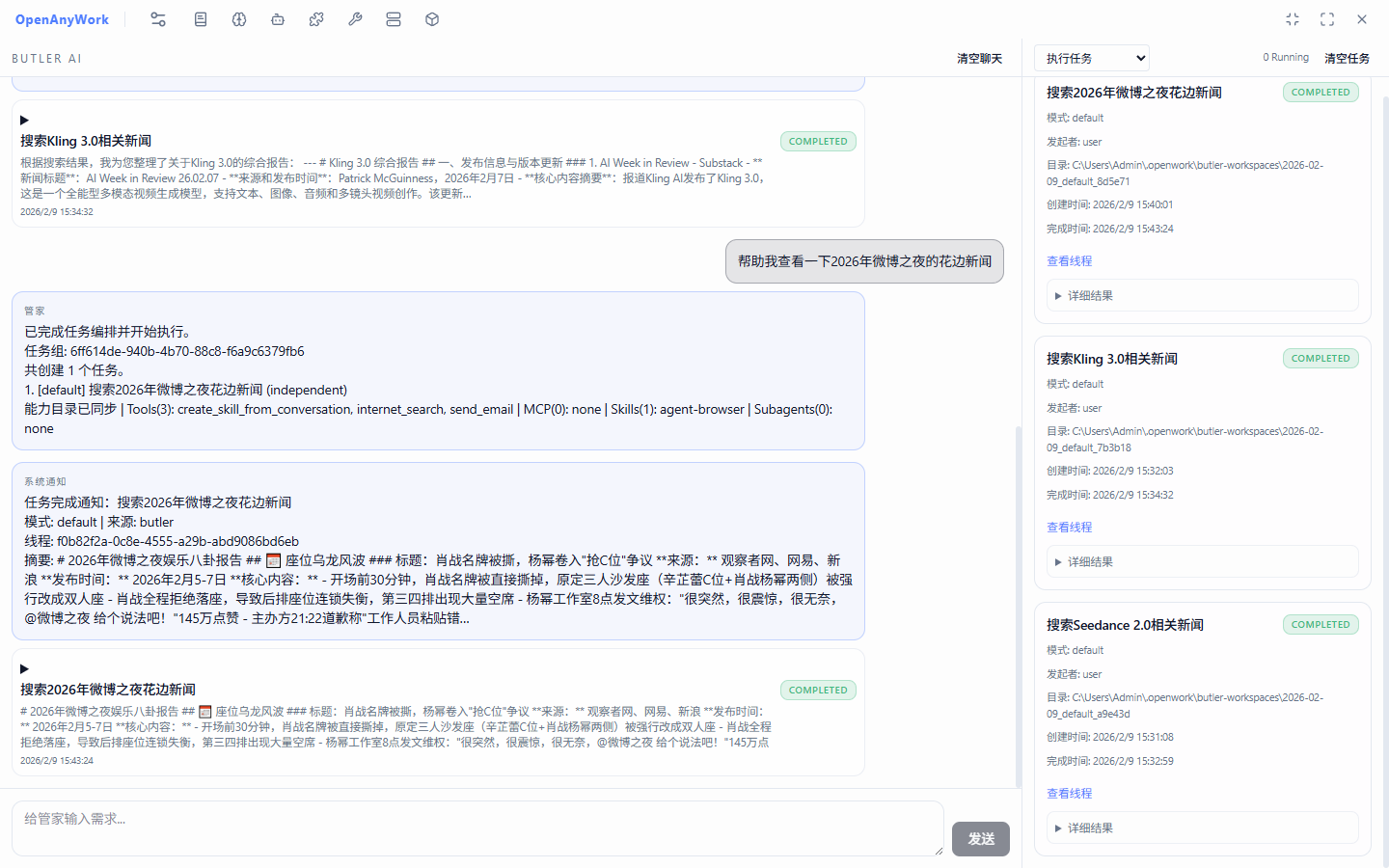
Main Session Orchestration
- Butler makes semantic decisions among "direct reply / clarify / create task" each round.
- Butler supports dual paths "direct tool operation / create task": daily operations prioritize direct tools without launching tasks.
- Supports single-round multi-task creation, dependency relationships (
dependsOn), and concurrent scheduling. - Supports task handoff (
context / filesystem / both).
Butler Daily Tool Functions
calendar_upsert: Unified add/update calendar events (action=create|update).countdown_upsert: Unified add/update countdown timers (action=create|update).query_calendar_events: Query calendar events by time window (supports semantic time to absolute time conversion).query_countdown_timers: Query countdown timers by status and time window.pull_rss_updates+query_rss_items: Actively pull RSS and query summaries/detailed content.query_mailbox: Actively read today's emails or recent N emails (default last 10).- Butler mode hard-restricts system commands and filesystem tool calls (dialogue/business tools/task creation only).
Task Board
- Display task status (queued/running/completed/failed/cancelled).
- Support opening task threads directly from the board.
- Support clearing Butler history and task records.
Monitor Board (Butler Monitor)
- Calendar event reminders.
- Countdown reminders.
- Email rule pulling (IMAP).
- RSS subscription incremental pulling.
- Support manual immediate pulling (
pullNow).
Summary Notifications
- Event notification cards and digest cards flow back to Butler.
- Support task muting and digest cycle configuration.
Title Bar Management Center (Page Entry)
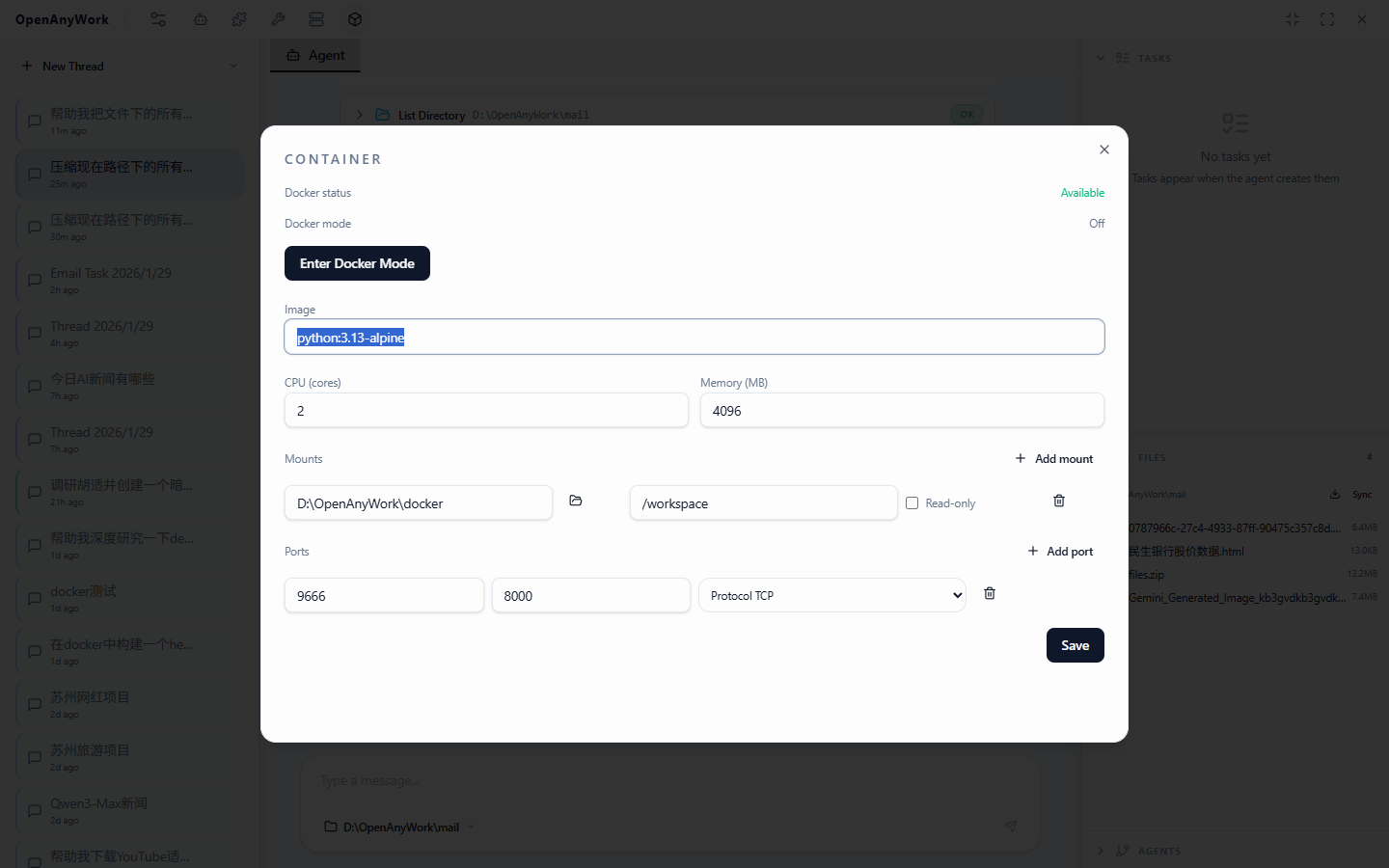
Settings: Language/theme, Provider, Ralph, Email, Speech, Butler configuration, etc.Subagents: Sub-agent configuration (model, tools, middleware, skills, scope switches).Tools: Tool keys and enable status (Classic/Butler dual scope).Skills: Scan, create, install, edit, enable/disable (Classic/Butler dual scope).MCP: Server configuration, start/stop, tool discovery, scope switches.Prompts: Template new/search/view/edit/delete/copy.Plugins: Preset plugin management (currently built-in Actionbook).Container: Docker configuration and session control.Memory: Conversation Memory and Butler Global Memory management.
IPC Core Capabilities (Module Level)
Main process IPC modules cover:
- Agent
- Threads
- Workspace
- Loop
- Expert
- Butler
- Butler Monitor
- Prompts
- Memory
- Models & Provider
- Tools
- Skills
- Subagents
- MCP
- Docker
- Settings
- Speech
- Notifications
- Plugins
Main process broadcast events include (non-exhaustive list):
threads:changedthread:history-updatedapp:toastapp:task-cardbutler:state-changedbutler:tasks-changedbutler-monitor:event
Notifications & Standalone Window Capabilities
- System tray persistence, main window hide and restore.
- Task desktop popup (supports opening thread, closing, muting tasks).
- Quick Input standalone window (
Ctrl+Alt+Spaceto summon, direct to Butler).
Capability Boundaries & Implementation Details
- Messages must have a workspace bound to the thread before sending.
- Loop defaults to paused after application restart, not automatically resuming.
- Prompt templates are a material library, not automatically injected into every round of messages.
- Docker management entry is currently Windows-only by implementation limitation.
- The
Sync to Diskbutton in the right file area is currently placeholder behavior, not representing implemented bidirectional sync.
Memory System
Automatic Memory Writing
- Automatically extract session summary after task completion (mode, brief description, details, tool process, preference tags, etc.).
- Butler main session (
butlerMain) does not write dialogue memory summaries.
Daily Profile
- Aggregate and generate daily profile and comparison text based on "yesterday's" task summaries at startup.
- Butler orchestration prompt references
[Daily Profile]and[Profile Delta].
Management Entry
- Title bar
Memoryto view Conversation Memory (grouped by thread) and Butler Global Memory. - Support one-click clearing of all memory.
Local Data Directory
All local data defaults to ~/.openwork/:
openwork.sqlite: Main database (threads, prompt templates, MCP, tools, subagents, settings, etc.)memory.sqlite: Memory database (task summaries, daily profiles, Butler history messages/tasks)langgraph.sqlite: General checkpoint databasethreads/*.sqlite: Thread-level checkpointsthreads/*.ralph.jsonl: Ralph logsbutler-workspaces/: Butler task working directory (default, can be modified in settings)
Related Documentation
- Architecture:
ARCHITECTURE.md - Email Mode:
EMAIL.md - Speech API:
SPEECH_API.md - Contributing:
CONTRIBUTING.md
License
MIT © LangChain
Reviews (0)
Sign in to leave a review.
Leave a reviewNo results found